9. Table Widgets
While list widgets handle one-dimensional lists of data, table widgets provide a structured way to display and interact with two-dimensional (tabular) data.
QTableWidgetis a self-contained widget that includes its own data storage, allowing developers to easily manipulate items directly within the widget.QTableViewis part of the Qt model/view framework, that requires an external model to supply data, promoting separation of concerns and reusability in larger applications.
Both support sorting, resizing columns and rows, and selecting multiple cells. These widgets are commonly used in applications requiring grid-based input or visualization, such as data entry forms or result displays.
9.1 QTableWidget
The QTableWidget class provides an item-based table view with a default model. The items in a QTableWidget are provided by QTableWidgetItem objects.
 |
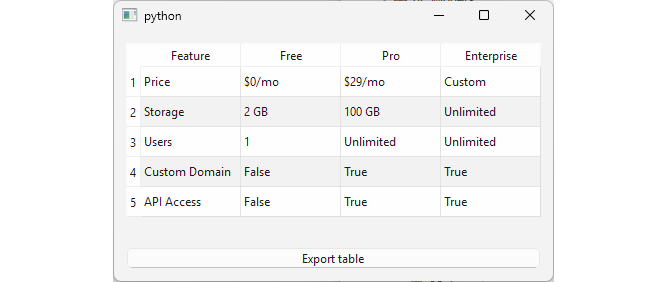
You need to enable your users to create and edit a service comparison matrix for your company. |
To use a table widget in your application:
 1 # The QTableWidget class provides an
 2 # item-based table view with a default model.
 3
 4 import sys
 5 from PySide6.QtCore import Slot, Qt
 6 from PySide6.QtWidgets import (QApplication, QWidget, QVBoxLayout,
 7     QTableWidget, QTableWidgetItem, QLabel, QPushButton)
 8
 9
10 class Window(QWidget):
11
12     def __init__(self, parent=None):
13
14         super().__init__(parent)
15
16         layout = QVBoxLayout()
17         self.setLayout(layout)
18
19         self.headers = ["Feature", "Free", "Pro", "Enterprise"]
20
21         self.data = [
22             ["Price", "$0/mo", "$29/mo", "Custom"],
23             ["Storage", "2 GB", "100 GB", "Unlimited"],
24             ["Users", "1", "Unlimited", "Unlimited"],
25             ["Custom Domain", False, True, True],
26             ["API Access", False, True, True]
27         ]
28
29         rows = len(self.data)
30         columns = len(self.data[0])
31
32         # 1. Create a table widget.
33
34         self.table_widget = QTableWidget(rows, columns)
35         self.table_widget.setHorizontalHeaderLabels(self.headers)
36         self.table_widget.setAlternatingRowColors(True)
37         self.table_widget.setSizeAdjustPolicy(
38             QTableWidget.SizeAdjustPolicy.AdjustToContents)
39
40         # 2. Populate the widget.
41
42         for row in range(rows):
43             for col in range(columns):
44                 item = QTableWidgetItem()
45                 item.setData(
46                     Qt.ItemDataRole.DisplayRole,
47                     str(self.data[row][col]))
48                 self.table_widget.setItem(row, col, item)
49
50         self.table_widget.itemChanged.connect(self.on_item_changed)
51
52         self.label = QLabel()
53         self.label.setAlignment(Qt.AlignmentFlag.AlignCenter)
54
55         self.export_button = QPushButton('Export table')
56         self.export_button.clicked.connect(self.export_data)
57
58         layout.addWidget(self.table_widget)
59         layout.addWidget(self.label)
60         layout.addWidget(self.export_button)
61
62     # 3. Create the required slots.
63
64     @Slot(QTableWidgetItem)
65     def on_item_changed(self, item):
66         row = item.row()
67         col = item.column()
68         text = item.text()
69         self.label.setText(
70             f'Cell[{row}, {col}]: new value is {text}')
71
72     @Slot()
73     def export_data(self):
74         print(', '.join(self.headers))
75         for r in range(self.table_widget.rowCount()):
76             row_data = []
77             for c in range(self.table_widget.columnCount()):
78                 row_data.append(self.table_widget.item(r, c).text())
79             print(', '.join(row_data))
80
81
82 if __name__ == '__main__':
83
84     app = QApplication(sys.argv)
85     main_window = Window()
86     main_window.show()
87     sys.exit(app.exec())
Create a
QTableWidgetinstance and set the table dimensions. The table in the example has five rows and four columns. We also add a label to the window and a push button for exporting the comparison matrix.Fill the table cells with data. Each table cell is represented with a
QTableWidgetIteminstance so we use a nested loop to create the items. We set each item’s data from a two-dimensional list usingQTableWidgetItem.setData(). After that, eachQTableWidgetItemis assigned to a table cell usingQTableWidget.setItem(row, column, item).Create two slot methods: one connected to
QTableWidget’sitemChanged()signal and the other connected to the push button’sclicked()signal. The first slot updates the label text when a table item is changed, and the second one ‘exports’ the matrix by printing it. The table is editable - if the user double-clicks a cell, changes its value, and presses Enter, the label’s text is updated accordingly.
9.2 QTableView
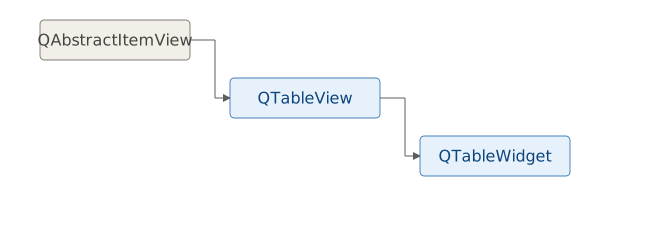
QTableView is the default model/view class for displaying tabular data, and just as QListWidget is a subclass of QListView, QTableWidget is a subclass of QTableView.
|
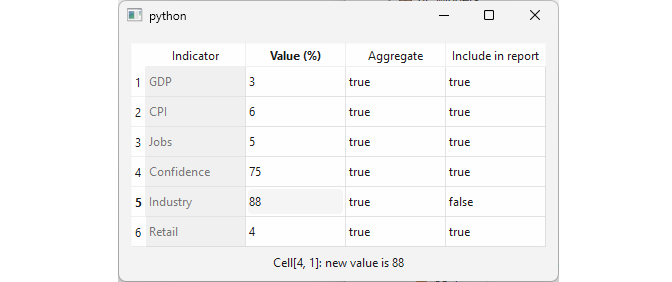
Your users need to edit a table of aggregate economic indicators and select which ones to include in the report. |
To use QTableView in your application:
 1 # QTableView implements a table view
 2 # that displays items from a model.
 3
 4 import sys
 5 from PySide6.QtCore import Slot, Qt
 6 from PySide6.QtGui import QStandardItemModel, QStandardItem
 7 from PySide6.QtWidgets import (QApplication, QWidget,
 8     QVBoxLayout, QTableView, QLabel)
 9
10
11 class Window(QWidget):
12
13     def __init__(self, parent=None):
14
15         super().__init__(parent)
16
17         layout = QVBoxLayout()
18         self.setLayout(layout)
19
20         self.header = ['Indicator', 'Value (%)',
21             'Aggregate', 'Include in report']
22         self.data = [
23             ['GDP', 3, True, True],
24             ['CPI', 6, True, True],
25             ['Jobs', 5, True, True],
26             ['Confidence', 75, True, True],
27             ['Industry', 92, True, True],
28             ['Retail', 4, True, True],
29         ]
30
31         # 1. Create the view
32
33         self.table_view = QTableView()
34         self.table_view.setSizeAdjustPolicy(
35             QTableView.SizeAdjustPolicy.AdjustToContents)
36
37         rows = len(self.data)
38         columns = len(self.data[0])
39
40         # 2. Create the model.
41
42         self.model = QStandardItemModel(rows, columns)
43         self.model.setHorizontalHeaderLabels(self.header)
44
45         for row in range(rows):
46             for col in range(columns):
47                 item = QStandardItem()
48                 if col == 0:
49                     item.setFlags(Qt.ItemFlag.NoItemFlags)
50                 data = self.data[row][col]
51                 item.setData(data, Qt.ItemDataRole.DisplayRole)
52                 self.model.setItem(row, col, item)
53
54         # 3. Connect the model with the view.
55
56         self.table_view.setModel(self.model)
57
58         self.notify_label = QLabel()
59         self.notify_label.setAlignment(Qt.AlignmentFlag.AlignCenter)
60         self.model.itemChanged.connect(self.notify_users)
61
62         layout.addWidget(self.table_view)
63         layout.addWidget(self.notify_label)
64
65     @Slot(QStandardItem)
66     def notify_users(self, item):
67         row = item.row()
68         col = item.column()
69         text = item.text()
70         self.notify_label.setText(
71             f'Cell[{row}, {col}]: new value is {text}')
72
73
74 if __name__ == '__main__':
75
76     app = QApplication(sys.argv)
77     main_window = Window()
78     main_window.show()
79     sys.exit(app.exec())
Create a
QTableViewinstance. We also add a label to the window to notify users of changes.Create a model instance. In the example, we use
QStandardItemModel, populating it with data from the two- dimensionaldatalist. Each item is represented with aQStandardItemobject. We set the data usingsetData()forDisplayRoleand adjust flags to make the first column read-only.Set the view’s model using
QTableView.setModel(). Connect the model’sitemChanged()signal to a slot to handle updates.
This separates the data model from the view, allowing the same model to be used with multiple views, and allowing a view’s model to be changed dynamically.
A key distinction between QTableWidget and QTableView is in their handling of data. QTableWidget is suitable for semi-structured or heterogeneous data, where individual cells can vary in type or format without column consistency - for instance, allowing a user to enter ‘Maybe’ in a boolean-like field instead of strictly True or False. In contrast, QTableView, paired with a model, is suitable for use with structured data, as models typically enforce uniform data types and validation rules per column. This flexibility makes QTableWidget ideal for quick prototypes and ad-hoc tables, while QTableView supports more scalable, data-driven applications.