2. Signals & Slots
The signals and slots mechanism is a fundamental concept in Qt, used by objects to communicate without needing to know anything about each other. A button simply emits a signal when clicked, and any slot connected to that signal responds. Adding or removing a connection requires no changes to either side.
A signal is an event notification emitted by a widget. A slot is a Python method or function that executes in response. You establish the relationship with connect()
2.1 Connecting a Signal to a Slot
 |
Your task is to build a balance panel for a personal finance application. Clicking a Refresh Balance button updates a label with the current account balance. |
To create a signal - slot connection:
 1 # Signals are event notifications emitted by widgets.
 2 # Slots are Python methods/functions that respond to them.
 3 # connect() establishes the relationship between the two.
 4
 5 import sys
 6 from PySide6.QtCore import Slot
 7 from PySide6.QtWidgets import (QApplication,
 8     QWidget, QLabel, QPushButton, QVBoxLayout)
 9
10
11 class Window(QWidget):
12
13     def __init__(self):
14
15         super().__init__()
16
17         self.setWindowTitle('Refresh Balance')
18         self.setMinimumWidth(150)
19         layout = QVBoxLayout()
20         self.setLayout(layout)
21
22         # 1. Create the label.
23         #    We keep a reference so the slot can update it.
24
25         self.balance_label = QLabel('Balance: -')
26         layout.addWidget(self.balance_label)
27
28         # 2. Create the button.
29         #    Clicking it emits the clicked() signal.
30
31         self.button = QPushButton('Click me!')
32         layout.addWidget(self.button)
33
34         # 3. Connect the signal to the slot.
35         #    Note there are no parentheses after on_refresh_clicked:
36         #    connect() expects a function object, not a function call.
37
38         self.button.clicked.connect(self.refresh_balance)
39
40     @Slot()
41     def refresh_balance(self):
42         self.balance_label.setText('Balance: $4,250,00')
43
44
45 if __name__ == '__main__':
46
47     app = QApplication(sys.argv)
48     main_window = Window()
49     main_window.show()
50     sys.exit(app.exec())
Create a
QLabelas an instance variable so the slot can reach it viaself. Set its text to'Balance: -'to show the user a placeholder before the first refresh.Create a
QPushButton. When the user clicks it, the button emits itsclicked()signal automatically.Connect the signal to the slot with
object.signal_name.connect(slot_name). The absence of parentheses afterself.refresh_balanceis intentional:connect()expects a callable to store and invoke later.
The slot is decorated with @Slot(). This is optional as omitting it still works, but the Qt documentation recommends it to avoid runtime overhead and it makes the intent of the method explicit. Note that @Slot has no parameters here: QPushButton.clicked() does emit a checked boolean, but since the button is not checkable we have no use for it, so we leave it out of both the decorator and the method signature. The opposite would not work - if a slot expects an argument which the signal does not provide, you will get an error.
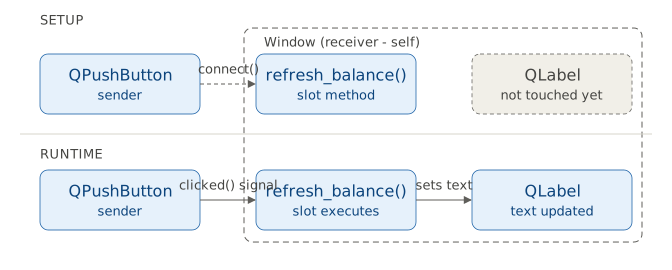
This diagram contrasts setup (connecting a signal to a slot), which you perform once, when the window is built, with runtime, where the slot executes when the signal is emitted. In Qt parlance, the button is the signal sender, the window is the signal receiver, and the refresh_balance() method is the slot. In this example, the label whose text is updated also belongs to the receiver, but this is not required.
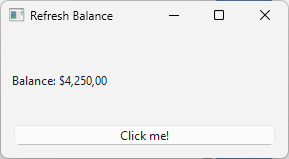
When you run the script, you’ll see a window with a label and a button. Clicking the button updates the label in place.
2.2 Passing Arguments to Slots
|
Your task is to extend the balance panel with a transaction category selector. You add three buttons (Income, Expense and Transfer) which update a label with the name of the selected category. Since |
To pass additional arguments to a slot:
 1 import sys
 2 from PySide6.QtWidgets import (QApplication,
 3     QWidget, QLabel, QPushButton, QVBoxLayout)
 4
 5
 6 class Window(QWidget):
 7
 8     def __init__(self):
 9
10         super().__init__()
11
12         self.setWindowTitle('Category selector')
13         self.setMinimumWidth(150)
14         layout = QVBoxLayout()
15         self.setLayout(layout)
16
17         self.category_label = QLabel('Category: -')
18         layout.addWidget(self.category_label)
19
20         # 1. Create three buttons and connect each to a lambda.
21         #    The lambda is an anonymous function - it has no name.
22
23         for category in ('Income', 'Expense', 'Transfer'):
24             button = QPushButton(category)
25             button.clicked.connect(
26                 lambda checked, c=category: self.select_category(c))
27             layout.addWidget(button)
28
29     # 2. A single named slot handles all three buttons.
30
31     def select_category(self, category):
32         self.category_label.setText(f'Category: {category}')
33
34
35 if __name__ == '__main__':
36
37     app = QApplication(sys.argv)
38     main_window = Window()
39     main_window.show()
40     sys.exit(app.exec())
-
Create three buttons and connect each to a lambda. The lambda
lambda checked, c=category: self.select_category(c):- Absorbs the
checkedboolean that thatclicked()emits. - Captures the current value of
category(c=category)
Create a single named slot that handles all three buttons.
The Python’s standard library’s functools.partial produces a new callable with some arguments pre-filled. It is an alternative to the lambda above - some find it more readable for argument binding:
1 from functools import partial
2
3 # Replace the lambda with:
4 button.clicked.connect(partial(self.select_category, category))
partial(self.select_category, category) returns a Python callable that, when invoked, calls select_category() with category already supplied. checked is ignored as in the previous case and the slot itself is unchanged.
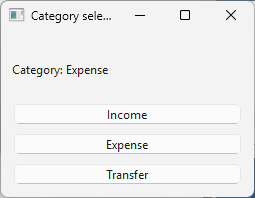
In either case, when you run the application and select a category, you should see it displayed in the label:
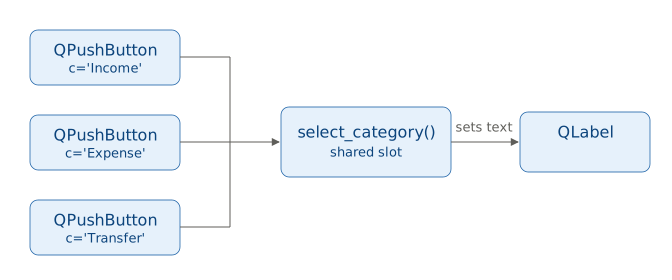
All three buttons share one slot, but each connection adds its own bound value (c='Income', c='Expense', c='Transfer') which is set at connect() time via a lambda or functools.partial.