30. Thread Synchronization
There are cases where executing a piece of code in a separate thread is desirable (or unavoidable) but it inevitably makes the program flow more complex and presents the programmer with a set of challenges, one of which is thread synchronization. In this chapter, we demonstrate why thread synchronization may be necessary and present the Qt tools for synchronizing threads.
30.1 Race Condition Demo
 |
You are working on a banking application that lets users withdraw money from their bank account. This takes place over a network so you decide to make withdrawals in a background thread to avoid blocking the GUI thread. |
In your application you:
 1 from PySide6.QtCore import QObject, QThread, Slot
 2
 3 # 1. Create the BankAccount class
 4
 5 class BankAccount(QObject):
 6
 7     def __init__(self, balance, parent=None):
 8         super().__init__(parent)
 9         self.balance = balance
10
11     @Slot(result=int)
12     def get_balance(self):
13         return self.balance
14
15     def withdraw(self, amount):
16         print('---withdraw start---',
17             QThread.currentThread().objectName())
18         balance = self.balance
19         QThread.msleep(1)
20         #print(end='')
21         #loop = QEventLoop()
22         #QTimer.singleShot(1000, loop.quit)
23         if balance >= amount:
24             balance -= amount
25             self.balance = balance
26         print('---withdraw end---',
27             QThread.currentThread().objectName(), self.balance)
- Create a class named
BankAccountto hold the user account balance, and add two methods,get_balanceto return the current balance, andwithdrawto let the user withdraw the specified amount of money from the account. In the demonstration we useQThread.msleep()to simulate network lag.
 1 from PySide6.QtCore import QObject, Signal
 2
 3 # 2. Create the worker class
 4
 5 class Worker(QObject):
 6
 7     finished = Signal()
 8
 9     def __init__(self, bank_account, amount, parent=None):
10         super().__init__(parent)
11         self.bank_account = bank_account
12         self.amount = amount
13
14     def process(self):
15         self.bank_account.withdraw(self.amount)
16         self.finished.emit()
- Create the
Workerclass. We will move this class to a background thread and call itsprocess()method to process the user request.
 1 import sys
 2 from PySide6.QtCore import QThread, QEventLoop, QTimer
 3 from PySide6.QtWidgets import (QApplication,
 4     QWidget, QPushButton, QVBoxLayout, QLabel)
 5 from bankaccount import BankAccount
 6 from worker import Worker
 7
 8
 9 class Window(QWidget):
10
11     def __init__(self):
12
13         super().__init__()
14
15         # 3. Simulate a joint bank account
16
17         self.thread_count = 5
18         self.amount = 100
19
20         self.label = QLabel('Click to start')
21         self.button = QPushButton('Withdraw money')
22         self.button.clicked.connect(self.start_threads)
23
24         layout = QVBoxLayout()
25         layout.addWidget(self.label)
26         layout.addWidget(self.button)
27         self.setLayout(layout)
28
29         self.workers = []
30
31     def start_threads(self):
32
33         self.button.setEnabled(False)
34
35         self.bank_account = BankAccount(
36             self.thread_count * self.amount)
37         self.bank_account_thread = QThread()
38         self.bank_account_thread.setObjectName(
39             'Bank account thread')
40         self.bank_account.moveToThread(
41             self.bank_account_thread)
42         self.bank_account_thread.start()
43
44         self.completed = 0
45
46         self.workers.clear()
47
48         for i in range(self.thread_count):
49             background_thread = QThread(self)
50             background_thread.setObjectName(f'Thread {i}')
51
52             worker_obj = Worker(self.bank_account, self.amount)
53             self.workers.append(worker_obj)
54             worker_obj.moveToThread(background_thread)
55
56             worker_obj.finished.connect(self.on_worker_done)
57
58             background_thread.started.connect(worker_obj.process)
59             worker_obj.finished.connect(background_thread.quit)
60             worker_obj.finished.connect(worker_obj.deleteLater)
61             background_thread.finished.connect(
62                 background_thread.deleteLater)
63
64             background_thread.start()
65
66     def on_worker_done(self):
67
68         self.completed += 1
69
70         if self.completed == self.thread_count:
71             print('Expected: 0, Got:', self.bank_account.balance)
72             self.label.setText('Final balance: ' +
73                 str(self.bank_account.balance))
74             self.bank_account_thread.quit()
75             self.bank_account_thread.wait()
76             self.button.setEnabled(True)
77             print('=====================')
78
79
80 if __name__ == '__main__':
81
82     app = QApplication(sys.argv)
83     main_window = Window()
84     main_window.show()
85     sys.exit(app.exec())
- In the main application class we simulate a situation where five users simultaneously withdraw money from a joint bank account. Each user withdraws 100 monetary units from the account. We initialize the bank account with (
thread_count * amount) monetary units so that the expected final balance is zero. On the “Withdraw money” button click, we create five background threads and five worker objects, moving each worker to its own thread. The money is withdrawn as soon as each background thread starts. The singleBankAccountobject also lives in its own separate thread.
A sample output could be:
 1 ---withdraw start--- Thread 0
 2 ---withdraw start--- Thread 1
 3 ---withdraw start--- Thread 4
 4 ---withdraw start--- Thread 2
 5 ---withdraw start--- Thread 3
 6 ---withdraw end--- Thread 2 400
 7 ---withdraw end--- Thread 3 400
 8 ---withdraw end--- Thread 4 400
 9 ---withdraw end--- Thread 1 400
10 ---withdraw end--- Thread 0 400
11 Expected: 0, Got: 400
12 =====================
We expect the final balance to be zero but we end up with 400 monetary units in the account left.
From the output, you can see that all five worker objects access and modify BankAccount.balance without synchronization. At the very beginning of BankAccount.withdraw() we assign self.balance to a local variable
1 balance = self.balance
All five threads reach that line of code before any of them had a chance to subtract the amount from the balance
1 ---withdraw start--- Thread 0
2 ---withdraw start--- Thread 1
3 ---withdraw start--- Thread 4
4 ---withdraw start--- Thread 2
5 ---withdraw start--- Thread 3
So for each worker, balance equals 500. When each worker subtracts the amount from the balance:
1 balance -= amount
2 self.balance = balance
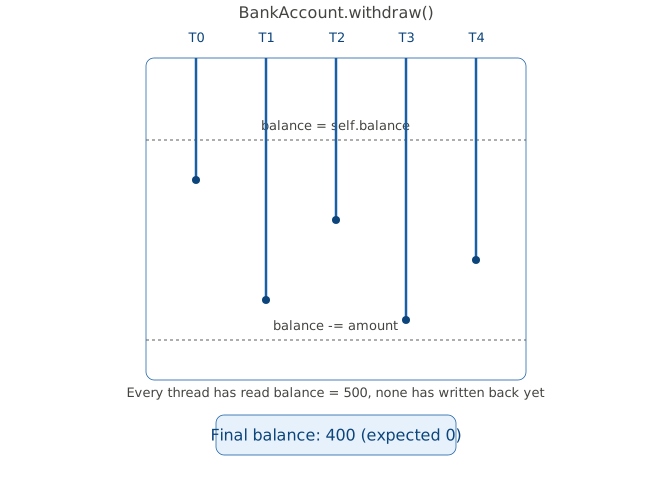
the final balance value ends up being 400. The withdrawal operation is not atomic, and access to the shared balance is not synchronized.
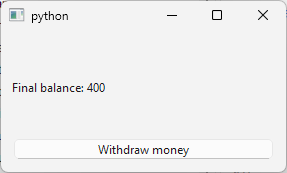
In such a situation, the developer needs a way to synchronize thread execution, i.e., to only let a single thread withdraw money at any given time. Qt provides several means to achieve this.
30.2 Queued Signal-Slot Connection
One benefit of Qt’s signals and slots mechanism is that queued connections are thread-safe for cross-thread communication. The slot is invoked when control returns to the event loop of the receiver object’s thread. Internally, Qt posts a QMetaCallEvent (event of type QEvent.MetaCall) to the receiver’s event queue, ensuring that slot invocations for that object are serialized.
|
You are developing a multithreaded banking application that enables users to withdraw money from their bank accounts. To avoid race conditions when accessing the account balance, you decide to take advantage of Qt’s signals and slots mechanism for thread-safe communication. |
 1 from PySide6.QtCore import QObject, Signal
 2
 3 class Worker(QObject):
 4
 5     transactionProcessed = Signal()
 6     requestUpdate = Signal(int)
 7
 8     def __init__(self, bank_account, amount, parent=None):
 9         super().__init__(parent)
10         self.bank_account = bank_account
11         self.amount = amount
12         self.requestUpdate.connect(self.bank_account.withdraw)
13
14     def process(self):
15         self.requestUpdate.emit(self.amount)
16         self.transactionProcessed.emit()
- Create the
Workerclass. This worker version has two signals,requestUpdate(int)which requests that theBankAccountupdate the balance, andtransactionProcessed(), emitted once the withdrawal completes. We connectWorker.requestUpdate()toBankAccount.withdraw()
1 self.requestUpdate.connect(self.bank_account.withdraw)
Both the worker and the bank account live in their own threads, so the connection type defaults to Qt.QueuedConnection. This means that:
- Emitting
requestUpdate()posts a queued invocation ofBankAccount.withdraw()onto the bank account thread’s event queue. withdraw()runs only when the bank account thread’s event loop dispatches that queued call, so it always executes there regardless of which thread emitted the signal.- Because this is a normal (non-blocking) queued connection, the worker thread returns from the
emit()immediately and does not wait forwithdraw()to finish.
This ensures that BankAccount.withdraw() is accessed by one thread at a time and the race condition is avoided.
 1 from PySide6.QtCore import QObject, QThread, Signal, Slot
 2
 3 class BankAccount(QObject):
 4
 5     balanceSent = Signal(int)
 6
 7     def __init__(self, balance, parent=None):
 8         super().__init__(parent)
 9         self.balance = balance
10
11     @Slot(int)
12     def withdraw(self, amount):
13         print('---withdraw start---',
14             QThread.currentThread().objectName())
15         balance = self.balance
16         if balance >= amount:
17             balance -= amount
18             QThread.msleep(1)
19             self.balance = balance
20         print('---withdraw end---',
21             QThread.currentThread().objectName())
22
23     @Slot()
24     def send_balance(self):
25         self.balanceSent.emit(self.balance)
- Create the
BankAccountclass. It is mostly unchanged except that we add a signal namedbalanceSent()to it. The signal will be used to send the final balance to the GUI thread.
 1 import sys
 2 from PySide6.QtCore import Signal, QThread
 3 from PySide6.QtWidgets import (QApplication,
 4     QWidget, QPushButton, QVBoxLayout, QLabel)
 5 from bankaccount import BankAccount
 6 from worker import Worker
 7
 8
 9 class Window(QWidget):
10
11     requestBalance = Signal()
12
13     def __init__(self):
14
15         super().__init__()
16
17         self.thread_count = 5
18         self.amount = 100
19
20         self.label = QLabel('Click to start')
21         self.button = QPushButton('Withdraw money')
22         self.button.clicked.connect(self.start_threads)
23
24         layout = QVBoxLayout()
25         layout.addWidget(self.label)
26         layout.addWidget(self.button)
27         self.setLayout(layout)
28
29         self.workers = []
30
31     def start_threads(self):
32
33         self.button.setEnabled(False)
34
35         self.bank_account = BankAccount(self.thread_count * self.amount)
36         self.bank_account_thread = QThread()
37         self.bank_account_thread.setObjectName('Bank account thread')
38         self.bank_account.moveToThread(self.bank_account_thread)
39         self.requestBalance.connect(self.bank_account.send_balance)
40         self.bank_account.balanceSent.connect(self.on_balance_sent)
41         self.bank_account_thread.start()
42
43         self.completed = 0
44
45         self.workers.clear()
46
47         for i in range(self.thread_count):
48             background_thread = QThread(self)
49             background_thread.setObjectName(f'Thread {i}')
50
51             worker_obj = Worker(self.bank_account, self.amount)
52             self.workers.append(worker_obj)
53             worker_obj.moveToThread(background_thread)
54
55             worker_obj.transactionProcessed.connect(self.on_worker_done)
56
57             background_thread.started.connect(worker_obj.process)
58             worker_obj.transactionProcessed.connect(background_thread.quit)
59             worker_obj.transactionProcessed.connect(worker_obj.deleteLater)
60             background_thread.finished.connect(background_thread.deleteLater)
61
62             background_thread.start()
63
64     def on_worker_done(self):
65         self.completed += 1
66         if self.completed == self.thread_count:
67             self.requestBalance.emit()
68
69
70     def on_balance_sent(self, balance):
71
72         self.bank_account_thread.quit()
73         self.bank_account_thread.wait()
74         print('Expected: 0, Got:', balance)
75         self.label.setText(f'Final balance: {balance}')
76         self.button.setEnabled(True)
77
78
79 if __name__ == '__main__':
80
81     app = QApplication(sys.argv)
82     main_window = Window()
83     main_window.show()
84     sys.exit(app.exec())
- Add the
requestBalance()signal to the main window. When all worker threads are finished, the main window sends this signal to the bank account thread, which in turn responds with thebalanceSent()signal. The output is:
 1 ---withdraw start--- Bank account thread
 2 ---withdraw end--- Bank account thread
 3 ---withdraw start--- Bank account thread
 4 ---withdraw end--- Bank account thread
 5 ---withdraw start--- Bank account thread
 6 ---withdraw end--- Bank account thread
 7 ---withdraw start--- Bank account thread
 8 ---withdraw end--- Bank account thread
 9 ---withdraw start--- Bank account thread
10 ---withdraw end--- Bank account thread
11 Expected: 0, Got: 0
Access to BankAccount.balance is synchronized. Note that neither the worker objects nor the main window object access BankAccount.balance directly - all communication takes place using signals and slots. Also note that all withdraw() calls are executed in the bank account thread.
30.3 QMutex
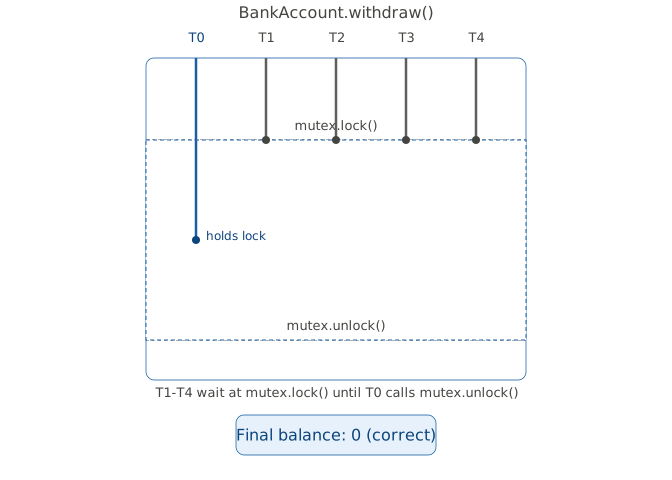
A mutex is a synchronization tool that prevents multiple threads from accessing the same shared resource - object, data structure or section of code - simultaneously. When one thread acquires a mutex, any other thread trying to lock the same mutex will be blocked and forced to wait until the first thread releases it. This prevents race conditions where concurrent access could corrupt data or cause unpredictable behavior in your program[^1].
In Qt, the mutex lock applies to the scope between QMutex.lock() and QMutex.unlock(). Any code inside, including function/method calls, runs under the protection of the lock. When you call lock() in a thread, other threads that try to call lock() in the same place will block until the thread that got the lock calls unlock()[^2].
|
You are working on a multithreaded banking application that allows users to withdraw money from their accounts. Use a mutex to prevent race conditions on the bank account balance. |
To use QMutex in your application:
 1 from PySide6.QtCore import QObject, Signal
 2
 3 class Worker(QObject):
 4
 5     finished = Signal()
 6
 7     def __init__(self, bank_account, amount, parent=None):
 8         super().__init__(parent)
 9         self.bank_account = bank_account
10         self.amount = amount
11
12     def process(self):
13         self.bank_account.withdraw(self.amount)
14         self.finished.emit()
- Create the worker class. The class is similar to the worker from the race condition demo, except we don’t need to send the
transactionProcessed()andrequestUpdate()signals.
 1 from PySide6.QtCore import QObject ,QThread, QMutex, Slot
 2
 3 class BankAccount(QObject):
 4
 5     def __init__(self, balance, parent=None):
 6         super().__init__(parent)
 7         self.balance = balance
 8         self.mutex = QMutex()
 9
10     @Slot(result=int)
11     def get_balance(self):
12         return self.balance
13
14     def withdraw(self, amount):
15         self.mutex.lock()
16         print('---withdraw start---',
17             QThread.currentThread().objectName())
18         balance = self.balance
19         QThread.msleep(1)
20         #print(end='')
21         #loop = QEventLoop()
22         #QTimer.singleShot(1000, loop.quit)
23         if balance >= amount:
24             balance -= amount
25             self.balance = balance
26         print('---withdraw end---',
27             QThread.currentThread().objectName(), self.balance)
28         self.mutex.unlock()
- Create the
BankAccountclass. In itswithdraw()method, guard the code that updates the account balance with thelock()andunlock()calls.
 1 import sys
 2 from PySide6.QtCore import QThread
 3 from PySide6.QtWidgets import (QApplication,
 4     QWidget, QPushButton, QVBoxLayout, QLabel)
 5 from bankaccount import BankAccount
 6 from worker import Worker
 7
 8 class Window(QWidget):
 9
10     def __init__(self):
11
12         super().__init__()
13
14         self.thread_count = 5
15         self.amount = 100
16
17         self.label = QLabel('Click to start')
18         self.button = QPushButton('Withdraw money')
19         self.button.clicked.connect(self.start_threads)
20
21         layout = QVBoxLayout()
22         layout.addWidget(self.label)
23         layout.addWidget(self.button)
24         self.setLayout(layout)
25
26         self.workers = []
27
28     def start_threads(self):
29
30         self.button.setEnabled(False)
31
32         self.bank_account = BankAccount(
33             self.thread_count * self.amount)
34         self.bank_account_thread = QThread()
35         self.bank_account_thread.setObjectName(
36             'Bank account thread')
37         self.bank_account.moveToThread(
38             self.bank_account_thread)
39         self.bank_account_thread.start()
40
41         self.completed = 0
42
43         self.workers.clear()
44
45         for i in range(self.thread_count):
46             background_thread = QThread(self)
47             background_thread.setObjectName(f'Thread {i}')
48
49             worker_obj = Worker(self.bank_account, self.amount)
50             self.workers.append(worker_obj)
51             worker_obj.moveToThread(background_thread)
52
53             worker_obj.finished.connect(self.on_worker_done)
54
55             background_thread.started.connect(worker_obj.process)
56             worker_obj.finished.connect(background_thread.quit)
57             worker_obj.finished.connect(worker_obj.deleteLater)
58             background_thread.finished.connect(
59                 background_thread.deleteLater)
60
61             background_thread.start()
62
63     def on_worker_done(self):
64
65         self.completed += 1
66
67         if self.completed == self.thread_count:
68             print('Expected: 0, Got:', self.bank_account.balance)
69             self.label.setText('Final counter: ' +
70                 str(self.bank_account.balance))
71             self.bank_account_thread.quit()
72             self.bank_account_thread.wait()
73             self.button.setEnabled(True)
74             print('=====================')
75
76
77 if __name__ == '__main__':
78
79     app = QApplication(sys.argv)
80     main_window = Window()
81     main_window.show()
82     sys.exit(app.exec())
When you start the application and withdraw money, the output is:
 1 ---withdraw start--- Thread 0
 2 ---withdraw end--- Thread 0 400
 3 ---withdraw start--- Thread 1
 4 ---withdraw end--- Thread 1 300
 5 ---withdraw start--- Thread 3
 6 ---withdraw end--- Thread 3 200
 7 ---withdraw start--- Thread 2
 8 ---withdraw end--- Thread 2 100
 9 ---withdraw start--- Thread 4
10 ---withdraw end--- Thread 4 0
11 Expected: 0, Got: 0
12 =====================
withdraw() calls are serialized and each is executed in the caller thread.
30.4 QMutexLocker
QMutexLocker[^3] is a convenience class that simplifies using mutexes. QMutexLocker is created within a method where a QMutex needs to be locked - the mutex is locked when the mutex locker is created and unlocked when the mutex locker is destroyed.
|
You use a mutex to prevent race conditions in your multithreaded banking application. You decide to use |
To use a QMutexLocker in your application:
 1 from PySide6.QtCore import (QObject, QThread, QMutex,
 2     QMutexLocker, Slot)
 3
 4 class BankAccount(QObject):
 5
 6     def __init__(self, balance, parent=None):
 7         super().__init__(parent)
 8         self.balance = balance
 9         self.mutex = QMutex()
10
11     @Slot(result=int)
12     def get_balance(self):
13         return self.balance
14
15     def withdraw(self, amount):
16         locker = QMutexLocker(self.mutex)
17         print('---withdraw start---',
18             QThread.currentThread().objectName())
19         balance = self.balance
20         QThread.msleep(1)
21         #print(end='')
22         #loop = QEventLoop()
23         #QTimer.singleShot(1000, loop.quit)
24         if balance >= amount:
25             balance -= amount
26             self.balance = balance
27         print('---withdraw end---',
28             QThread.currentThread().objectName(), self.balance)
In the
BankAccountclass, add a mutex instance variable.In the
withdraw()method, create aQMutexLockerlocal variable just before the code that updates the balance. Whenwithdraw()returns the variable goes out of scope, unlocking the mutex.
QMutexLocker is an example of the RAII idiom in C++, ensuring that a mutex is automatically unlocked when the locker goes out of scope - just as Python’s context managers guarantee automatic resource release upon exiting a with block of code.
30.5 QSemaphore
A semaphore is a synchronization primitive used in concurrent programming to control access to a shared resource with a limited number of units. It keeps the count of available units, allowing threads to acquire (decrement) the count when using the resource and release (increment) it when done[^4]. In Qt, the QSemaphore class provides a general counting semaphore.
|
You are developing a multithreaded banking application where multiple customers attempt to withdraw money using ATMs at the same location. Due to provider restrictions, the location has a limited number of internet connections available. To ensure that customers can only perform withdrawals when a connection is available, you decide to use a QSemaphore to manage the shared pool of ATM network connections. |
To use QSemaphore in your application:
 1 from random import randint
 2 from PySide6.QtCore import QObject, QSemaphore, QThread, Slot
 3
 4 class AtmPool(QObject):
 5
 6     def __init__(self, parent=None):
 7         super().__init__(parent)
 8         self.atm_count = 5
 9         self.semaphore = QSemaphore(self.atm_count)
10
11     @Slot()
12     def use_atm(self):
13         self.semaphore.acquire()
14         try:
15             print(QThread.currentThread().objectName() +
16                 ' is using an ATM ' +
17                 '(available: ' +
18                 str(self.semaphore.available()) + ')')
19             QThread.msleep(randint(10, 200))
20         finally:
21             print(QThread.currentThread().objectName() +
22                 ' done. (available before release: ' +
23                 str(self.semaphore.available()) + ')')
24             self.semaphore.release()
Create the class that represents the shared resource,
AtmPoolin the example. Initialize a QSemaphore with the number of available resources (e.g., 5 connections).In the
AtmPoolclass, add ause_atm()slot that acquires the semaphore before using the resource (simulating a withdrawal with a random sleep), and releases it in afinallyblock to ensure it’s always freed.
 1 from PySide6.QtCore import QObject, Signal
 2
 3 class Worker(QObject):
 4
 5     finished = Signal()
 6
 7     def __init__(self, atm_pool, parent=None):
 8         super().__init__(parent)
 9         self.atm_pool = atm_pool
10
11     def process(self):
12         self.atm_pool.use_atm()
13         self.finished.emit()
- Create the
Workerclass, which callsuse_atm()in itsprocess()method to simulate a customer using an ATM. In the main window class, create theAtmPoolobject and move it to its own thread. Then, create 15 worker threads (more than available resources) to demonstrate queuing. Each worker signals when finished.
 1 import sys
 2 from PySide6.QtCore import QThread
 3 from PySide6.QtWidgets import (QApplication,
 4     QWidget, QPushButton, QVBoxLayout, QLabel)
 5 from atmpool import AtmPool
 6 from worker import Worker
 7
 8 class Window(QWidget):
 9
10     def __init__(self):
11
12         super().__init__()
13
14         self.thread_count = 15
15
16         self.label = QLabel('Click to start', self)
17         self.button = QPushButton('Withdraw Money', self)
18         self.button.clicked.connect(self.start_threads)
19
20         layout = QVBoxLayout(self)
21         layout.addWidget(self.label)
22         layout.addWidget(self.button)
23
24         self.workers = []
25
26     def start_threads(self):
27
28         self.button.setEnabled(False)
29
30         self.atm_pool = AtmPool()
31         self.atm_pool_thread = QThread()
32         self.atm_pool_thread.setObjectName('Atm Pool thread')
33         self.atm_pool.moveToThread(self.atm_pool_thread)
34         self.atm_pool_thread.start()
35
36         self.completed = 0
37
38         self.workers.clear()
39
40         for i in range(self.thread_count):
41             background_thread = QThread(self)
42             background_thread.setObjectName(f'Thread {i}')
43
44             worker_obj = Worker(self.atm_pool)
45             self.workers.append(worker_obj)
46             worker_obj.moveToThread(background_thread)
47
48             worker_obj.finished.connect(self.on_worker_done)
49
50             background_thread.started.connect(worker_obj.process)
51             worker_obj.finished.connect(background_thread.quit)
52             worker_obj.finished.connect(worker_obj.deleteLater)
53             background_thread.finished.connect(
54                 background_thread.deleteLater)
55
56             background_thread.start()
57
58     def on_worker_done(self):
59
60         self.completed += 1
61
62         if self.completed == self.thread_count:
63             self.atm_pool_thread.quit()
64             self.atm_pool_thread.wait()
65             self.button.setEnabled(True)
66
67
68 if __name__ == '__main__':
69
70     app = QApplication(sys.argv)
71     main_window = Window()
72     main_window.show()
73     sys.exit(app.exec())
When you run the application and click “Withdraw Money, the output is:
 1 Thread 0 is using an ATM (available: 4)
 2 Thread 2 is using an ATM (available: 3)
 3 Thread 3 is using an ATM (available: 2)
 4 Thread 6 is using an ATM (available: 0)
 5 Thread 1 is using an ATM (available: 1)
 6 Thread 2 done. (available before release: 0)
 7 Thread 7 is using an ATM (available: 0)
 8 Thread 6 done. (available before release: 0)
 9 Thread 9 is using an ATM (available: 0)
10 Thread 7 done. (available before release: 0)
11 Thread 4 is using an ATM (available: 0)
12 Thread 3 done. (available before release: 0)
13 Thread 10 is using an ATM (available: 0)
14 Thread 0 done. (available before release: 0)
15 Thread 13 is using an ATM (available: 0)
16 Thread 1 done. (available before release: 0)
17 Thread 5 is using an ATM (available: 0)
18 Thread 9 done. (available before release: 0)
19 Thread 11 is using an ATM (available: 0)
20 Thread 13 done. (available before release: 0)
21 Thread 8 is using an ATM (available: 0)
22 Thread 8 done. (available before release: 0)
23 Thread 4 done. (available before release: 0)
24 Thread 10 done. (available before release: 0)
25 Thread 14 is using an ATM (available: 0)
26 Thread 12 is using an ATM (available: 0)
27 Thread 5 done. (available before release: 1)
28 Thread 11 done. (available before release: 1)
29 Thread 14 done. (available before release: 3)
30 Thread 12 done. (available before release: 4)
The semaphore limits concurrent access to the shared connections while allowing serialization of extra requests.
30.6 QSemaphoreReleaser
QSemaphoreReleaser[^5] is a convenience class that simplifies semaphore usage with RAII-style automatic release. It acquires the semaphore separately but ensures release when the releaser object is destroyed (e.g., goes out of scope), similar to QMutexLocker for mutexes. This helps prevent leaks if exceptions occur during resource usage.
|
In your multithreaded banking application, you decide to use |
To use QSemaphoreReleaser in your application:
 1 from random import randint
 2 from PySide6.QtCore import (QObject, QSemaphore,
 3     QSemaphoreReleaser, QThread, Slot)
 4
 5 class AtmPool(QObject):
 6
 7     def __init__(self, parent=None):
 8
 9         super().__init__(parent)
10         self.atm_count = 5
11         self.semaphore = QSemaphore(self.atm_count)
12
13     @Slot()
14     def use_atm(self):
15         self.semaphore.acquire()
16         releaser = QSemaphoreReleaser(self.semaphore)
17         print(QThread.currentThread().objectName() +
18             ' is using an ATM' +
19             ' (available: ' +
20             str(self.semaphore.available()) + ')')
21         QThread.msleep(randint(10, 200))
22         print(QThread.currentThread().objectName() +
23             ' done ' +
24             '(available before release: ' +
25             str(self.semaphore.available()) + ')')
26         #del releaser
In the
AtmPoolclass, modify theuse_atmmethod: Callacquire()first, then create aQSemaphoreReleaser(self.semaphore)immediately after. The releaser will automatically callrelease()when it goes out of scope at the end of the method.The rest of the code remains the same as in the basic semaphore example.
This approach makes the code cleaner and exception-safe, ensuring the semaphore is always released even if an error occurs during the withdrawal.
30.7 QWaitCondition
QWaitCondition allows a thread to tell other threads that some sort of condition has been met. One or more threads can block waiting for a QWaitCondition to set a condition with wakeOne() or wakeAll()[^6].
|
You are extending the banking application so that a withdrawal no longer fails when the balance is insufficient. Instead, it should block until a deposit makes the withdrawal possible, then complete automatically. |
To coordinate threads with QWaitCondition:
 1 from PySide6.QtCore import (QObject, QMutex,
 2     QMutexLocker,QThread, QWaitCondition)
 3
 4
 5 class BankAccount(QObject):
 6
 7     def __init__(self, parent=None):
 8
 9         super().__init__(parent)
10         self.balance = 0
11         self.mutex = QMutex()
12         self.condition = QWaitCondition()
13
14     def deposit(self, amount):
15
16         locker = QMutexLocker(self.mutex)
17         self.balance += amount
18         print(f'[Deposit] Balance updated: {self.balance}')
19         self.condition.wakeAll()
20
21     def withdraw(self, amount):
22
23         locker = QMutexLocker(self.mutex)
24
25         thread_name = QThread.currentThread().objectName()
26         while self.balance < amount:
27             if QThread.currentThread().isInterruptionRequested():
28                 return
29             print('[Withdraw] No money. Waiting... '
30                   f'| Thread: {thread_name}')
31             self.condition.wait(self.mutex)
32
33         self.balance -= amount
34         print('[Withdraw] Done. Remaining: '
35             f'{self.balance} | Thread: {thread_name}')
36
37     def wake_threads(self):
38         locker = QMutexLocker(self.mutex)
39         self.condition.wakeAll()
Add a
QWaitCOnditionalongside the existsingQMutexinBankAccount.deposit()locks the mutex, updates the balance, and callscondition.wakeAll()before the lock is released at the end of the method.withdraw()locks the mutex and loops onwhile self.balance < amount, callingcondition.wait(self.mutex)on each iteration. Note that we use awhileloop:wakeAll()can wake several waiting threads at once, but only one of them holds the mutex at any given moment, and by the time a given thread gets its turn, an earlier thread may already have spent the balance. Inside the loop,QThread.currentThread().isInterruptionRequested()is checked before eachwait()call.The
Workerclass is unchanged from the earlier sections. It callswithdraw()and emitsfinished().
  1 import sys
  2 from PySide6.QtCore import QThread
  3 from PySide6.QtWidgets import (QApplication,
  4     QWidget, QPushButton, QVBoxLayout, QLabel)
  5 from bankaccount import BankAccount
  6 from worker import Worker
  7
  8 class Window(QWidget):
  9
 10     def __init__(self):
 11
 12         super().__init__()
 13
 14         self.thread_count = 5
 15         self.amount = 100
 16
 17         self.label = QLabel()
 18         self.start_button = QPushButton('Start Withdrawals')
 19         self.deposit_button = QPushButton('Deposit Funds')
 20
 21         self.start_button.clicked.connect(self.start_threads)
 22         self.deposit_button.clicked.connect(self.deposit_money)
 23
 24         layout = QVBoxLayout(self)
 25         layout.addWidget(self.label)
 26         layout.addWidget(self.start_button)
 27         layout.addWidget(self.deposit_button)
 28
 29         self.threads = []
 30         self.workers = []
 31
 32         self.bank_account = BankAccount()
 33         self.completed = 0
 34
 35     def start_threads(self):
 36
 37         self.start_button.setEnabled(False)
 38         self.completed = 0
 39
 40         self.threads.clear()
 41         self.workers.clear()
 42
 43         for i in range(self.thread_count):
 44             thread = QThread(self)
 45             thread.setObjectName(f'Thread {i}')
 46             worker = Worker(self.bank_account, self.amount)
 47             worker.moveToThread(thread)
 48
 49             thread.started.connect(worker.process)
 50             worker.finished.connect(self.on_worker_done)
 51             worker.finished.connect(thread.quit)
 52             worker.finished.connect(worker.deleteLater)
 53             thread.finished.connect(thread.deleteLater)
 54
 55             self.threads.append(thread)
 56             self.workers.append(worker)
 57
 58             thread.start()
 59
 60     def deposit_money(self):
 61
 62         deposit = self.amount * self.thread_count
 63         print(f'[Main] Depositing {deposit}')
 64         self.bank_account.deposit(deposit)
 65         self.label.setText(
 66             f'Remaining balance: '
 67             f'{self.bank_account.balance}')
 68
 69     def on_worker_done(self):
 70
 71         self.completed += 1
 72         if self.completed == self.thread_count:
 73             print(f'Remaining balance: '
 74                   f'{self.bank_account.balance}')
 75             self.label.setText(
 76                 f'Remaining balance: '
 77                 f'{self.bank_account.balance}')
 78
 79             self.start_button.setEnabled(True)
 80
 81     def closeEvent(self, event):
 82
 83         for thread in list(self.threads):
 84             thread.requestInterruption()
 85
 86         self.bank_account.wake_threads()
 87
 88         for thread in list(self.threads):
 89             thread.quit()
 90             thread.wait()
 91
 92         self.threads.clear()
 93         self.workers.clear()
 94
 95         super().closeEvent(event)
 96
 97
 98 if __name__ == '__main__':
 99
100     app = QApplication(sys.argv)
101     main_window = Window()
102     main_window.show()
103     sys.exit(app.exec())
In
start_threads(), clearself.threadsandself.workersbefore creating threads.Handle an abrupt window close in
closeEvent(). A thread blocked incondition.wait()will sleep forever unless something wakes it, so quitting cleanly takes three steps in order: request interruption on every thread still running, then wake wake each one of them while holding the account’s mutex, then quit and wait on each thread in turn.
When you run the application and click Start Withdrawals with no funds in the account, the console shows all five threads blocking:
1 [Withdraw] No money. Waiting... | Thread: Thread 0
2 [Withdraw] No money. Waiting... | Thread: Thread 1
3 [Withdraw] No money. Waiting... | Thread: Thread 2
4 [Withdraw] No money. Waiting... | Thread: Thread 3
5 [Withdraw] No money. Waiting... | Thread: Thread 4
Now if you click Deposit Funds, every blocked thread wakes, takes its turn under the mutex, and completes:
1 [Main] Depositing 500
2 [Deposit] Balance updated: 500
3 [Withdraw] Done. Remaining: 400 | Thread: Thread 3
4 [Withdraw] Done. Remaining: 300 | Thread: Thread 1
5 [Withdraw] Done. Remaining: 200 | Thread: Thread 2
6 [Withdraw] Done. Remaining: 100 | Thread: Thread 4
7 [Withdraw] Done. Remaining: 0 | Thread: Thread 0
8 Remaining balance: 0
If you click Start Withdrawals again with an empty balance, then close the main window while all five threads are still blocked, the application shuts down cleanly.