25. Model-View Programming - Delegates
In Qt’s model-view architecture, a delegate sits between the view and the model and is responsible for:
- Rendering each item in the view,
- Providing an editor widget when the user wants to edit that item.
By default, Qt uses QStyledItemDelegate, which handles common data types automatically via a QItemEditorFactory. You can subclass QStyledItemDelegate to take full control over painting and editing. When subclassing, you can either continue using the factory or completely bypass it by reimplementing createEditor().
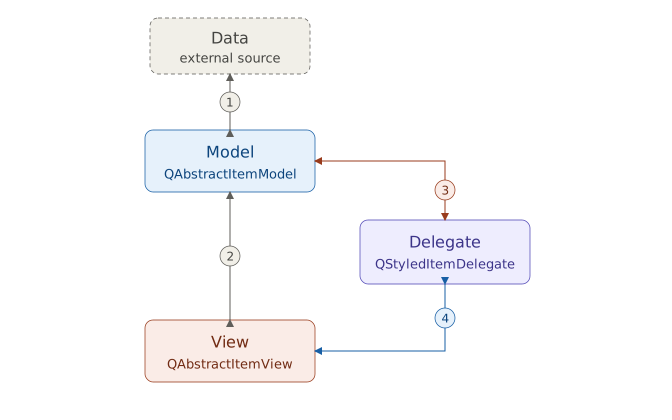
The four connectors above are not decorative - each carries a specific kind of traffic:
Data <-> Model. Reading the data in from the data source and writing it back out is entirely responsibility of the model’s author.
QAbstractItemModeldefines a standard communication interface with methods likedata(),setData(),insertRows(),removeRows()etc., but how you actually talk to the underlying source is code you write yourself.Model <-> View. Methods that describe the model’s shape rather than the value of one specific item, such as
rowCount(),columnCount(),headerData(), are called directly by the view, bypassing the delegate, and the model returns the answer directly to the view.Model <-> Delegate. The delegate calls
index.data(role)to read a value of a single item at a single role, andmodel.setData(index, value, role)to write one back in.Delegate <-> View. The view calls
paint(),sizeHint(),createEditor(),setEditorData(),updateEditorGeometry()on the delegate, which emits thecommitData()andcloseEditor()signals in return.
Say you have a list model with a single column connected with a view. A user clicks an ‘Insert’ button, and your slot calls insertRows() on the model to add one new cell of data. Here’s what happens:
Before anything else, your
insertRows()implementation writes the new value into the backing store.Still inside
insertRows(), the actual insertion is bracketed withbeginInsertRows()andendInsertRows(). These two methods emit therowsAboutToBeInserted()androwsInserted()signals, which every view connected to the model is listening for. This is what triggers the view to callrowCount()again, confirm the new size, and adjust its layout. At this point the view knows a new row exists, but not what is in it.When the view is ready to draw the new row, it calls the delegate’s
paint()method. Insidepaint(), the delegate reads the valueindex.data(Qt.DisplayRole).The delegate paints the data into the cell. If the new row is also meant to open for editing immediately, the view calls
createEditor()andsetEditorData()on the delegate.
You have several options for changing how model data is displayed and edited. The first three options work directly with the default QStyledItemDelegate:
Use item data roles with the default
QStyledItemDelegateto adjust an item’s appearance. For example, change its background color withBackgroundRole, or add an image withDecorationRole.Register a standard widget for a data type with
QItemEditorFactory. For example, replace the default spin box for integers with a line edit.Register a custom widget for a data type with
QItemEditorFactory. For example, use a custom widget made of a pair of radio buttons to edit boolean values.Subclass
QStyledItemDelegateto control display.Subclass
QStyledItemDelegateto control editing.Subclass
QStyledItemDelegateto handle both display and editing.
| Approach | Subclassing Required | Custom Display | Custom Editing | When to Use |
|---|---|---|---|---|
| Item Data Roles | No | Limited | No | Simple appearance tweaks (color, icon, alignment, font) |
| Register Standard Widget | No | No | Yes | Replace default editor for built-in types |
| Register Custom Widget | No | No | Yes | Need a small custom widget (e.g., Yes/No radio buttons) |
| Subclass for Display only | Yes | Full | No | Complex painting (LEDs, progress bars, custom shapes) |
| Subclass for Editing only | Yes | No | Full | Complex editor logic or validation |
| Subclass for Both | Yes | Full | Full | Complete control over look and behavior |
25.1 Using Item Data Roles to Customize Display
Each item in a model can return different data depending on which role the view is asking about. The table below lists the available roles and the data types they accept:
| Role | Accepted Types |
|---|---|
| BackgroundRole | QBrush |
| CheckStateRole | CheckState |
| DecorationRole | QIcon, QPixmap, QImage, QColor |
| DisplayRole | QString and types with a string representation |
| FontRole | QFont |
| SizeHintRole | QSize |
| TextAlignmentRole | Alignment |
| ForegroundRole | QBrush |
By returning the appropriate value for each role in your model’s data() method, you can control how items look.
 |
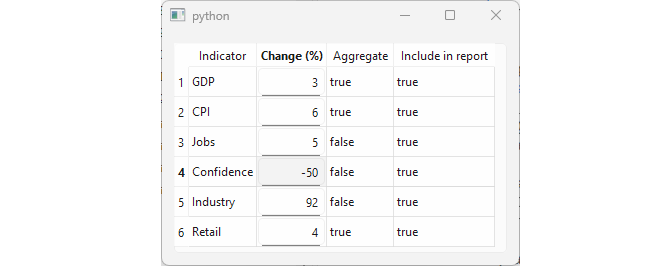
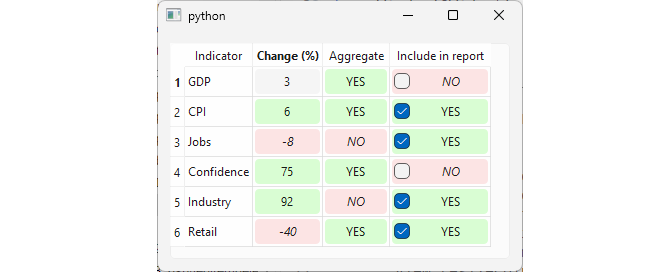
You are developing an application that displays a table of economic indicators. Use item data roles in your model to customize the display: apply a green background to non-negative values in the ‘Change (%)’ column and to |
To use item data roles to customize how the model data is displayed:

Create the model. Subclass
QAbstractTableModeland name itCsvModel. Initialize the table data directly in__init__()for simplicity. Also declare the column headers and twoQBrushfields (one green and one red) to be used for background colors.-
Customize
data(). Handle each role as follows:DisplayRole- for the boolean columns (2 and 3), return ‘YES’ forTrueand ‘NO’ forFalsevalues.CheckStateRole- for column 3 only, returnCheckedforTrueandUncheckedforFalsevalues.BackgroundRole- return the green brush if the value isTrueor greater than zero; return the red brush otherwise.FontRole- return an italic font forFalsevalues and for numeric values less than zero.TextAlignmentRole- returnAlignCenterfor columns 1, 2, and 3.
-
Customize
setData(). The model needs to handle two kinds of edits:EditRole- for regular editable columns (1 and 2), store the new value directly and emitdataChangedto notify the view.CheckStateRole- for column 3, the view passes aCheckStateenum value. Convert it to a plainboolbefore storing, then emitdataChanged().
Customize
flags(). For column 3 to display a checkbox, its items must be user-checkable. Return the standard flags plusItemIsUserCheckablefor that column.
Now, when you run the application you should see a window like this:
25.2 Registering Standard Widgets with QItemEditorFactory
When a user clicks to edit an item, the delegate is responsible for showing an editor widget. The delegate does not create those editors itself - it uses a QItemEditorFactory to create editors for it.
A factory maps data types to editor widgets. For each type, it holds an item editor creator, a small helper that produces the right editor widget for that type.
Qt provides a default factory that all delegates share. The table below shows the default editor widget for each supported type:
| Type | Editor Widget |
|---|---|
| bool | QComboBox |
| double | QDoubleSpinBox |
| int | QSpinBox |
| unsigned int | QSpinBox |
| QDate | QDateEdit |
| QDateTime | QDateTimeEdit |
| QPixmap | QLabel |
| QString | QLineEdit |
| QTime | QTimeEdit |
|
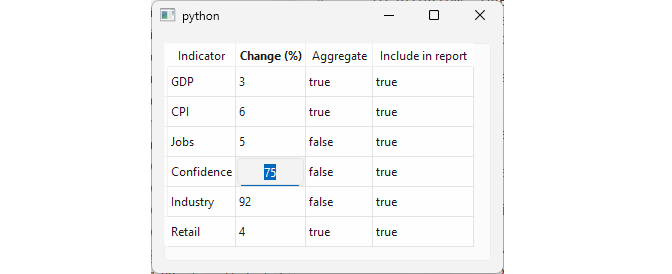
You are building a banking application that displays a table of economic indicators. The |
To replace the default editor widget for a data type with another standard widget:
-
Create an editor creator. Subclass
QItemEditorCreatorBaseand name itNumericLineEditCreator. Reimplement itscreateWidget()method to:- Create a
QLineEditobject. - Call
setAutoFillBackground(True)so the editor fully covers the table cell. - Create a
QIntValidatorand set it as the line edit’s validator. Note that the editor is constructed with theparentargument and that the creator does not keep a reference to the editor - deleting the editor isparents responsibility.
In the main window:
Create a factory and register the custom creator. Instantiate a
QItemEditorFactoryand useregisterEditor()to associate aNumericLineEditCreatorwith theinttype. All other types keep their default editors.Create a delegate and assign
factoryto it. Instantiate aQStyledItemDelegateand usesetItemEditorFactory()to give it the factory you just created.-
Assign the delegate to the target column. Call
view.setItemDelegateForColumn(1, delegate)to apply the custom editor only to the ‘Change’ column.This is the most targeted way to apply a custom editor:
setItemDelegateForColumn()affects one column of one view.setItemDelegate()affects the entire viewQItemEditorFactory.setDefaultFactory()affects all delegates in the entire application.
The model class is the same CsvModel from the previous section, without any custom formatting:
25.3 Registering Custom Widgets with QItemEditorFactory
You are not limited to Qt’s built-in widgets when providing editors - you can use your own custom widgets just as easily.
|
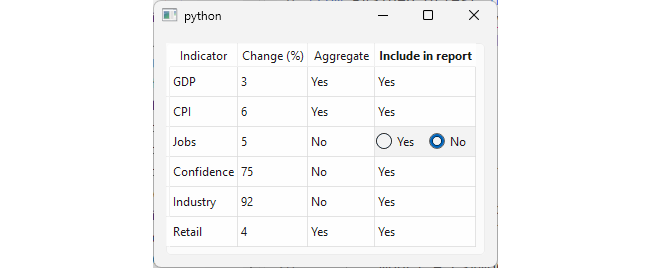
You are extending the banking application’s indicator table. The ‘Aggregate’ and Include in report’ columns hold boolean values that users need to edit. Use |
To register a custom widget as an editor:
- Create the custom editor widget. Subclass
QWidgetand lay out two radio buttons horizontally, one forTrue(‘Yes’) and one forFalse(‘No’). Add avalueproperty, with a getter and setter, and mark it as the user property withuser=True. This is the property that the delegate uses as the bridge to the model: it populates the editor by writing tovaluewhen the editor opens, and readsvalueback to store the result when the editor closes. If you want to bind a different property to the model, reimplementQItemEditorCreatorBase.valuePropertyName()in your creator class.
- Create an editor creator. Subclass
QItemEditorCreatorBaseand reimplementcreateWidget(). Since all the widget logic lives in the widget class itself, the creator is minimal - it just returns a new instance of your widget.
-
Put everything together,following the same steps as in the previous section:
- Create a
QItemEditorFactoryand callregisterEditor()to associate your creator with thebooltype. - Instantiate a
QStyledItemDelegateand assign the factory to it withsetItemEditorFactory(). - Call
view.setItemDelegateForColumn()for each target column.
The model class remains the same as in the previous section.
25.4 Custom Display in QStyledItemDelegate
The QStyledItemDelegate.paint() method is called by the view whenever an item needs to be drawn. Its signature is:
1 `QStyledItemDelegate.paint(painter, option, index)`
where:
painteris aQPainter, that performs the actual drawing.optionis aQStyleOptionViewItem, a snapshot of the drawing parameters for this item, including the available drawing area, palette and font.indexis a `QModelIndex, which is used to locate the item’s data in the model.
You can subclass QStyledItemDelegate and reimplement paint() to take full control over how an item looks in the view.
|
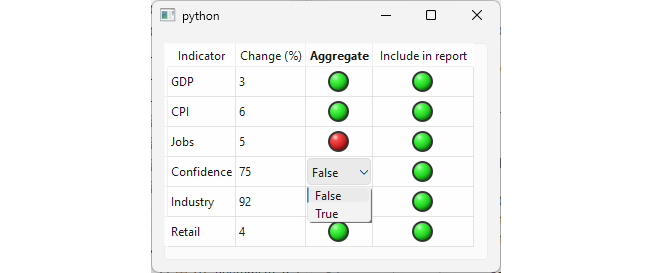
You are extending the banking application’s indicator table. Subclass |
To customize how items are displayed:
-
Subclass
QStyledItemDelegate. Create a subclass namedLedDelegateand reimplementpaint(). Inpaint():- Retrieve the item’s value from the model via
index.data(). - Call
draw_led()to paint the LED in the item’s cell. - Call
super.paint()to let the base class draw selection highlighting and fill the cell background when its editor is opened.
-
Paint the LED. Extract the drawing logic into a helper method named
draw_led(). In this method:- Use
option.rectto calculate the drawing area. Cap the diameter and add padding. - Define two colors, green for
Truevalues and red forFalse. - Create a
QRradialGradientto give the LED somewhat realistic appearance. - Call
drawEllipse()twice, once for the dark outer ring, and once for the gradient-filled dome on top.
Create the delegate. In the main window instantiate
LedDelegate().Assign the delegate to the target columns. Call
setItemDelegateForColumn()for columns 2 and 3, which hold the boolean values.
When you run the application, both boolean columns display green LEDs for True values and red LEDs for False. Double-clicking a cell still opens the default combobox editor for booleans- custom painting does not affect editing behavior.
25.5 Custom Editors in QStyledItemDelegate
In the previous section we customized how items are displayed by reimplementing paint(). To also provide a custom editor, you need to reimplement three additional methods:
createEditor(parent, option, index), which creates and returns the editor widget for the item.setEditorData(editor, index), which populates the editor with the item’s current value from the model.setModelData(editor, model, index), which reads the value from the editor and stores it in the model.
|
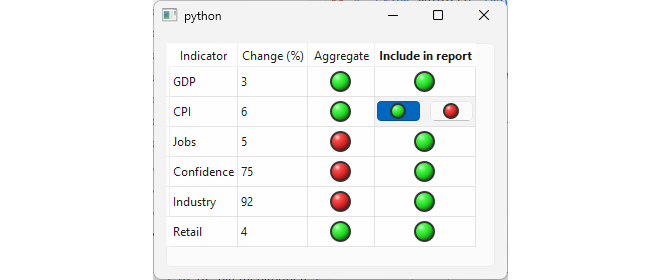
You are extending the banking application’s indicator table. Subclass |
To provide a custom editor:
- Extract the LED drawing logic into a standalone function. Both the delegate’s
paint()method and the editor widget’s button need to draw LEDs.
- Create the custom editor widget. The editor widget consists of two buttons laid out horizontally, each displaying a LED - green for
Trueon the left, red forFalseon the right. First create aQPushButtonsubclass that reimplementspaintEvent()to draw a LED usingdraw_led()instead of showing text. Also create aQWidgetsubclass that holds twoLedButtons in a horizontal layout. Add avalueproperty with a getter and setter, and reimplementkeyPressEvent()so the user can toggle the value by pressing the left or right arrow keys.
-
Subclass
QStyledItemDelegate. CreateLedDelegateand reimplement the four methods:paint()draws the LED in the cell, as in the previous section.createEditor()simply creates and returns aLedWidget.setEditorData()writes the item’s current value toLedWidget.value.setModelData()readsLedWidget.valueand writes it back to the model viasetData().
In the main window, create the model, view and delegate and assign the delegate to columns 2 and 3, as in the previous sections.
Now, when you run the application and double-click a boolean cell, the custom editor opens in place.
25.6 Combining Display and Editing in Delegates
The previous section showed how to provide both custom display and a custom editor widget. For boolean values, however, opening an editor on double-click is more ceremony than necessary - a single click or keystroke is enough to toggle the value. Qt supports this through editorEvent(), a method the delegate receives mouse and key events through even when no editor is opened.
|
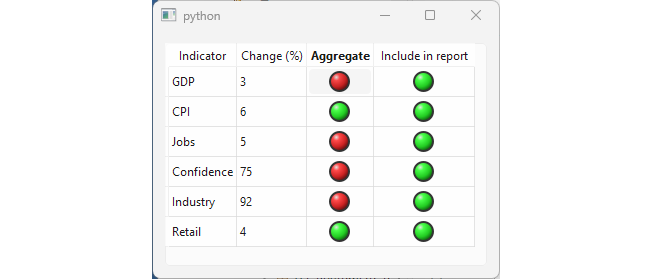
You are extending the banking application’s indicator table. Create a delegate that paints LED indicators for boolean columns and handles editing without creating any editor widget. |
To combine display and editing in a delegate without an editor widget:
Reimplement
createEditor()to returnNone. This suppresses the default editor - double-clicking a cell does nothing.Reimplement
paint()to draw LEDs, as in the previous sections.-
Reimplement
editorEvent():- For a
MouseButtonReleaseevent: if the left mouse button was released inside the cell (option.rect.contains(event.pos())), read the current value from the model, toggle it, and write it back. - For a
KeyPressevent: if the key isSpace, read the current value from the model, toggle it, and write it back. - For all other events, call the base class implementation.
When you run the application, boolean cells can be toggled with a single left click or by pressing Space.
25.7 Persistent Editors in Views
In all previous sections, editors appeared only while the user was actively editing, opening on double-click or keypress and closing when done. A persistent editor stays visible in the cell at all times, with no click required to activate it. This is useful when you want certain fields to be immediately editable without any extra interaction.
Persistent editors are opened by calling view.openPersistentEditor() for each cell that should have one. The view then keeps the editor widget visible for the lifetime of that cell.
|
You are extending the banking application’s indicator table. Make the |
To open persistent editors on a column:
-
Create the
NumericLineEditCreatorclass:- Reimplement
createWidget()to create aQLineEditas the editor and install a custom int validator on it. - Reimplement
valuePropertyName()to return'text'instead of relying on a user property. This tells the delegate to read and write the line edit’stextproperty when transferring data to and from the model.
- In the model’s
setData()then convert the string back tointbefore storing it.
Set up the factory and the delegate, as in section 25.2. Register
NumericLineEditCreatorfor theinttype and assign the delegate to column 1.Open a persistent editor for each cell in the column. After the model and view are set up, loop over the row and call
view.openPersistentEditor()for each index in column 1. The view immediately instantiates the editor widget for each cell. Users can edit values directly without double-clicking.