24. QAbstractItemModel
Of the three abstract models we have seen so far, QAbstractItemModel is the most inconvenient to subclass - not because it is more difficult but because QAbstractListModel and QAbstractTableModel, being specialized for lists and tables, provide default implementations for some methods that you have to implement yourself for QAbstractItemModels. At the same time, this makes QAbstractItemModel the most flexible of the three, and suitable for representing more complex data structures such as trees.
In this chapter, we implement a series of models suitable for representing hierarchical data structures to be viewed in a tree view. Where Chapter 22 modeled a bank’s client roster and Chapter 23 modeled an account’s transactions, this chapter models the budget those transactions are measured against - a hierarchy of categories and line items.
24.1 Basic Read-Only Single-Column Tree Model
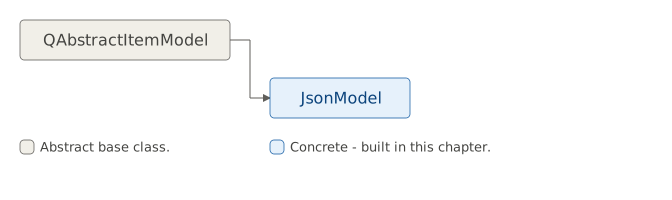
In addition to data() and rowCount() which are required for a QAbstractListModel subclass and columnCount() which is additionally required for a QAbstractTableModel subclass, creating a read-only QAbstractItemModel subclass requires reimplementing two more methods:
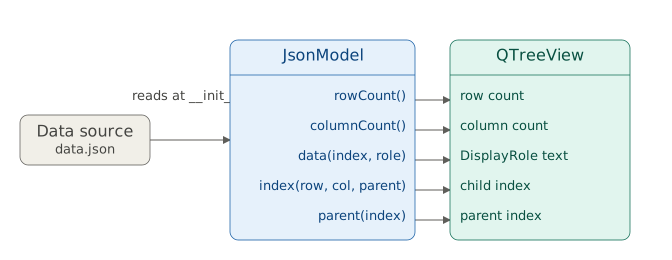
index(row, column, parent), which returns aQModelIndexfor the item at the givenrowandcolumnunder the givenparentindex.parent(index), which returns theQModelIndexof the parent of the item with the givenindex.
These two methods are roughly inverse to each other: index() navigates down the tree (from parent to child), while parent() navigates up (from child to parent). In both cases there are a few edge cases you need to take into account.
Like the previous two chapters, a QAbstractItemModel subclass sits between a data source and a view - but this time we need two extra methods to make navigating the hierarchy possible:
 |
You have a hierarchical JSON file (‘data.json’) describing your household budget as nested categories. Expenses breaks down into Housing and Transportation, each of which breaks down further into individual line items with a budgeted and actual amount. Your task is to represent this data in a tree view by implementing a |
To create a basic read-only tree model:
 1 import json
 2
 3
 4 # 1. Create a tree node class.
 5
 6 class TreeItem:
 7     def __init__(self, value, parent=None):
 8         self.value = value
 9         self.parent = parent
10         self.children = []
11         if parent:
12             parent.children.append(self)
13
14     @classmethod
15     def build_tree(cls, source):
16         root_item = TreeItem("", None)  # Empty root
17         with open(source) as json_file:
18             data = json.load(json_file)
19             for json_object in data:
20                 name = f"{json_object['name']}"
21                 tree_item = TreeItem(name, root_item)
22                 if 'children' in json_object:
23                     TreeItem.add_children(json_object, tree_item)
24         return root_item
25
26     @staticmethod
27     def add_children(json_object, parent):
28         for child_json_object in json_object['children']:
29             name = f"{child_json_object['name']}"
30             child = TreeItem(name, parent)
31             if 'children' in child_json_object:
32                 TreeItem.add_children(child_json_object, child)
- Create a Python class to represent a node in the tree. Python does not provide a built-in tree data structure so we make our own. Each
TreeItemholds avalue, a reference to itsparent, and a list ofchildren. When a parent is provided, the item automatically appends itself to the parent’schildren. The class methodbuild_tree()reads the JSON file and builds the full tree.
 1 from PySide6.QtCore import QAbstractItemModel, QModelIndex, Qt
 2 from treeitem import TreeItem
 3
 4
 5 # 2. Create the QAbstractItemModel subclass
 6 #    and implement rowCount(), columnCount(),
 7 #    data() and headerData().
 8
 9 class JsonModel(QAbstractItemModel):
10
11     def __init__(self, source, parent=None):
12
13         super().__init__(parent)
14         self.root_item = TreeItem.build_tree(source)
15
16     def rowCount(self, parent=QModelIndex()):
17
18         if parent.isValid():
19             return len(parent.internalPointer().children)
20         return len(self.root_item.children)
21
22     def columnCount(self, parent=QModelIndex()):
23         return 1
24
25     def data(self, index, role):
26
27         if role == Qt.ItemDataRole.DisplayRole:
28             return index.internalPointer().value
29         return None
30
31     def headerData(self, section, orientation, role):
32         if orientation == Qt.Orientation.Horizontal:
33             if role == Qt.ItemDataRole.DisplayRole:
34                 return 'Employee Name'
35
36     # 3. Implement index()
37
38     def index(self, row, column, parent=QModelIndex()):
39
40         if not self.hasIndex(row, column, parent):
41             return QModelIndex()
42
43         if parent.isValid():
44             parent_item = parent.internalPointer()
45         else:
46             parent_item = self.root_item
47         return self.createIndex(
48             row, column, parent_item.children[row])
49
50     # 4. Implement parent()
51
52     def parent(self, index):
53
54         if not index.isValid():
55             return QModelIndex()
56
57         item = index.internalPointer()
58         parent_item = item.parent
59
60         if parent_item == self.root_item:
61             return QModelIndex()
62
63         row = parent_item.parent.children.index(parent_item)
64         return self.createIndex(row, 0, parent_item)
Subclass
QAbstractItemModeland implementrowCount(),columnCount(), anddata(). These methods are already covered in the two previous chapters with the difference thatrowCount()has to account for the tree structure: if the parent index is valid, the row count is the number of children of the item it points to and the number of the root item’s children otherwise.-
Implement
index(). We first callhasIndex()to check whether the requested position is out of bounds, returning an invalidQModelIndexif so. We then determine the parent item: ifparentis valid, we get it viainternalPointer(); otherwise the parent item is the root item. Finally, we callcreateIndex()with the row, column and a reference to the child item, and return the result.hasIndex()determines whether therow,columnandparentcombination would return a valid index, but it does not tell us if the parent itself is valid. A valid position can exist under either a valid parent item or the invisible root, so we still need to distinguish between the two. Implement
parent(). This method returns the parent of the item with the givenindex. Ifindexis invalid we return an invalidQModelIndeximmediately. Otherwise we retrieve the item viainternalPointer()and get its parent. If the parent is the root, we again return an invalidQModelIndex. Otherwise, we determine the parent’s row within its own parent’s children list and return aQModelIndexcreated withcreateIndex().
 1 import sys
 2 from PySide6.QtTest import QAbstractItemModelTester
 3 from PySide6.QtWidgets import (QApplication, QWidget,
 4     QTreeView, QVBoxLayout)
 5 from jsonmodel import JsonModel
 6
 7
 8 class Window(QWidget):
 9
10     def __init__(self):
11         super().__init__()
12
13         layout = QVBoxLayout()
14         self.setLayout(layout)
15
16         model = JsonModel('data.json')
17         QAbstractItemModelTester(model,
18             QAbstractItemModelTester.FailureReportingMode.Warning)
19         view = QTreeView()
20         view.setModel(model)
21         layout.addWidget(view)
22
23
24 if __name__ == '__main__':
25
26     app = QApplication(sys.argv)
27     main_window = Window()
28     main_window.show()
29     sys.exit(app.exec())
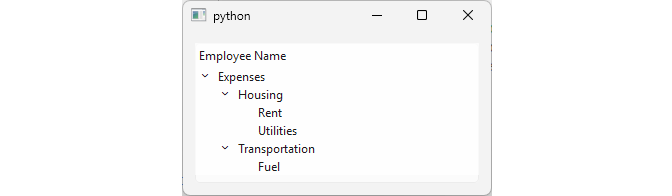
In the main window, create a model and view instances and bind them. When you run the code a read-only tree view with a single column is shown:
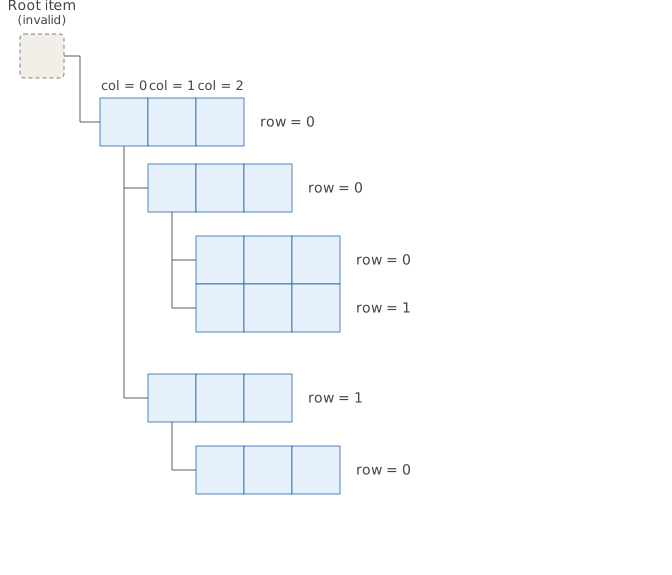
row() and a column()) but with one difference: those numbers are only meaningful relative to a node’s own parent, not the whole tree.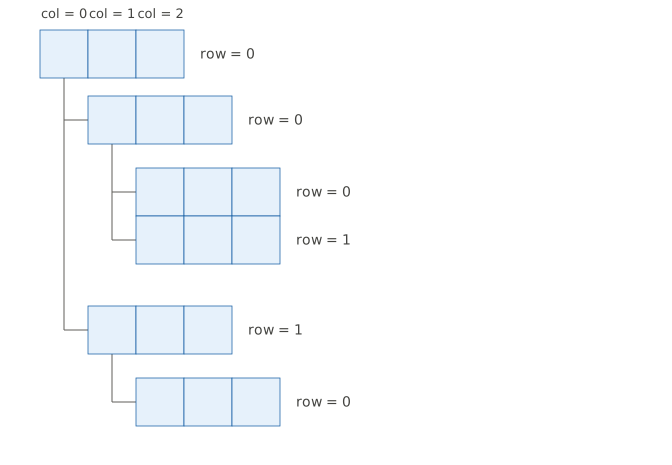
Rent and Utilities are both children of Housing, so they are row = 0 and row = 1 under Housing, regardless of Housing’s own position under Expenses. This is why index() and parent() both take a parent argument: the same row number means something different depending on which parent you’re asking about.
24.2 Adding Multiple Columns to the Tree Model
|
You successfully created a |
To create a read-only tree model with multiple columns:
 1 import json
 2
 3
 4 # 1. Implement the tree node class
 5
 6 class TreeItem:
 7
 8     COLUMNS = ['name', 'budget', 'actual']
 9
10     def __init__(self, data=None, parent=None):
11
12         if data is not None:
13             self.item_data = data
14         else:
15             self.item_data = [''] * len(TreeItem.COLUMNS)
16
17         self.parent = parent
18         self.children = []
19
20         if parent:
21             self.parent.append_child(self)
22
23     def append_child(self, item):
24         self.children.append(item)
25
26     def child(self, row):
27         return self.children[row]
28
29     def child_count(self):
30         return len(self.children)
31
32     def column_count(self):
33         return len(self.item_data)
34
35     def data(self, column):
36         try:
37             return self.item_data[column]
38         except IndexError:
39             return None
40
41     def row(self):
42         if self.parent:
43             return self.parent.children.index(self)
44         else:
45             return 0
46
47     @classmethod
48     def build_tree(cls, source):
49
50         root_item = TreeItem(parent=None)
51
52         with open(source) as json_file:
53             data = json.load(json_file)
54             for json_object in data:
55                 tree_item = TreeItem.create_item(
56                     json_object, root_item)
57                 if 'children' in json_object:
58                     TreeItem.add_children(json_object, tree_item)
59
60         return root_item
61
62     @staticmethod
63     def add_children(json_object, parent):
64         for child_json_object in json_object['children']:
65             child = TreeItem.create_item(
66                 child_json_object, parent)
67             if 'children' in child_json_object:
68                 TreeItem.add_children(child_json_object, child)
69
70     @staticmethod
71     def create_item(json_object, parent):
72         data = [json_object.get(col) for col in TreeItem.COLUMNS]
73         return TreeItem(data, parent)
74
-
Implement the tree node class. The implementation is similar to the previous example but we add several helper methods and store item data as a list to support multiple columns:
child(row)- returns the child item at given row.child_count()- returns the number of children.column_count()- returns the number of columns.data(column)- returns the data for the given columnrow()- returns the item’s own row index within its parent’s children list.
We also extract item creation into a separate
create_item()static method. Category nodes like Expenses, Housing, and Transportation only populate the name column. The budget and actual columns are left empty since those nodes represent groupings, not individual line items.
 1 from PySide6.QtCore import QAbstractItemModel, QModelIndex, Qt
 2 from treeitem import TreeItem
 3
 4
 5 # 2. Create the QAbstractItemModel subclass
 6 #    and implement rowCount(), columnCount(),
 7 #    data() and headerData()
 8
 9 class JsonModel(QAbstractItemModel):
10
11     def __init__(self, source, parent=None):
12
13         super().__init__(parent)
14         self.root_item = TreeItem.build_tree(source)
15         self.header = [c.capitalize() for c in TreeItem.COLUMNS]
16
17     def rowCount(self, parent=QModelIndex()):
18         if parent.isValid():
19             if parent.column() != 0:
20                 return 0
21             parent_item = parent.internalPointer()
22         else:
23             parent_item = self.root_item
24         return parent_item.child_count()
25
26     def columnCount(self, parent=QModelIndex()):
27         if parent.isValid():
28             return parent.internalPointer().column_count()
29         else:
30             return self.root_item.column_count()
31
32     def data(self, index, role):
33
34         if role == Qt.ItemDataRole.DisplayRole:
35             item = index.internalPointer()
36             return item.data(index.column())
37         return None
38
39     def headerData(self, section, orientation, role):
40         if orientation == Qt.Orientation.Horizontal:
41             if role == Qt.ItemDataRole.DisplayRole:
42                 return self.header[section]
43
44     # 3. Implement index() and parent()
45
46     def index(self, row, column, parent=QModelIndex()):
47
48         if not self.hasIndex(row, column, parent):
49             return QModelIndex()
50
51         if parent.isValid():
52             parent_item = parent.internalPointer()
53         else:
54             parent_item = self.root_item
55
56         childItem = parent_item.child(row)
57         return self.createIndex(row, column, childItem)
58
59     def parent(self, index):
60
61         if not index.isValid():
62             return QModelIndex()
63
64         item = index.internalPointer()
65         parent_item = item.parent
66
67         if parent_item == self.root_item:
68             return QModelIndex()
69         else:
70             row = parent_item.row()
71             return self.createIndex(row, 0, parent_item)
-
Subclass QAbstractItemModel and implement
rowCount(),columnCount(),data()andheaderData(). We make several changes compared to the previous example:rowCount()usesTreeItem.child_count()instead oflen(children)directly. Note that it also returns zero for any column other than the first one - it is a Qt convention for tree models that only items in the first column have children.columnCount()usesTreeItem.column_count()data()usesTreeItem.data(), passing the index column to get the correct field.headerData()returns the appropriate label from theheaderlist (‘Category’, ‘Budget’, ‘Actual’).
-
Implement
index()andparent(). The logic is the same as in the previous example, with two changes:index()usesTreeItem.child()to retrieve the child item instead of accessingchildrendirectly.parent()usesTreeItem.row()to determine the parent’s row instead of callingparent.children.index()directly.
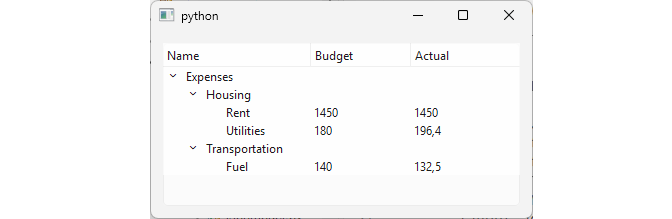
The main window code remains unchanged. When you run it a multi-column tree view is shown:
24.3 Making the Tree Model Editable
|
You have implemented a |
To make a QAbstractItemModel subclass editable:
 1 import json
 2
 3
 4 # 1. Add the set_data() method to the tree node class.
 5
 6 class TreeItem:
 7
 8     COLUMNS = ['name', 'budget', 'actual']
 9
10     def __init__(self, data=None, parent=None):
11
12         if data is not None:
13             self.item_data = data
14         else:
15             self.item_data = [''] * len(TreeItem.COLUMNS)
16
17         self.parent = parent
18         self.children = []
19
20         if parent:
21             self.parent.append_child(self)
22
23     def append_child(self, item):
24         self.children.append(item)
25
26     def child(self, row):
27         return self.children[row]
28
29     def child_count(self):
30         return len(self.children)
31
32     def column_count(self):
33         return len(self.item_data)
34
35     def data(self, column):
36         try:
37             return self.item_data[column]
38         except IndexError:
39             return None
40
41     def set_data(self, column, value):
42         self.item_data[column] = value
43
44     def row(self):
45         if self.parent:
46             return self.parent.children.index(self)
47         else:
48             return 0
49
50     @classmethod
51     def build_tree(cls, source):
52
53         root_item = TreeItem(parent=None)
54
55         with open(source) as json_file:
56             data = json.load(json_file)
57             for json_object in data:
58                 tree_item = TreeItem.create_item(
59                     json_object, root_item)
60                 if 'children' in json_object:
61                     TreeItem.add_children(json_object, tree_item)
62
63         return root_item
64
65     @staticmethod
66     def add_children(json_object, parent):
67         for child_json_object in json_object['children']:
68             child = TreeItem.create_item(
69                 child_json_object, parent)
70             if 'children' in child_json_object:
71                 TreeItem.add_children(child_json_object, child)
72
73     @staticmethod
74     def create_item(json_object, parent):
75         data = [json_object.get(col) for col in TreeItem.COLUMNS]
76         return TreeItem(data, parent)
- Add the
setData()method to the tree node class. This method sets the value at the given column in the item’s data.
 1 from PySide6.QtCore import QAbstractItemModel, QModelIndex, Qt
 2 from treeitem import TreeItem
 3
 4
 5 # 2. Create the QAbstractItemModel subclass
 6 #    and implement rowCount(), columnCount(), data(),
 7 #    headerData(), index() and parent().
 8
 9 class JsonModel(QAbstractItemModel):
10
11     def __init__(self, source, parent=None):
12
13         super().__init__(parent)
14         self.root_item = TreeItem.build_tree(source)
15         self.header = [c.capitalize() for c in TreeItem.COLUMNS]
16
17     def rowCount(self, parent=QModelIndex()):
18         if parent.isValid():
19             if parent.column() != 0:
20                 return 0
21             parent_item = parent.internalPointer()
22         else:
23             parent_item = self.root_item
24         return parent_item.child_count()
25
26     def columnCount(self, parent=QModelIndex()):
27         if parent.isValid():
28             return parent.internalPointer().column_count()
29         else:
30             return self.root_item.column_count()
31
32     def data(self, index, role):
33
34         if role == Qt.ItemDataRole.DisplayRole \
35            or role == Qt.ItemDataRole.EditRole:
36             item = index.internalPointer()
37             return item.data(index.column())
38         return None
39
40     def headerData(self, section, orientation, role):
41         if orientation == Qt.Orientation.Horizontal:
42             if role == Qt.ItemDataRole.DisplayRole:
43                 return self.header[section]
44
45     def index(self, row, column, parent=QModelIndex()):
46
47         if not self.hasIndex(row, column, parent):
48             return QModelIndex()
49
50         if not parent.isValid():
51             parent_item = self.root_item
52         else:
53             parent_item = parent.internalPointer()
54
55         childItem = parent_item.child(row)
56         if childItem:
57             return self.createIndex(row, column, childItem)
58         else:
59             return QModelIndex()
60
61     def parent(self, index):
62
63         if not index.isValid():
64             return QModelIndex()
65
66         item = index.internalPointer()
67         parent_item = item.parent
68
69         if parent_item == self.root_item:
70             return QModelIndex()
71         else:
72             row = parent_item.row()
73             return self.createIndex(row, 0, parent_item)
74
75     # 3. Implement flags().
76
77     def flags(self, index) -> Qt.ItemFlag:
78         if not index.isValid():
79             return Qt.ItemFlags()
80         return (super().flags(index) |
81                     Qt.ItemFlag.ItemIsEditable)
82
83     # 4. Implement setData()
84
85     def setData(self, index, value, role) -> bool:
86         if role == Qt.ItemDataRole.EditRole:
87             tree_item = index.internalPointer()
88             if tree_item.data(index.column()) != value:
89                 tree_item.set_data(index.column(), value)
90                 self.dataChanged.emit(index, index)
91                 return True
92             return False
93         return False
In the model, update
data()to also handleEditRolein addition toDisplayRole.Implement
flags(). As in previous chapters, return the base flags plusQt.ItemFlag.ItemIsEditableto signal to the view that items can be edited. Return an emptyQt.ItemFlags()for invalid indices. Category rows like Housing and Transportation remain technically editable in this simple example, even though their budget and actual columns are always empty. A production model would likely flag those specific cells as read-only.Implement
setData(). Check that the role isEditRoleand that the new value is different from the current one. If so, calltree_item.setData()to update the data, emitdataChanged()and returnTrue. ReturnFalseotherwise.
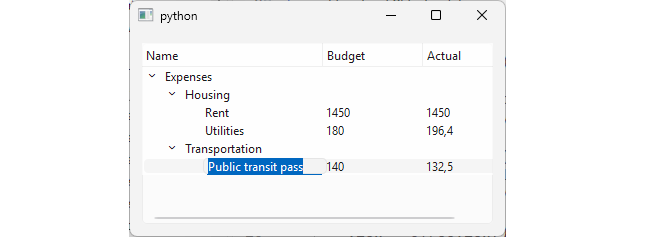
Now, if you double-click a cell in the tree view, an editor opens and you can edit its value. Note that changes are only saved in memory.
24.4 Resizable Tree Model (Inserting and Removing Nodes)
|
You have an editable |
To create a resizable tree model:
 1 import json
 2
 3
 4 # 1. Add a class-level `counter` to `TreeItem`
 5 #    to assign unique IDs to newly inserted nodes.
 6
 7 class TreeItem:
 8
 9     COLUMNS = ['name', 'budget', 'actual']
10     counter = 0
11
12     def __init__(self, data=None, parent=None):
13
14         if data is not None:
15             self.item_data = data
16         else:
17             self.item_data = [''] * len(TreeItem.COLUMNS)
18
19         self.parent = parent
20         self.children = []
21
22     def append_child(self, item):
23         TreeItem.counter += 1
24         self.children.append(item)
25
26     def child(self, row):
27         if self.child_count() > row:
28             return self.children[row]
29         else:
30             return None
31
32     def child_count(self):
33         return len(self.children)
34
35     def column_count(self):
36         return len(self.item_data)
37
38     def data(self, column):
39         try:
40             return self.item_data[column]
41         except IndexError:
42             return None
43
44     def set_data(self, column, value):
45         self.item_data[column] = value
46
47     def row(self):
48         if self.parent:
49             return self.parent.children.index(self)
50         else:
51             return 0
52
53     # 2. Add methods to insert and remove a child node.
54
55     def insert_child(self, row):
56         TreeItem.counter += 1
57         data = [f'New Item {TreeItem.counter}', '', '']
58         item = TreeItem(data, self)
59         self.children.insert(row, item)
60
61     def remove_child(self, row):
62         self.children[row:row + 1] = []
63
64     @staticmethod
65     def build_tree(source):
66
67         root_item = TreeItem(parent=None)
68
69         with open(source) as json_file:
70             data = json.load(json_file)
71             for json_object in data:
72                 tree_item = TreeItem.create_item(
73                     json_object, root_item)
74                 root_item.append_child(tree_item)
75                 if 'children' in json_object:
76                     TreeItem.add_children(json_object, tree_item)
77
78         return root_item
79
80     @staticmethod
81     def add_children(json_object, parent):
82         for child_json_object in json_object['children']:
83             child = TreeItem.create_item(
84                 child_json_object, parent)
85             parent.append_child(child)
86             if 'children' in child_json_object:
87                 TreeItem.add_children(child_json_object, child)
88
89     @staticmethod
90     def create_item(json_object, parent):
91         data = [json_object.get(col) for col in TreeItem.COLUMNS]
92         return TreeItem(data, parent)
Add a class-level
countertoTreeItemto assign unique IDs to newly inserted nodes.-
Add two new methods to
TreeItem:insert_child(row)creates a newTreeItemwith a unique ID and empty fields and inserts it at the given row in the parent’s children list.remove_child(row)removes the child at the given row using slice assignment. Note that unlike previous examples,__init__()no longer auto-appends the item to its parent. This is done ininsert_child().
  1 from PySide6.QtCore import QAbstractItemModel, QModelIndex, Qt
  2 from treeitem import TreeItem
  3
  4
  5 class JsonModel(QAbstractItemModel):
  6
  7     def __init__(self, source, parent=None):
  8
  9         super().__init__(parent)
 10         self.root_item = TreeItem.build_tree(source)
 11         self.header = [c.capitalize() for c in TreeItem.COLUMNS]
 12
 13     def rowCount(self, parent=QModelIndex()):
 14         if parent.isValid():
 15             if parent.column() != 0:
 16                 return 0
 17             parent_item = parent.internalPointer()
 18         else:
 19             parent_item = self.root_item
 20         return parent_item.child_count()
 21
 22     def columnCount(self, parent=QModelIndex()):
 23         if parent.isValid():
 24             return parent.internalPointer().column_count()
 25         else:
 26             return self.root_item.column_count()
 27
 28     def data(self, index, role):
 29
 30         if role == Qt.ItemDataRole.DisplayRole \
 31            or role == Qt.ItemDataRole.EditRole:
 32             item = index.internalPointer()
 33             return item.data(index.column())
 34
 35     def headerData(self, section, orientation, role):
 36         if orientation == Qt.Orientation.Horizontal:
 37             if role == Qt.ItemDataRole.DisplayRole:
 38                 return self.header[section]
 39
 40     def index(self, row, column, parent=QModelIndex()):
 41
 42         if not self.hasIndex(row, column, parent):
 43             return QModelIndex()
 44
 45         if not parent.isValid():
 46             parent_item = self.root_item
 47         else:
 48             parent_item = parent.internalPointer()
 49
 50         childItem = parent_item.child(row)
 51         if childItem:
 52             return self.createIndex(row, column, childItem)
 53         else:
 54             return QModelIndex()
 55
 56     def parent(self, index):
 57
 58         if not index.isValid():
 59             return QModelIndex()
 60
 61         item = index.internalPointer()
 62         parent_item = item.parent
 63
 64         if parent_item == self.root_item:
 65             return QModelIndex()
 66         else:
 67             row = parent_item.row()
 68             return self.createIndex(row, 0, parent_item)
 69
 70     def flags(self, index) -> Qt.ItemFlag:
 71         if not index.isValid():
 72             return Qt.ItemFlags()
 73         return (super().flags(index) |
 74                     Qt.ItemFlag.ItemIsEditable)
 75
 76     def setData(self, index, value, role):
 77         if role == Qt.ItemDataRole.EditRole:
 78             tree_item = index.internalPointer()
 79             if tree_item.data(index.column()) != value:
 80                 tree_item.set_data(index.column(), value)
 81                 self.dataChanged.emit(index, index)
 82                 return True
 83             return False
 84         return False
 85
 86
 87     # 3. Implement insertRows().
 88
 89     def insertRows(self, row, count, parent=QModelIndex()):
 90
 91         if 0 <= row <= self.rowCount(parent):
 92             self.beginInsertRows(parent, row, row + count - 1)
 93             if parent.isValid():
 94                 parent_item = parent.internalPointer()
 95             else:
 96                 parent_item = self.root_item
 97             parent_item.insert_child(row)
 98             self.endInsertRows()
 99             return True
100         return False
101
102     # 4. Implement removeRows().
103
104     def removeRows(self, row, count, parent=QModelIndex()):
105
106         self.beginRemoveRows(parent, row, row + count - 1)
107         if parent.isValid():
108             parent_item = parent.internalPointer()
109         else:
110             parent_item = self.root_item
111         parent_item.remove_child(row)
112         self.endRemoveRows()
113         return True
Implement
insertRows()in the model. Check that the requested row is within bounds usingrowCount(parent), then guard the insertion withbeginInsertRows()andendInsertRows().Implement
removeRows(). Guard the removal withbeginRemoveRows()andendRemoveRows().
 1 import sys
 2 from PySide6.QtTest import QAbstractItemModelTester
 3 from PySide6.QtWidgets import (QApplication, QWidget,
 4     QPushButton, QTreeView, QVBoxLayout)
 5 from jsonmodel import JsonModel
 6
 7
 8 class Window(QWidget):
 9
10     def __init__(self):
11         super().__init__()
12
13         layout = QVBoxLayout()
14         self.setLayout(layout)
15
16         self.model = JsonModel('data.json')
17         QAbstractItemModelTester(self.model,
18             QAbstractItemModelTester.FailureReportingMode.Warning)
19
20         self.view = QTreeView()
21         self.view.setModel(self.model)
22
23         self.insert_sibling_button = QPushButton('Insert sibling node')
24         self.insert_sibling_button.clicked.connect(self.on_insert_sibling)
25
26         self.insert_child_button = QPushButton('Insert child node')
27         self.insert_child_button.clicked.connect(self.on_insert_child)
28
29         self.remove_button = QPushButton('Remove current node')
30         self.remove_button.clicked.connect(self.on_remove)
31
32         layout.addWidget(self.view)
33         layout.addWidget(self.insert_sibling_button)
34         layout.addWidget(self.insert_child_button)
35         layout.addWidget(self.remove_button)
36
37     def on_insert_sibling(self):
38         parent = self.view.selectionModel().currentIndex().parent()
39         self.model.insertRow(self.model.rowCount(parent), parent)
40
41     def on_insert_child(self):
42         parent = self.view.selectionModel().currentIndex()
43         self.model.insertRow(self.model.rowCount(parent), parent)
44
45     def on_remove(self):
46         row = self.view.selectionModel().currentIndex().row()
47         parent = self.view.selectionModel().currentIndex().parent()
48         self.model.removeRow(row, parent)
49
50
51 if __name__ == '__main__':
52
53     app = QApplication(sys.argv)
54     main_window = Window()
55     main_window.show()
56     sys.exit(app.exec())
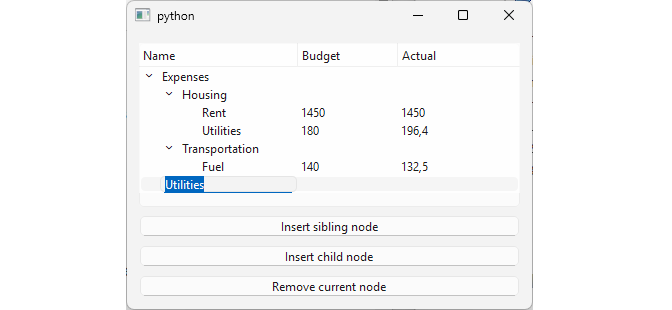
In the main window, add three buttons: Insert sibling, Insert child, and Remove current:
- Insert sibling inserts a new row at
row + 1under the current index’s parent, placing the new node below the selected one at the same level. - Insert child inserts a new row under the current index itself, making it a child of the selected node.
- Remove current removes the selected row from its parent.
When you run the code you’ll see a tree view with buttons to insert and remove nodes:
24.5 Minimum Methods to Implement by Model Type
| Level | QAbstractListModel | QAbstractTableModel | QAbstractItemModel |
|---|---|---|---|
| Read-Only |
rowCount() data()
|
rowCount() data() columnCount()` |
rowCount() data() columnCount() index() parent()
|
| Editable (+) |
setData() flags()
|
setData() flags()
|
setData() flags()
|
| Resizable (+) |
insertRows() removeRows()
|
insertRows() removeRows() insertColumns() removeColumns()
|
insertRows() removeRows() insertColumns() removeColumns()
|
Unlike TxtFileModel and CsvFileModel in the previous two chapters, JsonModel finally has to reimplement parent(). Every time QTreeView expands a node, computes indentation, or walks up to find an ancestor, it asks the model for that item’s parent.
24.6 Choosing the Right Model and the Right View
Across these three chapters you’ve built a QAbstractListModel, a QAbstractTableModel, and now a QAbstractItemModel You choose which one of them to inherit from by answering this question: what shape is your data? But that decision is independent of a second one you’ll need to make in real applications: which view, QListView, QTableView, or QTreeView should display it? These two questions don’t have to agree.
Every standard Qt view can technically accept every model shape. When there is a mismatch like showing a tree in a list view, nothing crashes - a view simply shows less of the model than a matched view would:
QAbstractListModel |
QAbstractTableModel |
QAbstractItemModel (hierarchical) |
|
|---|---|---|---|
QListView |
Native fit - one item per row | Works. Shows only one column. | Works. Shows only top-level items. No expand affordance. |
QTableView |
Works. Shown as a single-column grid. | Native fit - full grid. | Works. Shows only top-level rows and all columns. No expand affordance. |
QTreeView |
Works. Shown as a flat non-expandable list | Works. Shows as a flat non-expandable table. | Native fit - full recursive traversal. Expand/Collapse. |
QComboBox |
Native fit - popup list from a single column. | Works. Popup shows a single column. | Works. Popup shows only top-level items. |
Model choice tracks the shape of your source data, while view choice tracks what the user needs to see and do with it:
QListView- Single value per row (or icon-grid) display. You choose it when the user needs to pick from a set of things, not compare their attributes.QTableView- A full grid with visible, sortable columns. You choose it when the user needs to compare fields across rows side by side.QTreeView- The only one of the three that exposes hierarchy interactively. You choose it specifically when you need a navigable tree structure.QComboBoxConstrained single-choice input from a popup.
This independence is also why the same model can legitimately be handed to more than one view at once. A QSortFilterProxyModel (covered in section 26.4) is an example of code that has to stay shape-agnostic: it’s built directly on QAbstractItemModel, so the same proxy model can be used with either a flat table or a tree. Also,in section 26.9 we’ll take CsvModel from Chapter 23 and attach it to two views simultaneously: a QListView and a full QTableView.