22. QAbstractListModel
This chapter introduces custom Qt models using QAbstractListModel through a series of simple demonstrations manipulating a bank’s client roster.
The Qt model/view architecture is Qt’s variant of the model-view-controller (MVC) design pattern where, per the documentation, the controller and view are combined. The model and view are decoupled, allowing the same model to be used with multiple views.
Qt provides several abstract classes you can subclass for custom models, such as:
QAbstractItemModelQAbstractTableModelQAbstractListModel
Qt also offers ready-to-use concrete models, including:
QStandardItemModelQFileSystemModelQSqlQueryModel
While QStandardItemModel requires you to copy your data into QStandardItem objects one by one, a custom QAbstractListModel subclass takes a different approach. It wraps data that already exists somewhere else and exposes it to Qt’s views without duplicating it into a parallel set of item objects. This distinction matters if your data set is large or already has its own representation you don’t want to mirror in the model.
22.1 Read-only List Model
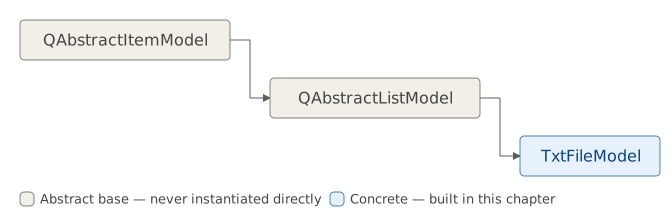
Of the three abstract model classes above, QAbstractListModel is the easiest to subclass. It provides default implementations for several QAbstractItemModel methods (most notably columnCount(), which always returns 1), and offers a specialized interface for simple, non-hierarchical sequences of items (lists).
Like other model classes, a QAbstractListModel subclass acts as an intermediary between a data source and a view:
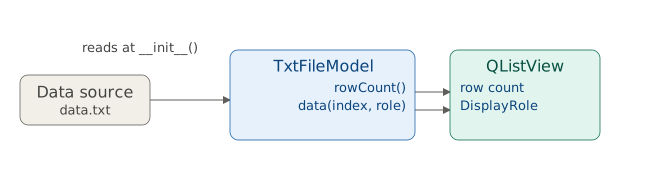
A data source can range from a simple Python list or structured text file to relational database data. The model’s role is to supply data in a format that a Qt view can read and display.
To create a read-only list model you must implement at least two methods:
rowCount(): Returns the number of rows in the model. (e.g.,len(lst)for a Python list, line count for a file, orcount(*)for a SQL query). Theparentparameter is for hierarchical models and unused here.data(index, role): Returns the data for the given role and item referenced by the index. For list models,indexis aQModelIndexobject withcolumn()as zero androw()indicating the position in the underlying data. Theroleis one of theQt.ItemDataRoleenumeration values(default:DisplayRole).
 |
You have a text file listing your bank’s client roster (‘data.txt’) and you need to display it in a list view. |
To use a QAbstractListModel subclass in your application:
 1 from PySide6.QtCore import QAbstractListModel, Qt
 2
 3 # 1. Create a QAbstractListModel subclass.
 4 #    The data is read from a text file
 5 #    and stored in a Python list.
 6
 7 class TxtFileModel(QAbstractListModel):
 8
 9     def __init__(self, source, parent=None):
10
11         super().__init__(parent)
12
13         self.txt_data = []
14         self.header = 'Clients'
15         with open(source) as txt_file:
16             for line in txt_file:
17                 self.txt_data.append(line.strip())
18
19     # 2. Implement the rowCount() method
20
21     def rowCount(self, parent) -> int:
22         return len(self.txt_data)
23
24     # 3. Implement the data() method
25
26     def data(self, index, role=Qt.ItemDataRole.DisplayRole) -> object|None:
27         if role == Qt.ItemDataRole.DisplayRole:
28             return self.txt_data[index.row()]
29         return None
30
31     # 4. Optionally, implement the headerData() method
32     #    QListView does not have a header
33     #    so this is never executed!
34
35     def headerData(self, section, orientation, role) -> object | None:
36         if orientation == Qt.Orientation.Horizontal:
37             if role == Qt.ItemDataRole.DisplayRole:
38                 return self.header
Subclass
QAbstractListModeland provide access to the data source. In the example we read the text file entirely in__init__()and store its lines in a Python list (self.txt_data), where each element is a single string (a client’s name and account type). For other types of data sources you can retrieve data dynamically instead.Implement
rowCount(). View classes call this method to determine the model’s length. Here we return the data list length withlen(self.txt_data).-
Implement
data(). This method returns model data for a given index and data role. Useindex.row()to accesstxt_data. Return data only forDisplayRole(the text for display) and returnNoneotherwise.A view will always ask for data associated with a specific data role. Qt has several built-in roles and you can define your own:
Constant Value Description DisplayRole0 The key data to be rendered in the form of text. ( QString)DecorationRole1 The data to be rendered as a decoration in the form of an icon. ( QColor,QIconorQPixmap)EditRole2 The data in a form suitable for editing in an editor. ( QString)ToolTipRole3 The data displayed in the item’s tooltip. ( QString)StatusTipRole4 The data displayed in the status bar. ( QString)WhatsThisRole5 The data displayed for the item in “What’s This?” mode. ( QString)FontRole6 The font used for items rendered with the default delegate. ( QFont)TextAlignmentRole7 The alignment of the text for items rendered with the default delegate. ( Qt::Alignment)BackgroundRole8 The background brush used for items rendered with the default delegate. ( QBrush)ForegroundRole9 The foreground brush (text color, typically) used for items rendered with the default delegate. ( QBrush)CheckStateRole10 This role is used to obtain the checked state of an item. ( CheckState)AccessibleTextRole11 The text to be used by accessibility extensions and plugins, such as screen readers. ( QString)AccessibleDescriptionRole12 A description of the item for accessibility purposes. ( QString)SizeHintRole13 The size hint for the item that will be supplied to views. ( QSize)InitialSortOrderRole14 This role is used to obtain the initial sort order of a header view section. ( Qt::SortOrder)UserRole0x0100 The first role that can be used for application-specific purposes. It might be tempting to skip the role check and simply return the
txt_dataelement for all roles, but this will lead to invalid/zero-sized items.SizeHintRoleexpects aQSizevalue. Sending a text value to the view for this role will break the view’s display. Optionally, implement
headerData()for row or column headers. Here, the single column header is ‘Clients’.QListViewdoes not display headers butQTableViewwould.
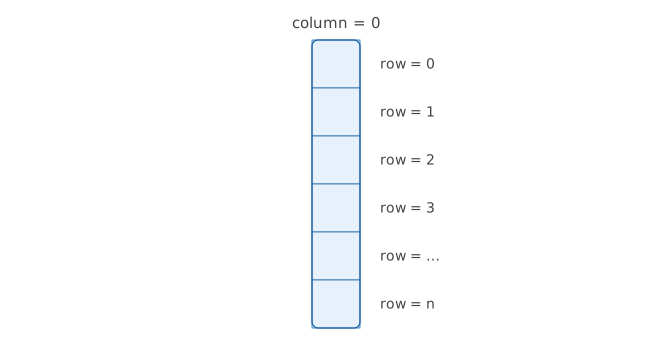
The QModelIndex class helps views locate model items. All Qt models are table-based: you can think of the model in this example as a one-column table with n rows. You can use row() and column() to reference this table’s cells, and in this chapter column() will always be zero, since a list model has only one column.
 1 import sys
 2 from PySide6.QtWidgets import (QApplication,
 3     QWidget, QListView, QVBoxLayout)
 4 from PySide6.QtTest import QAbstractItemModelTester
 5 from txtfilemodel import TxtFileModel
 6
 7
 8 class Window(QWidget):
 9
10     def __init__(self):
11
12         super().__init__()
13         layout = QVBoxLayout()
14         self.setLayout(layout)
15
16         model = TxtFileModel('data.txt')
17         QAbstractItemModelTester(model,
18             QAbstractItemModelTester.FailureReportingMode.Warning)
19         view = QListView()
20         view.setModel(model)
21         layout.addWidget(view)
22
23
24 if __name__ == '__main__':
25
26     app = QApplication(sys.argv)
27     main_window = Window()
28     main_window.show()
29     sys.exit(app.exec())
In the main window code we import TxtFileModel and create an instance of it, create a QListView() instance and assign the model to it.
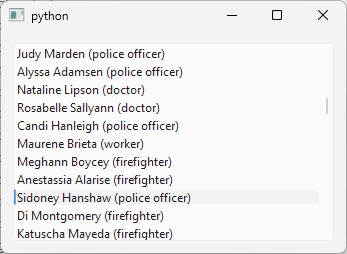
QAbstractItemModelTester aids model development. If you pass your model instance to its constructor it logs implementation errors to the console, helping catch issues early.
This demo is read-only. Next sections cover editable and resizable models.
22.2 Editable List Model
Creating a basic list model requires implementing at least rowCount() and data(). To make it editable, you need to implement two more:
setData(index, value, role): Sets the data for the given role (typicallyEditRole) and index, and returnsTrueif successful; otherwise returnsFalse. If set successfully, emit thedataChanged()signal.flags(index): Returns the item flags for the index. The base implementation enables and selects items. To allow editing, addQt.ItemFlags.ItemIsEditable.
|
You have implemented a read-only model of your bank’s client roster, backed by a text file (‘data.txt’) and you need to make it editable. |
To create an editable list model:
 1 from PySide6.QtCore import QAbstractListModel, Qt
 2
 3 # 1. Create a QAbstractListModel subclass
 4 #    and make the data available to it.
 5
 6 class TxtFileModel(QAbstractListModel):
 7
 8     def __init__(self, source, parent=None):
 9
10         super().__init__(parent)
11
12         self.txt_data = []
13         self.header = 'Clients'
14         with open(source) as txt_file:
15             for line in txt_file:
16                 self.txt_data.append(line.strip())
17
18     # 2. Implement the rowCount() and data() methods
19
20     def rowCount(self, parent) -> int:
21         return len(self.txt_data)
22
23     def data(self, index, role=Qt.ItemDataRole.DisplayRole) -> object|None:
24         if role in [Qt.ItemDataRole.DisplayRole, Qt.ItemDataRole.EditRole]:
25             return self.txt_data[index.row()]
26         return None
27
28     # 3. Implement the setData() method
29
30     def setData(self, index, value, role) -> bool:
31         if not index.isValid():
32             return False
33         if role == Qt.ItemDataRole.EditRole:
34             if self.txt_data[index.row()] != value:
35                 self.txt_data[index.row()] = value
36                 self.dataChanged.emit(index, index, [role])
37                 return True
38             return False
39         return False
40
41     # 4. Implement the flags() method
42
43     def flags(self, index) -> Qt.ItemFlags:
44         '''
45         The tester specifically checks flags(QModelIndex())
46         and expects it to return either 0 (no drop support
47         on the root, which is correct for the simple
48         editable list) or exactly Qt.ItemIsDropEnabled
49         (to indicate drop-on-viewport support).
50         Returning ItemIsEditable (or any other flags)
51         for an invalid index violates this expectation,
52         as editable doesn't make sense on the root.
53         qt.modeltest: FAIL! flags == Qt::ItemIsDropEnabled || flags == 0 ()
54         returned FALSE (/home/qt/work/qt/qtbase/src/testlib/qabstractitemmodeltester.cpp:377)
55         '''
56         if not index.isValid():
57             return Qt.ItemFlags()
58         return super().flags(index) | Qt.ItemFlags.ItemIsEditable
59
60     def headerData(self, section, orientation, role) -> object | None:
61         if orientation == Qt.Orientation.Horizontal:
62             if role == Qt.ItemDataRole.DisplayRole:
63                 return self.header
Create a
QAbstractListModelsubclass and provide access to the data source.Implement the
rowCount()anddata()methods as you did for the read-only model.Implement the
setData()method.setData()accepts three arguments:index,valueandrole. In the method we check if the role is equal toQt.ItemDataRole.EditRoleand, if it is, we set the model data for theindex.row()tovalueusingself.txt_data[index.row()] = value. If the data is set successfully we emit thedataChangedsignal and the method returnsTrue. Otherwise it returnsFalse. Take care that all code paths in this method return a boolean value.-
Implement the
flags()method. In this method we signal to views that the model data is editable by addingQt.ItemFlags.ItemIsEditableto the flags. Note that we can make the model items editable selectively by using theindexparameter. In the example we ignoreindexwhich means that all the model items are editable.The
Qt.ItemFlagsenum has these values:Constant Value Description Qt::NoItemFlags0 It does not have any properties set. Qt::ItemIsSelectable1 It can be selected. Qt::ItemIsEditable2 It can be edited. Qt::ItemIsDragEnabled4 It can be dragged. Qt::ItemIsDropEnabled8 It can be used as a drop target. Qt::ItemIsUserCheckable16 It can be checked or unchecked by the user. Qt::ItemIsEnabled32 The user can interact with the item. Qt::ItemIsAutoTristate64 The item’s state depends on the state of its children. Qt::ItemNeverHasChildren128 The item never has child items. Qt::ItemIsUserTristate256 The user can cycle through three separate states. Note that in our
flags()implementation we returnNoItemFlagsfor an invalid index (return Qt.ItemFlags()). If we didn’t, the model tester would print a warning:qt.modeltest: FAIL! flags == Qt::ItemIsDropEnabled || flags == 0 () returned FALSE (C:\Users\qt\work\qt\qtbase\src\testlib\qabstractitemmodeltester.cpp:377)
The model tester calls
flags()with an invalid index and expects the result to be either0/NoItemFlagsor exactly the drop-enabled flag. If you always addItemIsEditable(even for that invalid index) the test fails.An invalid index does not point to a real item, so it can not be edited. The tester is simply checking that the model does not claim that something that does not exist can be edited.
 1 import sys
 2 from PySide6.QtWidgets import (QApplication,
 3     QWidget, QListView, QLineEdit, QPushButton,
 4     QHBoxLayout, QVBoxLayout, QDataWidgetMapper)
 5 from PySide6.QtTest import QAbstractItemModelTester
 6 from txtfilemodel import TxtFileModel
 7
 8
 9 class Window(QWidget):
10
11     def __init__(self, parent=None):
12
13         super().__init__(parent)
14
15         layout = QVBoxLayout()
16         self.setLayout(layout)
17
18         self.model = TxtFileModel('data.txt')
19         QAbstractItemModelTester(self.model,
20             QAbstractItemModelTester.FailureReportingMode.Warning)
21
22         self.view = QListView()
23         self.view.setModel(self.model)
24
25         # 2. Create the widgets for displaying
26         #    and editing the data
27
28         self.lineedit = QLineEdit()
29         self.lineedit.returnPressed.connect(self.submit_new_value)
30         self.view.activated.connect(self.lineedit.setFocus)
31
32         self.submit_button = QPushButton('Submit')
33         self.submit_button.clicked.connect(self.submit_new_value)
34
35         # 3. Create the mapper object and set its model
36
37         self.mapper = QDataWidgetMapper()
38         self.mapper.setModel(self.model)
39
40         # 4. Add the mappings
41
42         self.mapper.addMapping(self.lineedit, 0)
43
44         self.mapper.setSubmitPolicy(
45             QDataWidgetMapper.SubmitPolicy.ManualSubmit)
46         self.mapper.toFirst()
47
48         # 5. Synchronize the model with the mapper
49
50         self.view.selectionModel().currentChanged.connect(
51             self.mapper.setCurrentModelIndex)
52
53         horizontal_layout = QHBoxLayout()
54         horizontal_layout.addWidget(self.lineedit)
55         horizontal_layout.addWidget(self.submit_button)
56
57         layout.addWidget(self.view)
58         layout.addLayout(horizontal_layout)
59
60     def submit_new_value(self):
61         self.mapper.submit()
62         self.view.setFocus()
63
64
65 if __name__ == '__main__':
66
67     app = QApplication(sys.argv)
68     main_window = Window()
69     main_window.show()
70     sys.exit(app.exec())
The main window code is the same as in the previous section, except that we add a method to handle the model’s dataChanged signals to show that they are indeed emitted in setData().
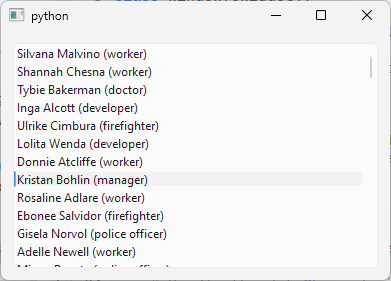
Now if you double-click any of the list view lines you are able to edit it and the changes are saved in the model (ie. to the TxtFileModel.txt_data list and signaled by the dataChanged signal. You can also implement the logic to update the text file from the txt_data values which we omit in this example.
22.3 Data-Widget Mapping
The QDataWidgetMapper class lets you map a data model row (or column) to a set of widgets, making them data-aware. When the mapper’s current index changes, mapped widgets are automatically updated with data from the model. This is useful for creating forms that enhance user experience when viewing and editing data.
|
You have an editable model of your bank’s client roster. Editing is enabled by double-clicking a client row in the list view, but your staff wants to edit a client’s details through a dedicated form field instead of double-clicking into the list. |
 1 from PySide6.QtCore import QAbstractListModel, Qt, QModelIndex
 2
 3 # 1. Create the model class
 4
 5 class TxtFileModel(QAbstractListModel):
 6
 7     def __init__(self, source, parent=None):
 8
 9         super().__init__(parent)
10
11         self.txt_data = []
12         self.header = 'Clients'
13         with open(source) as txt_file:
14             for line in txt_file:
15                 self.txt_data.append(line.strip())
16
17     def rowCount(self, parent=QModelIndex()) -> int:
18         return len(self.txt_data)
19
20     def data(self, index, role=Qt.ItemDataRole.DisplayRole) -> object|None:
21         if role == Qt.ItemDataRole.DisplayRole \
22         or role == Qt.ItemDataRole.EditRole:
23             return self.txt_data[index.row()]
24
25     def setData(self, index, value, role) -> bool:
26         if not index.isValid():
27             return False
28         if role == Qt.ItemDataRole.EditRole:
29             if self.txt_data[index.row()] != value:
30                 self.txt_data[index.row()] = value
31                 self.dataChanged.emit(index, index, [role])
32                 return True
33             return False
34         return False
35
36     def flags(self, index) -> Qt.ItemFlags:
37         if not index.isValid():
38             return Qt.ItemFlags()
39         return super().flags(index) | Qt.ItemFlags.ItemIsEditable
40
41     def headerData(self, section, orientation, role) -> object|None:
42         if orientation == Qt.Orientation.Horizontal:
43             if role == Qt.ItemDataRole.DisplayRole:
44                 return self.header
- Create a
QAbstractListModelsubclass to represent your model. Then, in the main window class:
 1 import sys
 2 from PySide6.QtWidgets import (QApplication,
 3     QWidget, QListView, QLineEdit, QPushButton,
 4     QHBoxLayout, QVBoxLayout, QDataWidgetMapper)
 5 from PySide6.QtTest import QAbstractItemModelTester
 6 from txtfilemodel import TxtFileModel
 7
 8
 9 class Window(QWidget):
10
11     def __init__(self, parent=None):
12
13         super().__init__(parent)
14
15         layout = QVBoxLayout()
16         self.setLayout(layout)
17
18         self.model = TxtFileModel('data.txt')
19         QAbstractItemModelTester(self.model,
20             QAbstractItemModelTester.FailureReportingMode.Warning)
21
22         self.view = QListView()
23         self.view.setModel(self.model)
24
25         # 2. Create the widgets for displaying
26         #    and editing the data
27
28         self.lineedit = QLineEdit()
29         self.lineedit.returnPressed.connect(self.submit_new_value)
30         self.view.activated.connect(self.lineedit.setFocus)
31
32         self.submit_button = QPushButton('Submit')
33         self.submit_button.clicked.connect(self.submit_new_value)
34
35         # 3. Create the mapper object and set its model
36
37         self.mapper = QDataWidgetMapper()
38         self.mapper.setModel(self.model)
39
40         # 4. Add the mappings
41
42         self.mapper.addMapping(self.lineedit, 0)
43
44         self.mapper.setSubmitPolicy(
45             QDataWidgetMapper.SubmitPolicy.ManualSubmit)
46         self.mapper.toFirst()
47
48         # 5. Synchronize the model with the mapper
49
50         self.view.selectionModel().currentChanged.connect(
51             self.mapper.setCurrentModelIndex)
52
53         horizontal_layout = QHBoxLayout()
54         horizontal_layout.addWidget(self.lineedit)
55         horizontal_layout.addWidget(self.submit_button)
56
57         layout.addWidget(self.view)
58         layout.addLayout(horizontal_layout)
59
60     def submit_new_value(self):
61         self.mapper.submit()
62         self.view.setFocus()
63
64
65 if __name__ == '__main__':
66
67     app = QApplication(sys.argv)
68     main_window = Window()
69     main_window.show()
70     sys.exit(app.exec())
Create your model object and the widgets for displaying and editing your model data.
Create the mapper object and use
QDataWidgetMapper.setModel()to connect your model to it.Use
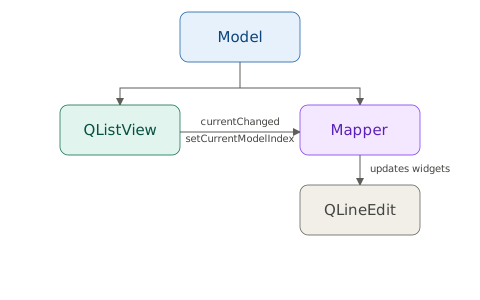
QDataWidgetMapper.addMapping()to map your model’s columns with the widgets. The example model has only one column, which we map to aQLineEditwidget.Synchronize the view’s current item with the mapper’s current index so both update when the user changes the view’s selection. Connect the view’s selection model
currentChangedsignal directly to the mapper’ssetCurrentModelIndex()slot.
The mapper updates its widgets automatically whenever its own current index changes. It does not watch the view’s selection, so you must tell it which row to display.
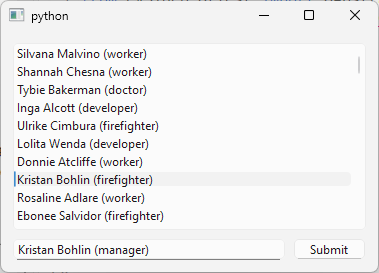
In the example, we use manual submit policy, updating the model via a ‘Submit’ button. This keeps the line edit in sync with the current view item, allowing easy updates by editing the line edit value and clicking ‘Submit’.
22.4 Resizable List Model
For a basic QAbstractListModel subclass, you need to implement at least two methods: rowCount() and data(). To make the model editable, you need to implement two more: setData() and flags(). To be able to add or remove rows, you also need to implement insertRows() and removeRows().
|
You have an editable model of your bank’s client roster. You need to let staff add new clients to the roster or remove existing ones. |
To make a resizable QAbstractListModel subclass:
 1 import csv
 2 from PySide6.QtCore import QAbstractListModel, QModelIndex, Qt
 3
 4 # 1. Create a QAbstractListModel subclass
 5
 6 class TxtFileModel(QAbstractListModel):
 7
 8     def __init__(self, source, parent=None):
 9
10         super().__init__(parent)
11
12         self.txt_data = []
13         self.header = 'Clients'
14         with open(source) as txt_file:
15             for line in txt_file:
16                 self.txt_data.append(line.strip())
17
18     def rowCount(self, parent=QModelIndex()) -> int:
19         return len(self.txt_data)
20
21     def data(self, index, role=Qt.ItemDataRole.DisplayRole) -> object|None:
22         if role == Qt.ItemDataRole.DisplayRole \
23         or role == Qt.ItemDataRole.EditRole:
24             return self.txt_data[index.row()]
25
26     def setData(self, index, value, role) -> bool:
27         if not index.isValid():
28             return False
29         if role == Qt.ItemDataRole.EditRole:
30             if self.txt_data[index.row()] != value:
31                 self.txt_data[index.row()] = value
32                 self.dataChanged.emit(index, index, [role])
33                 return True
34             return False
35         return False
36
37     def flags(self, index) -> bool:
38         if not index.isValid():
39             return Qt.ItemFlags()
40         return super().flags(index) | Qt.ItemFlags.ItemIsEditable
41
42     # 2. Implement the insertRows() method
43
44     def insertRows(self, row, count, parent=QModelIndex()):
45         if 0 <= row <= self.rowCount():
46             self.beginInsertRows(parent, row, row )
47             self.txt_data.insert(row, '<insert row data>')
48             self.endInsertRows()
49             return True
50         return False
51
52     # 3. Implement the removeRows() method
53
54     def removeRows(self, row, count, parent=QModelIndex()):
55         if 0 <= row < len(self.txt_data):
56             self.beginRemoveRows(parent, row, row)
57             self.txt_data[row:row + 1] = []
58             self.endRemoveRows()
59             return True
60         return False
61
62     # QListView does not have a header
63     # so this is never executed!
64
65     def headerData(self, section, orientation, role):
66         if orientation == Qt.Orientation.Horizontal:
67             if role == Qt.ItemDataRole.DisplayRole:
68                 return self.header
Create a subclass of the
QAbstractListModelclass. As in previous examples, read the data from a text file and store it in a Python list namedself.txt_data.Implement the
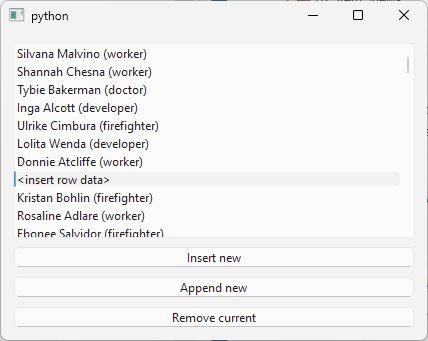
insertRows()method. For simplicity, the example inserts rows filled with template text (“<insert row data>”). Guard the data insertion withbeginInsertRows()(to signal connected views that rows are about to be inserted) andendInsertRows(). This pair of methods ensures that views remain in a valid state.beginInsertRows()takes three arguments:parent(an invalidQModelIndex()in our case),first(the starting row number post-insertion) andlast(the ending row number post-insertion).insertRows()returnsTrueon success orFalseotherwise.Implement the
removeRows()method. This removes rows from theself.txt_data, enclosed bybeginRemoveRows()andendRemoveRows(), and returnsTrueon success orFalseotherwise.
Then, in your main class:
  1 import sys
  2 from PySide6.QtWidgets import (QApplication,
  3     QWidget, QListView, QLineEdit, QPushButton,
  4     QHBoxLayout, QVBoxLayout, QDataWidgetMapper)
  5 from PySide6.QtTest import QAbstractItemModelTester
  6 from txtfilemodel import TxtFileModel
  7
  8
  9 class Window(QWidget):
 10
 11     def __init__(self):
 12
 13         super().__init__()
 14
 15         layout = QVBoxLayout()
 16         self.setLayout(layout)
 17
 18         self.model = TxtFileModel('data.txt')
 19         QAbstractItemModelTester(self.model)
 20         self.model.rowsInserted.connect(self.on_rows_inserted)
 21
 22         self.view = QListView()
 23         self.view.setModel(self.model)
 24         self.view.selectionModel().currentChanged.connect(
 25             self.on_current_changed)
 26
 27         self.lineedit = QLineEdit()
 28         self.lineedit.returnPressed.connect(self.submit_new_value)
 29         self.view.activated.connect(self.lineedit.setFocus)
 30
 31         self.mapper = QDataWidgetMapper()
 32         self.mapper.setModel(self.model)
 33         self.mapper.setSubmitPolicy(
 34             QDataWidgetMapper.SubmitPolicy.ManualSubmit)
 35         self.mapper.addMapping(self.lineedit, 0)
 36         self.mapper.toFirst()
 37
 38         self.submit_button = QPushButton('Submit')
 39         self.submit_button.clicked.connect(self.submit_new_value)
 40
 41         self.insert_button = QPushButton('Insert new')
 42         self.insert_button.clicked.connect(self.on_insert)
 43
 44         self.append_button = QPushButton('Append new')
 45         self.append_button.clicked.connect(self.on_append)
 46
 47         self.remove_button = QPushButton('Remove current')
 48         self.remove_button.clicked.connect(self.on_remove)
 49
 50         input_layout = QVBoxLayout()
 51         input_layout.addWidget(self.lineedit)
 52         input_layout.addWidget(self.submit_button)
 53
 54         buttons_layout = QVBoxLayout()
 55         buttons_layout.addWidget(self.insert_button)
 56         buttons_layout.addWidget(self.append_button)
 57         buttons_layout.addWidget(self.remove_button)
 58
 59         controls_layout = QHBoxLayout()
 60         controls_layout.addLayout(input_layout)
 61         controls_layout.addLayout(buttons_layout)
 62
 63         layout.addWidget(self.view)
 64         layout.addLayout(controls_layout)
 65
 66     def on_current_changed(self, current, previous):
 67         self.mapper.setCurrentIndex(current.row())
 68
 69     def submit_new_value(self):
 70         self.mapper.submit()
 71         self.view.setFocus()
 72
 73     def on_insert(self):
 74         row = self.view.selectionModel().currentIndex().row()
 75         if self.model.insertRows(row, 1):
 76             self.mapper.setCurrentIndex(row)
 77             self.lineedit.setFocus()
 78
 79     def on_append(self):
 80         row = self.model.rowCount()
 81         self.model.insertRows(row, 1)
 82         index = self.model.index(row, 0)
 83         self.view.scrollTo(index)
 84         self.lineedit.setFocus()
 85
 86     def on_remove(self):
 87         index = self.view.currentIndex()
 88         self.model.removeRows(index.row(), 1)
 89
 90     def on_rows_inserted(self, parent, first, last):
 91         index = self.model.index(first, 0)
 92         if index.isValid():
 93             self.view.setCurrentIndex(index)
 94             self.lineedit.setFocus()
 95
 96
 97 if __name__ == '__main__':
 98
 99     app = QApplication(sys.argv)
100     main_window = Window()
101     main_window.show()
102     sys.exit(app.exec())
- Create three
QPushButtons:insert_button,append_buttonandremove_button. Handle the insert button’sclicked()signal with a slot namedon_insert()callinginsertRow()to insert a single row by invokinginsertRows(). Similarly, handle the append button’sclicked()signal withon_append()to insert a row at the end.
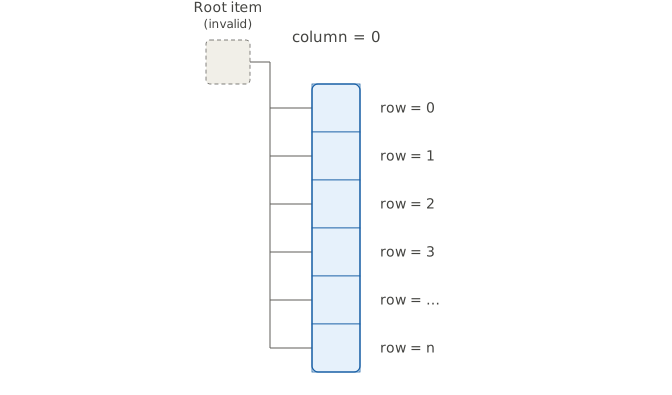
Throughout this chapter, TxtFileModel went from a two-method read-only stub to a model that a user can edit through the view or a mapped form field, and resize with insert and remove buttons, all without ever reimplementing the parent() method. Every item in a QAbstractListModel is conceptually a child of the model’s invisible root index (an invalid QModelIndex()):