3. UXD and Visual Design
“The public is more familiar with bad design than good design. It is, in effect, conditioned to prefer bad design, because that is what it lives with. The new becomes threatening, the old reassuring.”
We have already seen, even though 20 years or so old, user experience is still open to many definitions and interpretations; just what UX means, and includes, is a matter of debate and you need to be sure that you are explicit about just what it means for you. Mostly, we can agree that it is about placing emphasis on the user and expanding our concept of their experiences, in terms of technology and surrounding aspects outside of the interface. For this reason, there are different types of focus required from different technical specialists.
3.1 User Experience (UX) and User Experience Design (UXD)
It will be common for you to hear the term UXD (or User Experience Design), which means ‘User eXperience Design—er’. Typically, this specialism is focused on the look and feel of a specific interface, and training the UXD specialist to be a UX designer often occurs after training in graphic design or visual design. You will, however, also note that in terms of other kinds of interfaces, there are typically no well defined interface designers outside of the visual experience, and so the design of conversational and zero UI interfaces is often undertaken by user experience specialists.
In the case of UX, we are thinking typically about user experience in the broader context, not specifically design but more from a technical background of computer science and development. Therefore, UXD is not the natural home for somebody who is trained in the broader UX experience. Indeed, when it comes to specifying systems from an interface and interaction perspective a UX specialist should comply with current best practices.
These are typically set out as guidelines for user interface development specifically around expected look and feel across devices; which are typically codified in what is often understood to be a design language, design system or a look and feel document. These typically are given names that are often outside of the operating system on which they run so that their cross-disciplinarity can be highlighted. For instance, the ‘Metro UI’ was created by Microsoft to support the Windows active tile interface but was seen to be broader than this.
User experience is a broad term that encompasses all aspects of a user’s interaction with a product or service. It includes everything from the user’s initial impressions to the ease of use and functionality of the product, to the user’s overall satisfaction with the experience. On the other hand, user experience design is the process of designing the (visual) user experience. It is a discipline that focuses on creating products that are not only functional but also intuitive, engaging, and enjoyable to use. UX designers use a variety of research techniques and design principles to create products that meet the needs of their users. In essence, UX is the overall perception of a user’s experience with a product or service, while UX design is the intentional and strategic process of designing that experience to be as seamless and satisfying as possible for the user.
UXD often employs graphic or visual designers as part of the team. Visual design is an important aspect of UX design, and the role of a visual designer in UXD is to create visually appealing and functional interfaces that enhance the user experience.
While graphic design and visual design are important components of UX design, UXD goes beyond just visual elements. UXD is a multidisciplinary field that encompasses research, design, and evaluation of user experiences. It involves a range of tasks, including user research, information architecture, interaction design, usability testing, and more.
Again, visual design is just one part of the overall UX design process, and it involves the use of typography, colour, imagery, and other visual elements to create a cohesive and aesthetically pleasing user interface. Graphic design, on the other hand, is focused more on the creation of graphics and images to convey information or messages. Visual designers work closely with UX designers and developers to create interface designs that meet the needs of users while also communicating a clear brand message.
While UX specialists may work closely with graphic designers and visual designers to create compelling and visually appealing products, UXD itself is a broader discipline that encompasses a range of design and research activities aimed at creating user-centred products and services.
However, it’s important to note that UXD goes beyond just visual design. UX designers often work closely with user researchers, product managers, and developers to create user-centred products and services. They use a variety of research techniques to understand user needs and behaviors, and then design interfaces that meet those needs while also achieving business goals.
In short, while visual design is an important component of UXD, UX involves a multidisciplinary team working together to create products that meet user needs and provide a great user experience.
3.2 Design Systems and Languages
A design system is a collection of guidelines, components, and assets that are used to create and maintain a consistent and cohesive visual and interactive experience across different products, platforms, and channels. It serves as a single source of truth for design and helps ensure a unified and efficient design process.
Design systems are typically developed by design teams within organizations and are used by various stakeholders, including designers, developers, and product managers. They provide a standardized set of rules, principles, and patterns that guide the creation of user interfaces, interactions, and overall brand experience.
Design systems establish a consistent visual language, including colors, typography, iconography, and other graphical elements. This ensures a cohesive and recognizable look and feel across different applications and platforms. They often include a library of reusable user interface (UI) components, such as buttons, forms, navigation menus, and cards. These components are designed and documented with predefined styles, behaviors, and guidelines, allowing designers and developers to easily implement them in their projects.
Systems articulate a set of design principles and guidelines that help maintain a consistent user experience. These principles may cover topics like accessibility, responsiveness, layout, and content hierarchy, providing a framework for decision-making during the design process. And they include comprehensive documentation that outlines the guidelines, rules, and best practices for using the system. This documentation serves as a reference for designers and developers, ensuring proper implementation and reducing inconsistencies.
Systems often emphasize accessibility, aiming to create inclusive experiences that can be accessed by users with diverse abilities. They provide guidelines and recommendations for creating accessible designs and may include accessible UI components and color palettes. Finally systems often align with the organization’s brand identity and guidelines. They define the appropriate usage of logos, typography, colors, and other brand assets, ensuring consistency and brand recognition across all touchpoints.
By adopting a design system, organizations can streamline the design and development process, improve collaboration between teams, reduce redundant work, and maintain a cohesive user experience across their products and services. It also allows for scalability and efficiency, as design updates or changes can be applied globally through the system, ensuring a consistent experience across different platforms and products.
A design language — also known as a design language system or design language framework — is more specifically focused on the operational aspects of the overall system. A design language, refers to a comprehensive and consistent set of design principles, patterns, and guidelines that define the visual and interactive characteristics of a product, brand, or organization. It establishes a unified approach to design, ensuring consistency and coherence across various touchpoints.
Design languages are typically developed and maintained by design teams within organizations, and they serve as a reference for designers, developers, and other stakeholders involved in the creation and maintenance of products or services. By establishing a design language, organizations can achieve consistency, improve user experience, enhance brand recognition, and streamline the design and development process across their offerings.
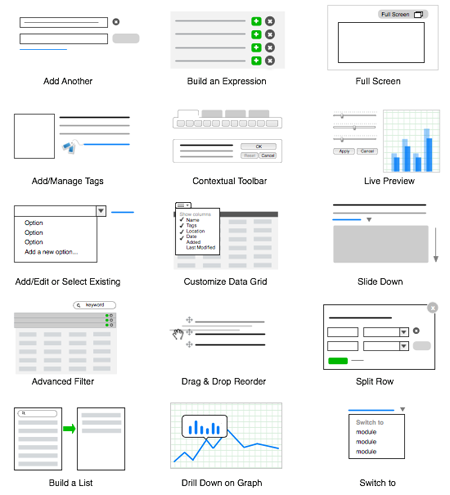
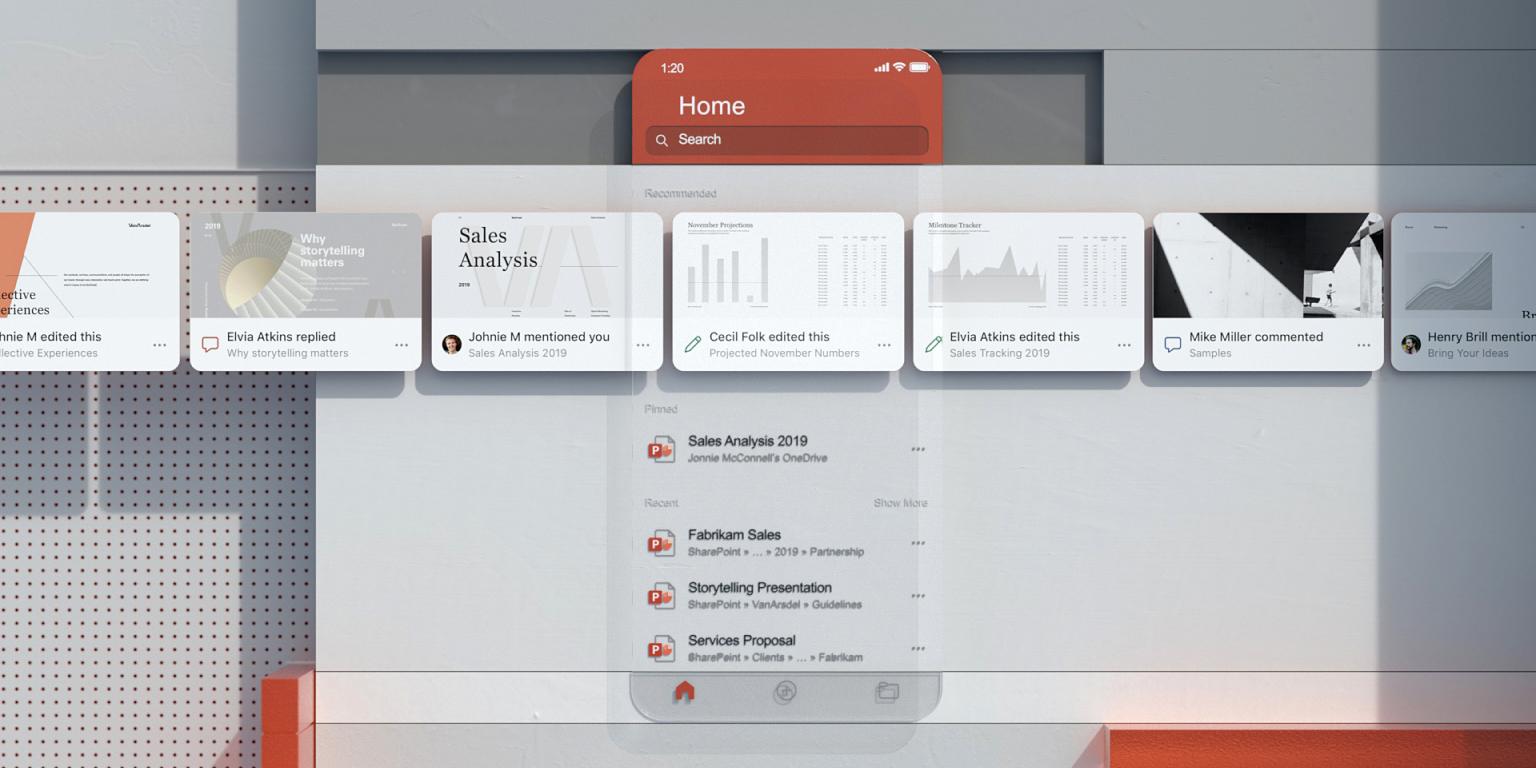
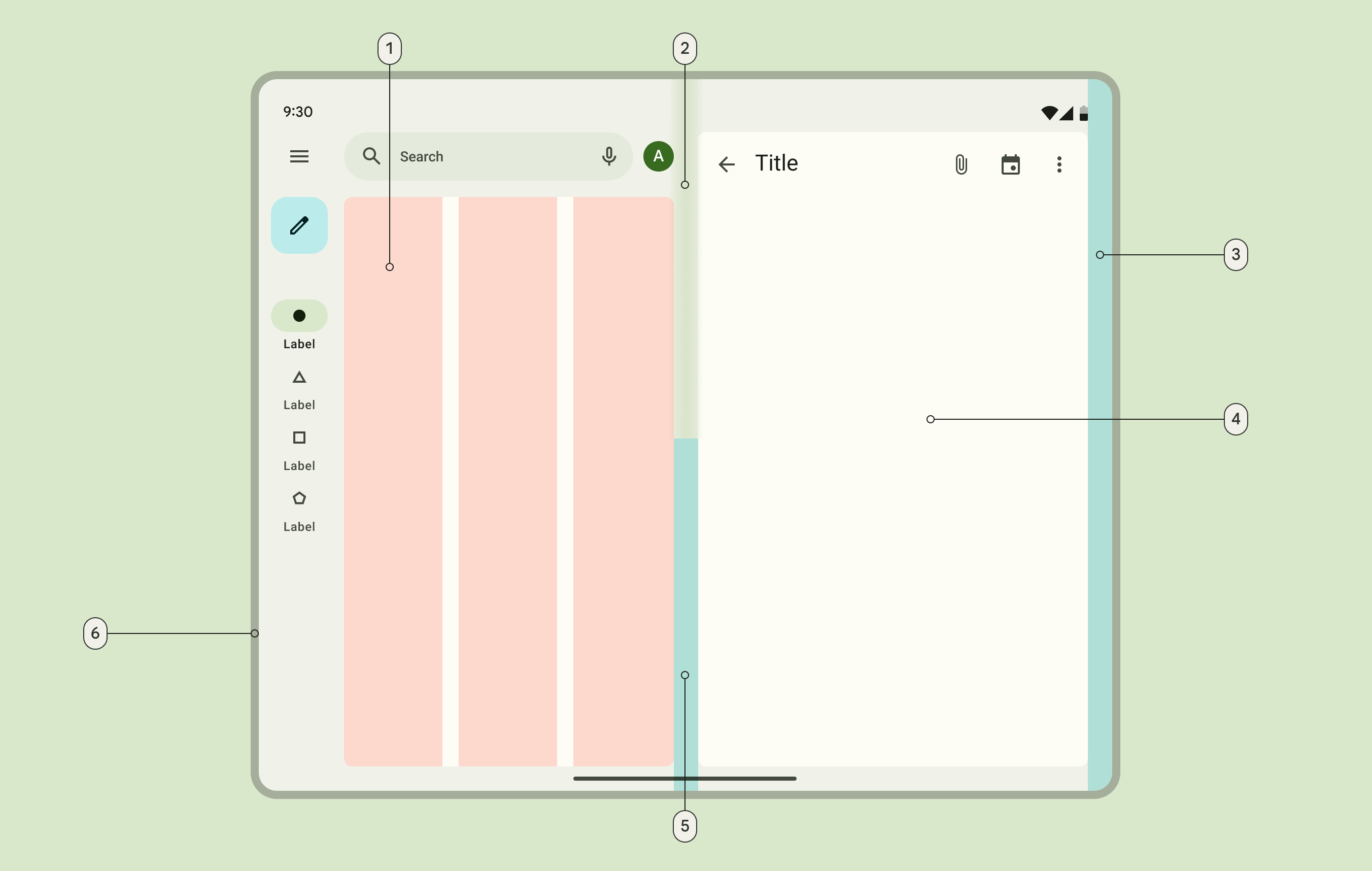
For instance, the original ‘Material Design’ (see Figure: Material Page Example) system typically found on Android devices and critically across most Google applications has evolved into its own specification to be applied across any platform Google related or not. Further languages include Microsoft Fluent (see Figure: Fluent Card Example) and indeed, Apple OSX, and IBM all have their own design systems or languages which you should conform to if you are building or specifying interfaces. These kinds of design systems (or languages) evolved from specifications in real-world architecture, and mutated to interface design patterns (see Figure: Common UI Patterns) via such repositories as the Portland Pattern Repository (famous for the wiki-wiki web developed by Ward Cunningham).
Not only technology developers or platform manufacturers create visual languages and guidelines for their applications and platforms. We can see that there are many other organisations who also have their own visual design languages such as Github, Twitter, and Mozilla all have a specification, that their software engineers can use; and this specification is typically contained (or at least modelled) within specific Cascading Style Sheets, directives or visual rendering directives which can be used in whatever circumstances.
Creation of these languages and specifications should not be attempted by anyone who is not a graphic designer or part of a UXD team and in terms of UX from a technical perspective (you), we are purely the users. So, for instance, we don’t create the artificial intelligence or machine learning algorithms, we just use them; we don’t build a new ANOVA statistical test, we trust the statisticians to have done their job and we don’t reinvent these, and this is the case for using visual design guidance. Conforming also enhances cognitive and perceptual understanding of the user and therefore what to expect is consistent across applications.
3.3 Interaction Design
UX design and interaction design are closely related but distinct disciplines. Interaction design is a subfield of UX design that specifically focuses on designing how users interact with a product or service.
Interaction design involves designing the flow of user interactions, defining how users navigate through a product or service, and creating the interactions that users have with the interface. This includes designing the placement and behaviour of buttons, menus, forms, and other interactive elements, as well as defining the transitions between screens and the feedback that users receive when they interact with the product.
UX design, on the other hand, encompasses a broader range of activities and disciplines. It includes everything from user research and usability testing to information architecture and visual design. While interaction design is a key component of UX design, it is just one of many elements that contribute to the overall user experience.
In essence, interaction design is a focused subset of UX design that is concerned specifically with designing how users interact with a product or service, while UX design is a broader discipline that encompasses all aspects of a user’s experience with a product or service.
3.4 Zero UI and Conversational Interfaces
It is important to realise that when we talk about UXD we are only talking about visual design. We are not talking about conversational interfaces or Zero UI devices which will still fall under the remit of the UX specialist. Indeed, these kinds of interaction modalities (including those of sonification for instance) have no design language or specifications as we see in visual design and are often highly technical in the way that they are expressed and elaborated, with technology doing the majority of the work, especially in language recognition models for conversational interfaces.
Zero UI interfaces are user interfaces that require little or no user interaction to operate. The goal of zero UI interfaces is to create seamless, intuitive experiences that require minimal effort from the user. They are designed to be intuitive and operate without any visible controls or buttons. Instead of relying on traditional input methods such as touch screens or keyboards, zero UI interfaces leverage technologies such as voice recognition, facial recognition, and gesture recognition to interpret the user’s intent and carry out actions. Examples of zero UI interfaces include Amazon’s Alexa and Google’s Assistant, which use natural language processing to interpret voice commands and smart home devices that can automatically adjust lighting and temperature based on user preferences.
Indeed, Conversational interfaces are a subset of Zero UIs that use natural language to enable communication between humans and machines. These interfaces are designed to emulate human conversation and provide a more intuitive way for users to interact with technology. Conversational interfaces can take many forms, including chatbots, voice assistants, and messaging apps.
Chatbots are computer programs designed to simulate human conversation, typically through text-based interactions. They are often used in customer service to answer frequently asked questions or provide basic support. Voice assistants, such as Amazon’s Alexa, Apple’s Siri, and Google Assistant, use speech recognition and natural language processing to enable voice-based interactions between users and devices. Messaging apps, such as Facebook Messenger and WhatsApp, also provide conversational interfaces through which users can interact with chatbots or human agents. Conversational interfaces have become increasingly popular due to their ease of use, accessibility, and ability to provide personalized experiences. They are used in a variety of applications, including customer service, healthcare, finance, and education.
3.5 Summary
In this chapter, I wanted to point out the difference between UX design, visual design and UX as a specialism. We’ve already covered definitions of UX, and we understood that there are different definitions of what is important in UX, what isn’t, and where you want to make sure that you understand that UXD, is really about visual design and UX is broader (you are specialising in UX).
Some texts for UXD as a specialism may emphasize the need for strong visual design skills, but this is not always the case. While visual design is an important aspect of UX design, many/most of the skills for UX designers prioritize skills such as user research, information architecture, and interaction design over visual design skills. Many UXD texts specifically state that specialists should have experience in user research, user testing, wireframing, prototyping, and other aspects of UX design that are not solely focused on visual design. That said, UX designers need to have a basic understanding of visual design principles and be able to work effectively with visual designers as part of a collaborative team. UX design skills may also include visual design as a desired skill, especially for smaller companies where a UX designer may be expected to handle multiple responsibilities. Overall, however, while visual design is an important aspect of UX design, the emphasis on visual design skills will vary depending on the company, industry, and specific project requirements.
3.5.1 Optional Further Reading
- [Material Design] https://material.io/
- [Microsoft Fluent Design] https://www.microsoft.com/design/fluent/
- [J Preece, H Sharp & Y Rogers] Interaction Design: Beyond Human-Computer Interaction, Wiley; 6th edition, 2023.
- [A van Boeijen, et al] Delft Design Guide: Design strategies and methods, BIS Publishers; Revised edition 2020.
- [J Johnson ] Designing with the Mind in Mind: Simple Guide to Understanding User Interface Design Guidelines, Morgan Kaufmann; 3rd edition, 2020.
- [J Tidwill, et al] Designing Interfaces, 3e: Patterns for Effective Interaction Design, O’Reilly; 3rd edition, 2020.