Part I: Introducing the User Experience

1. Be Curious, Be Critical!
most people are fools, most authority is malignant, God does not exist, and everything is wrong.
‘The Magical Number Seven, Plus or Minus Two: Some Limits on Our Capacity for Processing Information’ 1 is a very famous human factors research paper, written in the mid-fifties and concerning Psychoacoustics. The paper is interesting because it has spawned an often misunderstood usability principle: that our working memory can only handle seven (± 2) items at any one time, and therefore we should only make menus or lists a maximum of seven items long.
However, “Miller’s paper is a summary/analysis of research findings couched in the form of bits per channel. He amusingly relates the fact that the number seven seems to be plaguing his every move because seven seems to appear repeatedly regarding the amount of information that can be remembered or differentiated by humans. However, there are two caveats to this assertion: firstly, that the user is required to make absolute judgements of unidimensional stimuli and secondly that that stimulus is not clustered. This last point is quite important because using clustering means that we can remember or distinguish more than the unitary seven. For instance, we can remember seven characters in sequence, seven words in order, or seven phrases. In reality then, we have trouble differentiating uni-dimensional stimuli such as audible tones played without reference to each other, but we can differentiate more than seven tones when played in a sequence, or separately when multiple dimensions such as loudness and pitch are varied. Further, we can remember more than seven things within a list especially if those things are related or can be judged relatively, or occur as part of a sequence.
1.1 Being Critical
So this is a well found psychological finding (and very well written paper) that working memory can handle seven (±2) arbitrarily sized chunks of absolute uni-dimensional stimuli. And becomes the often quoted but mostly incorrect usability/HCI principle that you should only include seven items in a menu, or seven items in a list… and on and on.”
Indeed, this often incorrectly understood usability principle is a misconception that has become a firmly held belief; this is the ‘wrongness’ that Ted alludes to, and there are plenty of others. Let’s look at a few.
1.1.1 Buzz and Hype
Jacob Nielsen famously suggests that usability evaluations can be conducted with only five people, and this will catch over 80% of the usability errors present 2. In reality, Nielsen added a lot of caveats and additional conditions to be met, which have been lost from the ‘buzz’ surrounding the ‘five users’ evaluation work. Eager usability practitioners hooked upon this five user message as a way of justifying small studies, even when those small studies tested multiple and disjoint usability tasks. Even user studies that do not try to generalise their results need to make sure that the kinds of tasks performed are both limited and holistic. With these kinds of usability tests, Faulkner 3, demonstrates that the amount of usability errors uncovered could be as little as 55%. Further, Schmettow 4 tells us that user numbers cannot be prescribed before knowing just what the study is to accomplish. And Robertson 5 tells us that the interplay between Likert-Type Scales, Statistical Methods, and Effect Sizes are more complicated than we imagine when performing usability evaluations.
1.1.2 Shorthand
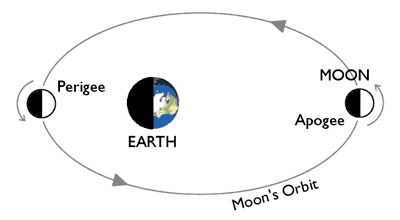
The Moon Orbits the Earth. More common misconceptions work their way into our understanding, usually because of a certain shorthand that makes the concepts more easily expressed, at the expense of introducing some minor errors. For instance, the Moon does not orbit the Earth (see figure Moon’s Orbit). Well, it kind of does, but in actuality the Moon orbits the combined centres of gravity of both the Moon and the Earth. This just so happens to be very near the centre of gravity exerted by the Earth because the Moon’s centre of gravity is so small.
In general, this misconception does not affect most people’s everyday life. However, it is technically important — how celestial bodies interact with each other is a major area within the study of Astronomy.
1.1.3 Sounds Right
The Earth is Closer to the Sun in the Summer than in the Winter. Let’s look at another misconception, the Earth is closer to the Sun in the summer than in the winter, and it is this closeness which accounts for the seasons. Again, this is kind-of right, part of the Earth is nearer to the Sun in the summer than in the winter, however, the Earth as a whole is not. The seasons are accounted for by the Earth being tilted on its axis by 23.4°. As the Earth orbits the Sun, different parts of the world receive different amounts of direct Sunlight and this accounts for the warming or cooling. But this warming or cooling is based on the angle of the Earth’s axis in relation to the Sun. And, therefore, the nearness of either the southern or the northern hemisphere to the Sun, not the Earth as a whole.
In your work as a user experience specialist, you often find there are many, unsaid, or shorthands expressed by users. These are technically incorrect but are satisfactory for their everyday work, but may introduce large problems with your technical solutions.
1.1.4 Common Sense
Blind People Can’t See. Certain facts seem to be ‘common sense’ — but you should always question common sense pronouncements. For instance, blind people cannot see. This seems obvious, like common sense, but in actuality it is incorrect. The reality of the situation is that some blind people, a very small percentage of blind people (termed profoundly blind) cannot see. In reality, the vast majority of blind people can see colours, shapes, blurred objects, and movement. In short most blind people can see something; only 4% can see nothing at all and are ‘profoundly’ blind.
1.1.5 Obviously!
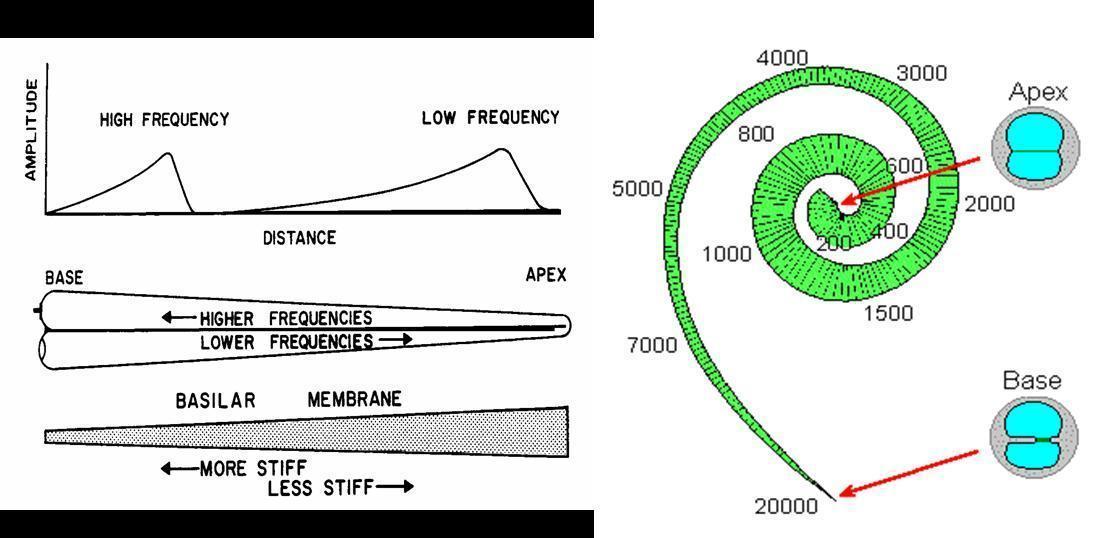
Vision is Parallel, Hearing is Serial. It is often thought that vision is parallel, in that we can see multiple objects all at the same time whereas hearing is serial because we can only hear one sound. This is incorrect, in reality the basilar membrane of the cochlear experiences different frequencies from its base to apex (see Figure: Basilar Membrane). These nerve cells are connected to different areas within the brain that are responsive to different frequencies and those frequencies are also processed in parallel.
1.1.6 A Little Knowledge is a Dangerous Thing
All Brains Have the Same Organisation. We all know that the brain has the same organisation. Indeed, we can see this in many diagrams of the brain in which there are specific areas devoted to specific jobs, such as vision, language, hearing and the like. But just how true is this? In reality, this is not as true as you may imagine. The brain mostly develops up to the age of twenty-one and within that time a concept called neuroplasticity is in effect, which states that the brain can change structurally and functionally as a result of input (or not) from the environment. This means that the brain can change and re-purpose unused areas 6. For instance, the visual cortex of a child who has become profoundly blind at, say, ten is overtime repurposed to process hearing, and possibly memory and touch. The brain develops in this way repurposing unused areas and adapting to its environment until development slows down at the age of twenty-one.
1.1.7 One Final Thought…
Look at this famous video from Daniel Simons and Christopher Chabris7. It requires you to count passes of a Basketball. Try to count them now, and then skip ahead for the result.
1.2 Being Curious
The story of UX and, more widely, HCI is not one you’d expect and you should always maintain a healthy curiosity when discussing it; it certainly isn’t as two–dimensional as just front end coding.
1.2.1 The Collision of Two Opposing Ideologies
In the past we characterised practical human computer interaction in terms of usability and interaction engineering (in some cases accessibility was included but mainly as an afterthought). We decided whether an interface was usable and the interaction design was good, based on tangible, measurable metrics such as task completion time. These kinds of metrics enabled us to understand the interactive experience in terms of time, theorising that the least time spent using the interface, the better; and this may have been, in some ways correct, as most computers were used in work situations.
As time has passed our concept of the computer and the interface evolved such that computers were no more tied down to the desk but could be mobile or ubiquitous, and the interface was not solely confined to software but may also include aspects of hardware, moving computers from the workplace and into the consumer product domain. Our ways of measuring and valuing the goodness of these interfaces however remained the same, task completion time, errors and error rates, correction times, Fitts Law pointing predictions, etc. Indeed this was the scientific or classic view of technology. At this point intangibles were seen as being soft science, unmeasurable and too open to incorrect interpretation. Other aspects, which might also affect how interfaces were experienced, but which could not be directly measured, and which relied more on subjective views of the user were seen as being, at best inconsequential, and at worst just plain old bad-science.
This clash of ideologies runs large through the whole of UX, its main theme being how to unify both the scientific and the romantic; the classic and the aesthetic; the tangible and the intangible; the measurable and the experiential. Indeed, UX is our attempt to unite classic HCI with modern ideas of experience and perception in which accessibility, usability, and interaction engineering (tangible, scientific, measurable) are combined with aesthetic, emotional, fun, affective, collaborative, and gameplay (intangible, humane, difficult to measure).
By understanding the clash of worlds we can also understand the more successful combination of these two – seemingly opposing – ideologies into a unified and cohesive whole as practically applied in UX. By understanding these nuances we can better understand what issues we will need to overcome in future UX design, build, and evaluation and also begin to value – and better understand – the subjective qualitative views of the interactive experiences of our users.
1.2.2 Perception of the User Experience
One of the other major themes of UX is that of perception, and the differences which lie between people and their experience of the world. The complicated experiences and perceptions of experience should be taken as warnings to anyone working in user experience. Our perceptions are complicated and incredibly difficult to categorise; what may seem to be obvious to one person, may be obscure to another. User experience, as opposed to classical HCI, takes these different subjective perceptions into account in its desire to create practical pleasing experiences for each user.
Perception is something not normally measured or quantified in classic HCI and so only in the modern additions of emotion, fun and dynamic interaction can these intangibles be acknowledged. UX shows us that experience can be massively divergent, and that outliers are as important as the general cases (if not more so).
1.2.3 Framing of Science in the User Experience
In our comparison of subjective and objective paradigms – the classical and the romantic – we must also take into account science and the scientific method especially in terms of empiricism, objectivity and the belief systems that arise around both objectivity and subjectivity.
Science has its limitations. For instance, many people have a common understanding of quality, in that they can tell quality when they see it, but quality is difficult to measure in any empirical or objective way; or describe with any degree of clarity. It seems in some ways an emergent property, or an umbrella term under which other more easily measured objective indicators can play a part. However, the richness of the description of quality is difficult to place only in such objective terms. So we can see that science cannot be the only measure of user experience, because science is mostly about generalisation, and because we do not have a full model of the universe; we therefore do not know all the variables which may arise to influence the user experience of a single individual. By nature we must conclude, in some regard, that objective, empirical science cannot give us all the answers at this time (until our model is complete), only the answer to testable questions.
This discussion of science is directly related to our discussions of the application of user experience, how we understand modern user experience, and how older styles of human computer interaction serve as an excellent base, but cannot provide the richness which is associated with the intangible, and often unquantifiable subjective, and emotional aspects which we would expect any user experience to comprise of.
We must, however, be cautious. By suggesting that subjective measures may not be testable means that we may be able to convince ourselves and others that a system is acceptable, and even assists or aids the user experience; while in reality there is no evidence, be it theoretical or experimental, which supports this argument. It may be that we are using rhetoric and argumentation to support subjective measures as a way of sidestepping the scientific process which may very well disprove our hypotheses as opposed to supporting it.
1.2.4 Theoretical and Empirical User Experience
Notice, in the last section we discussed one fundamental of science, the fact that we can disprove or support a hypothesis, in empirical work we cannot prove one. We cannot prove a hypothesis because in the real world we are not able to test every single condition that may be applied to the hypothesis. In this case we can only say that our hypothesis is strong because we have tried to destroy it and have failed.
However, those trained in rhetoric, in theoretical not empirical work, have a conception of science which is different to ours. In theoretical science it is quite possible to prove or disprove a hypothesis. This is because the model of the world is known in full (‘closed world’), all tests can be applied, all answers can be evaluated. This is especially the case with regard to mathematics or theoretical physics whereby the mathematical principles are the way the world is modelled, and this theoretical world works on known principles. However this is not the case in user experience, and it is not the case in empirical science whereby we are observing phenomena in the real world (‘open world’) and testing our theories using experiments, which may be tightly controlled, but are often as naturalistic as possible. In this case, it is not possible to prove a hypothesis, because our model of the world is not complete, because we do not know the extent of the world, or all possible variables, in complex combination, which are able to affect the outcome.
In real-world empirical work we only need one negative result to disprove our hypothesis, but we need to have tested all possibilities to prove our hypothesis correct; we just don’t know when everything has been tested.
1.2.5 Rhetoric, Argumentation, and the User Experience
So, how can we satisfy ourselves that subjective, or intangible factors are taken into account in the design process and afterwards. While we may not be able to measure the subjective outcomes or directly generalise them we are able to rationalise these aspects with logical argumentation; and rhetoric – the art of using language effectively so as to persuade or influence others – can obviously play a key role in this. However, you will notice that the problem with rhetoric is that while you may be able to persuade or influence others, especially with the aid of logical argumentation, your results and premise may still be incorrect. If you haven’t thought of, or don’t predict, the [counter]arguments that will be made, and have your own convincing counter arguments you’ll lose - you may be right, but if you are, your arguments and counter arguments should be complete; that’s the point of rhetoric and rhetorical debate.
Remember though, that with the user experience it is not our job to win an argument just for the sake of argumentation or rhetoric itself. We are not there to prove our eloquence, but we are there to support our inductive and deductive reasoning, and our own expertise when it comes to understanding the user experience within the subjective or intangible.
Further, the difference between a good UX’er and a bad one, like the difference between a good mathematician and a bad one, is precisely the ability to select the good facts from the bad ones on the basis of quality. You have to care! This is an ability about which formal traditional scientific method has nothing to say.
1.2.6 Values, and the Intangible Nature of the User Experience
‘Values’ are more important than you might imagine when working with humans, and it is useful to remember this in the context of understanding the user experience. In reality, many of the intangibilities which arise in UX work stem from these often hidden values.
More interestingly however, values which are often related to the world-views of individuals and more importantly their perception of these values, influence what they consider to be important.
We see the world not as it is, but as we are — or, as we are conditioned to see it.
– Anaïs Nin … or Stephen R. Covey
Indeed, the point here is that people bring their own values based on previous experience and their emotional state of equilibrium to any experience. These aspects are intangible and can be difficult to spot especially with regard to understanding the user experience. However, we can also use these values and world-views (if we have some idea of them) to positively influence users emotional response to an interface or interaction. Remember, we have already discussed that the expectation or perception of an experience, be it good or bad, will influence to a large degree the perception of that actual experience once enacted.
1.3 Summary
If there are two traits you should possess as a UX specialist, they are curiosity and the ability to be constructively critical. As we have seen, there are many reasons why errors and misconceptions can be embedded within both an organisation and the systems by which it runs. We can also see that if people want to believe their software has a good user experience they often will do. They are often blind to the real nature of the interface software, or systems, which they have built.
In UX, there is often no 100% correct answer (that we as UX specialists can derive) when it comes to creating, building, and then testing a system. The unique nature of the human individual means that there are many subjective aspects to an evaluation. Understanding whether the interface is correct is often based on anecdotal evidence and general agreement from users, but is also based on a statistical analysis of quantitative measures. This area of uncertainty can allow rhetoric to be applied, whereby an argument may be proposed which seems stronger than your empirical evidence, but which is not empirically supportable. There is also the danger that a sloppy or incorrect methodology will taint the empirical work such that the answers derived from a scientific method are incorrect. There are many cases of bad science8, and incorrect outcomes from supposedly well-conducted surveys. For instance, evidence suggests that 95 percent of our decisions are made without rational thought. So consciously asking people how they will behave unconsciously is at best simplistic and at worst, can really mess up your study.
One of the most well-known examples is the launch of New Coke. “Coca-Cola invested in ‘cutting-edge customer research’ to ensure that New Coke would be a big success. Taste tests with thousands of consumers clearly showed that people preferred it. The reality was somewhat different, however. Hardly anyone bought it.”9
In another set of studies10, people were asked what messages would be most successful at persuading homeowners to make certain changes, such as turning down the heating, recycling more, and being more environmentally friendly.
Most said that “receiving information about their impact on the environment would make them change. However, this made very little difference at all. In another study, people who said that providing them with information about how much money they could save if they reduced consumption led to them to use even more! Interestingly, the message that most successfully changed their behaviour (information about how neighbours were making changes) was pretty much dismissed as unlikely to have any effect on them at all.”
Remember, quantitative instruments such as controlled field studies, or field observations, will often be cheaper in the long run than questionnaire-based approaches. In all cases, if you are not curious and you are not critical you will not produce accurate results.
1.3.1 Optional Further Reading
- [J. L. Adams]. Conceptual blockbusting: A guide to better ideas. Basic Books, 2019.
- [Joseph CR. Licklider]. “Man-computer symbiosis.” IRE transactions on human factors in electronics 1 (1960): 4-11.
- [R. M. Pirsig]. Zen and the art of motorcycle maintenance: an inquiry into values. Morrow, New York, 1974.
- [Suzanne Vega]. Tom’s Diner, A&M PolyGram, 1987.
- [Suzanne Vega] Vega, S. (2008, September 23). Tom’s essay. The New York Times. Retrieved August 5, 2022.
2. What is UX?
The human mind … operates by association. With one item in its grasp, it snaps instantly to the next that is suggested by the association of thoughts, in accordance with some intricate web of trails carried by the cells of the brain. It has other characteristics, of course; trails that are not frequently followed are prone to fade, items are not fully permanent, memory is transitory. Yet the speed of action, the intricacy of trails, the detail of mental pictures, is awe-inspiring beyond all else in nature.
Man cannot hope fully to duplicate this mental process artificially, but he certainly ought to be able to learn from it. In minor ways he may even improve, for his records have relative permanency. The first idea, however, to be drawn from the analogy concerns selection. Selection by association, rather than by indexing, may yet be mechanised. One cannot hope thus to equal the speed and flexibility with which the mind follows an associative trail, but it should be possible to beat the mind decisively in regard to the permanence and clarity of the items resurrected from storage.
The idea of associative memory, first proposed by ‘Vannevar Bush’ in his 1945 Atlantic Monthly article ‘As We May Think’, is credited with being the inspiration, and precursor, for the modern World Wide Web. But for most of his article, Bush was not concerned solely with the technical aspects of his ‘MEMEX’ system. Instead, as with most computer visionaries, he was more concerned with how the computer system and its interfaces could help humanity. He wanted us to understand that instead of fitting into the way a computer interacts and presents its data, the human cognitive and interactive processes should be paramount. In short, the computer should adapt itself to accommodate human needs; not the reverse.
2.1 HCI Foundations
Since the early days of computer science, with the move from punch cards to QWERTY keyboards, from “Doug Englebart’s” mouse and rudimentary hypertext systems, via work on graphical user interfaces at Xerox PARC, to the desire to share information between any computer (the World Wide Web), the human has been at the heart of the system. Human-computer interaction then has had a long history in terms of computer science but is relatively young as a separate subject area. In some ways, its study is indivisible from that of the components which it helps to make usable. However, as we shall see, key scientific principles differ from most other aspects of computer science, support and underlay the area, and by implication its practical application as UX.
We will discuss aspects of the user experience such as rapid application development and agility, people and barriers to interactivity, requirements gathering, case studies and focus groups, stories and personas. We’ll look at accessibility guidelines, and usability principles, along with emotional design and human centred design. Finally, we’ll touch on the scientific method, experimentation, and inferential statistics. This seems like quite a lot of ground to cover, but it is very small in relation to the wider Human Factors / HCI domain. For instance we won’t cover:
- Adaptation;
- Customisation;
- Personalisation;
- Transcoding;
- Document Engineering;
- Cognitive Science;
- Neuroscience;
- Systems Behaviour;
- Interface Evolution;
- Emergent Behaviours;
- Application and User Agents;
- Widget Research & Design;
- Software Ethnography;
- Protocols, Languages, and Formats;
- Cognitive Ergonomics;
- Memory, Reasoning, and Motor Response;
- Learnability;
- Mental Workload;
- Decision-Making & Skilled Performance;
- Organisational Ergonomics;
- Socio-Technical Systems;
- Community Ergonomics;
- Cooperative Work;
- Inferential Statistics;
- Formal Experimental Methods; and
- Mobility and Ubiquity.
User experience (UX or UE) is often conflated with usability, but some would say takes its lead from the emerging discipline of experience design (XD). In reality, this means that usability is often thought of as being within the technical domain, responsible for engineering aspects of the interface or interactive behaviour by building usability paradigms directly into the system. On the other hand, user experience is meant to convey a wider remit that does not just primarily focus on the interface but other psychological aspects of the use behaviour. We’ll talk about this in more detail later, because as the UX field evolves, this view has become somewhat out of date.
2.2 UX Emergence
Human-Computer Interaction (HCI or CHI in North America) is not a simple subject to study for the Computer Scientist. HCI is an interdisciplinary subject that covers aspects of computer science, ergonomics, interface design, sociology and psychology. It is for this reason that HCI is often misunderstood by mainstream computer scientists. However, if HCI is to be understood and correctly applied then an enormous amount of effort, mathematical knowledge, and understanding is required to both create new principles and apply those principles in the real world. As with other human sciences11, there are no 100% correct answers, everything is open to error because the human – and the environments they operate within – are incredibly complicated. It is difficult to isolate a single factor, and there are many extraneous hidden factors at work in any interaction scenario. As a result, the luxury of a simple ‘yes’ or ‘no’ answer is not available12.
The HCI field – of which UX is a part – is disparate, with each practitioner coming from a different specialism. In some cases psychology or ergonomics, in others sociology, for us, software engineering may be the primary specialisation, and in the context of UX, product designers also feature. This text has its roots firmly within the mainstream computer science domain, but it is aimed at a much broader audience. Therefore, whatever your background, you should find that this text covers the principle areas and key topics that you will need to understand, and manipulate the user experience. This means that, unlike other texts on UX, I will mainly be focusing on the tools and techniques required to understand and evaluate the interface and system. While I will spend one chapter looking at practice and engineering I feel it is more important to possess intellectual tools and skills. This way, you will be able to understand any interface you work on rather than memorising a comprehensive treatise of the many different interfaces you may encounter now or in the future. This is not to say that the study of past work, or best practice, is without value, but it should not be the focus of a compressed treatise such as this. As technically literate readers, I expect that you will understand computational terminology and concepts such as input13 and output14 conventions; Graphical User Interfaces (GUIs) conventions15; and other general terminology. I also assume that you will know next to nothing about UX or HCI.
HCI can normally be divided into three broad stages, that of the creation of the principles theories and methodologies, the application of those aspects into a development, and the testing of the outcomes of that development. While this may sound disjoint, techniques used for the investigation and discovery of problem areas in HCI are exactly the same techniques that can be used to evaluate the positive or negative outcomes of the application of those techniques within a more production focused setting. Normally this can be seen as pre-testing a system before any changes are made, the application of those changes in software or hardware, followed by a final post-testing phase that equates to an evaluation stage in which the human aspects of the interface can be scientifically derived. This pre-testing is however, often missed during ‘requirements analysis’, in some cases because there is no system to pre-test, and in others because there is an over-inflated value given to the implicit understanding of the system already captured.
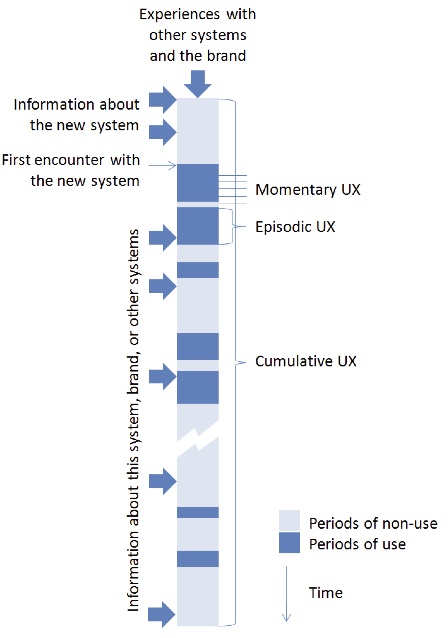
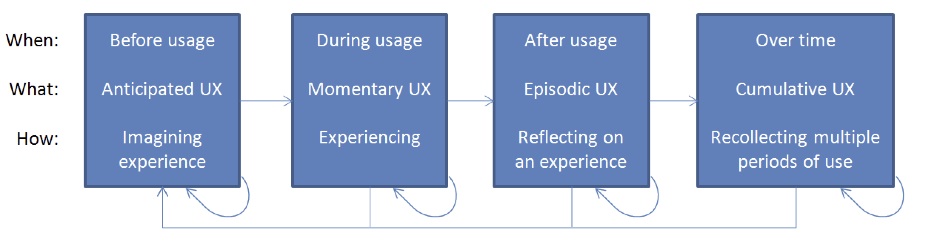
As a UX specialist, you will be concerned with the practical aspects surrounding the application of principles and guidelines into a development, and the testing of the outcomes of that development. This means that you will need to take into account the incremental nature of both the development and the experiences of the individual. Indeed we see that the user experience changes with time, and in some ways is linked with our memory and emotional state (see ‘Figure: UX Periods’ and ‘Figure: Time Spans of User Experience’ taken from 16). In this way we can see that it is possible to counteract an initially bad systems experience, in a system that possibly must be complicated (such as an aircraft cockpit), by increasing the learnability of the controls and their layout. The initial momentary and episodic user experience may be complex – and in some cases seen as negative. However, the cumulative user experience may resolve as simple – equating to a positive user experience (especially in the case of the cockpit whereby the instrumentation, systems, and their layout are often replicated between aeroplanes, regardless of manufacturer or type).
We can, therefore, see that UX directly applies to condition ‘1’ indeed without access to, or the usability of, a system or component by a user this condition cannot be met. In the requirements analysis domain, work often progresses in a software engineering fashion. The methodology for requirements is coalesced around a set of modelling principles often initiated by a wave of interviews, discussions, systems analysis and modelling. In addition to focus-group participation leading to a formal specification or model of the systems and interaction requirement17 (requirements elicitation). These requirements have to be validated and modelled, however, as we shall see in later chapters, there are some problems with current approaches.
2.3 The Importance of UX
While the use of HCI as a tool for knowledge discovery is important, the significance of UX in the interface design and engineering domain should not be overlooked. User facing aspects of the interface are often created by software engineers or application programmers. While these are highly trained specialists, they are often less focused on aspects of user interaction than they are on the programme functionality and logic. In some cases, the end user is often seen as a silent participant in the application creation process and is usually only considered once the system aspects of the development have been created and tested. Indeed, in many cases there is an implicit idea that the user will need to conform to the requirements of the system, and the interface created by the developers, as opposed to the design of the system being a collaborative activity between user and engineer.
The focus of the UX specialist then is to make sure that the user is taken into account from the start, that participation occurs at all stages of the engineering process, that the resultant interface is fit for purpose in its usability and accessibility, and that, as much as possible, the interface is designed to fit the user and provoke a positive emotional response. By trying to understand user requirements, concerning both the system and the interface, the UX specialist contributes to the overall application design lifecycle. Often in a very practical way that belies the underlying scientific processes at work.
As we have seen, both requirements analysis and requirements elicitation are key factors in creating a usable system that performs the tasks required of it by the users and the commissioners of the system. Typically, however, requirements analysis and elicitation are performed by systems analysts as opposed to trained UX, human factors, or ergonomic specialists. Naturally, this means that there is often an adherence to set modelling techniques, usually adapted from the software architecture design process. This inflexibility can often be counter-productive because adaptable approaches of inquiry are often required if we are to better understand the user interaction. In reality, user experience is very similar to usability, although it is rooted within the product design community as opposed to the systems computing community of usability. Indeed, practical usability is often seen as coming from the likes of Nielson, Shneiderman, and lately Krug; while user experience came from the likes of Norman, Cooper, and Gerrett. Although, thinking also suggests these views are becoming increasingly popular18:
Traditionally, the usability specialist would often be expected to undertake a certain degree of software engineering and coding whereas the user experience specialist was often more interdisciplinary in focus. This meant that the user experience specialist might undertake the design of the physical device along with a study of its economic traits but might not be able to take that design to a hardware or software resolution. Indeed, user experience has been defined as:
Therefore, user experience is sometimes seen as less concerned with quantifiable user performance but more the qualitative aspects of usability. In this way, UX was driven by a consideration of the ‘moments of engagement’, known as ‘touchpoints’, between people and the ideas, emotions, and the memories that these moments create. This was far more about making the user feel good about the system or the interface as opposed to purely the utility of the interactive performance. User experience then fell to some extent outside of the technical remit of the computer science-trained HCI specialist.
While once correct these views do not represent the current state of UX in the computer engineering domain. It is therefore the objective of this text to provide you with an overview of modern UX, along with the kinds of tools and techniques that will enable you to conduct your own well-formed scientific studies of human-facing interfaces and systems within the commercial environment.
2.4 Modern UX
Defining UX is akin to walking on quicksand. There is no firm ground, and you’re likely to get mired in many unproductive debates – indeed, to me it seems debates on definitions are currently ‘stuck in the muck’.
But why is defining UX important or even necessary? Well, it must be necessary because everybody seems to be doing it. Indeed ‘All About UX’ (AllAboutUX) have collected many definitions (see the Appendix) with multiple and different perspectives. Further, it’s important because it provides a common language and understanding, and a solid, succinct definition enables everyone to know where they’re going and – in some regard – predicts the road ahead.
So why is it such a problem? It seems to me that there is no clear definition of user experience because it is not yet a distinct domain. Everyone is an immigrant to UX19, and there are no native UX practitioners or indeed first-generation educated practitioners who share a common understanding of what the phenomenon of UX actually is. This is always the case with new, cross-disciplinary, or combinatorial domains. But this does not help us in our efforts to describe the domain such that we all understand what it is we do, where it is we are going, and what falls inside or outside that particular area.
2.4.1 The UX Landscape
Why am I so concerned with 20 paper and the work coalescing around AllAboutUX? The positive point about both of these sources is that they are created based on a community understanding of the area, which implicitly defines the landscape of the user experience domain. In other definitions, created by experts in the field, you are asked to subscribe to the author’s interpretation. Both Law and AllAboutUX base their work on the populous view making little interpretation and allowing others to see the large differences within the comprehension, understanding, and definition of the UX field.
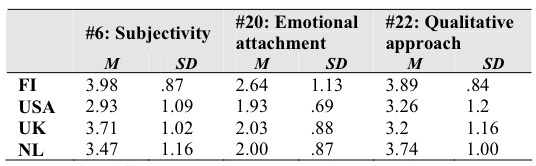
Indeed, purely by a cursory analysis of both sources we can see that there are major differences in understanding the subjectivity, emotional attachment, and qualitative approaches, even at the coarse-grained level of countries. Indeed, ‘Table: UX Country Differences’ shows us that the USA sees UX as less subjective than the other countries. However, all countries show a high degree of variance in the answers given. Further, all countries agree on the emotional attachment aspects of user experience but see this as being reasonably low as a factor in the UX landscape. However, all countries seem to agree that UX can be characterised by its qualitative approaches (as opposed to quantitative approaches) to understanding the experience.
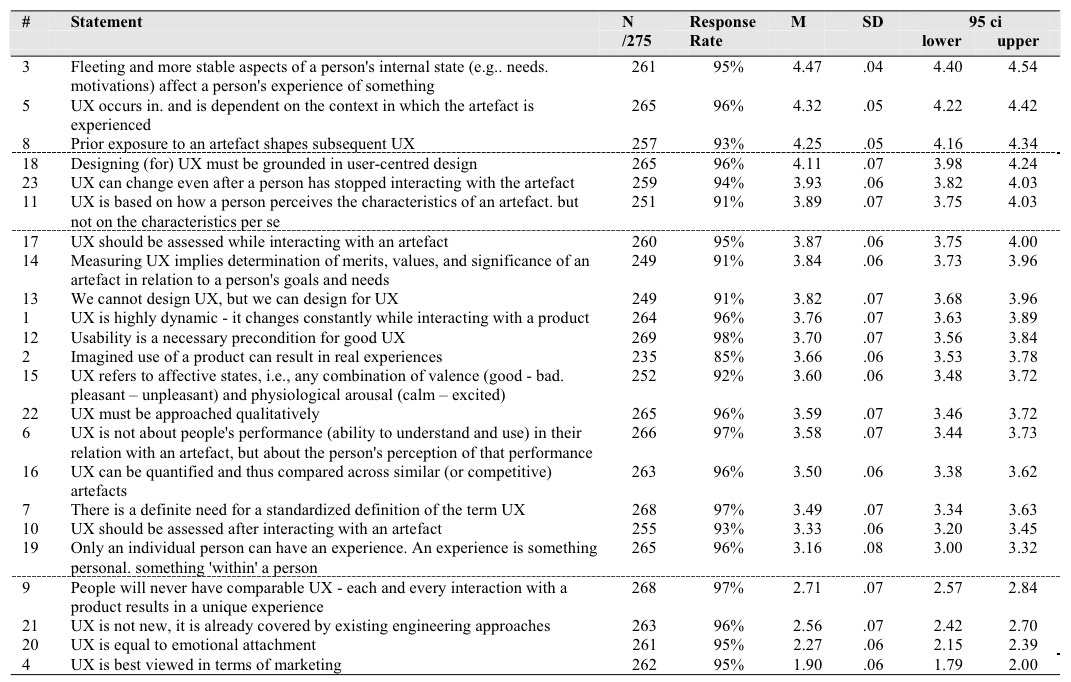
We can also infer (see tables taken from 21) that the community sees user experience as a lens into a person’s internal state. A state that affects their experience of the software or system and that this experience must take place within the presence of the software or system they are interacting with. And that it is dependent on their prior exposure to that software or system. Including its longitudinal aspects (see ‘Table: Twenty-three Statements About UX’), and that their responses are based on their ‘perceptions’ of the software or system they are interacting with — as opposed to the true properties of that system.
Further, the community sees that UX must be grounded in user centred design, we cannot design UX, but that we can design for UX. We can also see that the community do not think that UX is best viewed in terms of marketing. Or that UX is only equal to emotional responses (affective), or that UX is so individual that there will never be an overlap between people and products. Indeed, extrapolating from these results we can see that most UX specialists do not see the need for a high number of users in their testing and evaluation phases, or the need for quantitative statistical analysis. Instead, they prefer a low number of users combined with qualitative output and believe this can be extrapolated to a large population because people have comparable user experiences.
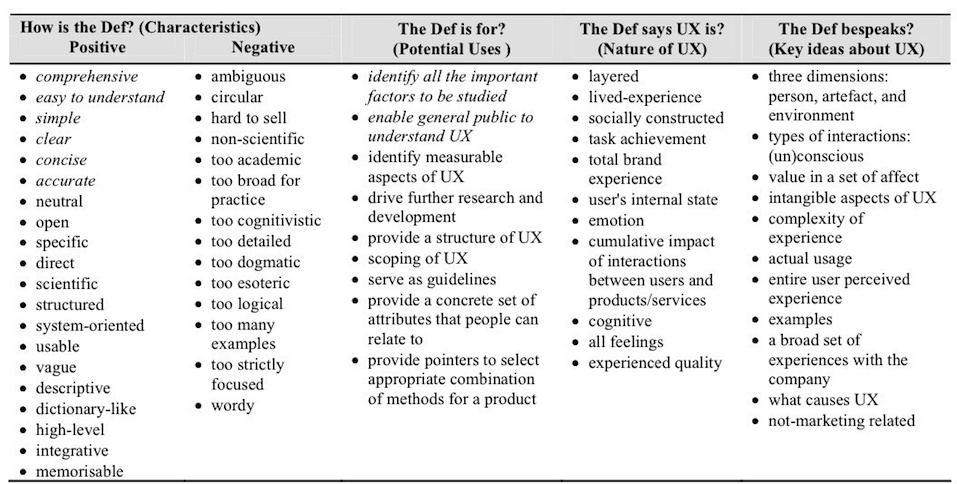
It seems that the most important parts of the UX landscape (see ‘Table: Twenty-three Statements About UX’), its nature and the ideas that are key to its understanding and application, can be summarised from the comments Law received. We could say that the nature of UX is multi-layered and concerns the user’s total experience (including their emotions and feelings) based on their current changeable internal state. UX is often socially constructed and represents the cumulative impact of interactions between users and the software or system, these interactions can be qualitatively and quantitatively measured. Key concepts across the UX landscape include the idea that not only the person, but also the artefact and environment are equally important, and that interactions contain (un)conscious components, intangible aspects, actual and perceived interactions. The users’ entire and broad experiences are valuable.
2.4.2 Caveat
As we have already seen, everything we discover should be looked at with a critical eye, including definitions and understanding of the UX landscape. So why may there be a problem with the landscape we have built in the previous section? From an analysis of Law’s paper, the responses from the community seemed to be reasonably strong — why should we, then, not believe them?
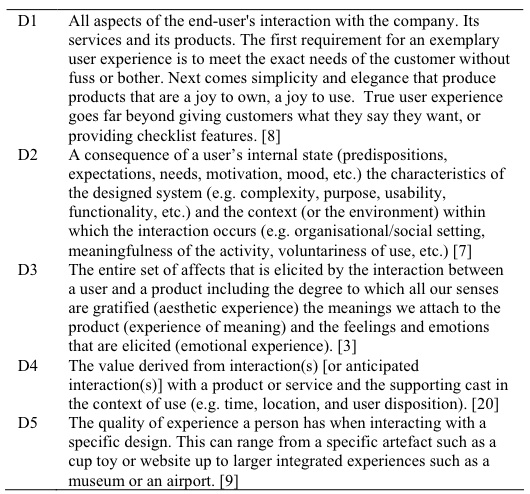
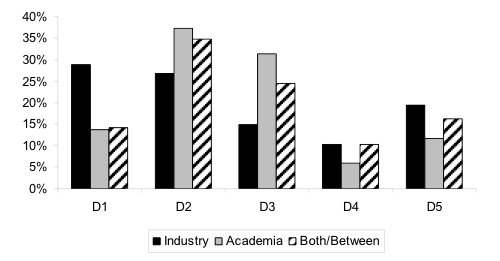
Firstly, take a look at the demographics 22), it seems that this questionnaire was completed by far more industrial practitioners than academic ones — this may have skewed the results. Further, only 27 people said they were educated in art and design therefore we may not be getting a full view of the arts and humanities area — and how it is perceived from a non-technical viewpoint. One hundred and twenty-three people said that they were interested in understanding UX to design better products, which suggests that product designers’ views, and not software technologists’, may have also skewed the results. In addition look at the countries, the authors say ‘[people from] 25 countries [responded], with larger groups of respondents from Finland (48), USA (43), UK (36), and the Netherlands (32)’ so obviously, the views from these countries will dominate. One of the main points to consider is the presumptions of the authors, as expressed in the five definitions used in the survey (see ‘Figure: UX Five Definitions’). The creation of these definitions implies the authors’ desire to elicit broad agreement (or not) and so their creation may introduce some degree of bias. And to some extent represents the authors’ view and implies that this view has some priority, as opposed to a choice made by the UX participants.
This said, it is still my opinion that the authors have done everything possible to be inclusive and to represent the community’s view of UX, however disjoint that may be, in an accurate and informative way. By investigating the domain more fully, taking into account other sources, we too can make more accurate appraisals of the UX landscape. and come to our own definition and understanding of what it means to be a UX specialist within that landscape.
As we have already discussed, the concept of UX is not nascent, indeed it has been around for 20-30 years. However, the formalization and professionalization of UX design as a distinct discipline are relatively recent developments.
The term “user experience” was first coined in the 1990s by Don Norman, a cognitive scientist who worked at Apple and other technology companies. Norman’s work on user-centered design and usability had a significant impact on the design industry, and his ideas helped establish the importance of designing products with the user in mind. However, it wasn’t until the early 2000s that UX design began to emerge as a distinct profession with its own set of practices and methodologies. As the importance of user-centered design became more widely recognized, companies began to hire dedicated UX designers and create UX teams to focus specifically on designing products that meet the needs of their users.
That said, there are certain aspects of the field that are still evolving and can be considered nascent; which include:
- Emerging technologies: As new technologies like virtual and augmented reality, artificial intelligence, and the Internet of Things continue to develop, UX designers will need to adapt their design methodologies to account for these new contexts and use cases.
- Inclusive design: While inclusive design has been a topic of discussion for many years, it is only recently that it has become a more prominent consideration in UX design. Inclusive design involves designing products and services that are accessible and usable by people of all abilities, ages, and backgrounds.
- Data-driven design: The use of data and analytics to inform design decisions is still a nascent aspect of UX design. While many companies are already using data to measure user behavior and improve their products, there is still much to be learned about how to effectively incorporate data into the design process.
- Ethical design: With the increasing attention being paid to data privacy and the ethical implications of technology, UX designers are increasingly being called upon to consider the ethical implications of their designs. This includes issues like data privacy, algorithmic bias, and the impact of technology on society as a whole.
- Cross-functional collaboration: While UX designers have long worked closely with other members of the design team, there is a growing recognition of the importance of cross-functional collaboration in UX design. This involves working closely with stakeholders from other areas of the business, such as product management, engineering, and marketing, to ensure that the user experience is aligned with business goals.
Overall, there are still many aspects of the discipline that are evolving and changing as technology, society, and business needs continue to evolve.
2.4.3 My View
I’ve previously written about my idea of UX. Having seen and read a number of definitions that suggest that UX is more about emotion and may be layered on top of other aspects of software engineering and development such as usability. However, the more I dig, the more I realise that I really do not believe any of the definitions as presented; either via the excellent work of Effie Law, or those parties coalesced around AllAboutUX and led primarily by Virpi Roto.
So what do I believe?
- I believe that UX is primarily about practice and application;
- I believe it is an umbrella term for a multitude of specialisms;
- I believe it is a phenomenon in that it exists and is observable;
- I believe that this phenomenon collects people, methods, tools, and techniques from the wider human factors domain and combines them for practical application;
- I do NOT believe that UX is a primary research domain but rather that UX is the practical application of a particular combination of tools, techniques, methods, principles, and mindset, pulling primarily from human factors and therefore psychology, social science, cognitive science, and human-computer interaction, and secondarily from product design and marketing;
- I do believe that UX is a secondary field of study, if the narrow definition of UX is mainly concerned with emotional indicators is used. However, I believe this is more properly defined as ‘affective experience’; further
- I do not believe that UX is a ‘layer’ in the software artefact route to development but rather describes that software artefact in a holistic way.
Indeed, I see UX as a combination of the following properties23:
-
- Utility
- the software in development must be useful, profitable, or beneficial;
-
- Effective in Use
- the software must be successful in producing a desired or intended result (primarily the removal of technical barriers particularly about accessibility);
-
- Efficient in Use
- the software must achieve maximum productivity with minimum wasted effort or expense (primarily the removal of barriers in relation to usability and interactivity);
-
- Affective in Use
- the software must support the emotional dimension of the experiences and feelings of the user when interacting; anticipating interaction, or when remembering interaction, with it; and
-
- Engaging in Use
- the software may exhibit an intangible dynamic deliciousness (umami) concerning the fun a system is to use.
So, my definition (and this may evolve) would be:
“User Experience is an umbrella term used to describe all the factors that contribute to the quality of experience a person has when interacting with a specific software artefact, or system. It focuses on the practice of user centred: design, creation, and testing, whereby the outcomes can be qualitatively tested using small numbers of users.”
In fact on 26th January 2014 it did evolve to:
“User Experience is an umbrella term used to describe all the factors that contribute to the quality of experience a person has when interacting with a specific software artefact, or system. It focuses on the practice of user centred: design, creation, and testing, whereby the outcomes can be qualitatively evaluated using small numbers of users.”
And again on 04th August 2022 to:
“User Experience is an umbrella term used to describe all the factors that contribute to the quality of experience a person has when interacting with a specific technical artefact, or system. It focuses on the practice of requirements gathering and specification, design, creation, and testing, integrating best practice, heuristics, and ‘prior-art’ whereby the outcomes can be qualitatively evaluated using small numbers of users, placing humans firmly in the loop”

2.5 Summary
As we can see, HCI is one of the most important aspects of computer science and application development. Further, UX is a mostly applied sub-domain of HCI. This is especially the case when that application development is focused on providing humans with access to the program functionality. But this is not the only concern of UX, indeed for many, it is the augmentation of the interactive processes and behaviours of the human in an attempt to deal with an ever more contemplated world that is the focus. This augmentation does not take the form of artificial intelligence or even cybernetics, but by enabling us to interact with computer systems more effectively, to understand the information that they are processing, and to allow us to focus more completely on the intellectual challenges; as opposed to those which are merely administrative or banal. Indeed, this objective has been Douglas C. Engelbart’s overarching aim since 1962:
“By augmenting human intellect we mean increasing the capability of a man to approach a complex problem situation, to gain comprehension to suit his particular needs, and to derive solutions to problems. Increased capability in this respect is taken to mean a mixture of the following: more-rapid comprehension, better comprehension, the possibility of gaining a useful degree of comprehension in a situation that previously was too complex, speedier solutions, better solutions, and the possibility of finding solutions to problems that before seemed insoluble.”
In the context of human factors, HCI is used in areas of the computer science spectrum that may not seem as though they obviously lend themselves to interaction. Even strategies in algorithms and complexity have some aspects of user dependency, as do the modelling and simulation domains within computational science.
In this regard, HCI is very much at the edge of discovery and the application of that discovery. Indeed, HCI requires a firm grasp of the key principles of science, scientific reasoning, and the philosophy of science. This philosophy, principles, and reasoning are required if a thorough understanding of the way humans interact with computers is to be achieved. In a more specific sense, if you need to understand, and show, that the improvements you have made to user interfaces for which you have a responsibility are, in fact, real and quantifiable.
In reality, it is impossible for a text such as this to give an all-encompassing in-depth analysis of the fields that are discussed; indeed this is not its aim. You should think of this text as a route into understanding the most complex issues of user experience from a practical perspective. But you should not regard it as a substitute for the most in-depth treatise presented as part of the further reading for each chapter. In reality, the vast majority of the work covered will enable you to both develop well-constructed interfaces and systems based on the principles of user experience; and run reasonably well-designed evaluations to test your developments.
2.5.1 Optional Further Reading
- [A. Dix] J. Finlay, G. Abowd, and R. Beale. Human-computer interaction. Prentice Hall Europe, London, 2nd ed edition, 1998.
- [C. Bowles] and J. Box. Undercover user experience: learn how to do great UX work with tiny budgets, no time, and limited support. Voices that matter. New Riders, Berkeley, CA, 2011.
- [R. Unger] and C. Chandler. A project guide to UX design: for user experience designers in the field or in the making. Voices that matter. New Riders, Berkeley, CA, 2009.
- [T. Erickson] and D. W. McDonald. HCI Remixed: essays on works that have influenced the HCI community. MIT Press, Cambridge, Mass., 2008.
3. UXD and Visual Design
“The public is more familiar with bad design than good design. It is, in effect, conditioned to prefer bad design, because that is what it lives with. The new becomes threatening, the old reassuring.”
We have already seen, even though 20 years or so old, user experience is still open to many definitions and interpretations; just what UX means, and includes, is a matter of debate and you need to be sure that you are explicit about just what it means for you. Mostly, we can agree that it is about placing emphasis on the user and expanding our concept of their experiences, in terms of technology and surrounding aspects outside of the interface. For this reason, there are different types of focus required from different technical specialists.
3.1 User Experience (UX) and User Experience Design (UXD)
It will be common for you to hear the term UXD (or User Experience Design), which means ‘User eXperience Design—er’. Typically, this specialism is focused on the look and feel of a specific interface, and training the UXD specialist to be a UX designer often occurs after training in graphic design or visual design. You will, however, also note that in terms of other kinds of interfaces, there are typically no well defined interface designers outside of the visual experience, and so the design of conversational and zero UI interfaces is often undertaken by user experience specialists.
In the case of UX, we are thinking typically about user experience in the broader context, not specifically design but more from a technical background of computer science and development. Therefore, UXD is not the natural home for somebody who is trained in the broader UX experience. Indeed, when it comes to specifying systems from an interface and interaction perspective a UX specialist should comply with current best practices.
These are typically set out as guidelines for user interface development specifically around expected look and feel across devices; which are typically codified in what is often understood to be a design language, design system or a look and feel document. These typically are given names that are often outside of the operating system on which they run so that their cross-disciplinarity can be highlighted. For instance, the ‘Metro UI’ was created by Microsoft to support the Windows active tile interface but was seen to be broader than this.
User experience is a broad term that encompasses all aspects of a user’s interaction with a product or service. It includes everything from the user’s initial impressions to the ease of use and functionality of the product, to the user’s overall satisfaction with the experience. On the other hand, user experience design is the process of designing the (visual) user experience. It is a discipline that focuses on creating products that are not only functional but also intuitive, engaging, and enjoyable to use. UX designers use a variety of research techniques and design principles to create products that meet the needs of their users. In essence, UX is the overall perception of a user’s experience with a product or service, while UX design is the intentional and strategic process of designing that experience to be as seamless and satisfying as possible for the user.
UXD often employs graphic or visual designers as part of the team. Visual design is an important aspect of UX design, and the role of a visual designer in UXD is to create visually appealing and functional interfaces that enhance the user experience.
While graphic design and visual design are important components of UX design, UXD goes beyond just visual elements. UXD is a multidisciplinary field that encompasses research, design, and evaluation of user experiences. It involves a range of tasks, including user research, information architecture, interaction design, usability testing, and more.
Again, visual design is just one part of the overall UX design process, and it involves the use of typography, colour, imagery, and other visual elements to create a cohesive and aesthetically pleasing user interface. Graphic design, on the other hand, is focused more on the creation of graphics and images to convey information or messages. Visual designers work closely with UX designers and developers to create interface designs that meet the needs of users while also communicating a clear brand message.
While UX specialists may work closely with graphic designers and visual designers to create compelling and visually appealing products, UXD itself is a broader discipline that encompasses a range of design and research activities aimed at creating user-centred products and services.
However, it’s important to note that UXD goes beyond just visual design. UX designers often work closely with user researchers, product managers, and developers to create user-centred products and services. They use a variety of research techniques to understand user needs and behaviors, and then design interfaces that meet those needs while also achieving business goals.
In short, while visual design is an important component of UXD, UX involves a multidisciplinary team working together to create products that meet user needs and provide a great user experience.
3.2 Design Systems and Languages
A design system is a collection of guidelines, components, and assets that are used to create and maintain a consistent and cohesive visual and interactive experience across different products, platforms, and channels. It serves as a single source of truth for design and helps ensure a unified and efficient design process.
Design systems are typically developed by design teams within organizations and are used by various stakeholders, including designers, developers, and product managers. They provide a standardized set of rules, principles, and patterns that guide the creation of user interfaces, interactions, and overall brand experience.
Design systems establish a consistent visual language, including colors, typography, iconography, and other graphical elements. This ensures a cohesive and recognizable look and feel across different applications and platforms. They often include a library of reusable user interface (UI) components, such as buttons, forms, navigation menus, and cards. These components are designed and documented with predefined styles, behaviors, and guidelines, allowing designers and developers to easily implement them in their projects.
Systems articulate a set of design principles and guidelines that help maintain a consistent user experience. These principles may cover topics like accessibility, responsiveness, layout, and content hierarchy, providing a framework for decision-making during the design process. And they include comprehensive documentation that outlines the guidelines, rules, and best practices for using the system. This documentation serves as a reference for designers and developers, ensuring proper implementation and reducing inconsistencies.
Systems often emphasize accessibility, aiming to create inclusive experiences that can be accessed by users with diverse abilities. They provide guidelines and recommendations for creating accessible designs and may include accessible UI components and color palettes. Finally systems often align with the organization’s brand identity and guidelines. They define the appropriate usage of logos, typography, colors, and other brand assets, ensuring consistency and brand recognition across all touchpoints.
By adopting a design system, organizations can streamline the design and development process, improve collaboration between teams, reduce redundant work, and maintain a cohesive user experience across their products and services. It also allows for scalability and efficiency, as design updates or changes can be applied globally through the system, ensuring a consistent experience across different platforms and products.
A design language — also known as a design language system or design language framework — is more specifically focused on the operational aspects of the overall system. A design language, refers to a comprehensive and consistent set of design principles, patterns, and guidelines that define the visual and interactive characteristics of a product, brand, or organization. It establishes a unified approach to design, ensuring consistency and coherence across various touchpoints.
Design languages are typically developed and maintained by design teams within organizations, and they serve as a reference for designers, developers, and other stakeholders involved in the creation and maintenance of products or services. By establishing a design language, organizations can achieve consistency, improve user experience, enhance brand recognition, and streamline the design and development process across their offerings.
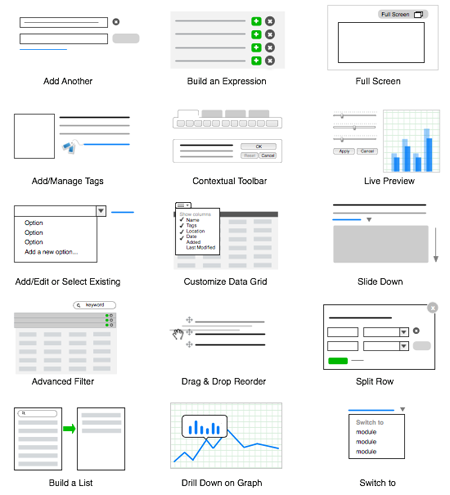
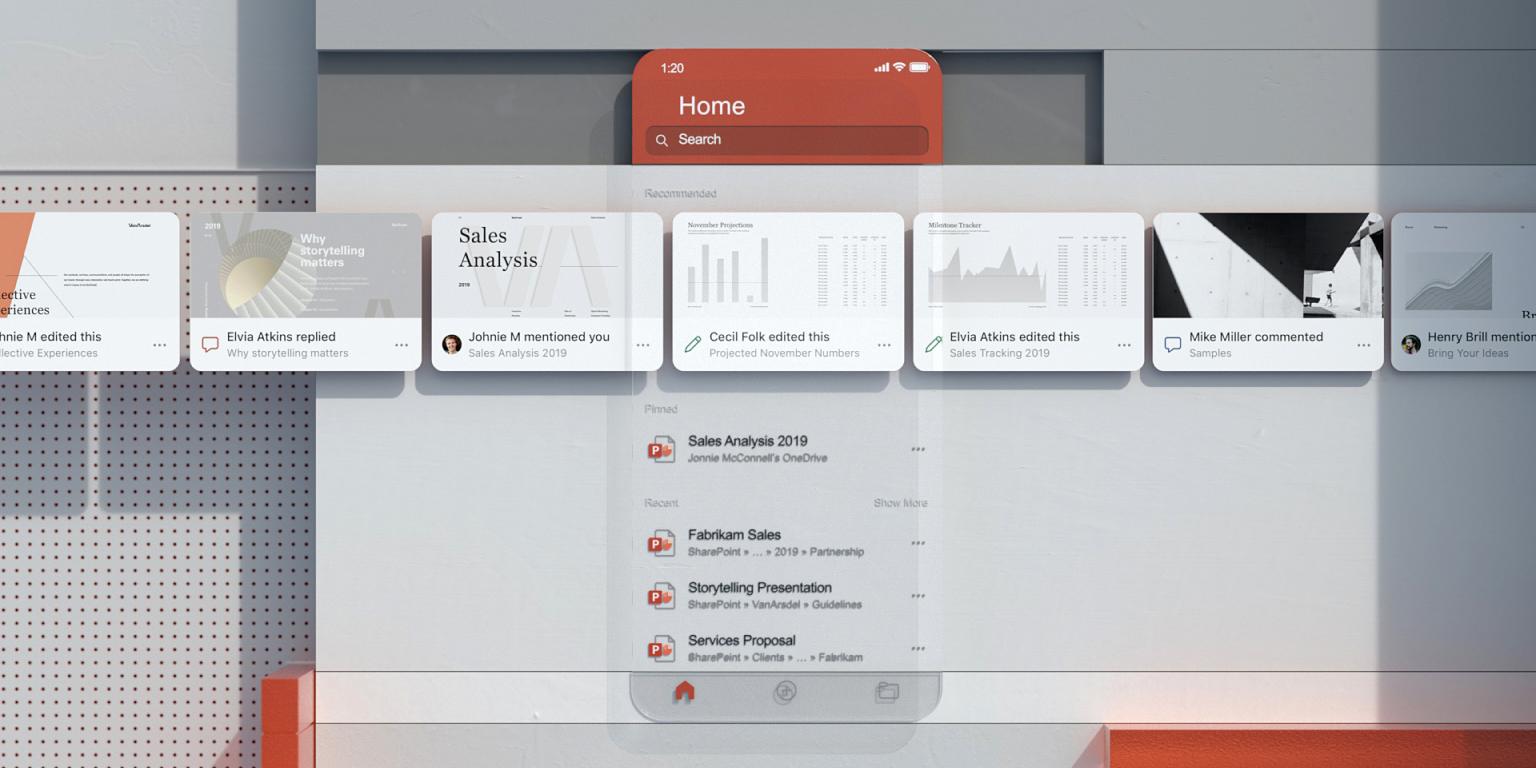
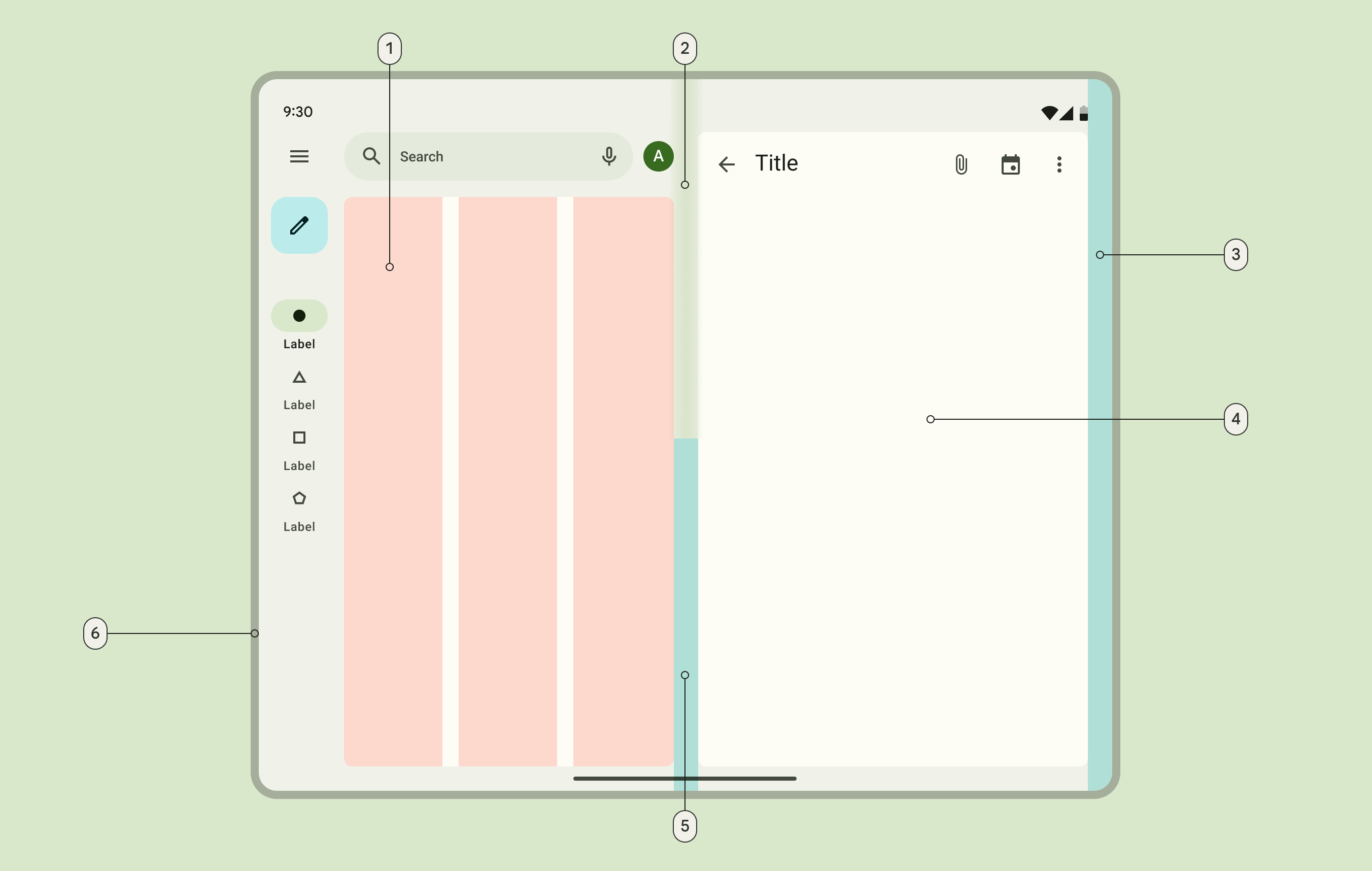
For instance, the original ‘Material Design’ (see Figure: Material Page Example) system typically found on Android devices and critically across most Google applications has evolved into its own specification to be applied across any platform Google related or not. Further languages include Microsoft Fluent (see Figure: Fluent Card Example) and indeed, Apple OSX, and IBM all have their own design systems or languages which you should conform to if you are building or specifying interfaces. These kinds of design systems (or languages) evolved from specifications in real-world architecture, and mutated to interface design patterns (see Figure: Common UI Patterns) via such repositories as the Portland Pattern Repository (famous for the wiki-wiki web developed by Ward Cunningham).
Not only technology developers or platform manufacturers create visual languages and guidelines for their applications and platforms. We can see that there are many other organisations who also have their own visual design languages such as Github, Twitter, and Mozilla all have a specification, that their software engineers can use; and this specification is typically contained (or at least modelled) within specific Cascading Style Sheets, directives or visual rendering directives which can be used in whatever circumstances.
Creation of these languages and specifications should not be attempted by anyone who is not a graphic designer or part of a UXD team and in terms of UX from a technical perspective (you), we are purely the users. So, for instance, we don’t create the artificial intelligence or machine learning algorithms, we just use them; we don’t build a new ANOVA statistical test, we trust the statisticians to have done their job and we don’t reinvent these, and this is the case for using visual design guidance. Conforming also enhances cognitive and perceptual understanding of the user and therefore what to expect is consistent across applications.
3.3 Interaction Design
UX design and interaction design are closely related but distinct disciplines. Interaction design is a subfield of UX design that specifically focuses on designing how users interact with a product or service.
Interaction design involves designing the flow of user interactions, defining how users navigate through a product or service, and creating the interactions that users have with the interface. This includes designing the placement and behaviour of buttons, menus, forms, and other interactive elements, as well as defining the transitions between screens and the feedback that users receive when they interact with the product.
UX design, on the other hand, encompasses a broader range of activities and disciplines. It includes everything from user research and usability testing to information architecture and visual design. While interaction design is a key component of UX design, it is just one of many elements that contribute to the overall user experience.
In essence, interaction design is a focused subset of UX design that is concerned specifically with designing how users interact with a product or service, while UX design is a broader discipline that encompasses all aspects of a user’s experience with a product or service.
3.4 Zero UI and Conversational Interfaces
It is important to realise that when we talk about UXD we are only talking about visual design. We are not talking about conversational interfaces or Zero UI devices which will still fall under the remit of the UX specialist. Indeed, these kinds of interaction modalities (including those of sonification for instance) have no design language or specifications as we see in visual design and are often highly technical in the way that they are expressed and elaborated, with technology doing the majority of the work, especially in language recognition models for conversational interfaces.
Zero UI interfaces are user interfaces that require little or no user interaction to operate. The goal of zero UI interfaces is to create seamless, intuitive experiences that require minimal effort from the user. They are designed to be intuitive and operate without any visible controls or buttons. Instead of relying on traditional input methods such as touch screens or keyboards, zero UI interfaces leverage technologies such as voice recognition, facial recognition, and gesture recognition to interpret the user’s intent and carry out actions. Examples of zero UI interfaces include Amazon’s Alexa and Google’s Assistant, which use natural language processing to interpret voice commands and smart home devices that can automatically adjust lighting and temperature based on user preferences.
Indeed, Conversational interfaces are a subset of Zero UIs that use natural language to enable communication between humans and machines. These interfaces are designed to emulate human conversation and provide a more intuitive way for users to interact with technology. Conversational interfaces can take many forms, including chatbots, voice assistants, and messaging apps.
Chatbots are computer programs designed to simulate human conversation, typically through text-based interactions. They are often used in customer service to answer frequently asked questions or provide basic support. Voice assistants, such as Amazon’s Alexa, Apple’s Siri, and Google Assistant, use speech recognition and natural language processing to enable voice-based interactions between users and devices. Messaging apps, such as Facebook Messenger and WhatsApp, also provide conversational interfaces through which users can interact with chatbots or human agents. Conversational interfaces have become increasingly popular due to their ease of use, accessibility, and ability to provide personalized experiences. They are used in a variety of applications, including customer service, healthcare, finance, and education.
3.5 Summary
In this chapter, I wanted to point out the difference between UX design, visual design and UX as a specialism. We’ve already covered definitions of UX, and we understood that there are different definitions of what is important in UX, what isn’t, and where you want to make sure that you understand that UXD, is really about visual design and UX is broader (you are specialising in UX).
Some texts for UXD as a specialism may emphasize the need for strong visual design skills, but this is not always the case. While visual design is an important aspect of UX design, many/most of the skills for UX designers prioritize skills such as user research, information architecture, and interaction design over visual design skills. Many UXD texts specifically state that specialists should have experience in user research, user testing, wireframing, prototyping, and other aspects of UX design that are not solely focused on visual design. That said, UX designers need to have a basic understanding of visual design principles and be able to work effectively with visual designers as part of a collaborative team. UX design skills may also include visual design as a desired skill, especially for smaller companies where a UX designer may be expected to handle multiple responsibilities. Overall, however, while visual design is an important aspect of UX design, the emphasis on visual design skills will vary depending on the company, industry, and specific project requirements.
3.5.1 Optional Further Reading
- [Material Design] https://material.io/
- [Microsoft Fluent Design] https://www.microsoft.com/design/fluent/
- [J Preece, H Sharp & Y Rogers] Interaction Design: Beyond Human-Computer Interaction, Wiley; 6th edition, 2023.
- [A van Boeijen, et al] Delft Design Guide: Design strategies and methods, BIS Publishers; Revised edition 2020.
- [J Johnson ] Designing with the Mind in Mind: Simple Guide to Understanding User Interface Design Guidelines, Morgan Kaufmann; 3rd edition, 2020.
- [J Tidwill, et al] Designing Interfaces, 3e: Patterns for Effective Interaction Design, O’Reilly; 3rd edition, 2020.