Web Clients in Prolog
SWI-Prolog includes comprehensive HTTP client libraries that make it straightforward to interact with REST APIs, parse JSON, and scrape web content, all from within Prolog.
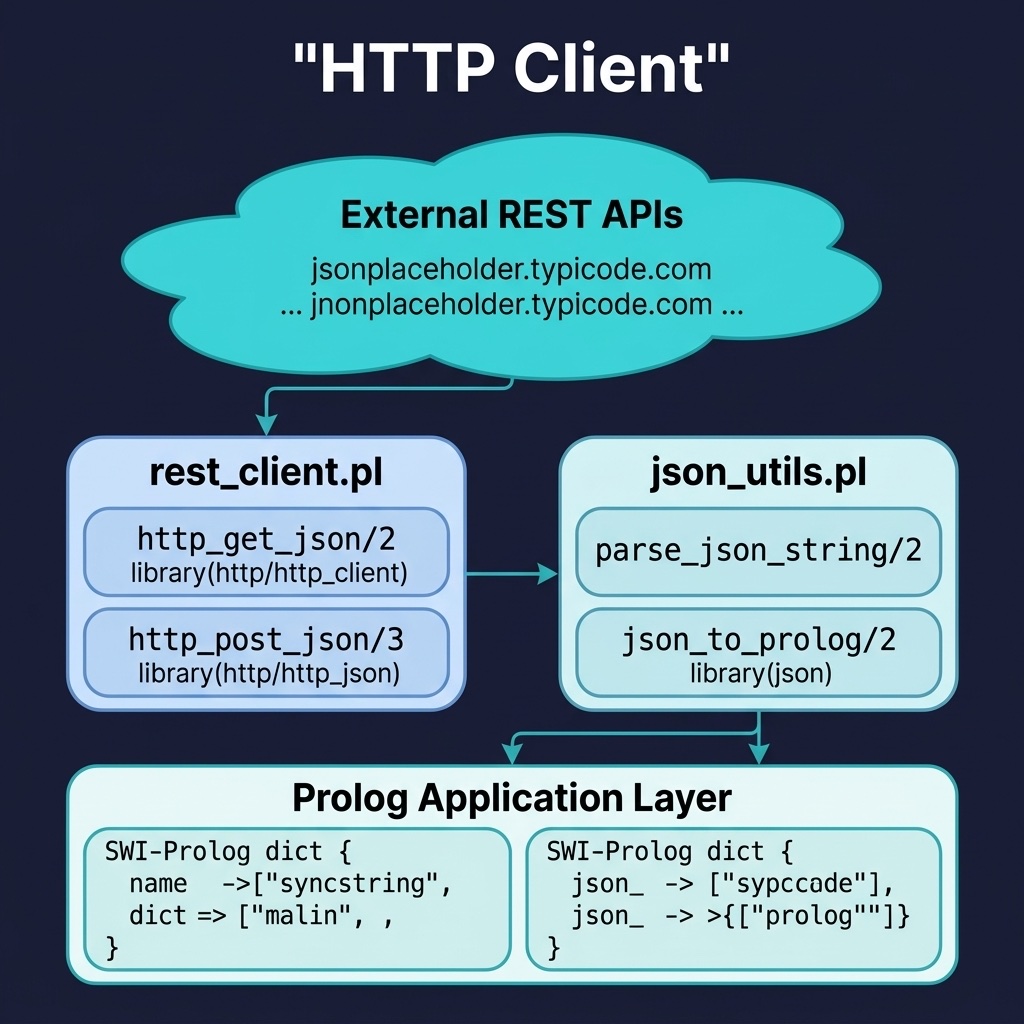
HTTP GET and POST Requests
SWI-Prolog ships with library(http/http_client), a full HTTP/1.1 client that handles GET, POST, PUT, and DELETE requests. The companion library library(http/http_json) adds automatic JSON serialisation and deserialisation, so a single http_get/3 call can fetch a URL and return its JSON body as a Prolog dict.
The key predicates are:
http_get(+URL, -Reply, +Options)- Sends a GET request. Thejson_object(dict)option tells the library to parse the response body as a SWI-Prolog dict rather than the olderjson/1term format.http_post(+URL, +Data, -Reply, +Options)- Sends a POST request. TheDataargument can beatom(Body),json(Term), or other content types. Custom request headers (such asContent-TypeorAuthorization) are passed via the options list.
Error handling is straightforward: if the server returns a non-2xx status code, http_get and http_post throw an http_error exception, which you can catch with catch/3.
The http_client project wraps SWI-Prolog’s HTTP libraries. Here is the file http_client/prolog/rest_client.pl:
 1 %% rest_client.pl - HTTP REST client utilities
 2 :- module(rest_client, [
 3     http_get_json/2,
 4     http_get_json/3,
 5     http_post_json/3,
 6     http_post_json/4
 7 ]).
 8
 9 :- use_module(library(http/http_client)).
10 :- use_module(library(http/http_json)).
11 :- use_module(library(json)).
12
13 %% http_get_json(+URL, -JsonTerm)
14 http_get_json(URL, JsonTerm) :-
15     http_get_json(URL, JsonTerm, []).
16
17 %% http_get_json(+URL, -JsonTerm, +Options)
18 %% Extra Options are passed through to http_get/3.
19 http_get_json(URL, JsonTerm, Options) :-
20     append(Options, [status_code(Code), json_object(dict)],
21            RequestOptions),
22     wrapped_call(
23         http_get(URL, JsonTerm, RequestOptions),
24         Code).
25
26 %% http_post_json(+URL, +JsonPayload, -Response)
27 http_post_json(URL, Payload, Response) :-
28     http_post_json(URL, Payload, Response, []).
29
30 %% http_post_json(+URL, +JsonPayload, -Response, +Options)
31 %% Extra Options are passed through to http_post/4.
32 http_post_json(URL, Payload, Response, Options) :-
33     append(Options,
34            [request_header('Content-Type'='application/json'),
35             status_code(Code),
36             json_object(dict)],
37            RequestOptions),
38     wrapped_call(
39         http_post(URL, json(Payload), Response, RequestOptions),
40         Code).
41
42 %% wrapped_call(:Goal, +Code)
43 %% Fail (with a warning) on transport errors or non-2xx replies.
44 wrapped_call(Goal, Code) :-
45     (   catch(Goal, E, (log_http_error(E), fail))
46     ->  (   success_code(Code)
47         ->  true
48         ;   log_http_error(bad_status(Code)),
49             fail
50         )
51     ;   log_http_error(request_failed),
52         fail
53     ).
54
55 success_code(Code) :- Code >= 200, Code < 300.
56
57 log_http_error(Error) :-
58     print_message(warning, http_client_error(Error)).
The http_get_json/2 predicate is a thin wrapper that adds the json_object(dict) option. The http_post_json/3 predicate posts the payload as json(Payload) with the appropriate Content-Type header, and the library serialises it directly. The response is automatically parsed back into a dict. Both get and post fail with a warning on transport errors or a non-2xx status. The Options variants pass extra options to the underlying http_get/3 and http_post/4.
You can test this in the REPL:
1 ?- http_get_json('https://jsonplaceholder.typicode.com/todos/1', R).
2 R = _{ completed:false, id:1, title:"delectus aut autem", userId:1 }.
Working with JSON
Most modern web APIs return JSON. SWI-Prolog provides two representations for JSON data:
- Dicts (the modern approach) - SWI-Prolog dicts are key-value stores accessed with dot notation (e.g.,
Dict.name). They map naturally to JSON objects and are the recommended format. json/1terms (the legacy approach) - The olderjson([key=value, ...])compound term format. Still supported but less ergonomic.
The atom_json_dict/3 predicate is the core conversion tool. It converts between a JSON-formatted atom (or string) and a Prolog dict in both directions:
1 %% Parsing: JSON string -> Prolog dict
2 ?- atom_json_dict('{"name":"Alice","age":30}', Dict, []).
3 Dict = _{ age:30, name:"Alice" }.
4
5 %% Generating: Prolog dict -> JSON string
6 ?- atom_json_dict(Json, _{name:"Bob", score:95}, []).
7 Json = '{"name":"Bob","score":95}'.
To traverse nested JSON structures, use chained dot notation: Dict.address.city accesses the city field inside a nested address object. For lists, use standard Prolog list operations: a JSON array becomes a Prolog list.
The http_client project also includes JSON utilities. Here is the file http_client/prolog/json_utils.pl:
 1 %% json_utils.pl - JSON parsing and generation utilities
 2 :- module(json_utils, [
 3     parse_json_string/2,
 4     json_dict_pairs/2,
 5     json_to_prolog/2
 6 ]).
 7
 8 :- use_module(library(json)).
 9
10 %% parse_json_string(+JsonString, -PrologTerm)
11 parse_json_string(JsonString, Term) :-
12     atom_json_dict(JsonString, Term, []).
13
14 %% json_dict_pairs(+JsonDict, -Pairs)
15 %% Convert a JSON dict to a list of Key-Value pairs.
16 json_dict_pairs(Dict, Pairs) :-
17     is_dict(Dict),
18     dict_pairs(Dict, _, Pairs).
19
20 %% json_to_prolog(+JsonDict, -Pairs)
21 %% Deprecated alias for json_dict_pairs/2, kept for compatibility.
22 json_to_prolog(Dict, Pairs) :-
23     print_message(warning, deprecated(json_to_prolog/2,
24                                       json_dict_pairs/2)),
25     json_dict_pairs(Dict, Pairs).
The json_dict_pairs/2 predicate uses dict_pairs/3 to decompose a dict into a list of Key-Value pairs. This is useful when you need to iterate over all fields in a JSON object without knowing the keys in advance. The older name json_to_prolog/2 is kept as a deprecated alias that prints a warning and forwards to json_dict_pairs/2.
Web Scraping
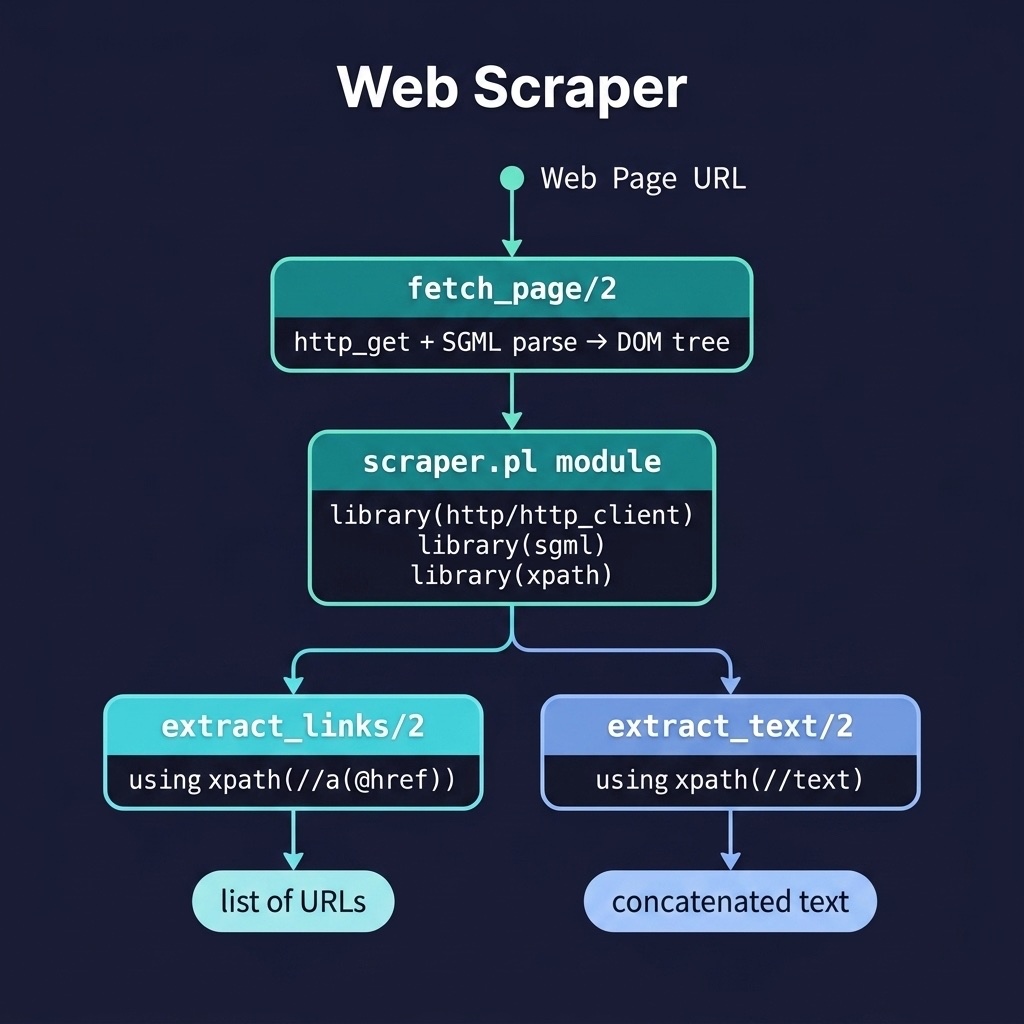
SWI-Prolog can also fetch and parse HTML pages directly. The workflow combines three libraries:
library(http/http_client)- Fetches the raw HTML content from a URL.library(sgml)- Parses the HTML string into a DOM tree (a nested Prolog term representing the document structure).library(xpath)- Queries the DOM tree using XPath expressions to extract specific elements.
The load_html/3 predicate from library(sgml) is tolerant of malformed HTML, making it suitable for scraping real-world web pages. Once you have a DOM tree, xpath/3 lets you select elements declaratively, for example, xpath(DOM, //a(@href), Href) extracts the href attribute from every <a> tag in the document.
The web_scraper project implements a simple HTML scraper. Here is the file web_scraper/prolog/scraper.pl:
 1 %% scraper.pl - Web scraping using HTTP client and SGML/HTML parser
 2 :- module(scraper, [
 3     fetch_page/2,
 4     extract_links/2,
 5     extract_text/2,
 6     parse_html_dom/2,
 7     strip_script_style/2
 8 ]).
 9
10 :- use_module(library(http/http_client)).
11 :- use_module(library(sgml)).
12 :- use_module(library(xpath)).
13
14 %% fetch_page(+URL, -DOM) - Fetch and parse an HTML page
15 %% Fails (with a warning) on transport errors or non-200 replies.
16 fetch_page(URL, DOM) :-
17     catch(
18         http_get(URL, Content,
19                  [to(string),
20                   timeout(20),
21                   status_code(Code),
22                   user_agent('PrologAIBook-Scraper/1.0')]),
23         E,
24         (   print_message(warning,
25                           scraper_error(transport(URL, E))),
26             fail
27         )),
28     (   Code == 200
29     ->  true
30     ;   print_message(warning, scraper_error(status(URL, Code))),
31         fail
32     ),
33     parse_html_dom(Content, DOM).
34
35 %% parse_html_dom(+HtmlString, -DOM) - Parse an HTML string into a DOM
36 parse_html_dom(Content, DOM) :-
37     setup_call_cleanup(
38         open_string(Content, In),
39         load_html(In, DOM, []),
40         close(In)).
41
42 %% extract_links(+DOM, -Links) - Extract all href links from HTML
43 extract_links(DOM, Links) :-
44     findall(Href, xpath(DOM, //a(@href), Href), Links).
45
46 %% extract_text(+DOM, -Text) - Extract visible text content
47 %% Text inside <script> and <style> subtrees is filtered out.
48 %% (library(xpath) has no //text node test, so we walk the DOM.)
49 extract_text(DOM, Text) :-
50     strip_script_style(DOM, CleanDOM),
51     findall(T, dom_text(CleanDOM, T), Texts),
52     atomic_list_concat(Texts, ' ', Text).
53
54 %% dom_text(+DOMList, -Text) is nondet
55 %% Yield each text-node atom/string in a DOM list.
56 dom_text([Node|Rest], Text) :-
57     (   (atom(Node) ; string(Node)),
58         Text = Node
59     ;   Node = element(_, _, Children),
60         dom_text(Children, Text)
61     ;   Rest \= [],
62         dom_text(Rest, Text)
63     ).
The fetch_page/2 predicate requests the page with the to(string) option so the body comes back as a Prolog string, sets a 20 second timeout and a custom User-Agent, and requests the HTTP status code. The call sits inside catch/3; a transport error or a non-200 status prints a warning and fails. parse_html_dom/2 then opens the string as a stream with open_string/2 and hands it to load_html/3.
The extract_links/2 predicate uses findall/3 with xpath/3 to collect results: the XPath expression //a(@href) selects all <a> elements and extracts their href attribute. extract_text/2 is different: because library(xpath) has no //text node test, it first removes <script> and <style> subtrees with strip_script_style/2, then walks the DOM with dom_text/2 to yield each text node.
Practical Applications
These HTTP client and scraping building blocks are used throughout the book:
- LLM API Integration - The
rest_clientmodule is the foundation for calling the Google Gemini and Ollama APIs (see the LLM Integration chapter). A singlehttp_post_json/3call sends a prompt and receives the model’s response. - SPARQL Queries - The Semantic Web chapter uses HTTP GET requests to query remote SPARQL endpoints like DBpedia and Wikidata, parsing the JSON results into Prolog terms for local reasoning.
- Knowledge Graph Enrichment - Web scraping can extract structured data from HTML pages and assert it into a local knowledge graph. For example, scraping a product catalogue and converting the extracted attributes into
entity/3facts. - Data Pipeline Preprocessing - Fetching CSV or JSON datasets from public APIs (such as government open data portals) and transforming them into Prolog facts for analysis with the anomaly detection or probabilistic reasoning modules.
Optional Practice Problems
- Image Link Scraper: In the
web_scraperproject, extendscraper.plto parse and extract thesrcattribute of all<img>tags on a webpage, handling relative paths correctly. - HTTP Retry Decorator: In
http_client, implement a wrapper predicatehttp_get_retry/3that automatically retries an HTTP request up to three times with exponential backoff if the server returns a temporary network code.