LLM Integration
Large Language Models are transforming AI, and Prolog can serve as a powerful orchestration layer, combining LLM-generated text with symbolic reasoning, structured knowledge, and explainable inference.
Calling LLM APIs from Prolog
SWI-Prolog’s HTTP client libraries (covered in the Web Clients chapter) make it straightforward to call any REST API, including LLM endpoints. The workflow is:
- Read the API key from an environment variable using
getenv/2. - Build the JSON request payload as a Prolog term.
- Send an HTTP POST request with
http_post/4, which automatically serialises the payload and deserialises the JSON response into a SWI-Prolog dict. - Extract the generated text from the response dict using dot notation.
Because http_post/4 is synchronous, the call blocks until the model returns its full response. For streaming responses (where tokens arrive incrementally), you would use http_open/3 with a read loop, but for most Prolog applications, the simpler synchronous approach is sufficient.
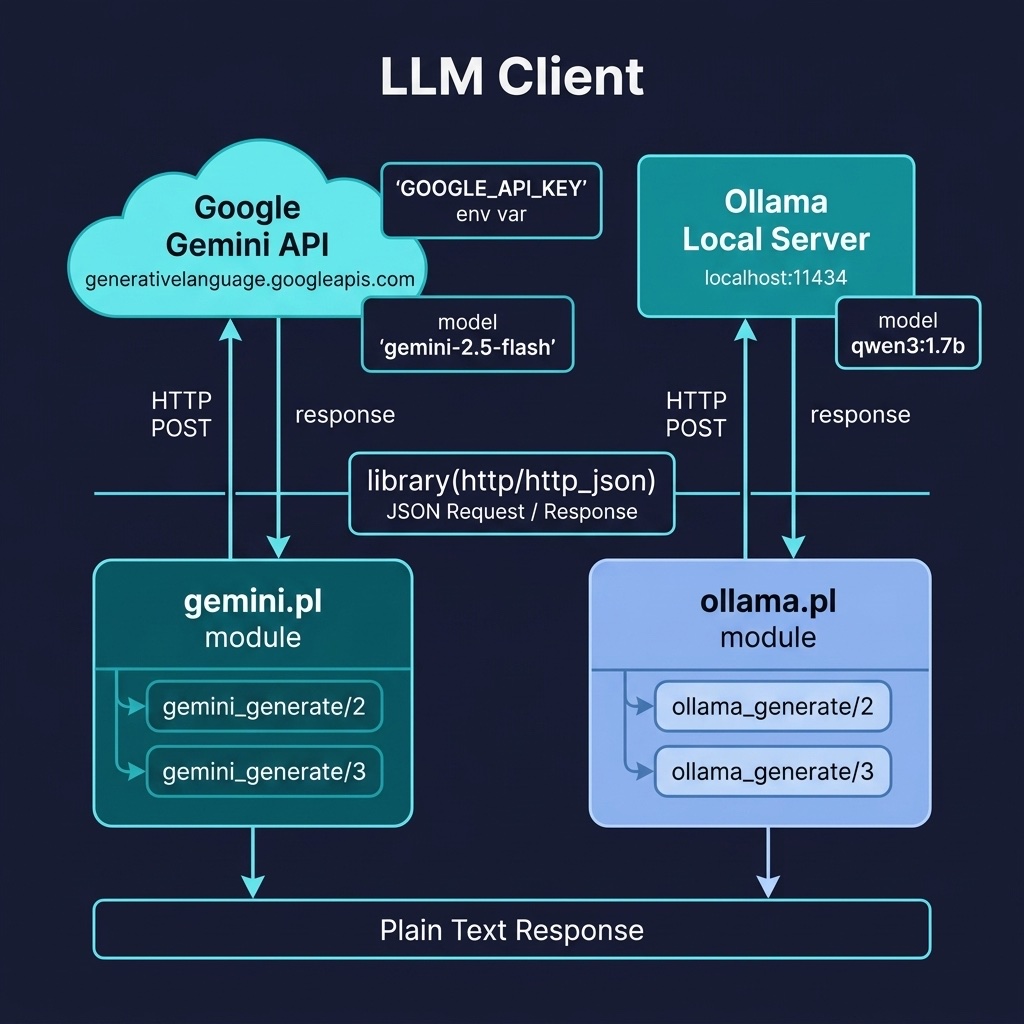
The llm_client project provides clients for Google Gemini and Ollama. Here is the file llm_client/prolog/gemini.pl:
 1 %% gemini.pl - Google Gemini API client
 2 :- module(gemini, [
 3     gemini_generate/2,
 4     gemini_generate/3
 5 ]).
 6
 7 :- use_module(library(http/http_client)).
 8 :- use_module(library(http/http_json)).
 9 :- use_module(library(json)).
10
11 %% gemini_generate(+Prompt, -Response)
12 %% Uses GOOGLE_API_KEY environment variable
13 gemini_generate(Prompt, Response) :-
14     gemini_generate(Prompt, Response, []).
15
16 %% gemini_generate(+Prompt, -Response, +Options)
17 %% Options: model(Model), temperature(T), max_output_tokens(N)
18 gemini_generate(Prompt, Response, Options) :-
19     require_env('GOOGLE_API_KEY', ApiKey),
20     option_value(model, Options, Model, 'gemini-2.5-flash'),
21     format(atom(URL),
22            'https://generativelanguage.googleapis.com/v1beta/models/~w:generateContent',
23            [Model]),
24     option_value(temperature, Options, Temperature, none),
25     option_value(max_output_tokens, Options, MaxTokens, none),
26     Payload = _{
27         contents: [_{parts: [_{text: Prompt}]}],
28         generationConfig: Config
29     },
30     generation_config(Temperature, MaxTokens, ConfigPairs),
31     (   ConfigPairs = []
32     ->  Config = json([])
33     ;   Config = json(ConfigPairs)
34     ),
35     catch(
36         http_post(URL, json(Payload), Result,
37                   [request_header('x-goog-api-key'=ApiKey),
38                    json_object(dict)]),
39         E,
40         (   log_llm_error(gemini, E),
41             fail
42         )),
43     extract_text_response(Result, Response).
44
45 %% generation_config(+Temperature, +MaxTokens, -ConfigPairs)
46 %% Build the generationConfig pairs for the payload body.
47 generation_config(none, none, []).
48 generation_config(T, none, [temperature=T]) :- T \= none.
49 generation_config(none, Max, [maxOutputTokens=Max]) :- Max \= none.
50 generation_config(T, Max, [temperature=T, maxOutputTokens=Max]) :-
51     T \= none, Max \= none.
52
53 %% require_env(+Name, -Value)
54 %% Get an environment variable or throw a clear existence_error.
55 require_env(Name, Value) :-
56     (   getenv(Name, Value)
57     ->  true
58     ;   existence_error(env, Name)
59     ).
60
61 %% option_value(+Key, +Options, -Value, +Default)
62 %% Simple member-based option lookup (library(option) not required).
63 option_value(Key, Options, Value, Default) :-
64     Opt =.. [Key, Value],
65     (   member(Opt, Options)
66     ->  true
67     ;   Value = Default
68     ).
69
70 %% extract_text_response(+Result, -Text)
71 %% Total: fails cleanly on error-shaped JSON (no candidates key).
72 extract_text_response(Result, Text) :-
73     is_dict(Result),
74     get_dict(candidates, Result, Candidates),
75     Candidates = [First|_],
76     is_dict(First),
77     get_dict(content, First, Content),
78     is_dict(Content),
79     get_dict(parts, Content, Parts),
80     Parts = [Part|_],
81     is_dict(Part),
82     get_dict(text, Part, Text).
The gemini_generate/2 predicate reads the GOOGLE_API_KEY environment variable, constructs the Gemini API URL, builds the nested JSON payload, and posts it. The request sends the API key in the x-goog-api-key header, not in the URL. The options list accepts model/1 (default gemini-2.5-flash), temperature/1, and max_output_tokens/1; generation_config/3 turns those into the generationConfig body. require_env/2 throws existence_error(env, Name) if the variable is unset. extract_text_response/2 is total. It walks the response’s candidates[0].content.parts[0].text path with is_dict/1 and get_dict/3 and fails cleanly on error-shaped JSON instead of throwing.
And a client for local Ollama models. Here is the file llm_client/prolog/ollama.pl:
 1 %% ollama.pl - Ollama local LLM API client
 2 :- module(ollama, [
 3     ollama_generate/2,
 4     ollama_generate/3
 5 ]).
 6
 7 :- use_module(library(http/http_client)).
 8 :- use_module(library(http/http_json)).
 9 :- use_module(library(json)).
10
11 %% ollama_generate(+Prompt, -Response)
12 %% Uses default model and localhost:11434
13 ollama_generate(Prompt, Response) :-
14     ollama_generate(Prompt, Response, [model('qwen3:1.7b')]).
15
16 %% ollama_generate(+Prompt, -Response, +Options)
17 ollama_generate(Prompt, Response, Options) :-
18     (member(model(Model), Options) -> true ; Model = 'qwen3:1.7b'),
19     URL = 'http://localhost:11434/api/generate',
20     Payload = json([
21         model=Model,
22         prompt=Prompt,
23         stream= @(false)
24     ]),
25     catch(
26         http_post(URL, json(Payload), Result, [json_object(dict)]),
27         E,
28         (   log_ollama_error(E),
29             fail
30         )),
31     (   is_dict(Result),
32         get_dict(response, Result, Response)
33     ->  true
34     ;   log_ollama_error(unexpected_response(Result)),
35         fail
36     ).
The Ollama client follows the same pattern but targets the local Ollama REST API on port 11434. The stream= @(false) option tells Ollama to return the complete response in a single JSON object rather than streaming tokens. The http_post/4 call is wrapped in catch/3, and a connection-refused error prints a warning hinting “is the Ollama server running?” Response extraction is guarded by is_dict/1 and get_dict/3 so an unexpected reply fails with a warning instead of throwing. The model name defaults to qwen3:1.7b but can be overridden via the options list.
Both clients can be tested in the REPL:
1 ?- gemini_generate("What is Prolog?", Response).
2 Response = "Prolog is a logic programming language...".
3
4 ?- ollama_generate("Explain backtracking", Response).
5 Response = "Backtracking is a systematic method...".
Structured Output from LLMs
Raw LLM text is useful for human consumption, but for integration with Prolog’s reasoning engine we need structured data. The key technique is to craft prompts that instruct the LLM to return its output as JSON with a specific schema. For example:
1 Extract all people and organizations from the following text.
2 Return your answer as JSON with this schema:
3 {"entities": [{"name": "...", "type": "person|org"}],
4  "relations": [{"subject": "...", "predicate": "...", "object": "..."}]}
Once the LLM returns JSON, we parse it into a SWI-Prolog dict and assert the extracted entities and relations as dynamic Prolog facts. This bridges the gap between statistical language understanding (the LLM) and symbolic reasoning (Prolog).
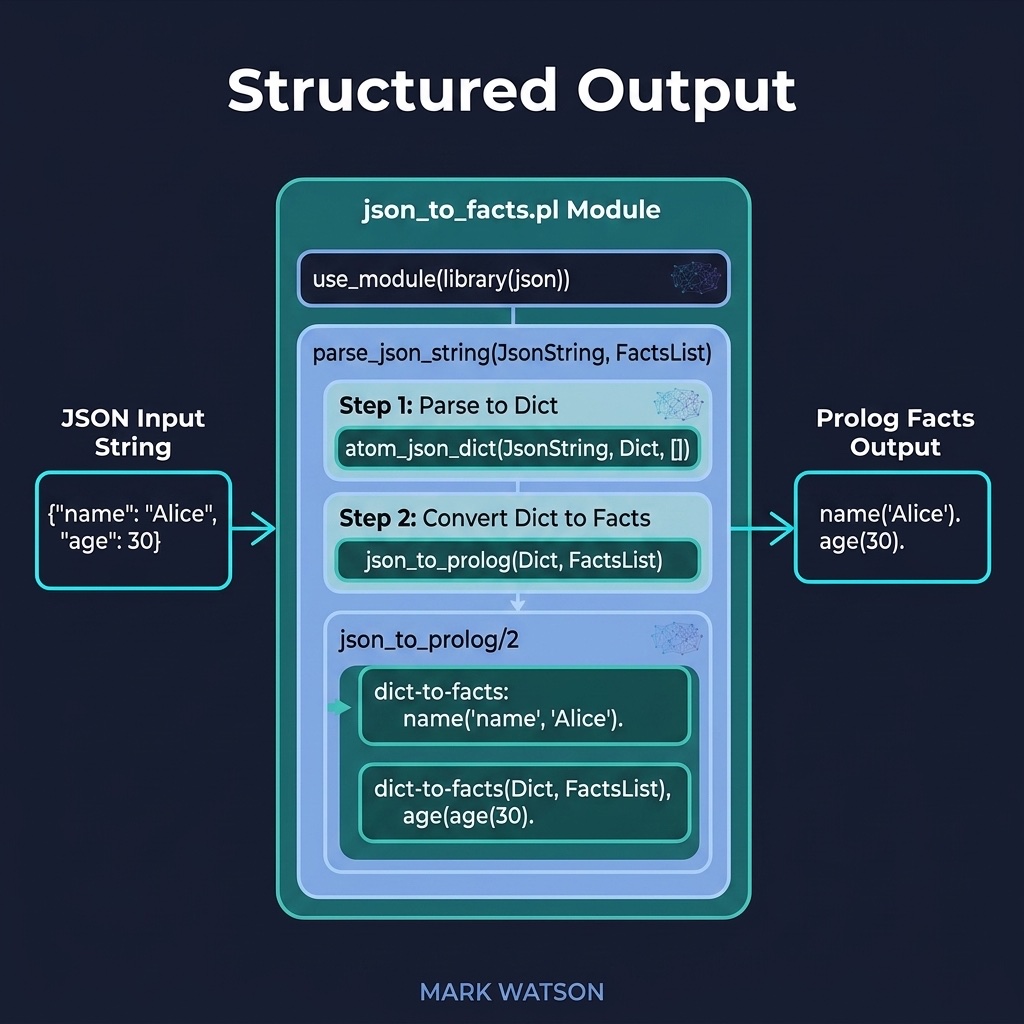
The structured_output project converts JSON LLM output into assertable Prolog facts. Here is the file structured_output/prolog/json_to_facts.pl:
 1 %% json_to_facts.pl - Convert structured LLM JSON output into Prolog
 2 %% facts
 3 :- module(json_to_facts, [
 4     json_string_to_facts/1,     % +JsonString
 5     json_string_to_facts/2,     % +JsonString, -Counts
 6     clear_extracted/0,          %
 7     extracted_entity/2,
 8     extracted_relation/3
 9 ]).
10
11 :- use_module(library(json)).
12
13 :- dynamic extracted_entity/2.    % extracted_entity(Name, Type)
14 :- dynamic extracted_relation/3.  % extracted_relation(Subject,
15                                   %            Predicate, Object)
16
17 %% clear_extracted/0
18 %% Remove every asserted entity/relation fact (test setup helper).
19 clear_extracted :-
20     retractall(extracted_entity(_, _)),
21     retractall(extracted_relation(_, _, _)).
22
23 %% json_string_to_facts(+JsonString)
24 %% Parses JSON with entities/relations arrays into Prolog facts
25 json_string_to_facts(JsonString) :-
26     json_string_to_facts(JsonString, _Counts).
27
28 %% json_string_to_facts(+JsonString, -Counts)
29 %% As /1 but also returns a counts dict:
30 %%   _{entities: NE, entities_with_warnings: WE,
31 %%     relations: NR, relations_with_warnings: WR}.
32 %% Malformed items are skipped with a print_message/2 warning and
33 %% counted, never thrown.
34 json_string_to_facts(JsonString, Counts) :-
35     atom_json_dict(JsonString, Dict, []),
36     (   get_dict(entities, Dict, Entities)
37     ->  foldl(assert_entity, Entities, 0-0, NE-WE)
38     ;   NE = 0, WE = 0
39     ),
40     (   get_dict(relations, Dict, Relations)
41     ->  foldl(assert_relation, Relations, 0-0, NR-WR)
42     ;   NR = 0, WR = 0
43     ),
44     Counts = _{ entities: NE, entities_with_warnings: WE,
45                 relations: NR, relations_with_warnings: WR }.
46
47 assert_entity(E, N0-W0, N-W) :-
48     (   get_dict(name, E, Name), get_dict(type, E, Type)
49     ->  (   \+ extracted_entity(Name, Type)
50         ->  assert(extracted_entity(Name, Type))
51         ;   true
52         ),
53         N is N0 + 1, W = W0
54     ;   print_message(warning,
55             malformed_entity_skipped(E)),
56         N = N0, W is W0 + 1
57     ).
58
59 assert_relation(R, N0-W0, N-W) :-
60     (   get_dict(subject, R, S),
61         get_dict(predicate, R, P),
62         get_dict(object, R, O)
63     ->  (   \+ extracted_relation(S, P, O)
64         ->  assert(extracted_relation(S, P, O))
65         ;   true
66         ),
67         N is N0 + 1, W = W0
68     ;   print_message(warning,
69             malformed_relation_skipped(R)),
70         N = N0, W is W0 + 1
71     ).
The json_string_to_facts/1 predicate parses the JSON string into a dict, then uses get_dict/3 to safely extract the entities and relations arrays. json_string_to_facts/2 returns a counts dict. Malformed items are skipped with a warning, never an exception. clear_extracted/0 removes all asserted entities and relations. The assert_entity/3 and assert_relation/3 helpers are foldl/4 accumulators that count asserted facts and warnings. The duplicate check (\+ extracted_entity(Name, Type)) prevents the same fact from being asserted twice if the LLM returns redundant extractions.
After calling json_string_to_facts/1, the extracted knowledge is immediately available for Prolog queries:
1 ?- json_string_to_facts('{"entities":[{"name":"Paris","type":"city"}]}').
2 true.
3
4 ?- extracted_entity(Name, Type).
5 Name = "Paris",
6 Type = "city".
Combining LLMs with Prolog Reasoning
The most powerful pattern in this book is the hybrid AI pipeline: use an LLM for tasks it excels at (natural language understanding, summarisation, information extraction) and use Prolog for tasks where it excels (structured reasoning, constraint satisfaction, explainable inference). Each system handles what it does best.
A typical hybrid pipeline has four stages:
- LLM Extraction: The LLM processes unstructured text and returns structured JSON (entities, relations, classifications).
- Fact Assertion: The JSON is parsed and asserted into Prolog’s dynamic database as facts.
- Symbolic Reasoning: Prolog rules fire over the asserted facts, producing conclusions, classifications, or recommendations.
- Explanation: Prolog’s proof-tree facilities (covered in the Reasoning chapter) explain why each conclusion was reached, something LLMs cannot reliably do.
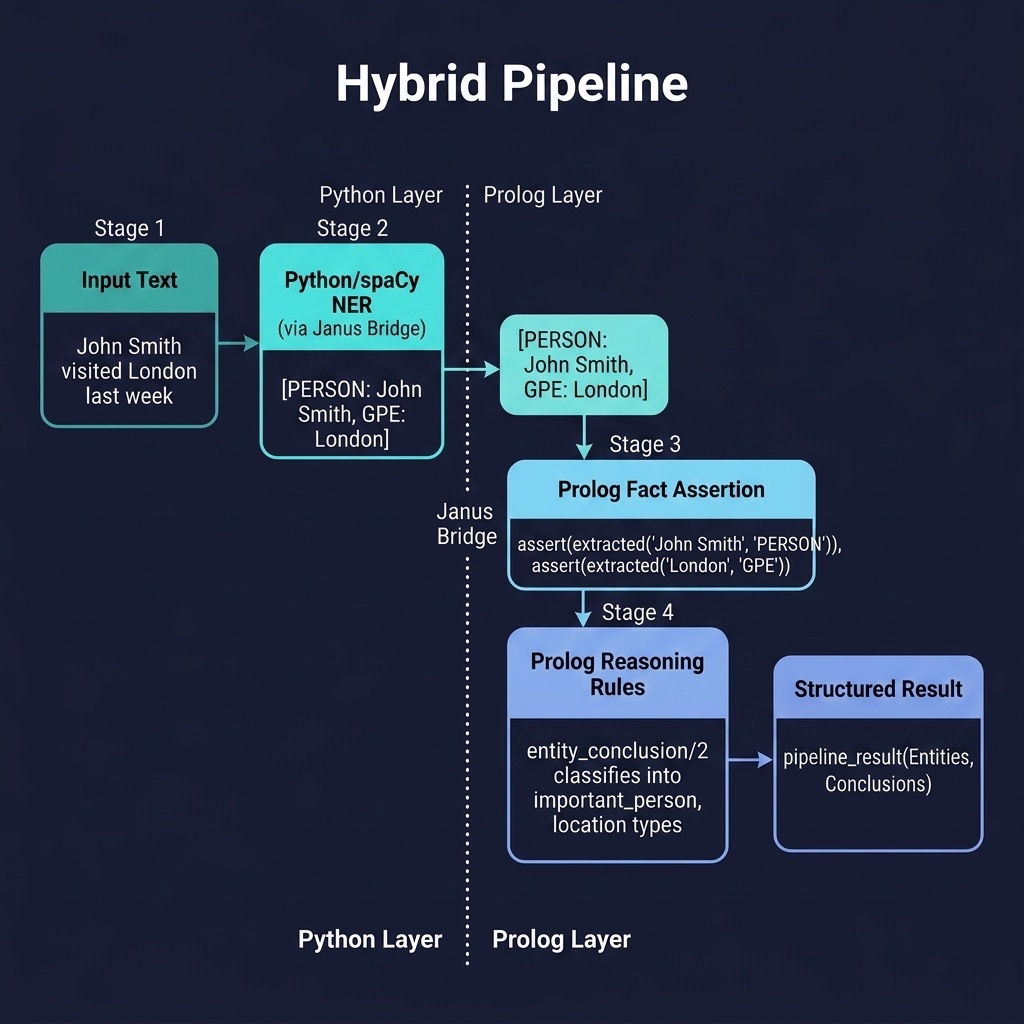
The hybrid_pipeline project demonstrates this architecture using Python/spaCy for NER and Prolog for reasoning, connected via the Janus bridge. Here is the file hybrid_pipeline/prolog/pipeline.pl:
 1 %% pipeline.pl - Hybrid AI pipeline: Python preprocessing + Prolog
 2 %% reasoning
 3 :- module(pipeline, [
 4     run_pipeline/2
 5 ]).
 6
 7 :- use_module(library(janus)).
 8
 9 :- dynamic extracted/2.
10
11 % Resolve the companion python/ directory relative to this source file
12 % so the module works from any current working directory.
13 :- initialization(setup_python_path, main).
14
15 setup_python_path :-
16     (   current_prolog_flag(windows, true)
17     ->  Sep = '\\'
18     ;   Sep = '/'
19     ),
20     once(source_file(pipeline:_, ThisFile)),
21     file_directory_name(ThisFile, PrologDir),
22     atomic_list_concat([PrologDir, '..', Sep, 'python'], PyDir),
23     py_add_lib_dir(PyDir).
24
25 %% run_pipeline(+InputText, -Result)
26 %% 1. Use Python/spaCy for NER extraction
27 %% 2. Assert extracted entities as Prolog facts
28 %% 3. Apply Prolog reasoning rules
29 %% 4. Return structured conclusions
30 run_pipeline(InputText, Result) :-
31     setup_call_cleanup(
32         true,
33         (   %% Step 1: Python NER
34             py_call(nlp_bridge:extract_entities(InputText), Entities),
35             %% Step 2: Assert as Prolog facts
36             maplist(assert_entity, Entities),
37             %% Step 3: Prolog reasoning
38             findall(conclusion(E, Type), entity_conclusion(E, Type),
39                 Conclusions),
40             Result = pipeline_result(Entities, Conclusions)
41         ),
42         %% Cleanup: always retract, even on failure or exception
43         retractall(extracted(_,_))).
44
45 %% extract_entities/1 returns a list of dicts:  _{text: T, label: L}
46 assert_entity(Entity) :-
47     Text = Entity.text,
48     Type = Entity.label,
49     assert(extracted(Text, Type)).
50
51 %% Only PERSON and GPE labels are mapped to conclusions; every other
52 %% spaCy entity label is deliberately dropped by these two clauses.
53 entity_conclusion(E, important_person) :-
54     extracted(E, 'PERSON').
55 entity_conclusion(E, location) :-
56     extracted(E, 'GPE').
The run_pipeline/2 predicate orchestrates the full workflow. The py_call/2 predicate (from library(janus)) calls Python’s spaCy NER model to extract entities from the input text. Each entity comes back as a plain dict, and assert_entity/1 reads its text and label fields in one pass before asserting it as an extracted/2 fact. Prolog’s entity_conclusion/2 rules then classify them. The companion python/ directory is resolved relative to this source file, so the module works from any current directory. The whole run is wrapped in setup_call_cleanup/3 so extracted/2 facts are retracted even on failure. The project ships a pyproject.toml pinning spacy==3.8.11 and a uv.lock, so uv reproduces the exact Python environment.
This pattern generalises easily: replace spaCy with an LLM call (using our gemini_generate/2 or ollama_generate/2 clients), replace the simple classification rules with domain-specific expert system rules, and you have a production-grade hybrid AI system.
Optional Practice Problems
- Fact Extraction Prompt: Write a structured JSON prompt in the
structured_outputproject that asks the LLM to output details about historical events. Parse this JSON into Prolog facts of the formevent(Name, Year, Location). - System Instruction Support: Extend the wrapper in
llm_clientto support system instructions, allowing you to configure the persona of the LLM before running queries.