The Janus Python Bridge
SWI-Prolog’s Janus library provides seamless bidirectional interoperability between Prolog and Python. This opens up the entire Python data science ecosystem (NumPy, scikit-learn, spaCy, transformers) to Prolog programs.
Setting Up Janus
For bidirectional integration, Janus requires both Python and SWI-Prolog to be configured so they can find each other.
Installation
If you are using a modern SWI-Prolog distribution (version 9.x or later), the Janus Prolog library is typically pre-packaged and included by default. On the Python side, you need to install the companion package janus-swi. Using uv is the recommended way to manage dependencies in this book:
1 uv add janus-swi
Alternatively, you can install it using standard pip:
1 pip install janus-swi
Configuring Python Paths from Prolog
Before Prolog can load and run your custom Python modules, it needs to know where those files reside. SWI-Prolog’s Janus library provides the py_add_lib_dir/1 predicate to add directories to Python’s module search path (sys.path).
For example, if your Python scripts are in a subdirectory named python, you initialize the path using:
1 :- initialization(py_add_lib_dir(python)).
You can also set the standard PYTHONPATH environment variable in your terminal before starting SWI-Prolog:
1 export PYTHONPATH="./python:$PYTHONPATH"
Testing the Connection
Once installed, you can quickly verify that Prolog can call Python. Start SWI-Prolog and query the Python version:
1 ?- use_module(library(janus)).
2 true.
3
4 ?- py_call(sys:version, Version).
5 Version = '3.9.6 (default, ...)'
Similarly, you can verify that Python can invoke Prolog. Start a Python shell and run a simple Prolog query:
1 import janus_swi as janus
2 result = janus.query_once("X is 2 + 3")
3 print(result)
4 # Output: {'X': 5}
Troubleshooting macOS Library Loading Issues
On macOS, running Janus may occasionally fail with a dynamic library loading error like:
1 ERROR: open_shared_object/3: dlopen(.../janus.so, 0x0009): Library not loaded: @rpath/Python3.framework/Versions/3.9/Python3
This happens if the SWI-Prolog package expects Python3.framework in the full Xcode bundle search path, but you only have Xcode Command Line Tools installed. You can fix this by updating the shared library’s RPATH list and re-signing the binary:
 1 # 1. Make the library writable
 2 chmod +w /opt/homebrew/Cellar/swi-prolog/10.0.2/lib/swipl/lib/arm64-darwin/janus.so
 3
 4 # 2. Add the Command Line Tools framework directory to its RPATHs
 5 install_name_tool -add_rpath /Library/Developer/CommandLineTools/Library/Frameworks /opt/homebrew/Cellar/swi-prolog/10.0.2/lib/swipl/lib/arm64-darwin/janus.so
 6
 7 # 3. Restore read-only permission
 8 chmod -w /opt/homebrew/Cellar/swi-prolog/10.0.2/lib/swipl/lib/arm64-darwin/janus.so
 9
10 # 4. Re-sign the library to satisfy macOS security
11 codesign -f -s - /opt/homebrew/Cellar/swi-prolog/10.0.2/lib/swipl/lib/arm64-darwin/janus.so
(Adjust the version path 10.0.2 if your installed version of SWI-Prolog differs).
Calling Python from Prolog
Janus provides two primary predicates to call Python from Prolog: py_call/2 and py_call/3.
py_call(+Call, -Return): Invokes a Python function or accesses a module attribute. The format forCallisModule:Function(Args...)orModule:Attribute. Janus automatically marshals Prolog terms to Python types and translates the return value back to a Prolog term.-
py_call(+Call, -Return, +Options): Provides additional options to control call evaluation and return type conversion. Key options include:py_object(true): Returns a reference to the Python object (as a Prolog blob handle) rather than converting the object into a native Prolog term. This is useful for passing complex objects (like machine learning models or large datasets) back to Python in subsequent calls without translation overhead.py_type(Type): Guides the translation behavior (e.g. converting a Python sequence to a list or tuple).
Data Conversion Reference
| Prolog Term | Python Object | Notes |
|---|---|---|
Atom (e.g., apple) |
String ('apple') |
|
String (e.g., "apple") |
String ('apple') |
|
| Integer | Integer | |
| Float | Float | |
List (e.g., [1, 2]) |
List ([1, 2]) |
|
Dict (e.g., json{a:1}) |
Dict ({'a': 1}) |
Maps SWI-Prolog dicts to Python dicts |
| Blob (reference) | Python Object | Opaque references passed back to Python |
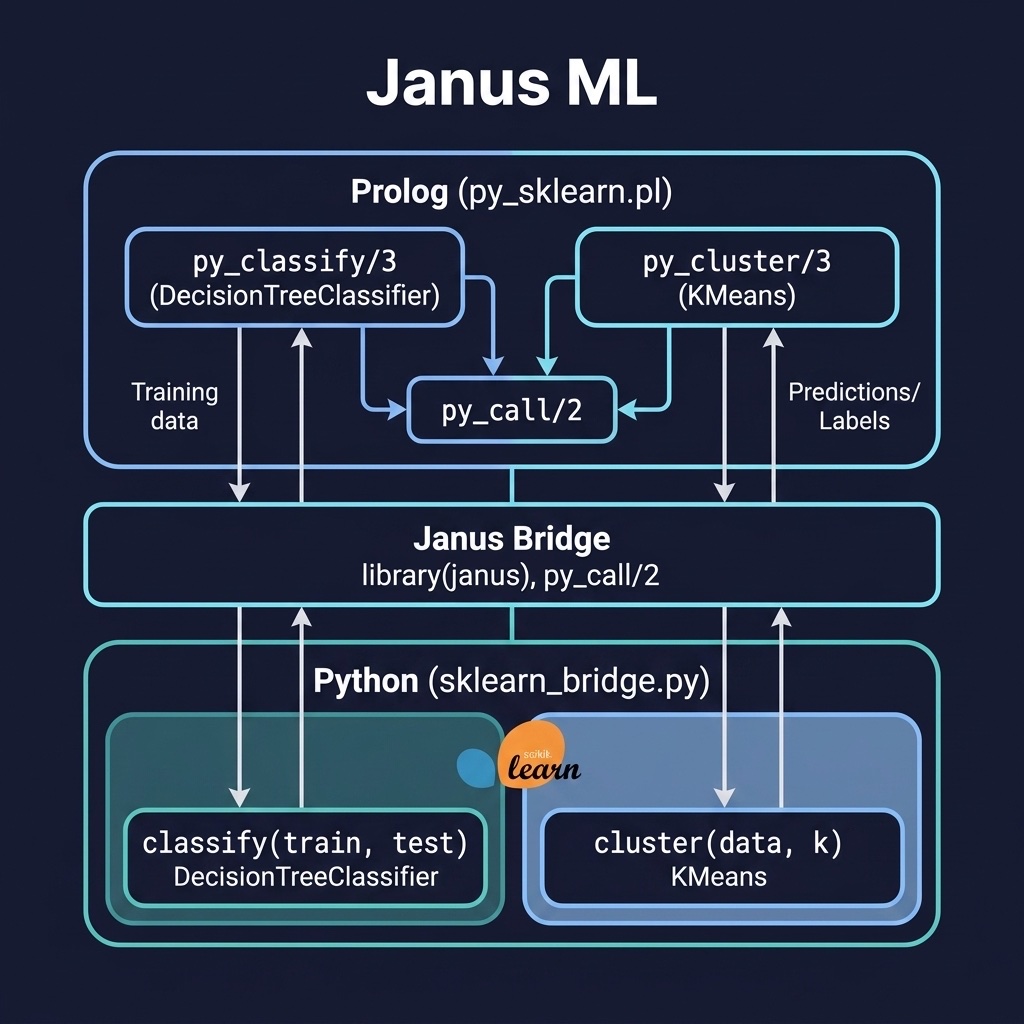
The janus_ml_python_interop project demonstrates calling scikit-learn from Prolog. Here is the file janus_ml_python_interop/prolog/py_sklearn.pl:
 1 %% py_sklearn.pl - Call scikit-learn from Prolog via Janus
 2 :- module(py_sklearn, [
 3     py_classify/3,
 4     py_cluster/3
 5 ]).
 6
 7 :- use_module(library(janus)).
 8
 9 :- initialization(py_add_lib_dir(python)).
10
11 %% py_classify(+TrainData, +TestData, -Predictions)
12 %% Uses scikit-learn's DecisionTreeClassifier via Janus
13 py_classify(TrainData, TestData, Predictions) :-
14     py_call(sklearn_bridge:classify(TrainData, TestData), Predictions).
15
16 %% py_cluster(+Data, +NClusters, -Labels)
17 %% Uses scikit-learn's KMeans via Janus
18 py_cluster(Data, NClusters, Labels) :-
19     py_call(sklearn_bridge:cluster(Data, NClusters), Labels).
The companion Python module janus_ml_python_interop/python/sklearn_bridge.py wraps the scikit-learn models:
 1 """sklearn_bridge.py - Python-side bridge for Janus ML integration"""
 2
 3 from sklearn.tree import DecisionTreeClassifier
 4 from sklearn.cluster import KMeans
 5 import numpy as np
 6
 7 def classify(train_data, test_data):
 8     """Train a DecisionTreeClassifier and predict on test data."""
 9     X_train = [row[:-1] for row in train_data]
10     y_train = [row[-1] for row in train_data]
11     X_test = [row[:-1] for row in test_data]
12
13     clf = DecisionTreeClassifier()
14     clf.fit(X_train, y_train)
15     predictions = clf.predict(X_test)
16     return predictions.tolist()
17
18 def cluster(data, n_clusters):
19     """Run KMeans clustering and return cluster labels."""
20     X = np.array(data)
21     kmeans = KMeans(n_clusters=n_clusters, random_state=42, n_init=10)
22     kmeans.fit(X)
23     return kmeans.labels_.tolist()
Hybrid AI Pipelines
A powerful Neuro-Symbolic AI pattern is the hybrid pipeline: using Python’s mature libraries for statistical and perceptual tasks (like tokenization, Named Entity Recognition, or embedding retrieval) and Prolog for symbolic logic, constraint checking, and reasoning.
This architecture has several distinct advantages:
- Separation of Concerns: Python handles unstructured, high-dimensional data (e.g. natural language) and converts it into structured records.
- Dynamic Assertion: Prolog receives the structured records, asserts them dynamically, and fires logical inference rules.
- Traceability: Prolog rules are declarative and produce explainable proof trees, overcoming the “black box” limitation of machine learning models.
The hybrid_pipeline project combines Python NLP (using spaCy for Named Entity Recognition) with Prolog reasoning rules. Here is the Prolog orchestration file hybrid_pipeline/prolog/pipeline.pl:
 1 %% pipeline.pl - Hybrid AI pipeline: Python preprocessing + Prolog
 2 %% reasoning
 3 :- module(pipeline, [
 4     run_pipeline/2
 5 ]).
 6
 7 :- use_module(library(janus)).
 8
 9 :- initialization(py_add_lib_dir(python)).
10
11 %% run_pipeline(+InputText, -Result)
12 %% 1. Use Python/spaCy for NER extraction
13 %% 2. Assert extracted entities as Prolog facts
14 %% 3. Apply Prolog reasoning rules
15 %% 4. Return structured conclusions
16 run_pipeline(InputText, Result) :-
17     %% Step 1: Python NER
18     py_call(nlp_bridge:extract_entities(InputText), Entities),
19     %% Step 2: Assert as Prolog facts
20     maplist(assert_entity, Entities),
21     %% Step 3: Prolog reasoning
22     findall(conclusion(E, Type), entity_conclusion(E, Type),
23         Conclusions),
24     Result = pipeline_result(Entities, Conclusions),
25     %% Cleanup
26     retractall(extracted(_,_)).
27
28 :- dynamic extracted/2.
29
30 assert_entity(Entity) :-
31     py_call(Entity:label_, Type),
32     py_call(Entity:text, Text),
33     assert(extracted(Text, Type)).
34
35 entity_conclusion(E, important_person) :-
36     extracted(E, 'PERSON').
37 entity_conclusion(E, location) :-
38     extracted(E, 'GPE').
Here is the Python companion script hybrid_pipeline/python/nlp_bridge.py which defines the Named Entity Recognition bridge. It uses spaCy to extract entities but includes a lightweight regex/rule-based fallback so the example can run even if the spaCy pipeline isn’t fully set up:
 1 """nlp_bridge.py - Python-side bridge for Janus Hybrid NLP Pipeline"""
 2
 3 # Load spaCy, fallback gracefully if not installed
 4 try:
 5     import spacy
 6     nlp = spacy.load("en_core_web_sm")
 7 except (ImportError, Exception):
 8     spacy = None
 9     nlp = None
10
11 class MockEntity:
12     def __init__(self, text, label):
13         self.text = text
14         self.label_ = label
15
16 def extract_entities(text):
17     """Extract Named Entities from text. Uses spaCy or a mock rule-based fallback."""
18     if nlp is None:
19         entities = []
20         for word in text.split():
21             clean = word.strip(",.")
22             if clean in ["John", "Smith"]:
23                 entities.append(MockEntity(clean, "PERSON"))
24             elif clean in ["London", "Paris"]:
25                 entities.append(MockEntity(clean, "GPE"))
26         return entities
27
28     doc = nlp(text)
29     return [MockEntity(ent.text, ent.label_) for ent in doc.ents]
Calling Prolog from Python
We can also run the bridge in the opposite direction: driving our application from a Python script and querying a Prolog logic engine to evaluate rules. Janus provides the janus_swi module for Python, which embeds SWI-Prolog directly inside the Python process.
This is highly useful for adding symbolic policy engines, safety guardrails, or decision trees on top of Python web services or LLM pipelines.
The Janus Python API
The janus_swi module provides several key methods to interact with Prolog:
janus.consult(path_to_prolog_file): Loads a Prolog source file into the embedded engine.janus.query_once(query_string, inputs): Executes a Prolog query exactly once. Theinputsparameter is a dictionary mapping Python variables to Prolog terms. It returns a dictionary of variable bindings if the query succeeds, orFalseif it fails.janus.query(query_string, inputs): Runs a Prolog query and returns a Python generator. Iterating over the generator yields bindings for all matching solutions, which is ideal for multi-valued backtracking queries.janus.apply(module_or_predicate, *args): Invokes a specific Prolog predicate directly.
Here is an example demonstrating how Python loads a Prolog file and queries a validation predicate:
 1 import janus_swi as janus
 2
 3 # Load the Prolog rules
 4 janus.consult("guardrails.pl")
 5
 6 # Execute a query with input bindings
 7 json_input = '{"client_age": 70, "risk_tolerance": "low", "allocations": {"stocks": 40}}'
 8 result = janus.query_once("validate_portfolio_json(Json, Errors)", {"Json": json_input})
 9
10 if result:
11     print("Violations:", result["Errors"])
12 else:
13     print("Query failed.")
Practical Applications
Combining Python’s data-driven, machine learning libraries with Prolog’s logic-driven, symbolic capabilities opens up several practical neuro-symbolic AI architectures:
1. LLM Guardrails & Compliance
Large Language Models (LLMs) excel at processing natural language, but struggle to guarantee compliance with exact logical bounds (e.g. regulatory rules, compliance math, and safety boundaries). By feeding the structured (JSON) output of an LLM into an embedded Prolog instance running janus_swi, you can enforce strict, mathematical logic checks on the output before displaying it to a user. If violations are found, the Prolog-generated error explanations can be fed back into the LLM’s prompt to prompt self-correction.
2. Constraint-Guided Optimization
Python libraries can be used to scrape data, poll live web APIs, or preprocess images and speech, translating the raw data into structured facts. Prolog’s Constraint Logic Programming (CLP) packages, such as clpfd or clpb, can then ingest these facts to solve highly complex scheduling, resource allocation, or routing problems, returning the optimal solution to the Python controller.
3. Explainable Machine Learning (XAI)
Deep learning models are notoriously hard to audit. In a hybrid system, you can use Python to execute a neural model (such as a neural classifier or object detector) and pass its confidence scores into Prolog. Prolog can then combine these statistical detections with a symbolic rule system to construct a clear, human-understandable explanation or justification of the final decision.
Optional Practice Problems
- Python Classification: In the
janus_ml_python_interopproject, write a Prolog query that uses Janus to load Python’sscikit-learnlibrary, pass a vector of features, and classify them using a pre-trained model. - Backtracking to DataFrame: Write a Python function in
pipeline.pythat calls a non-deterministic Prolog predicate usingjanus.query(), collects all backtracking results, and returns them as a Pandas DataFrame.