Expert Systems and Rule-Based AI
Expert systems were one of the earliest commercial successes of AI, and Prolog is an ideal language for building them. In this chapter we build a complete expert system shell and demonstrate it with practical examples.
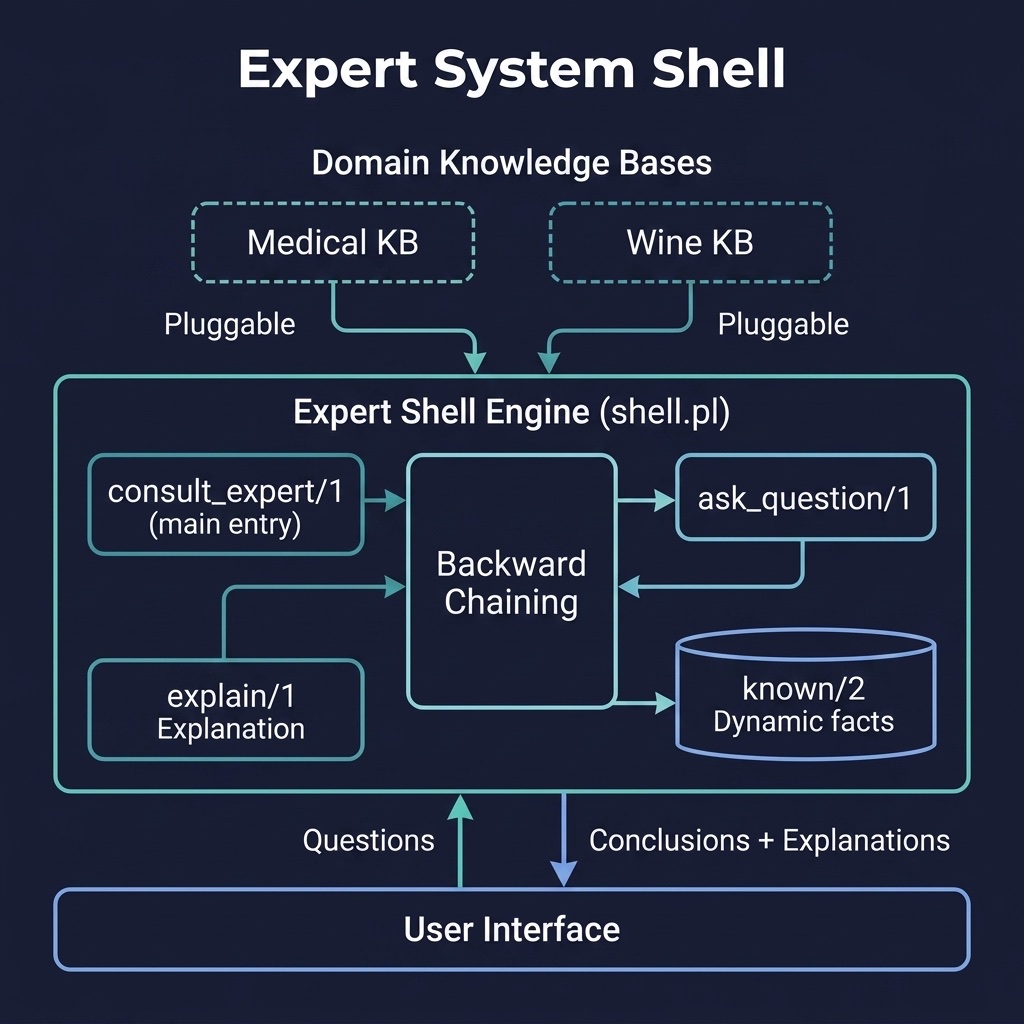
What Is an Expert System?
An expert system is a computer program that emulates the decision-making ability of a human expert. Developed in the 1970s and 1980s during the “Rule-Based AI” era (producing famous systems like MYCIN and DENDRAL), they represent one of the first successful applications of AI to real-world problems.
The standard architecture of an expert system consists of four key components:
- Knowledge Base (KB): A database of domain-specific facts and rules (heuristic knowledge) usually structured as “IF-THEN” statements.
- Inference Engine: The brain of the system, which applies logical rules to the knowledge base to deduce new information or prove a hypothesis. It can operate via forward chaining (data-driven) or backward chaining (goal-driven).
- Explanation Facility: A module that explains the system’s reasoning path to the user, answering “How” a conclusion was reached or “Why” a particular question is being asked.
- User Interface: The interactive portal through which the system prompts the user for missing information and displays conclusions.
Prolog is uniquely suited for building expert systems because its core runtime environment already includes an inference engine (SLD resolution) and a backtracking search mechanism.
Building an Expert System Shell in Prolog
Instead of hard-coding an expert system for a single domain, we can build a domain-independent shell. The shell defines the interactive loop, maintains the database of user-supplied facts, and provides explanation utilities, while the specific domain knowledge is loaded from a separate rules file via the shell’s load_kb/1 predicate.
To implement the shell, we use Prolog’s dynamic database to store facts provided by the user during a session using known/2 terms. Prolog’s built-in backward-chaining engine automatically executes the rules. When a rule needs an attribute that is not yet known, the shell prompts the user, records the answer, and continues evaluation.
The expert_shell project provides a domain-independent shell. Here is the file expert_shell/prolog/shell.pl:
  1  %% shell.pl - Expert system shell with backward chaining and explanations
  2 :- module(shell, [
  3     consult_expert/1,
  4     explain/1,
  5     ask_question/1,
  6     provide_answer/2,
  7     reset_known/0,
  8     load_kb/1
  9 ]).
 10
 11 :- dynamic known/2.  % known(Attribute, Value) - user-provided facts
 12
 13 %% reset_known - Clear all user-provided answers
 14 reset_known :-
 15     retractall(known(_, _)).
 16
 17 %% provide_answer(+Attribute, +Value)
 18 %% Programmatically supply an answer (used by tests and non-interactive
 19 %% drivers) instead of prompting the user.
 20 provide_answer(Attribute, Value) :-
 21     retractall(known(Attribute, _)),
 22     assertz(known(Attribute, Value)).
 23
 24 %% consult_expert(-Conclusion) - Main entry point
 25 %% When a KB has been loaded via load_kb/1, its hypothesis/1 rules
 26 %% (in module user) are tried first; otherwise the built-in default
 27 %% applies.  Answers provided earlier via provide_answer/2 are kept;
 28 %% call reset_known/0 explicitly for a fresh consultation.
 29 consult_expert(Conclusion) :-
 30     consult_kb_hypothesis(Conclusion),
 31     !.
 32
 33 consult_kb_hypothesis(Conclusion) :-
 34     kb_file(_),
 35     !,
 36     user:hypothesis(Conclusion).
 37 consult_kb_hypothesis(Conclusion) :-
 38     hypothesis(Conclusion).
 39
 40 %% explain(+Conclusion) - Show reasoning chain
 41 explain(Conclusion) :-
 42     explanation_text(Conclusion, Explanation),
 43     format("Conclusion: ~w~n", [Conclusion]),
 44     format("Reasoning: ~w~n", [Explanation]).
 45
 46 explanation_text(C, E) :-
 47     kb_file(_),
 48     user:hypothesis_explanation(C, E),
 49     !.
 50 explanation_text(C, E) :-
 51     hypothesis_explanation(C, E).
 52
 53 %% ask_question(+Attribute) - Ask user for information
 54 %% Reuse a known answer; otherwise read a line, strip a trailing '.',
 55 %% and convert to an atom or number as appropriate.  EOF aborts the
 56 %% consultation gracefully.
 57 ask_question(Attribute) :-
 58     known(Attribute, Value),
 59     !,
 60     format("~w: (cached) ~w~n", [Attribute, Value]).
 61 ask_question(Attribute) :-
 62     format("~nWhat is the value of ~w? ", [Attribute]),
 63     catch(read_line_to_string(user_input, Line),
 64           _, Line = end_of_file),
 65     (   Line == end_of_file
 66     ->  format("~nEOF reached; aborting consultation.~n"),
 67         fail
 68     ;   normalize_answer(Line, Value),
 69         provide_answer(Attribute, Value)
 70     ).
 71
 72 %% normalize_answer(+RawString, -Value)
 73 %% Strip a trailing '.', try a numeric conversion, else produce an atom.
 74 normalize_answer(Raw, Value) :-
 75     string_codes(Raw, Codes0),
 76     strip_trailing_dot(Codes0, Codes),
 77     string_codes(Term, Codes),
 78     (   catch(atom_number(Term, Value), _, fail)
 79     ->  true
 80     ;   atom_string(Value, Term)
 81     ).
 82
 83 strip_trailing_dot(Codes, Rest) :-
 84     append(Rest, [0'.], Codes),
 85     !.
 86 strip_trailing_dot(Codes, Codes).
 87
 88 %% load_kb(+File) - Consult a knowledge-base file defining hypothesis/1
 89 %% and hypothesis_explanation/2 rules (if_/then_ style conditions read
 90 %% known/2 answers via check/1).  Clears previously loaded KB rules.
 91 :- dynamic kb_file/1.
 92
 93 load_kb(File) :-
 94     retractall(kb_file(_)),
 95     unload_old_kb,
 96     assertz(kb_file(File)),
 97     open(File, read, In),
 98     repeat,
 99       read(In, Term),
100       (   Term == end_of_file
101       ->  close(In), !
102       ;   assertz(user:Term),
103           fail
104       ).
105
106 unload_old_kb :-
107     forall(clause(user:hypothesis(_), _, Ref), erase(Ref)),
108     forall(clause(user:hypothesis_explanation(_, _), _, Ref),
109            erase(Ref)),
110     dynamic(user:hypothesis/1),
111     dynamic(user:hypothesis_explanation/2).
112
113 %% check(+Condition) - True when the attribute has been answered as
114 %% requested, prompting via ask_question/1 when not yet known.
115 check(A == V) :- !,
116     (   known(A, V)
117     ->  true
118     ;   \+ known(A, _),
119         ask_question(A),
120         known(A, V)
121     ).
122
123 %% Default hypothesis rules (used when no KB is loaded)
124 hypothesis(unknown) :-
125     format("Could not determine a conclusion from the given facts.~n").
126
127 hypothesis_explanation(
128     unknown,
129     'Insufficient data to reach a conclusion.').
The shell’s key predicates:
consult_expert/1is the main entry point. It tries the loaded KB’shypothesis/1rules first (falling back to the built-inunknownhypothesis) and no longer auto-retractsknown/2facts. Callreset_known/0explicitly for a fresh consultation.explain/1routes throughexplanation_text/2, preferring the loaded KB’shypothesis_explanation/2over the shell’s own default.ask_question/1reads a line withread_line_to_string/2, runsnormalize_answer/2(which strips a trailing.and converts numbers) and treats EOF as a graceful abort. Known answers are reused and printed as “(cached)”.provide_answer/2supplies an answer programmatically (used by tests and non-interactive drivers) instead of prompting.reset_known/0clears all user-provided answers.load_kb/1loads a user knowledge-base file and asserts itshypothesis/1andhypothesis_explanation/2clauses into moduleuser, clearing any previously loaded KB rules. This is what makes pluggable knowledge bases real rather than aspirational.
Knowledge Acquisition and Rule Representation
Knowledge acquisition is the process of extracting domain knowledge from human experts and structuring it into rules. In a Prolog-based expert system, we represent this knowledge using clauses.
Structuring Rules for the Shell
To plug into our shell, a domain knowledge base must define rules for the hypothesis/1 predicate and explanations for hypothesis_explanation/2.
To prompt the user interactively, we define an ask_if/2 helper:
1 ask_if(Attribute, Value) :-
2     known(Attribute, Value), !.
3 ask_if(Attribute, Value) :-
4     \+ known(Attribute, _),
5     ask_question(Attribute),
6     known(Attribute, Value).
A rule in the knowledge base then looks like this:
1 hypothesis(diagnose_internet_issue) :-
2     ask_if(router_lights, off),
3     ask_if(cables_plugged_in, yes).
Improving Readability with Custom Operators
To make rules more readable for non-programmers, Prolog allows you to define custom operators using op/3. For example, we can define operators like if, then, and, and is to write rules in a natural-language-like syntax:
1 :- op(900, xfx, then).
2 :- op(800, xfy, and).
3 :- op(700, xfx, is).
4
5 % Now we can write rules like:
6 % rule 1: if router_lights is off and cables are connected then problem is router_power.
We can then write a simple parser/meta-interpreter to evaluate these custom-cased rules.
Explanation Facilities
One of the defining features of an expert system is its ability to explain its reasoning.
- “How” Explanations: Explain how the system reached a specific conclusion. This is done by traversing the proof tree or rule firing history and listing the rules and facts that succeeded.
- “Why” Explanations: Explain why the system is asking a particular question. When the system prompts the user with a question, the user can type
why. The system responds by showing the current rule it is trying to satisfy and the subgoal chain.
In our simplified shell.pl implementation, we provide a basic “How” explanation via explain/1, which fetches the pre-written hypothesis_explanation/2 text associated with the successful hypothesis. In a more advanced system, we can integrate the proof-tree meta-interpreter (from the previous chapter) to dynamically construct and display step-by-step explanations.
Case Study: A Wine Selection Advisor
To demonstrate rule-based reasoning in a practical domain, we look at the wine_advisor project. This advisor acts as a digital sommelier, recommending wines by matching food pairings and flavor profiles.
The system utilizes two distinct categories of rules:
- Meal Pairing Rules: Determining which color of wine (red, white, rose) matches the food type (fish, red meat, dessert).
- Flavor Preference Rules: Matching the user’s preference with the wine’s characteristics. The preference may be a body atom (
bold,moderate,light) or a sweetness atom (sweet,dry).
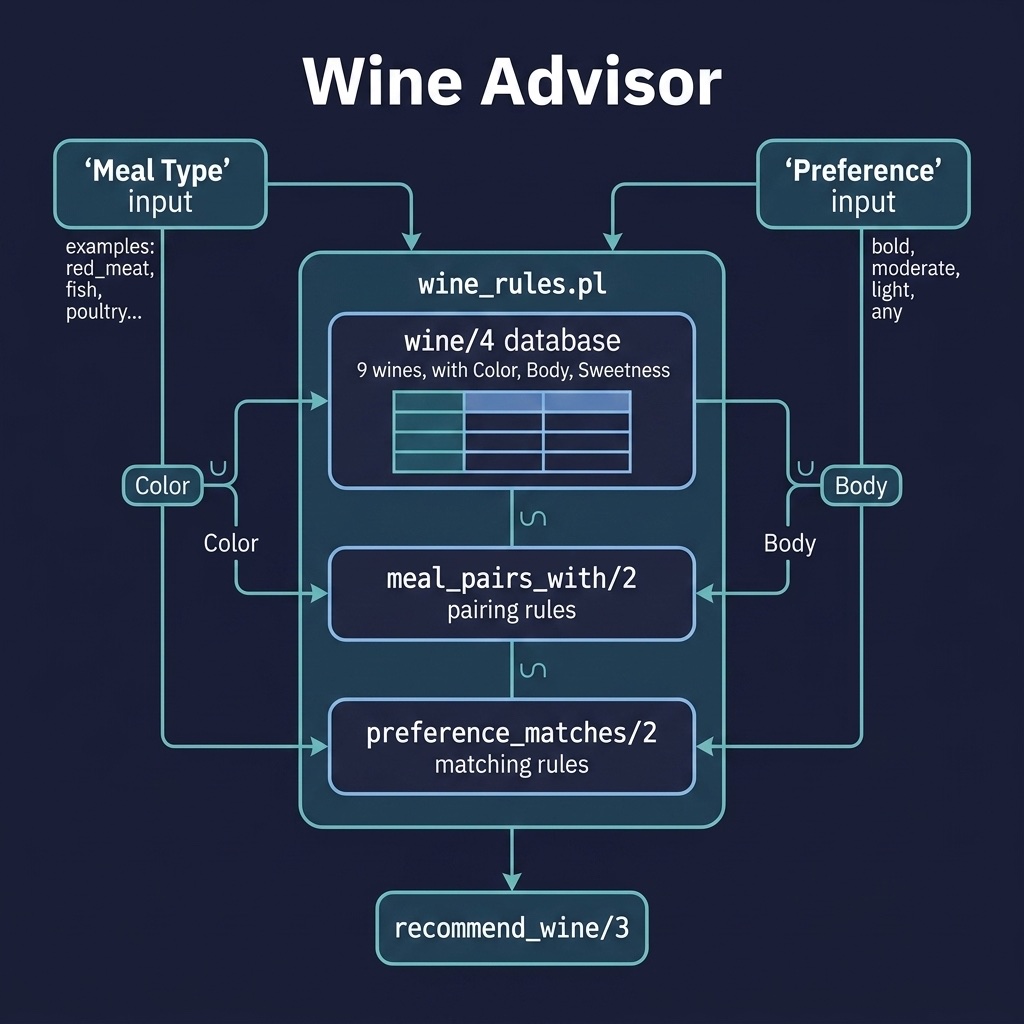
The wine_advisor project implements a rule-based wine recommender. Here is the file wine_advisor/prolog/wine_rules.pl:
 1  %% wine_rules.pl - Wine selection expert system
 2 :- module(wine_rules, [
 3     recommend_wine/3
 4 ]).
 5
 6 %% recommend_wine(+MealType, +Preference, -Wine)
 7 %% Preference may be a body atom (bold, moderate, light), a sweetness
 8 %% atom (sweet, dry), or 'any' matching all wines on both dimensions.
 9 recommend_wine(MealType, Preference, Wine) :-
10     wine(Wine, Color, Body, Sweetness),
11     meal_pairs_with(MealType, Color),
12     preference_matches(Preference, Body),
13     sweetness_matches(Preference, Sweetness).
14
15 %% Wine database: wine(Name, Color, Body, Sweetness)
16 wine(cabernet_sauvignon, red, full, dry).
17 wine(merlot, red, medium, dry).
18 wine(pinot_noir, red, light, dry).
19 wine(chardonnay, white, full, dry).
20 wine(sauvignon_blanc, white, light, dry).
21 wine(riesling, white, light, sweet).
22 wine(champagne, white, light, dry).
23 wine(rose, rose, light, dry).
24 wine(port, red, full, sweet).
25
26 %% Meal pairing rules
27 meal_pairs_with(red_meat, red).
28 meal_pairs_with(poultry, red).
29 meal_pairs_with(poultry, white).
30 meal_pairs_with(fish, white).
31 meal_pairs_with(seafood, white).
32 meal_pairs_with(pasta, red).
33 meal_pairs_with(dessert, white).
34 meal_pairs_with(cheese, red).
35
36 %% Preference matching: body dimension.
37 %% Sweetness preferences (sweet, dry) do not constrain body.
38 preference_matches(bold, full).
39 preference_matches(moderate, medium).
40 preference_matches(light, light).
41 preference_matches(sweet, _).
42 preference_matches(dry, _).
43 preference_matches(any, _).
44
45 %% Sweetness matching.
46 %% Body preferences (bold, moderate, light) do not constrain sweetness.
47 sweetness_matches(sweet, sweet).
48 sweetness_matches(dry, dry).
49 sweetness_matches(bold, _).
50 sweetness_matches(moderate, _).
51 sweetness_matches(light, _).
52 sweetness_matches(any, _).
This is a behavior change from the first edition of this chapter: body and sweetness are now orthogonal dimensions. recommend_wine(red_meat, bold, W) returns both cabernet_sauvignon and port because a bold preference constrains only body, not sweetness, and port is a full-bodied red. recommend_wine(dessert, sweet, W) returns only [riesling] because dessert pairs with white wine and only riesling is both white and sweet.
Case Study: A Pluggable Knowledge Base
As a final case study, we use the shell’s load_kb/1 support with the bundled expert_shell/prolog/sample_kb.pl, a small wine-selection knowledge base. Four hypotheses (serve_port, serve_riesling, serve_cabernet, serve_sauvignon_blanc) are driven by shell:check/1 conditions that read known/2 answers or prompt the user:
 1  %% sample_kb.pl - Wine-selection knowledge base for expert_shell
 2  %%
 3  %% If_/then_ style hypotheses: each condition is checked via
 4  %% shell:check/1, which reuses known/2 answers or asks the user.
 5  %% shell:load_kb/1 asserts these clauses into module `user` so the
 6  %% shell can find them via user:hypothesis/1 and
 7  %% user:hypothesis_explanation/2.
 8
 9 hypothesis(serve_port) :-
10     shell:check(meal == dessert),
11     shell:check(sweet_preference == yes).
12
13 hypothesis(serve_riesling) :-
14     shell:check(sweet_preference == yes),
15     \+ shell:known(meal, dessert).
16
17 hypothesis(serve_cabernet) :-
18     shell:check(meal == red_meat),
19     shell:check(bold_preference == yes).
20
21 hypothesis(serve_sauvignon_blanc) :-
22     shell:check(meal == fish),
23     shell:check(light_preference == yes).
24
25 hypothesis_explanation(serve_port,
26     'A dessert meal plus a sweet preference points to port.').
27 hypothesis_explanation(serve_riesling,
28     'A sweet preference without a dessert meal suggests riesling.').
29 hypothesis_explanation(serve_cabernet,
30     'Red meat plus a bold preference points to cabernet sauvignon.').
31 hypothesis_explanation(serve_sauvignon_blanc,
32     'Fish plus a light preference points to sauvignon blanc.').
Running the Wine Knowledge Base
Load the KB and run a consultation in the SWI-Prolog REPL. Here we supply the answers programmatically with provide_answer/2:
1 ?- shell:load_kb('prolog/sample_kb.pl'),
2    shell:provide_answer(meal, dessert),
3    shell:provide_answer(sweet_preference, yes),
4    shell:consult_expert(Conclusion).
5 Conclusion = serve_port.
6
7 ?- shell:explain(serve_port).
8 Conclusion: serve_port
9 Reasoning: A dessert meal plus a sweet preference points to port.
This case study demonstrates the power of separating the inference logic (defined in the shell) from the domain rules (loaded with load_kb/1), allowing you to build new expert systems simply by swapping in different rule files.
Optional Practice Problems
- Why Explanations: Extend the
expert_shellsystem to supportwhyqueries. When the system asks the user a question, the user should be able to typewhy, and the system should print the rules that are currently being evaluated. - Semi-Sweet Wines: In the
wine_advisorproject, add asemi-sweetpreference and at least one semi-sweet wine to the database, and write a test asserting it is recommended for the right meals.