Agent Behavior Trees
In artificial intelligence for robotics and video games, controlling agent behavior is a central challenge. Traditionally, developers relied on Finite State Machines (FSMs). While FSMs are simple to implement, they suffer from a major design flaw: as the number of states and transitions grows, the state-transition graph quickly becomes a tangled web (often called “spaghetti code”), making it incredibly difficult to modify or extend.
Behavior Trees (BTs) emerged as a powerful alternative. Instead of states, BTs organize an agent’s decision-making process into a hierarchical tree of nodes. Ticking the root node of the tree evaluates its children recursively, selecting actions based on environmental conditions.
BTs are:
- Highly Modular: Sub-trees can be designed and tested independently.
- Composable: New behaviors can be inserted by adding branches without modifying existing ones.
- Readable: The hierarchical structure mirrors human-like decision pathways (e.g., “if battery is low, charge; otherwise, if dust is detected, clean; otherwise, patrol”).
Prolog is exceptionally well-suited for implementing Behavior Trees. Its native pattern matching, recursive evaluation, and dynamic databases make it possible to build a complete behavior tree interpreter in under 100 lines of code.
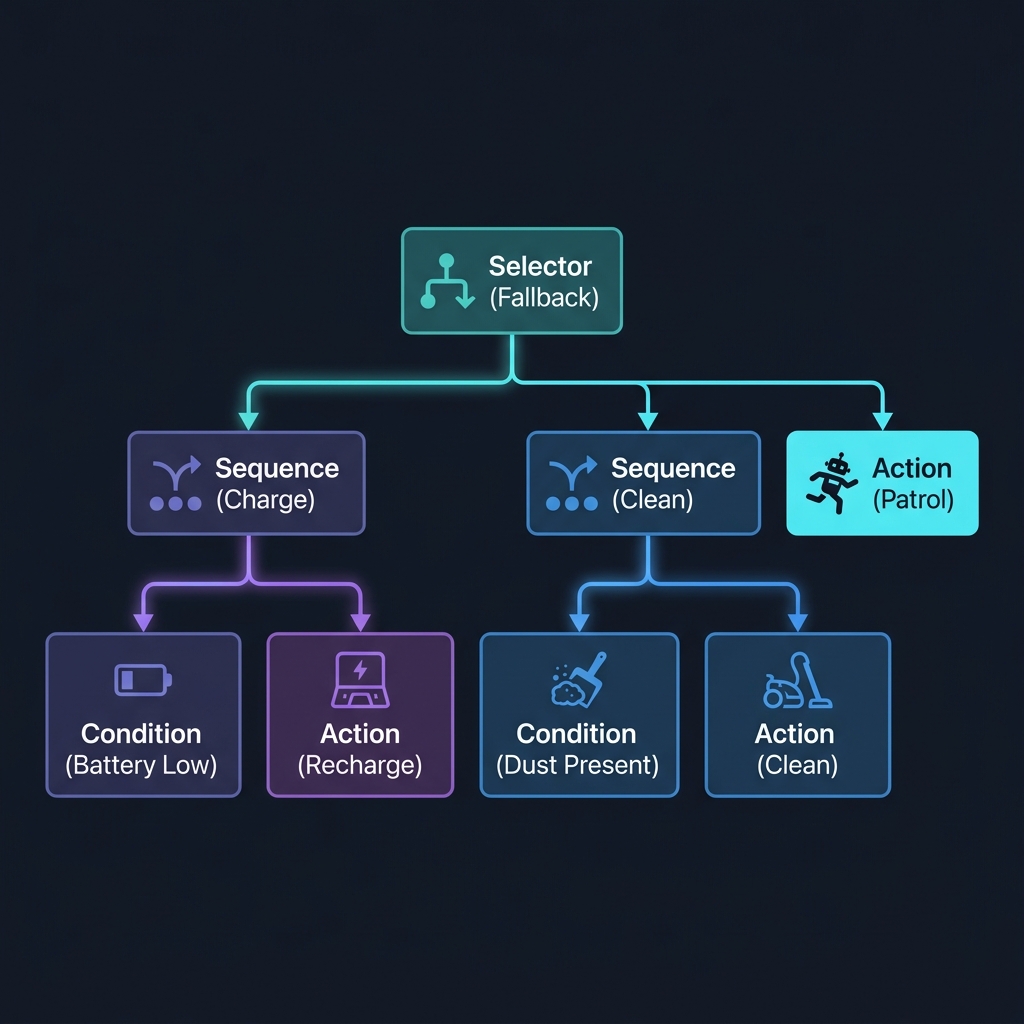
Behavior Tree Node Types
Our interpreter supports four core node types:
- Sequence (
sequence([Children])): Ticks children sequentially. If any child fails, the sequence fails immediately. If all succeed, the sequence succeeds. (Analogous to an logicalAND). - Selector (
selector([Children])): Ticks children sequentially. If any child succeeds, the selector succeeds immediately. If all fail, the selector fails. (Analogous to a logicalOR, used for fallback actions). - Condition (
condition(Name)): Evaluates a query. Returnssuccessif the query is true, andfailureotherwise. - Action (
action(Name)): Executes an active task, returningsuccess,failure, orrunning(if the action requires multiple ticks to complete).
Implementing the BT Engine in Prolog
The core engine uses recursive pattern matching to traverse the tree nodes. We define multifile hooks user_condition/1 and user_action/2 to allow external agent modules to define their specific logic.
Here is the implementation in source-code/agent_behavior_trees/prolog/behavior_trees.pl:
 1 :- module(behavior_trees, [
 2     tick/2,
 3     define_tree/2
 4 ]).
 5
 6 /** <module> Behavior Trees Engine
 7  *
 8  * A simple, lightweight, and elegant
 9  * Behavior Tree implementation in Prolog.
10  * Supports:
11  *   - sequence([Children])
12  *   - selector([Children]) (fallback)
13  *   - condition(Name)
14  *   - action(Name)
15  */
16
17 :- dynamic tree_definition/2.
18
19 % Define a tree name and its root node
20 define_tree(Name, RootNode) :-
21     retractall(tree_definition(Name, _)),
22     assertz(tree_definition(Name, RootNode)).
23
24 % Tick the entire tree by name
25 tick(TreeName, Status) :-
26     tree_definition(TreeName, RootNode),
27     !,
28     tick_node(RootNode, Status).
29
30 % --- Node Tick Implementation ---
31
32 % 1. Sequence Node: Ticks children in order.
33 %    - If a child fails, sequence fails.
34 %    - If a child returns 'running', sequence returns 'running'.
35 %    - If all children succeed, sequence succeeds.
36 tick_node(sequence(Children), Status) :-
37     tick_sequence(Children, Status).
38
39 % 2. Selector Node (Fallback): Ticks children in order.
40 %    - If a child succeeds, selector succeeds.
41 %    - If a child returns 'running', selector returns 'running'.
42 %    - If all children fail, selector fails.
43 tick_node(selector(Children), Status) :-
44     tick_selector(Children, Status).
45
46 % 3. Condition Node: Evaluates a user-defined condition predicate.
47 %    - Returns 'success' if the condition is true.
48 %    - Returns 'failure' if the condition is false.
49 tick_node(condition(CondName), Status) :-
50     (   call_condition(CondName)
51     ->  Status = success
52     ;   Status = failure
53     ).
54
55 % 4. Action Node: Executes a user-defined action predicate.
56 %    - The action predicate must bind its
57 %      status argument
58 %      (success, failure, or running).
59 tick_node(action(ActionName), Status) :-
60     call_action(ActionName, Status).
61
62 % --- Helper Predicates for Composites ---
63
64 % Sequence traversal
65 tick_sequence([], success).
66 tick_sequence([Child|Rest], Status) :-
67     tick_node(Child, ChildStatus),
68     (   ChildStatus = success
69     ->  tick_sequence(Rest, Status)
70     ;   Status = ChildStatus  % either 'failure' or 'running'
71     ).
72
73 % Selector traversal
74 tick_selector([], failure).
75 tick_selector([Child|Rest], Status) :-
76     tick_node(Child, ChildStatus),
77     (   ChildStatus = failure
78     ->  tick_selector(Rest, Status)
79     ;   Status = ChildStatus  % either 'success' or 'running'
80     ).
81
82 % --- Interface to Hook Action & Condition Predicates ---
83 % User-defined actions and conditions are
84 % expected to be defined in user modules
85 % or hooked into the following dynamic/multifile predicates:
86 :- multifile user_condition/1.
87 :- multifile user_action/2.
88
89 call_condition(CondName) :-
90     user_condition(CondName).
91
92 call_action(ActionName, Status) :-
Defining a Robot Agent
Now, we use our engine to program a cleaning robot. The robot has a battery level and a room dust state. We define its behavior tree as follows:
- High Priority Branch: If the battery is low, recharge.
- Medium Priority Branch: If dust is present, clean the room.
- Fallback Branch: Patrol the rooms, occasionally generating new dust.
Here is the implementation in source-code/agent_behavior_trees/prolog/robot_agent.pl:
  1 :- module(robot_agent, [
  2     run_simulation/1
  3 ]).
  4
  5 :- use_module(behavior_trees).
  6
  7 % Import multifile hooks
  8 :- multifile behavior_trees:user_condition/1.
  9 :- multifile behavior_trees:user_action/2.
 10
 11 % Dynamic state representing the robot's environment and internals
 12 :- dynamic battery/1.
 13 :- dynamic dusty/1.
 14
 15 % --- Define Conditions ---
 16
 17 % Battery is low if it's strictly below 30%
 18 behavior_trees:user_condition(battery_low) :-
 19     battery(Level),
 20     Level < 30,
 21     format('[Cond] Battery is low: ~w%~n', [Level]).
 22
 23 % Dust is present if dusty(true) is asserted
 24 behavior_trees:user_condition(dust_present) :-
 25     dusty(true),
 26     format('[Cond] Dust detected in room!~n').
 27
 28 % --- Define Actions ---
 29
 30 % Recharge Action
 31 behavior_trees:user_action(recharge, success) :-
 32     battery(Level),
 33     NewLevel is min(100, Level + 50),
 34     retractall(battery(_)),
 35     assertz(battery(NewLevel)),
 36     format('[Action] Charging... Battery increased from ~w% to ~w%~n',
 37         [Level, NewLevel]).
 38
 39 % Clean Action
 40 behavior_trees:user_action(clean, success) :-
 41     battery(Level),
 42     NewLevel is max(0, Level - 10),
 43     retractall(battery(_)),
 44     assertz(battery(NewLevel)),
 45     retractall(dusty(_)),
 46     assertz(dusty(false)),
 47     format('[Action] Cleaning dust... Battery at ~w%~n', [NewLevel]).
 48
 49 % Patrol Action
 50 behavior_trees:user_action(patrol, success) :-
 51     battery(Level),
 52     NewLevel is max(0, Level - 15),
 53     retractall(battery(_)),
 54     assertz(battery(NewLevel)),
 55     % Randomly generate new dust on patrol to keep the simulation
 56     % interesting
 57     maybe_generate_dust,
 58     format('[Action] Patrolling rooms... Battery at ~w%~n', [NewLevel]).
 59
 60 % Helper to randomly generate dust
 61 maybe_generate_dust :-
 62     random(0, 10, R),
 63     (   R > 6
 64     ->  retractall(dusty(_)),
 65         assertz(dusty(true)),
 66         format('[Env] Dust has settled in the room.~n')
 67     ;   true
 68     ).
 69
 70 % --- Initialize the Behavior Tree ---
 71
 72 :- define_tree(cleaning_robot,
 73     selector([
 74         sequence([
 75             condition(battery_low),
 76             action(recharge)
 77         ]),
 78         sequence([
 79             condition(dust_present),
 80             action(clean)
 81         ]),
 82         action(patrol)
 83     ])
 84 ).
 85
 86 % --- Run Simulation ---
 87
 88 % Run the behavior tree for N ticks
 89 run_simulation(Ticks) :-
 90     % Initialize state: full battery, no dust
 91     retractall(battery(_)),
 92     retractall(dusty(_)),
 93     assertz(battery(100)),
 94     assertz(dusty(false)),
 95     format('--- Starting Robot Simulation with BT ---~n'),
 96     run_ticks(1, Ticks).
 97
 98 run_ticks(Current, Max) :-
 99     Current > Max,
100     !,
101     format('--- Simulation Completed ---~n').
102 run_ticks(Current, Max) :-
103     format('~n[Tick ~w]~n', [Current]),
104     battery(Level),
105     dusty(D),
106     format('[State] Battery: ~w%, Dusty: ~w~n', [Level, D]),
107     tick(cleaning_robot, Status),
108     format('[BT] Root execution status: ~w~n', [Status]),
109     Next is Current + 1,
110     run_ticks(Next, Max).
Simulating the Agent
To run the simulation, execute the script from your terminal using SWI-Prolog:
1 $ swipl -g "run_simulation(10), halt." -t "halt(1)" prolog/robot_agent.pl
A sample execution trace shows the agent checking conditions and carrying out appropriate actions depending on battery levels and dynamic dust generation:
 1 --- Starting Robot Simulation with BT ---
 2
 3 [Tick 1]
 4 [State] Battery: 100%, Dusty: false
 5 [Action] Patrolling rooms... Battery at 85%
 6 [BT] Root execution status: success
 7
 8 [Tick 2]
 9 [State] Battery: 85%, Dusty: false
10 [Action] Patrolling rooms... Battery at 70%
11 [Env] Dust has settled in the room.
12 [BT] Root execution status: success
13
14 [Tick 3]
15 [State] Battery: 70%, Dusty: true
16 [Cond] Dust detected in room!
17 [Action] Cleaning dust... Battery at 60%
18 [BT] Root execution status: success
19
20 [Tick 4]
21 [State] Battery: 60%, Dusty: false
22 [Action] Patrolling rooms... Battery at 45%
23 [BT] Root execution status: success
24
25 [Tick 5]
26 [State] Battery: 45%, Dusty: false
27 [Action] Patrolling rooms... Battery at 30%
28 [BT] Root execution status: success
29
30 [Tick 6]
31 [State] Battery: 30%, Dusty: false
32 [Action] Patrolling rooms... Battery at 15%
33 [BT] Root execution status: success
34
35 [Tick 7]
36 [State] Battery: 15%, Dusty: false
37 [Cond] Battery is low: 15%
38 [Action] Charging... Battery increased from 15% to 65%
39 [BT] Root execution status: success
Notice how at Tick 3, dust is detected, causing the selector to bypass the patrol action and execute the clean action instead. At Tick 7, the low battery triggers the recharge branch, ignoring dust and patrol entirely.
Key Design Decisions
Dynamic database for state. The robot’s variables (like battery/1 and dusty/1) are kept as dynamic facts (:- dynamic ...). In Prolog, asserting and retracting facts mimics a global memory store, allowing conditions and actions to read and modify state without having to pass a state dictionary through the tree’s recursive helper functions.
Logical structures as DSL. Behavior trees are traditionally declared using JSON, XML, or specialized editor graphs. In Prolog, we can represent trees directly as structured terms, such as selector([sequence([condition(A), action(B)]), action(C)]). This provides an elegant domain-specific language (DSL) with zero parsing overhead, which can be modified directly within the source code.
Optional Practice Problems
- Sequence and Selector Nodes: In the
agent_behavior_treesproject, write unit tests to verify the behavior of compound nodes when one or more of their child nodes fail. - Vacuum Cleaning Agent: Create a behavior tree in
prolog/behavior_trees.plfor a robot vacuum cleaner agent. The tree should sequence tasks likedetect_dust,clean_area, andreturn_to_chargerbased on the status of sensors.