Prolog Tutorial
This chapter provides a hands-on introduction to Prolog for readers who are new to logic programming. We cover the essential concepts needed to understand the AI applications in later chapters.
Facts, Rules, and Queries
Prolog, which stands for Programming in Logic, is based on a subset of first-order predicate calculus. Unlike imperative languages where you specify how to compute something, Prolog is declarative: you describe the what, the facts and rules governing a problem domain, and let the execution engine deduce the answers to your queries.
The fundamental building blocks of a Prolog program are terms, which make up the data model:
- Atoms: Constant values representing specific objects or relations. They are written starting with a lowercase letter (e.g.,
tom,bob,parent) or enclosed in single quotes. - Numbers: Integers and floats (e.g.,
42,3.14). - Variables: Placeholders representing unknown values. They always start with an uppercase letter or an underscore (e.g.,
X,Parent,_temp). - Compound Terms: Structures composed of a functor (an atom) and a number of arguments (terms) enclosed in parentheses (e.g.,
father(tom),point(X, Y, Z)). The number of arguments is the term’s arity.
Defining Facts
A fact asserts an absolute truth in the database. For example:
1 parent(tom, bob).
Here, parent is a predicate of arity 2 (denoted parent/2). This fact states that “tom is a parent of bob”. Note that in Prolog, predicates are defined by order-sensitive arguments, and every statement must end with a period (.).
Writing Rules
A rule asserts a conditional truth. Rules consist of a head (what we want to prove) and a body (the conditions that must be met), separated by the neck operator :- (which reads as “if”):
1 grandparent(X, Z) :-
2     parent(X, Y),
3     parent(Y, Z).
This states: “X is a grandparent of Z if X is a parent of Y, and Y is a parent of Z.” The comma , acts as a logical conjunction (AND).
Querying the Knowledge Base
To execute a Prolog program, you run a query (or goal) against the database in the interactive REPL. When you input a query like ?- parent(tom, Child)., the engine searches the database for facts or rules that match, binding variables to values that make the query true.
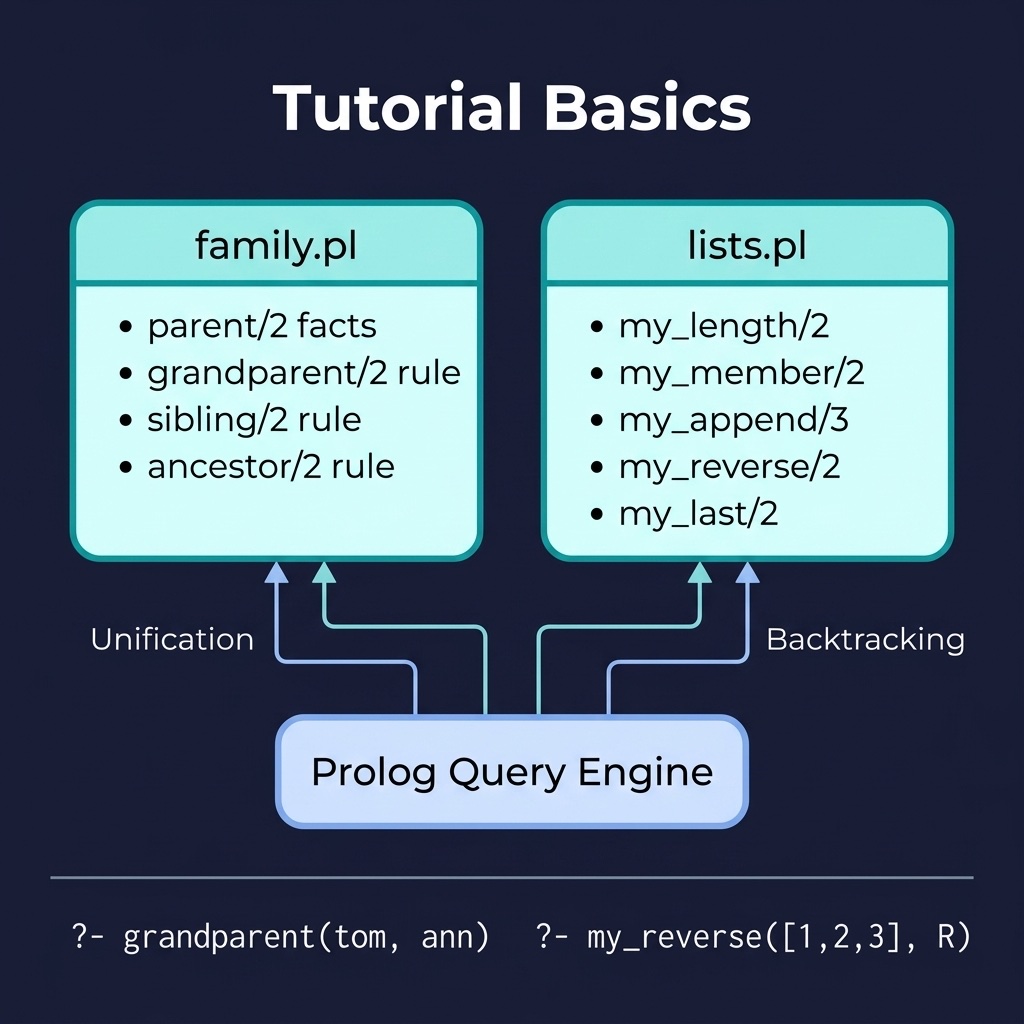
The companion project tutorial_basics demonstrates core Prolog concepts with a family relationships knowledge base. Here is the file tutorial_basics/prolog/family.pl:
 1 :- module(family, [
 2     parent/2,
 3     grandparent/2,
 4     sibling/2,
 5     ancestor/2,
 6     ancestor_within/3
 7 ]).
 8
 9 %% Facts: parent(Parent, Child)
10 parent(tom, bob).
11 parent(tom, liz).
12 parent(bob, ann).
13 parent(bob, pat).
14
15 %% Rules
16 grandparent(X, Z) :-
17     parent(X, Y),
18     parent(Y, Z).
19
20 sibling(X, Y) :-
21     parent(Z, X),
22     parent(Z, Y),
23     X \= Y.
24
25 %% ancestor(+X, -Y) / ancestor(X, Y)
26 %%
27 %% WARNING: this naive transitive closure is safe only for acyclic
28 %% `parent/2` data. If the data contains a cycle (e.g. by mistake a
29 %% person is their own ancestor) or if the rules were written in the
30 %% left-recursive form `ancestor(X,Z), parent(Z,Y)`, queries would not
31 %% terminate. Use ancestor_within/3 for a depth-bounded, always
32 %% terminating variant.
33 ancestor(X, Y) :- parent(X, Y).
34 ancestor(X, Y) :-
35     parent(X, Z),
36     ancestor(Z, Y).
37
38 %% ancestor_within(+X, -Y, +MaxDepth)
39 %% Depth-bounded ancestor search: yields each ancestor of X found
40 %% within MaxDepth parent/2 steps. Terminates even for cyclic data.
41 ancestor_within(X, Y, MaxDepth) :-
42     MaxDepth > 0,
43     parent(X, Z),
44     (   Y = Z
45     ;   MaxDepth1 is MaxDepth - 1,
46         ancestor_within(Z, Y, MaxDepth1)
47     ).
ancestor_within/3 is a depth-bounded variant of ancestor/2 that always terminates, even on cyclic parent/2 data.
Unification and Pattern Matching
At the heart of Prolog is unification, which generalizes pattern matching. Two terms unify if they are identical, or if they contain variables that can be instantiated (bound) in such a way that the terms become identical.
The rules for unification are straightforward:
- Constants: An atom or number unifies only with itself (e.g.,
apple = applesucceeds, butapple = orangefails). - Variables: An uninstantiated variable can unify with any term. Once unified, the variable is bound to that term (e.g.,
X = applesucceeds and bindsXtoapple). If two variables unify (e.g.,X = Y), they become co-referenced or aliased; binding one immediately binds the other. - Compound Terms: Two compound terms unify if they share the same functor and arity, and all of their corresponding arguments unify recursively (e.g.,
point(1, Y) = point(X, 5)succeeds by bindingX = 1andY = 5).
Let’s look at some examples in the REPL using the unification operator =:
 1 ?- apple = apple.
 2 true.
 3
 4 ?- apple = X.
 5 X = apple.
 6
 7 ?- parent(tom, X) = parent(tom, bob).
 8 X = bob.
 9
10 ?- parent(tom, X) = grandparent(tom, bob).
11 false.
The Occurs Check
In mathematical logic, a variable cannot unify with a term that contains that variable (for example, X = f(X)). Checking for this is called the occurs check.
By default, most Prolog implementations (including SWI-Prolog) omit the occurs check during standard unification for efficiency reasons. This can occasionally lead to circular/infinite terms:
1 ?- X = f(X).
2 X = f(X).  % Creates a cyclic term
If you require strict logical correctness, you can perform unification with the occurs check explicitly:
1 ?- unify_with_occurs_check(X, f(X)).
2 false.
Backtracking and Search
Prolog resolves queries by performing a depth-first search of the state space defined by your database. It evaluates goals from left to right and tries clauses from top to bottom. When a sub-goal fails, Prolog automatically backtracks to the most recent decision point (or choice point), retracts any variable bindings made since that point, and tries the next alternative.
Tracing Backtracking
Consider the query ?- grandparent(tom, ann). using the family.pl module:
- Prolog matches the query against the head of the rule
grandparent(X, Z) :- parent(X, Y), parent(Y, Z)., bindingX = tomandZ = ann. - It evaluates the first sub-goal:
parent(tom, Y). - Scanning the database from top to bottom, it finds the first match:
parent(tom, bob)., bindingY = bob. - It sets a choice point (since
parent(tom, liz)is another possible match for the first sub-goal). - It evaluates the second sub-goal:
parent(bob, ann).. - This matches a fact in the database, so the query succeeds.
If the second sub-goal had failed (e.g., if we queried ?- grandparent(tom, pat). and no match was found for the second sub-goal), Prolog would backtrack to the choice point at step 4, bind Y = liz, and attempt to prove parent(liz, pat).
Controlling Search with the Cut (!)
The cut operator, written as !, is a built-in predicate that always succeeds but has a crucial side effect: it discards all choice points created since the parent goal was matched. Once execution passes a cut, you cannot backtrack past it to try alternative clauses or alternative bindings for variables to the left of the cut.
Cuts are generally categorized into two types:
- Green Cuts: Used solely to optimize performance by pruning search paths that are known to lead to failure. They do not change the logical meaning of the program.
- Red Cuts: Alter the logical behavior of the program. If you remove a red cut, the program will yield different (and often incorrect) answers.
Negation as Failure (\+)
Prolog operates under the Closed World Assumption: anything that cannot be proven true from the database is assumed to be false. Consequently, Prolog implements negation using Negation as Failure (NAF), represented by the operator \+.
The query \+ Goal succeeds if and only if Goal fails to prove:
1 ?- \+ parent(tom, ann).
2 true.
(Note that \+ does not mean “logically false”; it means “not provable”. If a variable is uninstantiated inside a negation, it may not behave as expected because NAF is not constructive. It is best practice to ensure variables inside \+ Goal are already bound before the check.)
Lists and Recursive Data Structures
Lists are a primary data structure in Prolog. A list is an ordered sequence of terms enclosed in square brackets (e.g., [apple, banana, cherry]). The empty list is written as [].
Head and Tail Notation
A non-empty list can be split into two parts:
- Head: The first element of the list.
- Tail: A list containing all subsequent elements.
This is written using the vertical bar constructor: [Head | Tail]. For example:
- In the list
[apple, banana, cherry], the Head isapple, and the Tail is[banana, cherry]. - Unifying
[X | Y] = [apple]bindsX = appleandY = [].
Recursive List Processing
Since lists are defined recursively, they are processed using recursion. The standard pattern consists of:
- Base Case: The stopping condition, typically specifying the behavior when the list is empty (
[]). - Recursive Case: Processing the head of the list, then calling the predicate recursively on the tail (
T).
The tutorial_basics project includes hand-rolled list utilities that mirror the built-in predicates. Here is the file tutorial_basics/prolog/lists.pl:
 1 %% lists.pl - List processing examples
 2 %% Demonstrates: head/tail, recursion, list predicates
 3 %%
 4 %% NOTE: this file is named lists.pl, but its module is `my_lists`.
 5 %% Keeping the module name `my_lists` (rather than `lists`) is a
 6 %% deliberate workaround: naming a module `lists` shadows SWI-Prolog's
 7 %% own library(lists), which breaks library(plunit) and library(clpfd)
 8 %% (they depend on library(lists) internally).  All public predicates
 9 %% keep their original names and arities (my_length/2 etc.).
10
11 :- module(my_lists, [
12     my_length/2,
13     my_member/2,
14     my_append/3,
15     my_reverse/2,
16     my_last/2
17 ]).
18
19 :- use_module(library(clpfd)).
20
21 %% my_length(?List, ?N) - bidirectional length using CLP(FD)
22 %% Works in both directions: my_length([a,b,c], 3) succeeds, and
23 %% my_length(L, 3) binds L to a list of three fresh variables.
24 my_length(List, N) :-
25     N #>= 0,
26     my_length_(List, N).
27
28 my_length_([], 0).
29 my_length_([_|T], N) :-
30     N #> 0,
31     N1 #= N - 1,
32     my_length_(T, N1).
33
34 %% Membership
35 my_member(X, [X|_]).
36 my_member(X, [_|T]) :- my_member(X, T).
37
38 %% Append
39 my_append([], L, L).
40 my_append([H|T], L, [H|R]) :-
41     my_append(T, L, R).
42
43 %% Reverse using accumulator
44 my_reverse(List, Reversed) :-
45     my_reverse(List, [], Reversed).
46 my_reverse([], Acc, Acc).
47 my_reverse([H|T], Acc, Reversed) :-
48     my_reverse(T, [H|Acc], Reversed).
49
50 %% Last element
51 my_last([X], X).
52 my_last([_|T], X) :- my_last(T, X).
Because my_length/2 uses CLP(FD) constraints it works in both directions. my_length(L, 3) binds L to a list of three fresh variables.
Arithmetic and Comparison
In Prolog, arithmetic expressions are stored as compound terms rather than being evaluated automatically. For example, 1 + 2 is structurally the term +(1, 2).
To evaluate an arithmetic expression, you must use the is/2 operator:
1 ?- X = 1 + 2.
2 X = 1 + 2.    % Structural unification, no evaluation
3
4 ?- X is 1 + 2.
5 X = 3.        % Evaluates expression on the right and unifies with X
[!IMPORTANT] The right-hand side of
is/2must be fully instantiated (contain no free variables) at the time of evaluation, otherwise Prolog will throw aninstantiation_error. Constraint predicates fromlibrary(clpfd)are the exception: they accept partially instantiated arguments and wait until enough is known, which is whymy_length/2above works in both directions.
Term Comparison vs. Arithmetic Comparison
Prolog distinguishes between matching structure, verifying term identity, and comparing numerical values:
=: Unification (binds variables if possible).==: Strict term equivalence (checks if terms are identical without binding variables).\==: Strict term non-equivalence.=:=: Arithmetic equality (evaluates both sides numerically and compares results).=\=: Arithmetic inequality.
Example:
1 ?- 1 + 2 == 2 + 1.
2 false.        % Structurally different terms
3
4 ?- 1 + 2 =:= 2 + 1.
5 true.         % Both evaluate to 3
Other numerical comparison operators evaluate both sides before comparing: <, >, =< (less than or equal), and >= (greater than or equal).
Input and Output
Prolog provides basic input and output predicates to interact with the console and files.
Printing Terms
write/1: Prints a term to the current output stream.nl/0: Outputs a newline character.-
format/2: Provides formatted output similar toprintfin other languages. It takes a template string and a list of arguments:1 ?- format('Hello ~w, the result is ~d.~n', [world, 42]). 2 Hello world, the result is 42. 3 true.
Common format descriptors:~w: Write the term (using standard formatting).~q: Quote the term if necessary (so it can be read back byread/1).~d: Print an integer.~n: Output a newline.
Reading Input
-
read/1: Reads the next Prolog term from the stream. The term entered by the user must end with a period (.) and a newline.1 ?- read(X). 2 |: parent(tom, bob). 3 X = parent(tom, bob).
File Input and Output
To read from or write to a file, you open a stream, perform operations, and close the stream:
 1 read_file(Path) :-
 2     open(Path, read, Stream),
 3     read_terms(Stream),
 4     close(Stream).
 5
 6 read_terms(Stream) :-
 7     read(Stream, Term),
 8     (   Term == end_of_file
 9     ->  true
10     ;   format('Read term: ~w~n', [Term]),
11         read_terms(Stream)
12     ).
Modules and Code Organization
As a codebase grows, naming collisions become a significant risk. SWI-Prolog implements a module system to encapsulate code.
Defining a Module
At the top of your Prolog source file, declare the module name and list the public predicates that are exported:
1 :- module(math_utils, [
2     add/3,
3     square/2
4 ]).
All predicates not listed in the module declaration remain private to that file and cannot be called from outside the module.
Importing a Module
To load and use predicates from another module, use use_module/1 or use_module/2:
1 % Import a library module
2 :- use_module(library(lists)).
3
4 % Import a local module using a relative file path
5 :- use_module(math_utils).
You can also selectively import specific predicates to avoid polluting your namespace:
1 :- use_module(library(lists), [member/2, append/3]).
Definite Clause Grammars (DCGs), A First Look
Definite Clause Grammars (DCGs) are a built-in Prolog syntax designed for parsing and generating sequences (most commonly lists of tokens or characters). DCGs provide a clean, readable notation that automatically translates into standard Prolog clauses using difference lists.
Difference Lists
A difference list represents a list as the difference between two lists: a starting list and a remainder list (written as List1 - List2). This allows list concatenation in 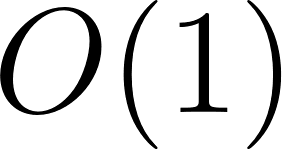 time without calling
 append/3.
DCG Syntax (-->)
Instead of the standard neck operator :-, DCG rules use -->. The compiler automatically adds two hidden arguments representing the difference list input and output.
For example, this simple grammar rule:
1 sentence --> noun_phrase, verb_phrase.
Is compiled internally into:
1 sentence(Start, End) :-
2     noun_phrase(Start, Mid),
3     verb_phrase(Mid, End).
Parsing and Generating
To test or run a DCG, use the built-in phrase/2 or phrase/3 predicate:
1 sentence --> [the], [cat], [sat].
2
3 ?- phrase(sentence, [the, cat, sat]).
4 true.
We will explore DCGs extensively in the Natural Language Processing (NLP) chapter.
Common SWI-Prolog Built-in Predicates
SWI-Prolog includes a rich set of built-in predicates for control flow, database manipulation, term inspection, and list processing. Here is a reference table of the most common predicates:
| Predicate | Description | Example Query & Result |
|---|---|---|
findall(Template, Goal, List) |
Finds all solutions matching Goal and collects Template values into List. Returns empty list if no solutions. |
?- findall(C, parent(tom, C), List). List = [bob, liz].
|
bagof(Template, Goal, List) |
Like findall/3, but groups results by free variables and fails if there are no solutions. |
?- bagof(C, parent(P, C), List). P = bob, List = [ann, pat] ; P = tom, List = [bob, liz].
|
setof(Template, Goal, Set) |
Like bagof/3, but sorts the resulting list and removes duplicates. |
?- setof(C, parent(P, C), Set). P = bob, Set = [ann, pat].
|
asserta(Clause) |
Dynamically asserts Clause at the beginning of the database. |
?- asserta(parent(tom, sam)). true.
|
assertz(Clause) |
Dynamically asserts Clause at the end of the database. |
?- assertz(parent(tom, sam)). true.
|
retract(Clause) |
Dynamically removes the first clause matching Clause from the database. |
?- retract(parent(tom, bob)). true.
|
retractall(Head) |
Removes all clauses whose head unifies with Head. |
?- retractall(parent(tom, _)). true.
|
functor(Term, Functor, Arity) |
Unifies with the name and arity of a compound term (or creates one). |
?- functor(parent(tom, bob), F, A). F = parent, A = 2.
|
arg(N, Term, Argument) |
Accesses the N-th argument of a compound term. |
?- arg(2, parent(tom, bob), Arg). Arg = bob.
|
Term =.. List |
The “univ” operator; converts a compound term to/from a list of functor and arguments. |
?- parent(tom, bob) =.. L. L = [parent, tom, bob].
|
Optional Practice Problems
- Grandparent and Sibling Relations: Extend the
family.pldatabase in thetutorial_basicsdirectory. Implement agrandparent/2predicate and asibling/2predicate (ensuring that a person is not their own sibling). Write unit tests intests/test_family.plto verify your implementation. - Reverse a List: In
lists.pl, implement a predicatereverse_list/2that reverses a list using an accumulator pattern for efficient linear-time execution. Add corresponding unit tests.