Client-Side Prolog with WebAssembly
Traditionally, incorporating a Prolog-based reasoning engine into a web application required a backend server running SWI-Prolog or another dialect. The web front-end would communicate with this server via HTTP REST APIs, WebSockets, or a language-specific bridge like Janus in Python. While this is a standard design, it introduces server overhead, hosting costs, network latency, and requires an internet connection to function.
WebAssembly (WASM) changes this paradigm. By compiling the entire SWI-Prolog engine (written in C) into a highly optimized WASM binary, we can download and run Prolog directly in the user’s web browser.
This architecture offers several key advantages:
- Zero Server Cost: The logic engine runs entirely on client CPU cycles. The server only needs to host static files (HTML, CSS, JS, WASM).
- Sub-millisecond Latency: Queries execute locally in microsecond loops, allowing interface elements to update instantly as users toggle options.
- Offline Resilience: Once the static files are loaded, the expert system works without any network connection, making it suitable for progressive web applications (PWAs).
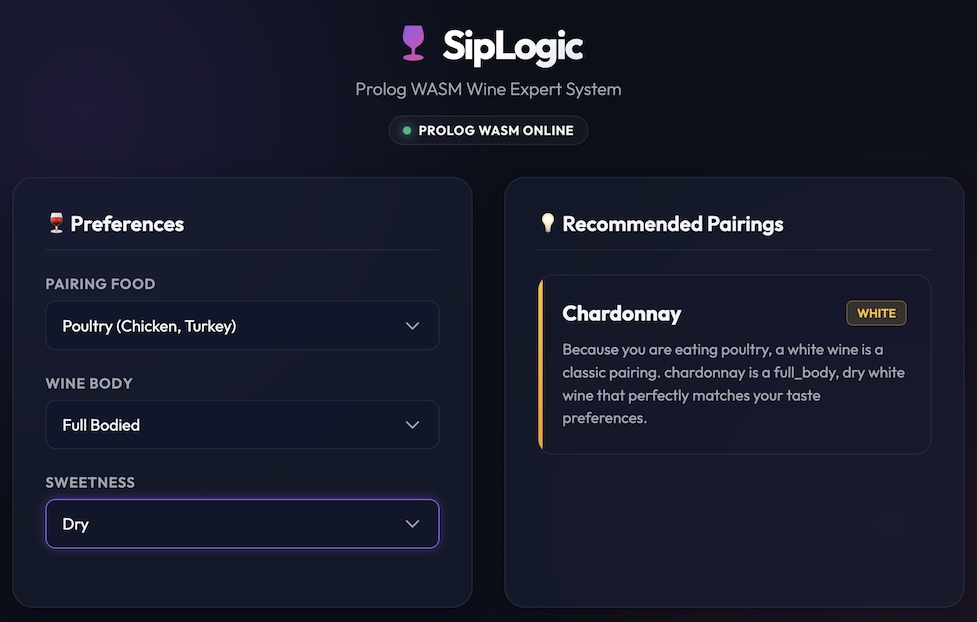
In this chapter, we explore SipLogic, a Wine Advisor expert system dashboard. It loads SWI-Prolog WASM, reads a local Prolog rule-base, and runs recommendations interactively on the client side.
Architecture of a WASM Prolog Application
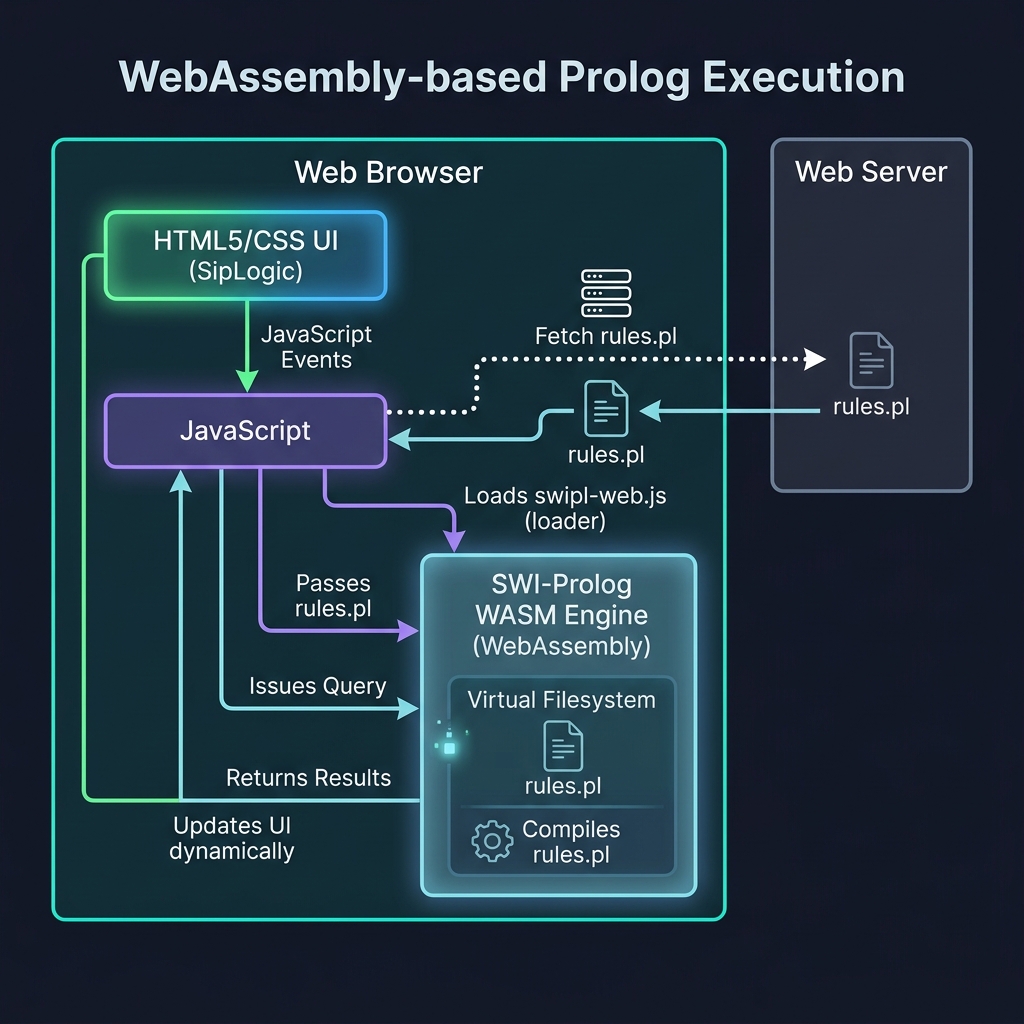
The execution model inside the browser is simple. The browser downloads the SWI-Prolog WASM runtime and our expert system rule file. It then uses the Emscripten virtual file system to load the rules inside the compiled runtime, after which JavaScript communicates with the engine via queries:
- WASM Initialization: The browser loads
swipl-web.js(from a CDN or local assets), which instantiates the SWI-Prolog engine. - Virtual FS Write: The application fetches the text of
rules.pland writes it to Emscripten’s virtual memory filesystem (e.g., at/rules.pl). - Engine Consultation: JavaScript queries the engine to run
consult('/rules.pl'). - Interactive Query Loop: Whenever the user updates UI filters (food, body preference, sweetness), a JavaScript event listener triggers, constructing and executing a Prolog query. The engine returns bindings as native JavaScript objects.
Recommender System Logic
Our advisor is defined by a Prolog database containing wine facts, food pairing rules, and a recommendation predicate.
Here is the code in source-code/prolog_wasm_web/rules.pl:
 1 % rules.pl - Wine Recommendation Expert System for WASM
 2
 3 % Database of Wines: wine(Name, Color, Body, Sweetness)
 4 wine(cabernet_sauvignon, red, full_body, dry).
 5 wine(merlot, red, medium_body, dry).
 6 wine(pinot_noir, red, light_body, dry).
 7 wine(chardonnay, white, full_body, dry).
 8 wine(sauvignon_blanc, white, medium_body, dry).
 9 wine(riesling, white, light_body, sweet).
10 wine(moscato, white, light_body, sweet).
11 wine(port, red, full_body, sweet).
12 wine(sauternes, white, full_body, sweet).
13
14 % Pairing rules: pair(WineColor, FoodType)
15 pair(red, meat).
16 pair(red, cheese).
17 pair(white, fish).
18 pair(white, poultry).
19 pair(white, spicy_food).
20 pair(white, dessert).
21 pair(red, dessert).
22
23 % Recommend a wine based on food, body preference, and sweetness
24 % preference.
25 % Returns Wine name, its Color, and a justification string.
26 recommend(Food, PreferredBody, PreferredSweetness, Wine, Color,
27     Explanation) :-
28     wine(Wine, Color, Body, Sweetness),
29     % Check food pairing compatibility
30     pair(Color, Food),
31     % Match preferences if specified (or allow any if 'any' is selected)
32     (PreferredBody == any ; Body == PreferredBody),
33     (PreferredSweetness == any ; Sweetness == PreferredSweetness),
34     % Generate a human-readable explanation
35     generate_explanation(Wine, Color, Body, Sweetness, Food,
36         Explanation).
37
38 % Generate a beautiful explanation sentence
39 generate_explanation(Wine, Color, Body, Sweetness, Food, Explanation) :-
40     format(string(Explanation),
41            "Because you are eating ~w, a ~w wine is a classic pairing. ~w is a ~w, ~w ~w wine that perfectly matches your taste preferences.",
42            [Food, Color, Wine, Body, Sweetness, Color]).
The recommendation logic matches the user’s food selection with compatible wine colors, verifies matching body and sweetness preferences (using the fallback term any), and calls format/3 to return a customized justification sentence.
JavaScript Integration
The JavaScript layer manages the lifecycle of the WASM engine: downloading the loader, fetching the rules, initializing the query handler, and responding to DOM input events.
Here is the implementation in source-code/prolog_wasm_web/app.js:
  1 // app.js - SipLogic application to load SWI-Prolog WASM and query recommendations
  2
  3 const SWIPL_WASM_VERSION = '8.1.2';
  4
  5 let prologEngine = null;
  6
  7 // Whitelisted values for each user-facing selector.  Anything else
  8 // is rejected before it can reach a Prolog query string.
  9 const ALLOWED = {
 10     food: ['meat', 'cheese', 'poultry', 'fish', 'spicy_food', 'dessert'],
 11     body: ['any', 'full_body', 'medium_body', 'light_body'],
 12     sweetness: ['any', 'dry', 'sweet']
 13 };
 14
 15 // pq(atom): single-quote-escape a value as a Prolog atom, defensively.
 16 // Whitelisted values are already safe; this guards any other code path
 17 // that builds query strings.
 18 function pq(atom) {
 19     return "'" + String(atom).replace(/\\/g, '\\\\').replace(/'/g, "\\'") + "'";
 20 }
 21
 22 function checkedValue(name, raw) {
 23     if (ALLOWED[name].indexOf(raw) === -1) {
 24         throw new Error(`Invalid ${name} selection: ${raw}`);
 25     }
 26     return raw;
 27 }
 28
 29 // DOM Elements
 30 const statusBadge = document.getElementById('statusBadge');
 31 const statusText = document.getElementById('statusText');
 32 const resultsContainer = document.getElementById('resultsContainer');
 33 const foodSelect = document.getElementById('foodSelect');
 34 const bodySelect = document.getElementById('bodySelect');
 35 const sweetnessSelect = document.getElementById('sweetnessSelect');
 36
 37 // Replace the results area with a small (icon, message, detail) state,
 38 // e.g. an empty state, an error banner, or a "still loading" notice.
 39 // icon is one of the short label tokens used by the CSS (⚠️, 🍷, ...).
 40 function showState(icon, message, detail) {
 41     resultsContainer.textContent = '';
 42
 43     const state = document.createElement('div');
 44     state.className = 'empty-state';
 45
 46     const iconEl = document.createElement('span');
 47     iconEl.className = 'empty-icon';
 48     iconEl.textContent = icon;
 49     state.appendChild(iconEl);
 50
 51     const messageEl = document.createElement('p');
 52     messageEl.textContent = message;
 53     state.appendChild(messageEl);
 54
 55     if (detail) {
 56         const detailEl = document.createElement('p');
 57         detailEl.style.fontSize = '0.85rem';
 58         detailEl.style.color = 'var(--text-secondary)';
 59         detailEl.textContent = detail;
 60         state.appendChild(detailEl);
 61     }
 62
 63     resultsContainer.appendChild(state);
 64 }
 65
 66 function showError(message, detail) {
 67     showState('⚠️', message, detail);
 68 }
 69
 70 // Initialize the SWI-Prolog WASM engine
 71 async function initProlog() {
 72     try {
 73         console.log("Initializing SWI-Prolog WASM...");
 74
 75         // 1. Initialize SWIPL loader
 76         const swipl = await SWIPL({
 77             arguments: ["-q"],
 78             locateFile: (path) =>
 79                 `https://unpkg.com/swipl-wasm@${SWIPL_WASM_VERSION}/dist/swipl/${path}`
 80         });
 81
 82         prologEngine = swipl.prolog;
 83         console.log("SWI-Prolog engine loaded. Fetching rules.pl...");
 84
 85         // 2. Fetch local rules.pl content
 86         const response = await fetch('rules.pl');
 87         if (!response.ok) {
 88             throw new Error(`Failed to fetch rules.pl: ${response.statusText}`);
 89         }
 90         const rulesText = await response.text();
 91
 92         // 3. Write rules.pl to Emscripten virtual filesystem
 93         swipl.FS.writeFile('/rules.pl', rulesText);
 94         console.log("rules.pl written to virtual FS. Consulting...");
 95
 96         // 4. Consult the rules inside Prolog; surface consult errors in the UI
 97         const consultResult = prologEngine.query("consult('/rules.pl').").once();
 98         if (consultResult && consultResult.error) {
 99             prologEngine = null;
100             showError("Failed to consult Prolog rules.", consultResult.message);
101             return;
102         }
103         console.log("Consult complete. Engine is online!");
104
105         // 5. Update UI status
106         statusBadge.classList.add('online');
107         statusText.textContent = "Prolog WASM Online";
108
109         // Enable inputs
110         [foodSelect, bodySelect, sweetnessSelect].forEach(select => {
111             select.disabled = false;
112         });
113
114         // Run initial recommendation
115         runRecommendation();
116
117         // Add event listeners
118         [foodSelect, bodySelect, sweetnessSelect].forEach(select => {
119             select.addEventListener('change', runRecommendation);
120         });
121
122     } catch (error) {
123         console.error("Failed to initialize Prolog WASM:", error);
124         statusText.textContent = "Error Loading Prolog";
125         showError("Failed to initialize the SWI-Prolog engine.", error.message);
126     }
127 }
128
129 // Run query and display results
130 function runRecommendation() {
131     if (!prologEngine) {
132         showState('🍷', "The Prolog engine is still loading...",
133                   "Recommendations will appear here once it is ready.");
134         return;
135     }
136
137     let food, body, sweetness;
138     try {
139         food = checkedValue('food', foodSelect.value);
140         body = checkedValue('body', bodySelect.value);
141         sweetness = checkedValue('sweetness', sweetnessSelect.value);
142     } catch (error) {
143         showError("Invalid selection.", error.message);
144         return;
145     }
146
147     resultsContainer.textContent = '';
148
149     // Construct Prolog query
150     // Example: recommend('meat', 'full_body', 'dry', Wine, Color, Explanation).
151     const queryStr = `recommend(${pq(food)}, ${pq(body)}, ${pq(sweetness)}, Wine, Color, Explanation).`;
152     console.log("Executing Query:", queryStr);
153
154     try {
155         const query = prologEngine.query(queryStr);
156         const recommendations = [];
157
158         // ... add the event listeners above, then fetch each solution by
159         // ... calling query.next() in a loop, checking result.error inside
160         // ... and after the loop and calling query.close() on failure paths,
161         // ... then render each recommendation with createElement and
162         // ... textContent rather than innerHTML. See the complete listing
163         // ... in this book's GitHub repository.
The CDN dependency is pinned to a specific version (8.1.2) instead of @latest. This prevents supply-chain drift and makes the page reproducible. User selections are validated against the ALLOWED whitelist and escaped with pq() before they enter the Prolog query string, which prevents query injection. All DOM rendering uses createElement and textContent rather than innerHTML, so Prolog-derived strings cannot inject markup. Consult and query failures are surfaced in the UI by checking result.error on the consult result and on every query step.
Running the Application Locally
Because modern web browsers block asynchronous network requests (such as fetch) when pages are loaded from local file paths (file://), you cannot test the project by double-clicking the index.html file. Instead, you must run a simple local HTTP server from the project directory.
Open a terminal, navigate to the source-code/prolog_wasm_web directory, and run the built-in Python HTTP server module:
1 $ python -m http.server 8000 --directory .
Then, open http://localhost:8000 in your web browser. You will see the status badge transition from red (Prolog Loading…) to a glowing emerald green (Prolog WASM Online). Changing any of the pairing selectors dynamically triggers queries that instantaneously update the recommended list.
Key Design Decisions
Loading from CDN vs. Self-Hosting WASM. In this example, the Emscripten JS and WASM assets are loaded via the unpkg CDN, pinned to version 8.1.2 (https://unpkg.com/swipl-wasm@8.1.2/dist/swipl/). For production applications, it is usually better to self-host these assets on your own web server or Content Delivery Network to avoid dependencies on external CDN infrastructure and to enforce Strict Content Security Policies (CSP).
File System Emulation. Emscripten maps virtual memory structures to regular file system logic. The call swipl.FS.writeFile('/rules.pl', rulesText) creates a virtual file that SWI-Prolog’s core consult predicate reads as if it were a physical file on disk. This is a powerful feature: it means you can reuse existing complex Prolog databases without modifying the Prolog codebase to load from strings.
The Query Lifecycle. Unlike a traditional long-running command-line loop, querying WASM Prolog in JavaScript uses an iterator pattern:
prologEngine.query(queryStr)returns an active query handle.- Calling
.next()returns a dictionary of the variable bindings (e.g.,{ Wine: "merlot", Color: "red" }) or a state object indicating the query is complete. - Always call
query.close()once you are done fetching results to free the internal memory structures allocated in the WASM heap.
Optional Practice Problems
- WASM Form Input: Modify
index.htmlin theprolog_wasm_webproject to include an input form where a user can enter a family member’s name and query the WASM Prolog engine to list all their siblings. - Execution Timing: Add code to
app.jsthat measures the time taken by the WASM Prolog engine to solve queries and renders the timing info in the browser DOM.