Building AI Agents with Prolog
AI agents that reason, plan, and act autonomously are a major focus of modern AI research. Prolog’s built-in support for logical reasoning, backtracking search, and knowledge representation makes it an excellent foundation for building intelligent agents.
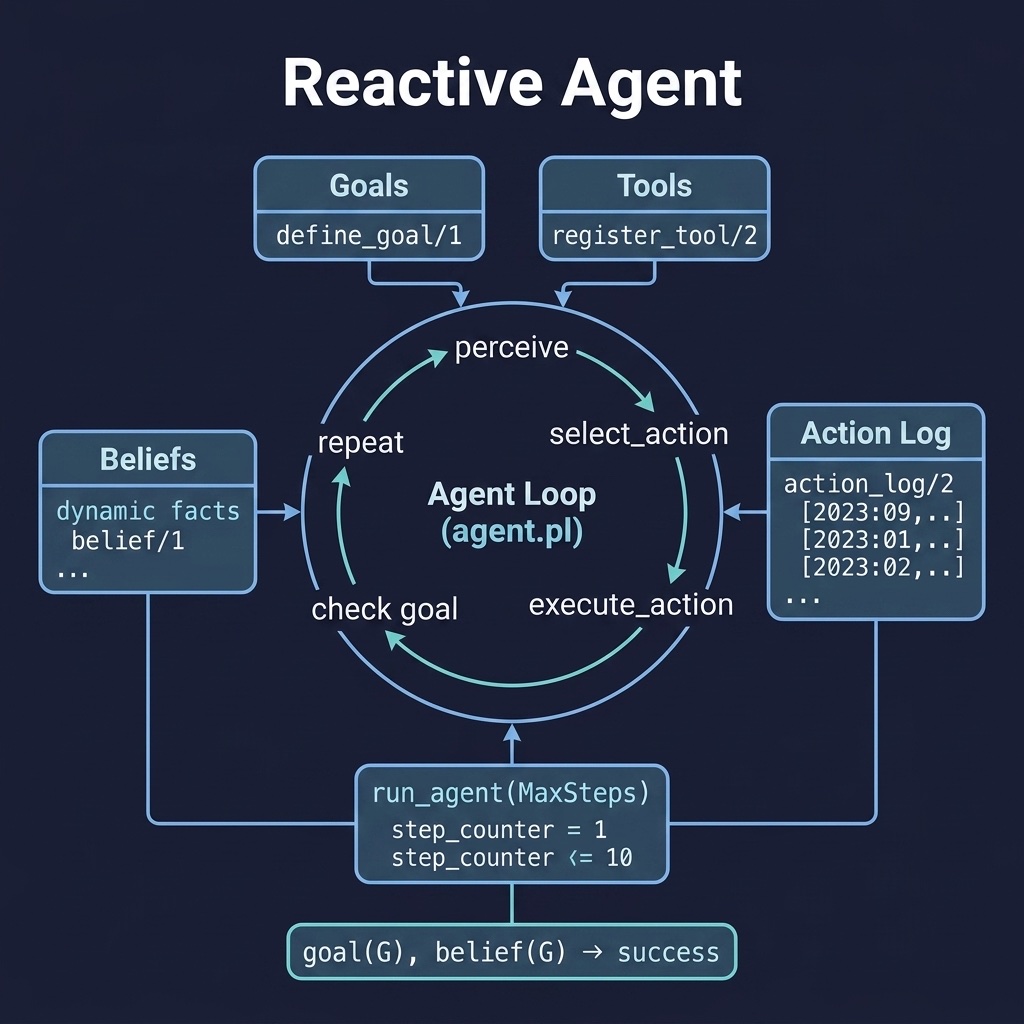
What Is an AI Agent?
An AI agent is a system that perceives its environment, reasons about what it observes, and takes actions to achieve its goals. Every agent, from a simple thermostat to a LLM-powered research assistant, follows the same fundamental pattern: the perception-reasoning-action loop.
- Perceive: observe the environment. This could mean reading sensor data, parsing a user’s natural language query, checking a database, or fetching the contents of a web page.
- Reason: decide what to do next. The agent matches its observations against its goals and its knowledge of how the world works, then selects the best action.
- Act: carry out the chosen action and feed the outcome back into the loop.
Prolog is a natural fit for agent architectures because its inference engine already implements a reasoning loop: given a goal, Prolog searches for a proof using the available rules and facts. Wrapping that inference engine inside a perception-action cycle produces a goal-directed agent with minimal code.
A Simple Reactive Agent
A reactive agent responds directly to its current perceptions without maintaining an internal model of the world. It maps observations to actions using simple rules. While limited, a reactive agent is fast, predictable, and easy to debug, making it the right starting point before adding the complexity of planning, memory, or tool use.
The reactive_agent project implements a reusable reactive agent framework with a perception-reasoning-action loop. Here is the file reactive_agent/prolog/agent.pl:
 1 %% agent.pl - Goal-directed agent with perception-reasoning-action loop
 2 :- module(agent, [
 3     run_agent/1,
 4     define_goal/1,
 5     register_tool/2
 6 ]).
 7
 8 :- dynamic goal/1.
 9 :- dynamic tool/2.         % tool(Name, Predicate)
10 :- dynamic belief/1.       % agent's current beliefs
11 :- dynamic action_log/2.   % action_log(Action, Timestamp)
12
13 %% define_goal(+Goal)
14 define_goal(G) :- assert(goal(G)).
15
16 %% register_tool(+Name, +Predicate)
17 register_tool(Name, Pred) :- assert(tool(Name, Pred)).
18
19 %% run_agent(+MaxSteps) - Main agent loop
20 run_agent(0) :- format("Agent: max steps reached.~n").
21 run_agent(N) :-
22     N > 0,
23     (   goal(G), belief(G)
24     ->  format("Agent: goal ~w achieved!~n", [G])
25     ;   perceive,
26         select_action(Action),
27         execute_action(Action),
28         N1 is N - 1,
29         run_agent(N1)
30     ).
31
32 %% TBD: Implement perceive, select_action, execute_action
33 perceive :- true.
34
35 select_action(idle) :-
36     format("Agent: no applicable action found.~n").
37
38 execute_action(idle) :- true.
39 execute_action(Action) :-
40     get_time(T),
41     assert(action_log(Action, T)),
42     format("Agent: executing ~w~n", [Action]).
The module defines four dynamic predicates as the agent’s working memory: goal/1 stores the current objective, tool/2 registers named actions the agent can take, belief/1 holds facts the agent has learned, and action_log/2 records every action with its timestamp for later analysis.
The core of the framework is run_agent/1. It takes a maximum step count and enters a loop: check whether the goal is already satisfied (in which case stop), then perceive the environment, select an action, execute it, decrement the counter, and recurse. The base case fires when the step counter reaches zero, preventing infinite loops.
The three predicates perceive/0, select_action/1, and execute_action/1 are deliberately written as extension points. Out of the box, perceive/0 does nothing, select_action/1 falls back to idle, and execute_action/1 logs the action with a timestamp. To build a working agent for a specific domain, you override these predicates in a separate module that imports agent.
Extending the Framework
Suppose we want an agent that monitors a file system and responds to disk space warnings. We create a new module that imports agent and fills in the extension points:
 1 :- module(filesystem_agent, []).
 2 :- use_module(prolog/agent).
 3
 4 perceive :-
 5     check_disk_space(PercentFree),
 6     (   PercentFree < 10
 7     ->  assert(belief(disk_low))
 8     ;   true
 9     ).
10
11 select_action(send_alert) :-
12     retract(belief(disk_low)),
13     tool(send_alert, _).
14 select_action(compress_logs) :-
15     retract(belief(disk_low)),
16     tool(compress_logs, _).
17
18 check_disk_space(P) :-
19     /* platform-specific: call df or use OS bindings */
20     P = 5.   % placeholder
21
22 :- define_goal(disk_ok).
23 :- register_tool(send_alert, alert_admin/0).
24 :- register_tool(compress_logs, rotate_logs/0).
This demonstrates the pattern: perceive/0 populates belief/1 with observations, and select_action/1 matches beliefs against registered tools to pick the next step. The framework handles the loop, logging, and goal checking automatically.
Running the Agent
Load the framework in SWI-Prolog and run:
1 ?- define_goal(answer_found).
2 ?- register_tool(search, search_web/1).
3 ?- run_agent(10).
The tests verify basic setup:
1 :- begin_tests(agent).
2
3 test(register_tool) :-
4     register_tool(search, search_web/1).
5
6 test(define_goal) :-
7     define_goal(answer_found).
8
9 :- end_tests(agent).
Goal-Directed Agents
A reactive agent responds to the immediate situation. A goal-directed agent goes further: it maintains an explicit representation of what it wants to achieve and uses that goal to guide every decision. The distinction matters because the same observation, “the disk is at 5% free space”, might lead to different actions depending on whether the goal is keep_system_running or minimize_cost.
In our framework, goals are first-class. The goal/1 predicate stores the current objective, and run_agent/1 checks it at the top of every loop iteration. When goal(G), belief(G) succeeds, the agent stops, the goal is achieved. This pattern generalizes to multiple goals by extending the check:
1 all_goals_satisfied :-
2     forall(goal(G), belief(G)).
Goal priorities are also straightforward to add. If goals conflict, say, save_disk_space and keep_logs_verbose, you order them with a priority argument:
1 :- dynamic goal/2.   % goal(Priority, GoalTerm)
2
3 highest_unsatisfied_goal(G) :-
4     findall(P-G, (goal(P, G), \+ belief(G)), Pairs),
5     sort(Pairs, Sorted),
6     reverse(Sorted, [_-G|_]).
Prolog’s unification engine makes goal matching natural: a goal like file_status(File, archived) succeeds when the belief database contains a matching belief(file_status('/var/log/syslog', archived)) fact. Variables in the goal term act as queries against the belief store.
Tool-Using Agents with LLM Integration
The reactive agent pattern becomes far more capable when the agent can call external tools (web search, database queries, LLM APIs, file system operations) and when an LLM helps select which tool to use.
The architecture has three layers:
- Tool Registry: Prolog facts (
tool/2) mapping tool names to the predicates that implement them. Each tool is a Prolog predicate that the agent can call. - Action Selection:
select_action/1queries the tool registry and the belief store to find applicable actions. In a simple agent, this is pure Prolog rule matching. In an LLM-augmented agent, the agent sends the list of available tools and the current beliefs to an LLM and asks it to pick the next action. - Tool Execution:
execute_action/1calls the selected tool predicate and records the result as a new belief.
A richer select_action/1 that uses an LLM to choose among registered tools looks like this:
1 select_action(Action) :-
2     findall(Name-Pred, tool(Name, Pred), Tools),
3     findall(B, belief(B), Beliefs),
4     format(atom(Prompt),
5            'Available tools: ~w. Current beliefs: ~w. What action?',
6            [Tools, Beliefs]),
7     ollama_generate(Prompt, ActionAtom),
8     term_string(Action, ActionAtom).
The LLM receives a description of the current state (beliefs) and a list of available tools, then returns the selected action as structured text. Prolog parses it back into a term and executes it. This combines the LLM’s flexibility (understanding natural language goals, adapting to novel situations) with Prolog’s reliability for tool execution and state management.
Defining Tools
Tools are just Prolog predicates registered with register_tool/2:
1 search_web(Query) :-
2     http_get('https://api.duckduckgo.com/', Result, [q(Query), format(json)]),
3     assert(belief(search_result(Query, Result))).
4
5 query_knowledge_base(Query) :-
6     findall(R, knowledge(Query, R, _), Results),
7     assert(belief(kb_result(Query, Results))).
Each tool predicate does its work and then asserts the result as a belief. This integrates the tool’s output into the agent’s state, making it available for the next round of reasoning and action selection.
Multi-Agent Communication
When multiple agents operate in the same environment, they need to communicate, like sharing discoveries, delegating subtasks, and coordinating to avoid conflicting actions. Prolog’s dynamic database is inherently shared within a process, which makes message passing between agents as simple as asserting and querying facts.
A minimal message-passing system uses a message/3 dynamic predicate:
1 :- dynamic message/3.   % message(Sender, Receiver, Content)
2
3 send_message(From, To, Content) :-
4     assert(message(From, To, Content)).
5
6 receive_messages(Agent, Messages) :-
7     findall(Msg, (retract(message(_, Agent, Msg))), Messages).
Each agent periodically calls receive_messages/2 in its perception step, processing messages and updating its beliefs accordingly. Because messages are retracted when read, each is consumed exactly once, a simple but effective protocol.
For more sophisticated coordination, agents can use a blackboard architecture: a shared data structure (the blackboard) to which any agent can post partial results or hypotheses. Other agents watch the blackboard for data relevant to their expertise. Prolog’s assert/retract mechanism implements a blackboard directly, agents assert findings as facts and other agents query those facts in their perception steps.
 1 %% Agent A: researcher
 2 perceive :-
 3     receive_messages(researcher, Msgs),
 4     process_research_tasks(Msgs),
 5     (   belief(search_complete(Topic))
 6     ->  assert(blackboard(search_done(Topic)))   % post to blackboard
 7     ;   true
 8     ).
 9
10 %% Agent B: summarizer, watches the blackboard
11 perceive :-
12     findall(Topic, blackboard(search_done(Topic)), Topics),
13     maplist(summarize_and_store, Topics).
Each agent is a specialization of the same run_agent/1 loop, but with a different goal, tool set, and perception predicate. They run either interleaved in a single Prolog process or in separate threads using SWI-Prolog’s thread_create/2.
Case Study: A Research Assistant Agent
The research_assistant project sketches a multi-stage agent that answers research questions by chaining together web search, LLM summarization, and Prolog knowledge-base reasoning. This is an experimental skeleton: the pack title is “Research assistant (experimental skeleton)” and the README declares “Status: experimental”. Here is the complete file research_assistant/prolog/assistant.pl (22 lines):
 1 %% assistant.pl - Research assistant agent
 2 %% Combines: web search → LLM summarization → Prolog knowledge base →
 3 %% reasoning
 4 :- module(assistant, [
 5     research/2
 6 ]).
 7
 8 :- dynamic knowledge/3.  % knowledge(Topic, Fact, Source)
 9
10 %% research(+Question, -Answer)
11 %% TBD: Full implementation combining:
12 %% 1. Parse question to identify search terms
13 %% 2. Web search via REST API (Brave Search / Tavily)
14 %% 3. Summarize results via LLM (Gemini/Ollama)
15 %% 4. Store structured knowledge as Prolog facts
16 %% 5. Reason over knowledge base to produce answer
17 research(Question, Answer) :-
18     format("Researching: ~w~n", [Question]),
19     %% Placeholder: direct LLM query
20     Answer = placeholder_answer(Question).
21
22 %% TBD: Implement search, summarize, store, reason pipeline
The skeleton declares the intended shape of the pipeline in comments and dynamic predicates. The planned implementation has five stages: parse the question to identify search terms, run a web search via a REST API such as Brave Search or Tavily, summarize the results with an LLM (Gemini or Ollama), store the structured knowledge as knowledge/3 Prolog facts, then reason over the knowledge base to produce the answer. The current research/2 only prints the question and returns a placeholder_answer/1 term; the search, summarize, store, and reason pipeline is not yet implemented. The single test in the suite is blocked('pipeline not yet implemented') rather than passing trivially.
The Planned Pipeline
The Web Clients chapter covers http_get/3 and JSON parsing, and the LLM Integration chapter covers the Gemini and Ollama clients, so a finished research/2 would combine those pieces into the five stages listed above. The research assistant also benefits from caching: if the same question (or similar search terms) was answered recently, the agent can return the cached knowledge rather than repeating the full pipeline. This is a natural fit for the Cache Engine chapter’s patterns.
Running the assistant:
1 ?- research("What are the health benefits of green tea?", Answer).
2 Researching: What are the health benefits of green tea?
3 Answer = placeholder_answer("What are the health benefits of green tea?").
Optional Practice Problems
- Obstacle Avoidance Goal: In the
reactive_agentproject, add a goal to the agent’s logic to steer around a simple 2D obstacle grid when navigating from a start position to a target destination. - arXiv Summary Agent: In the
research_assistantproject, write a rule that fetches paper details from the arXiv API using the search query keyword, parses the XML response, and outputs a brief summary.