Using the AnyLanguageModel Package with OpenAI, Gemini, and Ollama
As Swift developers, we are witnessing a Cambrian explosion of Large Language Models in addition to the built-in models that Apple provides. While Apple provides its native FoundationModels framework for integrating AI, the landscape is far larger, encompassing powerful remote APIs from OpenAI, Google, and Anthropic, as well as efficient local models running via Ollama, MLX, and Llama.cpp. Historically, supporting multiple providers meant writing and maintaining a separate, complex API client for each one. This approach leads to significant code duplication, vendor lock-in, and a brittle architecture that is difficult to adapt.
This chapter introduces the AnyLanguageModel package from Hugging Face, at:
https://github.com/huggingface/AnyLanguageModel.
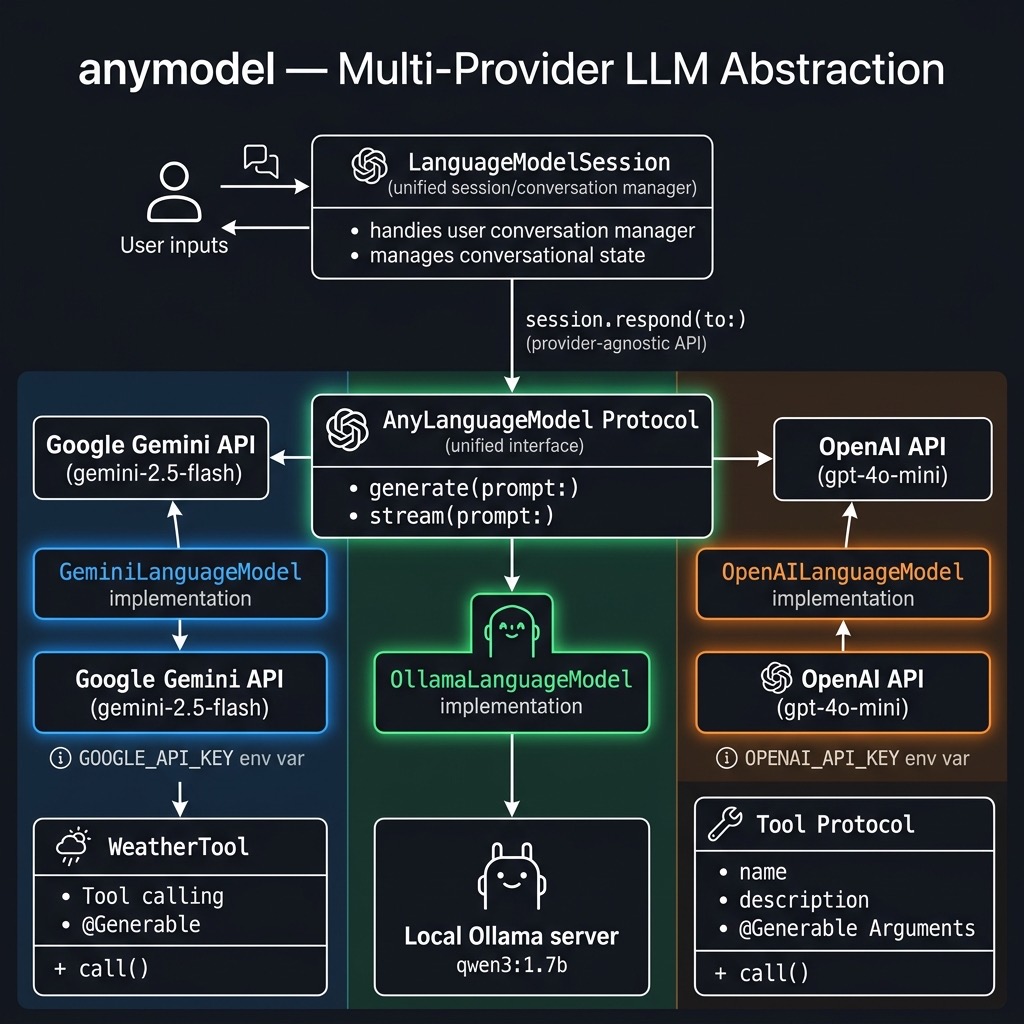
This package provides an elegant, unified abstraction layer that acts as an API-compatible, drop-in replacement for Apple’s FoundationModels, allowing you to write your inference and tool-handling logic once. The primary advantage of this single framework is flexibility. You can effortlessly swap backends—moving from Apple’s system model to gpt-4o-mini, gemini-2.5-flash, or a local qwen3 model—often by changing only a single line of initialization code. This strategy future-proofs your application, simplifies testing, and empowers you to choose the right model for the job based on cost, performance, or privacy.
The example source code for this chapter is in the directory anymodel in the GitHub repository for this book.
OpenAI Example
Our first example uses the OpenAI API with the gpt-4o-mini model. The LanguageModelSession class provides the same interface regardless of which provider you use:
import AnyLanguageModel
import Foundation

@main
struct OpenAIExample {
    static func main() async throws {
        guard let apiKey =
            ProcessInfo.processInfo
                .environment["OPENAI_API_KEY"],
            !apiKey.isEmpty
        else {
            fatalError(
                "Missing OPENAI_API_KEY "
                + "environment variable."
            )
        }

        let model = OpenAILanguageModel(
            apiKey: apiKey,
            model: "gpt-4o-mini"
        )

        let session = LanguageModelSession(model: model)
        let response = try await session.respond(
            to: "Write a haiku about Swift programming"
        )
        print(response.content)
    }
}
Notice how simple this is: create a model, create a session, and call respond. The same pattern works for every provider. Here is sample output from running this code:
swift run openai-example
[1/1] Planning build
Building for debugging...
[1/1] Write swift-version--58304C5D6DBC2206.txt
Build of product 'openai-example' complete! (1.54s)
Swift code flows like streams,
Semicolons vanish clear,
Build dreams line by line.
Google Gemini Example with Tool Use
One of the most powerful features of AnyLanguageModel is that it brings a unified tool-calling interface across all providers. Here we define a WeatherTool using the @Generable and @Guide macros (mirroring Apple’s FoundationModels API), then use it with Google’s Gemini:
import AnyLanguageModel
import Foundation

struct WeatherTool: Tool {
    let name = "getWeather"
    let description =
        "Retrieve the latest weather information "
        + "for a city."

    @Generable
    struct Arguments {
        @Guide(description:
            "The city to fetch the weather for.")
        var city: String
    }

    func call(
        arguments: Arguments
    ) async throws -> String {
        "The weather in \(arguments.city) is " +
        "sunny and 72°F / 23°C"
    }
}

@main
struct GeminiExample {
    static func main() async throws {
        guard let apiKey =
            ProcessInfo.processInfo
                .environment["GOOGLE_API_KEY"],
            !apiKey.isEmpty
        else {
            fatalError(
                "Missing GOOGLE_API_KEY "
                + "environment variable."
            )
        }

        let model = GeminiLanguageModel(
            apiKey: apiKey,
            model: "gemini-2.5-flash"
        )

        let session = LanguageModelSession(
            model: model, tools: [WeatherTool()]
        )
        let response = try await session.respond(
            to: "What's the weather like in Tokyo?"
        )
        print(response.content)
    }
}
The WeatherTool struct conforms to the Tool protocol. Its Arguments struct uses @Generable to let the model generate structured arguments, and @Guide annotations describe each parameter to the model. When the model decides to call this tool, the framework handles the JSON schema generation, argument parsing, and function invocation automatically.
Here is sample output:
for debugging...
[1/1] Write swift-version--58304C5D6DBC2206.txt
Build of product 'gemini-example' complete! (0.16s)
The weather in Tokyo is sunny and 72°F / 23°C.
Ollama Local Example
For local inference with no API key required, we use OllamaLanguageModel. This connects to a locally running Ollama service on the default port:
import AnyLanguageModel
import Foundation

@main
struct OllamaExample {
    static func main() async throws {
        let model = OllamaLanguageModel(
            model: "qwen3:1.7b"
        )

        let session = LanguageModelSession(model: model)
        let response = try await session.respond(
            to: "Write a haiku about Swift programming"
        )
        print(response.content)
    }
}
Make sure Ollama is running locally and you have pulled the model:
Here is sample output:
 $ swift run ollama-example
Building for debugging...
[1/1] Write swift-version--58304C5D6DBC2206.txt
Build of product 'ollama-example' complete! (0.16s)
Swift code flows smoothly.
With typesafe elegance, it's a modern marvel.
Swift's conciseness, a powerful tool.
AnyLanguageModel Package Wrap Up
In this chapter we have seen the simplicity of the AnyLanguageModel package. You have learned how to configure a LanguageModelSession to work with a wide array of providers, from major remote APIs to local models running via Ollama. We have shown that by acting as a drop-in replacement for Apple’s FoundationModels framework, this library allows you to build model-agnostic features using a consistent, familiar API. You are no longer required to write bespoke networking and parsing logic for each new model you want to experiment with.
This abstraction is more than a simple convenience; it represents a strategic design pattern for building modern, resilient AI applications in Swift. By decoupling your application’s business logic from the specific model implementation, you are now free to innovate. You can dynamically select the most cost-effective model for simple tasks and the most powerful model for complex reasoning, all within the same codebase. As the AI landscape continues to evolve, your application is now ready to adapt with minimal friction, ensuring you can always leverage the best-in-class technology for your users.