Using the OpenAI LLM APIs
I have been working as an artificial intelligence practitioner since 1982 and the capability of Large Language Models (LLMs) is unlike anything I have seen before. I managed a deep learning team at Capital One in 2017-2019 and we used precursors of TransFormer models like OpenAI’s ChatGPT, and Anthropic’s Claude.
You will need to apply to OpenAI for an access key at:
The GitHub repository for this example is:
I recommend reading the online documentation for the online documentation for the APIs to see all the capabilities of the beta OpenAI APIs. Let’s start by jumping into the example code that is in the directory source-code/OpenAI_swift.
The library that I wrote for this chapter supports four functions: for completing text, summarizing text, answering general questions, and getting embeddings for text. The get-4o-mini that we will use here is very inexpensive and capable.
You need to request an API key (I had to wait a few weeks to receive my key) and set the value of the environment variable OPENAI_KEY to your key. You can add a statement like:
export OPENAI_KEY=sa-hdedds7&dhdhsdffd...
to your .profile or other shell resource file that contains your key value (the above key value is made-up and invalid).
The file Sources/OpenAI_swift/OpenAI_swift.swift contains the source code (code description follows the listing):
import Foundation

struct OpenAI {
    private static let key = ProcessInfo.processInfo.environment["OPENAI_KEY"]!
    private static let baseURL = "https://api.openai.com/v1"

    private struct ChatRequest: Encodable {
        let model: String
        let messages: [[String: String]]
        let max_tokens: Int
        let temperature: Double
    }

    private struct EmbeddingRequest: Encodable {
        let model: String
        let input: String
    }

    private static func makeRequest<T: Encodable>(endpoint: String, body: T)
                            -> String {
        var responseString = ""
        let url = URL(string: baseURL + endpoint)!
        var request = URLRequest(url: url)
        request.httpMethod = "POST"
        request.setValue("application/json", forHTTPHeaderField: "Content-Type")
        request.setValue("Bearer \(key)", forHTTPHeaderField: "Authorization")
        request.httpBody = try? JSONEncoder().encode(body)

        let semaphore = DispatchSemaphore(value: 0)
        URLSession.shared.dataTask(with: request) { data, response, error in
            if let error = error {
                print("Error: \(error)")
            }
            if let data = data {
                responseString = String(data: data, encoding: .utf8) ?? "{}"
            }
            semaphore.signal()
        }.resume()
        semaphore.wait()

        return responseString
    }

    static func chat(messages: [[String: String]], maxTokens: Int = 25,
                                temperature: Double = 0.3) -> String {
        let chatRequest = ChatRequest(
            model: "gpt-4o-mini",
            messages: messages,
            max_tokens: maxTokens,
            temperature: temperature
        )

        let response = makeRequest(endpoint: "/chat/completions", body: chatRequest)
        guard let data = response.data(using: .utf8),
              let json = try? JSONSerialization.jsonObject(with: data)
                         as? [String: Any],
              let choices = json["choices"] as? [[String: Any]],
              let firstChoice = choices.first,
              let message = firstChoice["message"] as? [String: Any],
              let content = message["content"] as? String else {
            return ""
        }
        return content
    }

    static func embeddings(text: String) -> [Float] {
        let embeddingRequest = EmbeddingRequest(
            model: "text-embedding-ada-002",
            input: text
        )

        let response = makeRequest(endpoint: "/embeddings", body: embeddingRequest)
        guard let data = response.data(using: .utf8),
              let json = try? JSONSerialization.jsonObject(with: data)
                         as? [String: Any],
              let dataArray = json["data"] as? [[String: Any]],
              let embedding = dataArray.first?["embedding"] as? [NSNumber] else {
            return [1.23]
        }
        return embedding.map { number in Float(truncating: number) }
    }
}

// Usage functions:
func summarize(text: String, maxTokens: Int = 40) -> String {
    OpenAI.chat(messages: [
        ["role": "system",
         "content":
           "You are a helpful assistant that summarizes text concisely."],
        ["role": "user", "content": text]
    ], maxTokens: maxTokens)
}

func questionAnswering(question: String) -> String {
    OpenAI.chat(messages: [
        ["role": "system",
         "content":
           "You are a helpful assistant that answers questions directly and concisel\
y."],
        ["role": "user", "content": question]
    ], maxTokens: 25)
}

func completions(promptText: String, maxTokens: Int = 25) -> String {
    OpenAI.chat(messages: [["role": "user", "content": promptText]],
                           maxTokens: maxTokens)
}
This Swift implementation provides a streamlined interface to OpenAI’s API services, focusing primarily on chat completions and text embeddings functionality. The code is structured around a central OpenAI struct that encapsulates all API interactions and provides a clean, type-safe interface for making requests.
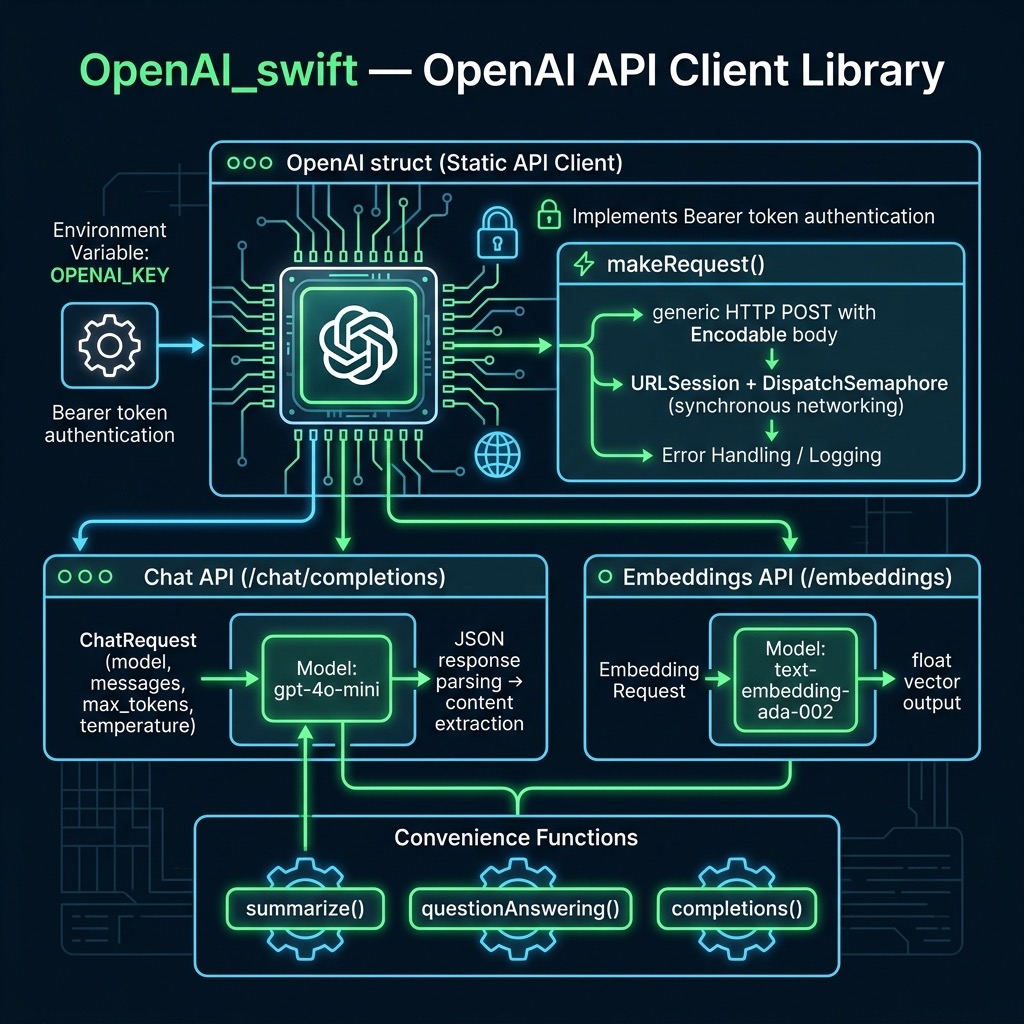
Core Architecture
The implementation follows a modular design pattern, separating concerns between network communication, request/response handling, and utility functions. It utilizes Swift’s strong type system through dedicated request models and leverages environment variables for secure API key management.
Key Features
Authentication and Configuration
The client automatically retrieves the OpenAI API key from environment variables, providing a secure way to handle authentication credentials. The base URL is configured as a constant, making it easy to modify for different environments or API versions.
Chat Completions
The chat completion functionality supports the GPT-4 model family, allowing for structured conversations through an array of messages. Each message contains a role (system, user, or assistant) and content. The implementation provides fine-grained control over:
- Maximum token output
- Temperature settings for response randomness
- Message context management
- Text embeddings
The embeddings feature implements OpenAI’s text-embedding-ada-002 model, converting text inputs into high-dimensional vector representations. These embeddings can be used for:
- Semantic search
- Text similarity comparisons
- Document classification
- Other natural language processing tasks
Utility Functions
The implementation includes pre-built utility functions for common use cases:
- Text summarization with customizable length
- Question-answering with concise responses
- General text completions
Technical Implementation Details
Network Communication
The networking layer uses URLSession with a synchronous approach via DispatchSemaphore. While this ensures straightforward usage, it’s worth noting that this approach should be carefully considered for production environments where asynchronous communication might be more appropriate.
Error Handling
The implementation includes basic error handling through Swift’s optional binding and guard statements, providing graceful fallbacks for common failure scenarios. The embedding function, for instance, returns a default value rather than throwing an error when processing fails.
Data Parsing
JSON parsing is handled through a combination of JSONEncoder for requests and JSONSerialization for responses, with careful optional chaining to safely handle malformed or unexpected responses.
Running Tests
The file SWIFT_BOOK/OpenAI_swift/Tests/OpenAI_swiftTests/OpenAI_swiftTests.swift contains test code:
 1     import XCTest
 2     @testable import OpenAI_swift
 3
 4     final class OpenAI_swiftTests: XCTestCase {
 5         func testExample() {
 6             print("Starting tests...")
 7             let embeds = OpenAI.embeddings(text: "Congress passed tax laws.")
 8             print(embeds[..<min(10, embeds.count)])
 9             let prompt = "He walked to the river and looked at"
10             let ret = completions(promptText: prompt)
11             print("** ret from OpenAI API call:", ret)
12             let question = "Where was Leonardo da Vinci born?"
13             let answer = questionAnswering(question: question)
14             print("** answer from OpenAI API call:", answer)
15             let text = "Jupiter is the fifth planet from the Sun and the largest in \
16 the Solar System. It is a gas giant with a mass one-thousandth that of the Sun, but \
17 two-and-a-half times that of all the other planets in the Solar System combined. Jup\
18 iter is one of the brightest objects visible to the naked eye in the night sky, and \
19 has been known to ancient civilizations since before recorded history. It is named a\
20 fter the Roman god Jupiter.[19] When viewed from Earth, Jupiter can be bright enough\
21  for its reflected light to cast visible shadows,[20] and is on average the third-br\
22 ightest natural object in the night sky after the Moon and Venus."
23             let summary = summarize(text: text)
24             print("** generated summary: ", summary)
25         }
26     }
Output from this test code is:
test
Building for debugging...
[4/4] Compiling OpenAI_swift OpenAI_swift.swift
Build complete! (0.59s)
Test Suite 'All tests' started at 2024-11-17 16:42:12.354.
Test Suite 'OpenAI_swiftPackageTests.xctest' started at 2024-11-17 16:42:12.355.
Test Suite 'OpenAI_swiftTests' started at 2024-11-17 16:42:12.355.
Test Case '-[OpenAI_swiftTests.OpenAI_swiftTests testExample]' started.
Test Case '-[OpenAI_swiftTests.OpenAI_swiftTests testExample]' passed (7.429 seconds\
).
Test Suite 'OpenAI_swiftTests' passed at 2024-11-17 16:42:19.784.
Executed 1 test, with 0 failures (0 unexpected) in 7.429 (7.429) seconds
Test Suite 'OpenAI_swiftPackageTests.xctest' passed at 2024-11-17 16:42:19.785.
Executed 1 test, with 0 failures (0 unexpected) in 7.429 (7.430) seconds
Test Suite 'All tests' passed at 2024-11-17 16:42:19.785.
Executed 1 test, with 0 failures (0 unexpected) in 7.429 (7.431) seconds
Starting tests...
[-0.0046315026, -0.0077434415, 0.0005571732, -0.024781546, -0.0031119392, -0.0185893\
25, -0.003362034, -0.020906659, 0.0074585234, -0.019463073]
** ret from OpenAI API call: the shimmering surface of the water, where the sunlight\
danced in tiny sparkles. The gentle flow of the river whispered secrets as
** answer from OpenAI API call: Leonardo da Vinci was born in Vinci, Italy, on April\
15, 1452.
** generated summary: Jupiter is the fifth planet from the Sun and the largest in t\
he Solar System, being a gas giant with a mass one-thousandth that of the Sun and tw\
o-and-a-half times that of
* Test run started.
* Testing Library Version: 102 (arm64e-apple-macos13.0)
* Test run with 0 tests passed after 0.001 seconds.