Natural Language Processing Using Apple’s Natural Language Framework
I have been working in the field of Natural Language Processing (NLP) since 1985 so I ‘lived through’ the revolutionary change in NLP that has occurred since 2014: Deep Learning results out-classed results from previous symbolic methods.
https://developer.apple.com/documentation/naturallanguage
I will not cover older symbolic methods of NLP here, rather I refer you to my previous books Practical Artificial Intelligence Programming With Java, Loving Common Lisp, or the Savvy Programmer’s Secret Weapon, and Haskell Tutorial and Cookbook for examples. We get better results using Deep Learning (DL) for NLP and the libraries that Apple provides.
You will learn how to apply both DL and NLP by using the state-of-the-art full-feature libraries that Apple provides in their iOS and macOS development tools.
Using Apple’s NaturalLanguage Swift Library
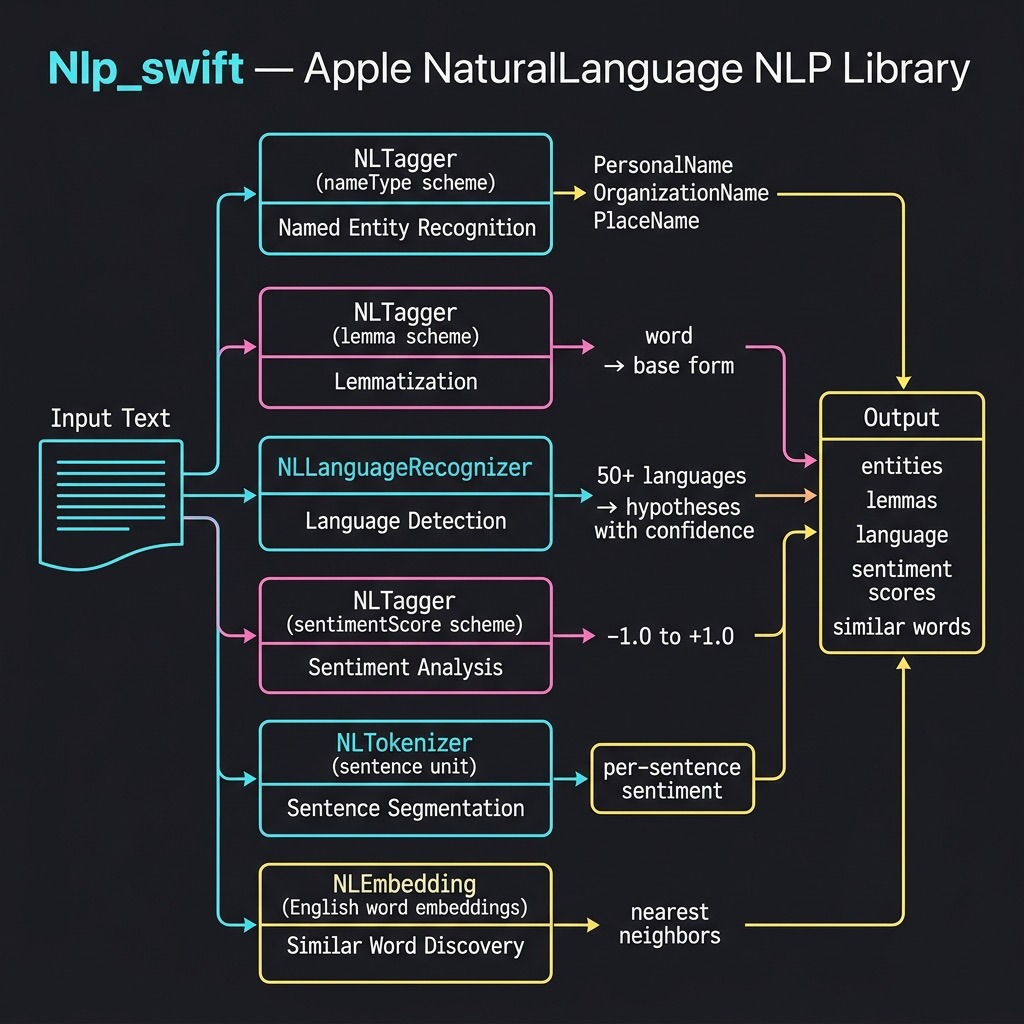
Apple’s NaturalLanguage framework provides a modern, Swift-native API for on-device natural language processing. The framework includes several key classes:
- NLTagger — performs tokenization, named entity recognition, lemmatization, part-of-speech tagging, and sentiment analysis
- NLLanguageRecognizer — identifies the dominant language of text
- NLTokenizer — splits text into words, sentences, or paragraphs
- NLEmbedding — provides pre-trained word embeddings for finding semantically similar words
These models run entirely on-device with no network calls required, making them fast, private, and available offline. You can read Apple’s documentation at https://developer.apple.com/documentation/naturallanguage/.
There are many pre-trained CoreML compatible models on the web, both from Apple and also from third party (e.g., https://github.com/likedan/Awesome-CoreML-Models).
Apple also provides tools for converting TensorFlow and PyTorch models to be compatible with CoreML https://coremltools.readme.io/docs.
NLP Utility Library
I created a small utility library that wraps the NaturalLanguage framework to make it easy to experiment with five key NLP capabilities. The source code for this example is in the source-code/Nlp_swift directory.
Named Entity Recognition
Named Entity Recognition (NER) identifies references to people, places, and organizations in text. The getEntities function uses NLTagger with the .nameType scheme:
public func getEntities(for text: String) -> [(String, String)] {
    let tagger = NLTagger(tagSchemes: [.nameType])
    tagger.string = text
    let options: NLTagger.Options = [.omitPunctuation,
                                     .omitWhitespace,
                                     .joinNames]
    var results: [(String, String)] = []
    tagger.enumerateTags(
        in: text.startIndex..<text.endIndex,
        unit: .word,
        scheme: .nameType,
        options: options
    ) { tag, range in
        if let tag = tag {
            results.append((String(text[range]), tag.rawValue))
        }
        return true
    }
    return results
}
The function creates an NLTagger configured for the .nameType tag scheme and enumerates over the words in the input text. The .joinNames option ensures that multi-word names like “George Bush” are returned as a single entity. Each word is tagged as a PersonalName, PlaceName, OrganizationName, or OtherWord. We filter out OtherWord tags in the main program to show only the named entities.
Lemmatization
Lemmatization reduces words to their base dictionary forms. For example, “went” becomes “go” and “representatives” becomes “representative”. The getLemmas function uses the .lemma scheme:
public func getLemmas(for text: String) -> [(String, String)] {
    let tagger = NLTagger(tagSchemes: [.lemma])
    tagger.string = text
    let options: NLTagger.Options = [.omitPunctuation,
                                     .omitWhitespace]
    var results: [(String, String)] = []
    tagger.enumerateTags(
        in: text.startIndex..<text.endIndex,
        unit: .word,
        scheme: .lemma,
        options: options
    ) { tag, range in
        let word = String(text[range])
        let lemma = tag?.rawValue ?? word
        results.append((word, lemma))
        return true
    }
    return results
}
This is structurally similar to getEntities but uses the .lemma tag scheme. When the tagger cannot determine a lemma for a word (for example, proper nouns), it falls back to returning the original word.
Language Detection
The NLLanguageRecognizer class can identify over 50 languages. Our wrapper provides both a simple dominant-language function and a more detailed hypotheses function:
public func detectLanguage(for text: String) -> String {
    let recognizer = NLLanguageRecognizer()
    recognizer.processString(text)
    guard let language = recognizer.dominantLanguage else {
        return "Unknown"
    }
    return language.rawValue
}

public func languageHypotheses(for text: String,
                               maxCount: Int = 5)
                               -> [(String, Double)] {
    let recognizer = NLLanguageRecognizer()
    recognizer.processString(text)
    let hypotheses = recognizer.languageHypotheses(
                         withMaximum: maxCount)
    return hypotheses
        .map { ($0.key.rawValue, $0.value) }
        .sorted { $0.1 > $1.1 }
}
The detectLanguage function returns an ISO 639-1 language code (e.g., “en”, “fr”, “de”). The languageHypotheses function returns multiple candidate languages with confidence scores, which is useful when text contains multiple languages or when the dominant language is ambiguous.
Sentiment Analysis
Apple’s NaturalLanguage framework includes a sentiment scoring model that rates text on a scale from -1.0 (very negative) to 1.0 (very positive):
public func analyzeSentiment(for text: String) -> Double {
    let tagger = NLTagger(tagSchemes: [.sentimentScore])
    tagger.string = text
    let (tag, _) = tagger.tag(at: text.startIndex,
                               unit: .paragraph,
                               scheme: .sentimentScore)
    if let tag = tag, let score = Double(tag.rawValue) {
        return score
    }
    return 0.0
}
We also provide a sentimentBySentence function that uses NLTokenizer to split text into individual sentences and then scores each one separately. This is useful for analyzing reviews or documents that contain mixed positive and negative statements:
public func sentimentBySentence(for text: String)
                                -> [(String, Double)] {
    let tokenizer = NLTokenizer(unit: .sentence)
    tokenizer.string = text
    var results: [(String, Double)] = []
    tokenizer.enumerateTokens(
        in: text.startIndex..<text.endIndex
    ) { range, _ in
        let sentence = String(text[range])
            .trimmingCharacters(in: .whitespacesAndNewlines)
        if !sentence.isEmpty {
            let score = analyzeSentiment(for: sentence)
            results.append((sentence, score))
        }
        return true
    }
    return results
}
Word Embeddings
Apple provides pre-trained word embeddings that map words to high-dimensional vectors, allowing you to find semantically similar words. The findSimilarWords function uses NLEmbedding to query these built-in embeddings:
public func findSimilarWords(for word: String,
                             maxResults: Int = 5)
                             -> [(String, Double)] {
    guard let embedding = NLEmbedding.wordEmbedding(
              for: .english) else {
        return []
    }
    var results: [(String, Double)] = []
    embedding.enumerateNeighbors(
        for: word, maximumCount: maxResults
    ) { neighbor, distance in
        results.append((neighbor, distance))
        return true
    }
    return results
}
The function returns the nearest neighbors sorted by cosine distance. Lower distance values indicate higher semantic similarity. This is useful for building features like search query expansion and synonym suggestions.
Running the Example
The main.swift file exercises all five NLP capabilities. Here is the output from running the example:
run
=== Named Entity Recognition ===
George Bush → PersonalName
Mexico → PlaceName
IBM → OrganizationName
Steve Jobs → PersonalName
Apple → OrganizationName
Los Altos → PlaceName
California → PlaceName
=== Lemmatization (showing changed forms) ===
went → go
representatives → representative
reported → report
founded → found
Altos → alto
=== Language Detection ===
"The quick brown fox jumps over the lazy dog...." → en
"Le renard brun rapide saute par-dessus le chien pa..." → fr
"Der schnelle braune Fuchs springt über den faulen ..." → de
"El rápido zorro marrón salta sobre el perro perezo..." → es
=== Sentiment Analysis ===
"I absolutely love this product! It's amazing and works ..."
score: 1.00 (positive)
"This is the worst experience I have ever had. Terrible ..."
score: -1.00 (negative)
"The meeting is scheduled for 3pm tomorrow in the confer..."
score: -0.80 (negative)
"The weather today is partly cloudy with a chance of rai..."
score: -0.80 (negative)
=== Sentence-Level Sentiment ===
"The hotel room was beautiful and spacious...." → 0.60 (positive)
"However, the service was disappointing and slow...." → -1.00 (negative)
"The food at the restaurant was absolutely deliciou..." → 1.00 (positive)
"I would not recommend the spa facilities...." → -1.00 (negative)
=== Word Embeddings (similar words) ===
king → throne (0.91), prince (0.93), duke (0.95),
majesty (0.96), warrior (0.99)
computer → workstation (0.84), mainframe (0.88), laptop (0.89),
software (0.90), computing (0.90)
happy → nice (0.81), glad (0.82), wonderful (0.82),
thing (0.86), miserable (0.87)
The named entity recognition correctly identifies “George Bush” and “Steve Jobs” as personal names, “Mexico”, “Los Altos”, and “California” as place names, and “IBM” and “Apple” as organization names. The multi-word entity joining (via the .joinNames option) works well, treating “George Bush” as a single entity.
The lemmatization results show how the framework reduces inflected forms to their base dictionary entries: “went” becomes “go”, “representatives” becomes “representative”, and so on.
Language detection is accurate across all four test languages. The sentiment analysis model is quite strong on clearly positive and negative text, but note that it can sometimes score neutral factual statements with slightly negative sentiment — this is a known characteristic of the on-device model. The sentence-level sentiment analysis shows how you can break down a mixed review to understand sentiment at a finer granularity.
The word embeddings results demonstrate that Apple’s built-in model captures meaningful semantic relationships: the nearest neighbors of “king” include “throne”, “prince”, and “duke”, while “computer” neighbors include “workstation”, “mainframe”, and “laptop”.
Chapter Wrap Up
In this chapter we explored Apple’s NaturalLanguage framework, which provides powerful on-device NLP capabilities without requiring any network calls or third-party dependencies. The framework’s NLTagger class handles named entity recognition, lemmatization, part-of-speech tagging, and sentiment analysis. NLLanguageRecognizer provides robust language detection across dozens of languages, and NLEmbedding offers pre-trained word vectors for computing semantic similarity.
All of these models run entirely on-device, making them suitable for applications that require privacy, offline capability, or low latency. For more advanced NLP tasks you may want to combine these framework capabilities with custom CoreML models or with the LLM-based approaches we cover in other chapters of this book.