Using Apple Intelligence’s Default System Model To Build a Chat Command Line Tool
Here we create a simple command line chat tool. The LLM specific code can also be used in iOS, iPadOS, and macOS applications. This chat tool will use the local system LLM for simple queries and will transparently call a more capable model on Apple’s servers in a secure and privacy preserving sandbox.
The following Swift package manifest defines an executable command-line program named chattool designed to run on macOS. The tool relies on Apple’s swift-argument-parser package to process command-line arguments.
Package.swift:
 1 // swift-tools-version: 6.2
 2 import PackageDescription
 3
 4 let package = Package(
 5     name: "ChatTool",
 6     platforms: [.macOS(.v26)],   // macOS 15/16 is fine too
 7     products: [
 8         .executable(name: "chattool", targets: ["ChatTool"])
 9     ],
10     dependencies: [
11         // ⬇︎ Apple’s official argument-parsing package
12         .package(url: "https://github.com/apple/swift-argument-parser.git",
13                  from: "1.3.0")
14     ],
15     targets: [
16         .executableTarget(
17             name: "ChatTool",
18             // expose the ArgumentParser product to the target
19             dependencies: [
20                 .product(name: "ArgumentParser", package: "swift-argument-parser")
21                 // FoundationModels is an Apple framework, no SPM entry needed
22             ],
23             path: "Sources/ChatTool"          // adjust if your path differs
24         )
25     ]
26 )
ChatTool.swift:
This Swift code implements a command-line chat interface that interacts directly with Apple’s native FoundationModels framework. Upon launch, it verifies the system’s default language model is available, initializes a LanguageModelSession with a hard-coded system prompt and temperature, and then enters a read-evaluate-print loop. The program continuously accepts user input from the console and sends it to the language model for processing until the user quits.
The core of the implementation leverages modern Swift concurrency (async/await) to handle the model’s output as an asynchronous stream. For each user prompt, it iterates through the text fragments as they are generated by session.streamResponse, writing only the new characters to standard output to create a real-time, typewriter-like effect. To enhance usability, it uses a DispatchSource to set up a signal handler for SIGINT (Ctrl+C), allowing a user to cancel the current in-progress stream from the model without terminating the entire chat application.
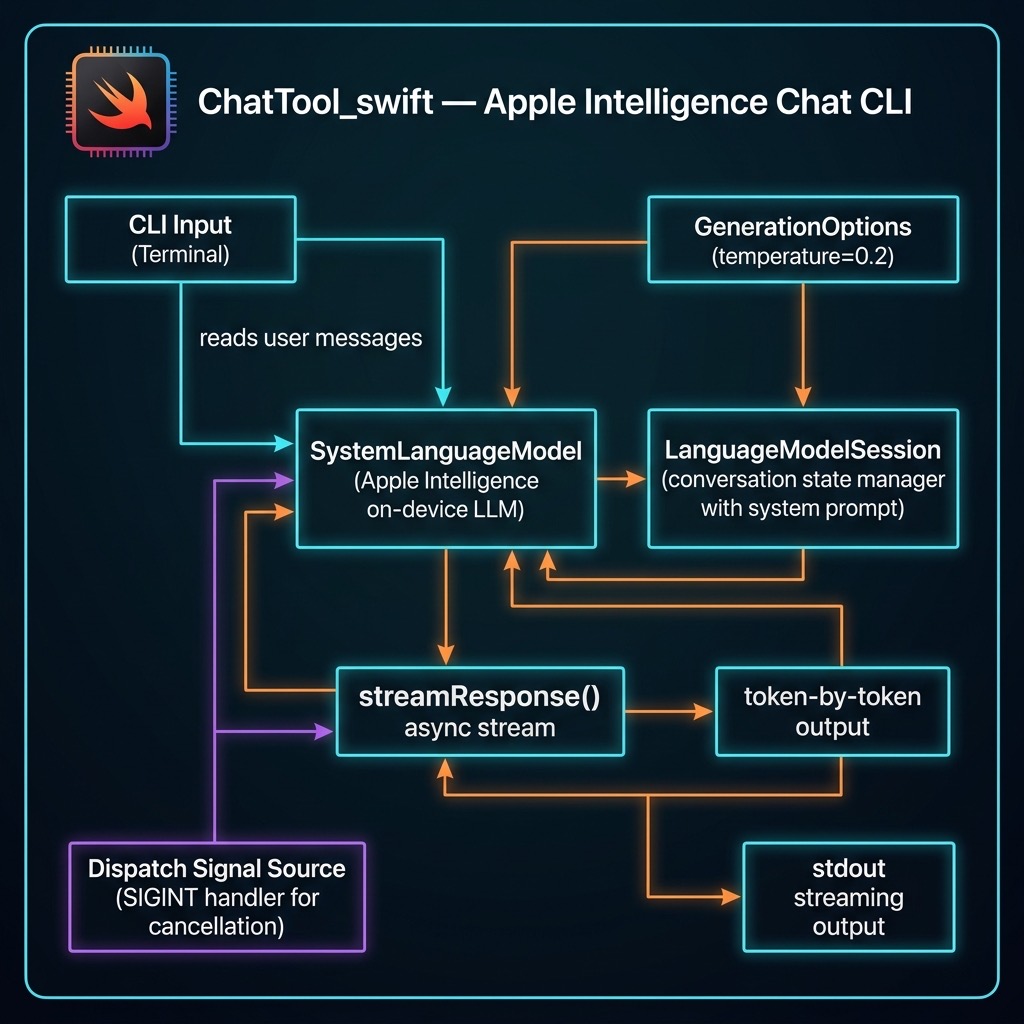
 1 import Foundation
 2 import FoundationModels
 3 import Dispatch
 4
 5 @main
 6 struct ChatCLI {
 7     static func main() async throws {
 8         // Hard-coded defaults
 9         let temperature  = 0.2
10         let sysPrompt    = "You are a helpful assistant."
11
12         // Verify model
13         let model = SystemLanguageModel.default
14         guard model.isAvailable else {
15             throw RuntimeError(
16                 "Model unavailable: \(model.availability)")
17         }
18
19         let session = LanguageModelSession(
20             instructions: sysPrompt)
21         print("Temperature: \(temperature)")
22         print("System Prompt: \(sysPrompt)")
23         let options = GenerationOptions(temperature: temperature)
24
25         print("Apple-Intelligence chat (T=0.2). /quit to exit.\n")
26
27         while true {
28             print("Enter your message: ", terminator: "")
29             guard let prompt =
30                 readLine(strippingNewline: true) else { break }
31             if prompt.isEmpty || prompt == "/quit" { break }
32
33             var previous = ""   // text already printed
34
35             let task = Task {
36                 for try await part in session.streamResponse(
37                     to: prompt, options: options) {
38                     let current: String = String(describing: part)
39                     // emit only new characters
40                     let delta = current.dropFirst(previous.count)
41                     if !delta.isEmpty {
42                         FileHandle.standardOutput.write(
43                             Data(delta.utf8))
44                         fflush(stdout)
45                         previous = current
46                     }
47                 }
48                 print() // newline when complete
49             }
50
51             // ^C cancels the streaming task
52             signal(SIGINT, SIG_IGN)
53             let sigSrc = DispatchSource.makeSignalSource(
54                 signal: SIGINT, queue: .main)
55             sigSrc.setEventHandler { task.cancel() }
56             sigSrc.resume()
57             defer { sigSrc.cancel() }
58
59             _ = try await task.value
60         }
61     }
62 }
63
64 /// Simple error wrapper
65 struct RuntimeError: Error, CustomStringConvertible {
66     let description: String
67     init(_ msg: String) { description = msg }
68 }
Here is sample output from two prompts:
 1 $ swift run
 2 [1/1] Planning build
 3 Building for debugging...
 4 [1/1] Write swift-version--58304C5D6DBC2206.txt
 5 Build of product 'chattool' complete! (0.12s)
 6 Temperature: 0.2
 7 System Prompt: You are a helpful assistant.
 8 Apple-Intelligence chat (T=0.2). /quit to exit.
 9
10 Enter your message: why is the sky blue?
11 The sky appears blue due to a phenomenon called Rayleigh scattering.
12 This occurs because the Earth's atmosphere is composed of gases and
13 small particles, such as nitrogen and oxygen. When sunlight enters
14 the atmosphere, it collides with these particles.
15
16 Sunlight is made up of different colors, each with a different
17 wavelength. Blue light has a shorter wavelength than other colors,
18 such as red or yellow. Because of this shorter wavelength, blue light
19 is scattered in all directions by the gases and particles in the
20 atmosphere.
21
22 As a result, when we look up at the sky, we see the scattered blue
23 light more prominently than the other colors. This is why the sky
24 appears blue during the day.
25
26 Enter your message: write a Swift function to print the first 11 prime numbers
27 Here is a Swift function that prints the first 11 prime numbers:
28
29 ```swift
30 func printFirst11PrimeNumbers() {
31     var primes: [Int] = []
32     var num = 2
33
34     while primes.count < 11 {
35         var isPrime = true
36
37         for prime in primes {
38             if prime * prime > num { break }
39             if num % prime == 0 {
40                 isPrime = false
41                 break
42             }
43         }
44
45         if isPrime { primes.append(num) }
46         num += 1
47     }
48
49     print("The first 11 prime numbers are: \(primes)")
50 }
51
52 printFirst11PrimeNumbers()
This function starts with the smallest prime number, 2, and checks
each subsequent number to see if it is prime. If it is, it adds it
to the primes array. The loop continues until there are 11 prime
numbers in the array, at which point it prints them.
Enter your message: /quit ```