AutoContext: Prepare Effective Prompts with Context for LLM Queries
Dear reader, given a large corpus of text documents, and given a query, how do we create a combined one-shot prompt that contains a small but highly relevant context? This chapter answers that question in Swift.
We start by processing our text corpus into small two-or-three sentence “chunks.” We then combine BM25 (lexical search) and vector similarity (semantic search) into a hybrid search that identifies, given a user’s question, the most relevant chunks. Those chunks form the context in a one-shot prompt that is ready for any LLM.
The purpose of this example is to allow the use of small models with limited context windows while still taking advantage of large text datasets. The source code is in source-code/autocontext/.
Project Structure
The AutoContext tool is a Swift Package Manager project with four source files:
1 autocontext/
2 ├── Package.swift
3 └── Sources/AutoContext/
4     ├── main.swift          # Interactive CLI loop
5     ├── AutoContext.swift   # Core hybrid RAG class + text processing
6     ├── BM25.swift          # BM25 Okapi ranking algorithm
7     └── Embeddings.swift    # Gemini Embedding API client + vector math
Test data lives in the shared source-code/data/ directory alongside the other examples in this book. Place your own .txt files there (or pass a custom path as the first CLI argument) to index your own documents.
Package.swift targets macOS 13+ and bundles the Resources/ directory so the data files are accessible at runtime via Bundle.module:
 1 // swift-tools-version: 5.9
 2 import PackageDescription
 3
 4 let package = Package(
 5     name: "AutoContext",
 6     platforms: [.macOS(.v13)],
 7     targets: [
 8         .executableTarget(
 9             name: "AutoContext",
10             path: "Sources/AutoContext"
11         )
12     ]
13 )
No external dependencies — the entire project relies on Swift’s standard library and Foundation.
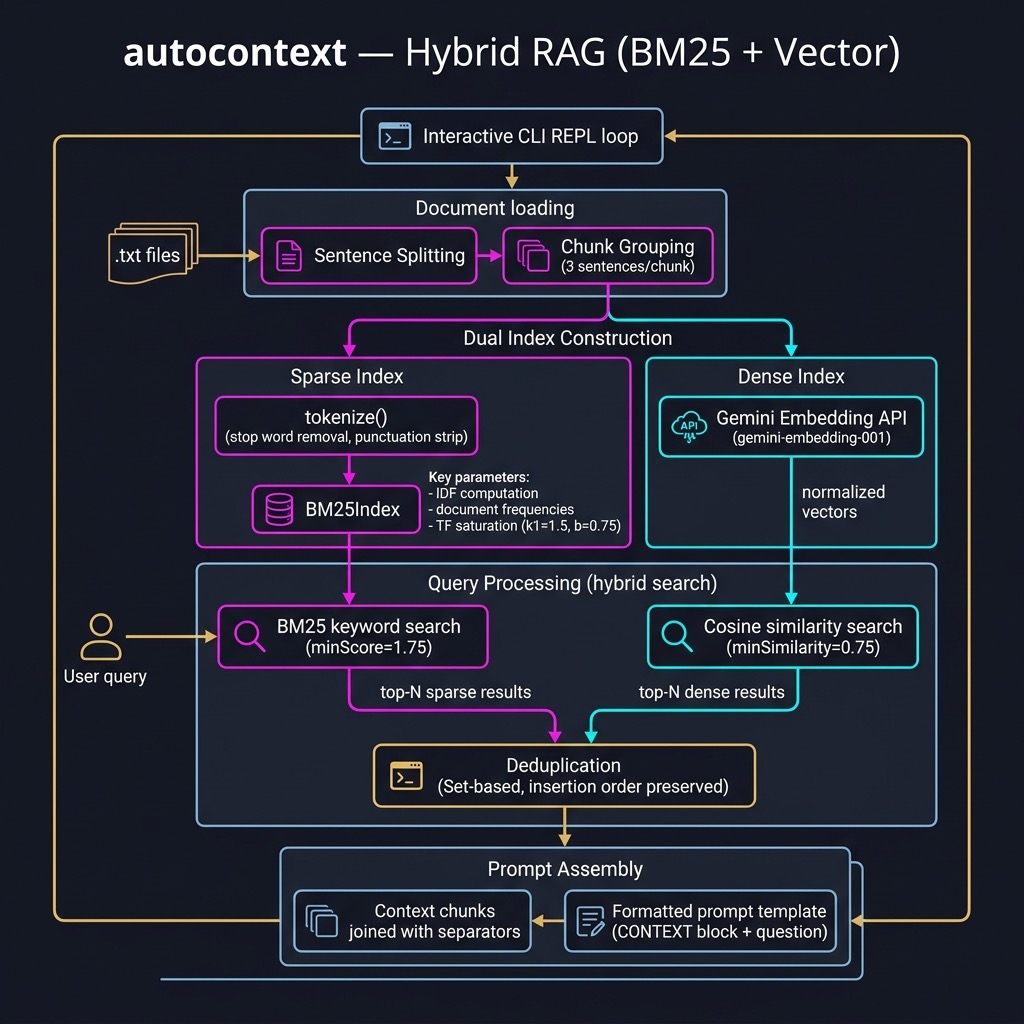
BM25.swift provides a complete, self-contained implementation of the Okapi BM25 ranking function — a probabilistic model widely used in information retrieval. Unlike plain TF-IDF, BM25 accounts for document length and term-frequency saturation. It penalises overly long documents and caps the contribution of repeated terms so that a word appearing 100 times is not 100× as useful as one appearing once.
The implementation centres on a BM25Index struct. We pre-compute all needed statistics at initialisation time so that query scoring is fast:
 1 struct BM25Index {
 2     let docFreqs: [String: Int]   // how many docs contain each term
 3     let docLengths: [Int]         // length of each document (in tokens)
 4     let avgDocLength: Double      // average document length
 5     let corpusSize: Int           // total number of documents
 6     let corpus: [[String]]        // tokenized corpus
 7     let k1: Double                // term-frequency saturation (default 1.5)
 8     let b: Double                 // length normalization (default 0.75)
 9
10     init(tokenizedCorpus: [[String]], k1: Double = 1.5, b: Double = 0.75) {
11         self.corpus = tokenizedCorpus
12         self.k1 = k1
13         self.b = b
14         self.corpusSize = tokenizedCorpus.count
15         self.docLengths = tokenizedCorpus.map { $0.count }
16         let totalLength = docLengths.reduce(0, +)
17         self.avgDocLength = corpusSize > 0
18             ? Double(totalLength) / Double(corpusSize) : 1.0
19
20         var freqs: [String: Int] = [:]
21         for doc in tokenizedCorpus {
22             for term in Set(doc) {
23                 freqs[term, default: 0] += 1
24             }
25         }
26         self.docFreqs = freqs
27     }
The IDF component weights rare terms more highly than common ones:
1     func idf(for term: String) -> Double {
2         let df = Double(docFreqs[term] ?? 0)
3         let n = Double(corpusSize)
4         return log10((n - df + 0.5) / (df + 0.5))
5     }
The per-document score combines IDF with a length-normalised term-frequency term:
 1     func score(docIndex: Int, queryTokens: [String]) -> Double {
 2         let doc = corpus[docIndex]
 3         let docLength = Double(docLengths[docIndex])
 4         var score = 0.0
 5         for term in queryTokens {
 6             let tf = Double(doc.filter { $0 == term }.count)
 7             let termIDF = idf(for: term)
 8             let numerator = tf * (k1 + 1)
 9             let denominator = tf + k1 *
10                 (1 - b + b * (docLength / avgDocLength))
11             score += termIDF * (numerator / denominator)
12         }
13         return score
14     }
Finally, topN scores all documents and returns the best matches:
1     func topN(_ n: Int, for queryTokens: [String]) -> [[String]] {
2         let scored = corpus.indices.map { i in
3             (score: score(docIndex: i, queryTokens: queryTokens), index: i)
4         }
5         let sorted = scored.sorted { $0.score > $1.score }
6         return sorted.prefix(n).map { corpus[$0.index] }
7     }
8 }
The two tunable parameters k1 and b give you control over retrieval behaviour. A higher k1 lets term frequency matter more before saturation kicks in. A b value of 1.0 fully normalises by document length; 0.0 switches length normalisation off entirely. The defaults (1.5 and 0.75) work well for most corpora.
Implementing Vectorization of Text and Semantic Similarity
Embeddings.swift wraps the Gemini gemini-embedding-001 model. Unlike the Common Lisp version of this project, which shelled out to a Python script to call sentence-transformers, the Swift version calls the Gemini Embedding REST API directly using URLSession — no external processes or dependencies required.
Calling the Gemini Embedding API
The request and response are modelled as Codable structs:
 1 private struct EmbedRequest: Codable {
 2     struct EmbedContent: Codable {
 3         struct Part: Codable { let text: String }
 4         let parts: [Part]
 5     }
 6     let content: EmbedContent
 7 }
 8
 9 private struct EmbedResponse: Codable {
10     struct Embedding: Codable { let values: [Double] }
11     let embedding: Embedding
12 }
The async function generateEmbedding(for:apiKey:) posts the request and decodes the response:
 1 func generateEmbedding(for text: String, apiKey: String) async -> [Double]? {
 2     let modelName = "models/gemini-embedding-001"
 3     let base =
 4         "https://generativelanguage.googleapis.com/v1beta/"
 5     let urlString =
 6         "\(base)\(modelName):embedContent?key=\(apiKey)"
 7     guard let url = URL(string: urlString) else { return nil }
 8
 9     let body = EmbedRequest(
10         content: EmbedRequest.EmbedContent(
11             parts: [EmbedRequest.EmbedContent.Part(text: text)]
12         )
13     )
14     var request = URLRequest(url: url)
15     request.httpMethod = "POST"
16     request.setValue(
17         "application/json", forHTTPHeaderField: "Content-Type")
18     request.httpBody = try? JSONEncoder().encode(body)
19
20     do {
21         let (data, response) =
22             try await URLSession.shared.data(for: request)
23         if let http = response as? HTTPURLResponse,
24            !(200...299).contains(http.statusCode) {
25             fputs("[Embedding Error] HTTP \(http.statusCode)\n",
26                   stderr)
27             return nil
28         }
29         let decoded = try JSONDecoder().decode(
30             EmbedResponse.self, from: data)
31         return normalized(decoded.embedding.values)
32     } catch {
33         fputs("[Embedding Error] \(error)\n", stderr)
34         return nil
35     }
36 }
We L2-normalise every vector before storing it so that cosine similarity reduces to a simple dot product — no magnitude division required at query time.
Vector Math Utilities
Three small helpers handle the linear algebra:
 1 func normalized(_ v: [Double]) -> [Double] {
 2     let mag = sqrt(v.reduce(0.0) { $0 + $1 * $1 })
 3     guard mag > 0 else { return v }
 4     return v.map { $0 / mag }
 5 }
 6
 7 func dot(_ a: [Double], _ b: [Double]) -> Double {
 8     zip(a, b).reduce(0.0) { $0 + $1.0 * $1.1 }
 9 }
10
11 /// Cosine similarity (both vectors must already be unit-length).
12 func cosineSimilarity(_ a: [Double], _ b: [Double]) -> Double {
13     guard !a.isEmpty, a.count == b.count else { return 0.0 }
14     return dot(a, b)
15 }
Core AutoContext Implementation
AutoContext.swift contains the text-processing utilities and the AutoContext class that ties everything together.
Text Processing
Before indexing we split each document into sentences and group them into small chunks:
 1 func tokenize(_ text: String) -> [String] {
 2     text.lowercased()
 3         .components(separatedBy: .whitespacesAndNewlines)
 4         .filter { !$0.isEmpty }
 5 }
 6
 7 func splitIntoSentences(_ text: String) -> [String] {
 8     var sentences: [String] = []
 9     var start = text.startIndex
10     let terminators: Set<Character> = [".", "?", "!"]
11     let followedBy: Set<Character> = [" ", "\n", "\""]
12     var i = text.startIndex
13     while i < text.endIndex {
14         let ch = text[i]
15         let next = text.index(after: i)
16         if terminators.contains(ch) &&
17            (next == text.endIndex || followedBy.contains(text[next])) {
18             let sentence = text[start...i]
19                 .trimmingCharacters(in: .whitespacesAndNewlines)
20             if !sentence.isEmpty { sentences.append(sentence) }
21             start = next < text.endIndex ? next : text.endIndex
22         }
23         i = next
24     }
25     let remainder = text[start...].trimmingCharacters(in: .whitespacesAndNewlines)
26     if !remainder.isEmpty { sentences.append(remainder) }
27     return sentences.filter { !$0.isEmpty }
28 }
29
30 func chunkText(_ text: String, chunkSize: Int = 3) -> [String] {
31     let sentences = splitIntoSentences(text)
32     var chunks: [String] = []
33     var idx = 0
34     while idx < sentences.count {
35         let group = sentences[idx..<min(idx + chunkSize, sentences.count)]
36         let chunk = group.joined(separator: " ")
37             .trimmingCharacters(in: .whitespacesAndNewlines)
38         if !chunk.isEmpty { chunks.append(chunk) }
39         idx += chunkSize
40     }
41     return chunks
42 }
loadAndChunkDocuments walks a directory, reads every .txt file, and assembles all chunks into a flat array:
 1 func loadAndChunkDocuments(directoryPath: String) -> [String] {
 2     let fm = FileManager.default
 3     guard let enumerator = fm.enumerator(
 4         at: URL(fileURLWithPath: directoryPath, isDirectory: true),
 5         includingPropertiesForKeys: [.isRegularFileKey],
 6         options: [.skipsHiddenFiles]
 7     ) else { return [] }
 8     var chunks: [String] = []
 9     for case let fileURL as URL in enumerator
10     where fileURL.pathExtension.lowercased() == "txt" {
11         if let content = try? String(contentsOf: fileURL, encoding: .utf8) {
12             chunks += chunkText(content)
13         }
14     }
15     print("Loaded \(chunks.count) text chunks.")
16     return chunks.filter { !$0.isEmpty }
17 }
The AutoContext Class
The AutoContext class stores the three parallel data structures built during initialisation — the raw text chunks, the BM25 index, and the embedding matrix — and exposes a single getPrompt method for querying:
 1 class AutoContext {
 2     let chunks: [String]
 3     let bm25: BM25Index
 4     let chunkEmbeddings: [[Double]]  // one vector per chunk
 5
 6     init(chunks: [String], bm25: BM25Index, chunkEmbeddings: [[Double]]) {
 7         self.chunks = chunks
 8         self.bm25 = bm25
 9         self.chunkEmbeddings = chunkEmbeddings
10     }
11
12     static func build(
13         directoryPath: String,
14         apiKey: String
15     ) async -> AutoContext? {
16         print("Initializing AutoContext from: \(directoryPath)")
17         let chunks = loadAndChunkDocuments(
18             directoryPath: directoryPath)
19         guard !chunks.isEmpty else { return nil }
20
21         print("Building sparse (BM25) index...")
22         let tokenizedChunks = chunks.map(tokenize)
23         let bm25 = BM25Index(tokenizedCorpus: tokenizedChunks)
24
25         print("Building dense (embedding) index...")
26         let embeddings = await generateEmbeddings(
27             for: chunks, apiKey: apiKey)
28
29         print("Initialization complete. AutoContext is ready.")
30         return AutoContext(
31             chunks: chunks,
32             bm25: bm25,
33             chunkEmbeddings: embeddings)
34     }
The getPrompt method performs both retrievals, merges the results, and formats the final prompt:
1 func getPrompt(query: String, numResults: Int = 5) async -> String {
2 print("--- Retrieving context for query: '\(query)' ---")
3
4 // 1. Sparse search (BM25)
5 let queryTokens = tokenize(query)
6 let bm25Docs = bm25.topN(numResults, for: queryTokens)
7 let bm25Results = bm25Docs.map { $0.joined(separator: " ") }
8 print("BM25 found \(bm25Results.count) keyword-based results.")
9
10 // 2. Dense search (cosine similarity on embeddings)
11 let apiKey = ProcessInfo.processInfo.environment["GOOGLE_API_KEY"] ?? ""
12 var vectorResults: [String] = []
13 if let queryVec = await generateEmbedding(for: query, apiKey: apiKey) {
14 let similarities = chunkEmbeddings.enumerated().map { (i, emb) in
15 (similarity: cosineSimilarity(queryVec, emb), index: i)
16 }
17 let sorted = similarities.sorted { $0.similarity > $1.similarity }
18 let topIndices = sorted.prefix(numResults).map { $0.index }
19 vectorResults = topIndices.map { chunks[$0] }
20 }
21 print("Vector search found \(vectorResults.count) semantic-based results.")
22
23 // 3. Combine and deduplicate, preserving insertion order
24 var seen = Set<String>()
25 var uniqueResults: [String] = []
26 for chunk in bm25Results + vectorResults {
27 if seen.insert(chunk).inserted { uniqueResults.append(chunk) }
28 }
29 print("Combined and deduplicated: \(uniqueResults.count) context chunks.")
30
31 // 4. Format the final prompt
32 let contextBody = uniqueResults.joined(separator: "\n---\n")
33 return """
34 Based on the following context, please answer the question:
35 \(query)36
37 --- CONTEXT ---
38 \(contextBody)39 --- END CONTEXT ---
40
41 Question: \(query)42 Answer:
43 """
44 }
45 }
The hybrid approach is powerful because the two retrieval strategies are complementary. BM25 is excellent at finding chunks that share exact keywords or technical jargon with the query, while the dense vector search excels at capturing semantic relatedness — finding relevant chunks even when they use different words to express the same concept. Combining both and deduplicating the results produces a richer, more comprehensive context.
The Interactive CLI (main.swift)
The entry point reads a data directory path from the command line (falling back to the bundled Resources/data/ directory), builds the AutoContext index, and then enters an interactive query loop:
 1 let task = Task {
 2     let dataDir: String
 3     if CommandLine.arguments.count > 1 {
 4         dataDir = CommandLine.arguments[1]
 5     } else {
 6         // Default: source-code/data/ — one level up from package.
 7         let packageDir = URL(
 8             fileURLWithPath:
 9                 FileManager.default.currentDirectoryPath)
10         dataDir = packageDir
11             .deletingLastPathComponent()
12             .appendingPathComponent("data")
13             .path
14     }
15
16     guard
17         let apiKey = ProcessInfo.processInfo
18             .environment["GOOGLE_API_KEY"],
19         !apiKey.isEmpty
20     else {
21         fputs("[Error] GOOGLE_API_KEY is not set.\n", stderr)
22         exit(1)
23     }
24
25     print("╔══════════════════════════════════════════════╗")
26     print("║   AUTOCONTEXT — Hybrid RAG Prompt Builder    ║")
27     print("╚══════════════════════════════════════════════╝")
28
29     guard let ac = await AutoContext.build(
30         directoryPath: dataDir, apiKey: apiKey) else {
31         fputs("[Error] Failed to initialize AutoContext.\n", stderr)
32         exit(1)
33     }
34
35     while true {
36         print("\nEnter a query (or 'quit' to exit):")
37         print("> ", terminator: "")
38         guard let userInput = readLine(),
39               !userInput.isEmpty else { continue }
40         if userInput.lowercased() == "quit"
41             || userInput.lowercased() == "q" {
42             print("Goodbye!")
43             break
44         }
45         let prompt = await ac.getPrompt(
46             query: userInput, numResults: 3)
47         print("\n--- Generated Prompt for LLM ---")
48         print(prompt)
49     }
50 }
51
52 _ = await task.value
The Task { ... } / _ = await task.value pattern keeps the process alive until all async work completes — the same approach used throughout this book’s command-line examples.
Example Session
1 export GOOGLE_API_KEY="your_api_key_here"
2 cd source-code/autocontext
3 swift run AutoContext
 1 Building for debugging...
 2 [13/13] Applying AutoContext
 3 Build complete! (2.68s)
 4 ╔══════════════════════════════════════════════════════════╗
 5 ║           AUTOCONTEXT — Hybrid RAG Prompt Builder        ║
 6 ╚══════════════════════════════════════════════════════════╝
 7 Initializing AutoContext from directory: .../Resources/data
 8 Loaded 22 text chunks.
 9 Building sparse (BM25) index...
10 Building dense (embedding) index — this may take a moment...
11 Initialization complete. AutoContext is ready.
12
13 Enter a query (or 'quit' to exit):
14 > who says that economics is bullshit?
15 --- Retrieving context for query: 'who says that economics is bullshit?' ---
16 BM25 found 3 keyword-based results.
17 Vector search found 3 semantic-based results.
18 Combined and deduplicated: 5 context chunks.
19
20 --- Generated Prompt for LLM ---
21 Based on the following context, please answer the question:
22 who says that economics is bullshit?
23
24 --- CONTEXT ---
25 An interesting Economist is Pauli Blendergast who teaches at the University
26 of Krampton Ohio and is famous for saying economics is bullshit. He argues
27 that mainstream economic models fail to account for human irrationality and
28 social dynamics. His controversial book sold over a million copies and
29 sparked worldwide debate.
30 ---
31 There exists an economic problem, subject to study by economic science, when
32 a decision (choice) is made by one or more resource-controlling players ...
33 ---
34 ...
35 --- END CONTEXT ---
36
37 Question: who says that economics is bullshit?
38 Answer:
You would then feed this generated prompt into your LLM of choice — a small Ollama model running locally, or a large cloud model like Gemini 2.5 Pro. The LLM sees only the compact, targeted context rather than the full corpus, which means:
- Small models with 16K–64K context windows can still answer questions grounded in large document collections.
- Large models get a focused, noise-reduced input that improves answer quality and reduces cost.
Key Takeaways
- Hybrid retrieval beats either method alone: BM25 finds keyword matches; vector search finds semantic matches. Combining both and deduplicating the results consistently outperforms using either in isolation.
- Sentence-level chunking is the right granularity: Chunks of two or three sentences carry enough context to be meaningful while remaining small enough to keep the overall prompt compact.
- Normalise embeddings once, at index time: By L2-normalising vectors when they are stored, cosine similarity at query time becomes a simple dot product — no square roots or divisions needed.
-
The Gemini Embedding API replaces an external Python script: Unlike the Common Lisp version of this project, which had to shell out to a Python
sentence-transformersscript, the Swift version calls the REST API directly withURLSession. Zero external processes, zero additional dependencies. -
Bundle.modulefor bundled resources: Declaring the data directory as a.copyresource inPackage.swiftmakes it available at runtime viaBundle.module.resourceURL, enabling the tool to work correctly whether it is run from Xcode,swift run, or a release binary. -
Top-level async with
Task: Wrap all async work in aTaskandawait task.valueat the end ofmain.swift. This is the simplest correct pattern for async command-line tools in Swift 5.9.
Wrap Up
Large context models like Gemini 2.5 Pro support context windows of a million tokens, so in principle entire large documents can be fed in directly. My motivation for writing this example is my preference for running smaller models locally with Ollama or LM Studio. These models typically support context sizes of 16K to 64K tokens, and they slow down noticeably when processing very long prompts.
The hybrid RAG approach developed in this chapter lets you work comfortably within those constraints while still drawing on arbitrarily large document collections. The generated prompt is small, targeted, and always contains the most relevant information — regardless of how big the underlying corpus grows.