Knowledge Base Navigator: Building an AI-Powered Information System
In two of my other books I covered the classic Knowledge Graph Navigator (KGN) project that combined symbolic Natural Language Processing (NLP) with access to public knowledge graphs like Wikidata and DBPedia. In this chapter I take a simpler, more modern approach: a Swift command-line tool powered by Google’s Gemini API.
The source code can be found in the directory: source-code/knowledge-navigator/.
In this chapter we explore a practical Swift application that combines modern AI APIs to create an interactive knowledge exploration tool. The Knowledge Base Navigator demonstrates how to integrate the Gemini REST API, decode JSON responses with Codable, and build an async interactive CLI loop — all in pure Swift with no third-party dependencies.
Project Overview
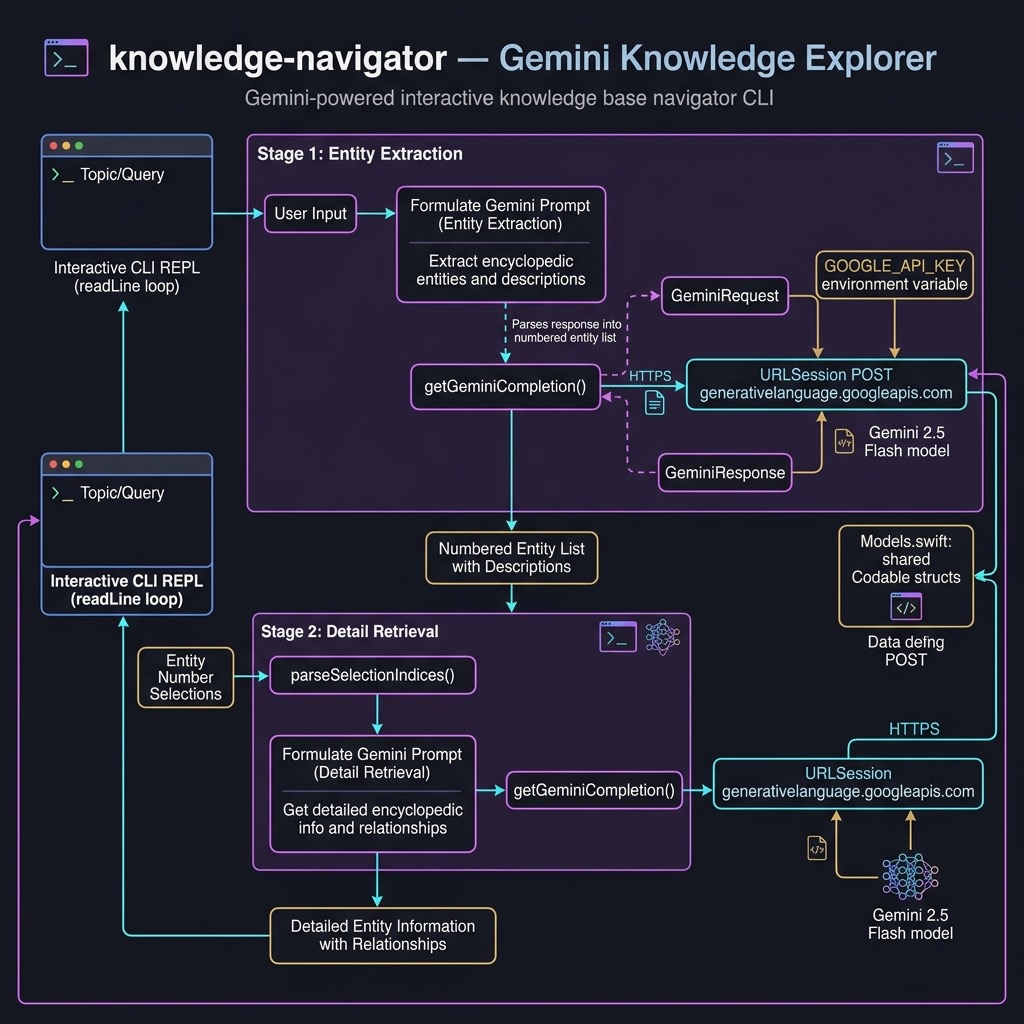
The Knowledge Base Navigator is a modern evolution of the classic Knowledge Graph Navigator (KGN). This version uses Google’s Gemini Flash LLM API to extract entities from natural language, disambiguate them, discover semantic links between entities, and retrieve detailed encyclopedic information. This represents a paradigm shift from traditional database-backed systems to an AI-driven pipeline.
The system follows a two-stage process:
- Entity Extraction: The user provides text; Gemini identifies potential entities (people, companies, countries, etc.) and returns them as a numbered list
- Deep Retrieval: The user selects entities by number; Gemini provides detailed facts and analyzes relationships between selected entities
Project Structure
The Knowledge Navigator is a Swift Package Manager project:
1 knowledge-navigator/
2 ├── Package.swift
3 └── Sources/KnowledgeNavigator/
4     ├── main.swift        # Interactive CLI loop
5     ├── GeminiAPI.swift   # URLSession-based Gemini client
6     └── Models.swift      # Codable request/response structs
Package Definition
Package.swift targets macOS 13+ to access Swift Concurrency (async/await) from a command-line entry point:
 1 // swift-tools-version: 5.9
 2 import PackageDescription
 3
 4 let package = Package(
 5     name: "KnowledgeNavigator",
 6     platforms: [.macOS(.v13)],
 7     targets: [
 8         .executableTarget(
 9             name: "KnowledgeNavigator",
10             path: "Sources/KnowledgeNavigator"
11         )
12     ]
13 )
No external dependencies — the entire project relies on Swift’s standard library and Foundation.
Core Implementation
Codable Models (Models.swift)
Swift’s Codable protocol lets us define the Gemini request and response shapes as plain structs. The encoder and decoder handle all JSON serialization automatically:
 1 // MARK: - Request
 2
 3 struct GeminiRequest: Codable {
 4     let contents: [Content]
 5
 6     struct Content: Codable {
 7         let parts: [Part]
 8     }
 9
10     struct Part: Codable {
11         let text: String
12     }
13 }
14
15 // MARK: - Response
16
17 struct GeminiResponse: Codable {
18     let candidates: [Candidate]?
19
20     struct Candidate: Codable {
21         let content: Content
22     }
23
24     struct Content: Codable {
25         let parts: [Part]
26     }
27
28     struct Part: Codable {
29         let text: String
30     }
31 }
Why nested structs? The Gemini API wraps text in a hierarchy: candidates → content → parts → text. Modeling each level as a separate Codable struct makes decoding straightforward — no manual key traversal required.
Why candidates is optional: The API may return no candidates on error. Marking it [Candidate]? means decoding never throws on a malformed/empty response; we handle the missing value explicitly.
Gemini API Client (GeminiAPI.swift)
The async function getGeminiCompletion wraps a URLSession data task and returns the model’s text, or nil on any failure:
 1 func getGeminiCompletion(userPrompt: String) async -> String? {
 2     guard
 3         let apiKey = ProcessInfo.processInfo
 4             .environment["GOOGLE_API_KEY"],
 5         !apiKey.isEmpty
 6     else {
 7         fputs("[Error] GOOGLE_API_KEY is not set.\n", stderr)
 8         return nil
 9     }
10
11     let modelName = "models/gemini-2.5-flash"
12     let base =
13         "https://generativelanguage.googleapis.com/v1beta/"
14     let urlString =
15         "\(base)\(modelName):generateContent?key=\(apiKey)"
16
17     guard let url = URL(string: urlString) else { return nil }
18
19     let requestBody = GeminiRequest(
20         contents: [
21             GeminiRequest.Content(parts: [
22                 GeminiRequest.Part(text: userPrompt)
23             ])
24         ]
25     )
26
27     var request = URLRequest(url: url)
28     request.httpMethod = "POST"
29     request.setValue(
30         "application/json", forHTTPHeaderField: "Content-Type")
31     request.httpBody = try? JSONEncoder().encode(requestBody)
32
33     do {
34         let (data, response) =
35             try await URLSession.shared.data(for: request)
36
37         if let httpResponse = response as? HTTPURLResponse,
38            !(200...299).contains(httpResponse.statusCode) {
39             let body =
40                 String(data: data, encoding: .utf8) ?? "<no body>"
41             fputs(
42                 "[Error] HTTP \(httpResponse.statusCode):" +
43                 " \(body)\n", stderr)
44             return nil
45         }
46
47         let geminiResponse = try JSONDecoder().decode(
48             GeminiResponse.self, from: data)
49         return geminiResponse.candidates?
50             .first?.content.parts.first?.text
51
52     } catch {
53         fputs(
54             "[Error] Network or decoding error: \(error)\n",
55             stderr)
56         return nil
57     }
58 }
Key patterns:
-
ProcessInfo.processInfo.environment["GOOGLE_API_KEY"]reads the API key from the environment — the same pattern used throughout this book -
JSONEncoder().encode(requestBody)serializes theGeminiRequeststruct directly; no manual JSON construction needed -
try await URLSession.shared.data(for:)is the modern async replacement for completion-handler networking -
JSONDecoder().decode(GeminiResponse.self, from: data)maps the response JSON onto ourCodablestructs - Optional chaining (
?.first?.content.parts.first?.text) navigates the nested response safely
Response parsing: The Gemini API returns a deeply nested structure. With Codable structs and optional chaining, we navigate it in a single expression rather than multiple guard/let bindings:
1 geminiResponse.candidates?.first?.content.parts.first?.text
Parsing User Selection (main.swift)
Before the main loop, a small helper function tokenizes the user’s comma/space-separated entity selections into integers:
1 func parseSelectionIndices(from line: String) -> [Int] {
2     let separators = CharacterSet(charactersIn: " \t,")
3     return line
4         .components(separatedBy: separators)
5         .filter { !$0.isEmpty && $0.allSatisfy(\.isNumber) }
6         .compactMap { Int($0) }
7 }
-
components(separatedBy:)splits on spaces, tabs, and commas -
allSatisfy(\.isNumber)keeps only purely numeric tokens (rejects “1a”, empty strings, etc.) -
compactMap { Int($0) }converts to integers, dropping any that fail
Interactive CLI Loop (main.swift)
Swift 5.9 command-line tools support top-level await by wrapping async work in a Task:
1 let task = Task {
2 print("╔══════════════════════════════════════════════╗")
3 print("║ GEMINI KNOWLEDGE BASE NAVIGATOR (Swift) ║")
4 print("╚══════════════════════════════════════════════╝")
5
6 while true {
7 print("\nEnter entity names or a sentence ('quit' to exit):")
8 print("> ", terminator: "")
9
10 guard let userInput = readLine(),
11 !userInput.isEmpty else { continue }
12
13 if userInput.lowercased() == "quit"
14 || userInput.lowercased() == "q" {
15 print("Goodbye!")
16 break
17 }
18
19 // Stage 1: entity extraction
20 print("\n[Extracting entities using Gemini...]")
21 let extractPrompt = """
22 Analyze the following user text: "\(userInput)".
23 Identify potential encyclopedic entities ...
24 Return ONLY a numbered list with a short 1-sentence description.
25 """
26
27 guard let entityListText = await getGeminiCompletion(
28 userPrompt: extractPrompt) else {
29 print("[Error getting entity list. Try again.]")
30 continue
31 }
32
33 print("\n--- IDENTIFIED ENTITIES ---")
34 print(entityListText)
35 print("---------------------------")
36
37 // Stage 2: detail retrieval
38 print("\nEnter entity numbers (space separated):")
39 print("> ", terminator: "")
40
41 guard let selectionLine = readLine(),
42 !selectionLine.isEmpty else { continue }
43 let indices = parseSelectionIndices(from: selectionLine)
44 guard !indices.isEmpty else {
45 print("[No valid selections. Returning to main prompt.]")
46 continue
47 }
48
49 print("\n[Fetching detailed facts and relationships...]")
50 let indicesString =
51 indices.map(String.init).joined(separator: ", ")
52 let detailPrompt = """
53 Review this numbered list of entities:
54 \(entityListText)55
56 The user selected entities: \(indicesString).
57 For each: provide detailed encyclopedic information.
58 Then summarize relationships among all selected entities.
59 Use clean section headers and bullet points.
60 """
61
62 if let detailsText = await getGeminiCompletion(
63 userPrompt: detailPrompt) {
64 print("\n\(detailsText)")
65 }
66 }
67 }
68
69 _ = await task.value
Key patterns:
-
while truewithbreakon quit — the simplest correct pattern for a persistent CLI loop -
readLine()returnsString?;guard lethandles both EOF and empty input -
print("> ", terminator: "")suppresses the trailing newline so the cursor stays on the prompt line -
await getGeminiCompletion(...)suspends the loop (without blocking a thread) while the network call completes -
_ = await task.valueat the end of the file ensures the process stays alive until the Task finishes
Why wrap in Task? Swift’s top-level concurrency support requires either marking the entry point @main with an async static func main(), or wrapping async work in a Task. The Task approach is simpler for small command-line tools where you do not need dependency injection or structured concurrency hierarchies.
Running the Application
1 # Set API key in your shell
2 export GOOGLE_API_KEY="your_api_key_here"
3
4 # From the project directory
5 cd source-code/knowledge-navigator
6 swift run KnowledgeNavigator
To run::
  1 $ swift run KnowledgeNavigator
  2 Building for debugging...
  3 [7/7] Applying KnowledgeNavigator
  4 Build of product 'KnowledgeNavigator' complete! (0.35s)
  5 ╔══════════════════════════════════════════════════════════╗
  6 ║        GEMINI KNOWLEDGE BASE NAVIGATOR (Swift)           ║
  7 ╚══════════════════════════════════════════════════════════╝
  8
  9 Enter entity names or a descriptive sentence (or 'quit' to exit):
 10 > Bill Gates, Microsoft, Steve Jobs, Apple Computer
 11
 12 [Extracting entities using Gemini...]
 13
 14 --- IDENTIFIED ENTITIES ---
 15 1.  **Bill Gates**: An American business magnate, software developer, investor, auth\
 16 or, and philanthropist, best known as the co-founder of Microsoft Corporation.
 17 2.  **Microsoft**: An American multinational technology corporation that produces co\
 18 mputer software, consumer electronics, personal computers, and related services.
 19 3.  **Steve Jobs**: An American business magnate, inventor, and investor who was the\
 20  co-founder, chairman, and CEO of Apple Inc.
 21 4.  **Apple Computer**: The former name of Apple Inc., an American multinational tec\
 22 hnology company that designs, manufactures, and markets consumer electronics, comput\
 23 er software, and online services.
 24 ---------------------------
 25
 26 Enter the numbers of the entities you want details for (space separated):
 27 > 1 2 3 4
 28
 29 [Fetching detailed facts and relationships for selected entities...]
 30
 31 Here is a detailed review of the selected entities, followed by an evaluation of the\
 32 ir collective relationships.
 33
 34 ***
 35
 36  ### Detailed Factual Information for Each Selected Entity
 37
 38  #### 1. Bill Gates
 39 *   **Full Name:** William Henry Gates III
 40 *   **Born:** October 28, 1955 (age 68 as of 2023), Seattle, Washington, U.S.
 41 *   **Nationality:** American
 42 *   **Known For:** Co-founder of Microsoft Corporation, business magnate, software d\
 43 eveloper, investor, author, and philanthropist.
 44 *   **Key Roles & Achievements:**
 45     *   Co-founded Microsoft with Paul Allen in 1975.
 46     *   Served as CEO of Microsoft until 2000, and as chairman and chief software ar\
 47 chitect until 2008. Remained chairman until 2014, and then technology advisor.
 48     *   Helped lead the personal computer revolution through Microsoft's operating s\
 49 ystems (MS-DOS, Windows) and software applications (Microsoft Office).
 50     *   Co-founded the Bill & Melinda Gates Foundation in 2000, which is recognized \
 51 as one of the world's largest private charitable foundations, focusing on global hea\
 52 lth, poverty, and education.
 53     *   Consistently ranked among the wealthiest people in the world.
 54 *   **Education:** Attended Harvard University but dropped out to dedicate himself t\
 55 o Microsoft.
 56 *   **Philanthropy:** Through the Bill & Melinda Gates Foundation, he has committed \
 57 billions to various causes, including eradicating diseases like polio and malaria, i\
 58 mproving sanitation, and advancing agricultural development.
 59
 60  #### 2. Microsoft
 61 *   **Full Name:** Microsoft Corporation
 62 *   **Founded:** April 4, 1975
 63 *   **Founders:** Bill Gates, Paul Allen
 64 *   **Headquarters:** Redmond, Washington, U.S.
 65 *   **Industry:** Technology (Software development, consumer electronics, personal c\
 66 omputers, cloud computing, gaming, artificial intelligence, online services).
 67 *   **Description:** An American multinational technology corporation that develops,\
 68  manufactures, licenses, supports, and sells computer software, consumer electronics\
 69 , personal computers, and related services. It is one of the world's largest softwar\
 70 e companies by revenue and one of the most valuable public companies globally.
 71 *   **Key Products & Services:**
 72     *   **Operating Systems:** Microsoft Windows
 73     *   **Productivity Software:** Microsoft Office suite (Word, Excel, PowerPoint, \
 74 Outlook, Teams)
 75     *   **Cloud Computing:** Microsoft Azure
 76     *   **Gaming:** Xbox series of video game consoles and services
 77     *   **Hardware:** Surface personal computers, HoloLens mixed reality headsets
 78     *   **Other:** LinkedIn (professional networking service), GitHub (software deve\
 79 lopment platform), Bing (search engine), Edge (web browser).
 80 *   **Leadership:** Satya Nadella (CEO), Brad Smith (President & Vice Chair).
 81 *   **Financials (as of recent reporting):** Consistently reports hundreds of billio\
 82 ns in annual revenue and tens of billions in net income, with a market capitalizatio\
 83 n often among the top few globally.
 84
 85  #### 3. Steve Jobs
 86 *   **Full Name:** Steven Paul Jobs
 87 *   **Born:** February 24, 1955, San Francisco, California, U.S.
 88 *   **Died:** October 5, 2011 (age 56), Palo Alto, California, U.S.
 89 *   **Nationality:** American
 90 *   **Known For:** Co-founder, chairman, and CEO of Apple Inc.; business magnate, in\
 91 ventor, and investor. He was a pioneer of the personal computer revolution of the 19\
 92 70s and 1980s.
 93 *   **Key Roles & Achievements:**
 94     *   Co-founded Apple Computer with Steve Wozniak and Ronald Wayne in 1976.
 95     *   Led Apple during the introduction of revolutionary products like the Macinto\
 96 sh computer, iPod, iPhone, and iPad, as well as the iTunes Store and App Store.
 97     *   Was ousted from Apple in 1985, after which he founded NeXT Inc., a computer \
 98 platform development company specializing in higher education and business markets.
 99     *   Acquired The Graphics Group (later renamed Pixar Animation Studios) from Luc\
100 asfilm in 1986, which he built into a major animation studio before selling it to Di\
101 sney.
102     *   Returned to Apple in 1997 as an interim CEO and then full-time CEO, revitali\
103 zing the company and leading it to unprecedented success.
104     *   Recognized for his vision in combining aesthetics, user-friendliness, and ad\
105 vanced technology.
106 *   **Education:** Attended Reed College but dropped out after one semester.
107 *   **Legacy:** Remembered as a charismatic and visionary leader whose work profound\
108 ly impacted the technology, music, and animation industries.
109
110  #### 4. Apple Computer (Apple Inc.)
111 *   **Former Name:** Apple Computer, Inc. (used until January 9, 2007)
112 *   **Current Name:** Apple Inc.
113 *   **Founded:** April 1, 1976
114 *   **Founders:** Steve Jobs, Steve Wozniak, Ronald Wayne
115 *   **Headquarters:** Cupertino, California, U.S.
116 *   **Industry:** Technology (Consumer electronics, computer software, online servic\
117 es, digital content distribution, artificial intelligence, automotive).
118 *   **Description:** An American multinational technology company that designs, manu\
119 factures, and markets consumer electronics, computer software, and online services. \
120 It is one of the "Big Five" American information technology companies and is consist\
121 ently ranked among the world's largest companies by revenue and market capitalizatio\
122 n.
123 *   **Key Products & Services:**
124     *   **Smartphones:** iPhone
125     *   **Personal Computers:** Mac (MacBook, iMac, Mac Pro, Mac Studio)
126     *   **Tablets:** iPad
127     *   **Wearables & Accessories:** Apple Watch, AirPods, HomePod
128     *   **Operating Systems:** iOS, iPadOS, macOS, watchOS, tvOS
129     *   **Software & Services:** App Store, iTunes Store, Apple Music, Apple TV+, Ap\
130 ple Pay, iCloud, Safari.
131 *   **Leadership:** Tim Cook (CEO).
132 *   **Financials (as of recent reporting):** Apple is the world's largest technology\
133  company by revenue, with annual revenues often exceeding hundreds of billions of do\
134 llars and a market capitalization that frequently makes it the world's most valuable\
135  public company.
136
137 ***
138
139  ### Collective Relationships, Associations, and Historical Connections
140
141 The selected entities – Bill Gates, Microsoft, Steve Jobs, and Apple Computer (Apple\
142  Inc.) – are deeply intertwined through a complex history of innovation, intense com\
143 petition, collaboration, and personal rivalry that shaped the modern technology land\
144 scape.
145
146 *   **Founders and Their Creations:**
147     *   **Bill Gates** is the visionary co-founder and long-time leader of **Microso\
148 ft**. He drove the company's dominance in the software market, particularly with the\
149  Windows operating system and Microsoft Office suite.
150     *   **Steve Jobs** is the iconic co-founder and transformative CEO of **Apple Co\
151 mputer (Apple Inc.)**. He spearheaded Apple's development of integrated hardware and\
152  software products, defining user experience with the Macintosh, iPod, iPhone, and i\
153 Pad.
154
155 *   **Direct Competition and Rivalry:**
156     *   **Microsoft and Apple** were, and to some extent still are, fierce competito\
157 rs, particularly in the personal computer market. Their rivalry dates back to the ea\
158 rly days of personal computing, intensifying with the advent of graphical user inter\
159 faces (GUIs).
160     *   Apple, under Steve Jobs, pioneered the commercial GUI with the Macintosh in \
161 1984. Microsoft, under Bill Gates, subsequently launched Windows, which brought a GU\
162 I to IBM-compatible PCs and eventually dominated the market due to its widespread ad\
163 option across many hardware manufacturers. This led to a long-standing "look and fee\
164 l" lawsuit initiated by Apple against Microsoft.
165     *   The competition extended to operating systems (macOS vs. Windows), office pr\
166 oductivity software (Microsoft Office vs. Apple's iWork), and eventually into other \
167 areas like digital media and mobile devices.
168
169 *   **Interdependence and Collaboration:**
170     *   Despite their rivalry, **Microsoft** was a critical software developer for *\
171 *Apple's** Macintosh platform in its early days, creating essential applications lik\
172 e Microsoft Word and Excel that were crucial for the Mac's commercial viability.
173     *   In 1997, when Apple was nearing bankruptcy during Steve Jobs's return, **Mic\
174 rosoft** made a significant \$150 million investment in non-voting Apple stock. This\
175  partnership also included a commitment from Microsoft to continue developing Office\
176  for Mac and for Apple to make Internet Explorer the default browser on Mac (tempora\
177 rily). This move, announced by Bill Gates himself at Macworld, was instrumental in k\
178 eeping Apple afloat and allowed Jobs to implement his turnaround strategy.
179
180 *   **Personal Rivalry and Mutual Respect:**
181     *   **Bill Gates and Steve Jobs** were the two most prominent figures of their g\
182 eneration in the tech world. Their relationship was characterized by intense profess\
183 ional rivalry, contrasting business philosophies (Microsoft's software licensing vs.\
184  Apple's integrated ecosystem), and a complicated personal dynamic involving both ad\
185 miration and occasional animosity.
186     *   Both men pushed the boundaries of technology and user experience, with their\
187  respective companies often leapfrogging each other in innovation. They often drew i\
188 nspiration from and reacted to each other's product announcements and strategies.
189     *   Towards the end of Jobs's life, their relationship reportedly softened, with\
190  a mutual respect for each other's contributions to the industry becoming more appar\
191 ent.
192
193 In essence, these four entities represent the two dominant poles of the personal com\
194 puting revolution and beyond. Bill Gates and Microsoft championed an open software e\
195 cosystem, while Steve Jobs and Apple pioneered a tightly integrated hardware and sof\
196 tware experience. Their intertwined history of innovation, competition, and strategi\
197 c alliances profoundly shaped the technological landscape we know today.
198
199 Enter entity names or a descriptive sentence (or 'quit' to exit):
200 >
Key Takeaways
-
Codablefor REST APIs: Define the request and response shapes as nestedCodablestructs — no third-party JSON library needed -
Async URLSession:
try await URLSession.shared.data(for:)replaces callback-based networking with clean, linear code - Two-Stage LLM Pipelines: Chaining two Gemini calls (extract entities → fetch details) keeps each prompt focused and yields higher-quality output
- Prompt Engineering: Tell the model exactly what format to return — “ONLY the numbered list” prevents verbose conversational padding
-
Top-Level Async: Wrap async CLI work in a
Taskandawait task.valueat the end ofmain.swiftto keep the process alive -
Zero External Dependencies: Foundation’s
URLSession,JSONEncoder, andJSONDecoderare sufficient for a production-quality Gemini client
Environment Setup
1 # macOS 13+ and Xcode 15+ required
2 xcode-select --install   # if needed
3
4 # API key
5 export GOOGLE_API_KEY="your_api_key_here"
6
7 # Build and run
8 cd source-code/knowledge-navigator
9 swift run KnowledgeNavigator
This project shows that building an AI-powered interactive tool in Swift requires very little boilerplate. Codable, URLSession, and Swift Concurrency together replace what traditionally needed multiple libraries — making the resulting code both concise and easy to maintain.