Using Apple Intelligence to Build a Coding Assistant
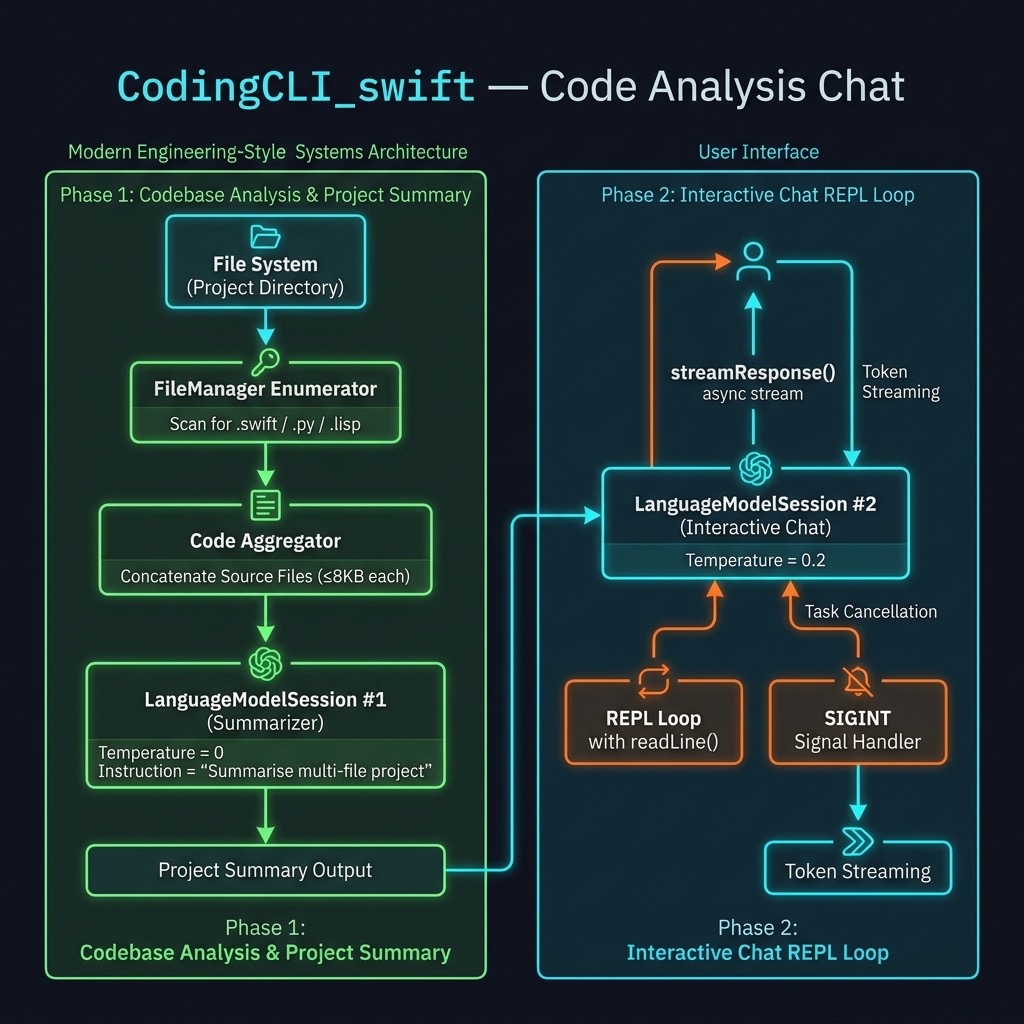
Apple’s on-device large language model — accessed through the FoundationModels framework — is a capable coding companion that runs entirely on device, with no API keys and no network requests. In this chapter we build CodingCLI, a command-line tool that:
- Walks the current project directory and reads every Swift, Python, and Lisp source file it finds
- Asks the model to summarise what each file does and what the project is about as a whole
- Drops into an interactive streaming chat loop so you can ask follow-up questions about the code
This is a genuinely useful development tool. Run it inside any Swift package, Python project, or mixed-language repository and you get an instant, context-aware AI assistant that already “knows” the codebase.
Requirements
-
macOS 26 (Tahoe) or later —
FoundationModelsships as a system framework starting with macOS 26. -
Xcode 17 or later — required to build against
FoundationModels. - Apple Silicon Mac — the on-device model runs on Apple Neural Engine hardware.
No third-party Swift packages, no API keys, and no internet connection are required.
Project Layout
1 CodingCLI_swift/
2 ├── Package.swift
3 ├── Sources/
4 │   └── CodingCLI/
5 │       └── CodingCLI.swift
6 └── test.py          ← sample file so the tool has something to summarise
Package.swift
The package requires no external dependencies. The only special configuration is linking FoundationModels, which ships as a system framework but is not yet in the default linker search path for Swift packages:
 1 // swift-tools-version: 6.2
 2 import PackageDescription
 3
 4 let package = Package(
 5     name: "CodingCLI",
 6     platforms: [
 7         .macOS(.v26)
 8     ],
 9     products: [
10         .executable(name: "CodingCLI", targets: ["CodingCLI"])
11     ],
12     targets: [
13         .executableTarget(
14             name: "CodingCLI",
15             linkerSettings: [
16                 .linkedFramework("FoundationModels")
17             ]
18         )
19     ]
20 )
The .macOS(.v26) platform constraint ensures SwiftPM refuses to build the package on an older OS where FoundationModels is unavailable. The .linkedFramework("FoundationModels") linker setting is the key: it tells the linker to pull in the system framework without requiring a SwiftPM dependency declaration.
CodingCLI.swift — Full Listing
CodingCLI.swift:
 1 import Foundation
 2 import FoundationModels
 3 import Dispatch
 4
 5 @main
 6 struct CodingCLI {
 7     static func main() async throws {
 8         // ---- 1. Gather candidate source files ----
 9         let exts = ["swift", "py", "lisp"]
10         var blobs: [String] = []
11
12         let enumerator =
13             FileManager.default.enumerator(atPath: ".")!
14
15         while let path = enumerator.nextObject() as? String {
16             guard let ext = path.split(separator: ".").last,
17                   exts.contains(ext.lowercased()) else { continue }
18
19             if let data = FileManager.default.contents(atPath: path),
20                data.count < 8 * 1024 {
21                 let text = String(decoding: data, as: UTF8.self)
22                 blobs.append("### \(path) ###\n\(text)")
23             }
24         }
25
26         let doc     = blobs.joined(separator: "\n")
27         let summary = try await Self.summarize(doc)
28         print("\n=== Project Summary ===\n\(summary)\n")
29
30         // ---- 2. Start interactive chat loop ----
31         let session = LanguageModelSession(
32             instructions: "You are a helpful assistant.")
33         let options = GenerationOptions(temperature: 0.2)
34         print("Apple-Intelligence chat (T=0.2). /quit to exit.\n")
35
36         while true {
37             print("Enter prompt:")
38             print("> ", terminator: "")
39             guard let prompt = readLine(strippingNewline: true) else { break }
40             if prompt.isEmpty || prompt == "/quit" { break }
41
42             var printed = ""
43             let task = Task {
44                 for try await part in session.streamResponse(
45                     to: prompt, options: options) {
46                     let delta = part.content.dropFirst(printed.count)
47                     if !delta.isEmpty {
48                         FileHandle.standardOutput.write(
49                             Data(delta.utf8))
50                         fflush(stdout)
51                         printed = part.content
52                     }
53                 }
54                 print()
55             }
56
57             signal(SIGINT, SIG_IGN)
58             let sig = DispatchSource.makeSignalSource(
59                 signal: SIGINT, queue: .main)
60             sig.setEventHandler { task.cancel() }
61             sig.resume()
62             defer { sig.cancel() }
63
64             _ = try await task.value
65         }
66
67     }
68
69     // ---- 3. Helper: summarise all code ----
70     static func summarize(_ text: String) async throws -> String {
71         let session = LanguageModelSession(
72             instructions: """
73             Summarise the following multi-file project. \
74             For each file give one bullet explaining its role, \
75             then a two-sentence overall description.
76             """
77         )
78         let prompt = text.prefix(24 * 1024)
79         let resp = try await session.respond(
80             to: String(prompt),
81             options: GenerationOptions(temperature: 0))
82         return resp.content
83     }
84 }
Walking Through the Code
Phase 1 — Gathering Source Files
The program starts by walking the current directory tree with FileManager.default.enumerator(atPath: "."). For each path it finds, it checks the file extension against an allowlist (swift, py, lisp) and silently skips anything else — build artifacts, JSON files, images, and so on.
Files larger than 8 KB are also skipped. This keeps the total context within the model’s practical limits and avoids sending enormous auto-generated files (like Package.resolved) that would not add useful signal to the summary.
Each accepted file is wrapped in a ### filename ### header and appended to blobs. Joining all blobs produces a single multi-file document that the model can reason about as a unit.
Phase 2 — Summarising the Project
summarize(_:) creates a dedicated LanguageModelSession with a system instruction that tells the model exactly what output format to produce: one bullet per file plus a two-sentence overview. Using temperature: 0 here makes the summary deterministic and factual — we do not want creative variation in a structured summary.
The text.prefix(24 * 1024) safety clamp truncates the combined source text to 24 KB before sending it to the model. The on-device model has a finite context window; this prevents a very large project from causing an error.
session.respond(to:options:) is the non-streaming variant — it waits for the complete response before returning. That is appropriate here because we print the full summary once, before the chat loop starts.
Phase 3 — Streaming Chat Loop
The chat session is separate from the summarisation session and carries its own conversation history. It uses the same FoundationModels streaming API we saw in the previous chapter, with a few additions:
The prompt display. Before calling readLine, we print:
1 Enter prompt:
2 >
The terminator: "" on the second print keeps the cursor on the same line as > , giving the user a visual cue that input is expected there.
Streaming with FileHandle. session.streamResponse(to:options:) returns an AsyncSequence of LanguageModelResponse values. Each successive value contains the full response text generated so far (not just the new token). We compute the delta — the newly added characters — by dropping the characters we have already printed, then write only those new characters to FileHandle.standardOutput. Calling fflush(stdout) after each write ensures characters appear immediately rather than being buffered.
Cancellation with SIGINT. Wrapping the streaming iteration in a Task lets us cancel it mid-stream. When the user presses Control-C, the DispatchSource signal handler calls task.cancel(), which propagates a CancellationError into the AsyncSequence iteration and stops the stream cleanly. The defer { sig.cancel() } tears down the signal handler after each turn so it does not accumulate.
Loop structure. The outer loop is while true rather than while let prompt = readLine(...) precisely because we need to print the prompt before readLine blocks waiting for input. The guard let inside the loop handles EOF (e.g., piped input ending).
Running the Tool
Run the tool from the project’s own source directory so it has something interesting to summarise:
 1 $ swift run
 2 Building for debugging...
 3 [7/7] Applying CodingCLI
 4 Build of product 'CodingCLI' complete! (0.56s)
 5
 6 === Project Summary ===
 7 ### test.py ###
 8 *   This file creates a chat completion using the Groq library.
 9 *   It demonstrates how to use Groq to generate responses for a chat prompt.
10
11 ### Package.swift ###
12 *   This file defines the Swift package, specifying its name, platforms, products, a\
13 nd targets.
14 *   It ensures compatibility with macOS 12 and links the FoundationModels framework.
15
16 ### Sources/CodingCLI/CodingCLI.swift ###
17 *   This file contains the main entry point of the Swift package.
18 *   It gathers source files, summarizes them, and starts an interactive chat loop.
19
20 Apple-Intelligence chat (T=0.2). /quit to exit.
21
22 Enter prompt:
23 > describe in 1 sentence why the sky is blue
24 The sky appears blue due to Rayleigh scattering, where shorter blue wavelengths of
25 sunlight are scattered in all directions by the gases and particles in Earth's atmos\
26 phere.
27 Enter prompt:
28 > write a concise Swift function to print the first 11 prime numbers
29 func printFirst11Primes() {
30     var primes: [Int] = []
31     var num = 2
32     while primes.count < 11 {
33         var isPrime = true
34         for prime in primes {
35             if prime * prime > num { break }
36             if num % prime == 0 {
37                 isPrime = false
38                 break
39             }
40         }
41         if isPrime {
42             primes.append(num)
43         }
44         num += 1
45     }
46     for prime in primes {
47         print(prime)
48     }
49 }
50
51 printFirst11Primes()
52 Enter prompt:
53 > /quit
The second question demonstrates that the model can generate code on-demand — but notice the chat session does not automatically include the project summary in its context. The two sessions are independent. If you want the model to answer questions specifically about your code, phrase your prompts accordingly, for example: “In CodingCLI.swift, what does the summarize function do?” — or modify the chat session’s instructions to include the summary text.
Ideas for Extension
This tool is a useful starting point. Here are some directions you might take it:
-
Inject the summary into the chat context. Pass
summaryas part of the chat session’sinstructionsstring so every follow-up question is answered in the context of the actual project. -
Support more file types. Add
"rb","js","ts","go", or any other extension to theextsarray. - Increase the file size limit selectively. For a small project the 8 KB cap is conservative. You could raise it, or apply a higher limit only for files matching certain patterns (e.g., the main entry-point file).
-
Save the summary to disk. Write the summary to
PROJECT_SUMMARY.mdso it persists between runs and can be committed to the repository. -
Accept a directory argument. Replace the hardcoded
"."withCommandLine.arguments.dropFirst().first ?? "."so the tool can be pointed at any directory.
Wrap Up
In this chapter we built a practical AI coding assistant entirely on top of Apple’s on-device FoundationModels framework. The tool requires no API keys, sends no data off-device, and works in any terminal — making it a private, fast alternative to cloud-based coding assistants for local development work.
The key techniques introduced here — multi-file context assembly, a dedicated summarisation session at temperature: 0, and a separate streaming chat session — compose naturally and can be adapted to many other document-analysis or question-answering tools.