Running Local LLMs with Apple’s MLX Framework
Apple’s MLX framework lets you run large language models entirely on-device on Apple Silicon, with no network calls and no API keys. Because the CPU, GPU, and Neural Engine all share the same unified memory pool, data never has to be copied between chips. The result is fast, low-overhead inference that works offline and keeps user data private.
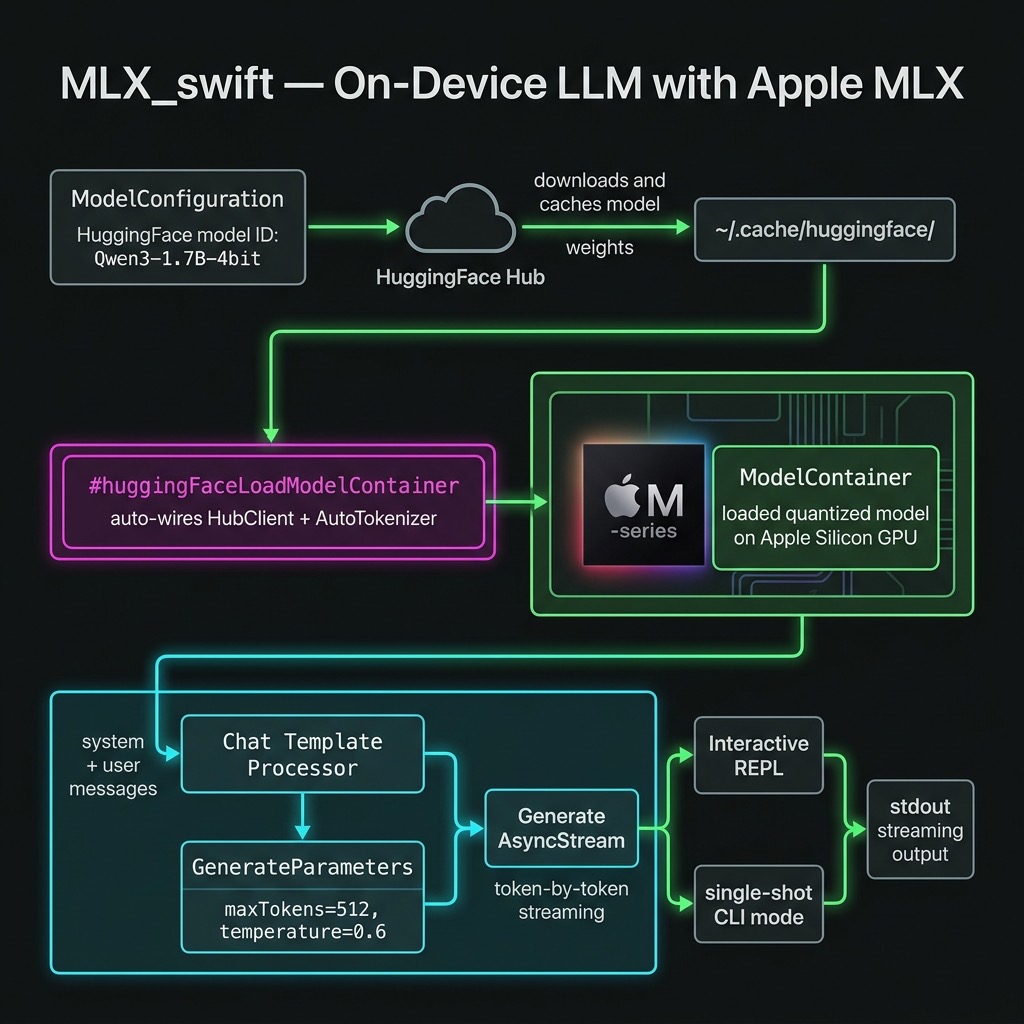
This chapter walks through a standalone Swift command-line tool in source-code/MLX_swift/ that downloads a small quantised language model on the first run, caches it locally, and exposes both a single-prompt mode and an interactive REPL.
Background: MLX and Apple Silicon
Apple introduced MLX in December 2023 as an open-source, NumPy-like array framework tuned for Apple Silicon’s unified memory architecture. The key insight is that the M-series chips give every compute unit — CPU, GPU, and Neural Engine — a single view of RAM. There is no host-to-device copy step before inference begins, which eliminates a major bottleneck that exists on discrete-GPU systems.
MLX is available in Python and Swift. The mlx-swift-lm repository provides the higher-level Swift libraries used in this chapter:
| Library | Purpose |
|---|---|
MLXLLM |
Load and run text-only language models |
MLXVLm |
Vision-language models (image + text) |
MLXLMCommon |
Shared types: ModelContainer, GenerateParameters, generate()
|
MLXHuggingFace |
Swift macros for one-step model loading from Hugging Face |
Note: The
mlx-swift-lmrepository (reusable libraries) is separate frommlx-swift-examples(demo apps). Always depend onmlx-swift-lmfor library code.
Choosing a Model
Any 4-bit quantised model published by the mlx-community organisation on Hugging Face can be used with this code. The model is specified by its Hugging Face repository ID. The example uses:
1 mlx-community/Qwen3-1.7B-4bit
Qwen3-1.7B-4bit is about 1 GB on disk. It runs comfortably on a Mac with 8 GB of unified memory and produces good-quality, instruction-following output. Other good choices for experimentation:
| Model ID | Disk | Notes |
|---|---|---|
mlx-community/Qwen3-1.7B-4bit |
~1 GB | Default in this example |
mlx-community/Llama-3.2-1B-Instruct-4bit |
~0.8 GB | Meta Llama |
mlx-community/Phi-4-mini-instruct-4bit |
~2.5 GB | Microsoft Phi-4 Mini |
mlx-community/Qwen3-8B-4bit |
~5 GB | Larger Qwen3 |
Models are downloaded on the first run and cached in
~/.cache/huggingface/. Subsequent runs start immediately from the
local cache.
Project Structure
1 source-code/MLX_swift/
2 ├── build.sh              # build + compile Metal shaders + run
3 ├── Package.swift
4 └── Sources/MLX_swift/
5     └── main.swift
The logic lives entirely in main.swift. build.sh handles the
Metal shader compilation step that swift build skips (see
“Running the Example” below).
Package.swift
 1 // swift-tools-version: 6.0
 2 import PackageDescription
 3
 4 let package = Package(
 5     name: "MLX_swift",
 6     platforms: [.macOS(.v14)],
 7     dependencies: [
 8         .package(
 9             url: "https://github.com/ml-explore/mlx-swift-lm",
10             branch: "main"
11         ),
12         .package(
13             url:
14                 "https://github.com/huggingface/swift-transformers",
15             from: "1.0.0"
16         ),
17     ],
18     targets: [
19         .executableTarget(
20             name: "MLX_swift",
21             dependencies: [
22                 .product(
23                     name: "MLXLLM",
24                     package: "mlx-swift-lm"),
25                 .product(
26                     name: "MLXLMCommon",
27                     package: "mlx-swift-lm"),
28                 .product(
29                     name: "MLXHuggingFace",
30                     package: "mlx-swift-lm"),
31                 .product(
32                     name: "Transformers",
33                     package: "swift-transformers"),
34             ],
35             path: "Sources/MLX_swift"
36         )
37     ]
38 )
Why two repositories? mlx-swift-lm provides MLXLLM,
MLXLMCommon, and MLXHuggingFace. The MLXHuggingFace Swift
macros expand to code that references HuggingFace.HubClient and
Tokenizers.AutoTokenizer at the call site — types that live in
swift-transformers, not mlx-swift-lm. Both packages must
therefore be explicit dependencies and imported in main.swift.
main.swift — Full Walkthrough
Imports
1 import Foundation
2 import HuggingFace
3 import Tokenizers
4 import MLXLLM
5 import MLXLMCommon
6 import MLXHuggingFace
HuggingFace and Tokenizers come from swift-transformers and
are required so that the #huggingFaceLoadModelContainer macro can
find HubClient and AutoTokenizer when it expands.
Configuration Constants
1 let modelID = "mlx-community/Qwen3-1.7B-4bit"
2 let temperature: Float = 0.6
3 let maxTokens = 512
All three values are at the top of the file so they are easy to
change. Swap modelID to try a different model. Reduce
temperature toward 0.0 for more deterministic output; increase it
toward 1.0 for more creative responses.
Loading the Model
 1 let config = ModelConfiguration(id: modelID)
 2
 3 let container: ModelContainer
 4 do {
 5     container = try await #huggingFaceLoadModelContainer(
 6         configuration: config
 7     ) { progress in
 8         let pct = Int(progress.fractionCompleted * 100)
 9         print("\r  Downloading \(config.name): \(pct)%  ",
10               terminator: "")
11         fflush(stdout)
12     }
13 } catch {
14     fputs("[Error] Failed to load model: \(error)\n", stderr)
15     exit(1)
16 }
ModelConfiguration(id:) creates a descriptor from a Hugging Face
repository ID. #huggingFaceLoadModelContainer is a Swift macro
from the MLXHuggingFace library. It automatically wires up:
- a HubClient downloader (pulls weights from Hugging Face)
- an AutoTokenizer loader (picks the right tokenizer for the model)
If the weights are already in ~/.cache/huggingface/ the progress
closure is never called. If they are not, it fires repeatedly as
each weight shard downloads. The returned ModelContainer owns the
loaded weights and tokenizer for the lifetime of the process.
Preparing Input and Generating
 1 let result =
 2     try await container.perform { context in
 3
 4     let messages: [[String: String]] = [
 5         ["role": "system",
 6          "content": "You are a helpful assistant."],
 7         ["role": "user",
 8          "content": userPrompt]
 9     ]
10     let input = try await context.processor.prepare(
11         input: .init(messages: messages))
12
13     var output = ""
14     let stream = try generate(
15         input: input,
16         parameters: GenerateParameters(
17             maxTokens: maxTokens,
18             temperature: temperature),
19         context: context)
20
21     for await generation in stream {
22         switch generation {
23         case .chunk(let text):
24             print(text, terminator: "")
25             fflush(stdout)
26             output += text
27         case .info:
28             break   // timing summary — ignore here
29         case .toolCall:
30             break   // tool calls unused in this demo
31         }
32     }
33     return output
34 }
Why context.processor.prepare? Different model families
(Llama, Qwen, Phi, Gemma, …) each have their own chat template.
Calling processor.prepare applies the correct template
automatically — you never hard-code <|im_start|>user or
[INST] by hand.
generate(input:parameters:context:) returns an
AsyncStream<Generation>. Each element is one of:
- .chunk(String) — a decoded text fragment to stream to the user
- .info(GenerateCompletionInfo) — a timing summary at the end
- .toolCall(ToolCall) — a function-call request (unused here)
Note on argument order: GenerateParameters requires
maxTokens before temperature — swapping them is a compile
error.
container.perform acquires the model’s internal lock before
running, preventing concurrent callers from corrupting shared GPU
memory. It is the correct way to interact with a ModelContainer
from an async context.
Async Entry Point
Because main.swift cannot be async at the top level without
the @main attribute, all async work is wrapped in a Task:
1 let mainTask = Task {
2     // … all async code …
3 }
4 _ = await mainTask.value
This avoids the @main struct boilerplate while still letting the
process properly await completion before exiting.
Interactive REPL
 1 while true {
 2     print("You: ", terminator: "")
 3     fflush(stdout)
 4
 5     guard let line = readLine(strippingNewline: true),
 6           !line.isEmpty else { continue }
 7
 8     if line.lowercased() == "quit"
 9         || line.lowercased() == "q" {
10         print("Goodbye!")
11         break
12     }
13     await runPrompt(line)
14 }
Each turn is independent: the model has no memory of previous turns.
Adding conversation history requires accumulating the messages array
across turns and passing the full history to processor.prepare.
Running the Example
Prerequisites
- macOS 14 (Sonoma) or later
- Apple Silicon (M1, M2, M3, M4, or later)
- Xcode 16 or the Xcode 16 command-line tools
- Metal Toolchain — download once (see below)
- Internet access for the first run (model download)
One-Time Metal Toolchain Setup
MLX’s GPU kernels are Metal shaders that must be compiled into a
mlx.metallib file. Xcode handles this automatically for app
targets, but swift build does not. The build.sh script
compiles the shaders using xcrun metal, which requires the Metal
Toolchain to be installed. Download it once:
1 xcodebuild -downloadComponent MetalToolchain
Single Prompt
1 cd source-code/MLX_swift
2 ./build.sh "Explain unified memory in one sentence."
Interactive REPL
1 cd source-code/MLX_swift
2 ./build.sh --repl
Build Only (then run manually)
1 ./build.sh
2 .build/arm64-apple-macosx/release/MLX_swift "add 1 + 13"
The first ./build.sh call compiles all Metal shaders (~39 files)
and links mlx.metallib. Subsequent calls skip the shader step
because the file already exists.
First-Run Output
The first time you run the tool the weights are downloaded from Hugging Face. Subsequent runs are instant because the weights are cached:
 1 ╔══════════════════════════════════════════════╗
 2 ║       MLX Swift — Local LLM on Device        ║
 3 ╚══════════════════════════════════════════════╝
 4 Model : mlx-community/Qwen3-1.7B-4bit
 5 Tokens: up to 512 per response
 6
 7 Loading model …
 8   Downloading Qwen3-1.7B-4bit: 100%
 9 Model ready.
10
11 User: add 1 + 13
12 Assistant: 1 + 13 = 14.
Swapping Models
To try a different model, change the single constant at the top of
main.swift:
1 let modelID = "mlx-community/Phi-4-mini-instruct-4bit"
No other code changes are needed. ModelConfiguration(id:) and
#huggingFaceLoadModelContainer handle downloading the matching
tokeniser configuration and model weights automatically.
Key Takeaways
- Unified memory = no copy overhead. Apple Silicon’s shared memory pool lets MLX move tensors between CPU and GPU without any marshalling step.
-
#huggingFaceLoadModelContainerhandles the download, caching, and model initialisation in a single macro call. It requiresimport HuggingFaceandimport Tokenizersat the call site because the macro expands to code that references those types directly. -
context.processor.prepareapplies the model-specific chat template automatically so you never need to hard-code prompt formats. -
generate(input:parameters:context:)streams decoded text via anAsyncStream<Generation>. Switch on.chunk,.info, and.toolCallcases to handle each event type. -
container.performserialises concurrent callers so that GPU memory is not corrupted by overlapping inference. -
swift build/swift runalone is not enough. Metal shaders must be compiled separately. Usebuild.sh, which invokesxcrun metalandxcrun metallibto producemlx.metallibnext to the binary. -
Changing models requires changing one string. Any
mlx-community4-bit model on Hugging Face slots in without further code changes.
Summary
The MLX_swift example demonstrates the full lifecycle of local
LLM inference on Apple Silicon: declare dependencies on
mlx-swift-lm and swift-transformers, construct a
ModelConfiguration from a Hugging Face ID, load it with
#huggingFaceLoadModelContainer, prepare input with the model’s
processor, and stream tokens with generate(). A build.sh script
handles the Metal shader compilation step that SPM skips. The
result is a fast, fully offline command-line assistant that keeps
all data on your device.