Querying Knowledge Graphs with SPARQL and Swift
In the previous chapter we introduced the semantic web, RDF, and the SPARQL query language. In this chapter we put those concepts to work by building a small Swift library — SparqlQuery_swift — that lets you query live knowledge graphs such as DBpedia and Wikidata from a Swift program with just a few lines of code.
The library uses modern Swift concurrency (async/await) and the standard Codable system, so there are no third-party dependencies to manage. The complete source is in the source-code/SparqlQuery_swift directory of the book’s GitHub repository.
What We Are Building
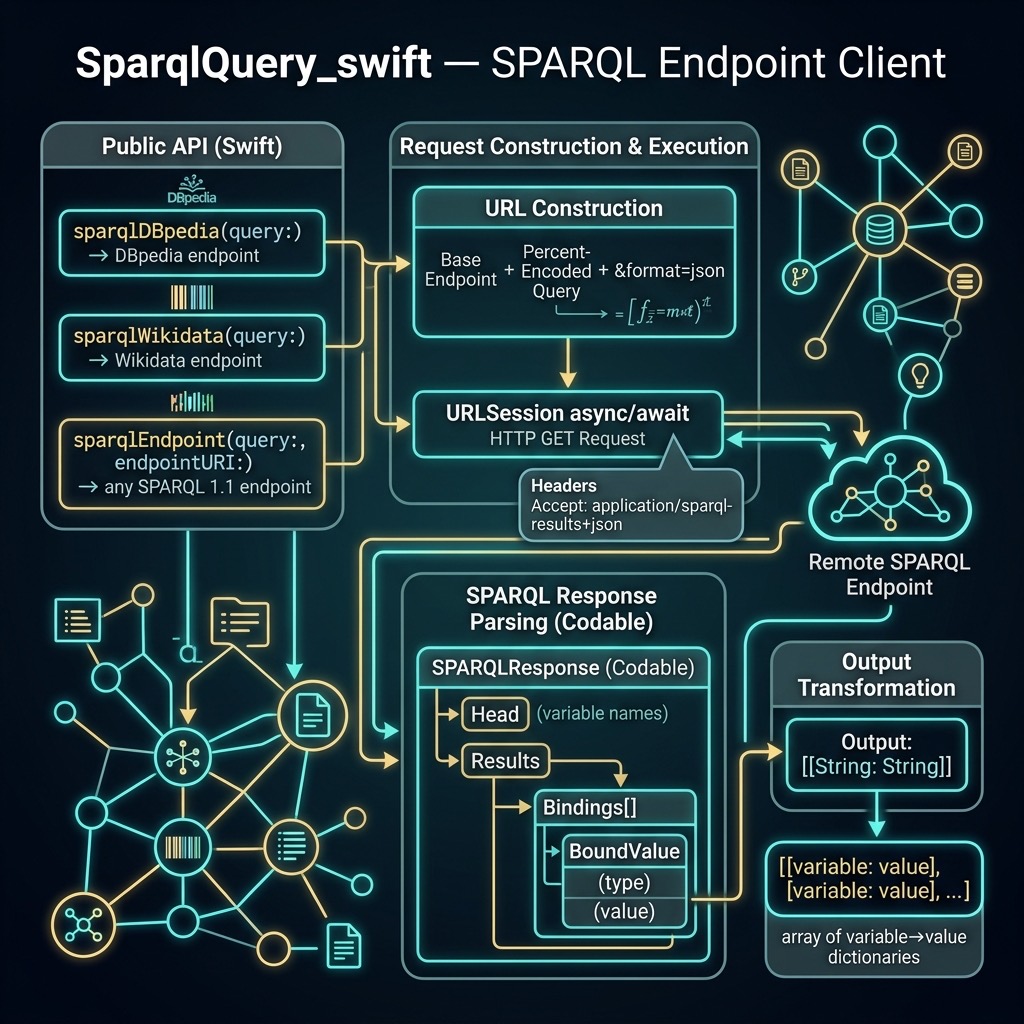
SparqlQuery_swift is a Swift package that exposes three public async functions:
-
sparqlDBpedia(query:)— queries the public DBpedia SPARQL endpoint -
sparqlWikidata(query:)— queries the public Wikidata SPARQL endpoint -
sparqlEndpoint(query:endpointURI:)— a generic helper for any standards-compliant SPARQL 1.1 endpoint
Each function accepts a SPARQL SELECT query string and returns [[String: String]] — an array of result rows, where each row is a dictionary mapping a SPARQL variable name to its bound string value. This is a simple, easy-to-iterate structure with no special types to learn.
Project Structure
The package has no external dependencies:
Package.swift
// swift-tools-version:5.9
import PackageDescription

let package = Package(
    name: "SparqlQuery_swift",
    platforms: [
        .macOS(.v13)
    ],
    products: [
        .library(
            name: "SparqlQuery_swift",
            targets: ["SparqlQuery_swift"]),
    ],
    targets: [
        .target(
            name: "SparqlQuery_swift"),
        .testTarget(
            name: "SparqlQuery_swiftTests",
            dependencies: ["SparqlQuery_swift"]),
    ]
)
We require macOS 13 or later because the async/await form of URLSession.data(for:) — which we use to make the HTTP requests — was introduced in that release. No third-party packages are needed; Foundation’s URLSession and JSONDecoder handle everything.
The Library: Full Source Listing
// SparqlQuery_swift.swift
// Copyright 2022-2026 Mark Watson. All rights reserved.
//
// Swift library for querying SPARQL endpoints (DBpedia, Wikidata, etc.)
// Uses async/await and Codable — no external dependencies required.

import Foundation

// MARK: - Codable response model

private struct SPARQLResponse: Codable {
    let head: Head
    let results: Results

    struct Head: Codable {
        let vars: [String]
    }

    struct Results: Codable {
        let bindings: [Binding]
    }

    // Each binding is a dictionary of variable name → { type, value }
    struct Binding: Codable {
        let values: [String: BoundValue]

        init(from decoder: Decoder) throws {
            let container = try decoder.singleValueContainer()
            values = try container.decode([String: BoundValue].self)
        }

        func encode(to encoder: Encoder) throws {
            var container = encoder.singleValueContainer()
            try container.encode(values)
        }
    }

    struct BoundValue: Codable {
        let type: String
        let value: String
    }
}

// MARK: - Public async API

/// Query the DBpedia SPARQL endpoint and return results as an array of
/// `[variableName: value]` dictionaries.
public func sparqlDBpedia(query: String) async throws -> [[String: String]] {
    let endpoint = "https://dbpedia.org/sparql?query="
    return try await sparqlEndpoint(query: query, endpointURI: endpoint)
}

/// Query the Wikidata SPARQL endpoint and return results as an array of
/// `[variableName: value]` dictionaries.
public func sparqlWikidata(query: String) async throws -> [[String: String]] {
    let endpoint =
        "https://query.wikidata.org/bigdata/namespace/wdq/sparql?query="
    return try await sparqlEndpoint(query: query, endpointURI: endpoint)
}

/// Generic SPARQL endpoint query. Pass any standards-compliant SPARQL 1.1
/// endpoint URI (with the `query=` parameter already appended).
public func sparqlEndpoint(
    query: String,
    endpointURI: String
) async throws -> [[String: String]] {
    guard let encoded = query.addingPercentEncoding(
        withAllowedCharacters: .urlQueryAllowed),
          let url = URL(string: endpointURI + encoded + "&format=json")
    else {
        throw URLError(.badURL)
    }

    var request = URLRequest(url: url)
    request.setValue(
        "application/sparql-results+json",
        forHTTPHeaderField: "Accept")

    let (data, response) = try await URLSession.shared.data(for: request)

    if let httpResponse = response as? HTTPURLResponse,
       !(200...299).contains(httpResponse.statusCode) {
        throw URLError(.badServerResponse)
    }

    let sparqlResponse =
        try JSONDecoder().decode(SPARQLResponse.self, from: data)
    let vars = sparqlResponse.head.vars

    return sparqlResponse.results.bindings.compactMap { binding in
        var row = [String: String]()
        for variable in vars {
            if let bound = binding.values[variable] {
                row[variable] = bound.value
            }
        }
        return row.isEmpty ? nil : row
    }
}
Let’s walk through the key design decisions.
The Codable Response Model
SPARQL endpoints that return JSON follow a standard schema defined in the W3C SPARQL 1.1 Query Results JSON Format specification. The response has two top-level keys:
-
head.vars— the ordered list of variable names from your SELECT clause (e.g.,["city", "population"]) -
results.bindings— an array of rows. Each row is a JSON object whose keys are variable names and whose values are objects with"type"and"value"fields.
The SPARQLResponse, Head, Results, Binding, and BoundValue structs model exactly this shape. Because the JSON keys in each binding row are dynamic (they are the query variable names, not hardcoded strings), we implement a custom Decodable initializer for Binding that decodes it as a plain [String: BoundValue] dictionary.
The HTTP Request
Each public function calls sparqlEndpoint(query:endpointURI:), which:
- Percent-encodes the SPARQL query string so it is safe to embed in a URL
- Appends
&format=jsonto request JSON output - Sets an
Accept: application/sparql-results+jsonheader as a belt-and-suspenders measure - Uses
URLSession.shared.data(for:)— theasyncvariant — to make a non-blocking HTTP GET - Checks for a non-2xx HTTP status and throws
URLError(.badServerResponse)if the endpoint reports an error - Decodes the response body with
JSONDecoder
The result is flattened: each Binding’s BoundValue.value string is extracted, producing the simple [[String: String]] structure that callers work with.
Running SPARQL Queries
Querying DBpedia
Let’s look at a few examples of what you can do with the library. The simplest possible query asks for one fact about a known resource — the population of Sedona, Arizona:
import SparqlQuery_swift

let query = """
SELECT ?population WHERE {
  <http://dbpedia.org/resource/Sedona,_Arizona>
  <http://dbpedia.org/ontology/populationTotal>
  ?population
}
"""

let results = try await sparqlDBpedia(query: query)
for row in results {
    print("Population:", row["population"] ?? "unknown")
}
Sample output:
Population: 10031
Finding Related Entities
A more interesting query asks DBpedia to find people who were born in Sedona. The ?person variable will be bound to each matching URI:
let query = """
SELECT ?person ?name WHERE {
  ?person <http://dbpedia.org/ontology/birthPlace>
          <http://dbpedia.org/resource/Sedona,_Arizona> .
  ?person <http://www.w3.org/2000/01/rdf-schema#label> ?name .
  FILTER (lang(?name) = "en")
}
LIMIT 10
"""

let results = try await sparqlDBpedia(query: query)
for row in results {
    print(row["name"] ?? "", "—", row["person"] ?? "")
}
This query introduces two new SPARQL features:
-
Multiple triple patterns in the WHERE clause (joined by
.) let us chain facts together — here we require that?personhas a birthPlace AND a label. -
FILTERrestricts results to English-language labels, since DBpedia stores labels in many languages.
Querying Wikidata
The same library works with Wikidata. Wikidata uses numeric property identifiers (e.g., P18 for “image”, P569 for “date of birth”) rather than descriptive URIs, but the SPARQL syntax is identical. Here we ask for the capital city of France and its population:
let query = """
SELECT ?capital ?capitalLabel ?population WHERE {
  wd:Q142 wdt:P36 ?capital .
  ?capital wdt:P1082 ?population .
  SERVICE wikibase:label {
    bd:serviceParam wikibase:language "en" .
  }
}
"""

let results = try await sparqlWikidata(query: query)
for row in results {
    print(row["capitalLabel"] ?? "", "population:", row["population"] ?? "")
}
Sample output:
The SERVICE wikibase:label block is a Wikidata-specific extension that automatically resolves entity labels into a human-readable string bound to ?<variableName>Label. You will see this pattern in almost every Wikidata query.
The Test Suite
The test file exercises the library against the live DBpedia endpoint:
import XCTest
@testable import SparqlQuery_swift

final class SparqlQueryTests: XCTestCase {

    func testDBpediaQuery() async throws {
        let query = """
        SELECT ?population WHERE {
          <http://dbpedia.org/resource/Sedona,_Arizona>
          <http://dbpedia.org/ontology/populationTotal>
          ?population
        }
        """
        let results = try await sparqlDBpedia(query: query)
        print("DBpedia results:", results)
        XCTAssertFalse(results.isEmpty,
            "Expected at least one result from DBpedia")
        XCTAssertNotNil(results.first?["population"])
    }
}
Run the tests with:
test
Note that this test makes a live network request to DBpedia. If DBpedia is temporarily unavailable (it is a free public service), the test will fail with a network error rather than an assertion failure — that is expected behaviour.
Tips for Writing SPARQL Queries
Use the browser-based query editors. Before embedding a query in Swift, test it interactively:
- DBpedia: https://dbpedia.org/sparql
- Wikidata: https://query.wikidata.org/ (includes autocomplete and examples)
Start with LIMIT. Public endpoints may reject or time out queries that return very large result sets. Always develop queries with a LIMIT 10 or LIMIT 25 clause and only remove it when you are confident the result set is small.
Explore with ?p ?o patterns. If you want to see all the facts DBpedia knows about a resource, use an open triple pattern:
let query = """
SELECT ?property ?value WHERE {
  <http://dbpedia.org/resource/Sedona,_Arizona> ?property ?value
}
LIMIT 50
"""
This is equivalent to SELECT * in SQL — a great way to discover what properties are available before writing a more targeted query.
Prefer rdfs:label for human-readable names. URIs like http://dbpedia.org/resource/Sedona,_Arizona are machine identifiers. The triple pattern ?entity rdfs:label ?name . FILTER (lang(?name) = "en") retrieves the English display name.
Wrap Up
In this chapter we built a clean, dependency-free Swift library for querying SPARQL knowledge graphs. The key points to take away are:
- The SPARQL JSON response format is consistent across all standards-compliant endpoints — one
Codablemodel handles DBpedia, Wikidata, and any other endpoint. - Modern Swift
async/awaitmakes the asynchronous HTTP request straightforward to write and easy to read. - The simple
[[String: String]]return type makes results trivial to iterate in any Swift program.
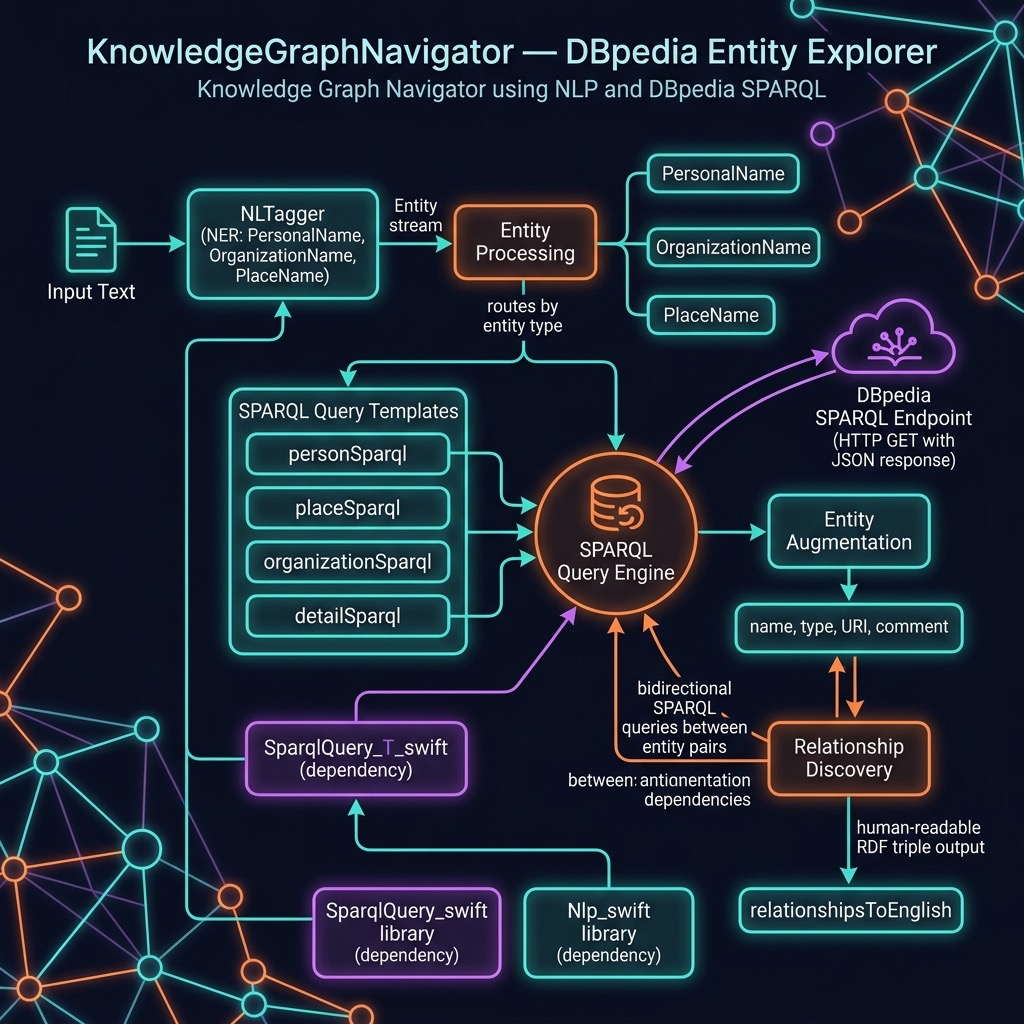
In the next chapter we will build on this library to create a knowledge graph navigator that uses both SPARQL queries and a large language model together — letting natural language questions drive structured lookups against DBpedia.