Document Question Answering Using Gemini APIs and a Local Embeddings Vector Database
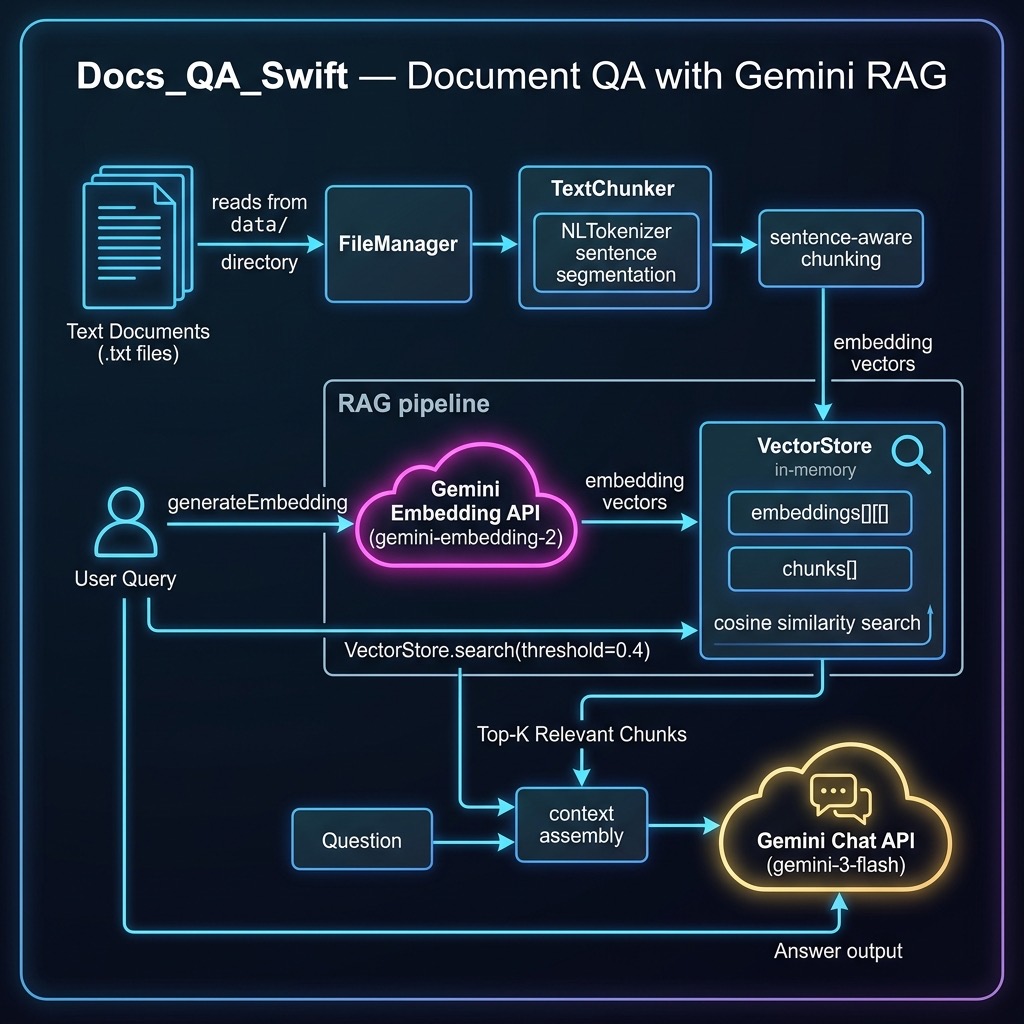
The example in this chapter implements Retrieval-Augmented Generation (RAG) using Google’s Gemini API. We use Gemini Embedding 2 to generate vector embeddings for document chunks and Gemini 3 Flash to answer questions using retrieved context. This approach lets you ground an LLM’s responses in your own local documents.
The source code for this example is in the source-code/Docs_QA_Swift directory. We split the implementation across four Swift source files for clarity:
- GeminiAPI.swift — REST API client for Gemini embeddings and chat
- TextChunker.swift — Sentence-aware text chunking using NLTokenizer
- VectorStore.swift — In-memory vector database with cosine similarity search
- main.swift — Ingests documents and answers questions via RAG
This example requires a GOOGLE_API_KEY environment variable to be set.
Gemini API Client
The GeminiAPI.swift file provides two core capabilities: generating embeddings and performing question answering. Both use the Gemini REST API at generativelanguage.googleapis.com with async/await and Codable for clean, type-safe JSON handling.
Embedding Requests
We define Codable structs for the Gemini embedding API request and response:
private struct EmbedRequest: Codable {
    struct Content: Codable {
        struct Part: Codable {
            let text: String
        }
        let parts: [Part]
    }
    let content: Content
}

private struct EmbedResponse: Codable {
    struct Embedding: Codable {
        let values: [Double]
    }
    let embedding: Embedding
}
The generateEmbedding function sends text to the Gemini embedContent endpoint and returns a normalized vector:
func generateEmbedding(for text: String,
                       apiKey: String)
                       async -> [Double]? {
    let model = "models/gemini-embedding-2"
    let urlString =
        "\(geminiBase)\(model):embedContent?key=\(apiKey)"
    guard let url = URL(string: urlString) else {
        return nil
    }

    let body = EmbedRequest(
        content: EmbedRequest.Content(
            parts: [EmbedRequest.Content.Part(text: text)]
        )
    )

    var request = URLRequest(url: url)
    request.httpMethod = "POST"
    request.setValue("application/json",
                     forHTTPHeaderField: "Content-Type")
    request.httpBody = try? JSONEncoder().encode(body)

    do {
        let (data, response) =
            try await URLSession.shared.data(for: request)
        if let http = response as? HTTPURLResponse,
           !(200...299).contains(http.statusCode) {
            let body = String(data: data, encoding: .utf8)
                       ?? "<no body>"
            fputs("[Embedding Error] HTTP " +
                  "\(http.statusCode): \(body)\n", stderr)
            return nil
        }
        let decoded = try JSONDecoder().decode(
            EmbedResponse.self, from: data)
        return normalized(decoded.embedding.values)
    } catch {
        fputs("[Embedding Error] \(error)\n", stderr)
        return nil
    }
}
Gemini Embedding 2 returns 3072-dimensional vectors. We L2-normalize them immediately so that dot product equals cosine similarity, simplifying later comparisons.
Chat Completion
For question answering we use the Gemini generateContent endpoint with a system instruction that constrains the model to answer using only the provided context:
private struct GeminiRequest: Codable {
    let systemInstruction: SystemInstruction?
    let contents: [Content]

    struct SystemInstruction: Codable {
        let parts: [Part]
    }
    struct Content: Codable {
        let parts: [Part]
    }
    struct Part: Codable {
        let text: String
    }
}

private struct GeminiResponse: Codable {
    let candidates: [Candidate]?

    struct Candidate: Codable {
        let content: Content
    }
    struct Content: Codable {
        let parts: [Part]
    }
    struct Part: Codable {
        let text: String
    }
}
The questionAnswering function sends the retrieved context as a system instruction and the user’s question as the content:
func questionAnswering(context: String, question: String,
                       apiKey: String) async -> String? {
    let model = "models/gemini-3-flash-preview"
    let urlString =
        "\(geminiBase)\(model):generateContent?key=\(apiKey)"
    guard let url = URL(string: urlString) else {
        return nil
    }

    let body = GeminiRequest(
        systemInstruction: GeminiRequest.SystemInstruction(
            parts: [GeminiRequest.Part(
                text: "Answer the user's question using " +
                      "only the following context:\n\n" +
                      "\(context)")]
        ),
        contents: [
            GeminiRequest.Content(
                parts: [GeminiRequest.Part(text: question)]
            )
        ]
    )

    var request = URLRequest(url: url)
    request.httpMethod = "POST"
    request.setValue("application/json",
                     forHTTPHeaderField: "Content-Type")

    do {
        request.httpBody =
            try JSONEncoder().encode(body)
    } catch {
        fputs("[Error] Failed to encode: \(error)\n",
              stderr)
        return nil
    }

    do {
        let (data, response) =
            try await URLSession.shared.data(for: request)
        if let http = response as? HTTPURLResponse,
           !(200...299).contains(http.statusCode) {
            let body = String(data: data, encoding: .utf8)
                       ?? "<no body>"
            fputs("[Chat Error] HTTP " +
                  "\(http.statusCode): \(body)\n", stderr)
            return nil
        }
        let decoded = try JSONDecoder().decode(
            GeminiResponse.self, from: data)
        return decoded.candidates?.first?
            .content.parts.first?.text
    } catch {
        fputs("[Chat Error] \(error)\n", stderr)
        return nil
    }
}
Vector Math Utilities
We include three small utility functions for vector operations:
func normalized(_ v: [Double]) -> [Double] {
    let mag = sqrt(v.reduce(0.0) { $0 + $1 * $1 })
    guard mag > 0 else { return v }
    return v.map { $0 / mag }
}

func dotProduct(_ a: [Double], _ b: [Double]) -> Double {
    guard a.count == b.count else {
        fputs("WARNING: vector length mismatch: " +
              "\(a.count) != \(b.count)\n", stderr)
        return 0.0
    }
    return zip(a, b).reduce(0.0) { $0 + $1.0 * $1.1 }
}

func cosineSimilarity(_ a: [Double],
                      _ b: [Double]) -> Double {
    guard !a.isEmpty, a.count == b.count else { return 0.0 }
    return dotProduct(a, b)
}
Since we normalize all vectors when they are generated, cosine similarity reduces to a simple dot product.
Text Chunking
The TextChunker.swift file handles splitting documents into chunks suitable for embedding. We use Apple’s NLTokenizer for sentence segmentation and then group sentences into chunks that don’t exceed a maximum character count:
func segmentTextIntoSentences(text: String) -> [String] {
    let tokenizer = NLTokenizer(unit: .sentence)
    tokenizer.string = text
    return tokenizer.tokens(
        for: text.startIndex..<text.endIndex
    ).map { range in
        String(text[range])
    }
}

func segmentTextIntoChunks(text: String,
                           maxChunkSize: Int) -> [String] {
    let sentences = segmentTextIntoSentences(text: text)
    var chunks: [String] = []
    var currentChunk = ""
    var currentSize = 0

    for sentence in sentences {
        if currentSize + sentence.count < maxChunkSize {
            currentChunk += sentence
            currentSize += sentence.count
        } else {
            if !currentChunk.isEmpty {
                chunks.append(currentChunk)
            }
            currentChunk = sentence
            currentSize = sentence.count
        }
    }
    if !currentChunk.isEmpty {
        chunks.append(currentChunk)
    }
    return chunks
}
This approach preserves sentence boundaries so that each chunk contains complete sentences — important for both embedding quality and for providing readable context to the LLM.
In-Memory Vector Store
The VectorStore.swift file provides a simple in-memory vector database:
struct VectorStore {
    private(set) var embeddings: [[Double]] = []
    private(set) var chunks: [String] = []

    mutating func add(chunk: String,
                      embedding: [Double]) {
        chunks.append(chunk)
        embeddings.append(embedding)
    }

    var count: Int { chunks.count }

    func search(queryEmbedding: [Double],
                threshold: Double = 0.4,
                maxResults: Int = 5)
                -> [(chunk: String, score: Double)] {
        var results: [(chunk: String, score: Double)] = []
        for i in 0..<embeddings.count {
            let score = cosineSimilarity(
                queryEmbedding, embeddings[i])
            if score > threshold {
                results.append((chunks[i], score))
            }
        }
        return results
            .sorted { $0.score > $1.score }
            .prefix(maxResults)
            .map { $0 }
    }
}
The search method computes cosine similarity between the query embedding and every stored chunk, then returns the top matches above a threshold. For a production system you would use a dedicated vector database, but this simple approach works well for small document collections.
The ingestDocuments function reads all .txt files from a directory, chunks them, generates embeddings, and populates the vector store:
func ingestDocuments(from directoryURL: URL,
                     apiKey: String,
                     chunkSize: Int = 200)
                     async -> VectorStore {
    var store = VectorStore()
    let fileManager = FileManager.default

    do {
        let contents = try fileManager.contentsOfDirectory(
            at: directoryURL,
            includingPropertiesForKeys: nil)
        let txtFiles = contents.filter {
            $0.pathExtension == "txt"
        }

        for file in txtFiles {
            let text = try String(contentsOf: file,
                                  encoding: .utf8)
            let chunks = segmentTextIntoChunks(
                text: text.plainText(),
                maxChunkSize: chunkSize)

            for chunk in chunks {
                if let embedding =
                    await generateEmbedding(
                        for: chunk, apiKey: apiKey) {
                    store.add(chunk: chunk,
                              embedding: embedding)
                }
            }
            print("  Indexed \(file.lastPathComponent)" +
                  " (\(chunks.count) chunks)")
        }
    } catch {
        fputs("[Error] Reading documents: " +
              "\(error)\n", stderr)
    }

    return store
}
Running the Example
The main.swift file exercises the full RAG pipeline. First it demonstrates embedding similarity, then it indexes the sample documents, and finally it answers three questions. Here is the output:
run
=== Document QA with Gemini ===
Embedding model: gemini-embedding-2
Chat model: gemini-3-flash-preview
--- Embedding Similarity Demo ---
Embedded: "John bought a new car" (3072 dimensions)
Embedded: "Sally drove to the store" (3072 dimensions)
Embedded: "The dog saw a cat" (3072 dimensions)
Similarity("car" vs "drove"): 0.7162
Similarity("car" vs "dog/cat"): 0.4965
→ Related sentences score higher
--- Indexing Documents ---
Indexed chemistry.txt (17 chunks)
Indexed sports.txt (3 chunks)
Indexed health.txt (25 chunks)
Indexed economics.txt (15 chunks)
Total chunks indexed: 60
--- Question Answering ---
Q: What is the history of chemistry?
A: Based on the provided text, the history of chemistry
is defined by its evolving definitions and focus:
* **1730:** Georg Ernst Stahl defined chemistry as the
art of resolving mixed, compound, or aggregate bodies
into their principles and composing bodies from those
principles.
* **1837:** Jean-Baptiste Dumas characterized chemistry
as the science concerned with the laws and effects of
molecular forces.
* **1947:** Linus Pauling accepted a definition of
chemistry as the science of substances: their
structure, properties, and the reactions that change
them into other substances.
* **1998:** Professor Raymond Chang broadened the
definition to the study of matter and the changes it
undergoes.
------------------------------------------------------------
Q: What is the definition of sports?
A: Based on the provided text, the definition of sport
includes the following:
* Activities based in physical athleticism or physical
dexterity.
* Derived from the Old French *desport* meaning
"leisure."
* The oldest English definition (circa 1300) is
"anything humans find amusing or entertaining."
* Usually governed by rules to ensure fair competition
and consistent adjudication of the winner.
------------------------------------------------------------
Q: What is microeconomics?
A: Microeconomics examines the behavior of basic elements
in the economy, including individual agents — such as
households and firms or buyers and sellers — and markets,
as well as their interactions.
------------------------------------------------------------
The embedding similarity demo shows that semantically related sentences (“bought a car” and “drove to the store”) score higher (0.72) than unrelated ones (“bought a car” and “the dog saw a cat” at 0.50). This cosine similarity metric is what powers the retrieval step: when you ask a question, we embed it and find the most similar document chunks.
The question answering results show that Gemini 3 Flash provides well-structured, factual answers grounded in the retrieved context. The system instruction constrains the model to answer using only the provided document chunks, reducing hallucination.
Chapter Wrap Up
In this chapter we built a complete RAG (Retrieval-Augmented Generation) pipeline in Swift:
- Document ingestion — Read text files, split them into sentence-aware chunks
- Embedding generation — Convert each chunk to a 3072-dimensional vector using Gemini Embedding 2
- Semantic search — Find the most relevant chunks for a query using cosine similarity
- Grounded generation — Feed the retrieved context to Gemini 3 Flash to generate accurate answers
This pattern is the foundation of many production AI applications. The key insight is that by grounding the LLM in your own documents, you get accurate, domain-specific answers rather than relying on the model’s training data alone.
For production use, you would want to replace the in-memory vector store with a persistent vector database like Qdrant, Pinecone, or pgvector, and add features like metadata filtering, hybrid search, and chunk overlap. But the core pattern — embed, retrieve, generate — remains the same.