A Chess Engine and AI Player in Pure Python
Chess is one of the oldest and most deeply studied problems in artificial intelligence. Before deep learning, before LLMs, before even the term “machine learning” was widely used, chess was the benchmark for intelligent machine behavior. Alan Turing wrote a chess-playing algorithm by hand and executed it on paper in 1948. Claude Shannon’s 1950 paper “Programming a Computer for Playing Chess” laid out the fundamental architecture, representation, search, and evaluation, that engine designers still use today. When IBM’s Deep Blue defeated Garry Kasparov in 1997 it was a watershed moment for AI. When Google’s AlphaZero learned superhuman chess through self-play reinforcement learning in 2017, it felt like the end of an era.
Yet here is the surprising thing: the classical approach that Deep Blue used, like alpha-beta search over a hand-crafted evaluation function, is still how most chess engines work, and it is still remarkably effective. Stockfish, consistently the highest-rated engine in the world, is a classical search engine. The techniques are elegant, understandable, and implementable from scratch in a few hundred lines of code. That is what we do in this chapter.
We build a complete chess engine and AI bot in pure Python with no external dependencies. The engine implements the full rules of chess such as castling, en passant, promotions, check, checkmate, and stalemate. The bot plays using iterative-deepening negamax search with alpha-beta pruning, a transposition table, and quiescence search. You can play against it, watch it play itself, or use it as a foundation for your own experiments.
The examples for this chapter are in the directory source-code/Chess_game.
Architecture Overview
The project is organized into three modules plus a test file:
1 Chess_game/
2 ├── chess_engine.py   # Board representation, move generation, Zobrist hashing
3 ├── chess_bot.py      # Evaluation, search, and the AI player
4 ├── main.py           # Interactive CLI and game loop
5 ├── test_engine.py    # Perft verification and hash correctness tests
6 └── pyproject.toml    # Project metadata (no external dependencies)
The separation is deliberate. The engine knows the rules of chess but nothing about strategy. The bot knows strategy but nothing about how to display a board or read user input. The CLI ties them together. This layered design is the same one used by professional engines like Stockfish, where the search and evaluation modules are decoupled from the move generation layer.
 1 ┌──────────────┐    ┌──────────────┐    ┌──────────────────┐
 2 │   main.py    │───▶│ chess_engine │───▶│  Rule-legal moves │
 3 │  (CLI loop)  │    │   .py        │    │  make/unmake      │
 4 └──────────────┘    └──────────────┘    └──────────────────┘
 5        │                   ▲
 6        ▼                   │
 7 ┌──────────────┐    ┌──────────────┐    ┌──────────────────┐
 8 │  User input  │    │  chess_bot   │───▶│  Negamax search  │
 9 │  + display   │    │   .py        │    │  + evaluation    │
10 └──────────────┘    └──────────────┘    └──────────────────┘
Let us work through each layer from the board representation up to the search algorithm.
Board Representation
The first decision in any chess engine is how to represent the board and the pieces. Our engine uses a simple but effective scheme: a 64-element Python list where index 0 is square a1 and index 63 is square h8. Each element is an integer encoding both the piece type and its color using bitwise arithmetic.
Dear reader, when I wrote the simple Chess program in the late 1970s that was distributed on the Apple II Computer demo tape I used a more efficient scheme of wrapping the Chess board with empty illegal squares to make piece movement more efficient. The first two editions of my Java AI book had such an example. Here I am taking a simpler implementation approach.
Bitwise Piece Encoding
Pieces are stored as integers that combine a type code (bits 0–2) with a color code (bits 3–4):
 1 # chess_engine.py — piece representation constants
 2
 3 EMPTY = 0
 4 PAWN = 1
 5 KNIGHT = 2
 6 BISHOP = 3
 7 ROOK = 4
 8 QUEEN = 5
 9 KING = 6
10
11 WHITE = 8    # bit 3
12 BLACK = 16   # bit 4
13
14 COLOR_MASK = WHITE | BLACK   # 24 — isolates the color bits
15 TYPE_MASK = 7                # isolates the type bits
A white pawn is WHITE | PAWN = 8 | 1 = 9. A black queen is BLACK | QUEEN = 16 | 5 = 21. To extract the type we use piece & TYPE_MASK; to extract the color we use piece & COLOR_MASK. This encoding is compact, fast, and lets us test piece properties with simple bitwise operations rather than string comparisons or object lookups.
The squares are named using the standard algebraic notation you see in chess books:
1 SQUARE_NAMES = [
2     f"{chr(ord('a') + col)}{row + 1}"
3     for row in range(8)
4     for col in range(8)
5 ]
6 # SQUARE_NAMES = ['a1', 'b1', 'c1', ..., 'g8', 'h8']
7 NAME_TO_SQUARE = {name: i for i, name in enumerate(SQUARE_NAMES)}
Square a1 is index 0, h1 is index 7, a8 is index 56, and h8 is index 63. The formula rank * 8 + file converts a rank (0–7) and file (0–7) into a square index.
The Board Class
The Board class holds the complete game state:
 1 # chess_engine.py — Board state (simplified)
 2
 3 class Board:
 4     def __init__(self):
 5         self.board = [EMPTY] * 64              # 64-square piece array
 6         self.pieces = {WHITE: set(), BLACK: set()}  # piece location sets
 7         self.king_square = {WHITE: None, BLACK: None}
 8         self.turn = WHITE
 9         self.castling_rights = WK | WQ | BK | BQ
10         self.en_passant_square = None
11         self.halfmove_clock = 0
12         self.fullmove_number = 1
13         self.history = []
14         self.zobrist_hash = 0
15         self.reset_board()
In addition to the 64-element board array, we maintain a pieces dictionary mapping each color to a set of square indices. This is a performance optimization: when generating moves we only need to iterate over the pieces of the side to move rather than scanning all 64 squares. The king_square dictionary gives us 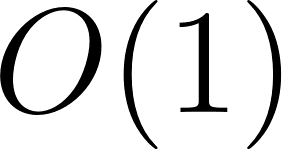 access to the king’s location for check detection.
Castling rights are stored as a 4-bit bitmask. The constants WK = 1, WQ = 2, BK = 4, and BQ = 8 let us test and clear individual rights with bitwise operations. When the white king moves, for example, we clear both white rights with self.castling_rights &= ~(WK | WQ).
FEN Support
The board can be initialized from a FEN (Forsyth-Edwards Notation) string, the standard compact notation for chess positions. The starting position is:
1 def reset_board(self):
2     self.from_fen("rnbqkbnr/pppppppp/8/8/8/8/PPPPPPPP/RNBQKBNR w KQkq - 0 1")
The from_fen method parses all six FEN fields: piece placement, side to move, castling rights, en passant square, halfmove clock, and fullmove number. The companion to_fen method generates a FEN string from the current state, which the CLI exposes through the fen command. FEN support is invaluable for testing: you can set up a specific tactical position and watch how the bot handles it:
1 Your move (or command): setfen
2 Enter FEN string: r1bqkbnr/pppp1ppp/2n5/4p3/2B1P3/5N2/PPPP1PPP/RNBQK2R b KQkq - 4 4
FEN is the lingua franca of chess engines. When you want to test a specific scenario (a forced mate, a tricky endgame, a positional sacrifice), find or construct the FEN string and load it. This is far more efficient than playing dozens of moves to reach the position you want to study.
Precomputed Move Tables
Chess pieces have fixed movement patterns. A knight on b1 always attacks the same set of squares (a3, c3, and d2), regardless of what else is on the board. Rather than computing these patterns on every move, we precompute them once at startup and store them in immutable lookup tables.
 1 # chess_engine.py — precomputed move tables
 2
 3 _knight_moves_list = [[] for _ in range(64)]
 4 _king_moves_list = [[] for _ in range(64)]
 5 _rook_rays_list = [[] for _ in range(64)]
 6 _bishop_rays_list = [[] for _ in range(64)]
 7 _queen_rays_list = [[] for _ in range(64)]
 8
 9 def _precompute_moves():
10     knight_offsets = [
11         (2, 1), (2, -1), (-2, 1), (-2, -1),
12         (1, 2), (1, -2), (-1, 2), (-1, -2)
13     ]
14     king_offsets = [
15         (1, 1), (1, 0), (1, -1),
16         (0, 1),          (0, -1),
17         (-1, 1), (-1, 0), (-1, -1)
18     ]
19     rook_dirs = [(1, 0), (-1, 0), (0, 1), (0, -1)]
20     bishop_dirs = [(1, 1), (1, -1), (-1, 1), (-1, -1)]
21
22     for s in range(64):
23         r, f = s // 8, s % 8
24
25         for dr, df in knight_offsets:
26             nr, nf = r + dr, f + df
27             if 0 <= nr < 8 and 0 <= nf < 8:
28                 _knight_moves_list[s].append(nr * 8 + nf)
29
30         for dr, df in king_offsets:
31             nr, nf = r + dr, f + df
32             if 0 <= nr < 8 and 0 <= nf < 8:
33                 _king_moves_list[s].append(nr * 8 + nf)
34
35         for dr, df in rook_dirs:
36             ray = []
37             nr, nf = r + dr, f + df
38             while 0 <= nr < 8 and 0 <= nf < 8:
39                 ray.append(nr * 8 + nf)
40                 nr += dr
41                 nf += df
42             if ray:
43                 _rook_rays_list[s].append(ray)
44
45         for dr, df in bishop_dirs:
46             ray = []
47             nr, nf = r + dr, f + df
48             while 0 <= nr < 8 and 0 <= nf < 8:
49                 ray.append(nr * 8 + nf)
50                 nr += dr
51                 nf += df
52             if ray:
53                 _bishop_rays_list[s].append(ray)
54
55         _queen_rays_list[s] = _rook_rays_list[s] + _bishop_rays_list[s]
56
57 _precompute_moves()
Knight and king moves are stored as flat lists of target squares. Sliding pieces (rook, bishop, queen) use rays: lists of squares extending in each direction from the origin. A ray lets us walk outward from a piece and stop as soon as we hit another piece, which is exactly how sliding-piece move generation works:
1 for ray in rays:
2     for target in ray:
3         target_piece = self.board[target]
4         if target_piece == EMPTY:
5             moves.append(Move(s, target, piece))
6         else:
7             if (target_piece & COLOR_MASK) == opponent:
8                 moves.append(Move(s, target, piece, target_piece))
9             break  # ray is blocked — stop here
After precomputation, the tables are frozen as nested tuples. In Python, tuples iterate faster than lists because the interpreter knows they will never change, so it can skip bounds-checking and mutation guards internally. This is a small but meaningful optimization given how often these tables are accessed during search:
1 KNIGHT_MOVES = tuple(tuple(moves) for moves in _knight_moves_list)
2 KING_MOVES = tuple(tuple(moves) for moves in _king_moves_list)
3 ROOK_RAYS = tuple(tuple(tuple(ray) for ray in rays) for rays in _rook_rays_list)
4 # ... and so on for bishops and queens
The Move Class
A Move object captures everything needed to apply and later undo a move:
 1 # chess_engine.py — Move representation
 2
 3 class Move:
 4     __slots__ = (
 5         'from_square', 'to_square', 'piece_moved', 'piece_captured',
 6         'promotion', 'is_en_passant', 'is_castling', 'is_double_push'
 7     )
 8
 9     def __init__(self, from_square, to_square, piece_moved,
10                  piece_captured=0, promotion=0,
11                  is_en_passant=False, is_castling=False, is_double_push=False):
12         self.from_square = from_square
13         self.to_square = to_square
14         self.piece_moved = piece_moved
15         self.piece_captured = piece_captured
16         self.promotion = promotion
17         self.is_en_passant = is_en_passant
18         self.is_castling = is_castling
19         self.is_double_push = is_double_push
Using __slots__ instead of a regular __dict__ reduces memory usage and improves attribute access speed. During a search the engine creates and discards thousands of Move objects per second, so these micro-optimizations add up.
The uci_string method produces the standard UCI (Universal Chess Interface) notation that most chess software uses. The move e2e4 means “move the piece on e2 to e4.” A promotion appends the promotion piece: e7e8q means “promote to a queen.”
Move Generation
Generating legal chess moves is the most intricate part of any engine. The rules seem simple but are full of edge cases: pawns capture diagonally but move straight forward, they can push two squares from their starting rank, they capture en passant, they promote on the last rank. Kings can castle but only if they have not moved, the rook has not moved, the squares between are empty, and the king does not pass through an attacked square. Our engine handles all of this in two stages: it first generates pseudo-legal moves (moves that are legal except they might leave the king in check) and then filters out any move that leaves the own king attacked.
Pseudo-Legal Move Generation
The get_pseudo_legal_moves method iterates over the current side’s pieces and generates moves based on each piece type. Pawns are the most complex:
 1 # chess_engine.py — pawn move generation (White, simplified)
 2
 3 if ptype == PAWN:
 4     if color == WHITE:
 5         # Single push
 6         target = s + 8
 7         if target < 64 and self.board[target] == EMPTY:
 8             if target >= 56:  # Rank 8 — promotion
 9                 for promo in (QUEEN, ROOK, BISHOP, KNIGHT):
10                     moves.append(Move(s, target, piece, promotion=promo))
11             else:
12                 moves.append(Move(s, target, piece))
13                 # Double push from rank 2
14                 if 8 <= s <= 15:
15                     double_target = s + 16
16                     if self.board[double_target] == EMPTY:
17                         moves.append(Move(s, double_target, piece,
18                                          is_double_push=True))
19         # Diagonal captures
20         file_idx = s % 8
21         if file_idx > 0:
22             target = s + 7
23             target_piece = self.board[target]
24             if target_piece != EMPTY and (target_piece & COLOR_MASK) == opponent:
25                 if target >= 56:
26                     for promo in (QUEEN, ROOK, BISHOP, KNIGHT):
27                         moves.append(Move(s, target, piece,
28                                          target_piece, promotion=promo))
29                 else:
30                     moves.append(Move(s, target, piece, target_piece))
31             elif target == self.en_passant_square:
32                 moves.append(Move(s, target, piece,
33                                  opponent | PAWN, is_en_passant=True))
34         # ... same for the other diagonal
Notice that promotions generate four separate moves, one for each promotion piece. This is important: although queen promotions are almost always best, the search needs to consider underpromotions (to knight, bishop, or rook) because in rare positions they are the only winning move. A knight promotion can give check where a queen promotion would not, for example.
Castling is generated within the king-move section and includes all the necessary legality checks inline:
 1 # chess_engine.py — castling generation (White king-side)
 2
 3 if color == WHITE:
 4     if s == 4:  # King must be on e1
 5         if (self.castling_rights & WK) and \
 6            self.board[5] == EMPTY and self.board[6] == EMPTY:
 7             if not self.is_square_attacked(4, BLACK) and \
 8                not self.is_square_attacked(5, BLACK) and \
 9                not self.is_square_attacked(6, BLACK):
10                 moves.append(Move(4, 6, piece, is_castling=True))
The three is_square_attacked calls verify that the king is not in check, does not pass through an attacked square, and does not land on an attacked square. These are the three castling legality conditions from the FIDE rules.
Attack Detection
The is_square_attacked method is the workhorse of legality checking. Given a square and an attacking color, it determines whether any enemy piece attacks that square. It checks all five attack patterns in order: pawn attacks, knight attacks, king attacks, rook/queen rays along ranks and files, and bishop/queen rays along diagonals.
 1 # chess_engine.py — attack detection (rook and queen rays)
 2
 3 for ray in ROOK_RAYS[square]:
 4     for target in ray:
 5         target_piece = self.board[target]
 6         if target_piece != EMPTY:
 7             if (target_piece & COLOR_MASK) == opponent and \
 8                (target_piece & TYPE_MASK) in (ROOK, QUEEN):
 9                 return True
10             break  # ray is blocked by any piece
The method returns True as soon as it finds any attacker, which makes it fast in the common case where the king is not in check.
From Pseudo-Legal to Legal
The final filtering step is elegantly simple. For each pseudo-legal move we make the move on the board, check whether our own king is now attacked, and then undo the move:
 1 # chess_engine.py — legal move filtering
 2
 3 def get_legal_moves(self):
 4     pseudo_moves = self.get_pseudo_legal_moves()
 5     legal_moves = []
 6     color = self.turn
 7     opponent = BLACK if color == WHITE else WHITE
 8
 9     for move in pseudo_moves:
10         state = BoardState(self)
11         self.make_move(move)
12         king_sq = self.king_square[color]
13         if not self.is_square_attacked(king_sq, opponent):
14             legal_moves.append(move)
15         self.unmake_move(move, state)
16     return legal_moves
This make-check-unmake pattern is the standard approach in chess engines. It is correct by construction (any move that does not leave the king in check is legal) and it relies on the efficiency of make_move and unmake_move to be fast enough for search.
Make Move and Unmake Move
During search the engine makes and unmakes thousands of moves per second. Deep-copying the entire board state for every move would be prohibitively slow. Instead, we use incremental updates: make_move modifies the board in place and saves just enough information to reverse the move later, and unmake_move restores the previous state using that saved information.
The BoardState class is a lightweight snapshot of the volatile metadata that changes on every move:
1 class BoardState:
2     __slots__ = ('en_passant_square', 'castling_rights',
3                  'halfmove_clock', 'zobrist_hash')
4
5     def __init__(self, board):
6         self.en_passant_square = board.en_passant_square
7         self.castling_rights = board.castling_rights
8         self.halfmove_clock = board.halfmove_clock
9         self.zobrist_hash = board.zobrist_hash
The make_move method handles every special case in chess. It moves the piece, handles captures (including en passant), processes promotions, moves the rook during castling, updates castling rights when kings or rooks move, sets or clears the en passant square after double pawn pushes, updates the halfmove clock, and increments the fullmove number. Here is the core of the method showing how it handles a regular capture and a promotion:
 1 # chess_engine.py — make_move (core logic, simplified)
 2
 3 def make_move(self, move):
 4     color = self.turn
 5     opponent = BLACK if color == WHITE else WHITE
 6
 7     # Remove piece from origin
 8     self.board[move.from_square] = EMPTY
 9     self.pieces[color].remove(move.from_square)
10
11     # Handle en passant capture
12     if move.is_en_passant:
13         cap_sq = move.to_square - 8 if color == WHITE else move.to_square + 8
14         self.board[cap_sq] = EMPTY
15         self.pieces[opponent].remove(cap_sq)
16     elif move.piece_captured:
17         self.pieces[opponent].remove(move.to_square)
18
19     # Place piece at destination (or promotion piece)
20     if move.promotion:
21         promo_piece = color | move.promotion
22         self.board[move.to_square] = promo_piece
23         self.pieces[color].add(move.to_square)
24     else:
25         self.board[move.to_square] = move.piece_moved
26         self.pieces[color].add(move.to_square)
27
28     # Update king square if king moved
29     if (move.piece_moved & TYPE_MASK) == KING:
30         self.king_square[color] = move.to_square
31
32     # ... castling rook movement, castling rights updates,
33     #     en passant square, halfmove clock, fullmove number, turn switch
The unmake_move method reverses all of this using the BoardState snapshot. It restores the moved piece to its origin, restores any captured piece (including en passant), restores the rook during castling, and resets all metadata from the saved state. Because the board array and piece sets are modified in place, there is no memory allocation during search beyond the lightweight BoardState objects.
The make/unmake pattern is one of the most important performance techniques in game-tree search. The alternative, cloning the board for each move, is conceptually simpler but dramatically slower. If you are building an engine for any turn-based game, learn this pattern. The key insight is that you only need to save the difference between the before and after states, not the entire state.
Zobrist Hashing
A transposition table is a cache of previously evaluated positions, keyed by a hash of the board state. The hash must be fast to compute and update incrementally; recomputing it from scratch on every move would negate the benefit of caching. Zobrist hashing is the standard solution.
The idea is simple. At startup we generate a table of random 64-bit integers, one for each possible piece on each square (64 squares × piece types), plus one for the side to move, plus values for castling rights and en passant squares. The hash of a position is the XOR of all the random numbers corresponding to the pieces on the board, plus the side-to-move value if it is Black’s turn, plus the castling and en passant values. XOR has the useful property that XORing a value twice cancels it out, so we can update the hash incrementally by XORing out the old piece position and XORing in the new one:
1 # chess_engine.py — Zobrist key generation (with stable seed for reproducibility)
2
3 _rng = random.Random(1337)
4 ZOBRIST_PIECES = [[_rng.getrandbits(64) for _ in range(32)] for _ in range(64)]
5 ZOBRIST_SIDE = _rng.getrandbits(64)
6 ZOBRIST_CASTLING = [_rng.getrandbits(64) for _ in range(16)]
7 ZOBRIST_EP = [_rng.getrandbits(64) for _ in range(64)]
The seed 1337 ensures that the same hash keys are generated every time the engine runs, which makes test results reproducible. During make_move, the hash is updated incrementally:
1 # XOR out the moving piece from its old square
2 self.zobrist_hash ^= ZOBRIST_PIECES[move.from_square][move.piece_moved]
3 # ... later, XOR in the piece at its new square
4 self.zobrist_hash ^= ZOBRIST_PIECES[move.to_square][move.piece_moved]
Because XOR is its own inverse, unmake_move does not need to recompute the hash at all; it simply restores the saved hash from the BoardState snapshot. The test suite verifies that the incremental hash matches a full recomputation after every move and is restored perfectly after every undo.
Evaluation
The evaluation function is the bot’s chess knowledge. It takes a board position and returns a number: positive if White is winning, negative if Black is winning. The search algorithm explores possible futures and uses the evaluation function to judge the positions at the leaves of the search tree.
Our evaluation has two components: material values and piece-square tables.
Material Values
Each piece type has a base value in centipawns (1 pawn = 100 centipawns):
 1 # chess_bot.py — material values
 2
 3 PIECE_VALUES = {
 4     PAWN: 100,
 5     KNIGHT: 320,
 6     BISHOP: 330,
 7     ROOK: 500,
 8     QUEEN: 900,
 9     KING: 20000
10 }
These values follow the traditional Reinfeld system. The king’s value is set very high (20000) so that the search never treats losing the king as an acceptable trade; in practice the king can never be captured because illegal moves are filtered out, but the high value ensures that checkmate (which is detected separately) produces an overwhelming score.
Piece-Square Tables
A piece’s value depends on where it stands. A knight in the center of the board controls more squares and is more powerful than a knight trapped in a corner. A pawn on the seventh rank is about to promote and is far more valuable than a pawn still on its starting square. We capture this knowledge with piece-square tables (PSTs): 64-element arrays that add or subtract a positional bonus for each square.
Here is the pawn table:
 1 # chess_bot.py — Pawn Piece-Square Table (from White's perspective)
 2
 3 PAWN_PST = [
 4       0,  0,  0,  0,  0,  0,  0,  0,
 5      50, 50, 50, 50, 50, 50, 50, 50,
 6      10, 10, 20, 30, 30, 20, 10, 10,
 7       5,  5, 10, 25, 25, 10,  5,  5,
 8       0,  0,  0, 20, 20,  0,  0,  0,
 9       5, -5,-10,  0,  0,-10, -5,  5,
10       5, 10, 10,-20,-20, 10, 10,  5,
11       0,  0,  0,  0,  0,  0,  0,  0
12 ]
Reading from the bottom (rank 1) to the top (rank 8): pawns are penalized for staying on their starting rank, encouraged to advance toward the center, and heavily rewarded for reaching the seventh rank (value 50). The center pawns on e2 and d2 get a small penalty (-20) to discourage moving them backward and to slightly favor other developing moves in the opening. Similar tables exist for knights, bishops, rooks, and queens, each encoding the positional principles that human players learn: knights belong in the center, bishops like long diagonals, rooks belong on open files and the seventh rank.
For Black’s pieces we mirror the table vertically using the XOR trick sq ^ 56, which flips the rank while preserving the file:
1 # chess_bot.py — evaluation (Black's perspective)
2
3 for sq in board.pieces[BLACK]:
4     piece = board.board[sq]
5     ptype = piece & TYPE_MASK
6     score -= PIECE_VALUES[ptype]
7     mirrored_sq = sq ^ 56  # Vertical flip for Black's perspective
8     score -= PST_TABLES[ptype][mirrored_sq]
King Safety and Endgame Transition
The king is special. In the middlegame the king should hide behind pawns in a castled position; standing in the center is dangerous because it is exposed to attack. In the endgame, when most pieces have been exchanged and the king is no longer in danger, the king becomes an active fighting piece that should march toward the center to support its pawns and attack the enemy. We handle this with two separate king tables:
 1 # chess_bot.py — King middlegame table (encourages castling safety)
 2
 3 KING_MIDDLE_PST = [
 4     -30,-40,-40,-50,-50,-40,-40,-30,
 5     -30,-40,-40,-50,-50,-40,-40,-30,
 6     -30,-40,-40,-50,-50,-40,-40,-30,
 7     -30,-40,-40,-50,-50,-40,-40,-30,
 8     -20,-30,-30,-40,-40,-30,-30,-20,
 9     -10,-20,-20,-20,-20,-20,-20,-10,
10      20, 20,  0,  0,  0,  0, 20, 20,
11      20, 30, 10,  0,  0, 10, 30, 20
12 ]
13
14 # King endgame table (encourages centralization)
15
16 KING_END_PST = [
17     -50,-40,-30,-20,-20,-30,-40,-50,
18     -30,-20,-10,  0,  0,-10,-20,-30,
19     -30,-10, 20, 30, 30, 20,-10,-30,
20     -30,-10, 30, 40, 40, 30,-10,-30,
21     -30,-10, 30, 40, 40, 30,-10,-30,
22     -30,-10, 20, 30, 30, 20,-10,-30,
23     -30,-30,  0,  0,  0,  0,-30,-30,
24     -50,-30,-30,-30,-30,-30,-30,-50
25 ]
The engine dynamically switches between these tables based on the total non-pawn, non-king material remaining on the board:
 1 def is_endgame(board):
 2     material = 0
 3     for sq in board.pieces[WHITE]:
 4         ptype = board.board[sq] & TYPE_MASK
 5         if ptype not in (PAWN, KING):
 6             material += PIECE_VALUES[ptype]
 7     for sq in board.pieces[BLACK]:
 8         ptype = board.board[sq] & TYPE_MASK
 9         if ptype not in (PAWN, KING):
10             material += PIECE_VALUES[ptype]
11     return material <= 3000
A threshold of 3000 centipawns means roughly that if each side has less than a queen and a rook combined in non-pawn material, the engine considers it an endgame and starts centralizing its king.
The Evaluation Function
The complete evaluation adds material and positional scores for both sides and returns the result from the perspective of the side to move where, for example, positive means the side to move is winning:
 1 def evaluate(board):
 2     score = 0
 3     endgame = is_endgame(board)
 4
 5     for sq in board.pieces[WHITE]:
 6         piece = board.board[sq]
 7         ptype = piece & TYPE_MASK
 8         score += PIECE_VALUES[ptype]
 9         if ptype == KING:
10             score += KING_END_PST[sq] if endgame else KING_MIDDLE_PST[sq]
11         else:
12             score += PST_TABLES[ptype][sq]
13
14     for sq in board.pieces[BLACK]:
15         piece = board.board[sq]
16         ptype = piece & TYPE_MASK
17         score -= PIECE_VALUES[ptype]
18         mirrored_sq = sq ^ 56
19         if ptype == KING:
20             score -= KING_END_PST[mirrored_sq] if endgame else KING_MIDDLE_PST[mirrored_sq]
21         else:
22             score -= PST_TABLES[ptype][mirrored_sq]
23
24     return score if board.turn == WHITE else -score
The final line that returns the negated score when it is Black’s turn is what makes this work with the negamax search algorithm, which we will see shortly. Negamax requires that every evaluation be from the perspective of the side to move.
Search: Negamax with Alpha-Beta Pruning
The evaluation function tells us how good a position is, but chess is about looking ahead. The search algorithm explores the tree of possible future positions and picks the move that leads to the best outcome, assuming the opponent plays their best moves in response.
Negamax
The core search algorithm is negamax, a variant of minimax that exploits the zero-sum nature of chess. In minimax, White maximizes and Black minimizes. In negamax, we always maximize from the perspective of the side to move: the value of a position is the value of the best move we can make, where “best” means the move that gives us the highest score after the opponent gets their best reply. The elegance of negamax is that the same code works for both sides so we can just negate the score when returning from the recursive call:
 1 # chess_bot.py — negamax search (simplified)
 2
 3 def search(board, depth, alpha, beta):
 4     global nodes_visited
 5     nodes_visited += 1
 6
 7     legal_moves = board.get_legal_moves()
 8
 9     if not legal_moves:
10         if board.is_in_check():
11             return -30000 + (max_depth - depth)  # Checkmate — prefer faster mates
12         else:
13             return 0  # Stalemate
14
15     if depth == 0:
16         return quiescence_search(board, alpha, beta)
17
18     best_score = -float('inf')
19
20     for move in legal_moves:
21         state = BoardState(board)
22         board.make_move(move)
23         score = -search(board, depth - 1, -beta, -alpha)  # Negate for opponent
24         board.unmake_move(move, state)
25
26         if score > best_score:
27             best_score = score
28         if score > alpha:
29             alpha = score
30         if alpha >= beta:
31             break  # Beta cutoff — opponent won't allow this position
32
33     return best_score
The key line is score = -search(board, depth - 1, -beta, -alpha). We make a move, recurse into the opponent’s turn, and negate the result because what is good for the opponent is bad for us. The alpha and beta parameters are negated and swapped for the same reason.
Alpha-Beta Pruning
Alpha-beta pruning is the optimization that makes deep search feasible. The idea is that if we are maximizing and we have already found a move that guarantees a score of  , and the opponent has a response that limits us to a score of
 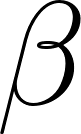 (where
 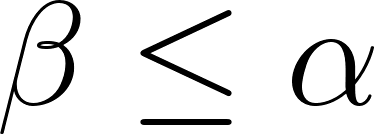 ), then we do not need to search any further in this position; the opponent will never allow us to reach it. The
 if alpha >= beta: break line implements this cutoff.
In the best case, with perfect move ordering, alpha-beta reduces the number of nodes searched from 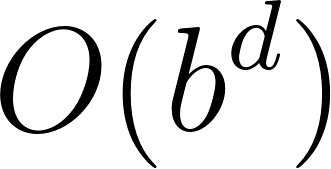 to
to 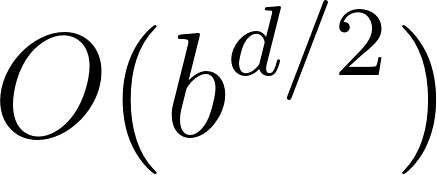 where
where 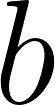 is the branching factor (about 35 in chess) and
 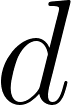 is the depth. This means that with good move ordering, searching to depth 4 with alpha-beta takes roughly the same time as searching to depth 2 without it. Move ordering is therefore critical, and we will return to it shortly.
Checkmate Scoring
Notice that checkmate returns -30000 + (max_depth - depth). The depth adjustment ensures that the bot prefers faster mates. A mate in 2 moves (found at a shallower depth, so max_depth - depth is smaller) scores higher than a mate in 5 moves. Without this adjustment the bot would be indifferent between delivering mate quickly or slowly, which can lead to it shuffling pieces aimlessly before finally checkmating that while technically winning would be aesthetically painful to watch.
Mate Score Adjustment in the Transposition Table
When mate scores are stored in the transposition table they need to be adjusted to be relative to the root of the search, not the depth at which they were found. When storing, we add the distance from the root; when retrieving, we subtract it:
 1 # Store: adjust mate score to be root-relative
 2 stored_score = best_score
 3 if stored_score > 29000:
 4     stored_score += (max_depth - depth)
 5 elif stored_score < -29000:
 6     stored_score -= (max_depth - depth)
 7
 8 # Retrieve: adjust back to be relative to current depth
 9 score_val = tt_score
10 if score_val > 29000:
11     score_val -= (max_depth - depth)
12 elif score_val < -29000:
13     score_val += (max_depth - depth)
This ensures that a mate score found at depth 3 is correctly interpreted when the same position is encountered at depth 5 in a different search path.
The Transposition Table
During a search the same positions arise through different move orders. For example, 1.e4 e5 2.Nf3 and 1.Nf3 Nf6 2.e4 (with colors adjusted) can lead to the same position. Recomputing the evaluation for each occurrence is wasteful. The transposition table (TT) caches the results of previous searches keyed by the Zobrist hash.
Each entry stores four pieces of information:
1 transposition_table[board.zobrist_hash] = {
2     'depth': depth,          # Search depth at which this was evaluated
3     'score': stored_score,   # The evaluation score
4     'flag': tt_flag,         # TT_EXACT, TT_ALPHA, or TT_BETA
5     'best_move': best_move   # The best move found (for move ordering)
6 }
The flag field encodes what kind of score we have:
- TT_EXACT (0): The score is the exact value of this position. We can return it immediately.
- TT_ALPHA (1): The score is an upper bound. The true value is at most this. If it is
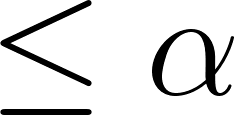 , we can return it.
- TT_BETA (2): The score is a lower bound. The true value is at least this. If it is
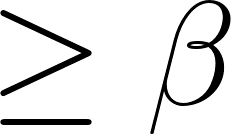 , we can return it.
These flags arise from alpha-beta cutoffs. When a beta cutoff occurs, we know the true value is at least best_score but we do not know the exact value; the search was cut short. Storing it as a lower bound (TT_BETA) lets us use it in future searches: if the lower bound is already , we can cut off immediately.
The lookup logic at the top of the search function checks the flag and uses the cached score only if it is safe to do so:
 1 # chess_bot.py — transposition table lookup
 2
 3 tt_entry = transposition_table.get(board.zobrist_hash)
 4 if tt_entry is not None and tt_entry['depth'] >= depth:
 5     tt_flag = tt_entry['flag']
 6     tt_score = tt_entry['score']
 7
 8     if tt_flag == TT_EXACT:
 9         return score_val
10     elif tt_flag == TT_ALPHA:
11         if score_val <= alpha:
12             return score_val
13         beta = min(beta, score_val)
14     elif tt_flag == TT_BETA:
15         if score_val >= beta:
16             return score_val
17         alpha = max(alpha, score_val)
18
19     if alpha >= beta:
20         return score_val
The condition tt_entry['depth'] >= depth ensures we only use cached results from searches that were at least as deep as what we need now. A shallow search result is not reliable for a deeper search because it might have missed a tactic that only appears at greater depth.
To prevent unbounded memory growth, the table is cleared when it exceeds 500,000 entries:
1 if len(transposition_table) > 500000:
2     transposition_table.clear()
A more sophisticated engine would use a replacement scheme (like replacing the entry with the shallowest depth) to keep the most valuable entries, but for a pure-Python educational engine a simple size cap is sufficient.
Quiescence Search
A problem with fixed-depth search is the horizon effect. If the search stops at depth 3 in the middle of a capture sequence, the bot might think it has won a queen when in reality the opponent will recapture on the next move. The evaluation function sees the position after the capture but before the recapture, and incorrectly concludes that the bot is ahead.
Quiescence search solves this by extending the search beyond the nominal depth for “noisy” moves, such as captures and promotions, until the position becomes “quiet” (no more captures available). The quiescence_search function evaluates the current position (the “stand-pat” score) and then searches all captures to see if any of them improve on that score:
 1 # chess_bot.py — quiescence search (simplified)
 2
 3 def quiescence_search(board, alpha, beta):
 4     global nodes_visited
 5     nodes_visited += 1
 6
 7     stand_pat = evaluate(board)
 8     if stand_pat >= beta:
 9         return beta
10     if stand_pat > alpha:
11         alpha = stand_pat
12
13     # Generate only captures and promotions
14     captures = [m for m in board.get_pseudo_legal_moves()
15                 if m.piece_captured or m.promotion]
16     captures.sort(key=lambda m: move_value(board, m), reverse=True)
17
18     for move in captures:
19         state = BoardState(board)
20         board.make_move(move)
21         score = -quiescence_search(board, -beta, -alpha)
22         board.unmake_move(move, state)
23
24         if score >= beta:
25             return beta
26         if score > alpha:
27             alpha = score
28
29     return alpha
The stand-pat score provides a lower bound: if doing nothing (standing pat) already gives us a score , the opponent will not allow this position, so we can cut off. We only search captures because they are the moves most likely to change the evaluation dramatically. Non-capture moves are assumed to not immediately improve our position beyond the stand-pat value, which is usually a good approximation.
Move Ordering
Alpha-beta pruning is most effective when the best moves are searched first. If the first move we try causes a beta cutoff, we skip all remaining moves so ordering the cutoff move first saves the most work. Our engine uses several heuristics combined in the move_value function:
 1 # chess_bot.py — move ordering heuristic
 2
 3 def move_value(board, move, tt_move=None):
 4     if tt_move is not None and move == tt_move:
 5         return 1000000  # Always try the transposition table move first
 6
 7     score = 0
 8
 9     # MVV-LVA: Most Valuable Victim - Least Valuable Attacker
10     if move.piece_captured:
11         victim_val = PIECE_VALUES[move.piece_captured & TYPE_MASK]
12         attacker_val = PIECE_VALUES[move.piece_moved & TYPE_MASK]
13         score += 10000 + victim_val - (attacker_val // 100)
14
15     # Promotions
16     if move.promotion:
17         score += 8000 + PIECE_VALUES[move.promotion]
18
19     # Castling
20     if move.is_castling:
21         score += 1000
22
23     # Positional progress based on piece-square tables
24     ptype = move.piece_moved & TYPE_MASK
25     if ptype != KING:
26         pst = PST_TABLES[ptype]
27         if board.turn == WHITE:
28             score += pst[move.to_square] - pst[move.from_square]
29         else:
30             score += pst[move.to_square ^ 56] - pst[move.from_square ^ 56]
31
32     return score
The heuristics, in priority order:
- Transposition table move: If a previous search found a best move for this position, try it first. This is the single most powerful ordering heuristic: the previous iteration’s best move causes a cutoff on the first move in many positions.
- MVV-LVA (Most Valuable Victim, Least Valuable Attacker): When capturing, prefer capturing the most valuable piece with the least valuable attacker. Capturing a queen with a pawn is great; capturing a pawn with a queen is less exciting (and possibly a blunder if the queen is then recaptured).
- Promotions: Promoting to a queen is almost always a strong move and should be searched early.
- Castling: Castling improves king safety and is usually a good developing move.
- PST delta: Moves that improve a piece’s positional score are searched before moves that don’t. This is a weak heuristic but helps break ties.
Iterative Deepening
The bot does not search directly to the target depth. Instead it uses iterative deepening: it searches to depth 1, then depth 2, then depth 3, and so on up to the target depth. Each iteration’s best move is stored in the transposition table and used to order moves in the next iteration:
 1 # chess_bot.py — iterative deepening (simplified)
 2
 3 def get_best_move(board, depth=3):
 4     global max_depth, nodes_visited
 5
 6     best_move = None
 7     best_score = -float('inf')
 8
 9     for d in range(1, depth + 1):
10         max_depth = d
11         nodes_visited = 0
12
13         legal_moves = board.get_legal_moves()
14         if not legal_moves:
15             break
16
17         # Use previous iteration's best move for ordering
18         tt_entry = transposition_table.get(board.zobrist_hash)
19         prev_best = tt_entry['best_move'] if tt_entry is not None else None
20         legal_moves.sort(key=lambda m: move_value(board, m, prev_best), reverse=True)
21
22         current_best_move = None
23         current_best_score = -float('inf')
24         alpha = -float('inf')
25         beta = float('inf')
26
27         for move in legal_moves:
28             state = BoardState(board)
29             board.make_move(move)
30             score = -search(board, d - 1, -beta, -alpha)
31             board.unmake_move(move, state)
32
33             if score > current_best_score:
34                 current_best_score = score
35                 current_best_move = move
36             if score > alpha:
37                 alpha = score
38
39         best_move = current_best_move
40         best_score = current_best_score
41
42         # Save root result for next iteration's move ordering
43         transposition_table[board.zobrist_hash] = {
44             'depth': d, 'score': best_score,
45             'flag': TT_EXACT, 'best_move': best_move
46         }
47
48     return best_move, best_score
This seems wasteful: why search depth 1 and 2 when we ultimately want depth 4? The answer is that the move ordering information from shallow searches dramatically increases the number of alpha-beta cutoffs at deeper levels. Searching depths 1, 2, 3, and 4 in sequence is typically faster than searching depth 4 directly, because the depth-3 best moves (fed into the depth-4 search via the transposition table) cause cutoffs on the first or second move in most positions.
Iterative deepening has another benefit: it produces a result at every depth. If the bot runs out of time, it can return the best move from the last completed iteration. This is essential for tournament play with time controls, though our simple CLI does not implement time limits.
The Interactive CLI
The main.py file ties everything together into an interactive game. It offers three modes: play as White, play as Black, or watch the bot play itself. This game program also supports a configurable search depth:
1 # main.py — game mode selection
2
3 print("Select Mode:")
4 print("  1. Play as White (against Bot)")
5 print("  2. Play as Black (against Bot)")
6 print("  3. Watch Bot vs Bot")
7 choice = input("Enter choice (1-3): ").strip()
The board display uses Unicode chess pieces and ANSI color codes for a clean terminal presentation. A sidebar shows the active turn, move count, 50-move rule status, check status, en passant square, castling rights, and the current evaluation score, all updated after every move:
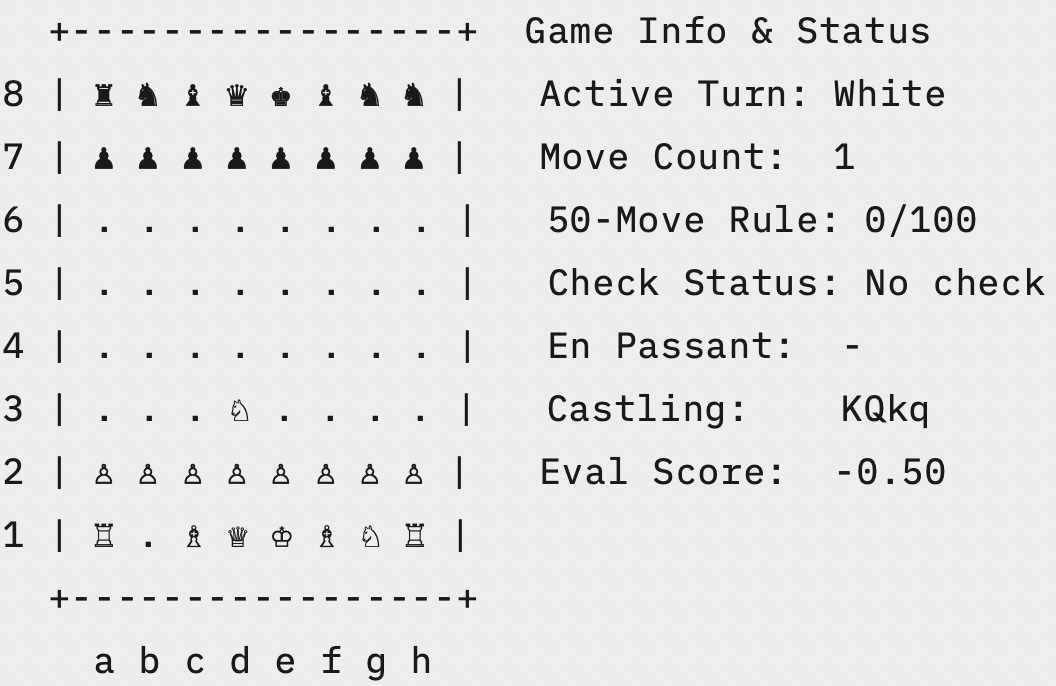
Moves are entered in UCI format: e2e4 to move the e-pawn, g1f3 to develop the knight, e7e8q to promote to a queen. The CLI also supports several utility commands:
fen: print the current position as a FEN stringsetfen: load a custom FEN positionlegal: list all legal moves in the current positionreset: reset the board to the starting positionhelp: show available commandsexit: quit the game
When it is the bot’s turn, the CLI reports the search depth, the move chosen, the evaluation score, the number of nodes searched, and the time taken:
1 Bot searching depth 3...
2 Bot played: e2e4 (eval: +0.50, nodes: 4291, time: 0.31s)
The move parser validates user input against the list of legal moves, so you cannot enter an illegal move; you will get an error message and a chance to try again:
1 Your move (or command): e2e5
2 Invalid move or command. Type 'help' for guidance.
Testing with Perft
How do you know a chess engine is correct? The standard method is perft (performance test), which counts the number of leaf nodes in the move tree to a given depth from a starting position. The expected counts for the standard starting position have been independently verified by dozens of engines and are known exactly:
| Depth | Expected Nodes | Description |
|---|---|---|
| 1 | 20 | White’s first moves |
| 2 | 400 | Black’s replies |
| 3 | 8,902 | White’s second moves |
| 4 | 197,281 | Black’s second replies |
| 5 | 4,865,609 | White’s third moves |
If an engine produces the wrong count at any depth, there is a bug in the move generator. Our test suite checks depths 1 through 3 and also verifies that the incremental Zobrist hash matches a fresh computation after every move and is perfectly restored after every undo:
 1 # test_engine.py — perft with hash verification
 2
 3 def perft(board, depth):
 4     if depth == 0:
 5         return 1
 6
 7     nodes = 0
 8     for move in board.get_legal_moves():
 9         state = BoardState(board)
10         board.make_move(move)
11
12         # Verify incremental hash matches fresh computation
13         if board.zobrist_hash != board.compute_zobrist_hash():
14             raise AssertionError(f"Hash mismatch after move {move}!")
15
16         nodes += perft(board, depth - 1)
17         board.unmake_move(move, state)
18
19         # Verify hash is restored after undo
20         if board.zobrist_hash != state.zobrist_hash:
21             raise AssertionError(f"Hash restore mismatch after unmake {move}!")
22
23     return nodes
Running the tests confirms that the move generator is correct and shows the engine’s speed:
1 $ uv run test_engine.py
2 Running move generator verification tests (Perft)...
3   Depth 1: Expected     20, got     20, Time: 0.000s (127,292 nodes/sec) -> PASS
4   Depth 2: Expected    400, got    400, Time: 0.002s (183,477 nodes/sec) -> PASS
5   Depth 3: Expected  8,902, got  8,902, Time: 0.048s (186,904 nodes/sec) -> PASS
6
7 All move generator tests passed successfully!
About 187,000 nodes per second in pure Python is respectable for an educational engine. A C implementation of the same algorithms would run 50–100x faster, but the point here is clarity, not raw speed.
If you modify the move generator, run perft immediately. It catches subtle bugs (a missing en passant case, a castling rights error, a wrong attack detection) that would be nearly impossible to find by playing games. Perft is your safety net. Extend the test to depth 4 or 5 if you make structural changes; the expected values (197,281 and 4,865,609) are well documented.
Playing Against the Bot
Here is a sample game in Bot vs Bot mode at depth 2. The bot opens symmetrically, developing knights before bishops as the piece-square tables encourage (please note that the Unicode characters for the Chess pieces do not render correctly in the following text listing):
 1 Bot searching depth 2...
 2 Bot played: b1c3 (eval: +0.00, nodes: 0, time: 0.00s)
 3
 4   +-----------------+  Game Info & Status
 5 8 | ♜ ♞ ♝ ♛ ♚ ♝ ♞ ♜ |   Active Turn: Black
 6 7 | ♟ ♟ ♟ ♟ ♟ ♟ ♟ ♟ |   Move Count:  1
 7 6 | . . . . . . . . |   50-Move Rule: 1/100
 8 5 | . . . . . . . . |   Check Status: No check
 9 4 | . . . . . . . . |   En Passant:  -
10 3 | . . ♘ . . . . . |   Castling:    KQkq
11 2 | ♙ ♙ ♙ ♙ ♙ ♙ ♙ ♙ |   Eval Score:  -0.50
12 1 | ♖ . ♗ ♕ ♔ ♗ ♘ ♖ |
13   +-----------------+
14     a b c d e f g h
15
16 Bot searching depth 2...
17 Bot played: b8c6 (eval: -0.50, nodes: 0, time: 0.01s)
The bot mirrors with b8c6, developing its knight to the same central square. The evaluation swings to +0.00 as the position is now symmetric. As the game progresses the bot will seek tactical opportunities (captures that win material, promotions, and checkmate sequences) guided by the combination of material values, piece-square tables, and the alpha-beta search.
When playing as a human, try the legal command when you are unsure what moves are available, and use setfen to load famous positions from chess literature. The FEN string for the position after 1.e4 e5 2.Nf3 Nc6 3.Bb5 (the Ruy Lopez, one of the oldest chess openings) is:
1 r1bqkbnr/pppp1ppp/2n5/1B2p3/4P3/5N2/PPPP1PPP/RNBQK2R b KQkq - 3 3
Running the Example
The project uses uv for dependency management. Since it has no external dependencies, setup is minimal:
1 cd source-code/Chess_game
2 uv run main.py
Select a game mode, choose a search depth (3 is a good balance of strength and speed; 4 is noticeably stronger but slower), and start playing. To verify the engine’s correctness and benchmark its speed:
1 uv run test_engine.py
The project requires Python 3.14 or later, as specified in pyproject.toml. No packages need to be installed: the entire engine and bot use only the Python standard library.
Why This Matters
Building a chess engine is a rite of passage for AI programmers. It teaches you about representation, search, and evaluation that are the three pillars of classical game AI in a concrete, testable way. The techniques in this chapter transfer directly to other adversarial games: Othello, checkers, Go (before AlphaGo), and any two-player zero-sum game with perfect information. The negamax algorithm with alpha-beta pruning is one of the most elegant and widely applicable ideas in computer science.
More broadly, this chapter is an example of symbolic AI where intelligence encoded in explicit rules and heuristics rather than learned from data. The evaluation function encodes human chess knowledge (knights belong in the center, rooks belong on the seventh rank, the king should castle in the middlegame) in the piece-square tables. The search algorithm encodes the principle of looking ahead and assuming rational opposition. There are no neural networks here, no training data, no gradient descent. And yet this approach, refined over decades, produces engines that play at grandmaster strength.
The gap between this engine and Stockfish is one of engineering, not fundamental approach. Stockfish uses the same algorithms (negamax, alpha-beta, transposition tables, quiescence search) but adds faster bitboard-based move generation, more sophisticated evaluation features, and decades of tuning. The architecture is the same. If you understand this chapter, you understand the skeleton of the world’s strongest chess engine.
Summary
We built a complete chess engine and AI bot in pure Python with no external dependencies. The engine implements the full rules of chess including all the tricky special cases such as castling with attack-path checking, en passant captures, promotions with underpromotion support, and check/checkmate/stalemate detection. The bot plays using iterative-deepening negamax search with alpha-beta pruning, a transposition table with Zobrist hashing, quiescence search to avoid the horizon effect, and MVV-LVA move ordering to maximize pruning efficiency.
The key techniques you learned:
- Bitwise piece encoding for compact and fast piece representation
- Precomputed move tables frozen as tuples for fast move generation
- Pseudo-legal then legal filtering for correct and simple move generation
- Make/unmake with lightweight state snapshots for fast search without board copying
- Zobrist hashing with incremental XOR updates for fast position identification
- Piece-square tables for positional evaluation with endgame-aware king placement
- Negamax search as the elegant symmetric formulation of minimax
- Alpha-beta pruning with transposition-table move ordering for efficient search
- Quiescence search to avoid the horizon effect on capture sequences
- Iterative deepening to improve move ordering and enable time-managed search
- Perft testing to verify move generator correctness against known standards
Try extending the engine
Here are suggested projects for you, dear reader:
- Add null-move pruning to search deeper in the same time. Implement killer moves and history heuristics for better move ordering.
- Add opening book support so the bot plays known theory. Or connect it to a GUI through the UCI protocol and play against it in a graphical interface. The foundation is here, everything else is refinement.