LLMs with Public APIs
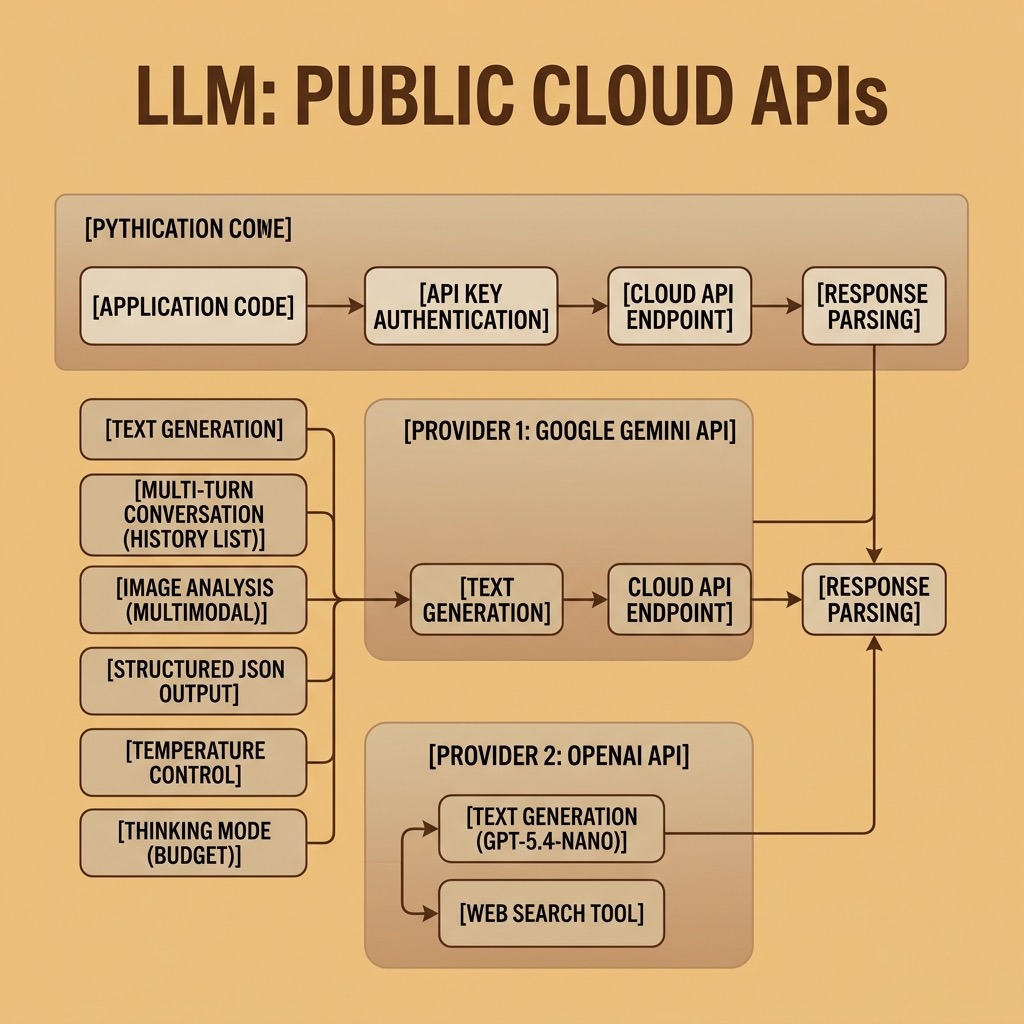
The fastest way to use large language models is through cloud APIs. Google, OpenAI, and Anthropic, all offer APIs that give you access to their most capable proprietary models with just a few lines of Python code. Fireworks.ai and NVIDIA are inference providers in the USA that offer fast inferencing for many open weight models. You don’t need a GPU, you don’t need to download model weights, and you can start building applications in minutes.
In this chapter we work through practical examples using the Google Gemini API, the OpenAI API, the Fireworks.ai API, and NVIDIA’s free NIM inference service. Each provider publishes its own Python client library, but instead of learning four of them we drive all four through litellm, the open-source library that puts a single OpenAI-format interface in front of more than 100 providers. The core concepts — sending prompts, receiving completions, managing conversations — are the same across providers; with litellm, the model name is often the only thing that changes.
The examples for this chapter are in the directory source-code/llm_public_apis.
One Interface for Every Provider: litellm
A library is only worth adding if it earns its keep. litellm earns it by
making the provider a property of a string rather than of your code.
A model is named "provider/model-name", and that name is the only thing that
decides where the request goes:
1 import litellm
2
3 litellm.completion(model="gemini/gemini-3-flash-preview", messages=[...])        # Google
4 litellm.completion(model="openai/gpt-5.4-nano", messages=[...])                  # OpenAI
5 litellm.completion(model="fireworks_ai/accounts/fireworks/models/deepseek-v4p1-flash", messages=[...])
6 litellm.completion(model="nvidia_nim/meta/llama-3.1-8b-instruct", messages=[...])
7 litellm.completion(model="ollama_chat/llama3.2:3b", messages=[...])              # local, next chapter
Only the first slash separates the provider from the model, so the ids that
themselves contain slashes — Fireworks’ accounts/fireworks/models/... and
NVIDIA’s meta/llama-3.1-8b-instruct — arrive at the provider intact.
litellm reads each provider’s API key from the environment, translates the call into that provider’s own protocol, and returns the answer in the OpenAI format, so switching providers never means switching client libraries. The entry points we use in this chapter are:
| Call | Purpose |
|---|---|
litellm.completion(model=..., messages=..., **options) |
Chat completion; temperature, max_tokens, stream=True, and provider extras as plain keyword arguments |
litellm.responses(model=..., input=..., tools=...) |
OpenAI’s Responses API, including the built-in {"type": "web_search_preview"} tool |
litellm.image_generation(model=..., prompt=..., n=1) |
Image generation; the image comes back as response.data[i].b64_json or .url
|
litellm.embedding(model=..., input=[...]) |
Embeddings; each vector is response.data[i]["embedding"]
|
completion returns the provider’s response object. The generated text is
response.choices[0].message.content; a thinking model’s trace, when it produces
one, rides along as reasoning_content on that same message. Options that not
every provider shares — Gemini’s reasoning_effort, Fireworks’ thinking — are
passed as ordinary keyword arguments and forwarded in the request body.
litellm is a normal PyPI dependency: this chapter’s project lists it in
pyproject.toml, and one command installs it along with the rest of the
examples’ dependencies:
1 uv sync
Setup and Authentication
Each provider still needs its own API key in an environment variable, and litellm picks it up from there. No provider SDK has to be installed.
Google Gemini
Google’s Gemini models need a free API key from Google AI Studio. Store it in an environment variable:
1 export GOOGLE_API_KEY="your-api-key-here"
Here is the simplest possible example: send a prompt to Gemini and print the response:
 1 # gemini_text.py - Basic text generation with Google Gemini
 2
 3 import litellm
 4
 5 MODEL = "gemini/gemini-3-flash-preview"
 6
 7 response = litellm.completion(
 8     model=MODEL,
 9     messages=[
10         {
11             "role": "user",
12             "content": "Briefly explain what a transformer model is in AI.",
13         }
14     ],
15 )
16
17 assert isinstance(response, litellm.ModelResponse)
18 print(response.choices[0].message.content)
The output will be a concise explanation of transformer models. litellm routes
the gemini/ prefix to Gemini’s API, reads GOOGLE_API_KEY from the
environment, and returns the reply text in
response.choices[0].message.content.
OpenAI
OpenAI’s GPT models need an API key from OpenAI’s platform:
1 export OPENAI_API_KEY="your-api-key-here"
OpenAI’s newest models are served by the Responses API, which answers with an
array of typed output items instead of a single message. That is a different
protocol from the chat completions endpoint every other provider uses, so litellm
gives it its own entry point, litellm.responses:
 1 # openai_text.py - Basic text generation with OpenAI
 2
 3 import litellm
 4 from litellm.types.utils import ResponsesAPIResponse
 5
 6 MODEL = "openai/gpt-5.4-nano"
 7
 8 response = litellm.responses(
 9     model=MODEL,
10     input="Briefly explain what a transformer model is in AI.",
11 )
12
13 # output_text is the concatenated text of every message item
14 assert isinstance(response, ResponsesAPIResponse)
15 print(response.output_text)
Both entry points follow the same pattern: hand litellm a model name and a prompt, then read the generated text from the response.
Fireworks.ai
Fireworks.ai provides fast, cost-effective access to open-weight models through an OpenAI-compatible API — the same protocol litellm speaks to every provider, so only the fireworks_ai/ prefix marks this example as Fireworks. DeepSeek V4 Flash, the default model we use here, delivers strong performance at a fraction of the cost of proprietary models.
Get a free API key from fireworks.ai and set it as an environment variable:
1 export FIREWORKS_API_KEY="your-api-key-here"
The simplest Fireworks example differs from the Gemini one only in the model string:
 1 # fireworks_text.py - Basic text generation with Fireworks.ai
 2
 3 import litellm
 4
 5 MODEL = "fireworks_ai/accounts/fireworks/models/deepseek-v4p1-flash"
 6
 7 response = litellm.completion(
 8     model=MODEL,
 9     messages=[
10         {
11             "role": "user",
12             "content": "Briefly explain what a transformer model is in AI.",
13         }
14     ],
15 )
16
17 assert isinstance(response, litellm.ModelResponse)
18 print(response.choices[0].message.content)
The output is a concise explanation of transformer models, produced by Fireworks’ servers. Note the model id: it contains slashes of its own, which is exactly the case litellm’s first-slash rule is there to handle. The messages format is the familiar Chat Completions structure with role-based message objects.
NVIDIA NIM (Free Inference)
NVIDIA’s build.nvidia.com service provides free API access to a broad catalogue of open-weight models (Llama, Mistral, Phi, DeepSeek, and NVIDIA’s own Nemotron family) hosted on NVIDIA GPUs. Like Fireworks.ai, NVIDIA exposes an OpenAI-compatible endpoint, which litellm reaches through the nvidia_nim provider.
Sign up for a free account, generate a key, and store it in an environment variable:
1 export NVIDIA_API_KEY="your-api-key-here"
The NVIDIA_client.py example in this chapter’s source directory takes a slightly different shape from the other examples. Instead of running its work at module level, it wraps litellm in a small reusable library so you can import it from other scripts:
 1 # NVIDIA_client.py - Library for NVIDIA's free inference service
 2
 3 import os
 4 from typing import Any
 5
 6 import litellm
 7
 8 PROVIDER = "nvidia_nim"
 9 DEFAULT_MODEL = "meta/llama-3.1-8b-instruct"
10 _BASE_URL = "https://integrate.api.nvidia.com/v1"
11
12
13 def model_id(model: str) -> str:
14     """litellm model string for an NVIDIA NIM model id."""
15     return f"{PROVIDER}/{model}"
16
17
18 def complete(prompt: str, model: str = DEFAULT_MODEL) -> str:
19     """Single-turn prompt → reply."""
20     response = litellm.completion(
21         model=model_id(model),
22         messages=[{"role": "user", "content": prompt}],
23         api_key=os.getenv("NVIDIA_API_KEY"),
24     )
25     assert isinstance(response, litellm.ModelResponse)
26     content = response.choices[0].message.content
27     if content is None:
28         raise RuntimeError("Empty response from model")
29     return content
30
31
32 def chat(messages: list[dict[str, Any]], model: str = DEFAULT_MODEL) -> str:
33     """Multi-turn conversation history → next assistant reply."""
34     response = litellm.completion(
35         model=model_id(model),
36         messages=messages,
37         api_key=os.getenv("NVIDIA_API_KEY"),
38     )
39     assert isinstance(response, litellm.ModelResponse)
40     content = response.choices[0].message.content
41     if content is None:
42         raise RuntimeError("Empty response from model")
43     return content
44
45
46 if __name__ == "__main__":
47     print(complete("Briefly explain what a transformer model is in AI."))
48
49     history: list[dict[str, Any]] = []
50     for turn in [
51         "What is the capital of France?",
52         "What is its population?",
53         "Name the top 3 tourist attractions there.",
54     ]:
55         history.append({"role": "user", "content": turn})
56         reply = chat(history)
57         history.append({"role": "assistant", "content": reply})
58         print(f"Q: {turn}\nA: {reply}\n")
Running the module directly (python NVIDIA_client.py) executes the demo in the main block; importing it from another script gives you clean helper functions with no module-level side effects:
 1 from NVIDIA_client import complete, chat
 2
 3 # Single-turn: fire and forget
 4 print(complete("Summarize the plot of Moby Dick in two sentences."))
 5
 6 # Multi-turn: pass along the conversation history yourself
 7 history = []
 8 for turn in ["What is the capital of France?", "What is its population?"]:
 9     history.append({"role": "user", "content": turn})
10     reply = chat(history)
11     history.append({"role": "assistant", "content": reply})
12     print(reply)
Three things are worth noting about this structure. First, the helper functions keep NVIDIA’s own model id in DEFAULT_MODEL and add the nvidia_nim/ prefix only at the call site, so that constant stays usable by code that talks to the endpoint another way. Second, _BASE_URL is hard-coded to the public NIM endpoint, keeping one source of truth for the address — the NVIDIA Object Oriented Agents chapter reuses both constants — and every call passes api_key=os.getenv("NVIDIA_API_KEY") explicitly, because litellm’s NIM provider otherwise looks for the key under the name NVIDIA_NIM_API_KEY. Third, the module has no side effects at import time: litellm reads its keys from the environment when a request is actually made, and the if name == “main”: guard means the demo only runs when you execute the file directly. That pattern — thin wrapper functions over a provider-prefixed model string, guarded by a main block — is a good template to follow when moving from prototyping to any code you’ll import elsewhere.
NVIDIA’s model catalogue includes meta/llama-3.1-8b-instruct (fast and general-purpose, used as the default above), mistralai/mixtral-8x7b-instruct-v0.1, nvidia/llama-3.1-nemotron-70b-instruct (strong on reasoning and instruction-following), and many more. Change the model argument or the DEFAULT_MODEL constant to try a different one. Because the endpoint is OpenAI-compatible, everything else you learn in this chapter (temperature, structured output, multi-turn conversations) transfers directly.
Text Generation
Text generation is the most fundamental LLM capability. You provide a prompt and the model generates a continuation or response.
Controlling Output with Temperature
The temperature parameter controls how creative or deterministic the output is. A temperature of 0 produces the most predictable output (the model always picks the highest-probability next token). Higher temperatures (up to 1.0 or 2.0) produce more varied and creative output.
 1 # gemini_temperature.py - Effect of temperature on text generation
 2
 3 import litellm
 4
 5 MODEL = "gemini/gemini-3-flash-preview"
 6
 7 prompt = "Write a one-sentence tagline for a coffee shop."
 8
 9 # Low temperature: deterministic, predictable
10 response_low = litellm.completion(
11     model=MODEL,
12     messages=[{"role": "user", "content": prompt}],
13     temperature=0.0,
14 )
15 assert isinstance(response_low, litellm.ModelResponse)
16 print(f"Temperature 0.0: {response_low.choices[0].message.content}")
17
18 # High temperature: creative, varied
19 response_high = litellm.completion(
20     model=MODEL,
21     messages=[{"role": "user", "content": prompt}],
22     temperature=1.5,
23 )
24 assert isinstance(response_high, litellm.ModelResponse)
25 print(f"Temperature 1.5: {response_high.choices[0].message.content}")
For most practical applications (code generation, data extraction, question answering), use a low temperature (0.0 to 0.3). For creative writing and brainstorming, higher temperatures (0.7 to 1.5) produce more interesting results.
The Fireworks version works the same way. With litellm, the only change is the model string; temperature is a shared keyword argument rather than a provider-specific config object:
 1 # fireworks_temperature.py - Effect of temperature on text generation
 2
 3 import litellm
 4
 5 MODEL = "fireworks_ai/accounts/fireworks/models/deepseek-v4p1-flash"
 6
 7 prompt = "Write a one-sentence tagline for a coffee shop."
 8
 9 # Low temperature: deterministic, predictable
10 response_low = litellm.completion(
11     model=MODEL,
12     messages=[{"role": "user", "content": prompt}],
13     temperature=0.0,
14 )
15 assert isinstance(response_low, litellm.ModelResponse)
16 print(f"Temperature 0.0: {response_low.choices[0].message.content}")
17
18 # High temperature: creative, varied
19 response_high = litellm.completion(
20     model=MODEL,
21     messages=[{"role": "user", "content": prompt}],
22     temperature=1.5,
23 )
24 assert isinstance(response_high, litellm.ModelResponse)
25 print(f"Temperature 1.5: {response_high.choices[0].message.content}")
You’ll see the same pattern as Gemini: temperature 0.0 produces a safe, predictable tagline, while 1.5 yields something more surprising and original.
Thinking Models
Some models can engage in extended internal reasoning before producing a response. Gemini exposes a knob for this that OpenAI’s compatible endpoint spells reasoning_effort; litellm takes it as an ordinary keyword argument and Gemini maps it onto its own thinking configuration.
 1 # gemini_thinking.py - Using Gemini's thinking mode for complex reasoning
 2
 3 import litellm
 4
 5 MODEL = "gemini/gemini-3-flash-preview"
 6
 7 prompt = """
 8 A farmer has a fox, a chicken, and a bag of grain. He needs to cross
 9 a river in a boat that can only carry him and one item at a time.
10 If left alone, the fox will eat the chicken, and the chicken will eat
11 the grain. How does the farmer get everything across safely?
12 """
13
14 response = litellm.completion(
15     model=MODEL,
16     messages=[{"role": "user", "content": prompt}],
17     reasoning_effort="low",  # keep the thinking budget small
18 )
19
20 assert isinstance(response, litellm.ModelResponse)
21 print(response.choices[0].message.content)
For Gemini 2.5 models reasoning_effort maps onto a thinking-token budget (“low” is about 1,024 tokens); for Gemini 3 it selects a thinking level. Reasoning cannot be switched off on Gemini 3 models, only reduced. Higher settings let the model work through harder problems at the cost of latency and money.
Fireworks’ DeepSeek models also support thinking mode, but the switch looks different: instead of an effort level you enable thinking with a provider-specific body field, again passed as a plain keyword argument:
 1 # fireworks_thinking.py - Extended reasoning with DeepSeek thinking mode
 2
 3 import litellm
 4
 5 MODEL = "fireworks_ai/accounts/fireworks/models/deepseek-v4p1-flash"
 6
 7 prompt = """
 8 A farmer has a fox, a chicken, and a bag of grain. He needs to cross
 9 a river in a boat that can only carry him and one item at a time.
10 If left alone, the fox will eat the chicken, and the chicken will eat
11 the grain. How does the farmer get everything across safely?
12 """
13
14 response = litellm.completion(
15     model=MODEL,
16     messages=[{"role": "user", "content": prompt}],
17     thinking={"type": "enabled"},
18 )
19
20 # DeepSeek returns thinking tokens in the response when thinking is enabled
21 assert isinstance(response, litellm.ModelResponse)
22 message = response.choices[0].message
23 reasoning = getattr(message, "reasoning_content", None)
24 if reasoning:
25     print("--- Thinking ---")
26     print(reasoning)
27     print("--- Answer ---")
28 print(message.content)
Extra keyword arguments are forwarded straight into the request body, which is how one interface stays provider-neutral without pretending the providers are identical. One useful consequence: a reasoning trace arrives as message.reasoning_content, which is why the example reads it with getattr — not every provider sends one. Some models instead leave a <think> block inline in the text (DeepSeek-R1 served by Ollama, as we will see in the next chapter), and there the trace stays inside message.content.
Multi-Turn Conversations
Real applications often involve multi-turn conversations where the model needs to remember previous exchanges. LLM APIs are stateless: the model retains nothing between calls, so you send the conversation history with each request.
 1 # gemini_conversation.py - Multi-turn conversation with Gemini
 2
 3 from typing import Any
 4
 5 import litellm
 6
 7 MODEL = "gemini/gemini-3-flash-preview"
 8
 9 # Build a conversation as a list of messages
10 conversation: list[dict[str, Any]] = []
11
12
13 def chat(user_message: str) -> str:
14     """Send a message and get a response, maintaining conversation history."""
15     conversation.append({"role": "user", "content": user_message})
16     response = litellm.completion(model=MODEL, messages=conversation)
17     assert isinstance(response, litellm.ModelResponse)
18     text = response.choices[0].message.content
19     if text is None:
20         raise RuntimeError("Empty response from model")
21     conversation.append({"role": "assistant", "content": text})
22     return text
23
24
25 # A multi-turn conversation — note how later questions reference earlier answers
26 print(chat("What is the capital of France?"))
27 print(chat("What is its population?"))  # "its" refers to Paris from context
28 print(chat("What are the top 3 tourist attractions there?"))
Notice that the second and third messages use pronouns (“its”, “there”) that only make sense given the conversation history. The model resolves these references correctly because it sees the full conversation with each request.
The Fireworks version is the same program with a different model string. Because litellm takes the same plain dicts for every provider, the history needs no translation:
 1 # fireworks_conversation.py - Multi-turn conversation with Fireworks
 2
 3 from typing import Any
 4
 5 import litellm
 6
 7 MODEL = "fireworks_ai/accounts/fireworks/models/deepseek-v4p1-flash"
 8
 9 messages: list[dict[str, Any]] = []
10
11
12 def chat(user_message: str) -> str:
13     """Send a message and get a response, maintaining conversation history."""
14     messages.append({"role": "user", "content": user_message})
15     response = litellm.completion(model=MODEL, messages=messages)
16     assert isinstance(response, litellm.ModelResponse)
17     reply = response.choices[0].message.content
18     if reply is None:
19         raise RuntimeError("Empty response from model")
20     messages.append({"role": "assistant", "content": reply})
21     return reply
22
23
24 # A multi-turn conversation — note how later questions reference earlier answers
25 print(chat("What is the capital of France?"))
26 print(chat("What is its population?"))  # "its" refers to Paris from context
27 print(chat("What are the top 3 tourist attractions there?"))
This is the payoff of the uniform interface: the conversation code is identical
for Gemini and Fireworks, and the same program runs against a local model by
changing MODEL to "ollama_chat/llama3.2:3b".
Multimodal Input: Analyzing Images
Modern LLMs can process images alongside text. This enables applications like image description, document analysis, chart reading, and visual question answering.
 1 # gemini_image.py - Analyzing an image with Gemini
 2
 3 import base64
 4 from pathlib import Path
 5
 6 import litellm
 7
 8 MODEL = "gemini/gemini-3-flash-preview"
 9
10 # Load an image from disk (replace with your own image path)
11 image_bytes = Path("photo.jpg").read_bytes()
12
13 prompt = "Describe what you see in this image. Be specific about people, objects, and setting."
14
15 # Build the data URL litellm sends as an image content part
16 data_url = f"data:image/jpeg;base64,{base64.b64encode(image_bytes).decode('ascii')}"
17
18 response = litellm.completion(
19     model=MODEL,
20     messages=[
21         {
22             "role": "user",
23             "content": [
24                 {"type": "text", "text": prompt},
25                 {"type": "image_url", "image_url": {"url": data_url}},
26             ],
27         }
28     ],
29     reasoning_effort="minimal",  # no deep thinking for a description
30 )
31
32 assert isinstance(response, litellm.ModelResponse)
33 print(response.choices[0].message.content)
The key detail is the image_url content part. litellm takes images as
OpenAI-style content parts, so there is no images= shortcut: the example
base64-encodes the bytes itself and builds the data: URL the wire expects. That
means no image library is needed just to send a picture, and the same message
works against any vision-capable model litellm can reach.
Web Search with LLMs
Some API providers allow the model to search the web as part of generating a response, which gives it access to current information beyond its training data.
Here is an example using OpenAI’s web search tool:
 1 # openai_search.py - Web search with OpenAI
 2
 3 import litellm
 4 from litellm.types.utils import ResponsesAPIResponse
 5
 6 MODEL = "openai/gpt-5.4-nano"
 7
 8 # The web_search_preview tool lets the model search for current information
 9 response = litellm.responses(
10     model=MODEL,
11     input="What were the major AI announcements at Google I/O 2025?",
12     tools=[{"type": "web_search_preview"}],
13 )
14
15 assert isinstance(response, ResponsesAPIResponse)
16 print(response.output_text)
The tools argument here holds a provider-side tool, not a Python function.
{"type": "web_search_preview"} is the Responses API’s built-in search tool:
it runs on OpenAI’s servers, so the searches happen before your code sees
anything, and the answer arrives in response.output_text already grounded in
the results. The model decides whether to search based on the query; factual
questions about recent events will trigger a search, while questions about
well-known topics may not.
Google’s Gemini also supports grounding with Google Search through a similar mechanism. Refer to the Google AI documentation for the current syntax, as this feature is actively evolving.
Structured Output
For many applications you need the model to return data in a specific format: JSON, CSV, or a particular schema. LLMs can be instructed to produce structured output through careful prompting.
 1 # gemini_structured.py - Getting structured JSON output from Gemini
 2
 3 import json
 4
 5 import litellm
 6
 7 MODEL = "gemini/gemini-3-flash-preview"
 8
 9 prompt = """Extract the following information from the text below and return
10 it as a JSON object with keys: "name", "company", "role", "years_experience".
11
12 Text: "Jane Smith has been working as a Senior Data Scientist at Acme Corp
13 for the past 7 years. She specializes in NLP and recommendation systems."
14 """
15
16 response = litellm.completion(
17     model=MODEL,
18     messages=[{"role": "user", "content": prompt}],
19     temperature=0.0,
20 )
21
22 # Parse the JSON from the response (strip any markdown code fences)
23 assert isinstance(response, litellm.ModelResponse)
24 text = response.choices[0].message.content or ""
25 raw = text.strip().removeprefix("```json").removesuffix("```").strip()
26 result = json.loads(raw)
27 print(json.dumps(result, indent=2))
Using temperature 0.0 is important for structured output: you want the model to be deterministic and precise rather than creative. Some APIs also support specifying a JSON schema directly in the request, which guarantees the output conforms to a specific structure.
The Fireworks version uses the same prompting strategy and the same cleanup code. Only the model string changes:
 1 # fireworks_structured.py - Getting structured JSON output from Fireworks
 2
 3 import json
 4
 5 import litellm
 6
 7 MODEL = "fireworks_ai/accounts/fireworks/models/deepseek-v4p1-flash"
 8
 9 prompt = """Extract the following information from the text below and return
10 it as a JSON object with keys: "name", "company", "role", "years_experience".
11
12 Text: "Jane Smith has been working as a Senior Data Scientist at Acme Corp
13 for the past 7 years. She specializes in NLP and recommendation systems."
14 """
15
16 response = litellm.completion(
17     model=MODEL,
18     messages=[{"role": "user", "content": prompt}],
19     temperature=0.0,
20 )
21
22 # Parse the JSON from the response (strip any markdown code fences)
23 assert isinstance(response, litellm.ModelResponse)
24 content = response.choices[0].message.content or ""
25 raw = content.strip().removeprefix("```json").removesuffix("```").strip()
26 result = json.loads(raw)
27 print(json.dumps(result, indent=2))
The output is identical to the Gemini version: a clean JSON object with the extracted fields. The JSON cleanup logic (stripping markdown code fences) is the same because all LLMs tend to wrap code blocks in backticks.
Practical Considerations
Cost
API calls are billed per token. Input tokens (your prompt) and output tokens (the model’s response) are priced separately, with output tokens typically costing 2-4x more. Prices vary significantly between providers and models:
- Smaller, faster models (Gemini 2.5 Flash, GPT-5.4-nano) are very inexpensive, often under $0.10 per million input tokens
- Frontier models (Gemini 2.5 Pro, GPT-5.4, Claude Opus) cost 10-50x more but offer superior reasoning
For most applications, start with a fast, inexpensive model and only upgrade to a frontier model for tasks that require it.
Rate Limits
All API providers enforce rate limits: maximum requests per minute, tokens per minute, and tokens per day. Free tiers have lower limits. If you’re building a production application, you’ll need to implement retry logic with exponential backoff and consider batching requests where possible.
Latency
API calls involve network round-trips and model inference time. Simple completions with small models return in under a second. Complex reasoning with frontier models can take 10-30 seconds or more. For interactive applications, use streaming — litellm.completion(model=..., messages=..., stream=True) yields partial results for every provider — so users see output as it’s generated rather than waiting for the complete response.
Privacy
Any data you send to an API is transmitted to the provider’s servers. For sensitive data (medical records, financial information, proprietary code), review the provider’s data usage policies carefully. Some providers offer data residency guarantees and opt-out options for training. For maximum privacy, consider using local models instead, as covered in the next chapter.
Error Handling
API calls can fail for many reasons: network errors, rate limiting, content filtering, malformed requests, or service outages. litellm maps provider failures onto an exception hierarchy whose specific classes — litellm.exceptions.AuthenticationError, litellm.exceptions.RateLimitError, litellm.exceptions.NotFoundError, litellm.exceptions.APIConnectionError — all derive from the base class litellm.exceptions.OpenAIError. Retry logic can therefore name the failure it cares about and still catch everything else in one clause. Production code should handle these gracefully:
 1 import time
 2
 3 import litellm
 4
 5
 6 def generate_with_retry(prompt, model="gemini/gemini-3-flash-preview", max_retries=3):
 7     """Call the model with exponential backoff on failure."""
 8     for attempt in range(max_retries):
 9         try:
10             response = litellm.completion(
11                 model=model,
12                 messages=[{"role": "user", "content": prompt}],
13             )
14             return response.choices[0].message.content
15         except litellm.exceptions.RateLimitError as e:
16             if attempt < max_retries - 1:
17                 wait = 2 ** attempt  # 1s, 2s, 4s
18                 print(f"Attempt {attempt + 1} failed: {e}. Retrying in {wait}s...")
19                 time.sleep(wait)
20             else:
21                 raise
22         except litellm.exceptions.OpenAIError as e:
23             # Non-transient: bad key, unknown model, server error
24             print(f"Request failed: {e}")
25             raise
Catching RateLimitError specifically means a throttled request is retried
with backoff, while a bad API key (AuthenticationError) or an unknown model
(NotFoundError) falls straight into the second clause instead of burning
three attempts. That second clause catches OpenAIError, the base class of
everything litellm raises, so it really is a catch-all. Note that
litellm.exceptions.APIError is not that base class: it covers HTTP-status
failures such as a 500, while the authentication, rate-limit and connection
errors are its siblings underneath OpenAIError.
Summary
Using LLMs through public APIs is the fastest path from idea to working application. The core pattern is simple across all providers: name a model, send a prompt, read the response — and because litellm speaks the protocol they share, the same code reaches all of them. The richness comes from features like multi-turn conversations, multimodal input, web search, structured output, and thinking modes.
The main tradeoffs of the API approach are cost (per-token pricing), privacy (data leaves your machine), and dependence on the provider’s availability. For applications where these tradeoffs are acceptable, public APIs give you access to the most capable models available.
In the next chapter we cover the alternative approach: running open-weights models locally on your own hardware, which offers privacy, no per-token cost, and offline operation at the expense of model capability and the need for suitable hardware.
Optional Practice Problems
To help solidify the concepts covered in this chapter, try implementing the following exercises. You can create these scripts in your local workspace to extend the existing code examples.
1. Easy: Dynamic Tagline Generator
Modify the gemini_temperature.py example to create a command-line script that:
- Prompts the user to enter a business type (e.g., “coffee shop”, “dog walking service”, “indie game studio”).
- Prompts the user to enter a target audience (e.g., “college students”, “busy professionals”, “hardcore gamers”).
- Generates three different taglines using three distinct temperature values (e.g.,
0.0for deterministic/professional,0.7for balanced, and1.5for highly creative/unconventional). - Displays the temperature alongside the generated tagline so you can compare the direct effects of the temperature parameter on creativity.
2. Medium: CLI Chatbot with System Instructions
Using the gemini_conversation.py script as a starting point, build a fully interactive command-line chatbot:
- When the script starts, prompt the user to input a “persona” or system instructions (e.g., “You are a helpful assistant who answers exclusively in pirate speak” or “You are an encouraging coding mentor”).
- Configure the client or prompt structure to enforce this persona. (Hint: put a
{"role": "system", "content": ...}entry at the front of the message list you pass tolitellm.completion.) - Enter a loop that repeatedly prompts the user for input (
input("You: ")). - Exit the loop gracefully if the user types
exitorquit. - Print the assistant’s responses and append each turn to the conversation history to maintain context.
3. Medium: Structured Multimodal Data Extractor
Combine the concepts from gemini_image.py and gemini_structured.py to extract structured information from a document image:
- Find or capture an image containing unstructured text (e.g., a photo of a restaurant receipt, a business card, or a book cover).
- Load the image, base64-encode the bytes, and pass them as an
image_urlcontent part of a user message, then write a script that sends the image along with a prompt requesting the model to extract key details. - Instruct the model to return a structured JSON response (e.g., for a book cover, extract
"title","author","publisher", and"estimated_publication_year"). - Parse the JSON response in Python and display the extracted keys and values in a formatted terminal printout.
4. Hard: High-Availability Structured Parser with Retry and Fallback
Create a robust text processing pipeline that extracts structural sentiment analysis from product reviews:
- Write a script that takes a list of raw user reviews (e.g.,
"The battery life is amazing, but the screen is a bit dim."). - Define a target schema for the output containing:
sentiment(must be one ofPositive,Negative, orNeutral),sentiment_score(a float between0.0and1.0), and a list ofprosandcons. - Implement a function to call the model
gemini/gemini-3-flash-previewto perform this extraction, ensuring temperature is set to0.0. - Integrate the exponential backoff retry logic described in the Error Handling section of this chapter. If a call fails, retry up to 3 times with progressive delays.
- Add a Fallback Provider: If the Gemini call still fails after 3 retries (due to rate limits, quota limits, or API outage), catch the exception, print a warning, and fall back to
openai/gpt-5.4-nanoto process that specific review. With litellm the fallback is a different model string, not a different client library.