Symbolic AI
When I started my paid career as an AI practitioner in 1982 my company bought me a Xerox 1108 Lisp Machine and I spent every spare moment I had working through two books by Patrick Winston that I had purchased a few years earlier: “Lisp” and “Artificial Intelligence.” This material was mostly what is now called symbolic AI or good old fashioned AI (GOFAI). The material in this chapter is optional for modern AI developers but I recently wrote the Python examples listed below when I was thinking of how different knowledge representation is today compared to 40 years ago. Except for the material using Python + Swi-Prolog, and Python + the MiniZinc constraint satisfaction system there is nothing in this chapter that I would consider using today for work but you might enjoy the examples anyway. After this chapter we will bear down on deep learning, information organization using RDF and property graph data stores.
I do not implement three examples in this chapter in “pure Python,” rather, I use the Python bindings for three well known tools that are implemented in C/C++:
- Swi-Prolog is a Prolog system that has many available libraries for a wide variety of tasks.
- Soar Cognitive Architecture is a flexible and general purpose reasoning and knowledge management system for building intelligent software agents.
- MiniZinc is a powerful Constraint Satisfaction System.
The material in this chapter is optional for the modern AI practitioner but I hope you find it interesting.
The examples for this chapter are in the directory source-code/symbolic-AI.
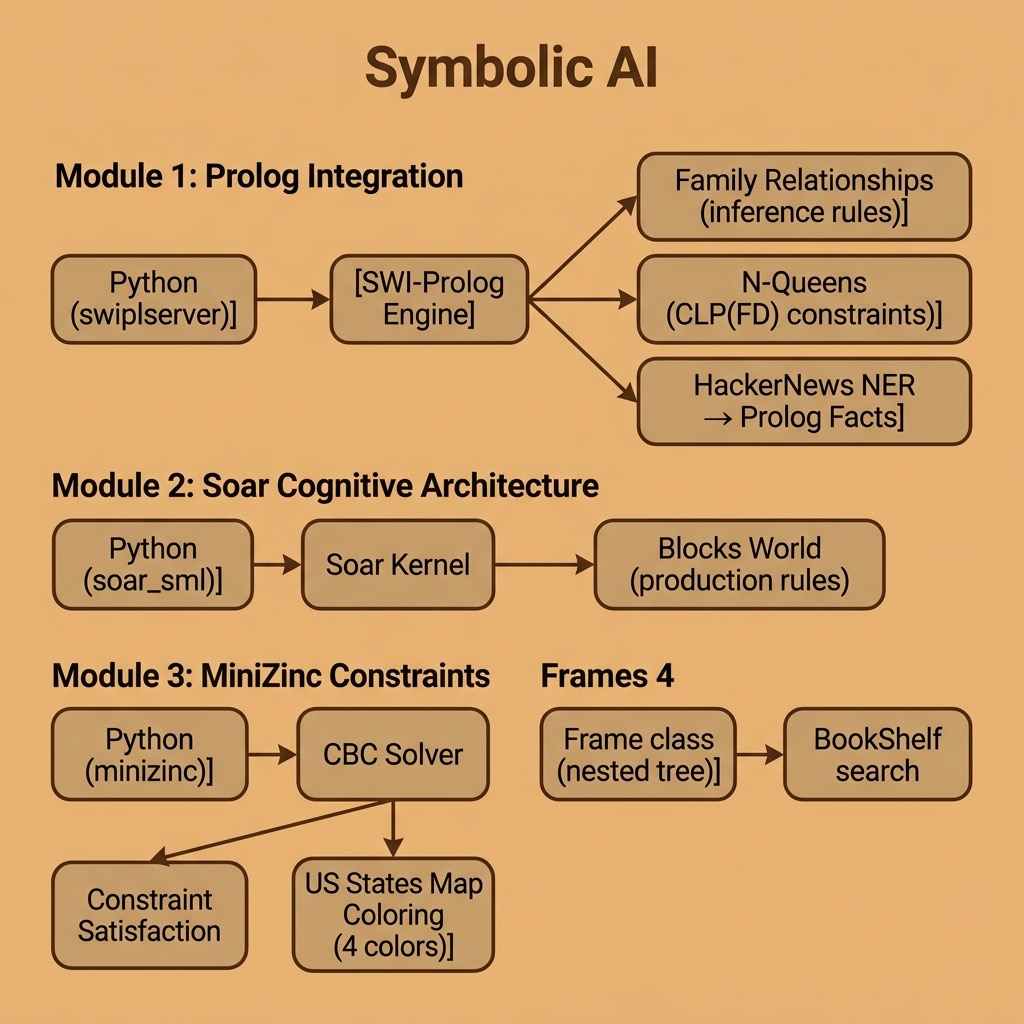
Comparison of Symbolic AI and Deep Learning
Symbolic AI, also known as “good old-fashioned AI” (GOFAI), is a form of artificial intelligence that uses symbolic representations and logical reasoning to solve problems. It is based on the idea that a computer can be programmed to manipulate symbols in the same way that humans manipulate symbols in their minds: an example of this is the process of logical reasoning.
Symbolic AI systems can consist of sets of rules, facts, and procedures that are used to represent knowledge and a reasoning engine that uses these symbolic representations to make inferences and decisions. Some examples of symbolic AI systems include expert systems, other types of rule-based systems, and decision trees. These systems are typically based on a set of predefined rules and the performance of the system is based on the knowledge manually encoded (or it can be learned) in these rules. Symbolic AI is largely non-numerical.
In comparison deep learning, which uses numerical representations (high dimensional matrices, or tensors, containing floating point data), is a subset of machine learning that uses neural networks with many multiple layers (the term “deep” comes from the idea of having dozens or even hundreds of layers, which differs from early neural network models comprised of just a few layers) to learn from data and make predictions or decisions. The basic building blocks of both simple neural models and deep learning models are artificial neurona, which are a simple mathematical function that receives input, applies a transformation, and produces an output. Neural networks can learn to perform a wide variety of tasks, such as image recognition, natural language processing, and game playing, by adjusting the weights of the neurons.
The key difference is that, while Symbolic AI relies on hand-coded rules and logical reasoning, deep learning relies on learning from data. Symbolic AI systems typically have a high level of interpretability and transparency, as the rules and knowledge are explicitly encoded and can be inspected by humans, while deep learning models are often considered “black boxes” due to their complexity and the difficulty of understanding how they arrived at a decision.
So, Symbolic AI uses symbolic representations and logical reasoning while deep learning uses neural networks to learn from data. The first one is more interpretable but less flexible, while the second one is more flexible, much more powerful for most applications, but is less interpretable.
We will start with one “pure Python” example in the next section.
Implementing Frame Data Structures in Python
Most of my learning experiments and AI projects in the early 1980s were built from scratch in Common Lisp and nested frame data structures were a common building block. Here we allow three types of data to be stored in frames:
- Numbers
- Strings
- Other frames
We write a general Python class Frame that supports creating frames and converting a frame, including deeply nested frames, into a string representation. We also write a simple Python class BookShelf as a container for frames that supports searching for any frames containing a string value.
 1 # Implement Lisp-like frames in Python
 2
 3 class Frame():
 4     frame_counter = 0
 5     def __init__(self, name = ''):
 6         Frame.frame_counter += 1
 7         self.objects = []
 8         self.depth = 0
 9         if (len(name)) == 0:
10             self.name = f"Frame:{Frame.frame_counter}"
11         else:
12             self.name = f'"{name}"'
13
14     def add_subframe(self, a_frame):
15         a_frame.depth = self.depth + 1
16         self.objects.append(a_frame)
17
18     def add_number(self, a_number):
19         self.objects.append(a_number)
20
21     def add_string(self, a_string):
22         self.objects.append(a_string)
23
24     def __str__(self):
25         indent = " " * self.depth * 2
26         ret = indent + f"<Frame {self.name}>\n"
27         for frm in self.objects:
28             if isinstance(frm, (int, float)):
29                 ret = ret + indent + '  ' + f"<Number {frm}>\n"
30             elif isinstance(frm, str):
31                 ret = ret + indent + '  ' + f'<String "{frm}">\n'
32             elif isinstance(frm, Frame):
33                 ret = ret + str(frm)
34         return ret
35
36 f1 = Frame()
37 f2 = Frame("a sub-frame")
38 f1.add_subframe(f2)
39 f1.add_number(3.14)
40 f2.add_string("a string")
41 print(f1)
42 f2.add_subframe(Frame('a sub-sub-frame'))
43 print(f1)
44
45 class BookShelf():
46
47     def __init__(self, name = ''):
48         self.frames = []
49
50     def add_frame(self, a_frame):
51         self.frames.append(a_frame)
52
53     def search_text(self, search_string):
54         return [frm for frm in self.frames if search_string in str(frm)]
55
56 bookshelf = BookShelf()
57 bookshelf.add_frame(f1)
58 search_results = bookshelf.search_text('sub')
59 print("Search results: all frames containing 'sub':")
60 for rs in search_results:
61     print(rs)
The implementation of the class Frame is straightforward. The init method init defines a list of contained objects (or frames), sets the default frame nesting depth to zero, and assigns a readable name. There are three separate methods to add subframes, numbers, and strings.
The method str ensures that when we print a frame that the output is human readable and visualizes frame nesting.
Here is some output:
 1 $ python
 2 >>> from frame import Frame Bookshelf
 3 >>> f1 = Frame()
 4 >>> f2 = Frame("a sub-frame")
 5 >>> f1.add_subframe(f2)
 6 >>> f1.add_number(3.14)
 7 >>> f2.add_subframe(Frame('a sub-sub-frame'))
 8 >>> print(f1)
 9 <Frame Frame:4>
10   <Frame "a sub-frame">
11     <Frame "a sub-sub-frame">
12   <Number 3.14>
13 >>> bookshelf = BookShelf()
14 >>> bookshelf.add_frame(f1)
15 >>> search_results = bookshelf.search_text('sub')
16 >>> for rs in search_results:
17 ...   print(rs)
18 ...
19 <Frame Frame:4>
20   <Frame "a sub-frame">
21     <Frame "a sub-sub-frame">
22   <Number 3.14>
I my early AI experiments in the 1980s I would start with implementing a simple frame library and extend it for the two types of applications that I worked on: Natural Language Processing (NLP) and planning systems.
I no longer use frames, preferring the use of off the shelf graph databases that we will cover in a later chapter. Graphs can represent a wider range of data representations because frames represent tree structured data and graphs are more general purpose than trees.
Use Predicate Logic by Calling Swi-Prolog
Please skip this section if you either don’t know how to program in Prolog or if you have no interest in learning Prolog. I have a writing project for a book titled Prolog for AI applications that is a work in progress. When that book is released I will add a link here. Before my Prolog book is released, please use Sheila McIlraith’s Swi-Prolog tutorial. It was written for her students and is a good starting point. You can also use the official Swi-Prolog manual for specific information. I will make this section self-contained if you just want to read the material without writing your own Python + Prolog applications.
You can start by reading the documentation for setting up Swi-Prolog so it can be called from Python.
I own many books on Prolog but my favorite that I recommend is “The Art Of Prolog” by Leon S. Sterling and Ehud Y. Shapiro. Here are a few benefits to using Prolog:
- Prolog is a natural fit for symbolic reasoning: Prolog is a logic programming language, which means that it is particularly well-suited for tasks that involve symbolic reasoning and manipulation of symbols. This makes it an excellent choice for tasks such as natural language processing, knowledge representation, and expert systems.
- Prolog has built-in support for logic and rule-based systems which makes it easy to represent knowledge and perform inferences. The syntax of Prolog is based on first-order logic, which means that it is similar to the way humans think and reason.
- Prolog provides a high-level and expressive syntax, which makes it relatively easy to write and understand code. The declarative nature of Prolog also makes it more readable and maintainable than some other languages.
- Prolog provides automatic backtracking and search, which makes it easy to implement algorithms that require searching through large spaces of possible solutions.
- Prolog has a set of built-in predicates and libraries that support natural language processing, which made it an ideal choice for tasks such as natural language understanding and generation. Now deep learning techniques are the more effective technology or NLP.
- Prolog has a large community of users and developers which means that there are many open source libraries and tools available for use in Prolog projects.
- Prolog can be easily integrated with other programming languages, such as Python, C, C++, Common Lisp, and Java. This integration with other languages makes Prolog a good choice for projects that require a combination of different languages.
- Prolog code is concise, which means less lines of code to write. Also, some programmers find that the declarative nature of the language makes it less prone to errors.
Using Swi-Prolog for the Semantic Web, Fetching Web Pages, and Handling JSON
In several ways, reading the historic Scientific American Article from 2001 The Semantic Web - A new form of Web content that is meaningful to computers will unleash a revolution of new possibilities by Tim Berners-Lee, James Hendler, and Ora Lassila changed my life. I spent a lot of time experimenting with the Swi-Prolog semweb library that I found to be the easiest way to experiment with RDF. We will cover the open source Apache Jena/Fuseki RDF data store and query engine in a later chapter. The Common Lisp and Semantic Web tools company Franz Inc. very kindly subsidized my work writing two Semantic Web books that cover Common Lisp, Java, Clojure, and Scala (available as downloadable PDFs on my web site). Writing these books lead directly to being invited to work at Google for a project using their Knowledge Graph.
Swi-Prolog can be installed from https://www.swi-prolog.org/download/stable. On macOS you can just use:
1 brew install swi-prolog
Here I mention how to load the semweb library and refer you to the library documentation:
1 ?- use_module(library(semweb/rdf_db)).
2 ?- use_module(library(semweb/sparql_client)).
3 ?- sparql_query('select * where { ?s ?p "Amsterdam" }',
4                 Row,
5                 host('dbpedia.org'), path('/sparql/')]).
The output is:
1 Row = row('http://dbpedia.org/resource/Anabaptist_riot',
2           'http://dbpedia.org/ontology/combatant') ;)
3 Row = row('http://dbpedia.org/resource/Thirteen_Years_War_(1454-1466)',
4           'http://dbpedia.org/ontology/combatant') ;)
5 Row = row('http://dbpedia.org/resource/Womens_Euro_Hockey_League',
6           'http://dbpedia.org/ontology/participant') ;)
Prolog is a flexible and general purpose language that is used to write compilers, handle text processing, etc. One common thing that I need no matter what programming language I use is fetching content from the web. Here is a simple example you can try to perform a HTTP GET operation and echo the fetched data to standard output:
1 use_module(library(http/http_open)).
2 http_open('https://markwatson.com', In, []),
3    copy_stream_data(In, user_output),
4    close(In).
Similarly, handling JSON data is a common task so here is an example for doing that:
1 ?- use_module(library(http/json)). % to enable json_read_dict/2
2 ?- FPath = 'test.json', open(FPath, read, Stream), json_read_dict(Stream, Dicty).
Python and Swi-Prolog Interop
You need to install the Python bridge library that is supported by the Swi-Prolog developers:
1 uv pip install swiplserver
I copied a Prolog program from the Swi-Prolog documentation to calculate how to eight queens on a chess board in such a way that no queen can capture another queen. Here I get three results by entering the semicolon key to get another answer or the period key to stop:
 1 $ swipl
 2
 3 ?- use_module(library(clpfd)). /* constraint satisfaction library */
 4 true.
 5
 6 ?- [n_queens]. /* load the file n_queens.pl */
 7 true.
 8
 9 ?- n_queens(8, Qs), label(Qs).
10 Qs = [1, 5, 8, 6, 3, 7, 2, 4] ;
11 Qs = [1, 6, 8, 3, 7, 4, 2, 5] ;
12 Qs = [1, 7, 4, 6, 8, 2, 5, 3] .
The source code to n_queens.pl is included in the examples directory swi-prolog for this book. This example was copied from the Swi-Prolog documentation. Here is Python code to use this Prolog example:
 1 from swiplserver import PrologMQI
 2 from pprint import pprint
 3
 4 with PrologMQI() as mqi:
 5     with mqi.create_thread() as prolog_thread:
 6         prolog_thread.query("use_module(library(clpfd)).")
 7         prolog_thread.query("[n_queens].")
 8         result = prolog_thread.query("n_queens(8, Qs), label(Qs).")
 9         pprint(result)
10         print(len(result))
We can run this example to see all 92 possible answers:
1  $ p n_queens.py
2 [{'Qs': [1, 5, 8, 6, 3, 7, 2, 4]},
3  {'Qs': [1, 6, 8, 3, 7, 4, 2, 5]},
4  {'Qs': [1, 7, 4, 6, 8, 2, 5, 3]},
5  {'Qs': [1, 7, 5, 8, 2, 4, 6, 3]},
6  {'Qs': [2, 4, 6, 8, 3, 1, 7, 5]},
7  ...
8  ]
9  92
Here I call the Swi-Prolog system synchronously; that is, each call to prolog_thread.query waits until the answers are ready. If you can also run long running queries asynchronously then please read the instructions online.
In the last example we simply ran an existing Prolog program from Python. Now let’s look at an example for asserting facts and Prolog rules from a Python script. First we look at a simple example of Prolog rules, asserting facts, and applying rules to facts. We will use the Prolog source file family.pl:
1 parent(X, Y) :- mother(X, Y).
2 parent(X, Y) :- father(X, Y).
3 grandparent(X, Z) :-
4   parent(X, Y),
5   parent(Y, Z).
Before using a Python script, let’s run an example in the Swi-Prolog REPL (in line 2, running [family]. loads the Prolog source file family.pl):
 1 $ swipl
 2 ?- [family].
 3 true.
 4
 5 ?- assertz(mother(irene, ken)).
 6 true.
 7
 8 ?- assertz(father(ken, ron)).
 9 true.
10
11 ?- grandparent(A,B).
12 A = irene,
13 B = ron ;
14 false.
When running Prolog queries you may get zero, one, or many results. The results print one at a time. Typing the semicolon character after a result is printed requests that the next result be printed. Typing a period after a result is printed lets the Prolog system know that you don’t want to see any more of the available results. When I entered a semicolon character in line 13 after the first result is printed, the Prolog system prints false because no further results are available.
Now we can write a Python script family.py that loads the Prolog rules file family.pl, asserts facts, run Prolog queries, and get the results back to the Python script:
 1 from swiplserver import PrologMQI
 2 from pprint import pprint
 3
 4 with PrologMQI() as mqi:
 5     with mqi.create_thread() as prolog_thread:
 6         prolog_thread.query("[family].")
 7         print("Assert a few initial facts:")
 8         prolog_thread.query("assertz(mother(irene, ken)).")
 9         prolog_thread.query("assertz(father(ken, ron)).")
10         result = prolog_thread.query("grandparent(A, B).")
11         pprint(result)
12         print(len(result))
13         print("Assert another test fact:")
14         prolog_thread.query("assertz(father(ken, sam)).")
15         result = prolog_thread.query("grandparent(A, B).")
16         pprint(result)
17         print(len(result))
The output looks like:
1 $ python family.py
2 Assert a few initial facts:
3 [{'A': 'irene', 'B': 'ron'}]
4 1
5 Assert another test fact:
6 [{'A': 'irene', 'B': 'ron'}, {'A': 'irene', 'B': 'sam'}]
7 2
Swi-Prolog is still under active development (the project was started in 1985) and used for new projects. If the declarative nature of Prolog programming appeals to you then I urge you to take the time to integrate Swi-Prolog into one of your Python-based projects.
Swi-Prolog and Python Deep Learning Interop
Good use cases for Python and Prolog applications involve using Python code to fetch and process data that is imported to Prolog. Applications can then use Prolog’s reasoning and other capabilities.
Here we look at a simple example that:
- Uses the Firebase Hacker News APIs to fetch most recent stories.
- Uses the spaCy library deep learning based NLP model to identify organization and peoples names from articles.
- Assert as Prolog facts terms like organization(Name, URI)*.
We will cover the spaCy library in depth later. For the purposes of this example, please consider spaCy as a “black box.”
The following listing shows the Python script hackernews.py:
 1 from urllib.request import Request, urlopen
 2 import json
 3 from bs4 import BeautifulSoup
 4 from pprint import pprint
 5
 6 from swiplserver import PrologMQI
 7
 8 import spacy
 9 try:
10     spacy_model = spacy.load("en_core_web_sm")
11 except:
12   from os import system
13   system("python -m spacy download en_core_web_sm")
14   spacy_model = spacy.load('en_core_web_sm')
15
16 LEN = 100 # larger amount of text is more expensive for OpenAI APIs
17
18 def get_new_stories(anAgent={'User-Agent': 'PythonAiBook/1.0'}):
19     req = Request("https://hacker-news.firebaseio.com/v0/newstories.json",
20                   headers=anAgent)
21     httpResponse = urlopen(req)
22     data = httpResponse.read()
23     #print(data)
24     ids = json.loads(data)
25     #print(ids)
26     # just return the most recent 3 stories:
27     return ids[0:3]
28
29 ids = get_new_stories()
30
31 def get_story_data(id, anAgent={'User-Agent': 'PythonAiBook/1.0'}):
32     req = Request(f"https://hacker-news.firebaseio.com/v0/item/{id}.json",
33                   headers=anAgent)
34     httpResponse = urlopen(req)
35     return json.loads(httpResponse.read())
36
37 def get_story_text(a_uri, anAgent={'User-Agent': 'PythonAiBook/1.0'}):
38     req = Request(a_uri, headers=anAgent)
39     httpResponse = urlopen(req)
40     soup = BeautifulSoup(httpResponse.read(), "html.parser")
41     return soup.get_text()
42
43 def find_entities_in_text(some_text):
44     def clean(s):
45         return s.replace('\n', ' ').strip()
46     doc = spacy_model(some_text)
47     return map(list, [[clean(entity.text), entity.label_] for entity in doc.ents])
48
49 import re
50 regex = re.compile('[^a-z_]')
51
52 def safe_prolog_text(s):
53     s = s.lower().replace(' ','_').replace('&','and').replace('-','_')
54     return regex.sub('', s)
55
56 for id in ids:
57     story_json_data = get_story_data(id)
58     #pprint(story_json_data)
59     if story_json_data != None and 'url' in story_json_data:
60         print(f"Processing {story_json_data['url']}\n")
61         story_text = get_story_text(story_json_data['url'])
62         entities = list(find_entities_in_text(story_text))
63         #print(entities)
64         organizations =
65             set([safe_prolog_text(name)
66                  for [name, entity_type] in entities if entity_type == "ORG"])
67         people =
68             set([safe_prolog_text(name)
69                  for [name, entity_type] in entities if entity_type == "PERSON"])
70         with PrologMQI() as mqi:
71             with mqi.create_thread() as prolog_thread:
72                 for person in people:
73                     s = f"assertz(person({person},
74                                   '{story_json_data['url']}'))."
75                     #print(s)
76                     try:
77                         prolog_thread.query(s)
78                     except:
79                         print(f"Error with term: {s}")
80                 for organization in organizations:
81                     s = f"assertz(organization({organization}, '{story_json_data['url']}'))."
82                     #print(s)
83                     try:
84                         prolog_thread.query(s)
85                     except:
86                         print(f"Error with term: {s}")
87                 try:
88                     result = prolog_thread.query("organization(Organization, URI).")
89                     pprint(result)
90                 except:
91                     print("No results for organizations.")
92                 try:
93                     result = prolog_thread.query("person(Person, URI).")
94                     pprint(result)
95                 except:
96                     print("No results for people.")
Here is some example output:
 1 {'Organization': 'bath_and_beyond_inc',
 2   'URI': 'https://bedbathandbeyond.gcs-web.com/news-releases/news-release-details/bed-bath-beyond-inc-provides-business-update'},
 3 {'Person': 'ryan_holiday',
 4   'URI': 'https://www.parttimetech.io/p/what-do-you-really-want'},
 5 {'Organization': 'nasa_satellite',
 6  {'Organization': 'nih',
 7   'URI': 'https://nap.nationalacademies.org/catalog/26424/measuring-sex-gender-identity-and-sexual-orientation'},
 8   'URI': 'https://landsat.gsfc.nasa.gov/article/now-then-landsat-u-s-mosaics/'},
 9 {'Organization': 'the_national_academies',
10 'URI': 'https://nap.nationalacademies.org/catalog/26424/measuring-sex-gender-identity-and-sexual-orientation'},
11 {'Organization': 'microsoft',
12   'URI': 'https://invention.si.edu/susan-kare-iconic-designer'},
13 {'Person': 'susan_kare',
14   'URI': 'https://invention.si.edu/susan-kare-iconic-designer'},
Later we will use deep learning models to summarize text and other NLP tasks. This example could be extended for defining Prolog terms in the form summary(URI, “…”). Other application ideas might be to use Python scripts for:
- Collect stock market data for a rule-based Prolog reasoner for stock purchase selections.
- A customer service chatbot that is mostly written in Python could be extended by using a Prolog based reasoning system.
Soar Cognitive Architecture
Soar is a flexible and general purpose reasoning and knowledge management system for building intelligent software agents. The Soar project is a classic AI tool and has the advantage of being kept up to date. As I write this the Soar GitHub repository was just updated a few days ago. Here is a bit of history:
Soar is a cognitive architecture that was originally developed at Carnegie Mellon University. It is a rule-based system that simulates the problem-solving abilities of human cognition. The architecture is composed of several interacting components, including a production system (a rule-based system), episodic memory (remembers past experiences), and working memory (for current state of the world).
The production system is the core component of Soar and is responsible for making decisions and performing actions. It is based on the idea of a production rule, which is a rule that describes a condition and an action to be taken when that condition is met. Production systems use rules to make decisions and to perform actions based on the current state of the system.
The episodic memory is a component that stores information about past events and experiences. It allows a system built with Soar to remember past events and use that information to make decisions affecting the future state of the world. The working memory is a component that stores information about the current state of the system and is used by the production system to make decisions.
Soar also includes several other components, such as an explanation facility, which allows the system to explain its decisions and actions, and a learning facility, which allows the system to learn from its experiences.
Soar is a general-purpose architecture that can be applied to a wide range of tasks and domains. In the past it has been particularly well-suited for tasks that involve planning, problem-solving, and decision-making. It has been used in a variety of applications, including robotics, NLP, and intelligent tutoring systems.
I am writing this material many years after my original use of the Soar project. My primary reference for preparing the following material is the short paper Introduction to the Soar Cognitive Architecture by John E. Laird. For self-study you can start at the Soar Tutorial Page that provides a download for an eight part tutorial in separate PDF files, binary Soar executables for Linux, Windows, and macOS, and all of the code for the tutorials.
I consider Soar to be important because it proposes and implements a general purpose cognitive architecture. A warning to the reader: Soar has a steep learning curve and there are simpler frameworks for solving practical problems. Later we will look at an example from the Soar Tutorial for the classic “blocks world” problem of moving blocks on a table subject to constraints like not being allowed to move a block if it has another object on top of it. Solving this fairly simple problem requires about 400 lines of Soar source code.
Background Theory
The design goals for the Soar Cognitive Architecture (which I will usually refer to as Soar) is to provide “fixed structures, mechanisms, and representations” to develop human level behavior across a wide range of tasks. There is a commercial company Soar.com that uses Soar for commercial and government projects.
We will cover Reinforcement Learning (which I will usually refer to as RL) in a later chapter but there is similar infrastructure supported by both Soar and RL: a simulated environment, data representing the state of the environment, and possible actions that can be performed in the environment that change the state.
As we have disused, there are two main types of memory of the Soar architecture:
- Working Memory - this is the data that specifies the current state of the environment. Actions in the environment change the data in working memory, either by modification, addition, or deletion. At the risk of over-anthropomorphism, consider this like human short term memory.
- Production Memory - this data is a form of production rules where the left-hand side of rules consist of patterns that if matched against working memory, the the actions on the right-hand side of a rule are executed. Consider these production rules as long-term memory.
Both Soar working memory and production memory are symbolic data. As a contrast, data in deep learning is numeric, mostly tensors. This symbolic data comprises goals (G), problem spaces (PS), states (S) and operators (O).
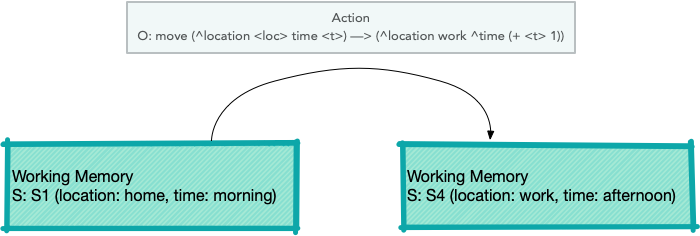
Soar Operator transitioning from one state to another (figure is from the Soar Tutorial):
Setup Python and Soar Development Environment
The Soar Python bindings are available as a pip package, making installation straightforward:
1 uv pip install soar-sml
This installs prebuilt bindings for the Soar kernel; no need to clone the repository or compile from source.
I will present here a simple example and explain a subset of the capabilities of Soar. When we are done here you can reference a recent paper by Neha Rajan and 2Sunderrajan Srinivasan Exploring Learning Capability of an Agent in SOAR: Using 8- Queens Problem for a complete example using Soar for cognitive modeling and a more complex example.
A minimal Soar Tutorial
I am presenting a minimal introduction to Soar and we will later provide an example of Python and Soar interop for the purpose of introducing you to Soar. If this material looks interesting then I encourage you to work through the Soar Tutorial Page.
Soar supports a rule language that uses the highly efficient Rete algorithm (optimized for huge numbers of rules, less optimized for large working memories). Let’s look at a sample rule from Chapter 1 (first PDF file) of the Soar tutorial:
1 sp {hello-world
2    (state <s> ^type state)
3 -->
4    (write |Hello World|)
5    (halt)
6 }
The token sp on line 1 stands for Soar Production. Rules are enclosed in { and }. The name of this rule is the symbol hello-world. In the tutorial you will usually see rule names partitioned using the characters * and -. Rules have a “left side” and a “right side”, separated by —>. If all of the left side patterns match working memory elements then the right-hand side actions are executed.
The following figure is from the Soar tutorial and shows two blocks stacked on top of each other. The bottom block rests on a table:
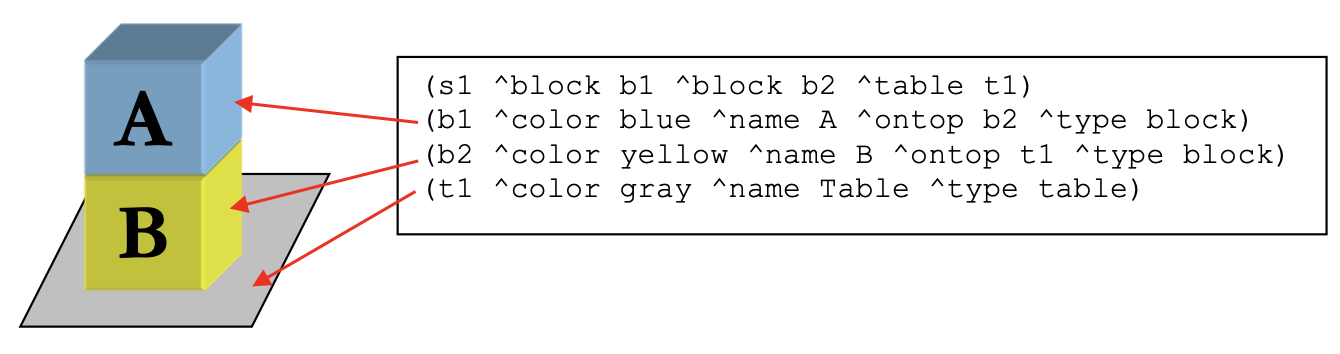
This figure represents state s1 that is a root of the graph also containing blocks named b1 and b2 as well as the table named t1. The blocks and table all have attributes ^color, ^name, and ^type. The blocks also have the optional attribute ^ontop.
Rule right-hand side actions can modify, delete, or add working memory data. For example, a left-hand side matching the attribute values for block b1 could modify its ^ontop attribute from the value b2 to the table named t1.
Example Soar System With Python Interop
We will use the blocks world example from the official Soar Tutorial. The agent starts with three blocks (A, B, C) on the table and moves them randomly until they are stacked A on B on C. The Soar production rules are in the file bw.soar in this book’s GitHub repository.
 1 import soar_sml as sml
 2
 3 def callback_debug(mid, user_data, agent, message):
 4     print(message)
 5
 6 if __name__ == "__main__":
 7     soar_kernel = sml.Kernel.CreateKernelInCurrentThread()
 8     soar_agent = soar_kernel.CreateAgent("agent")
 9     soar_agent.RegisterForPrintEvent(sml.smlEVENT_PRINT, callback_debug, None) # no user data
10     soar_agent.ExecuteCommandLine("source bw.soar")
11     run_result=soar_agent.RunSelf(50)
12     soar_kernel.DestroyAgent(soar_agent)
13     soar_kernel.Shutdown()
Run this example:
 1 $ uv run bw.py
 2
 3 Initial state has A, B, and C on the table.
 4 Moving Block: A to: B
 5 Moving Block: C to: A
 6 Moving Block: C to: TABLE
 7 Moving Block: A to: C
 8 Moving Block: B to: A
 9 Moving Block: A to: TABLE
10 Moving Block: B to: C
11 Moving Block: A to: B
12 Achieved A, B, C
Because the blocks are moved at random, the exact sequence of moves will vary between runs, but the agent always reaches the goal state (A on B on C on TABLE) and halts.
I consider Soar to be of historic interest and is an important example of a large multiple-decade research project in building large scale reasoning systems.
Constraint Programming with MiniZinc and Python
As with Soar, our excursion into constraint programming will be brief, hopefully enough to introduce you to a new style of programming though a few examples. I still use constraint programming and hope you might find the material in this section useful.
While I attempt to make this material self-contained reading, you may want to use the MiniZinc Python documentation as a reference for the Python interface and The MiniZinc Handbook as a reference to the MiniZinc language and its use for your own projects.
Constraint Programming (CP) is a paradigm of problem-solving that involves specifying the constraints of a problem, and then searching for solutions that satisfy those constraints. MiniZinc is a high-level modeling language for constraint programming that allows users to specify constraints and objectives in a compact and expressive way.
In MiniZinc a model is defined by a set of variables and a set of constraints that restrict the possible values of those variables. The variables can be of different types, such as integers, booleans, and sets, and the constraints can be specified using a variety of built-in predicates and operators. The model can also include an objective function that the solver tries to optimize.
Once a model is defined in MiniZinc, it can be solved using a constraint solver which is a software program that takes the model as input and returns solutions that satisfy the constraints. MiniZinc supports several constraint solvers, including Gecode, Chuffed, and OR-Tools, each of which has its own strengths and weaknesses.
MiniZinc provides a feature called “Annotations”, which allows the user to specify additional information to the solver, as the way to search for solutions, or setting the maximum time for the solver to run.
Installation and Setup for MiniZinc and Python
You need to first install the MiniZinc system. For macOS this can be done with brew install minizinc or can be installed from source code on macOs and Linux. The Python interface can be installed with uv pip install minizinc.
The following figure shows the MiniZincIDE with simple constraint satisfaction problem:
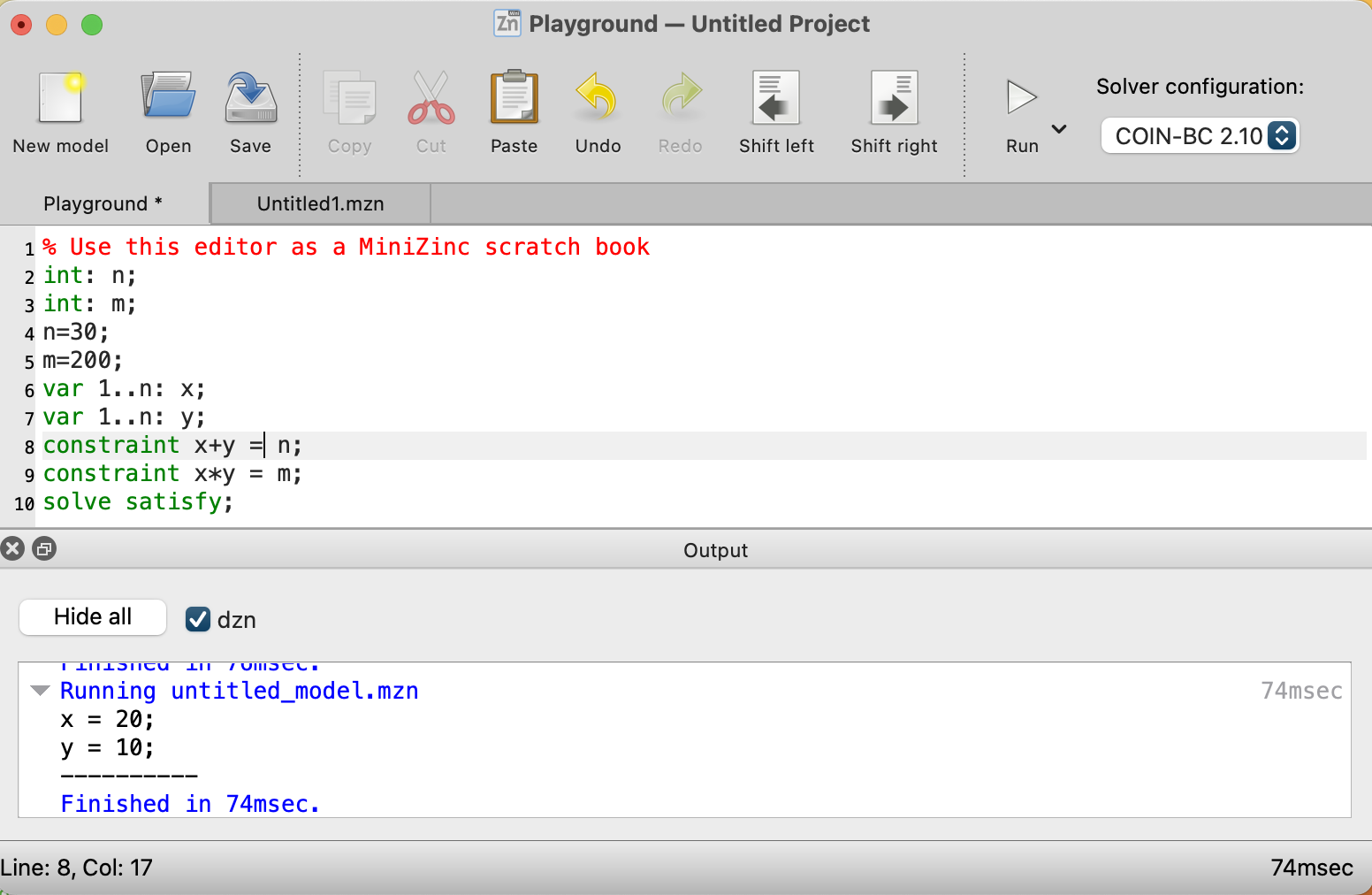
When I installed minizinc on macOS with brew, the solver coinbc was installed automatically so that is what we use here. Here is the MiniZinc source file test_mzn.mzn that you also see in the last figure:
1 int: n;
2 int: m;
3 var 1..n: x;
4 var 1..n: y;
5 constraint x+y = n;
6 constraint x*y = m;
There are several possible solvers to use with MiniZinc. When I install on macOS using brew the solver “coinbc” is available. When I install sudo apt install minizinc on Ubuntu Linux, the solver “gecode” is available.
Notice that we don’t set values for the constants n and m as we did when using MiniZincIDE. We instead set them in Python code before calling the solver in lines 7 and 8:
 1 from minizinc import Instance, Model, Solver
 2
 3 coinbc = Solver.lookup("coinbc")
 4
 5 test1 = Model("./test_mzn.mzn")
 6 instance = Instance(coinbc, test1)
 7 instance["n"] = 30
 8 instance["m"] = 200
 9
10 result = instance.solve()
11 print(result)
12 print(result["x"])
13 print(result["y"])
The result is:
1 $ python test_mzn.py
2 Solution(x=20, y=10, _checker='')
3 20
4 10
Let’s look at a more complex example: on the map of the USA, the states neighboring each other are colored differently than their adjoining states in such a way that no states with touching edges are the same color. We use integers to represent colors and the mapping of numbers to colors is unimportant. Here is a partial listing of us_states.mzn:
 1 int: nc = 3; %% needs to be 4 to solve this problem
 2
 3 var 1..nc: alabama;
 4 var 1..nc: alaska;
 5 var 1..nc: arizona;
 6 var 1..nc: arkansas;
 7 var 1..nc: california;
 8  ...
 9 constraint alabama != florida;
10 constraint alabama != georgia;
11 constraint alabama != mississippi;
12 constraint alabama != tennessee;
13 constraint arizona != california;
14 constraint arizona != colorado;
15 constraint arizona != nevada;
16 constraint arizona != new_mexico;
17 constraint arizona != utah;
18  ...
19 solve satisfy;
In line 9, as an example, the statement constraint alabama != florida; means that since Alabama and Florida share a border, they must have different color indices. Initially we set the number of allowed color to 3 on line 1 and with just three colors allowed this problem is unsolvable.
The output is:
1  $ minizinc --solver coinbc us_states.mzn
2 =====UNSATISFIABLE=====
So we need more than three colors. Let’s try int: nc = 4;:
 1 $ minizinc --solver coinbc us_states.mzn
 2 alabama = 2;
 3 alaska = 1;
 4 arizona = 3;
 5 arkansas = 4;
 6 california = 4;
 7 colorado = 4;
 8 connecticut = 2;
 9 delaware = 4;
10  ...
Here is a Python script us_states.py that uses this model and picks out the assigned color indices from the solution object:
 1 from minizinc import Instance, Model, Solver
 2
 3 coinbc = Solver.lookup("coinbc")
 4
 5 model = Model("./us_states.mzn")
 6 instance = Instance(coinbc, model)
 7 instance["nc"] = 4 # solve for a maximum of 4 colors
 8
 9 result = instance.solve()
10 print(result)
11 all_states = list(result.__dict__['solution'].__dict__.keys())
12 all_states.remove('_checker')
13 print(all_states)
14 for state in all_states:
15     print(f" {state} \t: \t{result[state]}")
Here is some of the output:
1 $ python us_states.py
2 Solution(alabama=2, alaska=1, arizona=3, arkansas=4, california=4, colorado=4, connecticut=2, delaware=4, florida=1, georgia=4, hawaii=1, idaho=4, ... ]
3  alabama    :   2
4  alaska     :   1
5  arizona    :   3
6  arkansas   :   4
7  ...
8  wisconsin  :   1
9  wyoming    :   3
Good Old Fashioned Symbolic AI Wrap-up
As a practical matter almost all of my work in the last ten years used either deep learning or was comprised of a combination of semantic web and linked data with deep learning projects. While the material in this chapter is optional for the modern AI practitioner, I still find using MiniZinc for constraint programming and Prolog to be useful. I included the material for the Soar cognitive architecture because I both find it interesting and I believe the any future development of “real AI” (or AGI) will involve hybrid approaches and there are many good ideas in the Soar implementation.
Optional Practice Problems
Here is a set of optional practice problems designed to help you explore and apply the symbolic AI concepts covered in this chapter:
Problem 1 (Easy): Add Slots and Inheritance to the Frame System
In early AI systems, a Frame represented an entity with specific slots (attributes) and values (e.g., color, size, parent). The current implementation in frame.py stores child frames, strings, and numbers in a flat list without distinguishing their semantic roles.
Extend the Frame class to support:
- Attributes/Slots: A dictionary of key-value pairs representing slots (e.g.,
frame.set_slot("type", "mammal")). - Inheritance: Modify slot retrieval so that if a slot is queried (e.g., via
frame.get_slot("legs")) but does not exist in the current frame, the lookup recursively searches its parent/super-frame (or subframe nesting structure) before returningNone. - Pretty Printing: Update
__str__to output the slots of each frame with indentation.
Hint: You can track parent relationships by passing a parent frame to the constructor or setting it when nesting.
Problem 2 (Medium): Modeling Kinship and Ancestry in Prolog
Extend family.pl by adding:
- A rule
sibling(X, Y)that identifies ifXandYshare a parent. Ensure that a person is not a sibling of themselves (X \= Y). - A rule
uncle(X, Y)andaunt(X, Y)identifying ifXis a sibling ofY’s parent. - A recursive rule
ancestor(X, Y)that successfully traces transitive lineages of any depth (e.g.,Xis a parent ofY, orXis a parent of an ancestor ofY).
Then, modify family.py to assert a three-generation family tree, query the Prolog server for the ancestors and siblings of a specific family member, and print the results in Python.
Problem 3 (Medium): Solving Cryptarithmetic Puzzles in MiniZinc
In constraint programming, a classic puzzle is Cryptarithmetic, where letters represent unique digits from 0 to 9 (with no leading zeros). The sum of words must equal the target word:

Write a MiniZinc model (send_more_money.mzn) and a Python driver script to solve this puzzle:
- Define variables for
S, E, N, D, M, O, R, Yas integers in0..9. - Add a constraint ensuring all letters represent different values (use
alldifferent([S, E, N, D, M, O, R, Y])). - Add constraints to prevent leading zeros:
S != 0andM != 0. - Add the arithmetic constraint:
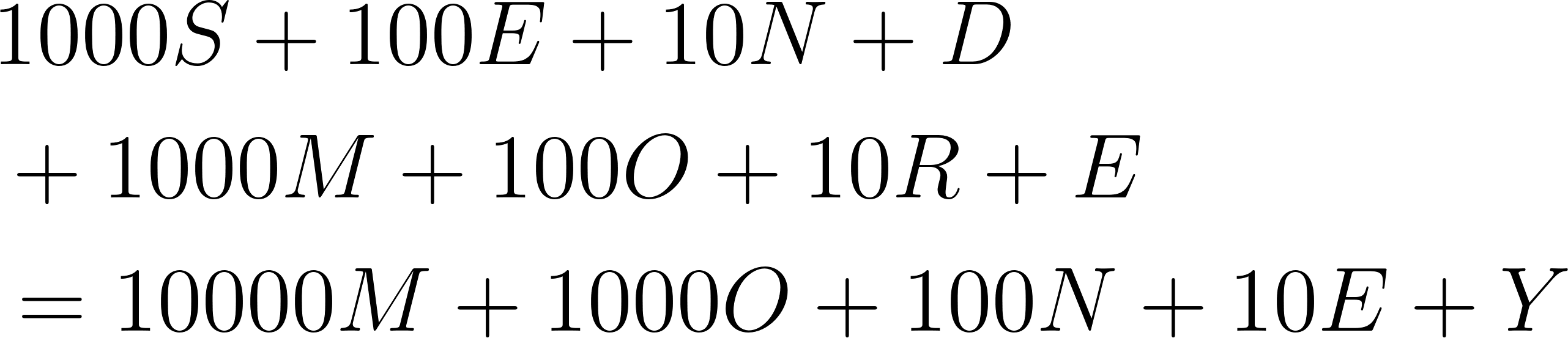
- Solve and print the resulting equation in Python, formatted as
9567 + 1085 = 10652.
Note: You can use test_mzn.py as a template for loading the model and retrieving solved variable values.
Problem 4 (Hard): Scale the Soar Blocks World to Four Blocks
The current blocks world configuration in bw.soar and bw.py builds a tower of three blocks (A on B on C).
Modify the model to scale this to four blocks (A, B, C, and D), stacking them in the order A on B on C on D on the TABLE:
- Update the goal detection rule
blocks-world*detect*goalin bw.soar to require a four-block tower (AonB,BonC,ConD, andDonTABLE). - Run the updated agent from bw.py. Because blocks are moved at random, a four-block tower may require more moves. Increase the cycle limit parameter in
soar_agent.RunSelf(50)from50to500to ensure the agent has enough decision cycles to find the goal state.