Getting Setup To Use Graph and Relational Databases
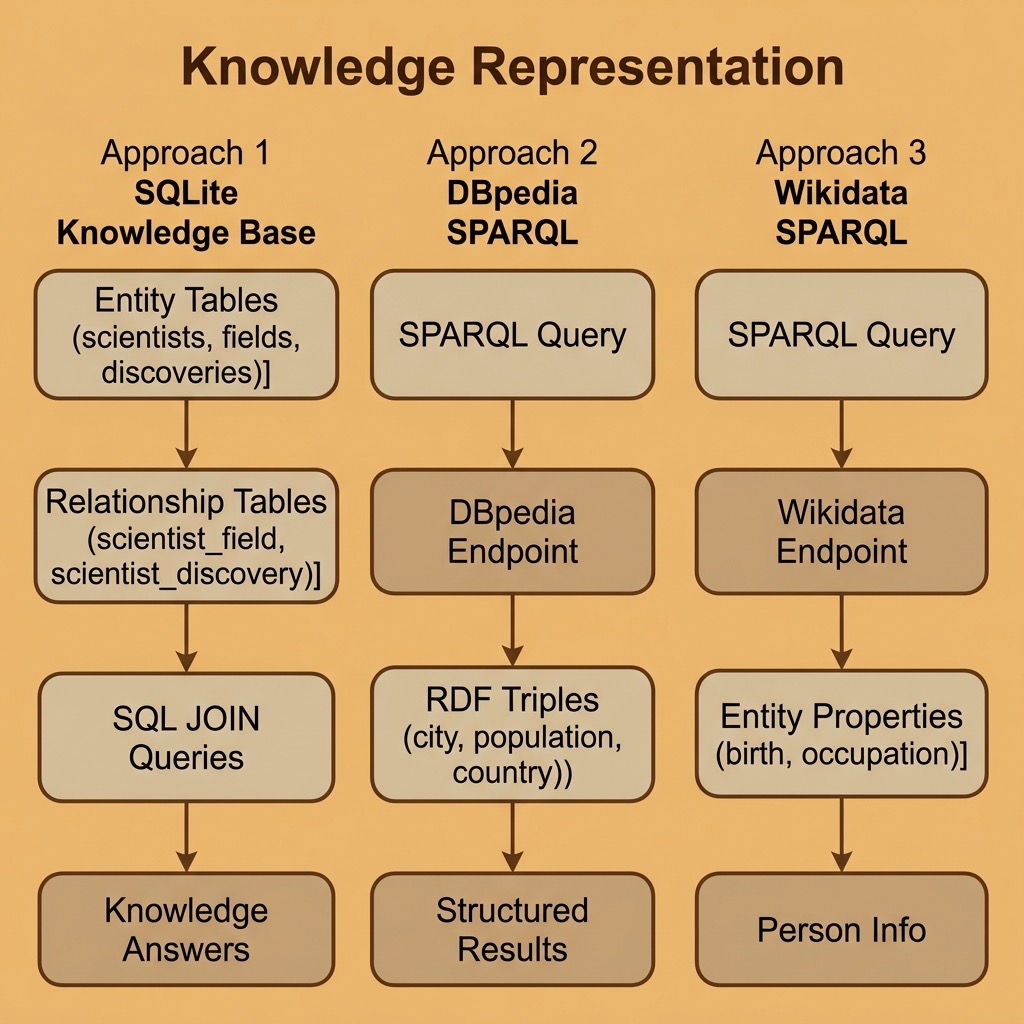
I use several types of data stores in my work but for the purposes of this book we can explore knowledge representation using two key platforms:
- SQLite for relational knowledge representation using the SQL query language.
The next chapter covers RDF and the SPARQL query language in more detail.
The examples for this chapter are in the directory source-code/knowledge_representation.
In technical terms, knowledge representation using graph and relational databases involves the use of graph structures and relational data models to represent and organize knowledge in a structured, computationally efficient, and easily accessible way.
A graph structure is a collection of nodes (also known as vertices) and edges (also known as arcs) that connect the nodes. Each node and edge in a graph can have properties, such as labels and attributes which provide information about the entities they represent. Graphs can be used to represent knowledge in a variety of ways, such as through semantic networks and using ontologies to define terms, classes, types, etc.
Relational databases, on the other hand, use a tabular data model to represent knowledge. The basic building block of a relational database is the table, which is a collection of rows (also known as tuples) and columns (also known as attributes). Each row represents an instance of an entity, and the columns provide information about the properties of that entity. Relationships between entities can also be represented by foreign keys, which link one table to another.
Combining these two technologies, knowledge can be represented as a graph of interconnected entities, where each entity is stored in a relational database table and connected to other entities through relationships represented by edges in the graph. This allows for efficient querying and manipulation of knowledge, as well as the ability to integrate and reason over large amounts of information.
Querying Wikidata with SPARQL and Python
Wikidata is a free, open knowledge base maintained by the Wikimedia Foundation. It contains structured data about millions of entities (people, places, organizations, scientific concepts, and more), all accessible through a public SPARQL endpoint. Unlike DBPedia, which extracts structured data from Wikipedia infoboxes, Wikidata is a curated knowledge base where the data is entered and maintained directly.
The Python SPARQLWrapper library makes it straightforward to query any SPARQL endpoint, including Wikidata:
1 uv pip install sparqlwrapper
Finding Information About a Person
Let’s query Wikidata for information about a specific person. Wikidata uses numeric entity identifiers (like Q937 for Albert Einstein) and property identifiers (like P19 for “place of birth”):
 1 # wikidata_person.py - Query Wikidata for information about a person
 2
 3 import sys
 4 from SPARQLWrapper import SPARQLWrapper, JSON
 5
 6 QUERY_TEMPLATE = """
 7 SELECT ?personLabel ?birthPlaceLabel ?birthDate
 8        (GROUP_CONCAT(DISTINCT ?occupationLabel; SEPARATOR=", ") AS ?occupations)
 9 WHERE {{
10     ?person wdt:P31 wd:Q5 .
11     ?person rdfs:label "{name}"@en .
12     OPTIONAL {{ ?person wdt:P19 ?birthPlace . }}
13     OPTIONAL {{ ?person wdt:P569 ?birthDate . }}
14     OPTIONAL {{ ?person wdt:P106 ?occupation . }}
15     SERVICE wikibase:label {{ bd:serviceParam wikibase:language "en" . }}
16 }}
17 GROUP BY ?personLabel ?birthPlaceLabel ?birthDate
18 LIMIT 5
19 """
20
21
22 def fetch_person(name: str) -> list[dict[str, str]]:
23     sparql = SPARQLWrapper("https://query.wikidata.org/sparql")
24     sparql.addCustomHttpHeader("User-Agent", "PythonAIBook/1.0")
25     sparql.setQuery(QUERY_TEMPLATE.format(name=name))
26     sparql.setReturnFormat(JSON)
27     results = sparql.queryAndConvert()
28
29     bindings = results.get("results", {}).get("bindings", [])
30     people = []
31     for r in bindings:
32         people.append({
33             "name": r.get("personLabel", {}).get("value", "unknown"),
34             "birth_place": r.get("birthPlaceLabel", {}).get("value", ""),
35             "birth_date": r.get("birthDate", {}).get("value", "")[:10],
36             "occupations": r.get("occupations", {}).get("value", ""),
37         })
38     return people
39
40
41 if __name__ == "__main__":
42     person_name = " ".join(sys.argv[1:]) if len(sys.argv) > 1 else "Albert Einstein"
43     try:
44         people = fetch_person(person_name)
45         if not people:
46             print(f"No results found for '{person_name}'.")
47         else:
48             for p in people:
49                 print(f"  Name: {p['name']}")
50                 if p["birth_place"]:
51                     print(f"  Born: {p['birth_place']}")
52                 if p["birth_date"]:
53                     print(f"  Date: {p['birth_date']}")
54                 if p["occupations"]:
55                     print(f"  Occupations: {p['occupations']}")
56                 print()
57     except Exception as e:
58         print(f"Error querying Wikidata: {e}")
The output returns a single clean row per person, with all occupations aggregated into one field:
1 $ uv run wikidata_person.py
2   Name: Albert Einstein
3   Born: Ulm
4   Date: 1879-03-14
5   Occupations: scientist, physicist, mathematician, inventor
Key things to notice about Wikidata’s SPARQL:
- wdt: properties represent direct claims (e.g., wdt:P19 is “place of birth”)
- wd: entities are Wikidata items (e.g., wd:Q5 is “human”)
- The SERVICE wikibase:label clause automatically resolves entity IDs to human-readable labels
- OPTIONAL prevents the query from failing when a property is missing
Querying Cities and Their Properties from DBPedia
DBPedia mirrors much of Wikipedia’s structured content as RDF triples. It uses different ontology conventions than Wikidata but is equally useful for knowledge representation tasks. Here we query DBPedia’s public SPARQL endpoint (using HTTPS for reliability) for cities and their populations:
 1 # dbpedia_cities.py - Query DBPedia for city data
 2
 3 from SPARQLWrapper import SPARQLWrapper, JSON
 4
 5 QUERY_STRING = """
 6 SELECT ?city_uri ?dbpedia_label ?population ?country_label
 7 WHERE {
 8     ?city_uri
 9         <http://dbpedia.org/ontology/type>
10         <http://dbpedia.org/resource/City> .
11     ?city_uri
12         <http://dbpedia.org/property/populationEst>
13         ?population .
14     ?city_uri
15          <http://www.w3.org/2000/01/rdf-schema#label>
16          ?dbpedia_label FILTER (lang(?dbpedia_label) = 'en') .
17     OPTIONAL {
18         ?city_uri <http://dbpedia.org/ontology/country> ?country .
19         ?country <http://www.w3.org/2000/01/rdf-schema#label>
20                  ?country_label FILTER (lang(?country_label) = 'en') .
21     }
22 }
23 ORDER BY DESC(?population)
24 LIMIT 10
25 """
26
27
28 def fetch_cities() -> list[dict[str, str]]:
29     sparql = SPARQLWrapper("https://dbpedia.org/sparql")
30     sparql.addCustomHttpHeader("User-Agent", "PythonAIBook/1.0")
31     sparql.setQuery(QUERY_STRING)
32     sparql.setReturnFormat(JSON)
33     results = sparql.queryAndConvert()
34
35     bindings = results.get("results", {}).get("bindings", [])
36     cities = []
37     for r in bindings:
38         cities.append({
39             "city": r.get("dbpedia_label", {}).get("value", "unknown"),
40             "population": int(r.get("population", {}).get("value", 0)),
41             "country": r.get("country_label", {}).get("value", "unknown"),
42         })
43     return cities
44
45
46 if __name__ == "__main__":
47     try:
48         cities = fetch_cities()
49         if not cities:
50             print("No results returned from DBpedia.")
51         else:
52             for c in cities:
53                 print(f"  {c['city']} ({c['country']}): population {c['population']:,}")
54     except Exception as e:
55         print(f"Error querying DBpedia: {e}")
The output (results may vary as DBPedia data is updated):
 1 $ uv run dbpedia_cities.py
 2   Fort Worth, Texas (United States): population 1,008,106
 3   Charlotte, North Carolina (unknown): population 911,311
 4   Detroit (unknown): population 645,705
 5   Gombe, Nigeria (Nigeria): population 446,800
 6   Ilesa (Nigeria): population 416,000
 7   Pittsburgh (unknown): population 307,668
 8   Durham, North Carolina (United States): population 296,186
 9   Toledo, Ohio (United States): population 265,638
10   Winston-Salem, North Carolina (United States): population 252,975
11   Huntsville, Alabama (unknown): population 249,102
When I use RDF data from public SPARQL endpoints like DBPedia or Wikidata in applications, I start by using the web-based SPARQL clients for these services, find useful entities, manually look to see what properties are defined for those entities, and then write custom SPARQL queries to fetch the data I need. The web-based query editors at query.wikidata.org and dbpedia.org/sparql are invaluable for this exploratory process.
We will use more SPARQL queries in the next chapter.
The SQLite Relational Database for Knowledge Representation
The SQLite database is included in the standard Python distribution, making it the zero-setup option for persistent data storage. While graph databases naturally express relationships between entities, relational databases can also serve as effective knowledge representations when the schema is designed to capture entity types, attributes, and relationships.
A Reusable SQLite Library
We start with a simple reusable library for SQLite using the standard library sqlite3:
 1 # sqlite_lib.py - Reusable SQLite helper functions
 2
 3 import sqlite3
 4 from typing import Any
 5
 6
 7 def connection(db_file_path: str) -> sqlite3.Connection:
 8     """Create and return a database connection."""
 9     return sqlite3.connect(db_file_path)
10
11
12 def query(
13     conn: sqlite3.Connection, sql: str, variable_bindings: tuple[Any, ...] | None = None
14 ) -> list[sqlite3.Row]:
15     """Execute a SQL query, commit if it modifies data, and return all results."""
16     cur = conn.cursor()
17     try:
18         if variable_bindings:
19             cur.execute(sql, variable_bindings)
20         else:
21             cur.execute(sql)
22     except sqlite3.Error as e:
23         conn.rollback()
24         raise
25     else:
26         if sql.strip().upper().startswith(("INSERT", "UPDATE", "DELETE", "CREATE")):
27             conn.commit()
28         return cur.fetchall()
Modeling a Knowledge Graph in SQLite
Relational databases become knowledge representation tools when we design tables to capture entities, their types, their attributes, and the relationships between them. Here is an example that builds a simple knowledge base about scientists, their fields, and their discoveries:
  1 # sqlite_knowledge.py - Knowledge representation with SQLite
  2
  3 import sqlite3
  4
  5
  6 def build_knowledge_base() -> sqlite3.Connection:
  7     """Build a relational knowledge base about scientists and their work."""
  8     conn = sqlite3.connect(":memory:")
  9     conn.row_factory = sqlite3.Row
 10     conn.execute("PRAGMA foreign_keys = ON")
 11     cur = conn.cursor()
 12
 13     cur.execute("""
 14         CREATE TABLE scientists (
 15             id INTEGER PRIMARY KEY,
 16             name TEXT NOT NULL,
 17             birth_year INTEGER,
 18             nationality TEXT
 19         )
 20     """)
 21
 22     cur.execute("""
 23         CREATE TABLE fields (
 24             id INTEGER PRIMARY KEY,
 25             name TEXT NOT NULL,
 26             description TEXT
 27         )
 28     """)
 29
 30     cur.execute("""
 31         CREATE TABLE discoveries (
 32             id INTEGER PRIMARY KEY,
 33             name TEXT NOT NULL,
 34             year INTEGER,
 35             description TEXT
 36         )
 37     """)
 38
 39     cur.execute("""
 40         CREATE TABLE scientist_field (
 41             scientist_id INTEGER REFERENCES scientists(id),
 42             field_id INTEGER REFERENCES fields(id),
 43             PRIMARY KEY (scientist_id, field_id)
 44         )
 45     """)
 46
 47     cur.execute("""
 48         CREATE TABLE scientist_discovery (
 49             scientist_id INTEGER REFERENCES scientists(id),
 50             discovery_id INTEGER REFERENCES discoveries(id),
 51             PRIMARY KEY (scientist_id, discovery_id)
 52         )
 53     """)
 54
 55     cur.execute(
 56         "INSERT INTO scientists (name, birth_year, nationality) VALUES (?, ?, ?)",
 57         ("Albert Einstein", 1879, "German"),
 58     )
 59     einstein_id = cur.lastrowid
 60
 61     cur.execute(
 62         "INSERT INTO scientists (name, birth_year, nationality) VALUES (?, ?, ?)",
 63         ("Marie Curie", 1867, "Polish"),
 64     )
 65     curie_id = cur.lastrowid
 66
 67     cur.execute(
 68         "INSERT INTO scientists (name, birth_year, nationality) VALUES (?, ?, ?)",
 69         ("Richard Feynman", 1918, "American"),
 70     )
 71     feynman_id = cur.lastrowid
 72
 73     cur.execute(
 74         "INSERT INTO fields (name, description) VALUES (?, ?)",
 75         ("Physics", "Study of matter, energy, and their interactions"),
 76     )
 77     physics_id = cur.lastrowid
 78
 79     cur.execute(
 80         "INSERT INTO fields (name, description) VALUES (?, ?)",
 81         ("Chemistry", "Study of the composition and properties of matter"),
 82     )
 83     chemistry_id = cur.lastrowid
 84
 85     cur.execute(
 86         "INSERT INTO fields (name, description) VALUES (?, ?)",
 87         ("Quantum Mechanics", "Physics of atomic and subatomic systems"),
 88     )
 89     qm_id = cur.lastrowid
 90
 91     cur.execute(
 92         "INSERT INTO discoveries (name, year, description) VALUES (?, ?, ?)",
 93         ("Special Relativity", 1905, "Time and space are relative"),
 94     )
 95     sr_id = cur.lastrowid
 96
 97     cur.execute(
 98         "INSERT INTO discoveries (name, year, description) VALUES (?, ?, ?)",
 99         ("Radioactivity", 1898, "Discovery of radium and polonium"),
100     )
101     rad_id = cur.lastrowid
102
103     cur.execute(
104         "INSERT INTO discoveries (name, year, description) VALUES (?, ?, ?)",
105         ("Quantum Electrodynamics", 1948, "Quantum theory of light and matter"),
106     )
107     qed_id = cur.lastrowid
108
109     cur.executemany("INSERT INTO scientist_field VALUES (?, ?)", [
110         (einstein_id, physics_id), (einstein_id, qm_id),
111         (curie_id, physics_id), (curie_id, chemistry_id),
112         (feynman_id, physics_id), (feynman_id, qm_id),
113     ])
114
115     cur.executemany("INSERT INTO scientist_discovery VALUES (?, ?)", [
116         (einstein_id, sr_id),
117         (curie_id, rad_id),
118         (feynman_id, qed_id),
119     ])
120
121     conn.commit()
122     return conn
123
124
125 def query_knowledge_base(conn: sqlite3.Connection) -> None:
126     """Demonstrate knowledge queries against the relational schema."""
127     cur = conn.cursor()
128
129     print("Scientists in Quantum Mechanics:")
130     cur.execute("""
131         SELECT s.name, s.nationality
132         FROM scientists s
133         JOIN scientist_field sf ON s.id = sf.scientist_id
134         JOIN fields f ON sf.field_id = f.id
135         WHERE f.name = 'Quantum Mechanics'
136     """)
137     for row in cur.fetchall():
138         print(f"  {row['name']} ({row['nationality']})")
139
140     print("\nDiscoveries by scientist:")
141     cur.execute("""
142         SELECT s.name AS scientist, d.name AS discovery,
143                d.year, d.description
144         FROM scientists s
145         JOIN scientist_discovery sd ON s.id = sd.scientist_id
146         JOIN discoveries d ON sd.discovery_id = d.id
147         ORDER BY d.year
148     """)
149     for row in cur.fetchall():
150         print(f"  {row['scientist']}: {row['discovery']} "
151               f"({row['year']}) — {row['description']}")
152
153     print("\nScientists who share a field:")
154     cur.execute("""
155         SELECT s1.name, s2.name, f.name
156         FROM scientist_field sf1
157         JOIN scientist_field sf2 ON sf1.field_id = sf2.field_id
158                                 AND sf1.scientist_id < sf2.scientist_id
159         JOIN scientists s1 ON sf1.scientist_id = s1.id
160         JOIN scientists s2 ON sf2.scientist_id = s2.id
161         JOIN fields f ON sf1.field_id = f.id
162     """)
163     for row in cur.fetchall():
164         print(f"  {row[0]} & {row[1]}: {row[2]}")
165
166
167 if __name__ == "__main__":
168     conn = build_knowledge_base()
169     query_knowledge_base(conn)
170     conn.close()
The output shows how SQL JOIN queries traverse the relationships between entities, much like following edges in a graph:
 1 Scientists in Quantum Mechanics:
 2   Albert Einstein (German)
 3   Richard Feynman (American)
 4
 5 Discoveries by scientist:
 6   Marie Curie: Radioactivity (1898) — Discovery of radium and polonium
 7   Albert Einstein: Special Relativity (1905) — Time and space are relative
 8   Richard Feynman: Quantum Electrodynamics (1948) — Quantum theory of light and matter
 9
10 Scientists who share a field:
11   Albert Einstein & Marie Curie: Physics
12   Albert Einstein & Richard Feynman: Physics
13   Albert Einstein & Richard Feynman: Quantum Mechanics
14   Marie Curie & Richard Feynman: Physics
The key insight is that the relationship tables (scientist_field, scientist_discovery) transform a flat relational database into a knowledge representation. Each relationship table captures a specific type of connection between entity types, and SQL JOINs let you traverse these connections to answer knowledge queries. While not as natural as a graph database for highly connected data, this pattern works well for structured knowledge with well-defined entity types and relationships.
We will combine the use of SQLite, RDF, SPARQL, and deep learning Natural Language Processing (NLP) libraries later in the book.
If you want to deepen your understanding of the standards behind the SPARQL queries we used in this chapter, the next chapter provides optional reference material on RDF data formats, RDFS sub-property hierarchies, the SPARQL query language in detail, and OWL reasoning. That background will help you write more sophisticated queries against Wikidata, DBPedia, and any other SPARQL endpoint.
Optional Practice Problems
To help solidify your understanding of knowledge representation using graph and relational systems, try implementing the following practice problems. They build directly on the code examples provided in this chapter.
1. Extended Wikidata Querying (Easy)
Modify the wikidata_person.py script to fetch additional metadata for a queried individual.
- Goal: Add the person’s date of death (
wdt:P570) and awards received (wdt:P166). -
Details:
- Update the SPARQL query template to retrieve the date of death and awards as optional values.
- Since a person can receive multiple awards, use
GROUP_CONCATin your SPARQL query (similar to how occupations are handled in the existing query) to join the awards into a comma-separated string:(GROUP_CONCAT(DISTINCT ?awardLabel; SEPARATOR=", ") AS ?awards). - Update the fetch_person function to parse these new fields.
- Format the console output to print the date of death and the list of awards if they are present.
- Test your script with “Marie Curie” or “Stephen Hawking”.
2. Relational Knowledge Base Expansion (Medium)
Extend the SQLite knowledge representation in sqlite_knowledge.py to model the academic and research institutions associated with the scientists.
- Goal: Track where scientists performed their research.
-
Details:
- Create a new
institutionstable:id INTEGER PRIMARY KEY,name TEXT NOT NULL,location TEXT. - Create a many-to-many relationship table
scientist_institutionto link scientists to institutions. Include fields forscientist_id(foreign key toscientists),institution_id(foreign key toinstitutions), and optionallystart_yearandend_yearto track their tenure. -
Add sample data for the existing scientists. For example:
- Albert Einstein at the Institute for Advanced Study (Princeton, USA).
- Marie Curie at the University of Paris (Paris, France).
- Richard Feynman at the California Institute of Technology (Pasadena, USA).
- Modify the query_knowledge_base function to display a list of scientists along with their institutions and locations.
3. DBpedia Query Customization and Pagination (Medium)
Expand the query capability in dbpedia_cities.py to allow more flexible searching.
- Goal: Allow users to query cities in a specific country and paginate the results.
-
Details:
- Modify the fetch_cities function to accept optional parameters for a country filter, a
limitparameter, and anoffsetparameter. - In the SPARQL query, dynamically inject a country filter (e.g., using
FILTER(CONTAINS(LCASE(?country_label), LCASE("{country}")))if a country is provided). - Use SPARQL
LIMITandOFFSETclauses dynamically based on the passed parameters to support pagination. - Update the CLI entry point to accept command-line arguments for country, limit, and offset, demonstrating how users can page through large result sets.
4. Hybrid Knowledge Loader: API to SQL (Hard)
Write a new Python script that bridges SPARQL query APIs and local relational stores by dynamically loading Wikidata details into a persistent SQLite database.
- Goal: Populate SQLite tables dynamically from public SPARQL query results.
-
Details:
- Create a new script
wikidata_to_sqlite.pyin source-code/knowledge_representation that connects to a local, persistent SQLite file (e.g.,knowledge.db) using the schema structure from sqlite_knowledge.py. - Accept a scientist’s name from the command line, query Wikidata using fetch_person (or an extended version of it), and retrieve their birth year, nationality, occupations, and discoveries.
- Implement duplicate checking: use SQL queries to verify if the scientist already exists in the
scientiststable to avoid duplicates. - Programmatically insert any new fields or discoveries into the
fieldsanddiscoveriestables, retrieve their generated database IDs, and construct the relationship links inscientist_fieldandscientist_discovery.