Overview of Recommendation Systems (Optional Material)
Recommendation systems are a type of information filtering system that utilize historical data, such as past user behavior or interactions, to predict the likelihood of a user’s interest in certain items or products. As an example application: if a product web site has 100K products that is too many for customers to browse through. Based on a customer’s past purchases, finding other customers with similar purchases, etc. it is possible to filter the products shown to a customer.
Note: This is an advanced topic and you will need to reference the linked documentation resources to fully understand the material.
Writing recommendation systems is a common requirement for almost all businesses that sell products to customers. Before we get started we need to define two terms that you may not be familiar with: Collaborative filtering: uses both similarities between users and items to calculate recommendations. This linked Wikipedia article also discusses content-based filtering which uses user and item features.
The Movie Lens dataset created by the GroupLens Research organization uses the user movie preference https://movielens.org dataset. This dataset is a standard for developing and evaluating recommendation system algorithms and models.
There are at least three good approaches to take:
- Use a turnkey recommendation system like Amazon Personalize that is a turn-key service on AWS. You can evaluate Amazon Personalize for your company’s use by spending about one hour working through the getting started tutorial.
- Use one of the standard libraries or TensorFlow implementations for the classic approach using [Matrix Factorization](https://en.wikipedia.org/wiki/Matrix_factorization_(recommender_systems) for collaborative filtering. Examples are Eric Lundquist’s Python library rankfm and the first example for the TensorFlow Recommenders library. Google has a good Matrix Factorization tutorial. While I prefer using the much more complicated TensorFlow Recommenders library, using matrix factorization is probably a good way to start and I recommend taking an hour to work through this Google Colab tutorial
- Use the TensorFlow Recommenders library that supports multi-tower deep learning models that use data for user interactions, user detail data, and product detail data.
We will not write any recommendation systems from scratch in this chapter. We will review one open source recommendation system that I have used at work, the TensorFlow Recommenders library.
Recommendation systems can use a wide variety of techniques, such as collaborative filtering, content-based filtering, and hybrid methods combining filtering algorithms, Matrix Factorization, or Deep Learning technologies, etc. to generate personalized recommendations for users. Collaborative filtering algorithms make recommendations based on the actions of similar users, while content-based filtering algorithms base recommendations on the attributes of items that a user has previously shown interest in. Hybrid methods may be further enhanced by incorporating additional data sources, such as demographic information, or by utilizing more advanced machine learning techniques, such as deep learning or reinforcement learning.
TensorFlow Recommenders
I used Google’s TensorFlow Recommenders library for a work project. I recommend it because it has very good documentation, many examples using the Movie Lens dataset, and is fairly easy to adapt to general user/product recommendation systems.
We will refer to the documentation and examples https://www.tensorflow.org/recommenders and follow the last Movie Lens example.
There are several types of data that could be used for recommending movies:
- User interactions (selecting movies).
- User data. User data is not used in this example, but for a product recommendation system I have created embeddings of all available data features associated with users.
- Movie data based on text embedding of movie titles. Note: for product recommendation systems you might still use text embedding of product descriptions, but you would also likely create embeddings based on product features.
We will use the TensorFlow Recommenders using rich features example. For the following overview discussion, you may want to either open this link to read this example or open the alternative Google Colab example link to run the example on Colab. Please note that this example takes about ten minutes to run on Colab. For our discussion, I will use short code snippets and use one screenshot of the example in Colab so you can optionally just follow along without opening either link for now.
The TF recommenders example starts with reading the Movie Lens dataset using the TensorFlow Data library:
 1 import tensorflow_datasets as tfds
 2 ratings = tfds.load("movielens/100k-ratings", split="train")
 3 movies = tfds.load("movielens/100k-movies", split="train")
 4
 5 ratings = ratings.map(lambda x: {
 6     "movie_title": x["movie_title"],
 7     "user_id": x["user_id"],
 8     "timestamp": x["timestamp"],
 9 })
10 movies = movies.map(lambda x: x["movie_title"])
We need to later generate embedding layers for both unique movie titles and also unique user IDs. We start with getting sequences for unique movie titles and user IDs:
1 unique_movie_titles = np.unique(np.concatenate(list(movies.batch(1000))))
2 unique_user_ids = np.unique(np.concatenate(list(ratings.batch(1_000).map(
3     lambda x: x["user_id"]))))
In this example Python user and movie models are derived from the Python class tf.keras.Model. Let’s look at the implementation of these two models:
 1 class UserModel(tf.keras.Model):
 2
 3   def __init__(self):
 4     super().__init__()
 5
 6     self.user_embedding = tf.keras.Sequential([
 7         tf.keras.layers.StringLookup(
 8             vocabulary=unique_user_ids, mask_token=None),
 9         tf.keras.layers.Embedding(len(unique_user_ids) + 1, 32),
10     ])
11     self.timestamp_embedding = tf.keras.Sequential([
12         tf.keras.layers.Discretization(timestamp_buckets.tolist()),
13         tf.keras.layers.Embedding(len(timestamp_buckets) + 1, 32),
14     ])
15     self.normalized_timestamp = tf.keras.layers.Normalization(
16         axis=None
17     )
18
19     self.normalized_timestamp.adapt(timestamps)
20
21   def call(self, inputs):
22     # Take the input dictionary, pass it through each input layer,
23     # and concatenate the result.
24     return tf.concat([
25         self.user_embedding(inputs["user_id"]),
26         self.timestamp_embedding(inputs["timestamp"]),
27         tf.reshape(self.normalized_timestamp(inputs["timestamp"]), (-1, 1)),
28     ], axis=1)
The function tf.keras.layers.StringLookup is used to create an embedding layer from a sequence of unique string IDs. Timestamps for user selection events are fairly continuous so we use tf.keras.layers.Discretization to collapse a wide range of timestamp values into discrete bins.
Classed derived from class tf.keras.Model are expected to implement a call method that is passed a inputs and returns a single Tensor of concatenated inputs and timestamp embeddings.
We build a similar model for movies:
 1 class MovieModel(tf.keras.Model):
 2
 3   def __init__(self):
 4     super().__init__()
 5
 6     max_tokens = 10_000
 7
 8     self.title_embedding = tf.keras.Sequential([
 9       tf.keras.layers.StringLookup(
10           vocabulary=unique_movie_titles,mask_token=None),
11       tf.keras.layers.Embedding(len(unique_movie_titles) + 1, 32)
12     ])
13
14     self.title_vectorizer = tf.keras.layers.TextVectorization(
15         max_tokens=max_tokens)
16
17     self.title_text_embedding = tf.keras.Sequential([
18       self.title_vectorizer,
19       tf.keras.layers.Embedding(max_tokens, 32, mask_zero=True),
20       tf.keras.layers.GlobalAveragePooling1D(),
21     ])
22
23     self.title_vectorizer.adapt(movies)
24
25   def call(self, titles):
26     return tf.concat([
27         self.title_embedding(titles),
28         self.title_text_embedding(titles),
29     ], axis=1)
The class MovieModel is different than the class UserModel since we create embeddings for movie titles instead of IDs.
We also wrap the user model in a separate query model that combines a user model with dense fully connected layers:
 1 class QueryModel(tf.keras.Model):
 2   """Model for encoding user queries."""
 3
 4   def __init__(self, layer_sizes):
 5     """Model for encoding user queries.
 6
 7     Args:
 8       layer_sizes:
 9         A list of integers where the i-th entry represents the number of units
10         the i-th layer contains.
11     """
12     super().__init__()
13
14     # We first use the user model for generating embeddings.
15     self.embedding_model = UserModel()
16
17     # Then construct the layers.
18     self.dense_layers = tf.keras.Sequential()
19
20     # Use the ReLU activation for all but the last layer.
21     for layer_size in layer_sizes[:-1]:
22       self.dense_layers.add(tf.keras.layers.Dense(layer_size, activation="relu"))
23
24     # No activation for the last layer.
25     for layer_size in layer_sizes[-1:]:
26       self.dense_layers.add(tf.keras.layers.Dense(layer_size))
27
28   def call(self, inputs):
29     feature_embedding = self.embedding_model(inputs)
30     return self.dense_layers(feature_embedding)
The call method returns the values calculated from feeding the input layer into the dense fully connected layers that have a relu non-linear activation function.
We also wrap the movie model in a candidate recommendation model:
 1 class CandidateModel(tf.keras.Model):
 2   """Model for encoding movies."""
 3
 4   def __init__(self, layer_sizes):
 5     """Model for encoding movies.
 6
 7     Args:
 8       layer_sizes:
 9         A list of integers where the i-th entry represents the number of units
10         the i-th layer contains.
11     """
12     super().__init__()
13
14     self.embedding_model = MovieModel()
15
16     # Then construct the layers.
17     self.dense_layers = tf.keras.Sequential()
18
19     # Use the ReLU activation for all but the last layer.
20     for layer_size in layer_sizes[:-1]:
21       self.dense_layers.add(tf.keras.layers.Dense(layer_size, activation="relu"))
22
23     # No activation for the last layer.
24     for layer_size in layer_sizes[-1:]:
25       self.dense_layers.add(tf.keras.layers.Dense(layer_size))
26
27   def call(self, inputs):
28     feature_embedding = self.embedding_model(inputs)
29     return self.dense_layers(feature_embedding)
The call method returns the values calculated from feeding the input layer for a movie model into the dense fully connected layers that have a relu non-linear activation function.
We finally train a deep learning model by creating an instance of class MovielensModel and calling its inherited fit method:
 1 model = MovielensModel([64, 32])
 2 model.compile(optimizer=tf.keras.optimizers.Adagrad(0.1))
 3
 4 two_layer_history = model.fit(
 5     cached_train,
 6     validation_data=cached_test,
 7     validation_freq=5,
 8     epochs=num_epochs,
 9     verbose=0)
10
11 accuracy = two_layer_history.history["val_factorized_top_k/top_100_categorical_accuracy"][-1]
12 print(f"Top-100 accuracy: {accuracy:.2f}.")
The output looks like:
1 Top-100 accuracy: 0.29.
This top-100 accuracy means that if you make a movie recommendation, it has a 29% chance of being in the top 100 recommendations for a user.
We can plot the training accuracy vs. training epoch for both one and two layers:
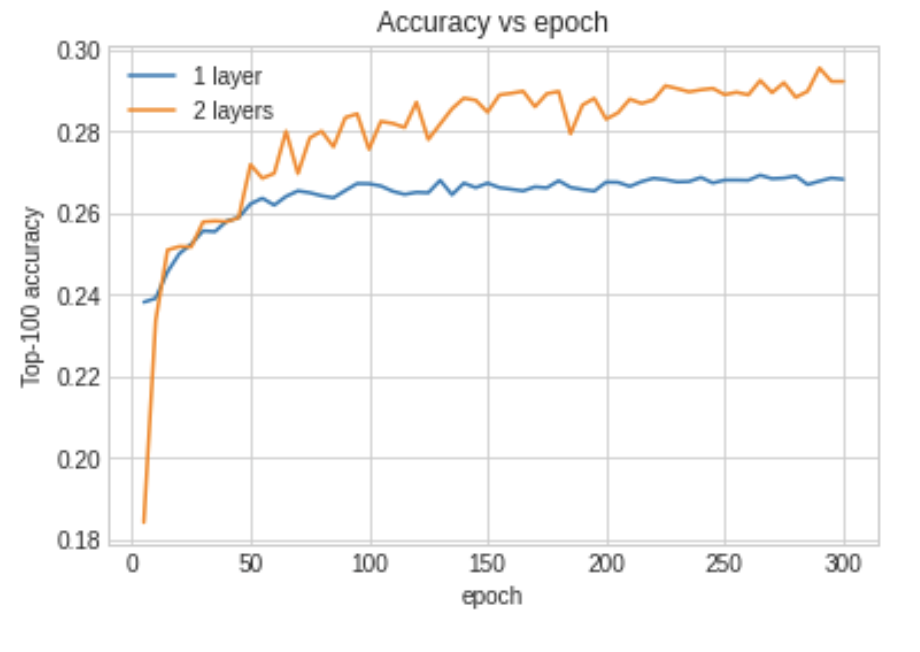
The example Google Colab project has an additional training run that gets better accuracy by stacking many additional hidden layers in the user and movie wrapper Python classes.
Recommendation Systems Wrap-up
If you need to write a recommendation system for your work then I hope this short overview chapter will get you started. Here are alternative approaches and a few resources:
- Consider using Amazon Personalize which is a turn-key service on AWS.
- Consider using Google’s turn-key Recommendations AI.
- Eric Lundquist has written a Python library rankfm for factorization machines for recommendation and ranking problems.
- If product data includes pictures then consider using this Keras example as a guide for creating embeddings for images and implementing image search.
- A research idea: a Keras example that was written by Khalid Salama that transforms input training data to a textual representation for input to a Transformer model. This example is based on the paper Behavior Sequence Transformer for E-commerce Recommendation in Alibaba by Qiwei Chen, Huan Zhao, Wei Li, Pipei Huang, and Wenwu Ou.