LLMs with Local Models
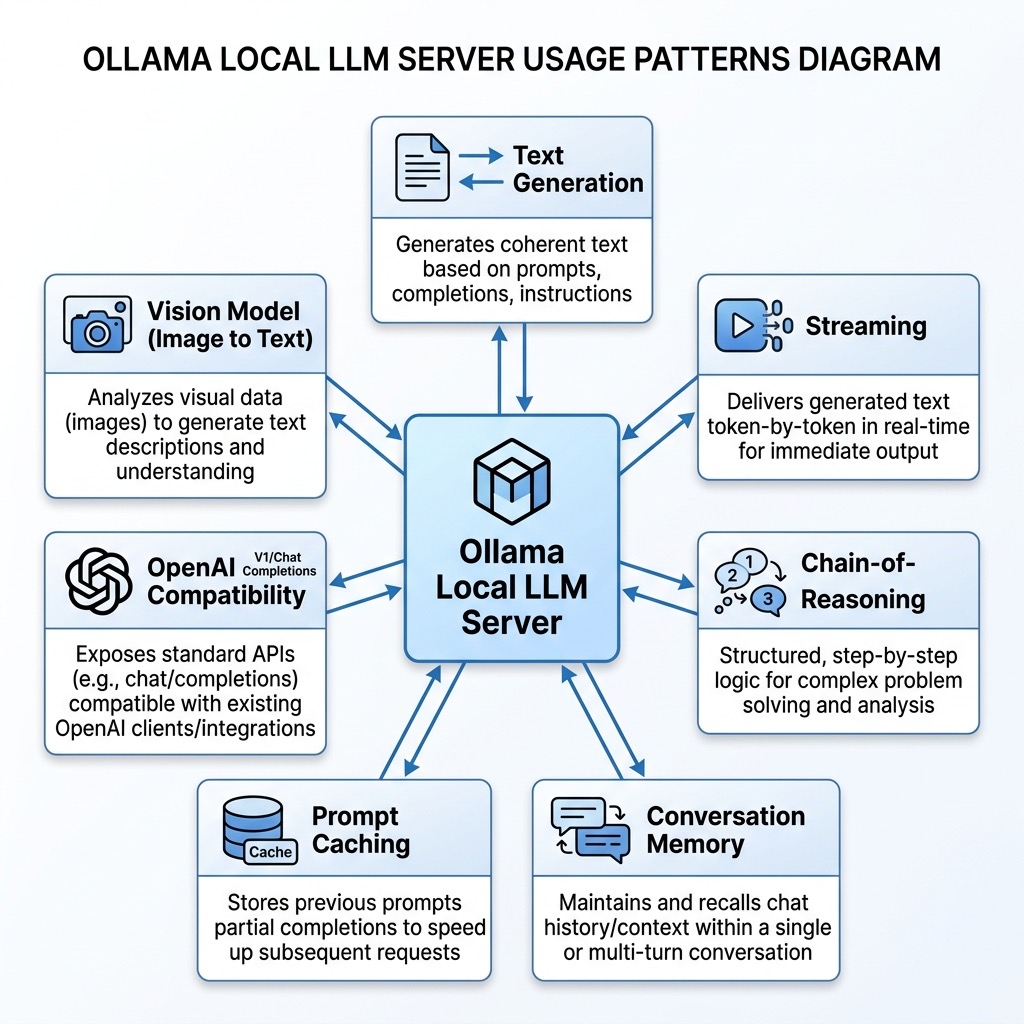
Running language models on your own hardware gives you privacy, zero per-token cost, and the ability to work offline. The tradeoff is that local models are generally smaller and less capable than the frontier models available through cloud APIs, and running larger models requires significant GPU memory or Apple Silicon unified memory.
In this chapter we focus on Ollama, the most popular tool for running local models. Ollama handles model downloading, quantization, GPU acceleration, and exposes a simple API; you can go from zero to a running local LLM in minutes. We also briefly mention alternative tools at the end of the chapter.
If you want to go deeper into Ollama, including tool use, agents, RAG, and advanced configuration, see my book Ollama in Action.
The examples for this chapter are in the directory source-code/llm_local_models.
Installing Ollama
Ollama is available for macOS, Linux, and Windows. On macOS:
1 brew install ollama
Or download the installer from ollama.com. After installation, start the Ollama service:
1 ollama serve
This starts a local server on port 11434. The service runs in the background and manages model loading, GPU memory, and request handling.
Downloading and Running Models
Ollama uses a Docker-like model for pulling and running models. To download a model:
1 ollama pull llama3.2:3b
This downloads Meta’s Llama 3.2 with 3 billion parameters, quantized to about 2 GB. You can interact with it immediately from the command line:
1 ollama run llama3.2:3b "What is the capital of France?"
Some recommended models to start with:
| Model | Size | Strengths |
|---|---|---|
| llama3.2:3b | 2 GB | Fast, good general purpose |
| gemma3:4b | 3 GB | Google’s small model, strong reasoning |
| qwen3:4b | 2.6 GB | Excellent multilingual and coding |
| deepseek-r1:7b | 4.7 GB | Strong reasoning with explicit chain-of-thought |
| llava:7b | 4.7 GB | Vision model, can analyze images |
Using Ollama from Python
As in the previous chapter, we drive the model through litellm, the open-source library that puts a single OpenAI-format interface on more than 100 providers. The local server is simply another provider: ollama_chat/llama3.2:3b names the model, and switching to a cloud model means changing that string rather than the code.
Two demos are the exception. The vision example and the prompt-caching benchmark use Ollama’s own Python SDK, because they depend on native features that litellm’s normalized response does not carry: the images field on a message, and the prompt_eval_duration / prompt_eval_count fields that make a cache hit measurable. We will point out the switch in each section.
1 uv sync # installs litellm and the chapter's dependencies
Basic Text Generation
The simplest use of litellm: send a prompt and print the response:
 1 import litellm
 2
 3 MODEL = "ollama_chat/llama3.2:3b"
 4
 5 response = litellm.completion(
 6     model=MODEL,
 7     messages=[{"role": "user", "content": "Briefly explain what a neural network is."}],
 8 )
 9 assert isinstance(response, litellm.ModelResponse), "Expected a non-streaming response"
10
11 print(response.choices[0].message.content)
This is the same shape as the cloud examples from the previous chapter — a provider-prefixed model string, a message list, and a chat completion response — but the request never leaves your machine.
Streaming Responses
For interactive applications, streaming lets users see output as it’s generated rather than waiting for the complete response:
 1 import litellm
 2
 3 MODEL = "ollama_chat/llama3.2:3b"
 4
 5 stream = litellm.completion(
 6     model=MODEL,
 7     messages=[{"role": "user", "content": "Write a short poem about programming."}],
 8     stream=True,
 9 )
10 assert isinstance(stream, litellm.CustomStreamWrapper), "Expected a streaming response"
11
12 # Print each chunk as it arrives, without newlines between chunks
13 for chunk in stream:
14     print(chunk.choices[0].delta.content or "", end="", flush=True)
15 print()  # final newline
Each chunk carries an incremental piece of the response in chunk.choices[0].delta.content. The flush=True argument ensures text appears immediately rather than being buffered.
Reasoning with Local Models
Some local models support explicit chain-of-thought reasoning, where the model shows its thinking process before providing a final answer. DeepSeek-R1 is particularly good at this.
First pull the model:
1 ollama pull deepseek-r1:7b
Here is an example that extracts both the reasoning trace and the final answer:
 1 import litellm
 2
 3
 4 def reason_about(
 5     question: str, model: str = "ollama_chat/deepseek-r1:7b"
 6 ) -> dict[str, str]:
 7     """Ask a question and extract both reasoning and final answer."""
 8     response = litellm.completion(
 9         model=model, messages=[{"role": "user", "content": question}]
10     )
11     assert isinstance(response, litellm.ModelResponse), (
12         "Expected a non-streaming response"
13     )
14     content = response.choices[0].message.content or ""
15
16     # A separate reasoning field if the provider sent one, otherwise the
17     # <think>...</think> block DeepSeek-R1 leaves inline.
18     reasoning = getattr(response.choices[0].message, "reasoning_content", None) or ""
19     answer = content
20     if "<think>" in content and "</think>" in content:
21         reasoning = content.split("<think>")[1].split("</think>")[0].strip()
22         answer = content.split("</think>")[1].strip()
23
24     return {"reasoning": reasoning, "answer": answer}
25
26
27 question = (
28     "A bakery sells 3 types of bread. Each type comes in 2 sizes. "
29     "How many different bread options are available? "
30     "Respond with just the number and a brief explanation."
31 )
32
33 result = reason_about(question)
34
35 if result["reasoning"]:
36     print("=== Reasoning ===")
37     print(result["reasoning"])
38     print()
39
40 print("=== Answer ===")
41 print(result["answer"])
The code checks two places for the reasoning trace. Models served by Ollama
usually leave it inline in the content as a <think>...</think> block, which we
split out by hand; providers that return the trace as a separate field populate
reasoning_content on the message, and litellm surfaces that for you via
getattr(response.choices[0].message, "reasoning_content", None). Checking both
is the portable habit: the model’s reasoning shows each step of its thinking,
making the output more transparent and debuggable than a black-box answer. This
is especially valuable for math, logic, and planning tasks.
Conversation Memory with Ollama
Cloud APIs handle conversation history by passing the full message list with each request. With local models the same pattern applies, but since there are no per-token costs, you can maintain longer conversations without worrying about expense.
Here is an example that maintains a conversation with memory across multiple exchanges and uses a system prompt to shape the assistant’s personality:
 1 from typing import Any
 2
 3 import litellm
 4
 5
 6 class LocalAssistant:
 7     """A simple conversational assistant that maintains message history."""
 8
 9     def __init__(
10         self, model: str = "ollama_chat/llama3.2:3b", system_prompt: str = ""
11     ) -> None:
12         self.model = model
13         self.messages: list[dict[str, Any]] = []
14         if system_prompt:
15             self.messages.append({"role": "system", "content": system_prompt})
16
17     def chat(self, user_message: str) -> str:
18         """Send a message and get a response, maintaining conversation history."""
19         self.messages.append({"role": "user", "content": user_message})
20         response = litellm.completion(model=self.model, messages=self.messages)
21         assert isinstance(response, litellm.ModelResponse), (
22             "Expected a non-streaming response"
23         )
24         reply = response.choices[0].message.content or ""
25         self.messages.append({"role": "assistant", "content": reply})
26         return reply
27
28     def message_count(self) -> int:
29         """Return the number of messages in the conversation history."""
30         return len(self.messages)
31
32
33 # Create an assistant with a specific personality
34 assistant = LocalAssistant(
35     system_prompt="You are a concise technical writing assistant. "
36     "Keep answers under 3 sentences."
37 )
38
39 # Multi-turn conversation — the model remembers prior context
40 print("Q:", "What is gradient descent?")
41 print("A:", assistant.chat("What is gradient descent?"))
42 print()
43
44 print("Q:", "How does the learning rate affect it?")
45 print("A:", assistant.chat("How does the learning rate affect it?"))
46 print()
47
48 print("Q:", "What happens if I set it too high?")
49 print("A:", assistant.chat("What happens if I set it too high?"))
50 print()
51
52 print(f"(Conversation has {assistant.message_count()} messages)")
Note that unlike cloud APIs, keeping long conversation histories in local models is free; there are no per-token costs. The main constraint is the model’s context window size, which varies by model (typically 4K to 128K tokens).
Prompt Caching for Performance
When you send the same long context (a document, a knowledge base, or a detailed system prompt) with multiple questions, Ollama can cache the prompt processing to dramatically speed up subsequent requests. This happens automatically when the prefix of the prompt is identical across requests.
This is the one demo that uses Ollama’s own Python SDK instead of litellm. The
measurement depends on prompt_eval_duration and prompt_eval_count, which are
fields of Ollama’s native response; litellm normalizes every provider into the
OpenAI response shape and does not carry them, so here the native client earns
its keep. Here is the example:
 1 import secrets
 2
 3 import ollama
 4
 5 MODEL = "llama3.2:3b"
 6
 7 # keep_alive holds the model (and therefore the cached prompt prefix) in memory
 8 # between requests; num_ctx pins the context window so both runs match.
 9 KEEP_ALIVE = "60m"
10 OPTIONS = {"num_ctx": 4096}
11
12 # A per-run nonce keeps the first request genuinely cold: this exact prefix has
13 # never been through the server before, so only the second request can hit the
14 # cache. Without it the benchmark would depend on what ran earlier in the day.
15 _RUN_NONCE = secrets.token_hex(8)
16
17 # A long static context that stays the same across queries
18 CONTEXT = f"[run {_RUN_NONCE}]\n" + (
19     """
20 The Python programming language was created by Guido van Rossum and first
21 released in 1991. Python's design philosophy emphasizes code readability
22 with its notable use of significant whitespace. Python is dynamically typed
23 and garbage-collected. It supports multiple programming paradigms, including
24 structured, object-oriented, and functional programming.
25
26 Python consistently ranks as one of the most popular programming languages.
27 It is widely used in web development, data science, machine learning,
28 automation, and scientific computing. The language's large standard library
29 and extensive ecosystem of third-party packages make it suitable for a
30 wide range of applications.
31 """
32     * 20
33 )  # repeat to create a substantial context
34
35
36 def timed_query(question: str, label: str) -> float:
37     """Send a query with the shared context; report the prompt-eval time."""
38     response = ollama.generate(
39         model=MODEL,
40         prompt=f"{CONTEXT}\n\nQuestion: {question}",
41         keep_alive=KEEP_ALIVE,
42         options=OPTIONS,
43     )
44     assert isinstance(response, ollama.GenerateResponse), (
45         "Expected a non-streaming response"
46     )
47
48     # prompt_eval_duration is in nanoseconds and covers only the prompt tokens
49     # Ollama actually had to evaluate, which is exactly what caching reduces.
50     eval_ms = (response.prompt_eval_duration or 0) / 1_000_000
51     print(
52         f"[{label}] Prompt eval: {eval_ms:.0f}ms | "
53         f"prompt tokens: {response.prompt_eval_count}"
54     )
55     return eval_ms
56
57
58 # First request: cold start, processes the full context
59 time_a = timed_query("When was Python created?", "Cold start")
60
61 # Second request: same context prefix, different question — cache hit
62 time_b = timed_query("What paradigms does Python support?", "Cache hit")
63
64 if time_a > 0 and time_b > 0:
65     print(f"\nSpeedup: {time_a / time_b:.1f}x faster on cached prompt")
A run looks like this: both requests carry the same long context, and the warm one evaluates almost none of it:
1 [Cold start] Prompt eval: 1234ms | prompt tokens: 2506
2 [Cache hit] Prompt eval: 92ms | prompt tokens: 2509
3
4 Speedup: 13.4x faster on cached prompt
The key settings for prompt caching:
- keep_alive: passed to
ollama.generate(...), this keeps the model and its KV cache in memory between requests. A long duration like"60m"avoids paying the load cost again. - num_ctx: pins the context window size so both requests are measured against the same window.
- Identical prefix: the cached portion must match exactly. If even one character of the context changes, the cache is invalidated — which is also why the example prepends a fresh nonce on each run, so the first request really is cold.
- Measure prompt evaluation, not the whole call:
prompt_eval_durationcovers only the tokens Ollama had to evaluate, so it isolates the thing caching improves. The second request reports the same 2,500-token prompt as the first, but evaluates it in a fraction of the time.
Prompt caching is especially valuable for applications like document Q&A, where you load a long document once and then answer many questions about it.
Image to Text Description (Vision Models)
Ollama also supports vision models, allowing you to pass an image along with your text prompt so the model can analyze the visual content. You just need to ensure you’re using a vision-capable model (like llava or qwen3.5). Ollama’s own Python SDK takes the image as the images field on a message — a path, a URL, or raw bytes — and handles the encoding for you, so this is the second demo where we use the native client instead of litellm.
Here is the sample image we will use for this example:
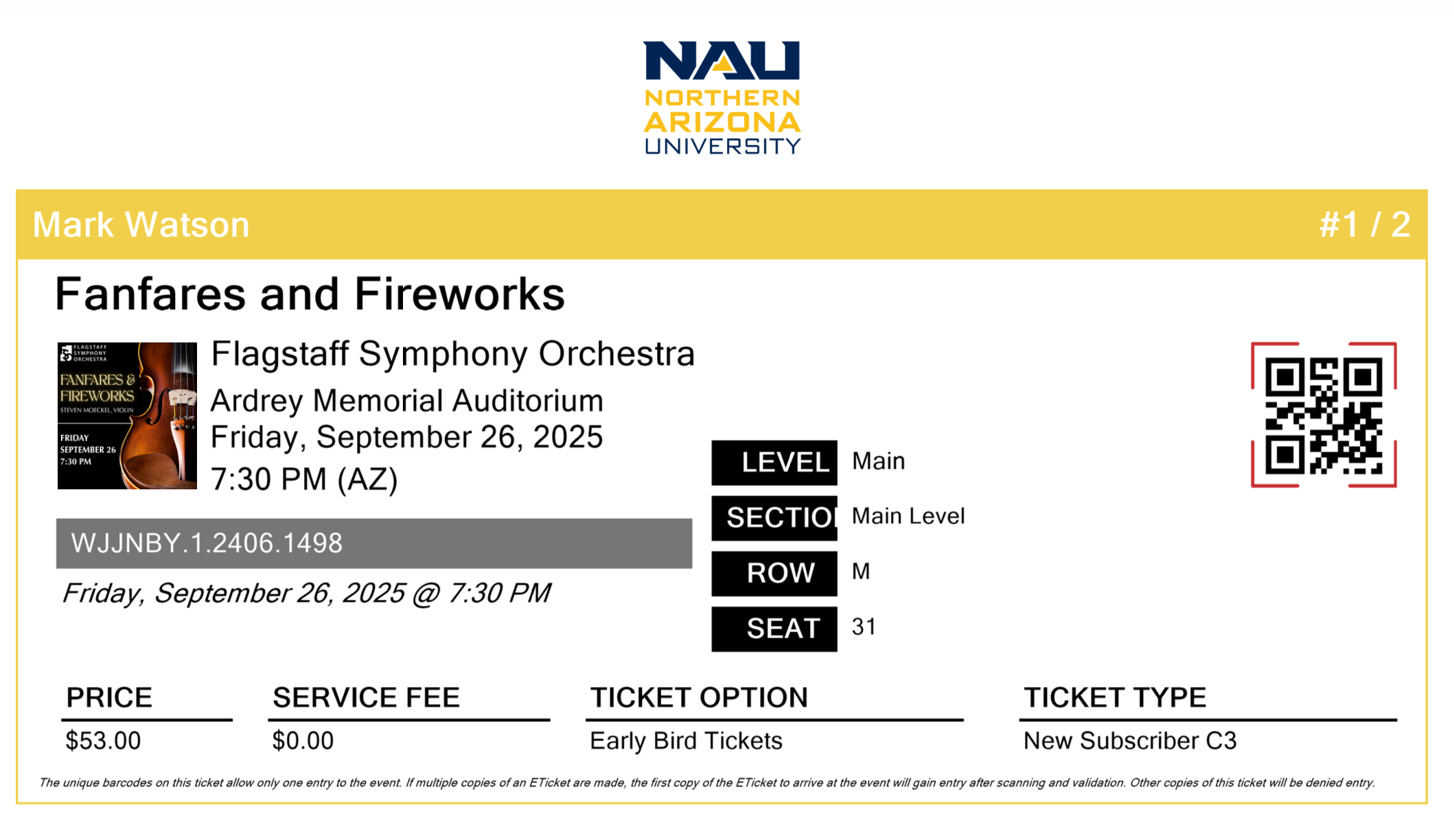
Here is an example of asking a vision model to describe an image:
 1 import ollama
 2
 3 # Specify the path to the image file to be analyzed
 4 image_path = "ticket.png"
 5
 6 # Send the image to the vision-capable model for a detailed description
 7 response = ollama.chat(
 8     model="qwen3.5:0.8b",  # Ensure you use a vision-capable model
 9     messages=[
10         {
11             "role": "user",
12             "content": "Describe this image in detail",
13             "images": [image_path],
14         }
15     ],
16     think=False,  # Suppresses the <think> reasoning block
17 )
18
19 # Print the model's descriptive analysis of the image
20 print(response.message.content)
Here is abbreviated output from running this example:
 1 $ uv run image_to_text_description.py
 2 This image is an event ticket from **Northern Arizona
 3 University (NAU)** for a performance called **"Fanfares
 4 and Fireworks."**
 5
 6 **Event Details**
 7 - **Event Name**: *Fanfares and Fireworks*
 8 - **Event Date**: Friday, September 26, 2025
 9 - **Time**: 7:30 PM (AZ)
10 - **Venue**: Ardrey Memorial Auditorium
11 - **Performance**: Flagstaff Symphony Orchestra
12
13 **Ticket Information**
14 - **Ticket Type**: *Early Bird Tickets* / *New Subscriber C3*
15 - **Ticket Price**: $53.00 (Service Fee: $0.00)
16 - **Section**: Main Level, Row M, Seat 31
17
18 A QR code is displayed on the right side of the ticket
19 for scanning at the venue.
Even this small 0.8B-parameter vision model extracts detailed structured information from the ticket image: event details, pricing, seating, and layout elements. This simple capability makes it easy to add image understanding to your local applications without needing complex computer vision pipelines.
One Client for Every Provider
Ollama exposes an OpenAI-compatible API endpoint — the same protocol litellm speaks to every provider. The local server is therefore not a special case; it is simply the ollama_chat provider, and the code below runs unchanged against a cloud API:
 1 import os
 2
 3 import litellm
 4
 5 # LLM_MODEL rather than LITELLM_MODEL: litellm already owns the LITELLM_*
 6 # environment namespace for its own settings.
 7 MODEL = os.environ.get("LLM_MODEL", "ollama_chat/llama3.2:3b")
 8
 9 response = litellm.completion(
10     model=MODEL,
11     messages=[
12         {"role": "system", "content": "You are a helpful assistant."},
13         {
14             "role": "user",
15             "content": "What is the difference between a list and a tuple in Python?",
16         },
17     ],
18     temperature=0.7,
19 )
20 assert isinstance(response, litellm.ModelResponse), "Expected a non-streaming response"
21
22 print(f"model: {MODEL}")
23 print(response.choices[0].message.content)
Set LLM_MODEL to a cloud model to send the same request elsewhere:
1 LLM_MODEL=fireworks_ai/accounts/fireworks/models/deepseek-v4p1-flash \
2     uv run python ollama_openai_compat.py
That one-variable switch is the whole point of routing every example through litellm: you can prototype against a local model and move to a hosted one — for speed, capability, or a larger context window — without rewriting the code.
Alternative Tools for Running Local Models
While Ollama is the system I usually use for running local models, several alternatives exist:
llama.cpp: The C++ inference engine that Ollama is built on. Use it directly if you need maximum control over quantization, batching, or want to embed inference in a C/C++ application. Available at github.com/ggerganov/llama.cpp.
LM Studio: A desktop application with a graphical interface for downloading, managing, and chatting with local models. Good for non-programmers or for quickly trying different models. Available at lmstudio.ai.
vLLM: A high-performance inference server optimized for throughput. Best suited for serving models to multiple users in production. Requires more GPU memory but can handle many concurrent requests efficiently. Available at github.com/vllm-project/vllm.
Hugging Face Transformers: The transformers Python library can load and run models directly. This gives you the most flexibility for fine-tuning and custom inference pipelines, but requires more setup and GPU memory management. Best for researchers and advanced users.
For most developers getting started with local models, Ollama provides the best balance of simplicity and capability.
Hardware Considerations
The amount of memory you need depends on the model size:
| Model Parameters | Quantized Size | Minimum RAM/VRAM |
|---|---|---|
| 1-3B | 1-2 GB | 8 GB RAM |
| 7-8B | 4-5 GB | 16 GB RAM |
| 14B | 8-9 GB | 16 GB RAM |
| 32-70B | 18-40 GB | 32-64 GB RAM |
On macOS with Apple Silicon (M1/M2/M3/M4), models run on the GPU using unified memory, which means your total system RAM is also your GPU memory. A MacBook with 16 GB of RAM can comfortably run 7-8B parameter models, and 32 GB or more enables larger models.
On Linux and Windows, a dedicated NVIDIA GPU with sufficient VRAM provides the best performance. Models can also run on CPU only, but inference is significantly slower (roughly 5-10x slower than GPU for most models).
Summary
Running LLMs locally with Ollama gives you a private, cost-free, offline-capable alternative to cloud APIs. The setup is straightforward: install Ollama, pull a model, and start making API calls from Python. Features like streaming, conversation memory, prompt caching, and reasoning models make local models practical for many real applications.
The main tradeoff is capability: the largest models that run locally (7-14B parameters on typical hardware) are less capable than frontier cloud models with hundreds of billions of parameters. For many tasks (code assistance, text summarization, data extraction, conversational interfaces), local models perform well enough, and the privacy and cost benefits make them the better choice.
Optional Practice Problems
Here are some exercises to help you apply the concepts from this chapter and extend the existing code examples.
1. Interactive Streaming Chat Loop (Easy)
- Objective: Extend ollama_streaming.py to create a command-line chat interface. Instead of a single hardcoded query, prompt the user for input in a loop, stream the model’s responses to the console in real-time, and exit when the user types
exitorquit. - Key Concepts: Input loops, real-time output streaming with
flush=True, basic text generation.
2. Context Window and History Management (Medium)
- Objective: Modify the LocalAssistant class in ollama_memory.py to handle context limits. Implement a maximum history size (e.g.,
 messages). When the conversation history exceeds this limit, the assistant should discard the oldest user/assistant exchanges. However, make sure that the original system prompt is always preserved at the beginning of the message history.
- Key Concepts: System prompt preservation, sliding window list management, message history truncation.
3. Extracting Structured JSON from Vision Models (Medium)
- Objective: Modify image_to_text_description.py to ask the local vision model to extract structured data from
ticket.pngas a raw JSON block. Instruct the model to return keys likeevent_name,date,time,venue, andprice. In your Python code, parse the model’s output using Python’s built-injsonmodule, print the resulting dictionary, and handle any parsing errors. - Key Concepts: Vision model prompting, structured output format directives, output parsing with JSON.
4. Multi-Model Answer Verification (Hard)
- Objective: Create a Python script that implements a multi-model validation pipeline. First, use reason_about from ollama_reasoning.py with
ollama_chat/deepseek-r1:7bto solve a logic puzzle (such as a word riddle or math problem). Then, extract the<think>reasoning trace and final answer. Finally, query a smaller general-purpose model likeollama_chat/llama3.2:3bwith litellm, passing it both the original question and the reasoning trace, and ask it to verify whether the final answer is logically correct based on the reasoning trace. - Key Concepts: Multi-model collaboration, chain-of-thought verification, automated self-correction/grading.