Knowledge Graph Visualization with Hy and GraphViz
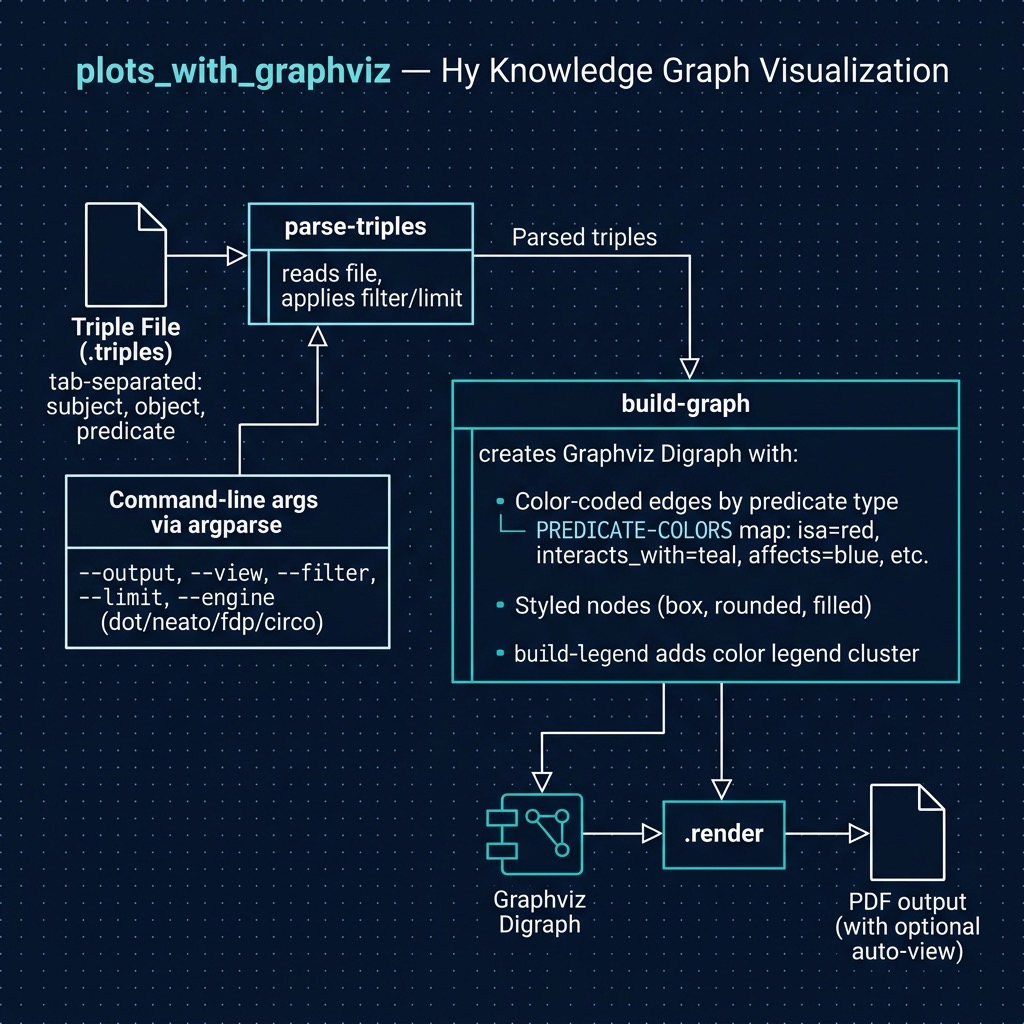
This chapter demonstrates a practical Hy application that parses UMLS (Unified Medical Language System) RDF triples and generates visual knowledge graphs. You’ll learn how to process structured data, build command-line interfaces, and create visualizations—all using Hy’s elegant Lisp syntax.
What This Program Does
The UMLS_graph.hy script:
- Parses triple files - Tab-separated files with subject, object, and predicate columns
- Builds directed graphs - Creates visual representations of relationships
- Color-codes edges - Different predicates get different colors for easy identification
- Generates PDF output - Uses Graphviz for professional-quality renderings
The Input Data Format
The program reads .triples files with this format:
1 subject object predicate
Example from test.triples:
1 steroid             eicosanoid          interacts_with
2 clinical_attribute  conceptual_entity   isa
3 neoplastic_process  disease_or_syndrome isa
Each line represents a relationship: “steroid interacts_with eicosanoid”, “clinical_attribute isa conceptual_entity”, etc.
Complete Annotated Source Code
 1 #!/usr/bin/env hy
 2 ;; UMLS RDF Triple Graph Visualizer
 3 ;;
 4 ;; Renders a directed graph from tab-separated triple files (subject, object, predic\
 5 ate).
 6 ;;
 7 ;; Usage:
 8 ;;   hy UMLS_graph.hy [OPTIONS] [input_file]
 9 ;;
10 ;; Options:
11 ;;   -o, --output NAME    Output file name (default: umls_graph)
12 ;;   -v, --view           Auto-open the generated PDF
13 ;;   -f, --filter PRED    Filter by predicate type (e.g., interacts_with)
14 ;;   -l, --limit N        Limit to first N triples
15 ;;   -e, --engine ENGINE  Layout engine: dot, neato, fdp, circo (default: dot)
16 ;;
17 ;; Examples:
18 ;;   hy UMLS_graph.hy test.triples
19 ;;   hy UMLS_graph.hy -v -l 50 test.triples
20 ;;   hy UMLS_graph.hy --filter isa --engine neato test.triples -o isa_graph
21
22 (import sys
23         argparse
24         graphviz [Digraph])
Imports and Module Structure
The import statement in Hy follows Python’s import semantics but with Lisp syntax:
1 (import sys
2         argparse
3         graphviz [Digraph])
This is equivalent to Python’s:
1 import sys
2 import argparse
3 from graphviz import Digraph
The square brackets [Digraph] extract a specific name from the graphviz module.
Defining Constants with setv
 1 ;; Color palette for predicates (maps predicate types to colors)
 2 (setv PREDICATE-COLORS
 3   {"isa" "#FF6B6B"              ; red for hierarchy
 4    "interacts_with" "#4ECDC4"   ; teal for interactions
 5    "affects" "#45B7D1"          ; blue
 6    "causes" "#96CEB4"           ; green
 7    "part_of" "#FFEAA7"          ; yellow
 8    "location_of" "#DDA0DD"      ; purple
 9    "treats" "#98D8C8"           ; mint
10    "result_of" "#F7DC6F"        ; gold
11    "process_of" "#BB8FCE"       ; lavender
12    "produces" "#85C1E9"         ; light blue
13    "disrupts" "#E74C3C"         ; dark red
14    "complicates" "#F39C12"      ; orange
15    "manifestation_of" "#1ABC9C" ; turquoise
16    "degree_of" "#95A5A6"        ; gray
17    "adjacent_to" "#E67E22"})    ; dark orange
Key Hy concepts:
-
setv- Binds a value to a variable (equivalent to Python’s assignment) -
{}- Dict literals use curly braces -
;- Comments start with semicolons - Hyphenated names like
PREDICATE-COLORSbecomePREDICATE_COLORSin Python
Defining Functions with defn
1 (defn get-predicate-color [predicate]
2   "Return color for predicate, or default gray if not mapped"
3   (.get PREDICATE-COLORS predicate "#CCCCCC"))
Anatomy of a function definition:
-
defn- The function definition macro -
get-predicate-color- Function name (becomesget_predicate_colorin Python) -
[predicate]- Parameter list in square brackets -
"Return color..."- Optional docstring (recommended!) -
(.get PREDICATE-COLORS predicate "#CCCCCC")- The function body
Method call syntax: The . macro in Hy has two forms:
-
(.obj method args)- Callobj.method(args) -
(. obj method args)- Alternative form (less common)
Here (.get PREDICATE-COLORS predicate "#CCCCCC") calls the dict’s get method.
List Comprehensions with lfor
The parse-triples function showcases Hy’s powerful lfor macro:
 1 (defn parse-triples [filepath limit filter-pred]
 2   "Parse triple file, return filtered list of (subject object predicate) tuples"
 3   (with [f (open filepath "r")]
 4     (setv triples (lfor line (.readlines f)
 5                         :setv tokens (.split (.strip line))
 6                         :if (= (len tokens) 3)
 7                         :setv [subj obj pred] tokens
 8                         :if (or (not filter-pred) (= pred filter-pred))
 9                         (tuple [subj obj pred])))
10     ;; Apply limit if specified
11     (if limit
12       (cut triples 0 limit)
13       triples)))
Breaking down the lfor:
1 (lfor line (.readlines f)           ; iterate over lines
2       :setv tokens (.split (.strip line))  ; bind intermediate value
3       :if (= (len tokens) 3)         ; filter: only 3-token lines
4       :setv [subj obj pred] tokens   ; destructure the tokens
5       :if (or (not filter-pred) (= pred filter-pred))  ; filter by predicate
6       (tuple [subj obj pred]))       ; result expression
Python equivalent:
1 triples = []
2 for line in f.readlines():
3     tokens = line.strip().split()
4     if len(tokens) == 3:
5         subj, obj, pred = tokens
6         if not filter_pred or pred == filter_pred:
7             triples.append((subj, obj, pred))
Key lfor clauses:
| Clause | Purpose | Example |
|---|---|---|
:setv |
Bind intermediate values | :setv x (calculate y) |
:if |
Filter elements | :if (> x 10) |
:for |
Nested iteration | :for x items |
:when |
Conditional processing | :when (valid? x) |
Context Managers with with
1 (with [f (open filepath "r")]
2   ;; f is available here
3   ;; file is automatically closed when exiting scope
4   (setv triples (lfor ...)))
The with statement in Hy uses square brackets for the binding:
1 (with [resource (create-resource)]
2   ;; use resource
3   )
Building the Graph
 1 (defn build-graph [triples engine]
 2   "Build graphviz Digraph from list of triples with color-coded edges"
 3   (setv g (Digraph :comment "UMLS Knowledge Graph"
 4                    :format "pdf"
 5                    :engine engine))
 6
 7   ;; Graph-level attributes for better layout (using keyword args)
 8   (.attr g :rankdir "LR" :splines "true" :overlap "false"
 9            :fontsize "10" :fontname "Helvetica")
10   (.attr g "node" :shape "box" :style "rounded,filled" :fillcolor "#E8F4FD"
11            :fontsize "10" :fontname "Helvetica")
12   (.attr g "edge" :fontsize "8" :fontcolor "gray40" :fontname "Helvetica"
13            :arrowsize "0.7")
14   ...)
Keyword arguments in Hy:
- Use
:keyword valuesyntax for keyword arguments -
:comment "UMLS Knowledge Graph"passescomment="UMLS Knowledge Graph"to Python
F-String Syntax
1 (print f"Reading triples from {args.input_file}...")
2 (print f"Parsed {(len triples)} triples with {(len unique-nodes)} unique nodes")
Hy f-strings require parentheses around expressions:
1 f"value: {(len items)}" ; Note parentheses around (len items)
Exception Handling
1 (try
2   (setv triples (parse-triples args.input_file args.limit args.filter))
3   (except [e FileNotFoundError]
4     (print f"Error: File '{args.input_file}' not found")
5     (sys.exit 1))
6   (except [e Exception]
7     (print f"Error parsing file: {e}")
8     (sys.exit 1)))
Hy try/except syntax:
1 (try
2   body-expressions...
3   (except [ExceptionTypeName as variable-name]
4     handler-expressions...))
Conditional Execution with when
1 (when (= (len triples) 0)
2   (if args.filter
3     (print f"Error: No triples found matching predicate '{args.filter}'")
4     (print "Error: No triples found"))
5   (sys.exit 1))
when is a convenient single-branch conditional—execute body only if condition is true.
The Main Entry Point
1 (when (= __name__ "__main__")
2   (main))
This is equivalent to Python’s:
1 if __name__ == "__main__":
2     main()
Running the Program
Basic Usage
 1 # Using default settings
 2 uv run hy UMLS_graph.hy test.triples
 3
 4 # Specify output file
 5 uv run hy UMLS_graph.hy -o my_graph test.triples
 6
 7 # Limit to 50 triples
 8 uv run hy UMLS_graph.hy -l 50 test.triples
 9
10 # Filter by predicate type
11 uv run hy UMLS_graph.hy --filter isa test.triples
12
13 # Use different layout engine
14 uv run hy UMLS_graph.hy --engine neato test.triples
15
16 # Auto-open the PDF
17 uv run hy UMLS_graph.hy -v test.triples
Layout Engine Options
| Engine | Best For |
|---|---|
dot |
Hierarchical layouts (default) |
neato |
Force-directed, unconstrained graphs |
fdp |
Force-directed placement |
circo |
Circular layouts |
Project Setup
The pyproject.toml defines dependencies:
 1 [project]
 2 name = "UMLS-Graph"
 3 version = "0.1.0"
 4 requires-python = ">=3.10"
 5 dependencies = [
 6     "hy",
 7     "graphviz",
 8 ]
 9
10 [build-system]
11 requires = ["hatchling"]
12 build-backend = "hatchling.build"
Install with:
1 uv sync
Key Hy Concepts Demonstrated
| Concept | Hy Syntax | Python Equivalent |
|---|---|---|
| Variable binding | (setv x 10) |
x = 10 |
| Function definition | (defn name [args] body) |
def name(args): body |
| Method calls | (.obj method args) |
obj.method(args) |
| List comprehension | (lfor x items expr) |
[expr for x in items] |
| F-strings | f"value: {(len x)}" |
f"value: {len(x)}" |
| Dictionary | {"key" value} |
{"key": value} |
| Try/except | (try body (except [E as e] handle)) |
try: body except E as e: handle |
| With statement | (with [r (create)] body) |
with create() as r: body |
| Conditionals | (when condition body) |
if condition: body |
Summary
This chapter demonstrated a real-world Hy application that:
- Parses structured data files with list comprehensions
- Builds command-line interfaces with
argparse - Creates visualizations with the
graphvizlibrary - Handles errors gracefully with try/except
- Uses idiomatic Hy patterns throughout
The combination of Lisp’s elegance and Python’s ecosystem makes Hy ideal for data processing and visualization tasks. This example scales from dozens to thousands of triples while maintaining readable, maintainable code.
Optional Practice Problems
-
Extend Predicate Colors: The current implementation defines a static dictionary of predicate colors
PREDICATE-COLORSin UMLS_graph.hy. Add a new mapping for a custom predicate (e.g."uses"with a color like"#FF00FF"), and create or modify a line in test.triples to use this new predicate. Verify that the generated output PDF reflects this custom color. -
Interactive Node Filtering: Currently, the program allows filtering the graph by predicate using the
-f/--filtercommand-line argument. Extend the command-line parser in theparse-argsfunction in UMLS_graph.hy to accept a new option-n/--node. Then, modify the list comprehension inside theparse-triplesfunction in UMLS_graph.hy to only return triples where either the subject or the object matches the specified node name. -
Support Alternative Formats (SVG/PNG Export): The
build-graphfunction in UMLS_graph.hy initializes theDigraphconstructor with a hardcoded format of"pdf". Modify UMLS_graph.hy to accept a new command-line argument-t/--type(for example, with choices"pdf","png", or"svg") usingargparse, and pass this format dynamically toDigraph.