Running Local LLMs Using Ollama
We saw in previous chapters how to use LLMs from commercial providers, for example GPT-5 from OpenAI and Gemini-3-flash from Google. Here we run smaller models on our own laptops or servers. You need to install Ollama: https://ollama.com.
The examples for this chapter are in the directory hy-lisp-python-book/source_code_for_examples/ollama_examples.
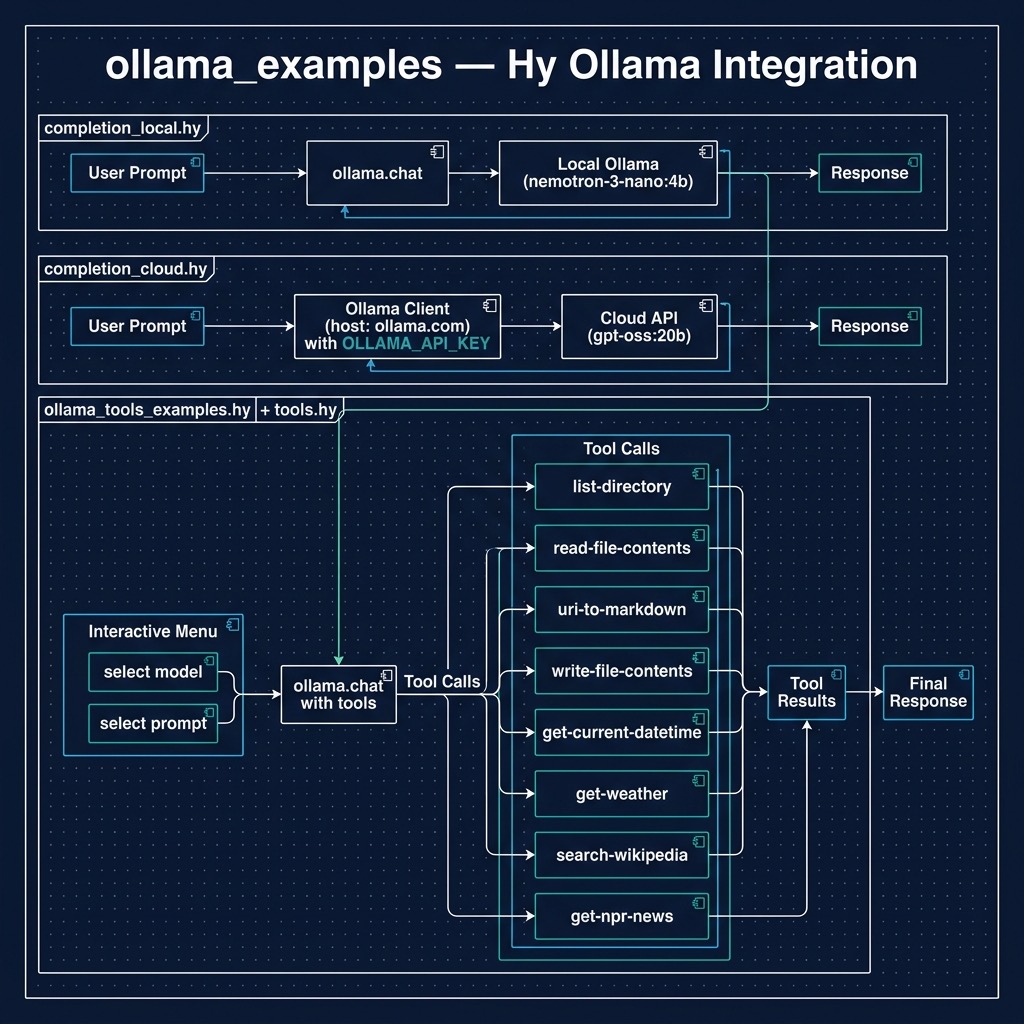
Install Ollama and then download a model we will experiment with:
1 $ ollama pull nemotron-3-nano:4b
2 $ ollama serve
The first line is run one time to download a model. The second line is run whenever you want to call the local Ollama service.
Ollama also provides a cloud service that can be used for occasional experiments for free. Examples in this chapter work with local models and if you sign up to get an API key and set the environment variable OLLAMA_API_KEY to your key then you can experiment also with the cloud examples.
Completions
Here we look at a “hello world” type simple example: we pass a text prompt to a local Ollama server instance. This is similar to previous examples for GPT-5 and Gemini-3-flash.
The example code is in the file completion_local.hy and uses a local model:
(import ollama)

(defn completion [prompt]
  ; Initiate chat with the model
  (setv response
        (ollama.chat
          :model "nemotron-3-nano:4b"
          :messages [{"role" "user" "content" user-prompt}]))
  (print response)
  (return response.message.content))

;;;; Test code:

; User prompt
(setv
  user-prompt
  "Sally is 77, Bill is 32, and Alex is 44 years old. Pairwise, what are their age d\
ifferences? Be concise."
  )

(print
 (completion user-prompt))
The output looks like (debug printout not shown):
$ uv run hy completion_local.hy
Using CPython 3.12.12
Creating virtual environment at: .venv
Installed 18 packages in 10ms
Sally-Bill: 45 years
Sally-Alex: 33 years
Bill-Alex: 12 years
Cloud Model Completion Example
If you set the environment variable OLLAMA_API_KEY then you can also use the example completion_cloud.hy:
 1 ; Ensure OLLAMA_API_KEY is set in ENV
 2
 3 (import os)
 4 (import ollama [Client])
 5
 6 ; Create client for Ollama Cloud API
 7 (setv client
 8   (Client
 9     :host "https://ollama.com"
10     :headers {"Authorization" (.get os.environ "OLLAMA_API_KEY")}))
11
12 (defn completion [prompt]
13   "Generate a completion using the Ollama Cloud API"
14   (setv response
15         (client.chat
16           "gpt-oss:20b"
17           :messages [{"role" "user" "content" prompt}]
18           :stream False))
19   (get (get response "message") "content"))
20
21 ;;;; Test code:
22
23 ; User prompt
24 (setv
25   user-prompt
26   "Sally is 77, Bill is 32, and Alex is 44 years old. Pairwise, what are their age d\
27 ifferences? Be concise."
28   )
29
30 (print
31  (completion user-prompt))
Tool Use
In the context of this book using tools means that we define functions in the Hy language and configure a Large Language Model to use these tools.
The example for this section ollama_tools_examples.hy works with local models and also cloud models if you have OLLAMA_API_KEY set. This example will show you a list of all available models (locally downloaded and any cloud models where you have pulled a tiny stub using, for example ollama pull deepseek-v3.1:671b-cloud) and you can select any model, then select from a list of prompts designed to test all tools defined in the file tools.hy.
Integrating tool use with Ollama represents a pivotal step in the evolution of local AI, bridging the gap between offline language models and interactive, real-world applications. This capability, often referred to as function calling, allows LLMs running on your own hardware to execute external code and query APIs, breaking the confines of their static training data. By equipping a local model with tools, developers can empower applications using LLMs to, for example, fetch live weather data, search a database, or control other software services. This transforms the LLM from a simple text-generation engine into a dynamic agent capable of performing complex, multi-step tasks and interacting directly with its environment, all while maintaining the privacy and control inherent to the Ollama ecosystem.
Use of Python docstrings at runtime: the Ollama Python SDK leverages docstrings as a crucial part of its runtime function calling mechanism. When defining functions that will be called by the LLM, the docstrings serve as structured metadata that gets parsed and converted into a JSON schema format. This schema describes the function’s parameters, their types, and expected behavior, which is then used by the model to understand how to properly invoke the function. The docstrings follow a specific format that includes parameter descriptions, type hints, and return value specifications, allowing the SDK to automatically generate the necessary function signatures that the LLM can understand and work with.
During runtime execution, when the LLM determines it needs to call a function, it first reads these docstring-derived schemas to understand the function’s interface. The SDK parses these docstrings using Python’s introspection capabilities (through the inspect module) and matches the LLM’s intended function call with the appropriate implementation. This system allows for a clean separation between the function’s implementation and its interface description, while maintaining human-readable documentation that serves as both API documentation and runtime function calling specifications. The docstring parsing is done lazily at runtime when the function is first accessed, and the resulting schema is typically cached to improve performance in subsequent calls.
Here is the sample tools library defined in tools.hy. This implementation defines a suite of functional tools designed for Large Language Model (LLM) orchestration, specifically tailored for the Ollama ecosystem. By leveraging Hy’s symbolic expression syntax, the code provides a clean, declarative approach to common side-effect operations such as filesystem manipulation, network requests, and data transformation. The module imports standard Python libraries like os, httpx, and xml.etree.ElementTree alongside third-party utilities like markdownify, demonstrating how seamlessly Hy bridges the gap between functional programming paradigms and the vast Python ecosystem. Each function ranging from directory listing and file I/O to real-time weather fetching and NPR news aggregation—is structured with clear docstrings and metadata, making them ideal candidates for “Function Calling” or “Tool Use” within an agentic LLM framework where the model must interact with the external world to fulfill complex user queries.
(import os)
(import httpx)
(import markdownify [markdownify])
(import datetime [datetime])
(import xml.etree.ElementTree :as ET)

(defn list-directory []
  "Lists files and directories in the current working directory"
  ; Args:
  ;   None
  ; Returns:
  ;   string containing the current directory name, followed by list of files in the\
 directory
  (setv current-dir (os.path.realpath "."))
  (setv files (os.listdir current-dir))

  (return f"Contents of current directory {current-dir} is: {files}"))

(defn read-file-contents [file-path]
  "Reads the contents of a file, given an input file-path"
  ; Args:
  ;   file-path: The path to the file
  ; Returns:
  ;   The contents of the file as a string
  (with [f (open file-path "r")]
    (.read f)))

(defn uri-to-markdown [uri]
  "Fetches HTML from a URI and converts it to markdown."
  (setv response (httpx.get uri))
  (.raise-for-status response)
  ; Convert the HTML text to Markdown
  (setv md (markdownify response.text))
  (return f"# Content from {uri}\n\n{md}"))

(defn write-file-contents [file-path content]
  "Writes the provided content to a file, given an input file-path"
  (with [f (open file-path "w")]
    (.write f content))
  (return f"Successfully wrote to {file-path}"))

(defn get-current-datetime []
  "Returns the current system date and time as a string"
  (return (.strftime (datetime.now) "%Y-%m-%d %H:%M:%S")))

(defn get-weather [location]
  "Fetches current weather data for a given city or region"
  (setv response (httpx.get f"https://wttr.in/{location}?format=3"))
  (.raise-for-status response)
  (return (.strip response.text)))

(defn search-wikipedia [query]
  "Takes a search query and returns an introductory summary paragraph from Wikipedia"
  (setv url f"https://en.wikipedia.org/api/rest_v1/page/summary/{query}")
  (setv url (.replace url " " "_"))
  (setv headers {"User-Agent" "OllamaToolsExample/1.0 (https://github.com/markwatson\
/ollama_cloud_examples)"})
  (setv response (httpx.get url :headers headers))
  (if (= response.status_code 200)
    (do
      (setv data (.json response))
      (return (get data "extract")))
    (return f"Failed to fetch Wikipedia page for {query}")))

(defn get-npr-news []
  "Fetches the top daily news headlines and summaries from NPR's public RSS feed"
  (setv headers {"User-Agent" "OllamaToolsExample/1.0 (https://github.com/markwatson\
/ollama_cloud_examples)"})
  (setv response (httpx.get "https://feeds.npr.org/1001/rss.xml" :headers headers))
  (.raise-for-status response)
  (setv root (ET.fromstring response.text))
  (setv items (get (.findall root "./channel/item") (slice 0 5)))
  (setv news-md "# NPR Top News\n\n")
  (for [item items]
    (setv title (. (item.find "title") text))
    (setv desc (. (item.find "description") text))
    (setv link (. (item.find "link") text))
    (setv news-md (+ news-md f"## [{title}]({link})\n{desc}\n\n")))
  (return news-md))
The code demonstrates a robust pattern for extending LLM capabilities through external API integrations and local system access. Functions like search-wikipedia and get-npr-news showcase how to handle HTTP headers and parse varied data formats, such as JSON and RSS/XML, converting the raw results into Markdown strings that are easily digestible by an LLM’s context window. The use of the httpx library ensures efficient, modern synchronous requests, while the integration of markdownify in the uri-to-markdown function helps strip away the “noise” of HTML tags, leaving only the semantic content for the model to process.
From a structural standpoint, these tools are built to be self-contained and modular. Each function follows a predictable “Input-Process-Output” flow, returning string-based feedback that can be piped directly back into a LLM chat completion loop. By providing the model with access to the list-directory and read-file-contents utilities, you effectively give the AI a “workspace” to explore and analyze, while the get-current-datetime function solves the common LLM limitation regarding temporal awareness. This collection serves as a practical blueprint for building any Hy language based agent that requires more than just static training data to provide accurate, real-time assistance.
In the next example in file ollama_tools_examples.hy we will configure a LLM to call the tools (or functions) defined in the last code listing. Note that this example works with both local and Ollama Cloud models.
This script provides a practical test harness for evaluating “Tool Use” or “Function Calling” capabilities across different models hosted on a local Ollama instance and also Ollama Cloud. By importing the toolset defined in the previous section, the program establishes a dynamic environment where an LLM can choose to execute specific Hy functions based on the user’s natural language input. The implementation features a sophisticated model selection loop that filters for cloud-based or local models depending on the presence of an OLLAMA_API_KEY, followed by an interactive menu of predefined prompts designed to exercise various tool categories. By bridging the gap between a high level client.chat call and the execution of local Hy logic, this code demonstrates how to effectively close the loop in an agentic workflow: identifying the model’s intent to use a tool, dispatching that intent to a Python-backed function, and surfacing the result back to the console.
; Ensure OLLAMA_API_KEY is set in ENV

(import os)
(import ollama [Client])

(import tools  [list-directory])
(import tools  [read-file-contents])
(import tools  [uri-to-markdown])
(import tools  [write-file-contents])
(import tools  [get-current-datetime])
(import tools  [get-weather])
(import tools  [search-wikipedia])
(import tools  [get-npr-news])

; Create client for local Ollama instance (which routes to cloud)
(setv api-key (.get os.environ "OLLAMA_API_KEY"))
(setv client (Client :host "http://127.0.0.1:11434"))

; Map function names to function objects
(setv available-functions {
  "list_directory" list-directory
  "read_file_contents" read-file-contents
  "uri_to_markdown" uri-to-markdown
  "write_file_contents" write-file-contents
  "get_current_datetime" get-current-datetime
  "get_weather" get-weather
  "search_wikipedia" search-wikipedia
  "get_npr_news" get-npr-news
})

(setv prompts [
  "List the files in the current directory."
  "Read the content of 'requirements.txt'."
  "Convert 'https://en.wikipedia.org/wiki/Hy_(programming_language)' to markdown."
  "Write 'Hello from Ollama tools!' to a file named 'test_output.txt'."
  "What is the current date and time?"
  "What is the weather in London?"
  "Search Wikipedia for 'Lisp (programming language)' and give me a summary."
  "What are the latest news headlines from NPR?"
])

(defn get-available-models []
  (try
    (do
      (setv response (client.list))
      (setv model-names (lfor r response.models r.model))
      (if api-key
          model-names
          (lfor m model-names :if (not (or (.endswith m ":cloud") (.endswith m "-clo\
ud"))) m)))
    (except [e Exception]
      (print "Error fetching models:" e)
      [])))

(while True
  (setv models (get-available-models))
  (when (not models)
      (print "No models found or error fetching models. Check your API key and conne\
ction.")
      (break))

  (print "\n--- Available Models ---")
  (for [[i m] (enumerate models)]
    (print f"{ (+ i 1) }. { m }"))
  (print f"{ (+ (len models) 1) }. Exit")

  (try
    (do
      (setv m-choice (input "\nSelect a model (number): "))
      (if (= m-choice (str (+ (len models) 1)))
          (break)
          (do
            (setv m-idx (- (int m-choice) 1))
            (when (or (< m-idx 0) (>= m-idx (len models)))
                (print "Invalid model choice.")
                (continue))
            (setv selected-model (get models m-idx))

            (while True
              (print f"\n--- Ollama Tools Test Menu (Model: {selected-model}) ---")
              (for [[i p] (enumerate prompts)]
                (print f"{ (+ i 1) }. { p }"))
              (print f"{ (+ (len prompts) 1) }. Back to Model Selection")

              (setv choice (input "\nSelect a prompt (number): "))

              (when (= choice (str (+ (len prompts) 1)))
                  (break))

              (setv idx (- (int choice) 1))
              (when (or (< idx 0) (>= idx (len prompts)))
                  (print "Invalid choice. Please select a number from the menu.")
                  (continue))

              (setv user-prompt (get prompts idx))
              (print f"\n>>> Executing prompt: {user-prompt}\n")

              ; Initiate chat with the model using Ollama Cloud API
              (setv response (client.chat
                selected-model
                :messages [{"role" "user" "content" user-prompt}]
                :tools [list-directory
                        read-file-contents
                        uri-to-markdown
                        write-file-contents
                        get-current-datetime
                        get-weather
                        search-wikipedia
                        get-npr-news]
              ))

              ; Process the model's response
              (if response.message.tool_calls
                  (for [tool-call response.message.tool_calls]
                    (print f"Tool Call: {tool-call.function.name}")
                    (setv function-to-call (.get available-functions tool-call.funct\
ion.name))
                    (if function-to-call
                      (do
                        (setv result (function-to-call #** tool-call.function.argume\
nts))
                        (print f"\n** Output of {tool-call.function.name}: {result}"\
))
                      (print f"\n** Function {tool-call.function.name} not found.")))
                  (print f"Model Response: {response.message.content}"))))))

    (except [e ValueError]
      (print "Please enter a valid number."))
    (except [e Exception]
      (print f"\nError during execution: {e}"))))
The architectural core of this script lies in the available-functions mapping and the way it integrates with the Ollama tool_calls response object. When the LLM determines that a specific task—such as checking the weather or reading a file—requires external data, it returns a structured request rather than a text response. The script intercepts these requests, looks up the corresponding Hy function by name, and executes it using Python’s “double-splat” (#**) keyword argument unpacking. This allows the model to pass complex parameters directly into the Hy functions, such as the location for a weather check or a uri for Markdown conversion, with minimal boilerplate.
Furthermore, the script provides an excellent look at how to manage state and connectivity in an LLM application. By wrapping the model listing and prompt selection in while loops and try-except blocks, the code handles common runtime issues like invalid user input or connection errors to the Ollama server. This interactive approach not only makes the system easier to debug but also serves as a template for more complex AI agents that might need to switch between different models or handle a diverse array of specialized tools depending on the current task context.
Wrap Up for Running Local LLMs Using Ollama
I spend most of my development time working with smaller LLMs running on Ollama (LM Studio is another good choice for running locally).
There are obvious privacy and security advantages running LLMs locally and very interesting and useful engineering problems can sometimes be solved with smaller models.
Optional Practice Problems
Here are a few optional practice problems to help you build a deeper understanding of local LLM tool use and structured outputs using the Hy language:
-
Implement a New API Tool:
Modify tools.hy to add a new tool function, such as
get-github-user-bio(which queries the public GitHub API for a user’s bio) orget-joke(which fetches a programming joke from a public API likehttps://icanhazdadjoke.com/). Remember to provide a clear docstring explaining the parameters so that Ollama can parse the metadata schema correctly. Update theavailable-functionsmapping and the:toolslist in ollama_tools_examples.hy to register and test your new tool. -
Complete the Tool-Use Loop (Multi-Turn Chat):
In ollama_tools_examples.hy, when the model requests a tool call, the script executes the Hy function locally and prints its output to the console. However, it does not send the tool’s response back to the LLM to generate a final answer. Modify the script to append the tool’s output as a new message with the role
"tool"(or"user", depending on the model’s specification) and send the entire conversation history back to the model usingclient.chatto receive the final synthesized response. -
Enforce Structured JSON Outputs:
Modify the completion function in completion_local.hy to request structured JSON output from Ollama. You can pass
:format "json"toollama.chatand instruct the model in your prompt to return the age differences as a JSON array of objects (e.g.,[{"person1": "Sally", "person2": "Bill", "difference": 45}]). Use Python’sjsonlibrary to parse the returned content and print it as a Hy dictionary.