Natural Language Processing
I have been working in the field of Natural Language Processing (NLP) since 1985 so I ‘lived through’ the revolutionary change in NLP that has occurred since 2014: deep learning results out-classed results from previous symbolic methods.
We won’t be Large Language Models (LLMs) in this chapter, we will cover LLMs in six chapters at the end of this book. Here we use the spaCy NLP library that is simple to use and provides good results.
I will not cover older symbolic methods of NLP here, rather I refer you to my previous books Practical Artificial Intelligence Programming With Java, [Loving Common Lisp, The Savvy Programmer’s Secret Weapon, and Haskell Tutorial and Cookbook for examples. We get better results using Deep Learning (DL) for NLP and the library spaCy (https://spacy.io) that we use in this chapter provides near state-of-the-art performance. The authors of spaCy frequently update it to use the latest breakthroughs in the field.
You will learn how to apply both DL and NLP by using the state-of-the-art full-feature library spaCy. This chapter concentrates on how to use spaCy in the Hy language for solutions to a few selected problems in NLP that I use in my own work. I urge you to also review the “Guides” section of the spaCy documentation where examples are in Python but after experimenting with the examples in this chapter you should have no difficulty in translating any spaCy Python examples to the Hy language.
If you have not already done so install the spaCy library and the full English language model:
Install uv if it is not already on your system.
One time setup:
1 $ cd hy-lisp-python-book/source_code_for_examples/nlp
2 $ uv run python -m spacy download en_core_web_sm
Exploring the spaCy Library
We will use the Hy REPL to experiment with spaCy, Lisp style. The following REPL listings are all from the same session, split into separate listings so that I can talk you through the examples:
 1 Marks-MacBook:nlp $ uv run hy
 2 Hy 1.1.0 (Business Hugs) using CPython(main) 3.12.0 on Darwin
 3 => (import spacy)
 4 => (setv nlp-model (spacy.load "enen_core_web_sm"))
 5 => (setv doc (nlp-model "President George Bush went to Mexico and he had a very good\
 6  meal"))
 7 => doc
 8 President George Bush went to Mexico and he had a very good meal
 9 => (dir doc)
10 ['_', '__bytes__', '__class__', '__delattr__', '__dir__', '__doc__', '__eq__', '__fo\
11 rmat__', '__ge__', '__getattribute__', '__getitem__', '__gt__', '__hash__', '__init_\
12 _', '__init_subclass__', '__iter__', '__le__', '__len__', '__lt__', '__ne__', '__new\
13 __', '__pyx_vtable__', '__reduce__', '__reduce_ex__', '__repr__', '__setattr__', '__\
14 setstate__', '__sizeof__', '__str__', '__subclasshook__', '__unicode__', '_bulk_merg\
15 e', '_py_tokens', '_realloc', '_vector', '_vector_norm', 'cats', 'char_span', 'count\
16 _by', 'doc', 'ents', 'extend_tensor', 'from_array', 'from_bytes', 'from_disk', 'get_\
17 extension', 'get_lca_matrix', 'has_extension', 'has_vector', 'is_nered', 'is_parsed'\
18 , 'is_sentenced', 'is_tagged', 'lang', 'lang_', 'mem', 'merge', 'noun_chunks', 'noun\
19 _chunks_iterator', 'print_tree', 'remove_extension', 'retokenize', 'sentiment', 'sen\
20 ts', 'set_extension', 'similarity', 'tensor', 'text', 'text_with_ws', 'to_array', 't\
21 o_bytes', 'to_disk', 'to_json', 'user_data', 'user_hooks', 'user_span_hooks', 'user_\
22 token_hooks', 'vector', 'vector_norm', 'vocab']
In lines 3-6 we import the spaCy library, load the English language model, and create a document from input text. What is a spaCy document? In line 9 we use the standard Python function dir to look at all names and functions defined for the object doc returned from applying a spaCy model to a string containing text. The value printed shows many built in “dunder” (double underscore attributes), and we can remove these:
In lines 23-26 we use the dir function again to see the attributes and methods for this class, but filter out any attributes containing the characters “__”:
23 => (lfor x (dir doc) :if (not (.startswith x "__")) x)
24 ['_', '_bulk_merge', '_py_tokens', '_realloc', '_vector', '_vector_norm', 'cats', 'c\
25 har_span', 'count_by', 'doc', 'ents', 'extend_tensor', 'from_array', 'from_bytes', '\
26 from_disk', 'get_extension', 'get_lca_matrix', 'has_extension', 'has_vector', 'is_ne\
27 red', 'is_parsed', 'is_sentenced', 'is_tagged', 'lang', 'lang_', 'mem', 'merge', 'no\
28 un_chunks', 'noun_chunks_iterator', 'print_tree', 'remove_extension', 'retokenize', \
29 'sentiment', 'sents', 'set_extension', 'similarity', 'tensor', 'text', 'text_with_ws\
30 ', 'to_array', 'to_bytes', 'to_disk', 'to_json', 'user_data', 'user_hooks', 'user_sp\
31 an_hooks', 'user_token_hooks', 'vector', 'vector_norm', 'vocab']
32 =>
The to_json method looks promising so we will import the Python pretty print library and look at the pretty printed result of calling the to_json method on our document stored in doc:
 36 => (import [pprint [pprint]])
 37 => (pprint (doc.to_json))
 38 {'ents': [{'end': 21, 'label': 'PERSON', 'start': 10},
 39           {'end': 36, 'label': 'GPE', 'start': 30}],
 40  'sents': [{'end': 64, 'start': 0}],
 41  'text': 'President George Bush went to Mexico and he had a very good meal',
 42  'tokens': [{'dep': 'compound',
 43              'end': 9,
 44              'head': 2,
 45              'id': 0,
 46              'pos': 'PROPN',
 47              'start': 0,
 48              'tag': 'NNP'},
 49             {'dep': 'compound',
 50              'end': 16,
 51              'head': 2,
 52              'id': 1,
 53              'pos': 'PROPN',
 54              'start': 10,
 55              'tag': 'NNP'},
 56             {'dep': 'nsubj',
 57              'end': 21,
 58              'head': 3,
 59              'id': 2,
 60              'pos': 'PROPN',
 61              'start': 17,
 62              'tag': 'NNP'},
 63             {'dep': 'ROOT',
 64              'end': 26,
 65              'head': 3,
 66              'id': 3,
 67              'pos': 'VERB',
 68              'start': 22,
 69              'tag': 'VBD'},
 70             {'dep': 'prep',
 71              'end': 29,
 72              'head': 3,
 73              'id': 4,
 74              'pos': 'ADP',
 75              'start': 27,
 76              'tag': 'IN'},
 77             {'dep': 'pobj',
 78              'end': 36,
 79              'head': 4,
 80              'id': 5,
 81              'pos': 'PROPN',
 82              'start': 30,
 83              'tag': 'NNP'},
 84             {'dep': 'cc',
 85              'end': 40,
 86              'head': 3,
 87              'id': 6,
 88              'pos': 'CCONJ',
 89              'start': 37,
 90              'tag': 'CC'},
 91             {'dep': 'nsubj',
 92              'end': 43,
 93              'head': 8,
 94              'id': 7,
 95              'pos': 'PRON',
 96              'start': 41,
 97              'tag': 'PRP'},
 98             {'dep': 'conj',
 99              'end': 47,
100              'head': 3,
101              'id': 8,
102              'pos': 'VERB',
103              'start': 44,
104              'tag': 'VBD'},
105             {'dep': 'det',
106              'end': 49,
107              'head': 12,
108              'id': 9,
109              'pos': 'DET',
110              'start': 48,
111              'tag': 'DT'},
112             {'dep': 'advmod',
113              'end': 54,
114              'head': 11,
115              'id': 10,
116              'pos': 'ADV',
117              'start': 50,
118              'tag': 'RB'},
119             {'dep': 'amod',
120              'end': 59,
121              'head': 12,
122              'id': 11,
123              'pos': 'ADJ',
124              'start': 55,
125              'tag': 'JJ'},
126             {'dep': 'dobj',
127              'end': 64,
128              'head': 8,
129              'id': 12,
130              'pos': 'NOUN',
131              'start': 60,
132              'tag': 'NN'}]}
133 =>
The JSON data is nested dictionaries. In a later chapter on Knowledge Graphs, we will want to get the named entities like people, organizations, etc., from text and use this information to automatically generate data for Knowledge Graphs. The values for the key ents (stands for “entities”) will be useful. Notice that the words in the original text are specified by beginning and ending text token indices (values of head and end in lines 52 to 142).
The values for the key tokens listed on lines 42-132 contains the head (or starting index, ending index, the token number (id), and the part of speech (pos). We will list what the parts of speech mean later.
We would like the words for each entity to be concatenated into a single string for each entity and we do this here in lines 136-137 and see the results in lines 138-139.
I like to add the entity name strings back into the dictionary representing a document and line 140 shows the use of lfor to create a list of lists where the sublists contain the entity name as a single string and the type of entity. We list the entity types supported by spaCy in the next section.
134 => doc.ents
135 (George Bush, Mexico)
136 => (for [entity doc.ents]
137 ... (print "entity text:" entity.text "entity label:" entity.label_))
138 entity text: George Bush entity label: PERSON
139 entity text: Mexico entity label: GPE
140 => (lfor entity doc.ents [entity.text entity.label_])
141 [['George Bush', 'PERSON'], ['Mexico', 'GPE']]
142 =>
We can also access each sentence as a separate string. In this example the original text used to create our sample document had only a single sentence so the sents property returns a list containing a single string:
147 => (list doc.sents)
148 [President George Bush went to Mexico and he had a very good meal]
149 =>
The last example showing how to use a spaCy document object is listing each word with its part of speech:
150 => (for [word doc]
151 ... (print word.text word.pos_))
152 President PROPN
153 George PROPN
154 Bush PROPN
155 went VERB
156 to ADP
157 Mexico PROPN
158 and CCONJ
159 he PRON
160 had VERB
161 a DET
162 very ADV
163 good ADJ
164 meal NOUN
165 =>
The following list shows the definitions for the part of speech (POS) tags:
- ADJ: adjective
- ADP: adposition
- ADV: adverb
- AUX: auxiliary verb
- CONJ: coordinating conjunction
- DET: determiner
- INTJ: interjection
- NOUN: noun
- NUM: numeral
- PART: particle
- PRON: pronoun
- PROPN: proper noun
- PUNCT: punctuation
- SCONJ: subordinating conjunction
- SYM: symbol
- VERB: verb
- X: other
Implementing a HyNLP Wrapper for the Python spaCy Library
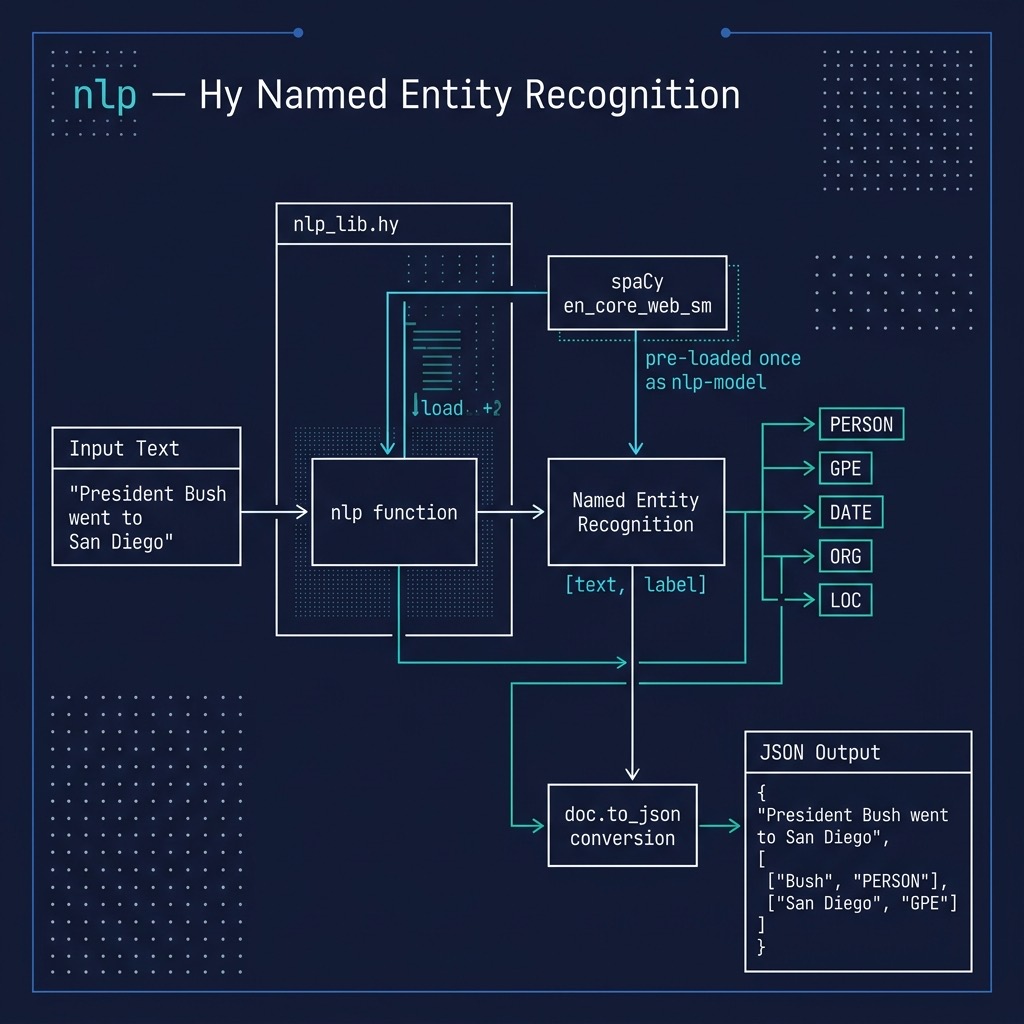
We will generate two libraries (in the file nlp_lib.hy). The first is a general NLP library. The test program is in the file nlp_example.hy.
For an example in a later chapter, we will use the library developed here to automatically generate Knowledge Graphs from text data. We will need the ability to find person, company, location, etc. names in text. We use spaCy here to do this. The types of named entities on which spaCy is pre-trained includes:
- CARDINAL: any number that is not identified as a more specific type, like money, time, etc.
- DATE
- FAC: facilities like highways, bridges, airports, etc.
- GPE: Countries, states (or provinces), and cities
- LOC: any non-GPE location
- PRODUCT
- EVENT
- LANGUAGE: any named language
- MONEY: any monetary value or unit of money
- NORP: nationalities or religious groups
- ORG: any organization like a company, non-profit, school, etc.
- PERCENT: any number in [0, 100] followed by the percent % character
- PERSON
- ORDINAL: any number spelled out, like “one”, “two”, etc.
- TIME
Listing for hy-lisp-python/nlp/nlp_lib.hy:
 1 (import spacy)
 2
 3 (setv nlp-model (spacy.load "en_core_web_sm"))
 4
 5 (defn nlp [some-text]
 6   (setv doc (nlp-model some-text))
 7   (setv entities (lfor entity doc.ents [entity.text entity.label_]))
 8   (setv j (doc.to_json))
 9   (setv (get j "entities") entities)
10   j)
Listing for hy-lisp-python/nlp/nlp_example.hy:
1 (import nlp-lib [nlp])
2
3 (print
4   (nlp "President George Bush went to Mexico and he had a very good meal"))
5
6 (print
7   (nlp "Lucy threw a ball to Bill and he caught it"))
 1 Marks-MacBook:nlp $ uv run hy nlp_example.hy
 2 {'text': 'President George Bush went to Mexico and he had a very good meal', 'ents':\
 3  [{'start': 10, 'end': 21, 'label': 'PERSON'}, {'start': 30, 'end': 36, 'label': 'GP\
 4 E'}], 'sents': [{'start': 0, 'end': 64}], 'tokens': [{'id': 0, 'start': 0, 'end': 9,\
 5  'tag': 'NNP', 'pos': 'PROPN', 'morph'
 6
 7  ...
 8
 9 {'text': 'Lucy threw a ball to Bill and he caught it', 'ents': [{'start': 0, 'end': \
10 4, 'label': 'PERSON'}, {'start': 21, 'end': 25, 'label': 'PERSON'}], 'sents': [{'sta\
11 rt': 0, 'end': 42}], 'tokens': [{'id': 0, 'start': 0, 'end': 4, 'tag': 'NNP', 'pos':\
12  'PROPN', 'morph': 'Number=Sing', 'lemma': 'Lucy', 'dep': 'nsubj', 'head': 1}, {'id'\
13 : 1, 'start': 5, 'end': 10, 'tag': 'VBD', 'pos': 'VERB', 'morph': 'Tense=Past|VerbFo\
14 rm=Fin', 'lemma': 'throw', 'dep': 'ROOT', 'head': 1}, {'id': 2, 'start': 11, 'end': \
15 12, 'tag
16
17  ...
18
19   ..LOTS OF OUTPUT NOT SHOWN..
Wrap-up
I spent several years of development time during the period from 1984 through 2015 working on natural language processing technology and as a personal side project I sold commercial NLP libraries that I wrote on my own time in Ruby and Common Lisp. The state-of-the-art of Deep Learning enhanced NLP is very good and the open source spaCy library makes excellent use of both conventional NLP technology and pre-trained Deep Learning models. I no longer spend very much time writing my own NLP libraries and instead use spaCy or more recently LLMs that we cover later.
I urge you to read through the spaCy documentation because we covered just basic functionality here that we will also need in the later chapter on automatically generating data for Knowledge Graphs. After working through the interactive REPL sessions and the examples in this chapter, you should be able to translate any Python API example code to Hy.
Optional Practice Problems
Here are a few optional practice problems to help you get more comfortable with spaCy and the Hy language. We encourage you to modify the code in the source_code_for_examples/nlp directory and experiment!
Problem 1: Filter Entities by Type
Currently, the nlp function in nlp_lib.hy returns all recognized entities. Modify the function (or write a new one) that takes an optional list of allowed entity labels (e.g., ["PERSON", "ORG"]) and filters the results.
- Implement the filtering logic in nlp_lib.hy.
- Update nlp_example.hy to call this function and only print entities of type "PERSON".
- Tip: You can use Hy’s list comprehensions (lfor) and check if an entity’s label is in the list of allowed labels using the in operator.
Problem 2: Extract Noun Phrases (Noun Chunks)
In addition to named entities, spaCy is excellent at identifying noun chunks (base noun phrases).
- Read the spaCy documentation for doc.noun_chunks or inspect it using the Hy REPL.
- Add a new function get-noun-chunks to nlp_lib.hy that processes input text and returns a list of strings representing the noun chunks.
- Verify your implementation in nlp_example.hy by analyzing a sentence like "The quick brown fox jumps over the lazy dog".
Problem 3: Token Filtering (Removing Stopwords and Punctuation)
When preparing text for downstream machine learning tasks, it is common to filter out punctuation and stopwords (common words like “the”, “is”, “at”).
- Inspect the attributes of a spaCy token in the REPL (e.g., word.is_punct and word.is_stop).
- Write a function clean-text-tokens in nlp_lib.hy that returns a list of token text strings, excluding any tokens where word.is_punct or word.is_stop is true.
- Test your function with a sample sentence and ensure the output contains only meaningful content words.