Using LangChain to Chain Together Large Language Models
Harrison Chase started the LangChain project in October 2022 and as I write the first version of this chapter back in May 2023 the GitHub repository for LangChain https://github.com/hwchase17/langchain has over 200 contributors.
Note: this chapter and material last updated August 15, 2025.
The material in this chapter is a very small subset of material in my recent Python book LangChain and LlamaIndex Projects Lab Book: Hooking Large Language Models Up to the Real World. Using GPT-5, ChatGPT, and Hugging Face Models in Applications. that you can read for free online by using the link Free To Read Online.
LangChain is a framework for building applications with large language models (LLMs) through chaining different components together. Some of the applications of LangChain are chatbots, generative question-answering, summarization, data-augmented generation and more. LangChain can save time in building chatbots and other systems by providing a standard interface for chains, agents and memory, as well as integrations with other tools and end-to-end examples. We refer to “chains” as sequences of calls (to an LLMs and a different program utilities, cloud services, etc.) that go beyond just one LLM API call. LangChain provides a standard interface for chains, many integrations with other tools, and end-to-end chains for common applications. Often you will find existing chains already written that meet the requirements for your applications.
For example, one can create a chain that takes user input, formats it using a PromptTemplate, and then passes the formatted response to a Large Language Model (LLM) for processing.
While LLMs are very general in nature which means that while they can perform many tasks effectively, they often can not directly provide specific answers to questions or tasks that require deep domain knowledge or expertise. LangChain provides a standard interface for agents, a library of agents to choose from, and examples of end-to-end agents.
LangChain Memory is the concept of persisting state between calls of a chain or agent. LangChain provides a standard interface for memory, a collection of memory implementations, and examples of chains/agents that use memory². LangChain provides a large collection of common utils to use in your application. Chains go beyond just a single LLM call, and are sequences of calls (whether to an LLM or a different utility). LangChain provides a standard interface for chains, lots of integrations with other tools, and end-to-end chains for common applications.
LangChain can be integrated with one or more model providers, data stores, APIs, etc.
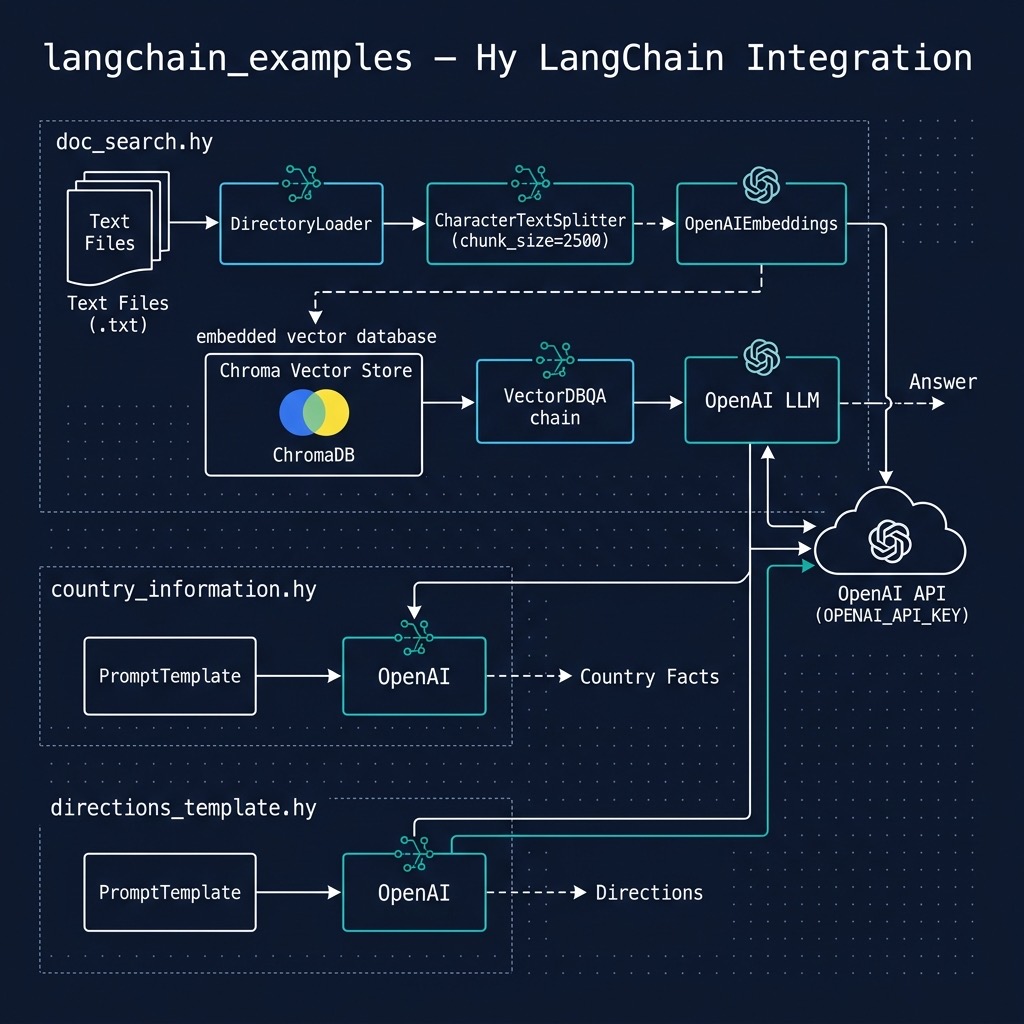
Installing Necessary Packages
We are using uv as a package manager and to run the examples. Run using:
1 $ cd hy-lisp-python-book/source_code_for_examples/langchain_examples
2 $ uv sync
3 $ uv run hy country_information.hy
4 $ uv run hy directions_template.hy
5 $ uv run hy doc_search.hy
Basic Usage and Examples
While I try to make the material in this book independent, something you can enjoy with no external references, you should also take advantage of the high quality documentation and the individual detailed guides for prompts, chat, document loading, indexes, etc.
As we work through some examples please keep in mind what it is like to use the ChatGPT web application: you enter text and get respponses. The way you prompt ChatGPT is obviously important if you want to get useful responses. In code examples we automate and formalize this manual process.
You need to choose a LLM to use. We will usually choose the GPT-3.5 API from OpenAI because it is general purpose and much less expensive than OpenAI’s previous model APIs. You will need to sign up for an API key and set it as an environment variable:
1 export OPENAI_API_KEY="YOUR KEY GOES HERE"
Both the libraries openai and langchain will look for this environment variable and use it. We will look at a few simple examples in a Hy REPL. We will start by just using OpenAI’s text prediction API that accepts a prompt and then continues generating text from that prompt:
1 $ uv run hy
2 Hy 1.1.0 using CPython(main)  3.12.0 on Darwin
3 => (import langchain_openai.llms [OpenAI])
4 => (setv llm (OpenAI :temperature 0.8))
5 => (llm "John got into his new sports car, and he drove it")
6 " to work. He felt really proud that he was able to afford the car and even parked i\
7 t in a prime spot so everyone could see. He felt like he had really made it."
8 =>
The temperature should have a value between 0 and 1. Use a small temperature value to get repeatable results and a large temperature value if you want very different completions each time you pass the same prompt text.
Our next example is in the source file directions_template.hy and uses the PromptTemplate class. A prompt template is a reproducible way to generate a prompt. It contains a text string (“the template”), that can take in a set of parameters from the end user and generate a prompt. The prompt template may contain language model instructions, few-shot examples to improve the model’s response, or specific questions for the model to answer.
 1 (import langchain.prompts [PromptTemplate])
 2 (import langchain_openai.llms [OpenAI])
 3
 4 (setv llm (OpenAI :temperature 0.9))
 5
 6 (defn get_directions [thing_to_do]
 7    (setv
 8      prompt
 9      (PromptTemplate
10        :input_variables ["thing_to_do"]
11        :template "How do I {thing_to_do}?"))
12     (setv
13       prompt_text
14       (prompt.format :thing_to_do thing_to_do))
15     ;; Print out generated prompt when you are getting started:
16     (print "\n" prompt_text ":")
17     (llm prompt_text))
18
19 (print (get_directions "get to the store"))
20 (print (get_directions "hang a picture on the wall"))
You could just write Hy string manipulation code to create a prompt but using the utility class PromptTemplate is more legible and works with any number of prompt input variables. In this example, the prompt template is really simple. For more complex Python examples see the LangChain prompt documentation. We will later see a more complex prompt example.
Let’s change directory to hy-lisp-python/langchain and run two examples in a Hy REPL:
 1 $ uv run hy
 2 Hy 1.1.0 using CPython(main)  3.12.0 on Darwin
 3 => (import directions_template [get_directions])
 4 => (print (get_directions "hang a picture on the wall"))
 5
 6  How do I hang a picture on the wall? :
 7
 8
 9 1. Gather necessary items: picture, level, appropriate hardware for your wall type (\
10 nails, screws, anchors, etc).
11
12 2. Select the location of the picture on the wall. Use a level to ensure that the pi\
13 cture is hung straight.
14
15 3. Mark the wall where the hardware will be placed.
16
17 4. Securely attach the appropriate hardware to the wall.
18
19 5. Hang the picture and secure with the hardware.
20
21 6. Stand back and admire your work!
22 => (print (get_directions "get to the store"))
23
24  How do I get to the store? :
25
26
27 The best way to get to the store depends on your location. If you are using public t\
28 ransportation, you can use a bus or train to get there. If you are driving, you can \
29 use a GPS or maps app to find the fastest route.
30 =>
The next example in the file country_information.hy is derived from an example in the LangChain documentation. In this example we use PromptTemplate that contains the pattern we would like the LLM to use when returning a response.
 1 (import langchain.prompts [PromptTemplate])
 2 (import langchain_openai.llms [OpenAI])
 3
 4 (setv llm (OpenAI :temperature 0.9))
 5
 6 (setv
 7   template
 8   "Predict the capital and population of a country.\n\nCountry: {country_name}\nCapi\
 9 tal:\nPopulation:\n")
10
11 (defn get_country_information [country_name]
12   (print "Processing " country_name ":")
13   (setv
14      prompt
15      (PromptTemplate
16        :input_variables ["country_name"]
17        :template template))
18   (setv
19       prompt_text
20       (prompt.format :country_name country_name))
21   ;; Print out generated prompt when you are getting started:
22   (print "\n" prompt_text ":")
23   (llm prompt_text))
24
25 (print (get_country_information "Germany"))
26 ;; (print (get_country_information "Canada"))
You can use the ChatGPT web interface to experiment with prompts. When you find a pattern that works well then write a Python script like the last example, changing the data you supply in the PromptTemplate instance.
Here are two examples of this code for getting information about Canada and Germany:
 1 $ uv run hy
 2 Hy 1.1.0 using CPython(main)  3.12.0 on Darwin
 3 => (import country_information [get_country_information])
 4 => (print (get_country_information "Canada"))
 5 Processing  Canada :
 6
 7  Predict the capital and population of a country.
 8
 9 Country: Canada
10 Capital:
11 Population:
12  :
13
14 Capital: Ottawa
15 Population: 37,592,000 (as of 2019)
16 => (print (get_country_information "Germany"))
17 Processing  Germany :
18
19  Predict the capital and population of a country.
20
21 Country: Germany
22 Capital:
23 Population:
24  :
25
26 Capital: Berlin
27 Population: 83 million
28 =>
We print the generated prompt and you can try copying this text (here for Canada) into the ChatGPT web app:
1 Predict the capital and population of a country.
2
3 Country:Canada
4 Capital:
5 Population:
So there is no magic here. We are simply generating prompts that contain context data.
Creating Embeddings
We will reference the LangChain embeddings documentation. We can use a Hy REPL to see what text to vector space embeddings might look like:
 1 $ uv run hy
 2 Hy 1.1.0 using CPython(main)  3.12.0 on Darwin
 3 => (import langchain_openai [OpenAIEmbeddings])
 4 => (setv embeddings (OpenAIEmbeddings))
 5 => (setv text "Mary has blond hair and John has brown hair. Mary lives in town and J\
 6 ohn lives in the country.")
 7 => (setv doc_embeddings (embeddings.embed_documents [text]))
 8 => doc_embeddings
 9 [[0.007754440331396565 0.0008957661819527747 -0.003335848878474548 -0.01803736554483\
10 232 -0.017987297643789046 0.028564378295111985 -0.013368429464419828 0.0047096176469\
11 93997..]]
12 => (setv query_embedding (embeddings.embed_query "Does John live in the city?"))
13 => query_embedding
14 [0.028118159621953964 0.011476404033601284 -0.009456867352128029 ...]
Notice that the doc_embeddings is a list where each list element is the embeddings for one input text document. The query_embedding is a single embedding. Please read the above linked embedding documentation.
We will use vector stores to store calculated embeddings for future use in the next example.
Using LangChain Vector Stores to Query Documents
We will reference the LangChain Vector Stores documentation. Weneed to install a few libraries that are pre-configured in the file pyproject.toml that uv uses:
- chroma
- chromadb
- unstructured
- pdf2image
- pytesseract
The next document query example is contained in a single script hy-lisp-python-book/source_code_for_examples/langchain/doc_search.hy with three document queries at the end of the script. In this example we read the text file documents in the directory hy-lisp-python-book/source_code_for_examples/langchain/data and create a local embeddings datastore we use for natural language queries:
 1 (import langchain.text_splitter [CharacterTextSplitter])
 2 (import langchain_community.vectorstores [Chroma])
 3 (import langchain_openai.embeddings [OpenAIEmbeddings])
 4 (import langchain_community.document_loaders [DirectoryLoader UnstructuredMarkdownLo\
 5 ader])
 6 (import langchain.chains [VectorDBQA])
 7 (import langchain_openai.llms [OpenAI])
 8
 9 (setv embeddings (OpenAIEmbeddings))
10
11 (setv loader (DirectoryLoader "./data/" :glob "**/*.txt" :loader_cls UnstructuredMar\
12 kdownLoader))
13 (setv documents (loader.load))
14 (print documents)
15
16 (setv
17   text_splitter
18   (CharacterTextSplitter :chunk_size 2500 :chunk_overlap 0))
19
20 (setv
21   texts
22   (text_splitter.split_documents documents))
23
24 (setv
25   docsearch
26   (Chroma.from_documents texts  embeddings))
27
28 (setv
29   qa
30   (VectorDBQA.from_chain_type
31     :llm (OpenAI)
32     :chain_type "stuff"
33     :vectorstore docsearch))
34
35 (defn query [q]
36   (print "Query: " q)
37   (print "Answer: " (qa.run q)))
38
39 (query "What kinds of equipment are in a chemistry laboratory?")
40 (query "What is Austrian School of Economics?")
41 (query "Why do people engage in sports?")
42 (query "What is the effect of body chemistry on exercise?")
The DirectoryLoader class is useful for loading a directory full of input documents. In this example we specified that we only want to process text files, but the file matching pattern could have also specified PDF files, etc.
The output is:
 1 $ uv sync
 2 $ uv run hy doc_search.hy
 3 Using embedded DuckDB without persistence: data will be transient
 4 Query:  What kinds of equipment are in a chemistry laboratory?
 5 Answer:   A chemistry laboratory typically contains various glassware, as well as ot\
 6 her equipment such as beakers, flasks, test tubes, Bunsen burners, hot plates, and o\
 7 ther materials used for conducting experiments.
 8 Query:  What is Austrian School of Economics?
 9 Answer:   The Austrian School of economics is a school of economic thought that emph\
10 asizes the spontaneous organizing power of the price mechanism. Austrians hold that \
11 the complexity of subjective human choices makes mathematical modelling of the evolv\
12 ing market extremely difficult and advocate a "laissez faire" approach to the econom\
13 y. Austrian School economists advocate the strict enforcement of voluntary contractu\
14 al agreements between economic agents, and hold that commercial transactions should \
15 be subject to the smallest possible imposition of forces they consider to be (in par\
16 ticular the smallest possible amount of government intervention). The Austrian Schoo\
17 l derives its name from its predominantly Austrian founders and early supporters, in\
18 cluding Carl Menger, Eugen von Böhm-Bawerk and Ludwig von Mises.
19 Query:  Why do people engage in sports?
20 Answer:   People engage in sports because they are enjoyable activities that involve\
21  physical athleticism or dexterity, and are governed by rules to ensure fair competi\
22 tion and consistent adjudication of the winner.
23 Query:  What is the effect of body chemistry on exercise?
24 Answer:   Body chemistry can affect the transfer of energy from one chemical substan\
25 ce to another, as well as the efficiency of energy-producing systems that do not rel\
26 y on oxygen, such as anaerobic exercise. It can also affect the body's ability to pr\
27 oduce enough moisture, which can lead to dry eye and other symptoms.
If you use this example to index a large number of documents you will want to store the index for future use. Then any application can reuse your local index. If you add documents to your data directory then re-run the script to create the local index. You can see examples of persistent vector stores in my LangChain book.
LangChain Wrap Up
I wrote a Python book that goes into greater detail on both LangChain as well as the library LlamaIndex that are often used together. You can buy my book LangChain and LlamaIndex Projects Lab Book: Hooking Large Language Models Up to the Real World or read it free online using the Free To Read Online Link.
Optional Practice Problems
-
Expand prompt template variables: In directions_template.hy, modify get_directions to take an additional input variable such as
audience(e.g., “beginner” or “expert”). Change the template structure (for example,"How do I {thing_to_do} for a {audience}?") and update the function to format and pass both variables. - Add custom fields to the template: Modify country_information.hy and its get_country_information function to predict not only the capital and population of a country, but also its primary language and currency. Update the template string and verify the generated output.
- Index and query custom documents: Add a new text document of your choice (for example, containing facts about a programming language or an encyclopedia entry) to the data directory. Then, add a corresponding query to the bottom of doc_search.hy to verify that the vector database query matches information from the new document.