Introduction to the Hy Language
The Hy programming language is a Lisp language that inter-operates smoothly with Python. We start with a few interactive examples that I encourage you to experiment with as you read. Then we will look at Hy data types and commonly used built-in functions that are used in the remainder of this book.
I assume that you know at least a little Python and more importantly the Python ecosystem and general tools like uv and pip.
Please start by installing uv on your laptop or server. Use either of the following commands on macOS or Linux:
| sh
On Windows use one of these commands:
| iex
Using Python Libraries
Using Python libraries like TensorFlow, Keras, BeautifulSoup, etc. are the reason I use the Hy language. Importing Python code and libraries and calling out to Python is simple and here we look at sufficient examples so that you will understand example code that we will look at later.
Note: starting in August 2025 the example programs in the GitHub repository XX are in individual directores, each pre-configured for use with uv
For example, in the chapter Responsible Web Scraping we will use the BeautifulSoup library. We will look at some Python code snippets and the corresponding Hy language versions of these snippets. Let’s first look at a Python example that we will then convert to Hy:
1 from bs4 import BeautifulSoup
2
3 raw_data = '<html><body><a href="http://markwatson.com">Mark</a></body></html>'
4 soup = BeautifulSoup(raw_data)
5 a_tags = soup.find_all("a")
6 print("a tags:", a_tags)
In the following listing notice how we import other code and libraries in Hy. The special form setv is used to define variables in a local context. Since the setv statements in lines 4, 6, and 7 are used at the top level, they are global in the Python/Hy module named after the root name of the source file.
 1 $ cd hy-lisp-python-book/source_code_for_examples/webscraping
 2 $ uv run hy
 3 Hy 1.1.0 (Business Hugs) using CPython(main) 3.12.0 on Darwin
 4 => (import bs4 [BeautifulSoup])
 5 => (setv raw-data "<html><body><a href=\"http://markwatson.com\">Mark</a></body></ht\
 6 ml>")
 7 => (setv soup (BeautifulSoup raw-data "lxml"))
 8 => (setv a (.find-all soup "a"))
 9 => (print "atags:" a)
10 atags: [<a href="http://markwatson.com">Mark</a>]
11 => (type a)
12 <class 'bs4.element.ResultSet'>
13 => (dir a)
14 ['__add__', '__class__', '__contains__', '__delattr__', '__delitem__', '__dict__', '\
15 __dir__', '__doc__', '__eq__', '__format__', '__ge__', '__getattr__', '__getattribut\
16 e__', '__getitem__', '__gt__', '__hash__', '__iadd__', '__imul__', '__init__', '__in\
17 it_subclass__', '__iter__', '__le__', '__len__', '__lt__', '__module__', '__mul__', \
18 '__ne__', '__new__', '__reduce__', '__reduce_ex__', '__repr__', '__reversed__', '__r\
19 mul__', '__setattr__', '__setitem__', '__sizeof__', '__str__', '__subclasshook__', '\
20 __weakref__', 'append', 'clear', 'copy', 'count', 'extend', 'index', 'insert', 'pop'\
21 , 'remove', 'reverse', 'sort', 'source']
Notice in lines 3 and 6 that we can have “-“ characters inside of variable and function names (raw-data and find-all in this case) in the Hy language where we might use “_” underscore characters in Python. Like Python, we can use type get get the type of a value and dir to see what symbols are available for a object.
Global vs. Local Variables
Although I don’t generally recommend it, sometimes it is convenient to export local variables defined with setv to be global variables in the context of the current module (that is defined by the current source file). As an example:
 1 $ uv run hy
 2 Hy 1.1.0 (Business Hugs) using CPython(main) 3.12.0 on Darwin
 3 => (defn foo []
 4 ... (global x)
 5 ... (setv x 1)
 6 ... (print x))
 7 => (foo)
 8 1
 9 => x
10 1
11 =>
Before executing function foo the global variable x is undefined (unless you coincidentally already defined somewhere else). When function foo is called, a global variable x is defined and then it equal to the value 1.
Using Python Code in Hy Programs
If there is a Python source file, named for example, test.py in the same directory as a Hy language file:
1 def factorial (n):
2   if n < 2:
3     return 1
4   return n * factorial(n - 1)
This code will be in a module named test because that is the root source code file name. We might import the Python code using the following in Python:
1 import test
2
3 print(test.factorial(5))
and we can use the following in Hy to import the Python module test (defined in test.py):
1 (import test)
2
3 (print (test.factorial 5))
Running this interactively in Hy:
1 $ uv run hy
2 Hy 1.1.0 (Business Hugs) using CPython(main) 3.12.0 on Darwin
3 => (import test)
4 => test
5 <module 'test' from '/Users/markw/GITHUB/hy-lisp-python/test.py'>
6 => (print (test.factorial 5))
7 120
If we only wanted to import BeautifulSoup from the Python BeautifulSoup library bs4 we can specify this in the import form:
1 (import bs4 [BeautifulSoup])
Using Hy Libraries in Python Programs
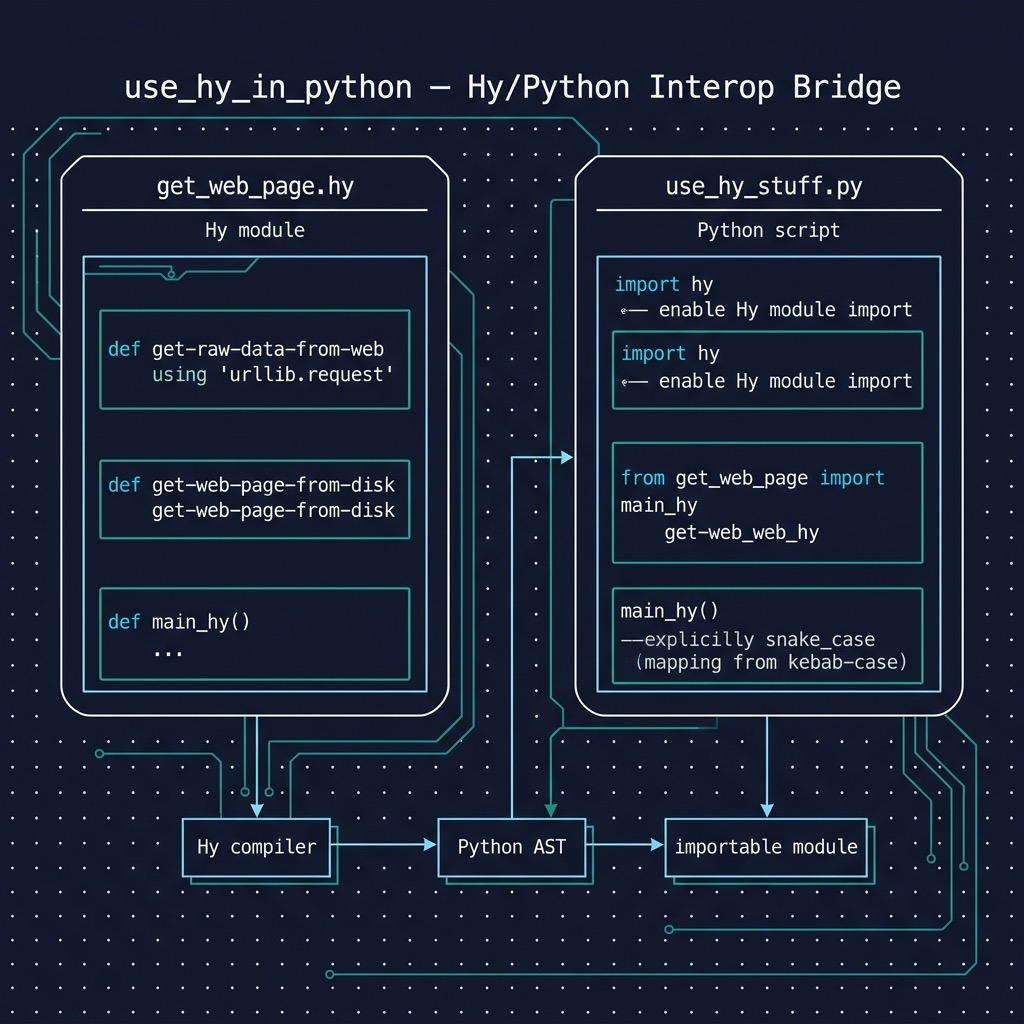
There is nothing special about importing and using Hy library code or your own Hy scripts in Python programs. The directory hy-lisp-python-book/source_code_for_examples/use_hy_in_python in the git repository for this book https://github.com/mark-watson/hy-lisp-python-book contains an example Hy script get_web_page.hy that is a slightly modified version of code we will explain and use in the later chapter on web scraping and a short Python script use_hy_stuff.py that uses a function defined in Hy:
get_web_page.hy:
 1 (import argparse os)
 2 (import urllib.request [Request urlopen])
 3
 4 (defn get-raw-data-from-web [aUri [anAgent
 5                                    {"User-Agent" "HyLangBook/1.0"}]]
 6   (setv req (Request aUri :headers anAgent))
 7   (setv httpResponse (urlopen req))
 8   (setv data (.read httpResponse))
 9   data)
10
11 (defn main_hy []
12   (print (get-raw-data-from-web "http://markwatson.com")))
We define two functions here. Notice the optional argument anAgent defined in lines 4-5 where we provide a default value in case the calling code does not provide a value. In the next Python listing we import the file in the last listing and call the Hy function main on line 4 using the Python calling syntax.
Hy is the same as Python once it is compiled to an abstract syntax tree (AST).
hy-lisp-python/use_in_python:
1 import hy
2 from get_web_page import main_hy
3
4 main_hy()
What I want you to understand and develop a feeling for is that Hy and Python are really the same but with a different syntax and that both languages can easily be used side by side.
Replacing the Python slice (cut) Notation with the Hy Functional Form
In Python we use a special notation for extracting sub-sequences from lists or strings:
$ uv run python
Python 3.12.0 (main, Oct  2 2023, 20:56:14) [Clang 16.0.3 ] on darwin
Type "help", "copyright", "credits" or "license" for more information.
>>> s = '0123456789'
>>> s[2:4]
'23'
>>> s[-4:]
'6789'
>>> s[-4:-1]
'678'
>>>
In Hy this would be:
$ uv run hy
Hy 1.1.0 (Business Hugs) using CPython(main) 3.12.0 on Darwin
=> (setv s "0123456789")
=> (cut s 2 4)
'23'
=> (cut s -4)
'6789'
=> (cut s -4 -1)
'678'
=>
It also works to use cut with setv to destructively change a list; for example:
=> (setv x [0 1 2 3 4 5 6 7 8])
=> x
[0, 1, 2, 3, 4, 5, 6, 7, 8]
=> (cut x 2 4)
[2, 3]
=> (setv (cut x 2 4) [22 33])
=> x
[0, 1, 22, 33, 4, 5, 6, 7, 8]
Iterating Through a List With Index of Each Element
We will use lfor as a form of Python list comprehension; for example:
 1 => (setv sentence "The ball rolled")
 2 => (lfor i (enumerate sentence) i)
 3 [(0, 'T'), (1, 'h'), (2, 'e'), (3, ' '), (4, 'b'), (5, 'a'), (6, 'l'), (7, 'l'), (8,\
 4  ' '), (9, 'r'), (10, 'o'), (11, 'l'), (12, 'l'), (13, 'e'), (14, 'd')]
 5 => (setv vv (lfor i (enumerate sentence) i))
 6 => vv
 7 [(0, 'T'), (1, 'h'), (2, 'e'), (3, ' '), (4, 'b'), (5, 'a'), (6, 'l'), (7, 'l'), (8,\
 8  ' '), (9, 'r'), (10, 'o'), (11, 'l'), (12, 'l'), (13, 'e'), (14, 'd')]
 9 => (for [[a b] vv]
10 ... (print a b))
11 0 T
12 1 h
13 2 e
14 3
15 4 b
16 5 a
17 6 l
18 7 l
19 8
20 9 r
21 10 o
22 11 l
23 12 l
24 13 e
25 14 d
26 =>
On line 2, the expression (enumerate sentence) generates one character at a time from a string. enumerate operating on a list will generate one list element at a time.
Line 9 shows an example of destructuring: the values in the list vv are tuples (tuples are like lists but are immutable, that is, once a tuple is constructed the values it holds can not be changed) with two values. The values in each tuple are copied into binding variables in the list [a b]. We could have used the following code instead but it is more verbose:
=> (for [x vv]
    (setv a (first x))
    (setv b (second x))
... (print a b))
0 T
1 h
2 e
3
4 b
 . . .
13 e
14 d
=>
Formatted Output
I suggest using the Python format method when you need to format output. In the following repl listing, you can see a few formatting options: insert any Hy data into a string (line 3), print values with a specific width and right justified (in line 5 the width for both values is 15 characters), print values with a specific width and left justified (in line 7), and limiting the number of characters values can be expressed as (in line 9 the object “cat” is expressed as just the first two characters and the value 3.14159 is expressed as just three numbers, the period not counting).
$ uv run hy
Hy 1.1.0 (Business Hugs) using CPython(main) 3.12.0 on Darwin
=> (.format "first: {} second: {}" "cat" 3.14159)
'first: cat second: 3.14159'
=> (.format "first: {:>15} second: {:>15}" "cat" 3.14159)
'first:             cat second:         3.14159'
=> (.format "first: {:15} second: {:15}" "cat" 3.14159)
'first: cat             second:         3.14159'
=> (.format "first: {:.2} second: {:.3}" "cat" 3.14159)
'first: ca second: 3.14'
=>
Notice the calling .format here returns a string value rather than writing to an output stream.
Importing Libraries from Different Directories on Your Laptop
I usually write applications by first implementing simpler low-level utility libraries that are often not in the same directory path as the application that I am working on. Let’s look at a simple example of accessing the library nlp_lib.hy in the directory hy-lisp-python/nlp from the directory hy-lisp-python/webscraping:
 1 $ pwd
 2 /Users/markw/GITHUB/hhy-lisp-python-book
 3 $ cd webscraping
 4 $ uv run hy
 5 Hy 1.1.0 (Business Hugs) using CPython(main) 3.12.0 on Darwin
 6 => (import sys)
 7 => (sys.path.insert 1 "../nlp")
 8 => (import nlp-lib [nlp])
 9 => (nlp "President George Bush went to Mexico and he had a very good meal")
10 {'text': 'President George Bush went to Mexico and he had a very good meal',
11   ...
12  'entities': [['George Bush', 'PERSON'], ['Mexico', 'GPE']]}
13 => (import [coref-nlp-lib [coref-nlp]])
14 => (coref-nlp "President George Bush went to Mexico and he had a very good meal")
15 {'corefs': 'President George Bush went to Mexico and President George Bush had a ver\
16 y good meal',  ...  }}}
17 =>
Here I did not install the library nlp_lib.hy using Python setuptools (which I don’t cover in this book, you can read the documentation) as a library on the system. I rely on relative paths between the library directory and the application code that uses the library.
On line 6 I am inserting the library directory into the Python system load path so the import statement on line 8 can find the nlp-lib library and on line 13 can find the coref-nlp-lib library.
Hy Looks Like Clojure: How Similar Are They?
Clojure is a dynamic general purpose Lisp language for the JVM. One of the great Clojure features is support of immutable data (read only after creation) that makes multi-threaded code easier to write and maintain.
Unfortunately, Clojure’s immutable data structures cannot be easily implemented efficiently in Python so the Hy language does not support immutable data, except for tuples. Otherwise the syntax for defining functions, using maps/hash tables/dictionaries, etc. is similar between the two languages.
The original Hy language developer Paul Tagliamonte was clearly inspired by Clojure.
The book Serious Python by Julien Danjou has an entire chapter (Chapter 9) on the Python AST (abstract syntax tree), an introduction to Hy, and an interview with Paul Tagliamonte. Recommended!
This podcast in 2015 interviews Hy developers Paul Tagliamonte, Tuukka Turto, and Morten Linderud. You can see the current Hy contributor list on github.
Plotting Data Using the Numpy and the Matplotlib Libraries
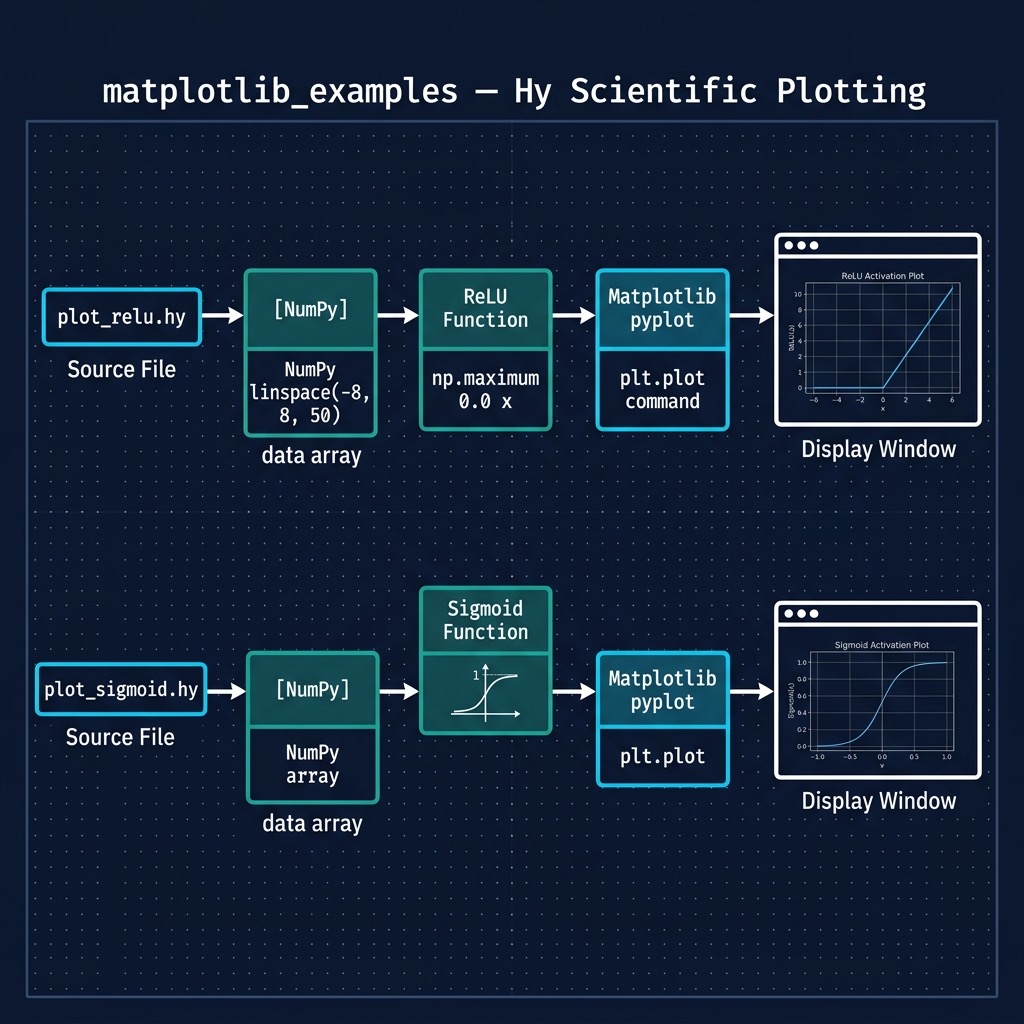
Data visualization is a common task when working with numeric data. In a later chapter on Deep Learning we will use two functions, the relu and sigmoid functions. Here we will use a few simple Hy language scripts to plot these functions.
The Numpy library supports what is called “broadcasting” in Python. In the function sigmoid that we define in the following REPL, we can pass either a single floating point number or a Numpy array as an argument. When we pass a Numpy array, then the function sigmoid is applied to each element of the Numpy array:
 1 $ uv run hy
 2 Hy 1.1.0 (Business Hugs) using CPython(main) 3.12.0 on Darwin
 3 => (import numpy :as np)
 4 => (import matplotlib.pyplot :as plt)
 5 =>
 6 => (defn sigmoid [x]
 7 ...   (/ 1.0 (+ 1.0 (np.exp (- x)))))
 8 => (sigmoid 0.2)
 9 0.549833997312478
10 => (sigmoid 2)
11 0.8807970779778823
12 => (np.array [-5 -2 0 2 5])
13 array([-5, -2,  0,  2,  5])
14 => (sigmoid (np.array [-5 -2 0 2 5]))
15 array([0.00669285, 0.11920292, 0.5, 0.88079708, 0.99330715])
16 =>
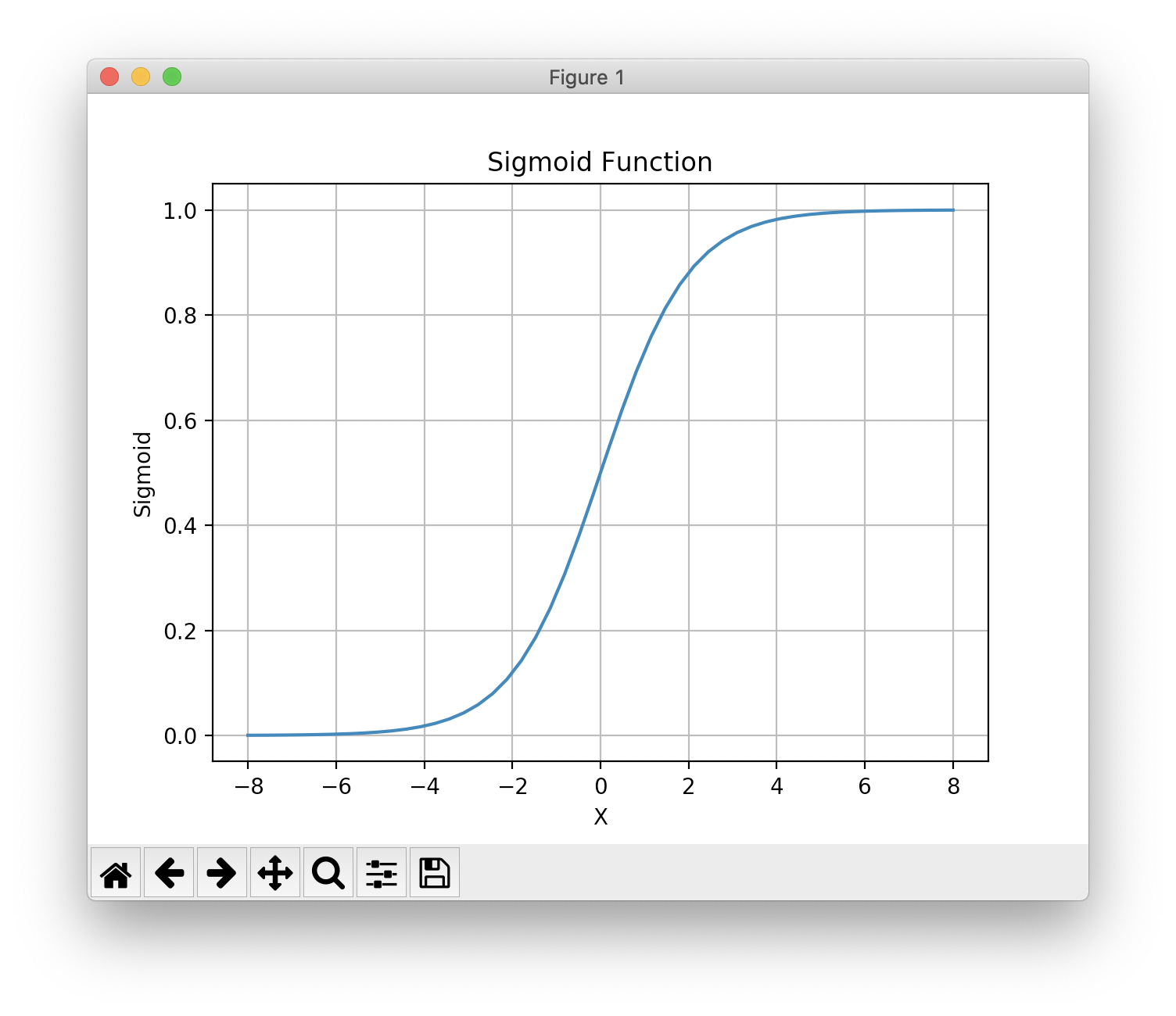
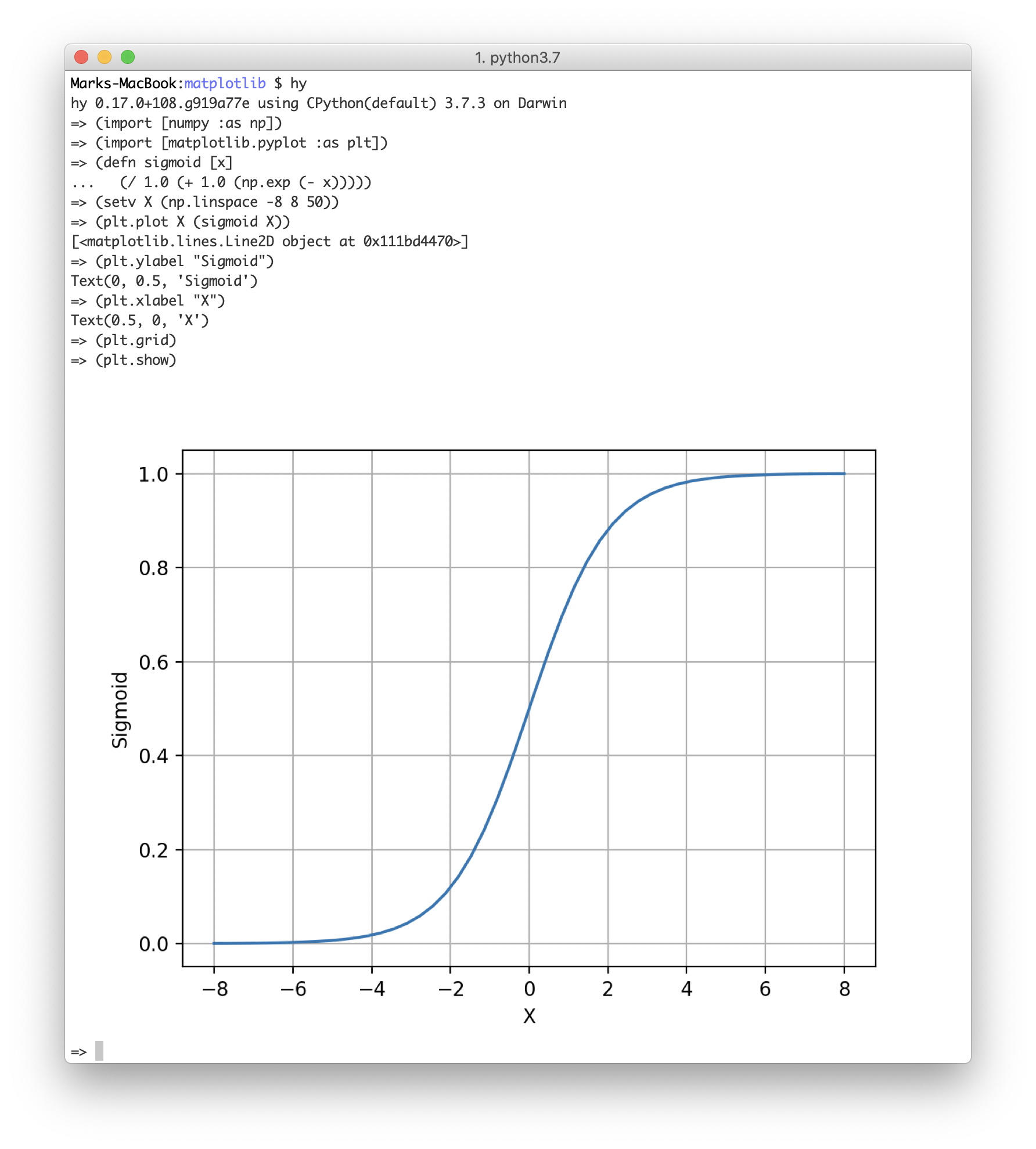
The git repository directory hy-lisp-python/matplotlib contains two similar scripts for plotting the sigmoid and relu functions. Here is the script to plot the sigmoid function:
 1 (import numpy :as np)
 2 (import matplotlib.pyplot :as plt)
 3
 4 (defn sigmoid [x]
 5   (/ 1.0 (+ 1.0 (np.exp (- x)))))
 6
 7 (setv X (np.linspace -8 8 50))
 8 (plt.plot X (sigmoid X))
 9 (plt.title "Sigmoid Function")
10 (plt.ylabel "Sigmoid")
11 (plt.xlabel "X")
12 (plt.grid)
13 (plt.show)
The generated plot looks like this on macOS (Matplotlib is portable and also works on Windows and Linux):
Bonus Points: Configuration for macOS and ITerm2 for Generating Plots Inline in a Hy REPL and Shell
On the macOS ITerm2 terminal app and on most Linux terminal apps, it is possible to get inline matplotlib plots in a shell (bash, zsh, etc.), in Emacs, etc. This will take some setup work but it is well worth it especially if you work on remote servers via SSH or tmux. Here is the setup for macOS:
1 pip3 install itermplot
The add the following to your .profile, .bash_profile, or .zshrc (depending on your shell setup):
1 export MPLBACKEND="module://itermplot"
Here we run an example from the last section in a zsh shell (bash, etc. also should work):
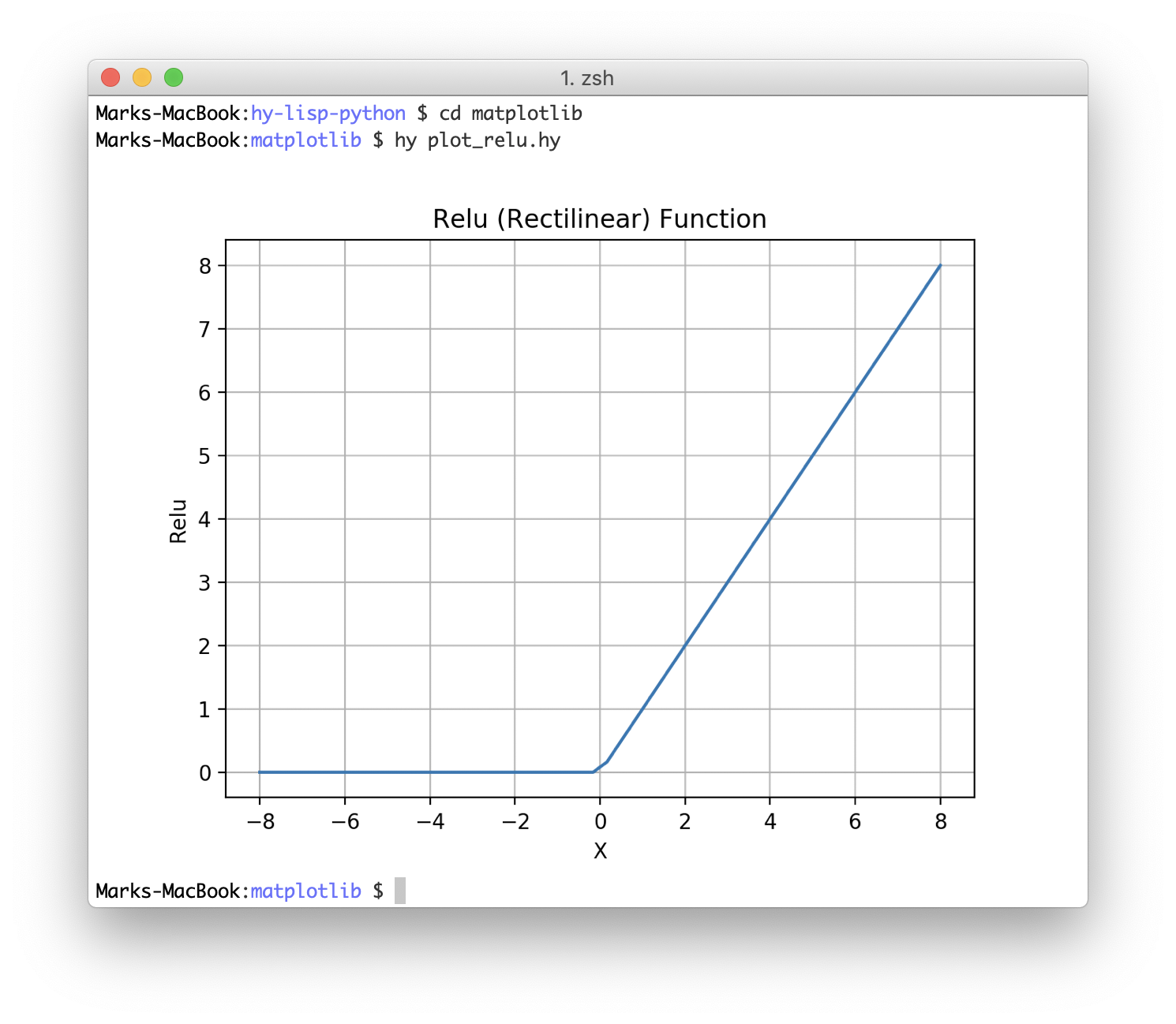
The best part of generating inline plots is during interactive REPL-based coding sessions:
If you use a Mac laptop to SSH into a remote Linux server you need to install itermplot and set the environment variable MPLBACKEND on the remote server.
Optional Practice Problems
To solidify your understanding of data visualization and Python-Hy interoperability, try completing the following exercises:
Data Visualization and Plotting
-
Plotting Multiple Curves: Modify
plot_sigmoid.hy(or create a new Hy script) to plot both the Sigmoid and ReLU functions on the same graph. Use(plt.plot ... :label "Sigmoid")and(plt.plot ... :label "ReLU"), and call(plt.legend)to render a legend. -
Visual Reference Lines: Add a horizontal dotted line at $y = 0.5$ on your Sigmoid plot to indicate the inflection point, and a vertical line at $x = 0$. In Matplotlib, this can be done using:
hylang (plt.axhline :y 0.5 :color "red" :linestyle "--") (plt.axvline :x 0.0 :color "gray" :linestyle "-.") -
Plotting Tanh: Implement and plot the hyperbolic tangent activation function ($\tanh$). The equation is $f(x) = \tanh(x)$. Hint: you can use numpy’s built-in
(np.tanh x). Compare its output range with the Sigmoid function.
Python Interoperability
-
Passing Parameters Across Languages: Modify
get_web_page.hyanduse_hy_stuff.pyso that instead of scraping a hardcoded URL, the Python script takes a URL as input from the user (or via command line usingsys.argv) and passes it as an argument to the Hy function. -
Overriding Default Parameters: The function
get-raw-data-from-webinget_web_page.hydefines an optional argumentanAgentwith a default dictionary value. Write Python code inuse_hy_stuff.pyto callget_raw_data_from_webdirectly, overriding the user agent to{"User-Agent": "Custom-Agent-Python"}. (Recall that kebab-case Hy names map to snake_case Python names, soget-raw-data-from-webbecomesget_raw_data_from_web.) -
Handling Interoperable Exceptions: Wrap the network request in
use_hy_stuff.pywith Python’s standardtry...exceptexception handling block. Catchurllib.error.URLErrorto handle connection failures gracefully when an invalid URL is passed, demonstrating how exceptions flow seamlessly between Hy and Python.