Datastores
I use flat files and the PostgreSQL relational database for most data storage and processing needs in my consulting business over the last twenty years. For work on large data projects at Compass Labs and Google I used Hadoop and Big Table. I will not cover big data datastores here, rather I will concentrate on what I think of as “laptop development” requirements: a modest amount of data and optimizing speed of development and ease of infrastructure setup. We will cover three datastores:
- Sqlite single-file-based relational database
- PostgreSQL relational database
- RDF library rdflib that is useful for semantic web and linked data applications
For graph data we will stick with RDF because it is a fairly widely used standard. Google, Microsoft, Yahoo and Yandex support schema.org for defining schemas for structured data on the web. In the next chapter we will go into more details on RDF, here we look at the “plumbing” for using the rdflib library to manipulate and query RDF data and how to export RDF data in several formats. Then in a later chapter, we will develop tools to automatically generate RDF data from raw text as a tool for developing customized Knowledge Graphs.
In one of my previous previous books Loving Common Lisp, or the Savvy Programmer’s Secret Weapon I also covered the general purpose graph database Neo4j which I like to use for some use cases, but for the purposes of this book we stick with RDF.
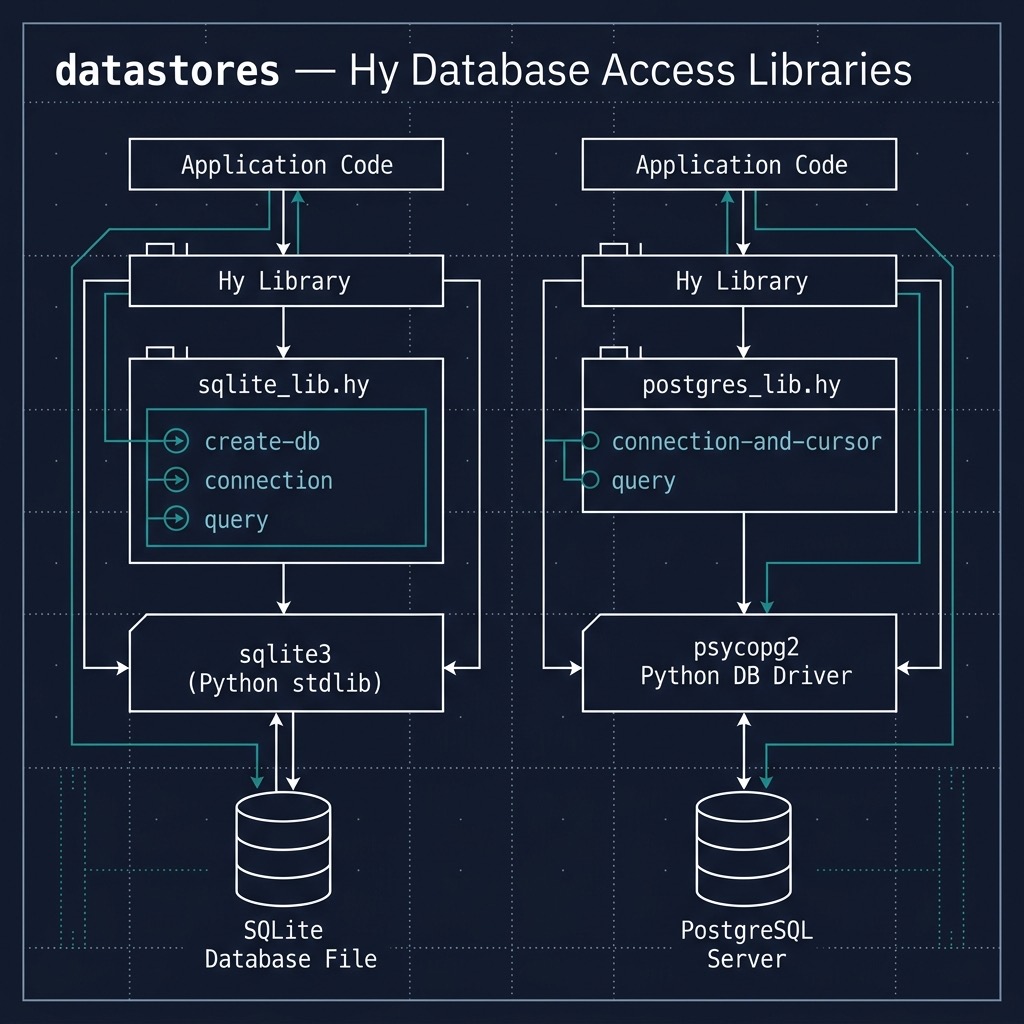
Sqlite
We will cover two relational databases: Sqlite and PostgreSQL. Sqlite is an embedded database. There are Sqlite libraries for many programming languages and here we use the Python library.
The following examples are simple but sufficient to show you how to open a single file Sqlite database, add data, modify data, query data, and delete data. I assume that you have some familiarity with relational databases, especially concepts like data columns and rows, and SQL queries.
Let’s start with putting common code for using Sqlite into a reusable library in the file sqlite_lib.hy:
 1 (import sqlite3)
 2
 3 (defn create-db [db-file-path] ;; db-file-path can also be ":memory:"
 4   (setv conn (sqlite3.connect db-file-path))
 5   (print version)
 6   (conn.close))
 7
 8 (defn connection [db-file-path] ;; db-file-path can also be ":memory:"
 9   (sqlite3.connect db-file-path))
10
11 (defn query [conn sql [variable-bindings None]]
12   (setv cur (conn.cursor))
13   (if variable-bindings
14     (cur.execute sql variable-bindings)
15     (cur.execute sql))
16   (cur.fetchall))
The function create-db in lines 3-6 creates a database from a file path if it does not already exist. The function connection (lines 8-9) creates a persistent connection to a database defined by a file path to the single file used for a Sqlite database. This connection can be reused. The function query (lines 11-16) requires a connection object and a SQL query represented as a string, makes a database query, and returns all matching data in nested lists.
The following listing of file sqlite_example.hyshows how to use this simple library:
 1 #!/usr/bin/env hy
 2
 3 (import sqlite-lib [create-db connection query])
 4
 5 (defn test_sqlite-lib []
 6   (setv conn (connection ":memory:")) ;; "test.db"))
 7   (query conn "CREATE TABLE people (name TEXT, email TEXT);")
 8   (print
 9     (query conn "INSERT INTO people VALUES ('Mark', 'mark@markwatson.com')"))
10   (print
11     (query conn "INSERT INTO people VALUES ('Kiddo', 'kiddo@markwatson.com')"))
12   (print
13     (query conn "SELECT * FROM people"))
14   (print
15     (query conn "UPDATE people SET name = ? WHERE email = ?"
16       ["Mark Watson" "mark@markwatson.com"]))
17   (print
18     (query conn "SELECT * FROM people"))
19   (print
20     (query conn "DELETE FROM people  WHERE name=?" ["Kiddo"]))
21     (print
22     (query conn "SELECT * FROM people"))
23   (conn.close))
24
25 (test_sqlite-lib)
We opened an in-memory database in lines 7 and 8 but we could have also created a persistent database on disk using, for example, “test_database.db” instead of :memory. In line 9 we create a database table with just two columns, each column holding string values.
In lines 15, 20, and 24 we are using a wild card query using the asterisk character to return all column values for each matched row in the database.
Running the example program produces the following output:
1 $ uv run hy sqlite_example.hy
2 []
3 []
4 [('Mark', 'mark@markwatson.com'), ('Kiddo', 'kiddo@markwatson.com')]
5 []
6 [('Mark Watson', 'mark@markwatson.com'), ('Kiddo', 'kiddo@markwatson.com')]
7 []
8 [('Mark Watson', 'mark@markwatson.com')]
Line 2 shows the version of SQlite we are using. The lists in lines 1-2, 4, and 6 are empty because the functions to create a table, insert data into a table, update a row in a table, and delete rows do not return values.
In the next section we will see how PostgreSQL treats JSON data as a native data type. For sqlite, you can store JSON data as a “dumped” string value but you can’t query by key/value pairs in the data. You can encode JSON as a string and then decode it back to JSON (or as a dictionary) using:
1 (import [json [dumps loads]])
2
3 (setv json-data .....)
4 (setv s-data (json.dumps json-data))
5 (setv restored-json-data (json.loads s-data))
PostgreSQL
We just saw use cases for the Sqlite embedded database. Now we look at my favorite general purpose database, PostgreSQL. The PostgreSQL database server is available as a managed service on most cloud providers and it is easy to also run a PostgreSQL server on your laptop or on a VPS or server.
We will use the psycopg PostgreSQL adapter that is compatible with CPython and can be installed using:
1 pip install psycopg2
The following material is self-contained but before using PostgreSQL and psycopg in your own applications I recommend that you reference the psycopg documentation.
Notes for Using PostgreSQL and Setting Up an Example Database “hybook” on macOS and Linux
The following two sections may help you get PostgreSQL set up on macOS and Linux.
macOS
For macOS we use the PostgreSQL application and we will start by using the postgres command line utility to create a new database and table in this database. Using postgres account, create a new database hybook:
 1 Marks-MacBook:datastores $ psql -d "postgres"
 2 psql (9.6.3)
 3 Type "help" for help.
 4
 5 postgres=# \d
 6 No relations found.
 7 postgres=# CREATE DATABASE hybook;
 8 CREATE DATABASE
 9 postgres=# \q
10 Marks-MacBook:datastores $
Create a table news in database hybook:
1 markw $ psql -d "hybook"
2 psql (9.6.3)
3 Type "help" for help.
4
5 hybook=# CREATE TABLE news (uri VARCHAR(50) not null, title VARCHAR(50), articletext\
6  VARCHAR(500), nlpdata VARCHAR(50));
7 CREATE TABLE
8 hybook=#
Linux
For Ubuntu Linux first install PostgreSQL and then use sudo to use the account postgres:
To start a local server:
1 sudo su - postgres
2 /usr/lib/postgresql/10/bin/pg_ctl -D /var/lib/postgresql/10/main -l logfile start
and to stop the server:
1 sudo su - postgres
2 /usr/lib/postgresql/10/bin/pg_ctl -D /var/lib/postgresql/10/main -l logfile stop
When the PostgreSQL server is running we can use the psql command line program:
 1 sudo su - postgres
 2 psql
 3
 4 postgres@pop-os:~$ psql -d "hybook"
 5 psql (10.7 (Ubuntu 10.7-0ubuntu0.18.10.1))
 6 Type "help" for help.
 7
 8 hybook=# CREATE TABLE news (uri VARCHAR(50) not null, title VARCHAR(50), articletext\
 9  VARCHAR(500), nlpdata VARCHAR(50));
10 CREATE TABLE
11 hybook=# \d
12         List of relations
13  Schema | Name | Type  |  Owner
14 --------+------+-------+----------
15  public | news | table | postgres
16 (1 row)
Using Hy with PostgreSQL
When using Hy (or any other Lisp language and also for Haskell), I usually start both coding and experimenting with new libraries and APIs in a REPL. Let’s do that here to see from a high level how we can use psycopg on the table news in the database hybook that we created in the last section:
 1 Marks-MacBook:datastores $ hy
 2 => (import json psycopg2)
 3 => (setv conn (psycopg2.connect :dbname "hybook" :user "markw"))
 4 => (setv cur (conn.cursor))
 5 => (cur.execute "INSERT INTO news VALUES (%s, %s, %s, %s)"
 6       ["http://knowledgebooks.com/schema" "test schema"
 7       "text in article" (json.dumps {"type" "news"})])
 8 => (conn.commit)
 9 => (cur.execute "SELECT * FROM news")
10 => (for [record cur]
11 ... (print record))
12 ('http://knowledgebooks.com/schema', 'test schema', 'text in article',
13  '{"type": "news"}')
14 => (cur.execute "SELECT nlpdata FROM news")
15 => (for [record cur]
16 ... (print record))
17 ('{"type": "news"}',)
18 => (cur.execute "SELECT nlpdata FROM news")
19 => (for [record cur]
20 ... (print (json.loads (first record))))
21 {'type': 'news'}
22 =>
In lines 6-8 and 13-14 you notice that I am using PostgreSQL’s native JSON support.
As with most of the material in this book, I hope that you have a Hy REPL open and are experimenting with the APIs and code in the book’s interactive REPL examples.
The file postgres_lib.hy wraps commonly used functionality for accessing a database, adding, modifying, and querying data in a short reusable library:
1 (defn connection-and-cursor [dbname username]
2   (setv conn (connect :dbname dbname :user username))
3   (setv cursor (conn.cursor))
4   [conn cursor])
5
6 (defn query [cursor sql [variable-bindings None]]
7   (if variable-bindings
8     (cursor.execute sql variable-bindings)
9     (cursor.execute sql)))
The function query in lines 8-11 executes any SQL comands so in addition to querying a database, it can also be used with appropriate SQL commands to delete rows, update rows, and create and destroy tables.
The following file postgres_example.hy contains examples for using the library we just defined:
 1 #!/usr/bin/env hy
 2
 3 (import postgres-lib [connection-and-cursor query])
 4
 5 (defn test-postgres-lib []
 6   (setv [conn cursor] (connection-and-cursor "hybook" "markw"))
 7   (query cursor "CREATE TABLE people (name TEXT, email TEXT);")
 8   (conn.commit)
 9   (query cursor "INSERT INTO people VALUES ('Mark',  'mark@markwatson.com')")
10   (query cursor "INSERT INTO people VALUES ('Kiddo', 'kiddo@markwatson.com')")
11   (conn.commit)
12   (query cursor "SELECT * FROM people")
13   (print (cursor.fetchall))
14   (query cursor "UPDATE people SET name = %s WHERE email = %s"
15       ["Mark Watson" "mark@markwatson.com"])
16   (query cursor "SELECT * FROM people")
17   (print (cursor.fetchall))
18   (query cursor "DELETE FROM people  WHERE name = %s" ["Kiddo"])
19   (query cursor "SELECT * FROM people")
20   (print (cursor.fetchall))
21   (query cursor "DROP TABLE people;")
22   (conn.commit)
23   (conn.close))
24
25 (test-postgres-lib)
Here is the output from this example Hy script:
1 Marks-MacBook:datastores $ ./postgres_example.hy
2 [('Mark', 'mark@markwatson.com'), ('Kiddo', 'kiddo@markwatson.com')]
3 [('Kiddo', 'kiddo@markwatson.com'), ('Mark Watson', 'mark@markwatson.com')]
4 [('Mark Watson', 'mark@markwatson.com')]
I use PostgreSQL more than any other datastore and taking the time to learn how to manage PostgreSQL servers and write application software will save you time and effort when you are prototyping new ideas or developing data oriented product at work. I love using PostgreSQL and personally, I only use Sqlite for very small database tasks or applications.
RDF Data Using the “rdflib” Library
While the last two sections on Sqlite and PostgreSQL provided examples that you are likely to use in your own work, we will now turn to something more esoteric but still useful, the RDF notations for using data schema and RDF triple graph data in semantic web, linked data, and Knowledge Graph applications. I used graph databases working with Google’s Knowledge Graph when I worked there and I have had several consulting projects using linked data. I currently work on the Knowledge Graph team at Olive AI. You will need to understand the material in this section for the two chapters that take a deeper dive into the semantic web and linked data and also develop an example that automatically creates Knowledge Graphs.
In my work I use RDF as a notation for graph data, RDFS (RDF Schema) to define formally data types and relationship types in RDF data, and occasionally OWL (Web Ontology Language) for reasoning about RDF data and inferring new graph triple data from data explicitly defined. Here we will only cover RDF since it is the most practical linked data tool and I refer you to my other semantic web books for deeper coverage of RDF as well as RDFS and OWL.
We will go into some detail on using semantic web and linked data resources in the next chapter. Here we will study the use of library rdflib as a data store, reading RDF data from disk and from web resources, adding RDF statements (which are triples containing a subject, predicate, and object) and for serializing an in-memory graph to a file in one of the standard RDF XML, turtle, or NT formats.
You need to install both the rdflib library and the plugin for using the JSON-LD format:
- rdflib
- rdflib-jsonld
These libraries and Hy are confiured for the uv environment in the directory hy-lisp-python-book/source_code_for_examples/rdf.
The following REPL session shows importing the rdflib library, fetching RDF (in XML format) from my personal web site, printing out the triples in the graph in NT format, and showing how the graph can be queried. I added most of this RDF to my web site in 2005, with a few updates since then. The following REPL session is split up into several listings (with some long output removed) so I can explain how the rdflib is being used. In the first REPL listing I load an RDF file in XML format from my web site and print it in NT format. NT format can have either subject/predicate/object all on one line separated by spaces and terminated by a period or as shown below, the subject is on one line with predicate and objects printed indented on two additional lines. In both cases a period character “.” is used to terminate search RDF NT statement. The statements are displayed in arbitrary order.
 1 datastores $ uv run hy
 2 Hy 1.1.0 (Business Hugs) using CPython(main) 3.12.0 on Darwin
 3 => (import rdflib [Graph])
 4 => (setv graph (Graph))
 5 => (graph.parse "https://www.w3.org/2000/10/rdf-tests/RDF-Model-Syntax_1.0/ms_4.1_1.\
 6 rdf")
 7 => (for [[subject predicate object] graph]
 8 ... (print subject "\n  " predicate "\n  " object " ."))
 9 N4836630a0d1b4585ab03d381011c092d
10    http://description.org/schema/attributedTo
11    Ralph Swick  .
12 N4836630a0d1b4585ab03d381011c092d
13    http://www.w3.org/1999/02/22-rdf-syntax-ns#subject
14    http://www.w3.org/Home/Lassila  .
15 N4836630a0d1b4585ab03d381011c092d
16    http://www.w3.org/1999/02/22-rdf-syntax-ns#type
17    http://www.w3.org/1999/02/22-rdf-syntax-ns#Statement  .
18 N4836630a0d1b4585ab03d381011c092d
19    http://www.w3.org/1999/02/22-rdf-syntax-ns#object
20    Ora Lassila  .
21 N4836630a0d1b4585ab03d381011c092d
22    http://www.w3.org/1999/02/22-rdf-syntax-ns#predicate
23    http://description.org/schema/Creator  .
24 => (for [[subject predicate object] graph] (print subject "\n  " predicate "\n  " ob\
25 ject " ."))
26 N0606a4fc1dce4d79843ead3a26db6c76
27    http://www.w3.org/1999/02/22-rdf-syntax-ns#type
28    http://www.w3.org/1999/02/22-rdf-syntax-ns#Statement  .
29 N0606a4fc1dce4d79843ead3a26db6c76
30    http://description.org/schema/attributedTo
31    Ralph Swick  .
32 N0606a4fc1dce4d79843ead3a26db6c76
33    http://www.w3.org/1999/02/22-rdf-syntax-ns#object
34    Ora Lassila  .
35 N0606a4fc1dce4d79843ead3a26db6c76
36    http://www.w3.org/1999/02/22-rdf-syntax-ns#subject
37    http://www.w3.org/Home/Lassila  .
38 N0606a4fc1dce4d79843ead3a26db6c76
39    http://www.w3.org/1999/02/22-rdf-syntax-ns#predicate
40    http://description.org/schema/Creator  .
41 =>
There are several available formats for serializing RDF data. Here we will serialize using the JSON-LD format (later we will also see examples for serializing in NT and Turtle formats):
 1 => (import rdflib [plugin])
 2 => (import rdflib.serializer [Serializer])
 3 => (print (graph.serialize :format "json-ld" :indent 2))
 4 [
 5   {
 6     "@id": "_:N0606a4fc1dce4d79843ead3a26db6c76",
 7     "@type": [
 8       "http://www.w3.org/1999/02/22-rdf-syntax-ns#Statement"
 9     ],
10     "http://description.org/schema/attributedTo": [
11       {
12         "@value": "Ralph Swick"
13       }
14     ],
15     "http://www.w3.org/1999/02/22-rdf-syntax-ns#object": [
16       {
17         "@value": "Ora Lassila"
18       }
19     ],
20     "http://www.w3.org/1999/02/22-rdf-syntax-ns#predicate": [
21       {
22         "@id": "http://description.org/schema/Creator"
23       }
24     ],
25     "http://www.w3.org/1999/02/22-rdf-syntax-ns#subject": [
26       {
27         "@id": "http://www.w3.org/Home/Lassila"
28       }
29     ]
30   }
31 ]
JSON-LD is convenient for implementing APIs that are intended for use by developers who are not familiar with RDF technology.
We will cover the SPARQL query language in more detail in the next chapter but for now, notice that SPARQL is similar to SQL queries. SPARQL queries can find triples in a graph matching simple patterns, match complex patterns, and update and delete triples in a graph. The following simple SPARQL query finds all triples with the predicate equal to http://www.w3.org/2000/10/swap/pim/contact#company and prints out the subject and object of any matching triples:
84 => (for [[subject object]
85 ... (graph.query
86 ...  "select ?subject ?object where { ?subject <http://description.org/schema/attrib\
87 utedTo> ?object }")]
88 ... (print subject "attributedTo: " object))
89 N0606a4fc1dce4d79843ead3a26db6c76 attributedTo:  Ralph Swick
We will see more examples of the SPARQL query language in the next chapter. For now, notice that the general form of a select query statement is a list of query variables (names beginning with a question mark) and a where clause in curly brackets that contains matching patterns. This SPARQL query is simple, but like SQL queries, SPARQL queries can get very complex. I only lightly cover SPARQL in this book. You can get PDF copies of my two older semantic web books for free: Practical Semantic Web and Linked Data Applications, Java, Scala, Clojure, and JRuby Edition and Practical Semantic Web and Linked Data Applications, Common Lisp Edition. There are links to relevant git repos and other information on my book web page.
In addition to the Turtle format I also use the simpler NT format that puts URI prefixes inline and unlike Turtle does not use prefix abrieviations. Here in line 159 we serialize to NT format:
159 => (graph.serialize :format "nt")
160 _:N0606a4fc1dce4d79843ead3a26db6c76
161   <http://www.w3.org/1999/02/22-rdf-syntax-ns#type>
162   <http://www.w3.org/1999/02/22-rdf-syntax-ns#Statement> .
163 _:N0606a4fc1dce4d79843ead3a26db6c76
164   <http://description.org/schema/attributedTo>
165   "Ralph Swick\" .
166 _:N0606a4fc1dce4d79843ead3a26db6c76
167   <http://www.w3.org/1999/02/22-rdf-syntax-ns#object>
168   "Ora Lassila\" .
169 _:N0606a4fc1dce4d79843ead3a26db6c76
170   <http://www.w3.org/1999/02/22-rdf-syntax-ns#subject>
171   <http://www.w3.org/Home/Lassila> .
172 _:N0606a4fc1dce4d79843ead3a26db6c76
173   <http://www.w3.org/1999/02/22-rdf-syntax-ns#predicate> <http://description.org/sch\
174 ema/Creator> .
175 =>
Using RDFLIB with in-memory RDF triple storage is very convenient with small or mid-size RDF data sets as long as initializing the data store by reading a local file containing RDF triples is a fast operation. If I need to use large RDF data sets I prefer to not use rdflib and instead use SPARQL to access a free or open source standalone RDF data store like OpenLink Virtuoso or GraphDB™ Free Edition. I also like and recommend the commercial AllegroGraph and Stardog RDF server products.
Wrap-up
We will go into much more detail on practical uses of RDF and SPARQL in the next chapter. I hope that you worked through the REPL examples in this section because if you understand the basics of using the rdflib then you will have an easier time understanding the more abstract material in the next chapter.
Optional Practice Problems
-
Persistent SQLite Storage and Custom Columns: The SQLite database in
sqlite_example.hycurrently uses":memory:"as a connection string, meaning all data is lost when the program exits. Modify the script to use a local file (e.g.,"contacts.db") to persist your data. Additionally, modify the database schema to add a newagecolumn to thepeopletable, and update the insertion queries and formatting to print this new field. -
Parameterized SQLite Insertions: In
sqlite_example.hy, several of theINSERTstatements are hardcoded as raw SQL strings without parameter bindings. Refactor all insertion queries to use SQLite parameter bindings (using?placeholders and passing parameters in a list toquery) to prevent potential SQL injection and clean up the string construction code. -
PostgreSQL JSON Queries: While PostgreSQL supports native JSON/JSONB data types, our simplified
postgres_example.hyscript only uses text columns. Using a local PostgreSQL instance, create a table with a JSONB column (e.g., storing a structure like{"status": "active", "roles": ["admin"]}). Add code to insert sample records containing JSON-like dictionary structures, and query the records using PostgreSQL’s json/jsonb query operators (such as->>or@>).