Using the Brave Search APIs
You will need to get a free API key at https://brave.com/search/api/ to use the following code examples. You can use the search API 2000 times a month for free or pay $5/month to get 20 million API calls a month.
Setting an Environment Variable for the Access Key for Brave Search APIs
Once you get a key for https://brave.com/search/api/ set the following environment variable:
export BRAVE_SEARCH_API_KEY=BSGhQ-Nd-......
That is not my real subscription key!
Example Search Script
The following shows the file brave.hy:
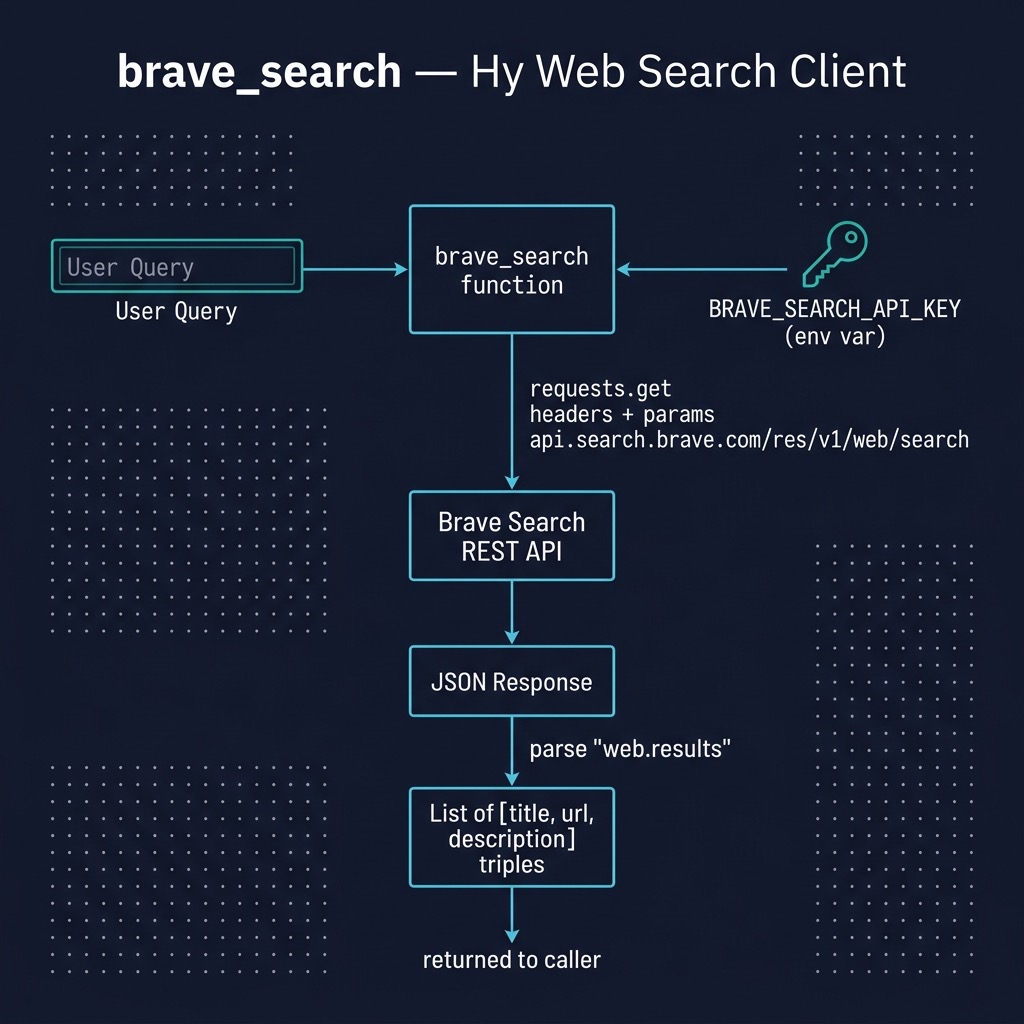
It takes very little Hy code to access the Brave search APIs. Here we define a function named brave_search that takes one parameter query. We get the API subscription ket from an environment variable, define the URI for the Brave search endpoint, and set up an HTTP request to this endpoint. I encourage you, dear reader, to experiment with printing out the HTTP response to see all data returned from the Brave search API. Here we only collect the tile, URL, and description for each search result:
(import os requests)
(import pprint [pprint])

(defn brave_search [query]
  (setv subscription-key (get os.environ "BRAVE_SEARCH_API_KEY"))
  (setv endpoint "https://api.search.brave.com/res/v1/web/search")

  ;; Construct a request
  (setv params {"q" query})
  (setv headers {"X-Subscription-Token" subscription-key})

  ;; Call the API
  (setv response (requests.get endpoint :headers headers :params params))

  ;; Pull out results
  (setv results (get (get (response.json) "web") "results"))

  ;; Create a list of lists containing title, URL, and description
  (setv res (lfor result results
                 [(get result "title")
                  (get result "url")
                  (get result "description")]))

  ;; Return the results
  res)

;; Example usage:
;;(setv search-results (brave-search "site:wikidata.org Sedona Arizona"))
;;(pprint search-results)
You can use search hints like “site:wikidata.org” to only search specific web sites. In the following example I use the search query:
1 "site:wikidata.org Sedona Arizona"
The example call:
(setv search-results (brave-search "site:wikidata.org Sedona Arizona"))
(pprint search-results)
produces the output (edited for brevity):
```
$ uv run hy -i brave.hy
Hy 1.1.0 (Business Hugs) using CPython(main) 3.12.0 on Darwin
=> (brave-search "site:wikidata.org Sedona Arizona")
[['Sedona - Wikidata',
  'https://m.wikidata.org/wiki/Q80041',
  'city in counties of Yavapai and Coconino, <strong>Arizona</strong>, United '
  'States'],
 ['Category:People from Sedona, Arizona - Wikidata',
  'https://www.wikidata.org/wiki/Q8748837',
  'All structured data from the main, Property, Lexeme, and EntitySchema '
  'namespaces is available under the Creative Commons CC0 License; text in the '
  'other namespaces is available under the Creative Commons '
  'Attribution-ShareAlike License; additional terms may apply.'],
 ['Category:Films set in Sedona, Arizona - Wikidata',
  'https://www.wikidata.org/wiki/Q25109087',
  'All structured data from the main, Property, Lexeme, and EntitySchema '
  'namespaces is available under the Creative Commons CC0 License; text in the '
  'other namespaces is available under the Creative Commons '
  'Attribution-ShareAlike License; additional terms may apply.'],

 ...
Running Hy using uv with the -i parameter loads the file and then puts the user into a Hy REPL.
Wrap-up
In addition to using automated web scraping to get data for my personal research, I often use automated web search. I find the Brave search APIs are the most convenient to use and I like paying for services that I use. The search engine Duck Duck Go also provides free search APIs but even though I use Duck Duck Go for 90% of my manual web searches, when I build automated systems I prefer to rely on services that I pay for.
Optional Practice Problems
-
Error Handling and Validation: The current implementation of
brave_searchassumes that theBRAVE_SEARCH_API_KEYenvironment variable is always defined and that the network request succeeds. Modify the function to check if the environment variable is set before making the request, and raise a clean error message if it is missing. Also, wrap the network request in a try/except block to handle connection errors or invalid HTTP responses gracefully. -
Retrieve Extra Metadata: Inspect the full JSON payload returned by the Brave Search API. Update the return value of
brave_searchto include additional metadata about the search results, such as the total search time, or individual result attributes like the published date or whether the result is from a secure site (HTTPS). -
Custom Result Filtering: Extend the
brave_searchfunction to accept an optional parameterfilter-domain. Modify the list comprehension (lfor) to only return results where the URL contains the specified domain name.