Using Google Gemini API
I primarily choose Google Gemini when I use commercial LLM APIs (most of my work involves running local LLM models using Ollama).
Note: I updated this chapter in March 2026 adding a section at the end of this chapter on the new experimental Gemini Interactions APIs.
Overall, the Google Gemini APIs provide a powerful and easy-to-use tool for developers to integrate advanced language processing capabilities into their applications, and can be a game changer for developers looking to add natural language processing capabilities to their projects.
Google Gemini offers two features that set it apart from other commercial APIs:
- Supports a one million token context size.
- Very low cost.
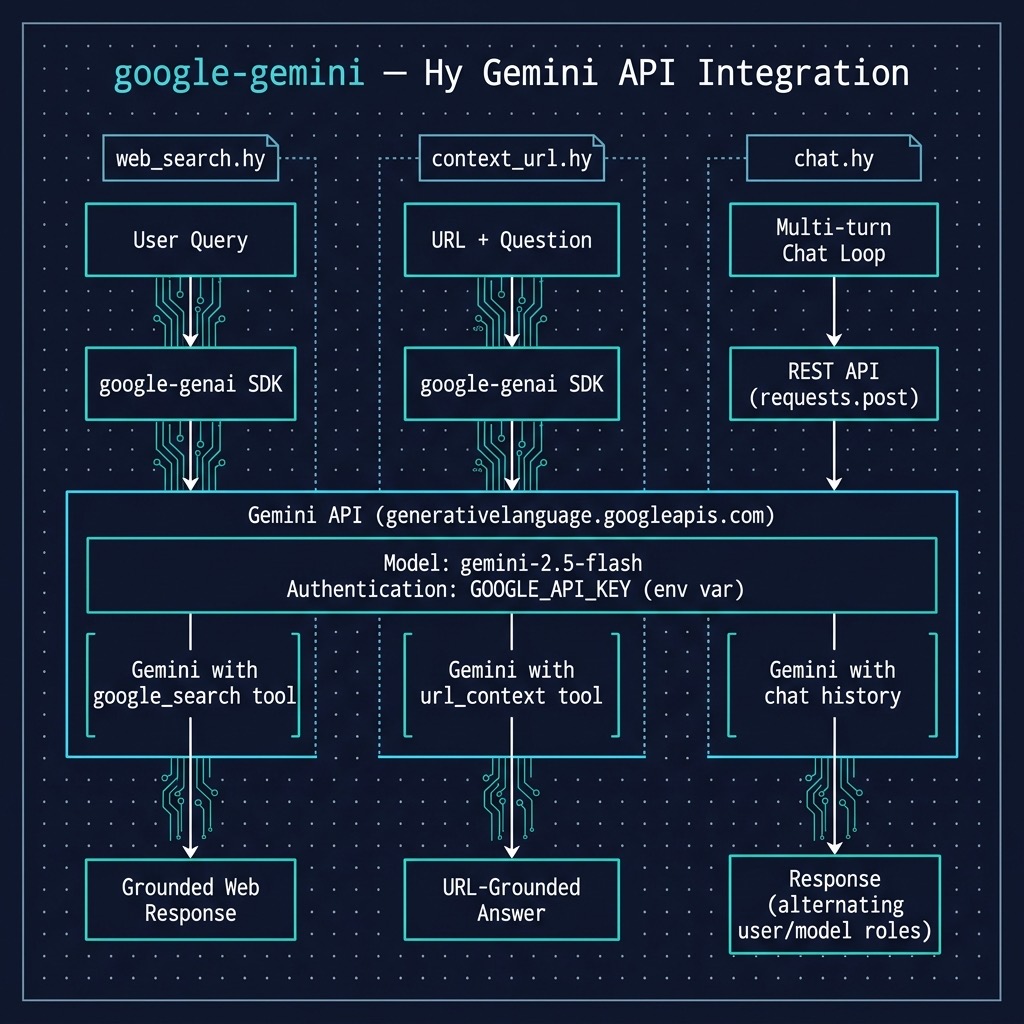
We will look at two ways to access Gemini and we will look at examples for each technique:
- Use the Python requests library to use Gemini’s REST style interface.
- Use Google’s Python google-genai package (and we will look at tool use in the same example).
REST Interface
The following example calls the Gemini completion API and stores user chat in a persistent context.
Here is a listing or the source file google-gemini/chat.hy:
 1 (import os)
 2 (import requests)
 3 (import json) ;; Explicitly import json for dumps
 4
 5 ;; Get API key from environment variable (standard practice)
 6 (setv api-key (os.getenv "GOOGLE_API_KEY"))
 7
 8 ;; Gemini API endpoint
 9 (setv api-url f"https://generativelanguage.googleapis.com/v1beta/models/gemini-2.0-f\
10 lash:generateContent?key={api-key}")
11
12 ;; Initialize the chat history (Note: Gemini uses 'user' and 'model')
13 (setv chat-history [])
14
15 (defn call-gemini [chat-history user-input]
16   "Calls the Gemini API with the chat history and user input using requests."
17
18   (setv headers {"Content-Type" "application/json"})
19
20   ;; Build the contents list, correctly alternating roles.
21   (setv contents [])
22   (for [message chat-history]
23     (.append contents message))
24   (.append contents {"role" "user" "parts" [{"text" user-input}]})
25
26   (setv data {
27               "contents" contents
28               "generationConfig" {
29                                   "maxOutputTokens" 200
30                                   "temperature" 1.2
31                                   }})
32
33   ;; Use json.dumps to convert the Python/Hy dict to a JSON string
34   (setv response (requests.post api-url :headers headers :data (json.dumps data)))
35
36   ;; Raise HTTPError for bad responses (4xx or 5xx)
37   (. response raise_for-status)
38
39   ;; Return the JSON response as a Hy dictionary/list
40   (response.json))
41
42 ;; --- Main Chat Loop ---
43 (while True
44   ;; Get user input from the console
45   (setv user-input (input "You: "))
46
47
48   ;; Call the Gemini API
49   (setv response-data (call-gemini chat-history user-input))
50
51   ;; Debug print (optional)
52   ;; (print "Raw response data:" response-data)
53
54   ;; Extract and print the assistant's message
55   ;; Using sequential gets for clarity, assumes expected structure
56   (setv candidates (get response-data "candidates"))
57   (setv first-candidate (get candidates 0))
58   (setv content (get first-candidate "content"))
59
60   (setv parts (get content "parts"))
61
62   (setv assistant-message (get (get parts 0) "text"))
63   (print "Assistant:" assistant-message)
64
65   ;; Append BOTH user and assistant messages to chat history (important for context)
66   (.append chat-history {"role" "user" "parts" [{"text" user-input}]})
67   (.append chat-history {"role" "model" "parts" [{"text" assistant-message}]}))
This example differs from the OpenAI API example in the previous chapter in two ways:
- It implements a chat (multiple user input conversation) interface.
- It uses the low level Python requests library since the Google Gemini library has some incompatibilities with the Hy language system.
Here is a sample output showing how the user chat complex is used:
 1 $ uv sync
 2 $ uv run hy chat.hy
 3 You: set the value of the variable X to 1 + 7
 4 Assistant: python
 5 X = 1 + 7
 6
 7
 8 This code will:
 9
10 1. **Calculate:**  1 + 7, which results in 8.
11 2. **Assign:** Assign the value 8 to the variable named `X`.
12
13 You: print the value of X + 3
14 Assistant: python
15 X = 1 + 7  # Make sure X is defined as 8
16 print(X + 3)
17
18
19 This code will:
20
21 1. **Calculate:** Take the current value of X (which is 8) and add 3 to it, resultin\
22 g in 11.
23 2. **Print:** Display the result (11) on the console.
24
25 You: print the value of X + 3
26 Assistant: python
27 X = 1 + 7  # Make sure X is defined as 8
28 print(X + 3)
29
30 This code will:
31
32 1. **Calculate:** Take the current value of `X` (which is 8) and add 3 to it, result\
33 ing in 11.
34 2. **Print:** Display the result (11) on the console.
35
36 You:
Using Google’s Python Package to Access Gemini
We use the package google-genai in the example context_url.hy:
 1 (import os)
 2 (import google [genai])
 3 (import pprint [pprint])
 4
 5 ;; Set enviroment variable: "GOOGLE_API_KEY"
 6
 7 (setv client (genai.Client))
 8
 9 (defn context_qa [prompt]
10   "Calls the Gemini API using url_context tool with a prompt containing both a URI a\
11 nd user question"
12
13   (setv
14     response
15     (client.models.generate_content
16       :model "gemini-2.5-flash"
17       :contents prompt
18       :config {"tools" [{"url_context" {}}]}))
19
20   (return response.text))
21
22 (when (= __name__ "__main__")
23   (print
24     (context_qa
25       "https://markwatson.com What musical instruments does Mark Watson play?")))
The tool url_context is called automatically when a URI is present in a user prompt. A prompt can also contain multiple URIs and they are all used in generating text from the input prompt.
The output for this example is:
1 $ uv run hy context_url.hy
2 Mark Watson plays the guitar, didgeridoo, and American Indian flute.
If you want to reuse this example without using tools, just remove the option :config {“tools” [{“url_context” {}}]}.
The GitHub repository for the this Google package also contains useful examples and documentation links: https://github.com/googleapis/python-genai.
New Experimental Gemini Interactions APIs
The following code listing demonstrates the powerful synergy between Google’s latest generative AI capabilities and the expressive, Lisp-like syntax of the Hy language. By leveraging the google.genai library, the script orchestrates a new experimental “Interaction” that bridges the gap between real-world web data and private, localized business logic. It begins by initializing a Gemini client and defining a structured schema for a custom tool, check_inventory, which simulates an internal database lookup. The core of the program lies in the client.interactions.create call, where a natural language prompt triggers a multi-step workflow: first, utilizing the built-in Google Search tool to identify current market trends, and subsequently, preparing to invoke the local inventory function for those specific items. This approach highlights how modern LLMs have evolved from simple text generators into central reasoning engines capable of coordinating complex tool-calling sequences across disparate data environments.
This listing of gemini_interactions_api.hy is edited fr page width:
 1 (import google [genai])
 2
 3 ;; Set environment variable: "GOOGLE_API_KEY"
 4 ;; More info:
 5 ;; https://ai.google.dev/gemini-api/docs/interactions
 6
 7 (setv client (genai.Client))
 8
 9 ;; Define a custom function tool that checks an internal inventory database
10 (setv check-inventory
11   {"type" "function"
12    "name" "check_inventory"
13    "description" "Checks the internal inventory database for a product model."
14    "parameters"
15      {"type" "object"
16       "properties"
17         {"product_name"
18            {"type" "string"
19             "description" "The name or model of the product to check"}}
20       "required" ["product_name"]}})
21
22 ;; Create an interaction that combines a built-in Google Search tool with
23 ;; the custom check_inventory function tool
24 (setv interaction
25   (client.interactions.create
26     :model "gemini-3-flash-preview"
27     :input (+ "Search the web for top 3 trending noise-canceling headphones today, "
28               "and check if we have those models in our internal inventory.")
29     :tools [{"type" "google_search"}   ; built-in tool
30             check-inventory]))         ; custom function tool
31
32 ;; Process each output from the interaction
33 (for [output interaction.outputs]
34   (cond
35     (= output.type "function_call")
36       (do
37         (print f"Tool ID: {output.id}")
38         (print f"Calling: {output.name} with args: {output.arguments}"))
39     (= output.type "text")
40       (print output.text)))
This code uses Hy’s interoperability with Python, allowing developers to define complex JSON-like tool schemas using native Hy dictionaries. This example was originally written in Python for the Gemini online documentation. By combining the Google Search built-in tool with the user defined check_inventory function, the code creates a unified execution context. The Gemini model intelligently determines when to use the live web versus when to request data from the local environment, returning a structured interaction object that contains both the model’s reasoning and the specific tool calls required to fulfill the request.
Processing the results is handled a for loop that iterates over the interaction’s outputs, using a cond macro to differentiate between raw text responses and pending function calls. This pattern is useful for production workflows because it allows an application to capture the specific arguments such as product names discovered via search and pass them into actual database queries or call local functions. This example effectively illustrates the “agentic” workflow where the AI doesn’t just provide an answer, but generates the necessary “Tool ID” and argument set to drive further programmatic action.
Here is example output:
 1 $ uv run hy gemini_interactions_api.hy
 2 UserWarning: Interactions usage is experimental and may change in future versions.
 3   (client.interactions.create
 4 Tool ID: 4uu76c87
 5 Calling: check_inventory with args: {'product_name': 'Sony WH-1000XM6'}
 6 Tool ID: wk8lh5fn
 7 Calling: check_inventory with args: {'product_name': 'Bose QuietComfort Ultra Headph\
 8 ones (2nd Gen)'}
 9 Tool ID: 3gkrxgyc
10 Calling: check_inventory with args: {'product_name': 'Apple AirPods Pro 3'}
Dear reader, note that these APIs may change. Please check out the documentation https://ai.google.dev/gemini-api/docs/interactions for more use cases of the Interactions APIs.
Wrap Up for Using the Gemini APIs
There are many good commercial LLM APIs (and I have most of them) but I currently most frequently use Gemini for two reasons: supports a one million token context size and is very low cost.
I discuss Gemini in more detail in another book that you can read online: https://leanpub.com/solo-ai/read.
Optional Practice Problems
- Persistent Conversation History: Modify the CLI chat script chat.hy to serialize the chat history to a JSON file when exiting, and load it when starting. This allows resuming chat sessions across restarts.
-
Inspect Grounding Citations: Modify the web_search.hy script to print the sources and URLs referenced by the
google_searchtool. You will need to inspect the model’s response metadata structure. - System Instructions in GUI: Add a system instruction text field in ui_chat.hy to allow specifying the behavior or persona of the model (such as a helpful programming tutor) via the API request configuration.