Knowledge Base Navigator: Building an AI-Powered Information System
Earlier we looked at the Knowledge Graph Navigator (KGN) project that combined symbolic Natural Language Processing (NLP) with access to public knowledge graphs like DBPedia. Here we take a much simpler and more powerful approach using Google’s Gemini API with built-in web search grounding.
The code can be found in the directory: source_code_for_examples/knowledge_base_navigator.
In this chapter, we explore a practical application that combines modern AI APIs with Hy to create an interactive knowledge exploration tool. The Knowledge Base Navigator demonstrates how to integrate external services using Python’s rich library ecosystem while writing expressive Lisp-style code.
This example differs from the KGN project since no SPARQL queries or local knowledge base are involved. Instead, we use Gemini’s built-in google_search tool to dynamically retrieve and synthesize information from the web. Dear reader, this is a fundamentally different and simpler approach!
Project Overview
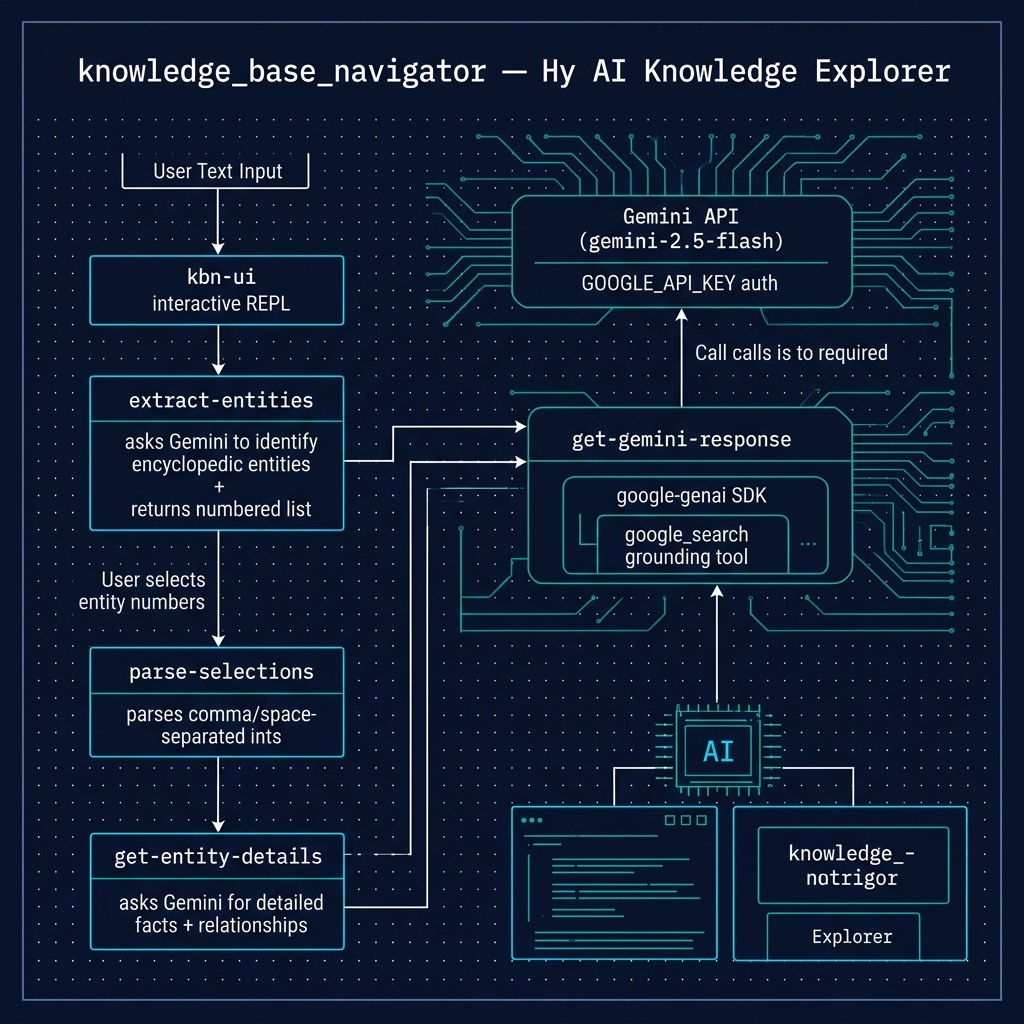
The Knowledge Base Navigator is a modern evolution of the classic Knowledge Graph Navigator (KGN). This new version uses Google’s Gemini API to extract entities from natural language, disambiguate them, discover semantic links between entities, and retrieve detailed encyclopedic information. This represents a paradigm shift from traditional database-backed systems to an AI-driven pipeline.
The system follows a two-stage process:
- Entity Extraction: The user provides text, Gemini identifies potential entities (people, companies, countries, etc.) and returns them as a numbered list
- Deep Retrieval: The user selects entities by number, Gemini provides detailed facts and analyzes relationships between entities — grounded by live web search
Project Structure
The Knowledge Base Navigator consists of just two files:
1 knowledge_base_navigator/
2 ├── pyproject.toml                    # uv project configuration
3 └── knowledge_base_navigator.hy      # Core application
Project Configuration
The pyproject.toml file defines the project and its dependencies:
 1 [project]
 2 name = "knowledge-base-navigator"
 3 version = "0.1.0"
 4 description = "AI-powered Knowledge Base Navigator using Gemini"
 5 readme = "README.md"
 6 requires-python = ">=3.12"
 7 dependencies = [
 8     "google-genai>=1.31.0",
 9     "hy>=1.1.0",
10 ]
We only need two dependencies beyond the Python standard library:
google-genai— Google’s official Python SDK for the Gemini APIhy— The Hy language itself
Compare this to the KGN example which required spacy, requests, and several other libraries. By delegating entity extraction and knowledge retrieval to Gemini, we dramatically simplify our dependency footprint.
Core Implementation
The following code is from the file knowledge_base_navigator.hy.
Gemini API Client Setup
The SDK initialization is straightforward:
1 (import google [genai])
2
3 ;; The google-genai SDK reads GOOGLE_API_KEY from the environment.
4 (setv client (genai.Client))
The genai.Client constructor automatically reads the GOOGLE_API_KEY environment variable. This is a clean example of Hy’s seamless Python interop — we import and use the Google SDK exactly as we would in Python, but with Lisp syntax.
Generic Gemini Response Function
The core API function wraps the SDK’s generate_content call:
 1 (defn get-gemini-response [prompt #** kwargs]
 2   "Send a prompt to Gemini and return the text response.
 3    Accepts optional keyword arguments passed to config."
 4   (setv config (| {"tools" [{"google_search" {}}]} kwargs))
 5   (setv response
 6     (client.models.generate_content
 7       :model "gemini-2.5-flash"
 8       :contents prompt
 9       :config config))
10   response.text)
Key Hy patterns demonstrated here:
#** kwargscollects arbitrary keyword arguments, equivalent to Python’s**kwargs(| dict1 dict2)merges dictionaries, equivalent to Python’sdict1 | dict2- Keyword arguments to Python methods use the
:keyword valuesyntax (:model,:contents,:config) - Attribute access uses dot notation:
response.text
The google_search tool is included by default in every request, giving Gemini access to live web search results for grounded, factual answers.
Entity Extraction
The entity extraction function constructs a carefully engineered prompt:
 1 (defn extract-entities [user-text]
 2   "Ask Gemini to identify encyclopedic entities in the user's text.
 3    Returns the raw numbered-list text from Gemini."
 4   (setv prompt
 5     (+ "Analyze the following user text: \"" user-text "\".\n"
 6        "Identify potential encyclopedic entities (people, companies, "
 7        "countries, cities, products, concepts, etc.) mentioned.\n"
 8        "Categorize them if necessary. Return them as a neatly formatted "
 9        "numbered list (1., 2., 3., etc.) with a short 1-sentence "
10        "description for each.\n"
11        "DO NOT return any other conversational text, ONLY the numbered "
12        "list so the user can see their options."))
13   (get-gemini-response prompt))
Prompt engineering principle: Be explicit about output format. The instruction to return ONLY the numbered list prevents verbose conversational responses that would be harder to parse. This is a recurring pattern in LLM-powered applications — constrained output formatting makes downstream processing much simpler.
Notice how Hy’s string concatenation with + keeps long prompts readable across multiple lines without complex escape sequences.
User Selection Parsing
The selection parser handles flexible user input:
 1 (defn parse-selections [selection-line]
 2   "Parse a string of space- or comma-separated numbers into a list
 3    of ints. Non-numeric tokens are silently ignored."
 4   (setv tokens (.split (.replace selection-line "," " ")))
 5   (setv result [])
 6   (for [token tokens]
 7     (when (.strip token)
 8       (try
 9         (.append result (int (.strip token)))
10         (except [ValueError]
11           None))))
12   result)
This function demonstrates several Hy idioms:
- Method chaining:
(.split (.replace selection-line "," " "))— first replace commas with spaces, then split on whitespace try/except: Exception handling uses the same pattern as Python but with Hy’s s-expression syntaxwhen: A Lisp-style conditional that only executes its body when the test is truthy (equivalent toifwithout an else branch)
The function is intentionally lenient — if the user types 1, 2, 3 or 1 2 3 or even 1, two, 3, it extracts the valid numbers and ignores everything else.
Detail Retrieval with Relationship Discovery
The detail retrieval function sends a multi-task prompt to Gemini:
 1 (defn get-entity-details [entity-list-text indices]
 2   "Ask Gemini for detailed facts and relationships for selected
 3    entities. entity-list-text is the numbered list from
 4    extract-entities. indices is a list of integers the user selected."
 5   (setv index-str (.join ", " (lfor i indices (str i))))
 6   (setv prompt
 7     (+ "Review this numbered list of entities:\n"
 8        entity-list-text "\n\n"
 9        "The user has selected entity numbers: " index-str ".\n"
10        "Task 1: For each selected entity, generate detailed, factual, "
11        "encyclopedic information (like birth place, description, and "
12        "relationships for people; industry, net income, description, "
13        "relationships for companies; and similar details for countries, "
14        "cities, or products).\n"
15        "Task 2: Evaluate ALL the selected entities collectively and "
16        "explicitly summarize any known relationships, associations, or "
17        "historical connections among them.\n"
18        "Format the output carefully with clean section headers and "
19        "bullet points."))
20   (get-gemini-response prompt))
The lfor (list comprehension for) expression (lfor i indices (str i)) converts each integer index to a string, then .join assembles them into a comma-separated list. This is Hy’s equivalent of Python’s ", ".join(str(i) for i in indices).
The two-task prompt structure ensures we get both individual entity details AND a relationship analysis in a single API call, making efficient use of the Gemini API.
Interactive UI Loop
The kbn-ui function implements the main interactive text interface:
 1 (defn kbn-ui []
 2   "Main interactive loop for the Knowledge Base Navigator."
 3   (while True
 4     (print "\n============= GEMINI KNOWLEDGE BASE NAVIGATOR =============")
 5     (print "\nEnter entity names or a descriptive sentence (or 'quit' to exit):")
 6     (setv prompt (input "> "))
 7
 8     (when (in (.lower (.strip prompt)) ["quit" "q"])
 9       (print "Goodbye!")
10       (break))
11
12     (when (> (len (.strip prompt)) 0)
13       (print "\n[Extracting entities using Gemini...]")
14       (setv entity-list-text (extract-entities prompt))
15
16       (if (is entity-list-text None)
17         (print "\n[Error getting entity list from Gemini. Please try again.]")
18         (do
19           (print (+ "\n--- IDENTIFIED ENTITIES ---\n"
20                     entity-list-text
21                     "\n---------------------------"))
22           (print "\nEnter the numbers of entities for detailed info (space or comma separated):")
23           (setv selection-line (input "> "))
24           (setv indices (parse-selections selection-line))
25
26           (if (= (len indices) 0)
27             (print "\n[No valid selections made. Skipping to next prompt.]")
28             (do
29               (print "\n[Fetching detailed facts and relationships...]")
30               (setv details (get-entity-details entity-list-text indices))
31               (print (+ "\n" details)))))))))
Key loop patterns in Hy:
while Truewith(break)for controlled exit — the Lisploop/returnidiom translates naturally(input "> ")for user input — Python’s built-in function called directly(when ...)guards for conditional execution(do ...)groups multiple expressions where only one is expected (likeprognin Common Lisp)- Nested
if/dohandles the multi-branch control flow
Finally, the entry point:
1 (when (= __name__ "__main__")
2   (kbn-ui))
This is the standard Python if __name__ == "__main__" guard expressed in Hy. It allows the file to be both imported as a module and run as a standalone script.
Running the Application
1 $ cd source_code_for_examples/knowledge_base_navigator
2 $ uv sync
3 $ uv run hy knowledge_base_navigator.hy
Example Session
 1 ============= GEMINI KNOWLEDGE BASE NAVIGATOR =============
 2
 3 Enter entity names or a descriptive sentence (or 'quit' to exit):
 4 > Bill Gates and Microsoft
 5
 6 [Extracting entities using Gemini...]
 7
 8 --- IDENTIFIED ENTITIES ---
 9 1. Bill Gates: An American business magnate, software developer,
10    and philanthropist who co-founded Microsoft Corporation.
11 2. Microsoft: A multinational technology corporation that develops,
12    manufactures, and licenses computer software.
13 ---------------------------
14
15 Enter the numbers of entities for detailed info (space or comma separated):
16 > 1 2
17
18 [Fetching detailed facts and relationships...]
19
20 === BILL GATES ===
21 * Born: October 28, 1955, Seattle, Washington
22 * Occupation: Business magnate, investor, philanthropist
23 * Net Worth: ~$120 billion
24 * Founded Microsoft in 1975 with Paul Allen
25
26 === MICROSOFT ===
27 * Founded: April 4, 1975
28 * Headquarters: Redmond, Washington
29 * Industry: Technology, Software, Cloud Computing
30 * Revenue: $211 billion (2023)
31
32 === RELATIONSHIP ===
33 Bill Gates co-founded Microsoft with Paul Allen in 1975.
34 He served as CEO until 2000 and remained Chairman until 2014.
35 Microsoft was the primary source of Gates' wealth.
Key Takeaways
- Python Interop: Hy seamlessly imports and uses Python libraries like
google-genai. The SDK’s Pythonic API translates naturally to Hy’s s-expression syntax with keyword arguments. - Minimal Dependencies: By delegating entity extraction and knowledge retrieval to Gemini, we eliminate the need for NLP libraries (spacy), SPARQL endpoints, and HTTP request handling that the KGN example required.
- Prompt Engineering: Constructing clear prompts with explicit format instructions is essential. The “ONLY the numbered list” constraint prevents verbose responses.
- Web Search Grounding: Gemini’s
google_searchtool provides live, grounded results rather than relying on static knowledge bases — the information is always current. - Interactive CLI in Hy:
while True+input+printcreate effective command-line interfaces. Hy’swhenanddoforms provide clean control flow. - Error Tolerance: The
parse-selectionsfunction demonstrates defensive programming — accepting flexible input formats and silently ignoring invalid entries rather than crashing.
Comparison with KGN
| Aspect | KGN (Chapter 12) | Knowledge Base Navigator |
|---|---|---|
| Entity Recognition | spaCy NLP model | Gemini LLM |
| Data Source | DBPedia via SPARQL | Gemini + web search |
| Dependencies | 6+ libraries | 2 libraries |
| Source Files | 5 files | 1 file |
| Data Currency | Static knowledge graph | Live web results |
| Relationship Discovery | SPARQL graph traversal | LLM reasoning |
Both approaches have merits. The KGN approach gives you structured, machine-readable relationships from a curated knowledge graph. The Knowledge Base Navigator approach gives you richer, more flexible information with natural language descriptions, at the cost of less structured output. The choice depends on your use case.
Environment Setup
1 # Set API key before running
2 export GOOGLE_API_KEY="your_api_key_here"
3
4 # Install dependencies and run
5 cd source_code_for_examples/knowledge_base_navigator
6 uv sync
7 uv run hy knowledge_base_navigator.hy
This example demonstrates that Hy is an excellent choice for AI-powered applications. The combination of Lisp’s expressive syntax with Python’s rich library ecosystem makes it easy to build sophisticated tools with minimal code. The google-genai SDK integrates naturally with Hy, and the result is a concise, readable application that would be substantially more verbose in most other languages.
Optional Practice Problems
- Add a Search History Command (
/history): Modify the interactive loop in knowledge_base_navigator.hy to keep track of previous search prompts. Initialize a listhistory(e.g.,(setv history [])) before starting thewhileloop, and append each valid search query to it. Add a check so that if the user enters/history, the application prints a list of all past queries instead of sending the input to Gemini. -
Implement Domain-Specific Filtering via System Instructions: Add support for a system instruction that restricts entity extraction to a specific domain or topic. Customize
extract-entitiesto accept an optionalsystem-instructionparameter, and pass it into the Gemini configuration block:1 (setv config (| {"system_instruction" system-instruction 2 "tools" [{"google_search" {}}]} 3 kwargs))
Integrate this into the CLI loop (perhaps via a command like/domain <topic>) to let the user restrict exploration to domains like “programming languages”, “historical figures”, or “sci-fi movies”. -
Export Search Results to Markdown: After retrieving entity details and relationship summaries, prompt the user with “Would you like to save these details? (y/n)”. If they respond with
yoryes, prompt them for a filename and write the Markdown-formatted content to disk using Hy’swithmacro and Python’s standardopenfunction:1 (with [f (open filename "w")] 2 (.write f details))