Leanpub Header

Skip to main content

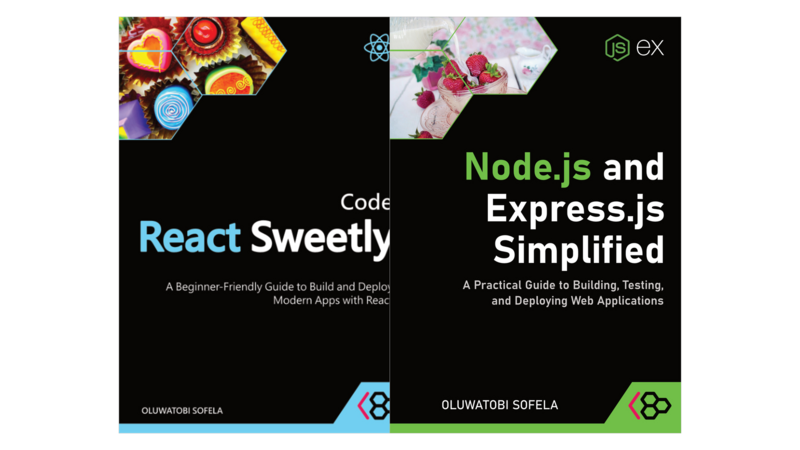
Node.js and Express.js Simplified

A Practical Guide to Building, Testing, and Deploying Web Applications

Node.js and Express.js Simplified
This book is 100% completeLast updated on 2026-09-16

Learn Node.js and Express.js by building practical web applications, not by memorizing endless syntax.

Node.js and Express.js Simplified guides you through the essential concepts you need to create servers, handle requests and data, organize Express applications, connect frontends, test your code, and deploy real projects.

Clear explanations, practical examples, and a focus on understanding make this an approachable guide for anyone ready to take their JavaScript skills beyond the browser.

Minimum price

$9.99

$14.99

You pay

Author earns

$

Also available for 1 book credit with a Reader Membership

PDF
EPUB
WEB
APP
279
Pages
Discussion Forum
About

About

About the Book

Build practical Node.js and Express.js applications without getting lost in unnecessary complexity.

Node.js and Express.js Simplified is a beginner-friendly, hands-on guide to using JavaScript beyond the browser. It takes you from the fundamentals of working with Node.js to building web servers and Express.js applications. It also shows you how to connect the backend to frontends, test your code, and deploy your projects for others to use.

Rather than overwhelming you with every API, pattern, or tool in the Node.js ecosystem, this book focuses on the concepts you need to understand how modern server-side JavaScript applications work. Each topic is explained in clear, approachable language and reinforced with practical examples you can apply to your own projects.

You’ll learn how to:

  • Work with files, URLs, events, and other core Node.js features.
  • Create web servers that receive requests and send responses.
  • Serve webpages and other resources with Node.js.
  • Use Express.js to simplify HTTP request handling.
  • Organize applications with routes, routers, controllers, and views.
  • Work confidently with route parameters, query parameters, and form data.
  • Handle file uploads in Node.js applications.
  • Connect a frontend application to a Node.js and Express.js backend.
  • Test your application and troubleshoot common issues.
  • Prepare and deploy your code so your application can run online.

The book emphasizes understanding, not memorizing syntax. Along the way, you’ll see how the pieces fit together—from a browser making a request to your server processing that request and returning the appropriate response.

Whether you are learning backend development for the first time, expanding your JavaScript skills beyond frontend development, or looking for a practical introduction to Node.js and Express.js, this book will help you build a solid foundation you can carry into larger projects.

By the end, you won’t just know how to write Node.js and Express.js code. You’ll understand how to structure, connect, test, and deploy web applications with confidence.

Author

About the Author

CodeSweetly

Learning to be a software developer can sometimes feel overwhelming or tedious, but CodeSweetly is here to help.

Unlike other resources, CodeSweetly helps you become a confident developer by simplifying technical concepts and presenting them in a way that supports your unique learning style, so you can focus on coding sweetly.

We break down programming topics with clear tutorials, examples, cheat sheets, and illustrations made to make complex ideas easier to grasp. Our approach centers on clarity and simplicity for your success.

Whether you’re new to coding or a pro, CodeSweetly makes learning to code easier and more enjoyable.

You can buy printed copies of our publications at Amazon.

Contents

Table of Contents

Introduction

  1. Welcome to Node.js and Express.js!
  2. What You’ll Learn
  3. How You’ll Learn
  4. What You Should Already Know
  5. The Tools You’ll Need
  6. A Personal Note
  7. Let’s Begin!

Getting Started with Node.js

  1. Install Node.js on Your System
  2. Create a New Directory for Your Project
  3. Create a package.json File
  4. Why Node.js
  5. Node’s Module Support
  6. Create HTTP Servers with Node.js
  7. The http.ServerResponse APIs
  8. How to Run JavaScript Code on the Command Line
  9. What Can You Build with Node.js?

File Management in Node.js

  1. Types of Interfaces in the File System Module
  2. Add the Callback-Based File System Module to Your Node.js App
  3. Add the Promise-Based File System Module to Your Node.js App
  4. Important File System Module Methods for Managing Files in Node.js
  5. The node:fs Module Gives You APIs to Work with a Computer’s File System

File Uploads in Node.js

  1. Create a New Project Directory
  2. Create a package.json File
  3. Create a Form for Uploading Files
  4. Install the Formidable Package
  5. Use the Formidable Module in Your Node.js Application
  6. Run Your Application
  7. What Is the Formidable parse() Method?
  8. Specify Where Formidable Should Save the Uploaded Files

URL Management in Node.js

  1. How to Use the Node.js url Module
  2. URL Constructor – Parse URLs
  3. fileURLToPath Function – Resolve File URLs to Paths
  4. pathToFileURL Function – Resolve Paths to URLs
  5. The node:url Module Provides APIs for Working with URLs

Serve Webpages in Node.js

  1. Create a New Project Directory
  2. Create the HTML Files for the Webpages You Wish to Serve
  3. Configure a Web Server to Respond to Browser Requests by Serving Webpages
  4. Run Your Application

Event Management in Node.js

  1. Add the Events Module to Your Node.js Application
  2. Create and Trigger Events with the EventEmitter API
  3. Important Emitter Methods for Managing Events in Node.js
  4. The node:events Module Provides APIs for Event Management

Use Express.js to Simplify HTTP Request Handling in Node

  1. Create a Project Directory
  2. Create a package.json File
  3. Configure the Project as an ES Module Application
  4. Why Express.js?
  5. Raw Node.js Code vs. Express.js Code
  6. Important Stuff to Know About Creating Express.js Web Servers in Node.js

Routes, Middleware, and Controllers in Express.js

  1. Syntax of a Route in Express
  2. Middleware vs. Route Handler
  3. Examples
  4. Important Things to Know about the next Parameter
  5. Categories of Middleware in Express.js

Route vs. Query Parameters in Express.js

  1. Create a New Project Directory
  2. Create a package.json File
  3. Configure the Project as an ES Module Application
  4. Install Express
  5. Configure a Web Server to Respond to Browser Requests
  6. What Is a Query Parameter in Express?
  7. What Is a Route Parameter in Express?

Router in Express.js

  1. Create a New Project Directory
  2. Create a package.json File
  3. Configure the Project as an ES Module Application
  4. Install Express
  5. Group Related Routes and Middleware
  6. Configure the Main Express Application
  7. Run Your Express.js Application
  8. Important Things to Know about Express Routers

Views in Express.js

  1. Create a New Project Directory
  2. Create a package.json File
  3. Configure the Project as an ES Module Application
  4. Install Express
  5. Types of Views in Express.js
  6. What Are Static Views in Express.js?
  7. What Are Dynamic Views in Express.js?

Handling Form Data in Express.js

  1. Validation vs Sanitization vs Output Escaping: What’s the Difference?
  2. Types of Form Validation
  3. What Is Client-Side Form Validation?
  4. What Is Server-Side Form Validation?
  5. How to Use Express-Validator to Validate a Form’s Data
  6. Important Things to Know About Validation, Sanitization, and Output Escaping in Express
  7. POST vs GET Method Attributes in HTML Forms

Connect a Frontend Application to a Node.js Backend

  1. Create a New Project Directory
  2. Create the Frontend and Backend Project Directories
  3. Configure the Project’s Backend
  4. Configure the Project’s Frontend
  5. Configure CORS in the Backend
  6. Run Your Full-Stack Application
  7. Send Data from the Frontend to the Express Backend
  8. Use express.json() to Parse a JSON Request Body

Deploy a Full-Stack Application

  1. Deploy Your Backend Application to Render
  2. Deploy Your Frontend Application to Vercel

Manage User Sessions in Express with Express-Session

  1. Create a Basic Express Application
  2. Inspect Your App’s Cookies in the Browser
  3. Add Session Support with express-session
  4. Understand the Three Session-Related Properties
  5. Explore the Session Properties in Action

Test Express HTTP Endpoints with Supertest and node:test

  1. What’s the Difference Between a Test Runner and an HTTP Testing Tool?
  2. Create a Project Directory
  3. Create a package.json File
  4. Configure the Project as an ES Module Application
  5. Install Express
  6. Install the HTTP Testing Library
  7. Test HTTP Requests
  8. Run the App Script
  9. Use the node:test Module to Run Tests
  10. Configure the App’s Web Server
  11. Run the Express.js Web Server
  12. Important Things to Know about Testing HTTP Endpoints

Use TypeScript with Express.js

  1. Create a Project Directory
  2. Create a package.json File
  3. Configure the Project as an ES Module Application
  4. Install Express
  5. Install TypeScript and Type Definitions
  6. Configure a Web Server to Respond to Browser Requests
  7. Run the Express Web Server

Add ESLint to an Express Application

  1. Initialize ESLint’s Configuration
  2. Lint Your Code
  3. Customize ESLint Rules
  4. Specify the Files ESLint Should Ignore

Epilogue

  1. What Next?
  2. Keep Growing
  3. One Last Favor
  4. Final Words

Get the free Community Edition

You can get the free Community Edition in PDF or EPUB just by sharing your name and email address with the author, or you can just click this link to read a shorter sample online...


Also by the Author

Also by the Author

The Leanpub 60 Day 100% Happiness Guarantee

Within 60 days of purchase you can get a 100% refund on any Leanpub purchase, in two clicks.

See full terms...

Earn $8 on a $10 Purchase, and $16 on a $20 Purchase

We pay 80% royalties on purchases of $7.99 or more, and 80% royalties minus a 50 cent flat fee on purchases between $0.99 and $7.98. You earn $8 on a $10 sale, and $16 on a $20 sale. So, if we sell 5000 non-refunded copies of your book for $20, you'll earn $80,000.

(Yes, some authors have already earned much more than that on Leanpub.)

In fact, authors have earned over $15 million writing, publishing and selling on Leanpub.

Learn more about writing on Leanpub

Free Updates. DRM Free.

If you buy a Leanpub book, you get free updates for as long as the author updates the book! Many authors use Leanpub to publish their books in-progress, while they are writing them. All readers get free updates, regardless of when they bought the book or how much they paid (including free).

Most Leanpub books are available in PDF (for computers) and EPUB (for phones, tablets and Kindle). The formats that a book includes are shown at the top right corner of this page.

Finally, Leanpub books don't have any DRM copy-protection nonsense, so you can easily read them on any supported device.

Learn more about Leanpub's ebook formats and where to read them

Write and Publish on Leanpub

You can use Leanpub to easily write, publish and sell in-progress and completed ebooks and online courses!

Leanpub is a powerful platform for serious authors, combining a simple, elegant writing and publishing workflow with a store focused on selling in-progress ebooks.

Leanpub is a magical typewriter for authors: just write in plain text, and to publish your ebook, just click a button. (Or, if you are producing your ebook your own way, you can even upload your own PDF and/or EPUB files and then publish with one click!) It really is that easy.

Learn more about writing on Leanpub