LangGraph
LangGraph is good for building stateful, multi-step LLM applications, things like agents, workflows, or multi-tool reasoning pipelines using a graph-based execution model instead of simple chains.
Key Benefits:
- State management: Maintains conversation or agent memory across turns.
- Control flow: Lets you branch, loop, and merge tasks dynamically (unlike LangChain’s mostly linear chains).
- Tool orchestration: Coordinates multiple tools or models (e.g., search + code interpreter + summarizer).
- Persistence: Supports saving/reloading graph state for long-running agent sessions.
LangGraph combines LangChain-style models and tools, DAG-style control flow, and memory persistence, and is useful for building complex agent systems that need structured, inspectable logic.
Note: This example builds the agent loop explicitly with LangGraph’s StateGraph API rather than a prebuilt helper such as create_agent. Writing the graph out by hand shows exactly where the model is called, where tools run, and how the loop decides to stop, which makes the control flow much easier to customize or extend.
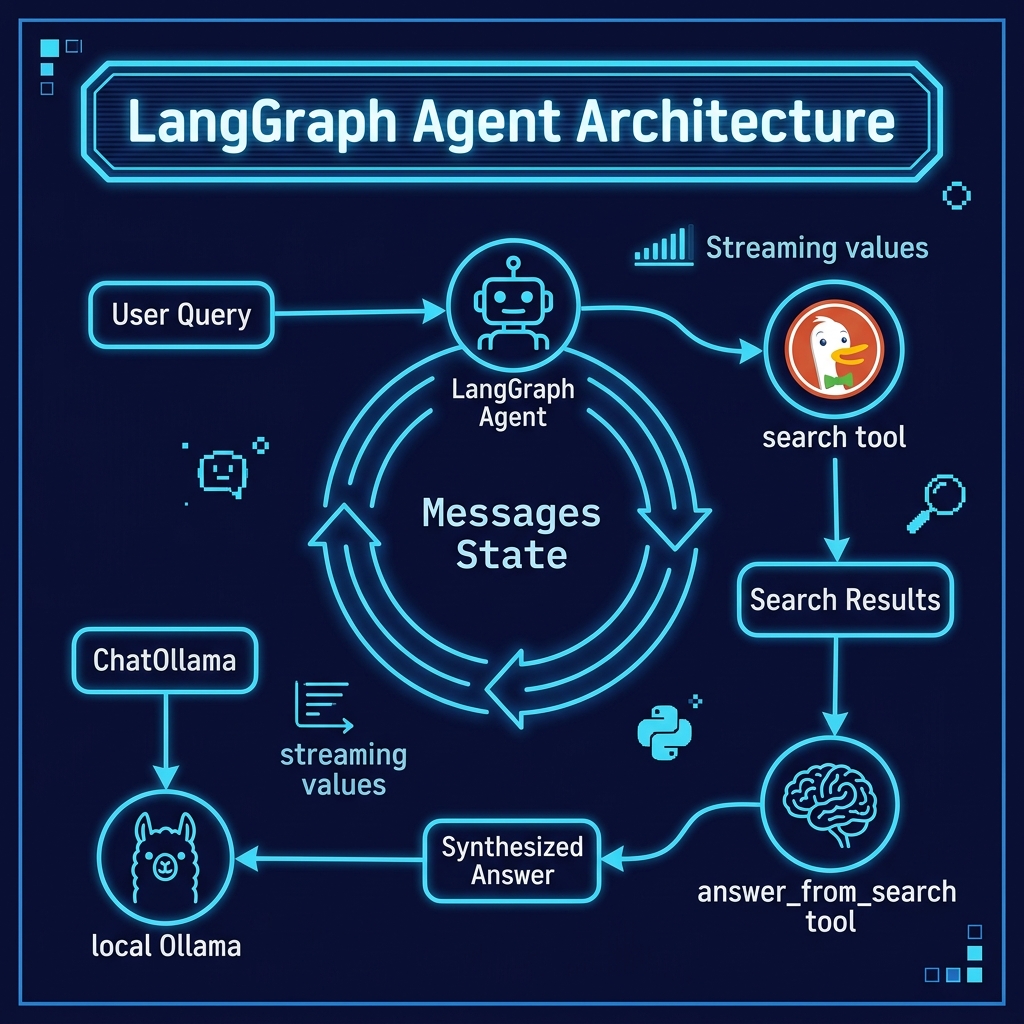
We look at one example here, in the file Ollama_in_Action_Book/source-code/langgraph/langgraph_agent_test.py. It implements a ReAct-style (Reasoning and Acting) agent as a small graph with two nodes and one conditional edge. An llm_call node invokes a ChatOllama model bound to two tools, a prebuilt ToolNode executes whichever tools the model requests, and a should_continue function on a conditional edge routes execution back to llm_call whenever the model asks for another tool call, or ends the run when the model produces a final answer. This is the fundamental agent loop, expressed as an explicit graph instead of being hidden inside a helper.
The two tools are a search function that runs a DuckDuckGo web search and an answer_from_search function that sends the original question plus the retrieved text to the same local LLM to synthesize a concise answer. Keeping retrieval and synthesis as separate tool steps lets the model decide when it has enough information, instead of forcing a fixed pipeline. Here is the complete listing:
  1 """LangGraph agent example: a tool-calling loop built with StateGraph.
  2
  3 Replaces the higher-level LangChain ``create_agent`` with an explicit LangGraph
  4 graph so you can see (and control) every step:
  5
  6 - ``llm_call`` node: invokes the Ollama chat model with the conversation so far;
  7   the model may return tool calls.
  8 - ``tools`` node: a prebuilt ``ToolNode`` that executes the requested tools.
  9 - ``should_continue`` edge: loops back to ``llm_call`` while the model keeps
 10   requesting tools, otherwise finishes.
 11 """
 12
 13 import sys
 14 from pathlib import Path
 15 from typing import Literal
 16
 17 from langchain_community.tools import DuckDuckGoSearchRun
 18 from langchain_core.messages import HumanMessage, SystemMessage
 19 from langchain_core.tools import tool
 20 from langchain_ollama import ChatOllama
 21 from langgraph.graph import END, START, MessagesState, StateGraph
 22 from langgraph.prebuilt import ToolNode
 23
 24 ROOT = Path(__file__).resolve().parents[1]
 25 if str(ROOT) not in sys.path:
 26     sys.path.insert(0, str(ROOT))
 27
 28 from ollama_config import get_model
 29
 30 llm = ChatOllama(model=get_model())
 31
 32
 33 @tool
 34 def search(s_query: str) -> str:
 35     """Use DuckDuckGo to run a web search."""
 36     ddg_search = DuckDuckGoSearchRun()
 37     results = ddg_search.run(s_query)
 38     print(f"\n***************** Search Results:\n\n{results}\n\n")
 39     return results
 40
 41
 42 @tool
 43 def answer_from_search(original_query: str, search_results: str) -> str:
 44     """Given a user's original query and DuckDuckGo search results, return an answer."""
 45     messages = [
 46         {
 47             "role": "system",
 48             "content": "You are an expert at answering a question, given text that contains the answer.",
 49         },
 50         {
 51             "role": "user",
 52             "content": (
 53                 f"For this original user question:\n\n{original_query}\n\n"
 54                 f"Provide a concise answer given this context text:\n\n{search_results}"
 55             ),
 56         },
 57     ]
 58     response = llm.invoke(messages)
 59     r = response.content.strip()
 60     print(f"\n***************** Processed answer from answer_from_search:\n\n{r}\n\n")
 61     return r
 62
 63
 64 SYSTEM_PROMPT = """You are a helpful assistant that follows these steps:
 65 1. First use the 'search' tool to find relevant information
 66 2. Then use 'answer_from_search' tool with both the original query and search results to provide a final answer
 67 3. Always use both tools in sequence - search first, then answer_from_search
 68 Make sure to pass both the original query and search results to answer_from_search."""
 69
 70 tools = [search, answer_from_search]
 71 llm_with_tools = llm.bind_tools(tools)
 72
 73
 74 def llm_call(state: MessagesState) -> dict:
 75     """Invoke the model; it either calls a tool or produces the final answer."""
 76     response = llm_with_tools.invoke(
 77         [SystemMessage(content=SYSTEM_PROMPT)] + state["messages"]
 78     )
 79     return {"messages": [response]}
 80
 81
 82 tool_node = ToolNode(tools)
 83
 84
 85 def should_continue(state: MessagesState) -> Literal["tools", END]:
 86     """Route to the tool node when the model requested tool calls, else stop."""
 87     last_message = state["messages"][-1]
 88     if last_message.tool_calls:
 89         return "tools"
 90     return END
 91
 92
 93 # Build the graph: START -> llm_call -> (tools loop) -> END
 94 builder = StateGraph(MessagesState)
 95 builder.add_node("llm_call", llm_call)
 96 builder.add_node("tools", tool_node)
 97 builder.add_edge(START, "llm_call")
 98 builder.add_conditional_edges("llm_call", should_continue, ["tools", END])
 99 builder.add_edge("tools", "llm_call")
100 agent = builder.compile()
101
102 query = (
103     "What city does Mark Watson live? Mark Watson who is an AI Practitioner "
104     "and Consultant Specializing in Large Language Models, LangChain/Llama-Index "
105     "Integrations, Deep Learning, and the Semantic Web."
106 )
107 agent_input = {"messages": [HumanMessage(content=query)]}
108
109 for step in agent.stream(agent_input, stream_mode="values"):
110     message = step["messages"][-1]
111     if isinstance(message, tuple):
112         print(message)
113     else:
114         message.pretty_print()
How the graph works
The state of the graph is MessagesState, which is simply a running list of chat messages. Each node receives the current state and returns an update that LangGraph merges back in.
llm_callprepends the system prompt to the conversation so far and invokesllm_with_tools. Because the model is bound to the tools, its response is either a normal reply or an AI message whosetool_callsfield names one or more tools and the arguments to pass them. The response is wrapped in{"messages": [response]}so LangGraph appends it to the state.tool_nodeis LangGraph’s prebuiltToolNode. It reads the tool calls off the last message, runs each matching@toolfunction (heresearchoranswer_from_search), and appends the results asToolMessageentries. UsingToolNodemeans we do not have to write the dispatch and error handling ourselves.should_continueinspects the last message. If the model requested tool calls it returns"tools", sending execution to the tool node; otherwise it returnsEND, finishing the graph. This single conditional edge is the whole agent loop:STARTgoes intollm_call,llm_callconditionally loops throughtoolsand back, and eventually exits atEND.
Because the loop is spelled out as edges, it is easy to change. You could cap the number of iterations, add human-in-the-loop approval before a tool runs, or route to different tools based on the query, all by editing nodes and edges rather than a hidden framework loop.
The streaming at the end uses agent.stream(..., stream_mode="values"), which yields the full state after each step. Printing the last message each time gives a live trace of the reasoning: each AI message (with its tool call requests) and each tool result as the loop runs, until the model settles on a final answer.
Here is some sample output. Exact behavior varies between runs and between models, since the agent decides at runtime how many searches to perform before answering:
 1 $ uv run langgraph_agent_test.py
 2 ================================ Human Message =================================
 3
 4 What city does Mark Watson live? Mark Watson who is an AI Practitioner and Consultant Specializing in Large Language Models, LangChain/Llama-Index Integrations, Deep Learning, and the Semantic Web.
 5 ================================== Ai Message ==================================
 6 Tool Calls:
 7   search (f240ff76-65e1-4868-abfc-e27f7e5020bf)
 8  Call ID: f240ff76-65e1-4868-abfc-e27f7e5020bf
 9   Args:
10     s_query: Mark Watson AI Practitioner Consultant Large Language Models LangChain Llama-Index Integrations Deep Learning Semantic Web
11
12 ***************** Search Results:
13
14 LangChain is an open source framework with a pre-built agent architecture and integrations for any model or tool ...
15
16 ================================= Tool Message =================================
17 Name: search
18
19 LangChain is an open source framework with a pre-built agent architecture and integrations for any model or tool ...
20 ================================== Ai Message ==================================
21 Tool Calls:
22   search (23ba2296-68e7-4d58-bb81-e1abe364c7ea)
23  Call ID: 23ba2296-68e7-4d58-bb81-e1abe364c7ea
24   Args:
25     s_query: Mark Watson AI Practitioner Consultant Deep Learning semantic web bio location home office
26
27 ...
28
29 ================================== Ai Message ==================================
30
31 Based on my search results for Mark Watson (AI Practitioner and Consultant Specializing in Large Language Models, LangChain/Llama-Index Integrations, Deep Learning, and the Semantic Web), he lives in **Flagstaff, Arizona**.
Reading the trace from top to bottom shows the loop in action. The human message enters the graph, then llm_call returns an AI message requesting search (you can see the tool call ID and the generated s_query argument). should_continue routes to the tool node, which runs DuckDuckGo and appends the raw results as a Tool Message. Control returns to llm_call, which on this run judged the first results too generic and issued a second, more specific search. After a couple of iterations the model had enough context and, instead of requesting another tool, returned a plain AI message with the final answer, Flagstaff, Arizona. At that point should_continue returned END and the run finished.
Note that the agent had to try searching several times before finding the “correct Mark Watson.” With a larger model the agent is more likely to also use the answer_from_search tool exactly as the system prompt describes; smaller local models sometimes answer directly once a search returns a confident snippet. Either way, the same graph drives both behaviors, which is the point of writing the loop explicitly: the control flow is fixed and inspectable even though the model’s decisions are not.
Wrap Up
This chapter built a small agent from first parts: a model-bound llm_call node, a prebuilt ToolNode, and a conditional should_continue edge, all wired into a StateGraph over MessagesState. That three-piece pattern (model node, tool node, continue-or-stop edge) is the core of most LangGraph agents. Once you are comfortable with it you can grow the graph by adding more nodes (routing, validation, memory persistence) and more edges (branching, parallel tool workers) without changing how the loop fundamentally works. Because the graph is explicit, every step is visible in the stream and every branch is a line of code you control.
Optional Practice Problems
Implement a Router Node. Extend the LangGraph agent in
langgraph_agent_test.pyby adding a conditional router node. The router should inspect the initial user query and determine if it requires a web search. If the query can be answered directly (e.g., “What is 2+2?”), route the state directly to an answer generation node, bypassing the search tool completely.Add Search History to Graph State. Modify the state definition of the graph to include a list field
search_history: list[str]. Each time the search node is executed, append the query to this list. If the agent generates a search query that matches an entry in the list, redirect it to refine its search query to avoid infinite loops.Graph Architecture Visualization. Use LangGraph’s built-in visualization utility. Write a short snippet in your python script that calls
agent.get_graph().draw_mermaid_png()and saves the resulting image to disk. Verify the flow of nodes and edges matches your code definition.Verify Answers Node. Introduce a validation node called
answer_verifier. Once the agent produces a final candidate answer, this node should use the LLM to verify if the answer completely answers the user’s initial query. If it does, route toEND; if not, route back to the tool/search step with feedback on what was missing.