Long Term Persistence Using Mem0 and Chroma
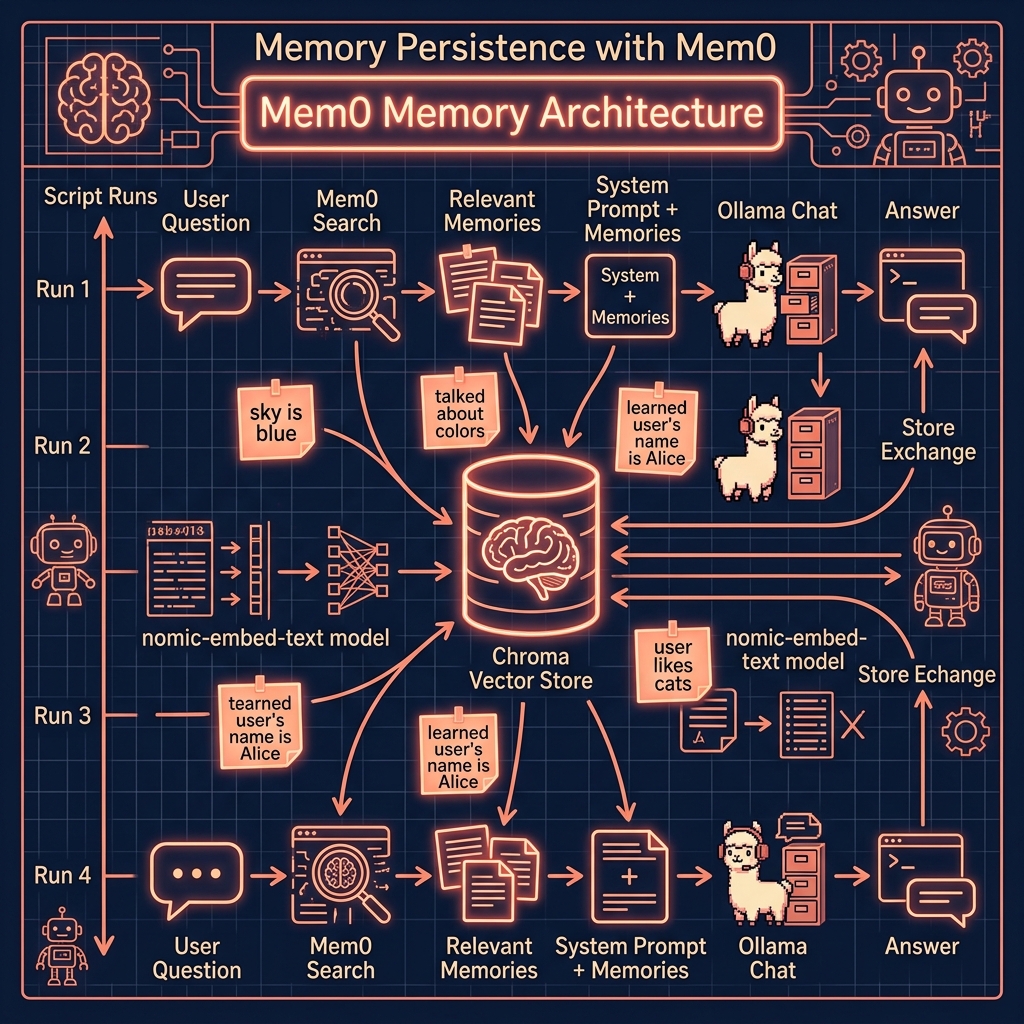
Something important that we haven’t covered yet: building a persistent memory for LLM applications. Here we use two libraries:
- Mem0: persistent memory for AI Agents and LLM applications. GitHub: https://github.com/mem0ai/mem0.
- Chroma: AI-native open-source vector database that simplifies building LLM apps by providing tools for storing, embedding, and searching embeddings.
The examples in this file are in the directory memory.
The example in this chapter is simple and can be copied and modified for multiple applications; for example:
- Code advice agent for Python
- Store thoughts and ideas
Code Example Using Mem0 and Chroma
This Python script demonstrates how to create a persistent memory for an AI assistant using the mem0ai library, chromadb for vector storage, and ollama for interacting with LLMs. Designed to be run repeatedly, each execution processes a user prompt, leverages past interactions stored in a local ChromaDB database, and then generates a concise, relevant response using a local Gemma model. The core idea is that the mem0ai library facilitates storing conversation snippets and retrieving them based on the semantic similarity to the current query. This retrieved context, referred to as “memories,” is then injected into the LLM’s system prompt, allowing the AI to maintain a coherent and context-aware conversation across multiple, independent runs. By persisting these memories locally, the system effectively builds a long-term conversational understanding, enabling the AI to recall and utilize previously discussed information to provide more informed and relevant answers over time, even when the script is executed as a fresh process each time.
The Chroma vector store database is stored under the file path ./db_local and until you delete this directory, memories of old interactions are maintained.
One parameter you may want to change is the number of memories matched in the Chroma database. This can be set in the line of code m.search(query=args.prompt, limit=5, …).
The example code is found in the file mem0_persistence.py:
 1 # Run this script repeatedly to build a persistent memory:
 2 #
 3 #   uv run mem0_persistence.py "What color is the sky?"
 4 #   uv run mem0_persistence.py "What is the last color we talked about?"
 5
 6 import argparse
 7 import sys
 8 from pathlib import Path
 9
10 ROOT = Path(__file__).resolve().parents[1]
11 if str(ROOT) not in sys.path:
12     sys.path.insert(0, str(ROOT))
13
14 from mem0 import Memory
15 from ollama import ChatResponse
16
17 from ollama_config import get_client, get_model
18
19 USER_ID = "123"
20
21 _model = get_model()
22
23 config = {
24   "user_id": USER_ID,
25   "vector_store": {
26     "provider": "chroma",
27     "config": { "path": "db_local" }
28   },
29   "llm": {
30     "provider": "ollama",
31     "config": {
32       "model": _model,
33       "temperature": 0.1,
34       "max_tokens": 5000
35     }
36   },
37   "embedder": {
38     "provider": "ollama",
39     "config": {
40       "model": "nomic-embed-text"
41     }
42   },
43 }
44
45 def call_ollama_chat(model: str, messages: list[dict]) -> str:
46   """
47   Send a chat request to Ollama and return the assistant's reply.
48   """
49   client = get_client()
50   response: ChatResponse = client.chat(
51       model=model,
52       messages=messages
53   )
54   return response.message.content
55
56 def main():
57   p = argparse.ArgumentParser()
58   p.add_argument("prompt", help="Your question")
59   args = p.parse_args()
60
61   m = Memory.from_config(config)
62   print(f"User: {args.prompt}")
63
64   rel = m.search(query=args.prompt, limit=5, user_id=USER_ID)
65   mems = "\n".join(f"- {e['memory']}" for e in rel["results"])
66   print("Memories:\n", mems)  #
67
68   system0 = "You are a helpful assistant who answers with very concise, short answers."
69   system = f"{system0}\nPrevious user memories:\n{mems}"
70
71   msgs = [
72     {"role":"system","content":system},
73     {"role":"user","content":args.prompt}
74   ]
75
76   reply = call_ollama_chat(_model, msgs)
77
78   convo = {"role":"assistant","content":f"QUERY: {args.prompt}\n\nANSWER:\n{reply}\n"}
79   m.add(convo, user_id=USER_ID, infer=False) # set to True to use LLM to infer good inserts
80
81   print(f"\n\n** convo:\n{convo}\n\n")
82
83   print("Assistant:", reply)
84
85 if __name__=="__main__":
86   main()
In the line m.add(…) set infer=True if you want to use the configured LLM in Ollama to filter out inserts. I almost always set this to False to store all questions and answers in the Chroma vector database.
Example Output
The following output has been lightly edited, removing library deprecation warnings and extra blank lines in the output. As with most examples in this book we use uv to manage dependences and run Python code:
The first time we run the test script the vector database is empty so the user query “Name two Physical laws” does not match any previous memories stored in the Chroma vector database:
 1  $ uv run mem0_persistence.py "Name two Physical laws"
 2
 3 User: Name two Physical laws
 4 Memories:
 5
 6 ** convo:
 7 {'role': 'assistant', 'content': "QUERY: Name two Physical laws\n\nANSWER:\n1.  Newton's First Law\n2.  Law of Conservation of Energy\n"}
 8
 9 Assistant: 1.  Newton's First Law
10 2.  Law of Conservation of Energy
Now the Chroma data store contains one memory:
 1 $ uv run mem0_persistence.py "Name another different Physical law"
 2
 3 User: Name another different Physical law
 4 Memories:
 5  - QUERY: Name two Physical laws
 6
 7 ANSWER:
 8 1.  Newton's First Law
 9 2.  Law of Conservation of Energy
10
11 ** convo:
12 {'role': 'assistant', 'content': "QUERY: Name another different Physical law\n\nANSWER:\n1.  Newton's Third Law\n"}
13
14 Assistant: 1.  Newton's Third Law
Here we ask a question in a different subject domain:
 1 $ uv run mem0_persistence.py "What color is the sky?"
 2
 3 User: What color is the sky?
 4 Memories:
 5  - QUERY: Name another different Physical law
 6
 7 ANSWER:
 8 1.  Newton's Third Law
 9
10 - QUERY: Name two Physical laws
11
12 ANSWER:
13 1.  Newton's First Law
14 2.  Law of Conservation of Energy
15
16 ** convo:
17 {'role': 'assistant', 'content': 'QUERY: What color is the sky?\n\nANSWER:\nBlue.\n'}
18
19 Assistant: Blue.
We check persistence:
 1 $ uv run mem0_persistence.py "What is the last color we talked about?"
 2
 3 User: What is the last color we talked about?
 4 Memories:
 5  - QUERY: What color is the sky?
 6
 7 ANSWER:
 8 Blue.
 9
10 - QUERY: Name two Physical laws
11
12 ANSWER:
13 1.  Newton's First Law
14 2.  Law of Conservation of Energy
15
16 - QUERY: Name another different Physical law
17
18 ANSWER:
19 1.  Newton's Third Law
20
21 ** convo:
22 {'role': 'assistant', 'content': 'QUERY: What is the last color we talked about?\n\nANSWER:\nBlue.\n'}
23
24 Assistant: Blue.
25
26 ## Optional Practice Problems
27
28 1. **Persistent Local Database Storage.** By default, the memory database might run in-memory or in a temporary folder. Modify the `config` dictionary in `mem0_persistence.py` to specify a concrete local directory path (e.g., `./chroma_db`) for Chroma storage. Verify that memories are persisted on disk and survive running the script multiple times.
29
30 2. **Inference-based Memory Filtering.** Set `infer=True` in `mem0_persistence.py` under `m.add(...)`. Customize the prompt template or configuration to instruct Mem0 to only save factual details about the user (e.g., their name, preferences, location, or pets) while ignoring general factual trivia questions like "What is the capital of France?".
31
32 3. **Multi-User Memory Separation.** Test the agent's memory isolation capabilities. Add two different user profiles, say `USER_ID = "user_alice"` and `USER_ID = "user_bob"`. Store a preference for Alice (e.g., "Alice loves green tea") and one for Bob (e.g., "Bob prefers coffee"). Run a query for Bob asking what his favorite drink is, and verify that the retrieved memories do not leak Alice's preference.
33
34 4. **Wipe and Delete Memory Utility.** Add a new command-line option (e.g., `--clear`) to `mem0_persistence.py`. When run with this flag, the script should invoke Mem0's database reset or delete methods to erase all stored memories for the given user, making it easy to reset the session.