LLM Tool Calling with Ollama
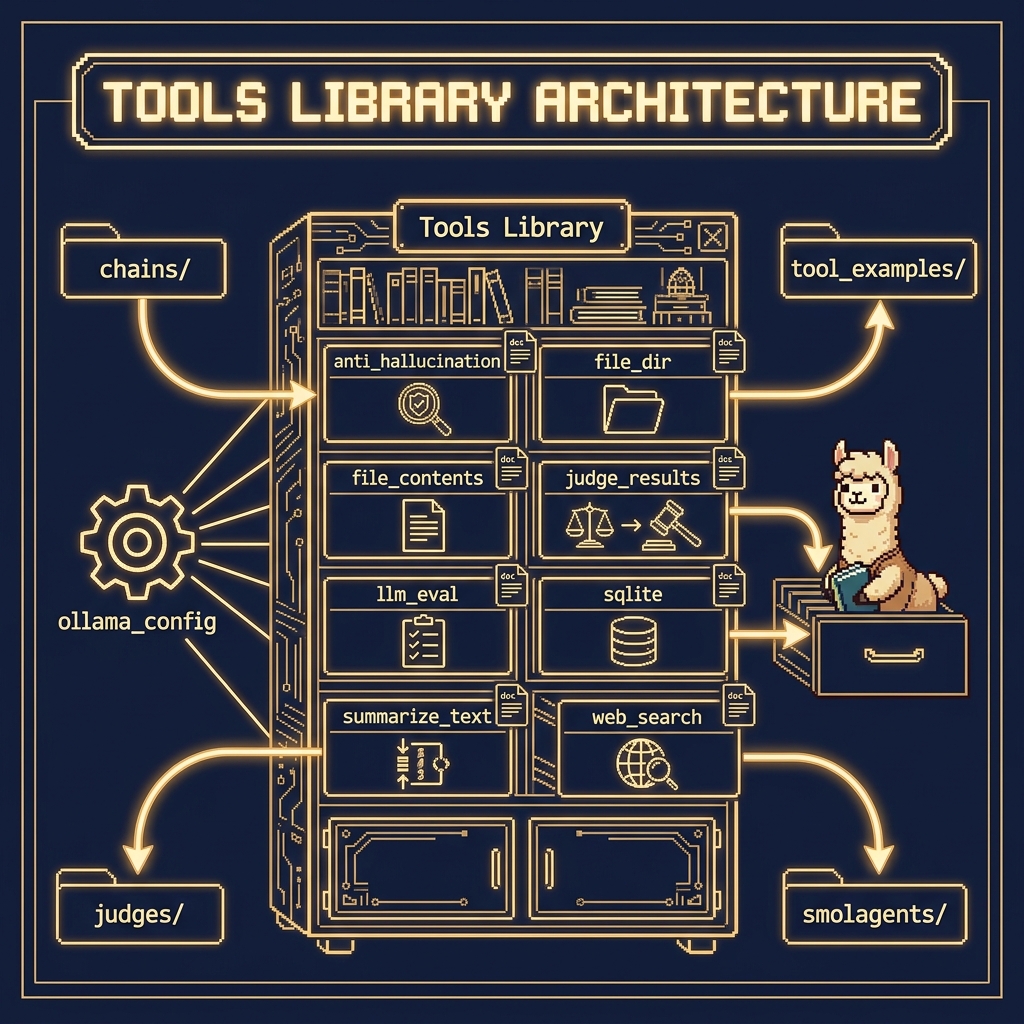
There are several example Python tool utilities in the GitHub repository https://github.com/mark-watson/Ollama_in_Action_Book in the source-code/tools directory that we will use for function calling (this directory also contains examples for other chapters). One of the examples here is in the directory tool_example.
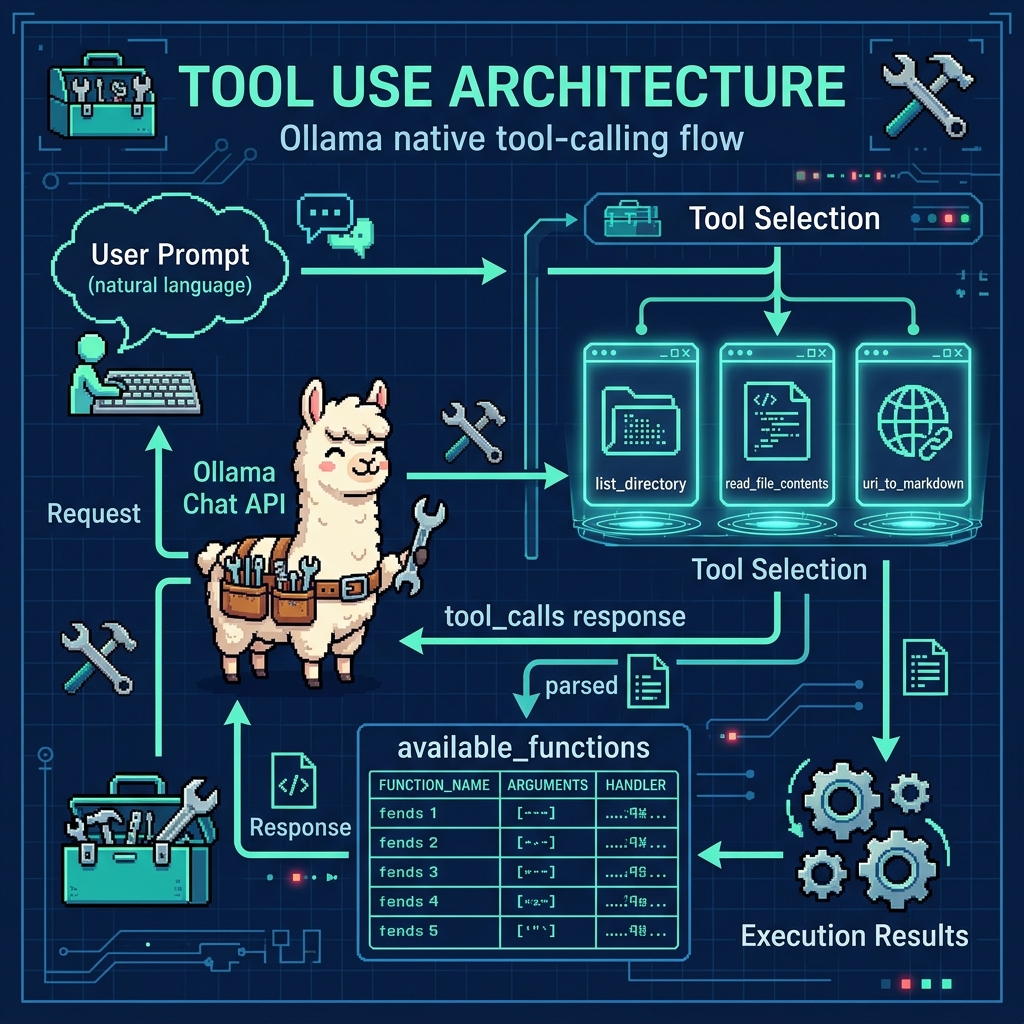
Use of Python docstrings at runtime:
The Ollama Python SDK leverages docstrings as a crucial part of its runtime function calling mechanism. When defining functions that will be called by the LLM, the docstrings serve as structured metadata that gets parsed and converted into a JSON schema format. This schema describes the function’s parameters, their types, and expected behavior, which is then used by the model to understand how to properly invoke the function. The docstrings follow a specific format that includes parameter descriptions, type hints, and return value specifications, allowing the SDK to automatically generate the necessary function signatures that the LLM can understand and work with.
During runtime execution, when the LLM determines it needs to call a function, it first reads these docstring-derived schemas to understand the function’s interface. The SDK parses these docstrings using Python’s introspection capabilities (through the inspect module) and matches the LLM’s intended function call with the appropriate implementation. This system allows for a clean separation between the function’s implementation and its interface description, while maintaining human-readable documentation that serves as both API documentation and runtime function calling specifications. The docstring parsing is done lazily at runtime when the function is first accessed, and the resulting schema is typically cached to improve performance in subsequent calls.
Example Showing the Use of Tools Developed Later in this Chapter
The source file tool_examples/ollama_tools_examples.py contains simple examples of using the tools we develop later in this chapter. We will look at example code using the tools, then at the implementation of the tools. In this examples source file we first import these tools:
 1 from tool_file_dir import list_directory
 2 from tool_file_contents import read_file_contents
 3 from tool_web_search import uri_to_markdown
 4
 5 import ollama
 6
 7 # Map function names to function objects
 8 available_functions = {
 9     'list_directory': list_directory,
10     'read_file_contents': read_file_contents,
11     'uri_to_markdown': uri_to_markdown,
12 }
13
14 # User prompt
15 user_prompt = "Please list the contents of the current directory, read the 'requirements.txt' file, and convert 'https://markwatson.com' to markdown."
16
17 # Initiate chat with the model
18 response = ollama.chat(
19     model='llama3.1',
20     messages=[{'role': 'user', 'content': user_prompt}],
21     tools=[list_directory, read_file_contents, uri_to_markdown],
22 )
23
24 # Process the model's response
25 for tool_call in response.message.tool_calls or []:
26     function_to_call = available_functions.get(tool_call.function.name)
27     print(f"{function_to_call=}")
28     if function_to_call:
29         result = function_to_call(**tool_call.function.arguments)
30         print(f"Output of {tool_call.function.name}: {result}")
31     else:
32         print(f"Function {tool_call.function.name} not found.")
This code demonstrates the integration of a local LLM with custom tool functions for file system operations and web content processing. It imports three utility functions for listing directories, reading file contents, and converting URLs to markdown, then maps them to a dictionary for easy access.
The main execution flow involves sending a user prompt to the Ollama hosted model (here we are using the small IBM “granite3-dense” model), which requests directory listing, file reading, and URL conversion operations. The code then processes the model’s response by iterating through any tool calls returned, executing the corresponding functions, and printing their results. Error handling is included for cases where requested functions aren’t found in the available tools dictionary.
Here is sample output from using these three tools (most output removed for brevity and blank lines added for clarity):
 1 $ uv run ollama_tools_examples.py
 2
 3 function_to_call=<function read_file_contents at 0x104fac9a0>
 4
 5 Output of read_file_contents: {'content': 'git+https://github.com/mark-watson/Ollama_Tools.git\nrequests\nbeautifulsoup4\naisuite[ollama]\n\n', 'size': 93, 'exists': True, 'error': None}
 6
 7 function_to_call=<function list_directory at 0x1050389a0>
 8 Output of list_directory: {'files': ['.git', '.gitignore', 'LICENSE', 'Makefile', 'README.md', 'ollama_tools_examples.py', 'requirements.txt', 'venv'], 'count': 8, 'current_dir': '/Users/markw/GITHUB/Ollama-book-examples', 'error': None}
 9
10 function_to_call=<function uri_to_markdown at 0x105038c20>
11
12 Output of uri_to_markdown: {'content': 'Read My Blog on Blogspot\n\nRead My Blog on Substack\n\nConsulting\n\nFree Mentoring\n\nFun stuff\n\nMy Books\n\nOpen Source\n\n Privacy Policy\n\n# Mark Watson AI Practitioner and Consultant Specializing in Large Language Models, LangChain/Llama-Index Integrations, Deep Learning, and the Semantic Web\n\n# I am the author of 20+ books on Artificial Intelligence, Python, Common Lisp, Deep Learning, Haskell, Clojure, Java, Ruby, Hy language, and the Semantic Web. I have 55 US Patents.\n\nMy customer list includes: Google, Capital One, Babylist, Olive AI, CompassLabs, Mind AI, Disney, SAIC, Americast, PacBell, CastTV, Lutris Technology, Arctan Group, Sitescout.com, Embed.ly, and Webmind Corporation.
13
14  ...
15
16  # Fun stuff\n\nIn addition to programming and writing my hobbies are cooking,\n photography, hiking, travel, and playing the following musical instruments: guitar, didgeridoo, and American Indian flute:\n\nMy guitar playing: a boogie riff\n\nMy didgeridoo playing\n\nMy Spanish guitar riff\n\nPlaying with George (didgeridoo), Carol and Crystal (drums and percussion) and Mark (Indian flute)\n\n# Open Source\n\nMy Open Source projects are hosted on my github account so please check that out!
17
18  ...
19
20 Hosted on Cloudflare Pages\n\n © Mark Watson 1994-2024\n\nPrivacy Policy', 'title': 'Mark Watson: AI Practitioner and Author of 20+ AI Books | Mark Watson', 'error': None}
Please note that the text extracted from a web page is mostly plain text. Section heads are maintained but the format is changed to markdown format. In the last (edited for brevity) listing, the HTML H1 element with the text Fun Stuff is converted to markdown:
1 # Fun stuff
2
3 In addition to programming and writing my hobbies are cooking,
4 photography, hiking, travel, and playing the following musical
5 instruments: guitar, didgeridoo, and American Indian flute ...
You have now looked at example tool use. We will now implement the several tools in this chapter and the next. We will look at the first tool for reading and writing files in fine detail and then more briefly discuss the other tools in the https://github.com/mark-watson/Ollama_in_Action_Book repository in the source-code directory.
Tool for Reading and Writing File Contents
This tool is meant to be combined with other tools, for example a summarization tool and a file reading tool might be used to process a user prompt to summarize a specific local file on your laptop. This example is in the tools directory in the file tool_file_contents.py:
 1 """
 2 Provides functions for reading and writing file contents with proper error handling
 3 """
 4
 5 from pathlib import Path
 6 import json
 7
 8
 9 def read_file_contents(file_path: str, encoding: str = "utf-8") -> str:
10     """
11     Reads contents from a file and returns the text
12
13     Args:
14         file_path (str): Path to the file to read
15         encoding (str): File encoding to use (default: utf-8)
16
17     Returns:
18         Contents of the file as a string
19     """
20     try:
21         path = Path(file_path)
22         if not path.exists():
23             return f"File not found: {file_path}"
24
25         with path.open("r", encoding=encoding) as f:
26             content = f.read()
27             return f"Contents of file '{file_path}' is:\n{content}\n"
28
29     except Exception as e:
30         return f"Error reading file '{file_path}' is: {str(e)}"
31
32
33 def write_file_contents(
34         file_path: str, content: str,
35         encoding: str = "utf-8",
36         mode: str = "w") -> str:
37     """
38     Writes content to a file and returns operation status
39
40     Args:
41         file_path (str): Path to the file to write
42         content (str): Content to write to the file
43         encoding (str): File encoding to use (default: utf-8)
44         mode (str): Write mode ('w' for write, 'a' for append)
45
46     Returns:
47         a message string
48     """
49     try:
50         path = Path(file_path)
51
52         # Create parent directories if they don't exist
53         path.parent.mkdir(parents=True, exist_ok=True)
54
55         with path.open(mode, encoding=encoding) as f:
56             bytes_written = f.write(content)
57
58         return f"File '{file_path}' written OK."
59
60     except Exception as e:
61         return f"Error writing file '{file_path}': {str(e)}"
62
63
64 # Function metadata for Ollama integration
65 read_file_contents.metadata = {
66     "name": "read_file_contents",
67     "description": "Reads contents from a file and returns the content as a string",
68     "parameters": {"file_path": "Path to the file to read"},
69 }
70
71 write_file_contents.metadata = {
72     "name": "write_file_contents",
73     "description": "Writes content to a file and returns operation status",
74     "parameters": {
75         "file_path": "Path to the file to write",
76         "content": "Content to write to the file",
77         "encoding": "File encoding (default: utf-8)",
78         "mode": 'Write mode ("w" for write, "a" for append)',
79     },
80 }
81
82 # Export the functions
83 __all__ = ["read_file_contents", "write_file_contents"]
read_file_contents
This function provides file reading capabilities with robust error handling with parameters:
- file_path (str): Path to the file to read
- encoding (str, optional): File encoding (defaults to “utf-8”)
Features:
- Uses pathlib.Path for cross-platform path handling
- Checks file existence before attempting to read
- Returns file contents with descriptive message
- Comprehensive error handling
LLM Integration:
- Includes metadata for function discovery
- Returns descriptive string responses instead of raising exceptions
write_file_contents
This function handles file writing operations with built-in safety features. The parameters are:
- file_path (str): Path to the file to write
- content (str): Content to write to the file
- encoding (str, optional): File encoding (defaults to “utf-8”)
- mode (str, optional): Write mode (‘w’ for write, ‘a’ for append)
Features:
- Automatically creates parent directories
- Supports write and append modes
- Uses context managers for safe file handling
- Returns operation status messages
LLM Integration:
- Includes detailed metadata for function calling
- Provides clear feedback about operations
Common Features of both functions:
- Type hints for better code clarity
- Detailed docstrings that are used at runtime in the tool/function calling code. The text in the doc strings is supplied as context to the LLM currently in use.
- Proper error handling
- UTF-8 default encoding
- Context managers for file operations
- Metadata for LLM function discovery
Design Benefits for LLM Integration: the utilities are optimized for LLM function calling by:
- Returning descriptive string responses
- Including metadata for function discovery
- Handling errors gracefully
- Providing clear operation feedback
- Using consistent parameter patterns
Tool for Getting File Directory Contents
This tool is similar to the last tool so here we just list the worker function from the file tool_file_dir.py:
 1 """
 2 File Directory Module
 3 Provides functions for listing files in the current directory
 4 """
 5
 6 from typing import Dict, List, Any
 7 from typing import Optional
 8 from pathlib import Path
 9 import os
10
11 def list_directory(pattern: str = "*", list_dots=None) -> Dict[str, Any]:
12     """
13     Lists files and directories in the current working directory
14
15     Args:
16         pattern (str): Glob pattern for filtering files (default: "*")
17
18     Returns:
19         string with directory name, followed by list of files in the directory
20     """
21     try:
22         current_dir = Path.cwd()
23         files = list(current_dir.glob(pattern))
24
25         # Convert Path objects to strings and sort
26         file_list = sorted([str(f.name) for f in files])
27
28         file_list = [file for file in file_list if not file.endswith("~")]
29         if not list_dots:
30             file_list = [file for file in file_list if not file.startswith(".")]
31
32         return f"Contents of current directory: [{', '.join(file_list)}]"
33
34     except Exception as e:
35         return f"Error listing directory: {str(e)}"
Tool for Accessing SQLite Databases Using Natural Language Queries
The example file tool_sqlite.py serves two purposes here:
- Test and example code: utility function _create_sample_data creates several database tables and the function main serves as an example program.
- The Python class definitions SQLiteTool and OllamaFunctionCaller are meant to be copied and used in your applications.
  1 import sqlite3
  2 import json
  3 import sys
  4 from pathlib import Path
  5 from typing import Dict, Any, List, Optional
  6 from functools import wraps
  7 import re
  8 from contextlib import contextmanager
  9 from textwrap import dedent  # for multi-line string literals
 10
 11 ROOT = Path(__file__).resolve().parents[1]
 12 if str(ROOT) not in sys.path:
 13     sys.path.insert(0, str(ROOT))
 14
 15 from ollama_config import get_client, get_model
 16
 17 class DatabaseError(Exception):
 18     """Custom exception for database operations"""
 19     pass
 20
 21
 22 def _create_sample_data(cursor):  # Helper function to create sample data
 23     """Create sample data for tables"""
 24     sample_data = {
 25         'example': [
 26             ('Example 1', 10.5),
 27             ('Example 2', 25.0)
 28         ],
 29         'users': [
 30             ('Bob', 'bob@example.com'),
 31             ('Susan', 'susan@test.net')
 32         ],
 33         'products': [
 34             ('Laptop', 1200.00),
 35             ('Keyboard', 75.50)
 36         ]
 37     }
 38
 39     for table, data in sample_data.items():
 40         for record in data:
 41             if table == 'example':
 42                 cursor.execute(
 43                     "INSERT INTO example (name, value) VALUES (?, ?) ON CONFLICT DO NOTHING",
 44                     record
 45                 )
 46             elif table == 'users':
 47                 cursor.execute(
 48                     "INSERT INTO users (name, email) VALUES (?, ?) ON CONFLICT DO NOTHING",
 49                     record
 50                 )
 51             elif table == 'products':
 52                 cursor.execute(
 53                     "INSERT INTO products (product_name, price) VALUES (?, ?) ON CONFLICT DO NOTHING",
 54                     record
 55                 )
 56
 57
 58 class SQLiteTool:
 59     _instance = None
 60
 61     def __new__(cls, *args, **kwargs):
 62         if not isinstance(cls._instance, cls):
 63             cls._instance = super(SQLiteTool, cls).__new__(cls)
 64         return cls._instance
 65
 66     def __init__(self, default_db: str = "test.db"):
 67         if hasattr(self, 'default_db'):  # Skip initialization if already done
 68             return
 69         self.default_db = default_db
 70         self._initialize_database()
 71
 72     @contextmanager
 73     def get_connection(self):
 74         """Context manager for database connections"""
 75         conn = sqlite3.connect(self.default_db)
 76         try:
 77             yield conn
 78         finally:
 79             conn.close()
 80
 81     def _initialize_database(self):
 82         """Initialize database with tables"""
 83         tables = {
 84             'example': """
 85                 CREATE TABLE IF NOT EXISTS example (
 86                     id INTEGER PRIMARY KEY,
 87                     name TEXT,
 88                     value REAL
 89                 );
 90             """,
 91             'users': """
 92                 CREATE TABLE IF NOT EXISTS users (
 93                     id INTEGER PRIMARY KEY,
 94                     name TEXT,
 95                     email TEXT UNIQUE
 96                 );
 97             """,
 98             'products': """
 99                 CREATE TABLE IF NOT EXISTS products (
100                     id INTEGER PRIMARY KEY,
101                     product_name TEXT,
102                     price REAL
103                 );
104             """
105         }
106
107         with self.get_connection() as conn:
108             cursor = conn.cursor()
109             for table_sql in tables.values():
110                 cursor.execute(table_sql)
111             conn.commit()
112             _create_sample_data(cursor)
113             conn.commit()
114
115     def get_tables(self) -> List[str]:
116         """Get list of tables in the database"""
117         with self.get_connection() as conn:
118             cursor = conn.cursor()
119             cursor.execute("SELECT name FROM sqlite_master WHERE type='table';")
120             return [table[0] for table in cursor.fetchall()]
121
122     def get_table_schema(self, table_name: str) -> List[tuple]:
123         """Get schema for a specific table"""
124         with self.get_connection() as conn:
125             cursor = conn.cursor()
126             cursor.execute(f"PRAGMA table_info({table_name});")
127             return cursor.fetchall()
128
129     def execute_query(self, query: str) -> List[tuple]:
130         """Execute a SQL query and return results"""
131         with self.get_connection() as conn:
132             cursor = conn.cursor()
133             try:
134                 cursor.execute(query)
135                 return cursor.fetchall()
136             except sqlite3.Error as e:
137                 raise DatabaseError(f"Query execution failed: {str(e)}")
138
139 class OllamaFunctionCaller:
140     def __init__(self, model: str = None):
141         self.model = model or get_model()
142         self.sqlite_tool = SQLiteTool()
143         self.function_definitions = self._get_function_definitions()
144
145     def _get_function_definitions(self) -> Dict:
146         return {
147             "query_database": {
148                 "description": "Execute a SQL query on the database",
149                 "parameters": {
150                     "type": "object",
151                     "properties": {
152                         "query": {
153                             "type": "string",
154                             "description": "The SQL query to execute"
155                         }
156                     },
157                     "required": ["query"]
158                 }
159             },
160             "list_tables": {
161                 "description": "List all tables in the database",
162                 "parameters": {
163                     "type": "object",
164                     "properties": {}
165                 }
166             }
167         }
168
169     def _generate_prompt(self, user_input: str) -> str:
170         prompt = dedent(f"""
171             You are a SQL assistant. Based on the user's request, generate a JSON response that calls the appropriate function.
172             Available functions: {json.dumps(self.function_definitions, indent=2)}
173
174             User request: {user_input}
175
176             Respond with a single JSON object containing:
177             - "function": The function name to call
178             - "parameters": The parameters for the function
179
180             Return ONLY the JSON object, with no other text or explanation.
181
182             Response:
183         """).strip()
184         return prompt
185
186     def _parse_ollama_response(self, response: str) -> Dict[str, Any]:
187         try:
188             # Find the first opening brace
189             start_idx = response.find('{')
190             if start_idx == -1:
191                 raise ValueError("No valid JSON object found in response")
192
193             # Use raw_decode to parse the first JSON object found
194             decoder = json.JSONDecoder()
195             obj, end_idx = decoder.raw_decode(response[start_idx:])
196             return obj
197         except (json.JSONDecodeError, ValueError) as e:
198             raise ValueError(f"Invalid JSON in response: {str(e)}")
199
200     def process_request(self, user_input: str) -> Any:
201         try:
202             client = get_client()
203             response = client.generate(model=self.model, prompt=self._generate_prompt(user_input))
204             function_call = self._parse_ollama_response(response['response'])
205
206             if function_call["function"] == "query_database":
207                 return self.sqlite_tool.execute_query(function_call["parameters"]["query"])
208             elif function_call["function"] == "list_tables":
209                 return self.sqlite_tool.get_tables()
210             else:
211                 raise ValueError(f"Unknown function: {function_call['function']}")
212         except Exception as e:
213             raise RuntimeError(f"Request processing failed: {str(e)}")
214
215 def main():
216     function_caller = OllamaFunctionCaller()
217     queries = [
218         "Show me all tables in the database",
219         "Get all users from the users table",
220         "What are the top 5 products by price?"
221     ]
222
223     for query in queries:
224         try:
225             print(f"\nQuery: {query}")
226             result = function_caller.process_request(query)
227             print(f"Result: {result}")
228         except Exception as e:
229             print(f"Error processing query: {str(e)}")
230
231 if __name__ == "__main__":
232     main()
This code provides a natural language interface for interacting with an SQLite database. It uses a combination of Python classes, SQLite, and Ollama for running a language model to interpret user queries and execute corresponding database operations. Below is a breakdown of the code:
- Database Setup and Error Handling: a custom exception class, DatabaseError, is defined to handle database-specific errors. The database is initialized with three tables: example, users, and products. These tables are populated with sample data for demonstration purposes.
- SQLiteTool Class: the SQLiteTool class is a singleton that manages all SQLite database operations. Key features include: – Singleton Pattern: Ensures only one instance of the class is created. – Database Initialization: Creates tables (example, users, products) if they do not already exist. – Sample Data: Populates the tables with predefined sample data. – Context Manager: Safely manages database connections using a context manager.
Utility Methods:
- get_tables: Retrieves a list of all tables in the database.
- get_table_schema: Retrieves the schema of a specific table.
- execute_query: Executes a given SQL query and returns the results.
Sample Data Creation:
A helper function, _create_sample_data, is used to populate the database with sample data. It inserts records into the example, users, and products tables. This ensures the database has some initial data for testing and demonstration.
OllamaFunctionCaller Class:
The OllamaFunctionCaller class acts as the interface between natural language queries and database operations. Key components include:
- Integration with Ollama LLM: Uses the Ollama language model to interpret natural language queries.
- Function Definitions: Defines two main functions: – query_database: Executes SQL queries on the database. – list_tables: Lists all tables in the database.
- Prompt Generation: Converts user input into a structured prompt for the language model.
- Response Parsing: Parses the language model’s response into a JSON object that specifies the function to call and its parameters.
- Request Processing: Executes the appropriate database operation based on the parsed response.
Function Definitions:
The OllamaFunctionCaller class defines two main functions that can be called based on user input:
- query_database: Executes a SQL query provided by the user and returns the results of the query.
- list_tables: Lists all tables in the database and is useful for understanding the database structure.
Request Processing Workflow:
The process_request method handles the entire workflow of processing a user query:
- Input: Takes a natural language query from the user.
- Prompt Generation: Converts the query into a structured prompt for the Ollama language model.
- Response Parsing: Parses the language model’s response into a JSON object.
- Function Execution: Calls the appropriate function (query_database or list_tables) based on the parsed response.
- Output: Returns the results of the database operation.
Main test/example function:
The main function demonstrates how the system works with sample queries. It initializes the OllamaFunctionCaller and processes a list of example queries, such as:
- “Show me all tables in the database.“
- “Get all users from the users table.“
- “What are the top 5 products by price?“
For each query, the system interprets the natural language input, executes the corresponding database operation, and prints the results.
Summary:
This code creates a natural language interface for interacting with an SQLite database. It works as follows:
- Database Management: The SQLiteTool class handles all database operations, including initialization, querying, and schema inspection.
- Natural Language Processing: The OllamaFunctionCaller uses the Ollama language model to interpret user queries and map them to database functions.
- Execution: The system executes the appropriate database operation and returns the results to the user.
This approach allows users to interact with the database using natural language instead of writing SQL queries directly, making it more user-friendly and accessible.
The output looks like this:
 1 $ uv run tool_sqlite.py
 2
 3 Query: Show me all tables in the database
 4 Result: ['example', 'users', 'products']
 5
 6 Query: Get all users from the users table
 7 Result: [(1, 'Bob', 'bob@example.com'), (2, 'Susan', 'susan@test.net')]
 8
 9 Query: What are the top 5 products by price?
10 Result: [(1, 'Laptop', 1200.0), (3, 'Laptop', 1200.0), (2, 'Keyboard', 75.5), (4, 'Keyboard', 75.5)]
Tool for Summarizing Text
Tools that are used by LLMs can themselves also use other LLMs. The tool defined in the file tool_summarize_text.py might be triggered by a user prompt such as “summarize the text in local file test1.txt” of “summarize text from web page https://markwatson.com” where it is used by other tools like reading a local file contents, fetching a web page, etc.
We will start by looking at the file tool_summarize_text.py and then look at an example in example_chain_web_summary.py.
 1 """
 2 Summarize text
 3 """
 4
 5 from ollama import ChatResponse
 6 from ollama import chat
 7
 8
 9 def summarize_text(text: str, context: str = "") -> str:
10     """
11     Summarizes text
12
13     Parameters:
14         text (str): text to summarize
15         context (str): another tool's output can at the application layer can be used set the context for this tool.
16
17     Returns:
18         a string of summarized text
19
20     """
21     prompt = "Summarize this text (and be concise), returning only the summary with NO OTHER COMMENTS:\n\n"
22     if len(text.strip()) < 50:
23         text = context
24     elif len(context) > 50:
25         prompt = f"Given this context:\n\n{context}\n\n" + prompt
26
27     summary: ChatResponse = chat(
28         model="llama3.2:latest",
29         messages=[
30             {"role": "system", "content": prompt},
31             {"role": "user", "content": text},
32         ],
33     )
34     return summary["message"]["content"]
35
36
37 # Function metadata for Ollama integration
38 summarize_text.metadata = {
39     "name": "summarize_text",
40     "description": "Summarizes input text",
41     "parameters": {"text": "string of text to summarize",
42                    "context": "optional context string"},
43 }
44
45 # Export the functions
46 __all__ = ["summarize_text"]
This Python code implements a text summarization tool using the Ollama chat model. The core function summarize_text takes two parameters: the main text to summarize and an optional context string. The function operates by constructing a prompt that instructs the model to provide a concise summary without additional commentary. It includes an interesting logic where if the input text is very short (less than 50 characters), it defaults to using the context parameter instead. Additionally, if there’s substantial context provided (more than 50 characters), it prepends this context to the prompt. The function utilizes the Ollama chat model “llama3.2:latest” to generate the summary, structuring the request with a system message containing the prompt and a user message containing the text to be summarized. The program includes metadata for Ollama integration, specifying the function name, description, and parameter details, and exports the summarize_text function through all.
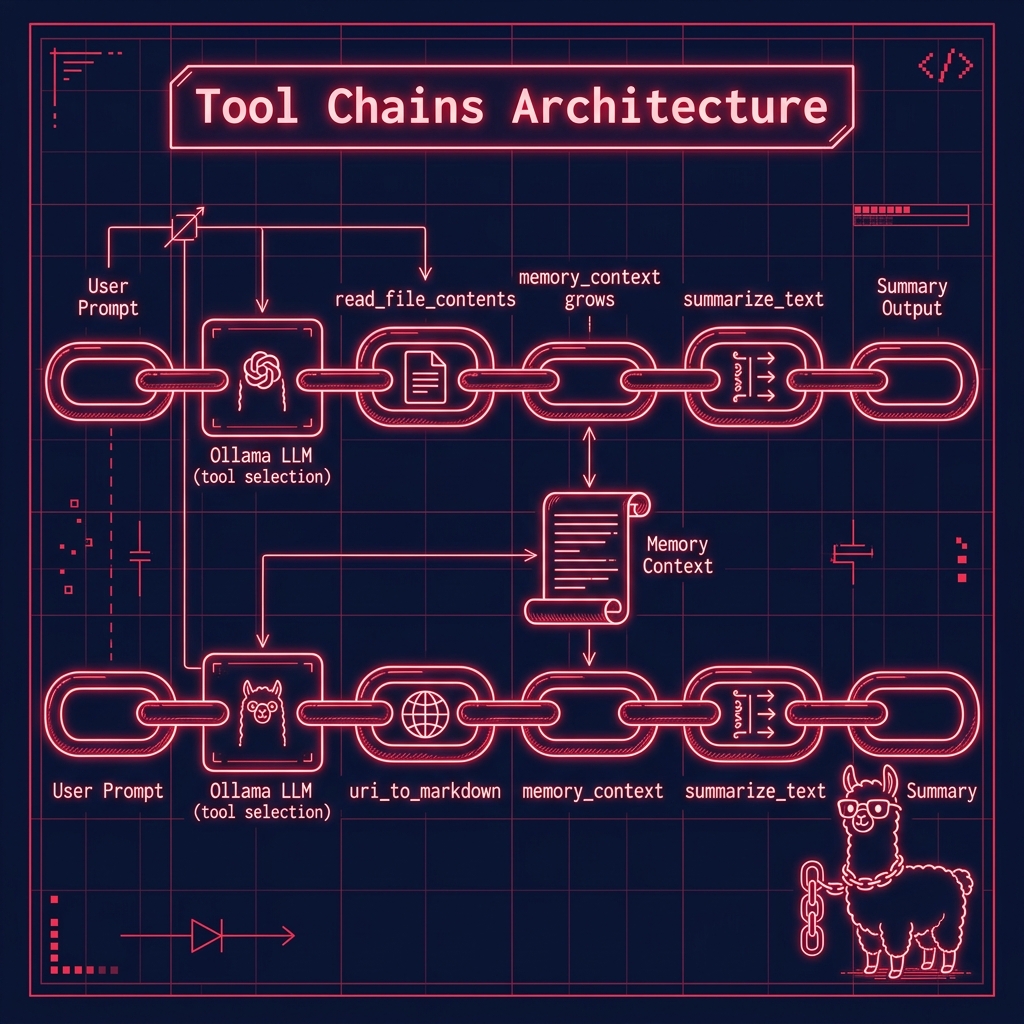
Here is an example of using this tool that you can find in the file example_chain_web_summary.py in the directory chains. Please note that this example also uses the web search tool that is discussed in the next section.
 1 import sys
 2 from pathlib import Path
 3
 4 ROOT = Path(__file__).resolve().parents[1]
 5 if str(ROOT) not in sys.path:
 6     sys.path.append(str(ROOT))
 7
 8 from tools.tool_web_search import uri_to_markdown
 9 from tools.tool_summarize_text import summarize_text
10
11 from pprint import pprint
12
13 from ollama_config import get_client, get_model
14
15 # Map function names to function objects
16 available_functions = {
17     "uri_to_markdown": uri_to_markdown,
18     "summarize_text": summarize_text,
19 }
20
21 client = get_client()
22 memory_context = ""
23 # User prompt
24 user_prompt = "Get the text of 'https://knowledgebooks.com' and then summarize the text from this web site."
25
26 # Initiate chat with the model
27 response = client.chat(
28     model=get_model(),
29     messages=[{"role": "user", "content": user_prompt}],
30     tools=[uri_to_markdown, summarize_text],
31 )
32
33 # Process the model's response
34
35 pprint(response.message.tool_calls)
36
37 for tool_call in response.message.tool_calls or []:
38     function_to_call = available_functions.get(tool_call.function.name)
39     print(
40         f"\n***** {function_to_call=}\n\nmemory_context[:70]:\n\n{memory_context[:70]}\n\n*****\n"
41     )
42     if function_to_call:
43         print()
44         if len(memory_context) > 10:
45             tool_call.function.arguments["context"] = memory_context
46         print("\n* * tool_call.function.arguments:\n")
47         pprint(tool_call.function.arguments)
48         print(f"Arguments for {function_to_call.__name__}: {tool_call.function.arguments}")
49         result = function_to_call(**tool_call.function.arguments)  # , memory_context)
50         print(f"\n\n** Output of {tool_call.function.name}: {result}")
51         memory_context = memory_context + "\n\n" + result
52     else:
53         print(f"\n\n** Function {tool_call.function.name} not found.")
Here is the output edited for brevity:
  1 $ uv run example_chain_web_summary.py
  2 [ToolCall(function=Function(name='uri_to_markdown', arguments={'a_uri': 'https://knowledgebooks.com'})),
  3  ToolCall(function=Function(name='summarize_text', arguments={'context': '', 'text': 'uri_to_markdown(a_uri = "https://knowledgebooks.com")'}))]
  4
  5 ***** function_to_call=<function uri_to_markdown at 0x1047da200>
  6
  7 memory_context[:70]:
  8
  9 *****
 10
 11 * * tool_call.function.arguments:
 12
 13 {'a_uri': 'https://knowledgebooks.com'}
 14 Arguments for uri_to_markdown: {'a_uri': 'https://knowledgebooks.com'}
 15 INFO:httpx:HTTP Request: POST http://127.0.0.1:11434/api/chat "HTTP/1.1 200 OK"
 16
 17 ** Output of uri_to_markdown: Contents of URI https://knowledgebooks.com is:
 18 # KnowledgeBooks.com - research on the Knowledge Management, and the Semantic Web
 19
 20 KnowledgeBooks.com - research on the Knowledge Management, and the Semantic Web
 21
 22 KnowledgeBooks.com
 23
 24 Knowledgebooks.com
 25 a sole proprietorship company owned by Mark Watson
 26 to promote Knowledge Management, Artificial Intelligence (AI), NLP, and Semantic Web technologies.
 27
 28 Site updated: December 1, 2018
 29 With the experience of working on Machine Learning and Knowledge Graph applications for 30 years (at Google,
 30  Capital One, SAIC, Compass Labs, etc.) I am now concerned that the leverage of deep learning and knowledge
 31  representation technologies are controlled by a few large companies, mostly in China and the USA. I am proud
 32  to be involved organizations like Ocean Protocol and Common Crawl that seek tp increase the availability of quality data
 33  to individuals and smaller organizations.
 34 Traditional knowledge management tools relied on structured data often stored in relational databases. Adding
 35  new relations to this data would require changing the schemas used to store data which could negatively
 36  impact exisiting systems that used that data. Relationships between data in traditional systems was
 37  predefined by the structure/schema of stored data. With RDF and OWL based data modeling, relationships in
 38  data are explicitly defined in the data itself. Semantic data is inherently flexible and extensible: adding
 39  new data and relationships is less likely to break older systems that relied on the previous verisons of
 40  data.
 41 A complementary technology for knowledge management is the automated processing of unstructured text data
 42  into semantic data using natural language processing (NLP) and statistical-base text analytics.
 43 We will help you integrate semantic web and text analytics technologies into your organization by working
 44  with your staff in a mentoring role and also help as needed with initial development. All for reasonable consulting rates
 45 Knowledgebooks.com Technologies:
 46
 47 SAAS KnowledgeBooks Semantic NLP Portal (KBSportal.com) used for
 48  in-house projects and available as a product to run on your servers.
 49 Semantic Web Ontology design and development
 50 Semantic Web application design and development using RDF data stores, PostgreSQL, and MongoDB.
 51
 52 Research
 53 Natural Language Processing (NLP) using deep learning
 54 Fusion of classic symbolic AI systems with deep learning models
 55 Linked data, semantic web, and Ontology's
 56 News ontology
 57 Note: this ontology was created in 2004 using the Protege modeling tool.
 58 About
 59 KnowledgeBooks.com is owned as a sole proprietor business by Mark and Carol Watson.
 60 Mark Watson is an author of 16 published books and a consultant specializing in the JVM platform
 61  (Java, Scala, JRuby, and Clojure), artificial intelligence, and the Semantic Web.
 62 Carol Watson helps prepare training data and serves as the editor for Mark's published books.
 63 Privacy policy: this site collects no personal data or information on site visitors
 64 Hosted on Cloudflare Pages.
 65
 66 ***** function_to_call=<function summarize_text at 0x107519260>
 67
 68 memory_context[:70]:
 69
 70 Contents of URI https://knowledgebooks.com is:
 71 # KnowledgeBooks.com
 72
 73 *****
 74
 75 * * tool_call.function.arguments:
 76
 77 {'context': '\n'
 78             '\n'
 79             'Contents of URI https://knowledgebooks.com is:\n'
 80             '# KnowledgeBooks.com - research on the Knowledge Management, and '
 81             'the Semantic Web \n'
 82             '\n'
 83             'KnowledgeBooks.com - research on the Knowledge Management, and '
 84 ...
 85             'Carol Watson helps prepare training data and serves as the editor '
 86             "for Mark's published books.\n"
 87             'Privacy policy: this site collects no personal data or '
 88             'information on site visitors\n'
 89             'Hosted on Cloudflare Pages.\n',
 90  'text': 'uri_to_markdown(a_uri = "https://knowledgebooks.com")'}
 91 Arguments for summarize_text: {'context': "\n\nContents of URI https://knowledgebooks.com is:\n# KnowledgeBooks.com - research on the Knowledge Management, and the Semantic Web \n\nKnowledgeBooks.com - research on the Knowledge Management, and the Semantic Web \n\nKnowledgeBooks.com \n\nKnowledgebooks.com \na sole proprietorship company owned by Mark Watson\nto promote Knowledge Management, Artificial Intelligence (AI), NLP, and Semantic Web technologies.
 92
 93 ...
 94
 95 \n\nResearch\nNatural Language Processing (NLP) using deep learning\nFusion of classic symbolic AI systems with deep learning models\nLinked data, semantic web, and Ontology's\nNews ontology\nNote: this ontology was created in 2004 using the Protege modeling tool.\nAbout\nKnowledgeBooks.com is owned as a sole proprietor business by Mark and Carol Watson.\nMark Watson is an author of 16 published books and a consultant specializing in the JVM platform\n (Java, Scala, JRuby, and Clojure), artificial intelligence, and the Semantic Web.\nCarol Watson helps prepare training data and serves as the editor for Mark's published books.\nPrivacy policy: this site collects no personal data or information on site visitors\nHosted on Cloudflare Pages.\n", 'text': 'uri_to_markdown(a_uri = "https://knowledgebooks.com")'}
 96
 97
 98 ** Output of summarize_text: # Knowledge Management and Semantic Web Research
 99 ## About KnowledgeBooks.com
100 A sole proprietorship company by Mark Watson promoting AI, NLP, and Semantic Web technologies.
101 ### Technologies
102 - **SAAS KnowledgeBooks**: Semantic NLP Portal for in-house projects and product sales.
103 - **Semantic Web Development**: Ontology design and application development using RDF data stores.
104
105 ### Research Areas
106 - Natural Language Processing (NLP) with deep learning
107 - Fusion of symbolic AI systems with deep learning models
108 - Linked data, semantic web, and ontologies
Tool for Web Search and Fetching Web Pages
The examples in this section are in the directory tools.
This code provides a set of functions for web searching and HTML content processing in the file tool_web_search.py, with the main functions being uri_to_markdown, search_web, brave_search_summaries, and brave_search_text. The uri_to_markdown function fetches content from a given URI and converts HTML to markdown-style text, handling various edge cases and cleaning up the text by removing multiple blank lines and spaces while converting HTML entities. The search_web function is a placeholder that’s meant to be implemented with a preferred search API, while brave_search_summaries implements actual web searching using the Brave Search API, requiring an API key from the environment variables and returning structured results including titles, URLs, and descriptions. The brave_search_text function builds upon brave_search_summaries by fetching search results and then using uri_to_markdown to convert the content of each result URL to text, followed by summarizing the content using a separate summarize_text function. The code also includes utility functions like replace_html_tags_with_text which uses BeautifulSoup to strip HTML tags and return plain text, and includes proper error handling, logging, and type hints throughout. The module is designed to be integrated with Ollama and exports uri_to_markdown and search_web as its primary interfaces.
  1 # file: tool_web_search.py
  2 """
  3 Provides functions for web searching and HTML to Markdown conversion
  4 and for returning the contents of a URI as plain text (with minimal markdown)
  5 """
  6
  7 import sys
  8 from pathlib import Path
  9
 10 ROOT = Path(__file__).resolve().parents[1]
 11 if str(ROOT) not in sys.path:
 12     sys.path.insert(0, str(ROOT))
 13
 14 from typing import Dict, Any
 15 import requests
 16 from bs4 import BeautifulSoup
 17 import re
 18 from urllib.parse import urlparse
 19 import html
 20 import json
 21 from tool_summarize_text import summarize_text
 22
 23 import requests
 24 import os
 25 import logging
 26 from pprint import pprint
 27 from bs4 import BeautifulSoup
 28
 29 logging.basicConfig(level=logging.INFO)
 30
 31 api_key = os.environ.get("BRAVE_SEARCH_API_KEY")
 32 if not api_key:
 33     raise ValueError(
 34         "API key not found. Set 'BRAVE_SEARCH_API_KEY' environment variable."
 35     )
 36
 37
 38 def replace_html_tags_with_text(html_string):
 39     soup = BeautifulSoup(html_string, "html.parser")
 40     return soup.get_text()
 41
 42
 43 def uri_to_markdown(a_uri: str) -> Dict[str, Any]:
 44     """
 45     Fetches content from a URI and converts HTML to markdown-style text
 46
 47     Args:
 48         a_uri (str): URI to fetch and convert
 49
 50     Returns:
 51         web page text converted converted markdown content
 52     """
 53     try:
 54         # Validate URI
 55         parsed = urlparse(a_uri)
 56         if not all([parsed.scheme, parsed.netloc]):
 57             return f"Invalid URI: {a_uri}"
 58
 59         # Fetch content
 60         headers = {
 61             "User-Agent": "Mozilla/5.0 (Windows NT 10.0; Win64; x64) AppleWebKit/537.36"
 62         }
 63         response = requests.get(a_uri, headers=headers, timeout=10)
 64         response.raise_for_status()
 65
 66         # Parse HTML
 67         soup = BeautifulSoup(response.text, "html.parser")
 68
 69         # Get title
 70         title = soup.title.string if soup.title else ""
 71
 72         # Get text and clean up
 73         text = soup.get_text()
 74
 75         # Clean up the text
 76         text = re.sub(r"\n\s*\n", "\n\n", text)  # Remove multiple blank lines
 77         text = re.sub(r" +", " ", text)  # Remove multiple spaces
 78         text = html.unescape(text)  # Convert HTML entities
 79         text = text.strip()
 80
 81         return f"Contents of URI {a_uri} is:\n# {title}\n\n{text}\n"
 82
 83     except requests.RequestException as e:
 84         return f"Network error: {str(e)}"
 85
 86     except Exception as e:
 87         return f"Error processing URI: {str(e)}"
 88
 89
 90 def search_web(query: str, max_results: int = 5) -> str:
 91     """
 92     Performs a web search and returns results
 93     Note: This is a placeholder. Implement with your preferred search API.
 94
 95     Args:
 96         query (str): Search query
 97         max_results (int): Maximum number of results to return
 98
 99     Returns:
100         Dict[str, Any]: Dictionary containing:
101             - 'results': List of search results
102             - 'count': Number of results found
103             - 'error': Error message if any, None otherwise
104     """
105
106     # Placeholder for search implementation
107     return {
108         "results": [],
109         "count": 0,
110         "error": "Web search not implemented. Please implement with your preferred search API.",
111     }
112
113
114 def brave_search_summaries(
115     query,
116     num_results=3,
117     url="https://api.search.brave.com/res/v1/web/search",
118     api_key=api_key,
119 ):
120     headers = {"X-Subscription-Token": api_key, "Content-Type": "application/json"}
121     params = {"q": query, "count": num_results}
122
123     response = requests.get(url, headers=headers, params=params)
124     ret = []
125
126     if response.status_code == 200:
127         search_results = response.json()
128         ret = [
129             {
130                 "title": result.get("title"),
131                 "url": result.get("url"),
132                 "description": replace_html_tags_with_text(result.get("description")),
133             }
134             for result in search_results.get("web", {}).get("results", [])
135         ]
136         logging.info("Successfully retrieved results.")
137     else:
138         try:
139             error_info = response.json()
140             logging.error(f"Error {response.status_code}: {error_info.get('message')}")
141         except json.JSONDecodeError:
142             logging.error(f"Error {response.status_code}: {response.text}")
143
144     return ret
145
146
147 def brave_search_text(query, num_results=3):
148     summaries = brave_search_summaries(query, num_results)
149     ret = ""
150     for s in summaries:
151         url = s["url"]
152         text = uri_to_markdown(url)
153         summary = summarize_text(
154             f"Given the query:\n\n{query}\n\nthen, summarize text removing all material that is not relevant to the query and then be very concise for a very short summary:\n\n{text}\n"
155         )
156         ret += ret + summary
157     print("\n\n-----------------------------------")
158     return ret
159
160 # Function metadata for Ollama integration
161 uri_to_markdown.metadata = {
162     "name": "uri_to_markdown",
163     "description": "Converts web page content to markdown-style text",
164     "parameters": {"a_uri": "URI of the web page to convert"},
165 }
166
167 search_web.metadata = {
168     "name": "search_web",
169     "description": "Performs a web search and returns results",
170     "parameters": {
171         "query": "Search query",
172         "max_results": "Maximum number of results to return",
173     },
174 }
175
176 # Export the functions
177 __all__ = ["uri_to_markdown", "search_web"]
Tools Wrap Up
We have looked at the implementations and examples uses for several tools. In the next chapter we continue our study of tool use with the application of judging the accuracy of output generated of LLMs: basically LLMs judging the accuracy of other LLMs to reduce hallucinations, inaccurate output, etc.
Optional Practice Problems
Implement a Calculator Tool. Create a new tool file
tool_calculator.pywith a functionevaluate_expression(expression: str) -> strthat evaluates safe mathematical expressions. Register this tool with Ollama using the function metadata format shown in the chapter. Test it by asking the LLM to solve a multi-step word math problem that requires using the tool.Directory-to-Summary Chain. Combine
tool_file_dir.py,tool_file_contents.py, andtool_summarize_text.pyinto a three-step chain script. Given a directory name and a target filename, the LLM should first check if the file exists in the directory, retrieve its content using the file contents tool, and finally summarize the content.Enhance the SQLite Tool with Schema Inspection. In
tool_sqlite.py, the LLM can query the database but might not know the available tables and columns. Add a new toolget_database_schema(db_path: str) -> strthat returns the schema of all tables. Verify that the LLM first calls this schema-inspection tool before querying a table it was not previously aware of.Graceful Tool Error Recovery. Modify the tool execution loop in
ollama_tools_examples.pyso that if a tool raises an exception (e.g., file not found, network error), the error message is wrapped in a system instruction and passed back to the LLM. Test this by prompting the LLM to read a non-existent file, and observe if it attempts to correct its argument or reports the error back to the user.