Automatic Evaluation of LLM Results: More Tool Examples
As Large Language Models (LLMs) become increasingly integrated into production systems and workflows, the ability to systematically evaluate their performance becomes crucial. While qualitative assessment of LLM outputs remains important, organizations need robust, quantitative methods to measure and compare model performance across different prompts, use cases, and deployment scenarios. This has led to the development of specialized tools and frameworks designed specifically for LLM evaluation.
The examples listed here can be found in the directory Ollama_in_Action_Book/source-code/tools.
The evaluation of LLM outputs presents unique challenges that set it apart from traditional natural language processing metrics. Unlike straightforward classification or translation tasks, LLM responses often require assessment across multiple dimensions, including factual accuracy, relevance, coherence, creativity, and adherence to specified formats or constraints. Furthermore, the stochastic nature of LLM outputs means that the same prompt can generate different responses across multiple runs, necessitating evaluation methods that can account for this variability.
Modern LLM evaluation tools address these challenges through a combination of automated metrics, human-in-the-loop validation, and specialized frameworks for prompt testing and response analysis. These tools can help developers and researchers understand how well their prompts perform, identify potential failure modes, and optimize prompt engineering strategies. By providing quantitative insights into LLM performance, these evaluation tools enable more informed decisions about model selection, prompt design, and system architecture in LLM-powered applications.
In this chapter we take a simple approach:
- Capture the chat history including output for an interaction with a LLM.
- Generate a prompt containing the chat history, model output, and a request to a different LLM to evaluate the output generated by the first LLM. We request that the final output of the second LLM is a score of ‘G’ or ‘B’ (good or bad) judging the accuracy of the first LLM’s output.
We look at several examples in this chapter of approaches you might want to experiment with.
Tool For Judging LLM Results
Here we implement our simple approach of using a second LLM to evaluate the output of the first LLM tat generated a response to user input.
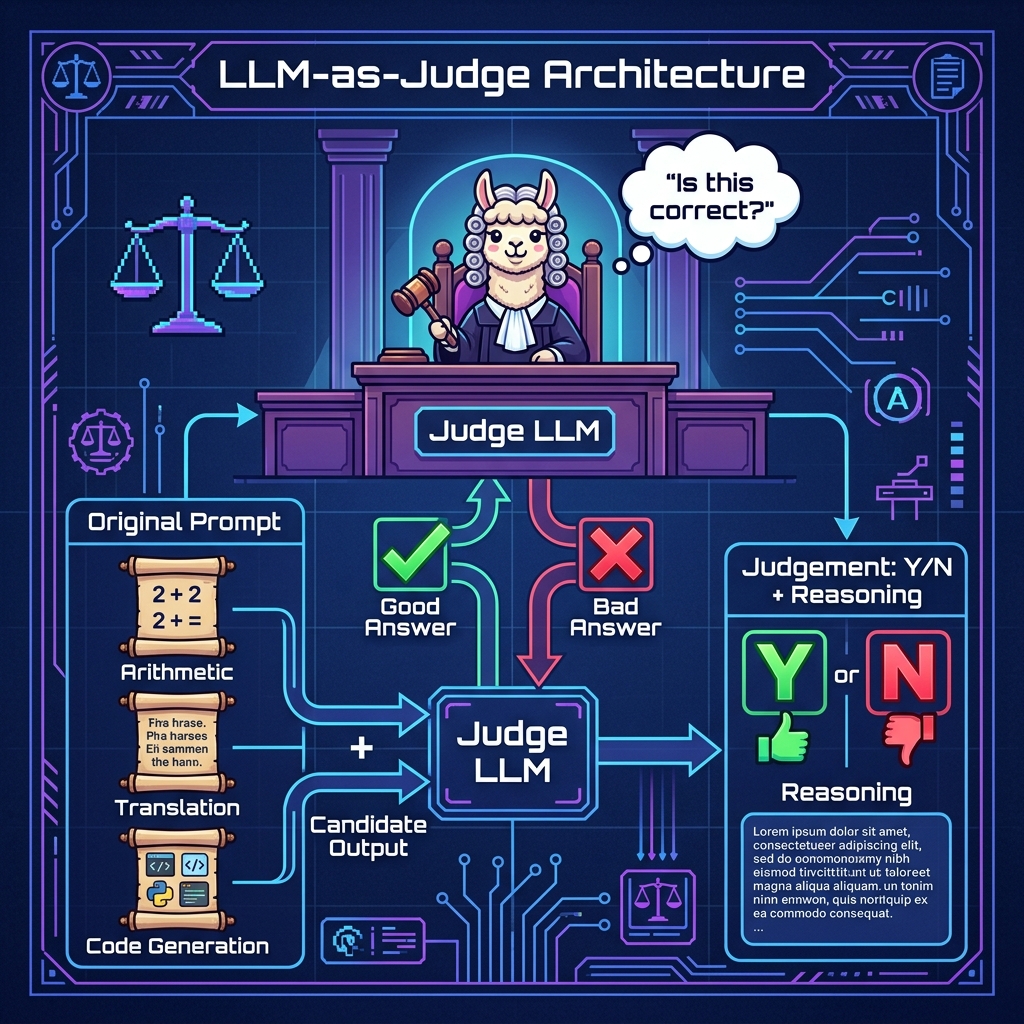
The following listing shows the tool tool_judge_results.py:
 1 """
 2 Judge results from LLM generation from prompts
 3 """
 4
 5 import sys
 6 from pathlib import Path
 7
 8 ROOT = Path(__file__).resolve().parents[1]
 9 if str(ROOT) not in sys.path:
10     sys.path.insert(0, str(ROOT))
11
12 from typing import Optional, Dict, Any
13 from pathlib import Path
14 import json
15 import re
16 from pprint import pprint
17
18 from ollama_config import get_client, get_model
19
20 client = get_client()
21
22 def judge_results(original_prompt: str, llm_gen_results: str) -> Dict[str, str]:
23     """
24     Takes an original prompt to a LLM and the output results
25
26     Args:
27         original_prompt (str): original prompt to a LLM
28         llm_gen_results (str): output from the LLM that this function judges for accuracy
29
30     Returns:
31         result: str: string that is one character with one of these values:
32             - 'B': Bad result
33             - 'G': A Good result
34     """
35     try:
36         messages = [
37             {"role": "system", "content": "Always judge this output for correctness."},
38             {"role": "user", "content": f"Evaluate this output:\n\n{llm_gen_results}\n\nfor this prompt:\n\n{original_prompt}\n\nDouble check your work and explain your thinking in a few sentences. End your output with a Y or N answer"},
39         ]
40
41         response = client.chat(
42             model=get_model(),
43             messages=messages,
44         )
45
46         r = response.message.content.strip()
47         print(f"\n\noriginal COT response:\n\n{r}\n\n")
48
49         # look at the end of the response for the Y or N judgement
50         s = r.lower()
51         # remove all non-alphabetic characters:
52         s = re.sub(r'[^a-zA-Z]', '', s).strip()
53
54         return {'judgement': s[-1].upper(), 'reasoning': r[1:].strip()}
55
56     except Exception as e:
57         print(f"\n\n***** {e=}\n\n")
58         return {'judgement': 'E', 'reasoning': str(e)}  # on any error, assign 'E' result
This Python code defines a function judge_results that takes an original prompt sent to a Large Language Model (LLM) and the generated response from the LLM, then attempts to judge the accuracy of the response.
Here’s a breakdown of the code:
The main function judge_results takes two parameters:
- original_prompt: The initial prompt sent to an LLM
- llm_gen_results: The output from the LLM that needs evaluation
The function judge_results returns a dictionary with two keys:
- judgement: Single character (‘B’ for Bad, ‘G’ for Good, ‘E’ for Error)
- reasoning: Detailed explanation of the judgment
The evaluation process is:
- Creates a conversation with two messages: – System message: Sets the context for evaluation – User message: Combines the original prompt and results for evaluation
- Uses the Qwen 2.5 Coder (14B parameter) model through Ollama
- Expects a Y/N response at the end of the evaluation
Sample output
 1 $ cd OllamaEx
 2 $ uv run example_judge.py
 3
 4 ==================================================
 5  Judge output from a LLM
 6 ==================================================
 7
 8 ==================================================
 9  First test: should be Y, or good
10 ==================================================
11
12
13 original COT response:
14
15 The given output correctly calculates the absolute value of age differences for each pair:
16
17 - Sally (55) and John (18): \( |55 - 18| = 37 \)
18 - Sally (55) and Mary (31): \( |55 - 31| = 24 \)
19 - John (18) and Mary (31): \( |31 - 18| = 13 \)
20
21 These calculations are accurate, matching the prompt's requirements. Therefore, the answer is Y.
22
23
24
25 ** JUDGEMENT ***
26
27 judgement={'judgement': 'Y', 'reasoning': "The given output correctly calculates the absolute value of age differences for each pair:\n\n- Sally (55) and John (18): \\( |55 - 18| = 37 \\)\n- Sally (55) and Mary (31): \\( |55 - 31| = 24 \\)\n- John (18) and Mary (31): \\( |31 - 18| = 13 \\)\n\nThese calculations are accurate, matching the prompt's requirements. Therefore, the answer is Y."}
28
29 ==================================================
30  Second test: should be N, or bad
31 ==================================================
32
33
34 original COT response:
35
36 Let's evaluate the given calculations step by step:
37
38 1. Sally (55) - John (18) = 37. The difference is calculated as 55 - 18, which equals 37.
39 2. Sally (55) - Mary (31) = 24. The difference is calculated as 55 - 31, which equals 24.
40 3. John (18) - Mary (31) = -13. However, the absolute value of this difference is |18 - 31| = 13.
41
42 The given output shows:
43 - Sally and John: 55 - 18 = 31. This should be 37.
44 - Sally and Mary: 55 - 31 = 24. This is correct.
45 - John and Mary: 31 - 18 = 10. This should be 13.
46
47 The output contains errors in the first and third calculations. Therefore, the answer is:
48
49 N
50
51 ** JUDGEMENT ***
52
53 judgement={'judgement': 'N', 'reasoning': "et's evaluate the given calculations step by step:\n\n1. Sally (55) - John (18) = 37. The difference is calculated as 55 - 18, which equals 37.\n2. Sally (55) - Mary (31) = 24. The difference is calculated as 55 - 31, which equals 24.\n3. John (18) - Mary (31) = -13. However, the absolute value of this difference is |18 - 31| = 13.\n\nThe given output shows:\n- Sally and John: 55 - 18 = 31. This should be 37.\n- Sally and Mary: 55 - 31 = 24. This is correct.\n- John and Mary: 31 - 18 = 10. This should be 13.\n\nThe output contains errors in the first and third calculations. Therefore, the answer is:\n\nN"}
Evaluating LLM Responses Given a Chat History
Here we try a difference approach by asking the second “judge” LLM to evaluate the output of the first LLM based on specific criteria like “Response accuracy”, “Helpfulness”, etc.
The following listing shows the tool utility tool_llm_eval.py:
  1 import json
  2 import sys
  3 from pathlib import Path
  4 from typing import List, Dict, Optional, Iterator
  5
  6 ROOT = Path(__file__).resolve().parents[1]
  7 if str(ROOT) not in sys.path:
  8     sys.path.insert(0, str(ROOT))
  9
 10 from ollama_config import get_client, get_model
 11
 12
 13 def clean_json_response(response: str) -> str:
 14     """
 15     Cleans the response string by removing markdown code blocks, think tags, and other formatting
 16     """
 17     # Strip reasoning model <think>...</think> blocks
 18     if "</think>" in response:
 19         response = response.split("</think>", 1)[-1]
 20     # Remove markdown code block indicators
 21     response = response.replace("```json", "").replace("```", "")
 22     # Strip whitespace
 23     response = response.strip()
 24     # Extract JSON object if there's leading non-JSON text
 25     start = response.find("{")
 26     if start > 0:
 27         response = response[start:]
 28     return response
 29
 30 def evaluate_llm_conversation(
 31     chat_history: List[Dict[str, str]],
 32     evaluation_criteria: Optional[List[str]] = None,
 33     model: str = None  # defaults to get_model() when None
 34 ) -> Dict[str, any]:
 35     """
 36     Evaluates a chat history using Ollama to run the evaluation model.
 37
 38     Args:
 39         chat_history: List of dictionaries containing the conversation
 40         evaluation_criteria: Optional list of specific criteria to evaluate
 41         model: Ollama model to use for evaluation (defaults to MODEL env var or nemotron-3-nano:4b)
 42
 43     Returns:
 44         Dictionary containing evaluation results
 45     """
 46     if model is None:
 47         model = get_model()
 48
 49     if evaluation_criteria is None:
 50         evaluation_criteria = [
 51             "Response accuracy",
 52             "Coherence and clarity",
 53             "Helpfulness",
 54             "Task completion",
 55             "Natural conversation flow"
 56         ]
 57
 58     # Format chat history for evaluation
 59     formatted_chat = "\n".join([
 60         f"{'User' if msg['role'] == 'user' else 'Assistant'}: {msg['content']}"
 61         for msg in chat_history
 62     ])
 63
 64     # Create evaluation prompt
 65     evaluation_prompt = f"""
 66     Please evaluate the following conversation between a user and an AI assistant.
 67     Focus on these criteria: {', '.join(evaluation_criteria)}
 68
 69     Conversation:
 70     {formatted_chat}
 71
 72     Provide a structured evaluation with:
 73     1. Scores (1-10) for each criterion
 74     2. Brief explanation for each score
 75     3. Overall assessment
 76     4. Suggestions for improvement
 77
 78     Format your response as JSON.
 79     """
 80
 81     try:
 82         client = get_client()
 83         response = client.generate(
 84             model=model,
 85             prompt=evaluation_prompt,
 86             system="You are an expert AI evaluator. Provide detailed, objective assessments in JSON format. Only return JSON, no other text."
 87         )
 88
 89         response_clean: str = clean_json_response(response['response'])
 90
 91         # Parse the response to extract JSON
 92         try:
 93             evaluation_result = json.loads(response_clean)
 94         except json.JSONDecodeError:
 95             # Fallback if response isn't proper JSON
 96             evaluation_result = {
 97                 "error": "Could not parse evaluation as JSON",
 98                 "raw_response": response_clean
 99             }
100
101         return evaluation_result
102
103     except Exception as e:
104         return {
105             "error": f"Evaluation failed: {str(e)}",
106             "status": "failed"
107         }
108
109 # Example usage
110 if __name__ == "__main__":
111     # Sample chat history
112     sample_chat = [
113         {"role": "user", "content": "What's the capital of France?"},
114         {"role": "assistant", "content": "The capital of France is Paris."},
115         {"role": "user", "content": "Tell me more about it."},
116         {"role": "assistant", "content": "Paris is the largest city in France and serves as the country's political, economic, and cultural center. It's known for landmarks like the Eiffel Tower, Louvre Museum, and Notre-Dame Cathedral."}
117     ]
118
119     # Run evaluation
120     result = evaluate_llm_conversation(sample_chat)
121     print(json.dumps(result, indent=2))
We will use these five evaluation criteria:
- Response accuracy
- Coherence and clarity
- Helpfulness
- Task completion
- Natural conversation flow
The main function evaluate_llm_conversation uses these steps:
- Receives chat history and optional parameters
- Formats the conversation into a readable string
- Creates a detailed evaluation prompt
- Sends prompt to Ollama for evaluation
- Cleans and parses the response
- Returns structured evaluation results
Sample Output
 1 $ cd tools
 2 $ uv run tool_llm_eval.py
 3 {
 4   "evaluation": {
 5     "responseAccuracy": {
 6       "score": 9,
 7       "explanation": "The assistant correctly answered the user's question about the capital of France, and provided accurate information when the user asked for more details."
 8     },
 9     "coherenceAndClarity": {
10       "score": 8,
11       "explanation": "The assistant's responses were clear and easy to understand. However, there was a slight shift in tone from a simple answer to a more formal description."
12     },
13     "helpfulness": {
14       "score": 9,
15       "explanation": "The assistant provided relevant information that helped the user gain a better understanding of Paris. The response was thorough and answered the user's follow-up question."
16     },
17     "taskCompletion": {
18       "score": 10,
19       "explanation": "The assistant completed both tasks: providing the capital of France and elaborating on it with additional context."
20     },
21     "naturalConversationFlow": {
22       "score": 7,
23       "explanation": "While the responses were clear, they felt a bit abrupt. The assistant could have maintained a more conversational tone or encouraged further discussion."
24     }
25   },
26   "overallAssessment": {
27     "score": 8.5,
28     "explanation": "The assistant demonstrated strong technical knowledge and was able to provide accurate information on demand. However, there were some minor lapses in natural conversation flow and coherence."
29   },
30   "suggestionsForImprovement": [
31     {
32       "improvementArea": "NaturalConversationFlow",
33       "description": "Consider using more conversational language or prompts to engage users further."
34     },
35     {
36       "improvementArea": "CoherenceAndClarity",
37       "description": "Use transitional phrases and maintain a consistent tone throughout the conversation."
38     }
39   ]
40 }
A Tool for Detecting Hallucinations
Here we use a text template file templates/anti_hallucinations.txt to define the prompt template for checking a user input, a context, and the resulting output by another LLM (most of the file is not shown for brevity):
 1 You are a fair judge and an expert at identifying false hallucinations and you are tasked with evaluating the accuracy of an AI-generated answer to a given context. Analyze the provided INPUT, CONTEXT, and OUTPUT to determine if the OUTPUT contains any hallucinations or false information.
 2
 3 Guidelines:
 4 1. The OUTPUT must not contradict any information given in the CONTEXT.
 5 2. The OUTPUT must not introduce new information beyond what's provided in the CONTEXT.
 6 3. The OUTPUT should not contradict well-established facts or general knowledge.
 7 4. Check that the OUTPUT doesn't oversimplify or generalize information in a way that changes its meaning or accuracy.
 8
 9 Analyze the text thoroughly and assign a hallucination score between 0 and 1, where:
10 - 0.0: The OUTPUT is unfaithful or is incorrect to the CONTEXT and the user's INPUT
11 - 1.0: The OUTPUT is entirely accurate abd faithful to the CONTEXT and the user's INPUT
12
13 INPUT:
14 {input}
15
16 CONTEXT:
17 {context}
18
19 OUTPUT:
20 {output}
21
22 Provide your judgement in JSON format:
23 {{
24     "score": <your score between 0.0 and 1.0>,
25     "reason": [
26         <list your reasoning as Python strings>
27     ]
28 }}
Here is the tool tool_anti_hallucination.py that uses this template:
 1 """
 2 Provides functions detecting hallucinations by other LLMs
 3 """
 4
 5 import sys
 6 from pathlib import Path
 7
 8 ROOT = Path(__file__).resolve().parents[1]
 9 if str(ROOT) not in sys.path:
10     sys.path.insert(0, str(ROOT))
11
12 from typing import Optional, Dict, Any
13 from pprint import pprint
14 import json
15
16 from ollama_config import get_client, get_model
17
18 def read_anti_hallucination_template() -> str:
19     """
20     Reads the anti-hallucination template file and returns the content
21     """
22     template_path = Path(__file__).parent / "templates" / "anti_hallucination.txt"
23     with template_path.open("r", encoding="utf-8") as f:
24         content = f.read()
25         return content
26
27 TEMPLATE = read_anti_hallucination_template()
28
29 def detect_hallucination(user_input: str, context: str, output: str) -> str:
30     """
31     Given user input, context, and LLM output, detect hallucination
32
33     Args:
34         user_input (str): User's input text prompt
35         context (str): Context text for LLM
36         output (str): LLM's output text that is to be evaluated as being a hallucination)
37
38     Returns: JSON data:
39      {
40        "score": <your score between 0.0 and 1.0>,
41        "reason": [
42          <list your reasoning as bullet points>
43        ]
44      }
45     """
46     prompt = TEMPLATE.format(input=user_input, context=context, output=output)
47     client = get_client()
48     response = client.chat(
49         model=get_model(),
50         messages=[
51             {"role": "system", "content": prompt},
52             {"role": "user", "content": output},
53         ],
54     )
55     try:
56         return json.loads(response.message.content)
57     except json.JSONDecodeError:
58         print(f"Error decoding JSON: {response.message.content}")
59     return {"score": 0.0, "reason": ["Error decoding JSON"]}
60
61
62 # Export the functions
63 __all__ = ["detect_hallucination"]
64
65 ## Test only code:
66
67 def main():
68     def separator(title: str):
69         """Prints a section separator"""
70         print(f"\n{'=' * 50}")
71         print(f" {title}")
72         print('=' * 50)
73
74     # Test file writing
75     separator("Detect hallucination from a LLM")
76
77     test_prompt = "Sally is 55, John is 18, and Mary is 31. What are pairwise combinations of the absolute value of age differences?"
78     test_context = "Double check all math results."
79     test_output = "Sally and John:  55 - 18 = 31. Sally and Mary:  55 - 31 = 24. John and Mary:  31 - 18 = 10."
80     judgement = detect_hallucination(test_prompt, test_context, test_output)
81     print(f"\n** JUDGEMENT ***\n")
82     pprint(judgement)
83
84
85 if __name__ == "__main__":
86     try:
87         main()
88     except Exception as e:
89         print(f"An error occurred: {str(e)}")
This code implements a hallucination detection system for Large Language Models (LLMs) using the Ollama framework. The core functionality revolves around the detect_hallucination function, which takes three parameters: user input, context, and LLM output, and evaluates whether the output contains hallucinated content by utilizing another LLM (llama3.2) as a judge. The system reads a template from a file to structure the evaluation prompt.
The implementation includes type hints and error handling, particularly for JSON parsing of the response. The output is structured as a JSON object containing a hallucination score (between 0.0 and 1.0) and a list of reasoning points. The code also includes a test harness that demonstrates the system’s usage with a mathematical example, checking for accuracy in age difference calculations. The modular design allows for easy integration into larger systems through the explicit export of the detect_hallucination function.
The output looks something like this:
 1 $ uv run tool_anti_hallucination.py
 2
 3 ==================================================
 4  Detect hallucination from a LLM
 5 ==================================================
 6
 7 ** JUDGEMENT ***
 8
 9 {'reason': ['The OUTPUT claims that the absolute value of age differences are '
10             '31, 24, and 10 for Sally and John, Sally and Mary, and John and '
11             'Mary respectively. However, this contradicts the CONTEXT, as the '
12             'CONTEXT asks to double-check math results.',
13             'The OUTPUT does not introduce new information, but it provides '
14             'incorrect calculations: Sally and John: 55 - 18 = 37, Sally and '
15             'Mary: 55 - 31 = 24, John and Mary: 31 - 18 = 13. Therefore, the '
16             'actual output should be recalculated to ensure accuracy.',
17             'The OUTPUT oversimplifies the age differences by not considering '
18             "the order of subtraction (i.e., John's age subtracted from "
19             "Sally's or Mary's). However, this is already identified as a "
20             'contradiction in point 1.'],
21  'score': 0.0}
Wrap Up
Here we looked at several examples for using one LLM to rate the accuracy, usefulness, etc. of another LLM given an input prompt. There are two topics in this book that I spend most of my personal LLM research time on: automatic evaluation of LLM results, and tool using agents (the subject of the next chapter).
Optional Practice Problems
Graded Judgement Scale. The
judge_resultsfunction returns a binary Y/N verdict. Modify it so the judge LLM returns a score on a 1–5 scale (1 = completely wrong, 5 = perfectly correct) instead of a single letter. Update the system message prompt, the parsing logic that currently extracts the last alphabetic character, and the returned dictionary so it includes a numericscorekey. Test your changes with the good and bad arithmetic outputs fromexample_judge.pyand verify that the good output scores higher than the bad one.Custom Evaluation Criteria. In
tool_llm_eval.pythe default evaluation criteria are hard-coded (e.g., “Response accuracy”, “Helpfulness”). Write a new driver script calledeval_code_review.pythat callsevaluate_llm_conversationwith a customevaluation_criterialist tailored for code review, for example: “Code correctness”, “Readability”, “Edge-case handling”, and “Security considerations”. Feed it theis_primeprompt and both the good and bad code outputs fromexample_judge2.pyand compare the resulting scores.Multi-Source Hallucination Detection. The
detect_hallucinationfunction accepts a singlecontextstring. Extend it to accept a list of context strings, then concatenate them (with clear source labels, e.g., “Source 1:”, “Source 2:”) before filling in the template. Write a test case where two context sources contain slightly conflicting facts and observe how the hallucination score changes compared to providing only one source.Batch Evaluation Harness.
example_judge2.pyruns several test cases sequentially and prints results to the console. Refactor it into a reusable harness that (a) reads test cases from a JSON file (each entry containingprompt,expected_good_output, andexpected_bad_output), (b) runsjudge_resultson every case, and (c) writes a summary report (also JSON) that includes each case’s verdict, reasoning, and an overall pass/fail count. Add at least two new test-case categories beyond whatexample_judge2.pyalready covers (e.g., summarization accuracy and factual question-answering).Automated Quality Pipeline. Combine all three tools from this chapter (
judge_results,evaluate_llm_conversation, anddetect_hallucination) into a single Python script calledquality_pipeline.py. Given an input prompt, the script should (a) call an LLM to generate a response, (b) runjudge_resultsto get a Y/N verdict, (c) runevaluate_llm_conversationto obtain multi-criteria scores, and (d) rundetect_hallucinationwith the original prompt as context. Aggregate all results into a single JSON report and print a one-line summary such as:PASS — Judge: Y | Eval avg: 8.2/10 | Hallucination: 0.95. Consider what happens when the individual tools disagree (e.g., the judge says Y but the hallucination score is low) and add logic that flags such conflicts in the report.