Using Property Graph Database with Ollama
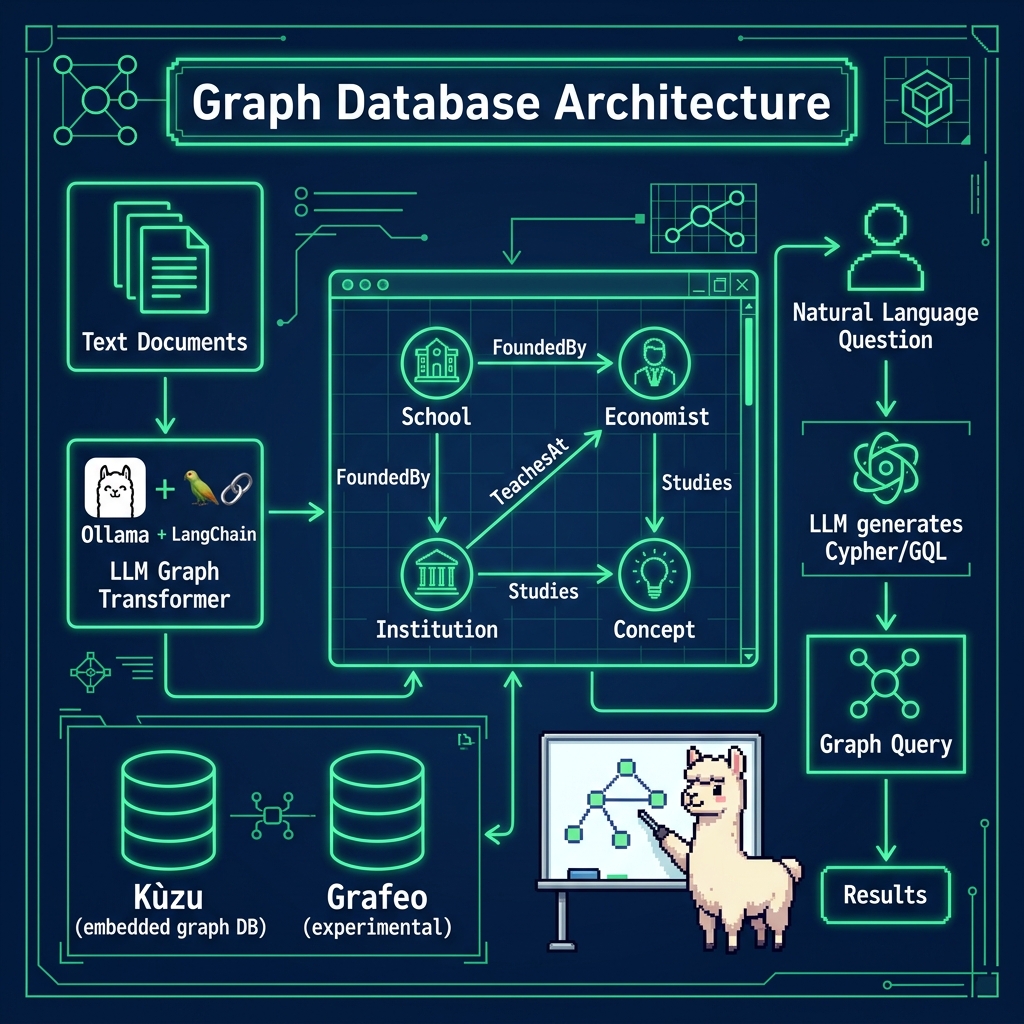
I have a long history of working with Knowledge Graphs (at Google and OliveAI) and I usually use RDF graph databases and the SPARQL query language. I have recently developed a preference for property graph databases because recent research has shown that using LLMs with RDF-based graphs have LLM context size issues due to large schemas, overlapping relations, and complex identifiers that exceed LLM context windows. Property graph databases like Neo4J and LadybugDB (which we use in this chapter) have more concise schemas. LadybugDB is the community-maintained successor to the Kùzu database, which was acquired by Apple and is no longer actively developed.
It is true that Google and other players are teasing ‘infinite context’ LLMs but since this book is about running smaller models locally I have chosen to only show a property graph example.
Overview of Property Graphs
Property graphs represent a powerful and flexible data modeling paradigm that has gained significant traction in modern database systems and applications. At its core, a property graph is a directed graph structure where both vertices (nodes) and edges (relationships) can contain properties in the form of key-value pairs, providing rich contextual information about entities and their connections. Unlike traditional relational databases that rely on rigid table structures, property graphs offer a more natural way to represent highly connected data while maintaining the semantic meaning of relationships. This modeling approach is particularly valuable when dealing with complex networks of information where the relationships between entities are just as important as the entities themselves. The distinguishing characteristics of property graphs make them especially well-suited for handling real-world data scenarios where relationships are multi-faceted and dynamic. Each node in a property graph can be labeled with one or more types (such as Person, Product, or Location) and can hold any number of properties that describe its attributes. Similarly, edges can be typed (like “KNOWS”, “PURCHASED”, or “LOCATED_IN”) and augmented with properties that qualify the relationship, such as timestamps, weights, or quality scores. This flexibility allows for sophisticated querying and analysis of data patterns that would be cumbersome or impossible to represent in traditional relational schemas. The property graph model has proven particularly valuable in domains such as social network analysis, recommendation systems, fraud detection, and knowledge graphs, where understanding the intricate web of relationships between entities is crucial for deriving meaningful insights.
Example Using Ollama, LangChain, and the LadybugDB Property Graph Database
The example shown here uses a custom LangChain wrapper around LadybugDB with GraphCypherQAChain to answer natural-language questions about a movie/actor graph. Since LadybugDB is a new project, we create a lightweight LadybugGraph adapter class that provides the schema and query interface that LangChain expects. Here is the file graph_ladybug_property_example.py:
  1 import ladybug
  2 from langchain_community.chains.graph_qa.cypher import GraphCypherQAChain
  3 from langchain_community.graphs.graph_store import GraphStore
  4 from langchain_ollama.llms import OllamaLLM
  5 import sys
  6 from pathlib import Path
  7
  8 ROOT = Path(__file__).resolve().parents[1]
  9 if str(ROOT) not in sys.path:
 10     sys.path.insert(0, str(ROOT))
 11
 12 from ollama_config import get_client, get_model
 13 import shutil
 14
 15 db_path = "test_db"
 16 if Path(db_path).exists():
 17     shutil.rmtree(db_path)
 18
 19 db = ladybug.Database(db_path)
 20 conn = ladybug.Connection(db)
 21
 22
 23 # ---------------------------------------------------------------------------
 24 # Custom LadybugGraph wrapper for LangChain's GraphCypherQAChain
 25 # ---------------------------------------------------------------------------
 26 class LadybugGraph(GraphStore):
 27     """Minimal LangChain graph wrapper around a LadybugDB connection."""
 28
 29     def __init__(self, database, allow_dangerous_requests: bool = False):
 30         self._db = database
 31         self._conn = ladybug.Connection(database)
 32         self._allow_dangerous_requests = allow_dangerous_requests
 33         self._schema = ""
 34         self.refresh_schema()
 35
 36     @property
 37     def get_schema(self) -> str:
 38         return self._schema
 39
 40     @property
 41     def get_structured_schema(self) -> dict:
 42         return {"schema": self._schema}
 43
 44     def refresh_schema(self) -> None:
 45         """Build a human-readable schema string from the database metadata."""
 46         node_tables = []
 47         rel_tables = []
 48         try:
 49             result = self._conn.execute("CALL show_tables() RETURN *;")
 50             while result.has_next():
 51                 row = result.get_next()
 52                 table_name = row[1] if len(row) > 1 else row[0]
 53                 table_type = row[2] if len(row) > 2 else ""
 54                 if table_type == "NODE":
 55                     node_tables.append(table_name)
 56                 elif table_type == "REL":
 57                     rel_tables.append(table_name)
 58         except Exception:
 59             pass
 60
 61         parts = []
 62         for nt in node_tables:
 63             try:
 64                 props_result = self._conn.execute(
 65                     f"CALL table_info('{nt}') RETURN *;"
 66                 )
 67                 props = []
 68                 while props_result.has_next():
 69                     prow = props_result.get_next()
 70                     props.append(f"{prow[1]}: {prow[2]}")
 71                 parts.append(f"Node: {nt} ({', '.join(props)})")
 72             except Exception:
 73                 parts.append(f"Node: {nt}")
 74
 75         for rt in rel_tables:
 76             parts.append(f"Relationship: {rt}")
 77
 78         self._schema = "\n".join(parts) if parts else "No schema available."
 79
 80     def query(self, query: str, params: dict = None) -> list[dict]:
 81         """Execute a Cypher query and return results as list of dicts."""
 82         try:
 83             result = self._conn.execute(query)
 84             columns = result.get_column_names()
 85             rows = []
 86             while result.has_next():
 87                 values = result.get_next()
 88                 rows.append(dict(zip(columns, values)))
 89             return rows
 90         except Exception as e:
 91             return [{"error": str(e)}]
 92
 93     def add_graph_documents(self, graph_documents, include_source=False):
 94         raise NotImplementedError("Use Cypher queries to add data.")
 95
 96 # Create two tables and a relation: Movie, Person, ActedIn
 97 conn.execute("CREATE NODE TABLE Movie (name STRING, PRIMARY KEY(name))")
 98 conn.execute(
 99     "CREATE NODE TABLE Person (name STRING, birthDate STRING, PRIMARY KEY(name))"
100 )
101 conn.execute("CREATE REL TABLE ActedIn (FROM Person TO Movie)")
102 conn.execute("CREATE (:Person {name: 'Al Pacino', birthDate: '1940-04-25'})")
103 conn.execute("CREATE (:Person {name: 'Robert De Niro', birthDate: '1943-08-17'})")
104 conn.execute("CREATE (:Movie {name: 'The Godfather'})")
105 conn.execute("CREATE (:Movie {name: 'The Godfather: Part II'})")
106 conn.execute(
107     "CREATE (:Movie {name: 'The Godfather Coda: The Death of Michael Corleone'})"
108 )
109 conn.execute(
110     "MATCH (p:Person), (m:Movie) WHERE p.name = 'Al Pacino' AND m.name = 'The Godfather' CREATE (p)-[:ActedIn]->(m)"
111 )
112 conn.execute(
113     "MATCH (p:Person), (m:Movie) WHERE p.name = 'Al Pacino' AND m.name = 'The Godfather: Part II' CREATE (p)-[:ActedIn]->(m)"
114 )
115 conn.execute(
116     "MATCH (p:Person), (m:Movie) WHERE p.name = 'Al Pacino' AND m.name = 'The Godfather Coda: The Death of Michael Corleone' CREATE (p)-[:ActedIn]->(m)"
117 )
118 conn.execute(
119     "MATCH (p:Person), (m:Movie) WHERE p.name = 'Robert De Niro' AND m.name = 'The Godfather: Part II' CREATE (p)-[:ActedIn]->(m)"
120 )
121
122 conn.execute("CREATE (:Person {name: 'Marlon Brando', birthDate: '1924-04-03'})")
123 conn.execute("CREATE (:Person {name: 'Diane Keaton', birthDate: '1946-01-05'})")
124 conn.execute("CREATE (:Movie {name: 'Apocalypse Now'})")
125 conn.execute("CREATE (:Movie {name: 'Annie Hall'})")
126
127 conn.execute(
128     "MATCH (p:Person), (m:Movie) WHERE p.name = 'Marlon Brando' AND m.name = 'Apocalypse Now' CREATE (p)-[:ActedIn]->(m)"
129 )
130 conn.execute(
131     "MATCH (p:Person), (m:Movie) WHERE p.name = 'Diane Keaton' AND m.name = 'Annie Hall' CREATE (p)-[:ActedIn]->(m)"
132 )
133 conn.execute(
134     "MATCH (p:Person), (m:Movie) WHERE p.name = 'Diane Keaton' AND m.name = 'The Godfather: Part II' CREATE (p)-[:ActedIn]->(m)"
135 )
136 conn.execute(
137     "MATCH (p:Person), (m:Movie) WHERE p.name = 'Al Pacino' AND m.name = 'Apocalypse Now' CREATE (p)-[:ActedIn]->(m)"
138 )
139
140 from langchain_ollama import ChatOllama
141 from langchain_core.prompts import ChatPromptTemplate
142 from langchain_core.runnables import RunnableLambda
143
144 graph = LadybugGraph(db, allow_dangerous_requests=True)
145
146 # Use ChatOllama for better instruction following
147 base_llm = ChatOllama(
148     model=get_model(),
149     temperature=0,
150 )
151
152 # Custom prompt using ChatPromptTemplate
153 CYPHER_GENERATION_PROMPT = ChatPromptTemplate.from_messages([
154     ("system", """You are a Cypher expert for a property graph database. Generate ONLY the Cypher query.
155 Rules:
156 1. Do NOT use 'GROUP BY' or 'HAVING'. Cypher performs grouping implicitly.
157 2. For filtering on aggregations, use 'WITH' and 'WHERE'.
158 3. Start directly with MATCH or other Cypher keywords.
159 4. No preamble, no explanation, no markdown."""),
160     ("human", """Schema:
161 {schema}
162
163 Example:
164 Question: Which actors appeared in more than one movie?
165 Cypher: MATCH (p:Person)-[:ActedIn]->(m:Movie) WITH p.name AS name, COUNT(m) AS count WHERE count > 1 RETURN name
166
167 Question: {question}
168 Cypher Query:""")
169 ])
170
171 def clean_cypher_output(output):
172     """Clean the LLM output to extract only the Cypher query."""
173     content = output.content if hasattr(output, 'content') else str(output)
174
175     # Remove markdown code blocks if present
176     content = content.replace("```cypher", "").replace("```", "").strip()
177
178     # Heuristic: Find the first Cypher keyword and strip everything before it
179     keywords = ["MATCH", "CREATE", "MERGE", "RETURN", "WITH", "UNWIND"]
180     for keyword in keywords:
181         if keyword in content.upper():
182             idx = content.upper().find(keyword)
183             content = content[idx:]
184             break
185
186     # Take only the first line to avoid any trailing explanations
187     return content.split("\n")[0].strip()
188
189 # Create a runnable that cleans the output
190 cypher_llm = base_llm | RunnableLambda(clean_cypher_output)
191
192 # Create a chain using GraphCypherQAChain with our custom LadybugGraph wrapper
193 chain = GraphCypherQAChain.from_llm(
194     llm=cypher_llm,
195     qa_llm=base_llm,
196     graph=graph,
197     verbose=True,
198     allow_dangerous_requests=True,
199     cypher_prompt=CYPHER_GENERATION_PROMPT,
200 )
201
202 print(graph.get_schema)
203
204 # Ask two questions
205 chain.invoke("Who acted in The Godfather: Part II?")
206 chain.invoke("Robert De Niro played in which movies?")
207 chain.invoke("Which actors acted in Apocalypse Now?")
208 chain.invoke("What movies did Diane Keaton act in?")
209 chain.invoke("Which actors appeared in more than one movie in the database?")
This code demonstrates the implementation of a graph database using LadybugDB, integrated with LangChain for question-answering capabilities. The code first defines a custom LadybugGraph wrapper class that provides the schema introspection and query execution interface that LangChain’s GraphCypherQAChain expects. It then initializes a database connection and establishes a schema with two node types (Movie and Person) and a relationship type (ActedIn), creating a graph structure suitable for representing actors and their film appearances.
The implementation populates the database with specific data about “The Godfather” trilogy and several prominent actors (Al Pacino, Robert De Niro, Marlon Brando, and Diane Keaton). It uses Cypher query syntax to create nodes for both movies and actors, then establishes relationships between them using the ActedIn relationship type. The data model represents a typical many-to-many relationship between actors and movies.
This example then sets up a question-answering chain using LangChain, which combines the LadybugDB graph database with the Ollama language model. This chain enables natural language queries against the graph database, allowing users to ask questions about actor-movie relationships and receive responses based on the stored graph data. The implementation includes several example queries to demonstrate the system’s functionality.
Here is the output from this example:
 1 $ rm -rf test_db
 2 $ uv run graph_ladybug_property_example.py
 3 Node: Movie (name: STRING)
 4 Node: Person (name: STRING, birthDate: STRING)
 5 Relationship: ActedIn
 6
 7 > Entering new GraphCypherQAChain chain...
 8 Generated Cypher:
 9 MATCH (p:Person)-[:ActedIn]->(m:Movie) WHERE m.name = 'The Godfather: Part II' RETURN p.name
10 Full Context:
11 [{'p.name': 'Al Pacino'}, {'p.name': 'Robert De Niro'}, {'p.name': 'Diane Keaton'}]
12
13 > Finished chain.
14
15 > Entering new GraphCypherQAChain chain...
16 Generated Cypher:
17 MATCH (p:Person {name: 'Robert De Niro'})-[:ActedIn]->(m:Movie) RETURN m.name AS movieName
18 Full Context:
19 [{'movieName': 'The Godfather: Part II'}]
20
21 > Finished chain.
22
23 > Entering new GraphCypherQAChain chain...
24 Generated Cypher:
25 MATCH (p:Person)-[:ActedIn]->(m:Movie) WHERE m.name = 'Apocalypse Now' RETURN p.name AS actor
26 Full Context:
27 [{'actor': 'Al Pacino'}, {'actor': 'Marlon Brando'}]
28
29 > Finished chain.
30
31 > Entering new GraphCypherQAChain chain...
32 Generated Cypher:
33 MATCH (p:Person {name: 'Diane Keaton'})-[:ActedIn]->(m:Movie) RETURN m.name AS movieName;
34 Full Context:
35 [{'movieName': 'The Godfather: Part II'}, {'movieName': 'Annie Hall'}]
36
37 > Finished chain.
38
39 > Entering new GraphCypherQAChain chain...
40 Generated Cypher:
41 MATCH (p:Person)-[:ActedIn]->(m:Movie) WITH p.name AS name, COUNT(m) AS count WHERE count > 1 RETURN name
42 Full Context:
43 [{'name': 'Diane Keaton'}, {'name': 'Al Pacino'}]
44
45 > Finished chain.
The Cypher query language is commonly used in property graph databases. Here is a sample query:
1 MATCH (p:Person)-[:ActedIn]->(m:Movie {name: 'The Godfather: Part II'})
2 RETURN p.name
This Cypher query performs a graph pattern matching operation to find actors who appeared in “The Godfather: Part II”. Let’s break it down:
- MATCH initiates a pattern matching operation
- (p:Person) looks for nodes labeled as “Person” and assigns them to variable p
- -[:ActedIn]-> searches for “ActedIn” relationships pointing outward
- (m:Movie ) matches Movie nodes specifically with the name property equal to “The Godfather: Part II”
- RETURN p.name returns only the name property of the matched Person nodes
Based on the previous code’s data, this query would return “Al Pacino” and “Robert De Niro” since they both acted in that specific film.
Using LLMs to Create Graph Databases from Text Data
Using LadybugDB with local LLMs is simple to implement as seen in the last section. If you use large property graph databases hosted with LadybugDB or Neo4J, then the example in the last section is hopefully sufficient to get you started implementing natural language interfaces to property graph databases.
Now we will do something very different: use LLMs to generate data for property graphs, that is, to convert text to Python code to create a LadybugDB property graph database.
Specifically, we use the approach:
- Use the last example file graph_ladybug_property_example.py as an example for Claude Sonnet 3.5 to understand the LadybugDB Python APIs.
- Have Claude Sonnet 3.5 read the file data/economics.txt and create a schema for a new graph database and populate the schema from the contents of the file data/economics.txt.
- Ask Claude Sonnet 3.5 to also generate query examples.
Except for my adding the utility function query_and_print_result, this code was generated by Claude Sonnet 3.5:
  1 """
  2 Created by Claude Sonnet 3.5 from prompt:
  3
  4 Given some text, I want you to define Property graph schemas for
  5 the information in the text. As context, here is some Python code
  6 for defining two tables and a relation and querying the data:
  7
  8 [[CODE FROM graph_ladybug_property_example.py]]
  9
 10 NOW, HERE IS THE TEST TO CREATE SCHEME FOR, and to write code to
 11 create nodes and links conforming to the scheme:
 12
 13 [[CONTENTS FROM FILE data/economics.txt]]
 14
 15 """
 16
 17 import ladybug
 18
 19 db = ladybug.Database("economics_db")
 20 conn = ladybug.Connection(db)
 21
 22 # Node tables
 23 conn.execute("""
 24 CREATE NODE TABLE School (
 25     name STRING,
 26     description STRING,
 27     PRIMARY KEY(name)
 28 )""")
 29
 30 conn.execute("""
 31 CREATE NODE TABLE Economist (
 32     name STRING,
 33     birthDate STRING,
 34     PRIMARY KEY(name)
 35 )""")
 36
 37 conn.execute("""
 38 CREATE NODE TABLE Institution (
 39     name STRING,
 40     type STRING,
 41     PRIMARY KEY(name)
 42 )""")
 43
 44 conn.execute("""
 45 CREATE NODE TABLE EconomicConcept (
 46     name STRING,
 47     description STRING,
 48     PRIMARY KEY(name)
 49 )""")
 50
 51 # Relationship tables
 52 conn.execute("CREATE REL TABLE FoundedBy (FROM School TO Economist)")
 53 conn.execute("CREATE REL TABLE TeachesAt (FROM Economist TO Institution)")
 54 conn.execute("CREATE REL TABLE Studies (FROM School TO EconomicConcept)")
 55
 56 # Insert some data
 57 conn.execute("CREATE (:School {name: 'Austrian School', description: 'School of economic thought emphasizing spontaneous organizing power of price mechanism'})")
 58
 59 # Create economists
 60 conn.execute("CREATE (:Economist {name: 'Carl Menger', birthDate: 'Unknown'})")
 61 conn.execute("CREATE (:Economist {name: 'Eugen von Böhm-Bawerk', birthDate: 'Unknown'})")
 62 conn.execute("CREATE (:Economist {name: 'Ludwig von Mises', birthDate: 'Unknown'})")
 63 conn.execute("CREATE (:Economist {name: 'Pauli Blendergast', birthDate: 'Unknown'})")
 64
 65 # Create institutions
 66 conn.execute("CREATE (:Institution {name: 'University of Krampton Ohio', type: 'University'})")
 67
 68 # Create economic concepts
 69 conn.execute("CREATE (:EconomicConcept {name: 'Microeconomics', description: 'Study of individual agents and markets'})")
 70 conn.execute("CREATE (:EconomicConcept {name: 'Macroeconomics', description: 'Study of entire economy and issues affecting it'})")
 71
 72 # Create relationships
 73 conn.execute("""
 74 MATCH (s:School), (e:Economist)
 75 WHERE s.name = 'Austrian School' AND e.name = 'Carl Menger'
 76 CREATE (s)-[:FoundedBy]->(e)
 77 """)
 78
 79 conn.execute("""
 80 MATCH (s:School), (e:Economist)
 81 WHERE s.name = 'Austrian School' AND e.name = 'Eugen von Böhm-Bawerk'
 82 CREATE (s)-[:FoundedBy]->(e)
 83 """)
 84
 85 conn.execute("""
 86 MATCH (s:School), (e:Economist)
 87 WHERE s.name = 'Austrian School' AND e.name = 'Ludwig von Mises'
 88 CREATE (s)-[:FoundedBy]->(e)
 89 """)
 90
 91 conn.execute("""
 92 MATCH (e:Economist), (i:Institution)
 93 WHERE e.name = 'Pauli Blendergast' AND i.name = 'University of Krampton Ohio'
 94 CREATE (e)-[:TeachesAt]->(i)
 95 """)
 96
 97 # Link school to concepts it studies
 98 conn.execute("""
 99 MATCH (s:School), (c:EconomicConcept)
100 WHERE s.name = 'Austrian School' AND c.name = 'Microeconomics'
101 CREATE (s)-[:Studies]->(c)
102 """)
103
104 """
105 Code written from the prompt:
106
107 Now that you have written code to create a sample graph database about
108 economics, you can write queries to extract information from the database.
109 """
110
111 def query_and_print_result(query):
112     """Basic pretty printer for Ladybug query results"""
113     print(f"\n* Processing: {query}")
114     result = conn.execute(query)
115     if not result:
116         print("No results found")
117         return
118
119     # Get column names
120     while result.has_next():
121         r = result.get_next()
122         print(r)
123
124 # 1. Find all founders of the Austrian School
125 query_and_print_result("""
126 MATCH (s:School)-[:FoundedBy]->(e:Economist)
127 WHERE s.name = 'Austrian School'
128 RETURN e.name
129 """)
130
131 # 2. Find where Pauli Blendergast teaches
132 query_and_print_result("""
133 MATCH (e:Economist)-[:TeachesAt]->(i:Institution)
134 WHERE e.name = 'Pauli Blendergast'
135 RETURN i.name, i.type
136 """)
137
138 # 3. Find all economic concepts studied by the Austrian School
139 query_and_print_result("""
140 MATCH (s:School)-[:Studies]->(c:EconomicConcept)
141 WHERE s.name = 'Austrian School'
142 RETURN c.name, c.description
143 """)
144
145 # 4. Find all economists and their institutions
146 query_and_print_result("""
147 MATCH (e:Economist)-[:TeachesAt]->(i:Institution)
148 RETURN e.name as Economist, i.name as Institution
149 """)
150
151 # 5. Find schools and count their founders
152 query_and_print_result("""
153 MATCH (s:School)-[:FoundedBy]->(e:Economist)
154 RETURN s.name as School, COUNT(e) as NumberOfFounders
155 """)
156
157 # 6. Find economists who both founded schools and teach at institutions
158 query_and_print_result("""
159 MATCH (s:School)-[:FoundedBy]->(e:Economist)-[:TeachesAt]->(i:Institution)
160 RETURN e.name as Economist, s.name as School, i.name as Institution
161 """)
162
163 # 7. Find economic concepts without any schools studying them
164 query_and_print_result("""
165 MATCH (c:EconomicConcept)
166 WHERE NOT EXISTS {
167     MATCH (s:School)-[:Studies]->(c)
168 }
169 RETURN c.name
170 """)
171
172 # 8. Find economists with no institutional affiliations
173 query_and_print_result("""
174 MATCH (e:Economist)
175 WHERE NOT EXISTS {
176     MATCH (e)-[:TeachesAt]->()
177 }
178 RETURN e.name
179 """)
How might you use this example? Using one or two shot prompting in LLM input prompts to specify data format and other information and then generating structured data of Python code is a common implementation pattern for using LLMs.
Here, the “structured data” I asked an LLM to output was Python code.
I cheated in this example by using what is currently the best code generation LLM: Claude Sonnet 3.5. I also tried this same exercise using Ollama with the model qwen2.5-coder:14b and the results were not quite as good. This is a great segway into the final chapter Book Wrap Up.
Optional Practice Problems
Adding Properties to the Graph Schema. Modify the Cypher schema creation in
graph_ladybug_property_example.pyto add a new propertybirth_yearto theEconomistnode type. Insert birth years for Carl Menger (1840) and Ludwig von Mises (1881), and run a query that filters for economists born before 1900.Common Affiliation Query. Write a Cypher query to find pairs of economists who are associated with the same
Schoolor teach at the sameInstitution. Print their names and the shared node name.Natural Language to Cypher Translator. Build a Python script that takes a natural language question (e.g. “Which school studies microeconomics?”) and uses Ollama to translate it into a Cypher query. Execute this query on your local Kuzu/Ladybug database and print the results. Hint: use few-shot prompt examples to guide the query generation.
Bi-directional Relationships. In graph databases, relationships are directed. Discuss what happens if you query
MATCH (a)-[:FoundedBy]->(b)vsMATCH (b)-[:FoundedBy]->(a). Write a query that finds all connections between two nodes regardless of relationship direction.