Semantic Navigator App Using Gradio
Even though this is a book on using local LLMs I thought, dear reader, that it would be fun to add a complete web app example that is also an effective application of LLMs to perform natural language processing (NLP) tasks that a decade ago would have required a major development effort and would not have been as effective as the LLM-based solution we use here.
Overview or Semantic Web and Linked Data
The Semantic Web, often referred to as Web 3.0 or the Web of Data, represents an ambitious vision originally proposed by Tim Berners-Lee, the inventor of the World Wide Web. While the traditional web is a collection of documents designed for human consumption—where computers essentially act as mailmen delivering pages they cannot “understand”—the Semantic Web aims to make the underlying data machine-readable. By providing a common framework that allows data to be shared and reused across application, enterprise, and community boundaries, it transforms the internet from a library of isolated silos into a massive, interconnected global database.
At the heart of this transformation is a specific technology stack designed to categorize and link information. The Resource Description Framework (RDF) serves as the standard data model, breaking down information into “triples” (subject, predicate, and object) that describe relationships between entities. To ensure these entities are unique and discoverable, they are identified using Uniform Resource Identifiers (URIs), which function like permanent, global addresses for concepts rather than just web pages. This layer is often visualized as a “Layer Cake,” progressing from basic syntax to complex logic and trust protocols.
Linked Data provides the practical set of best practices required to realize this vision. It is governed by four core principles: using URIs as names for things, using HTTP URIs so people can look up those names, providing useful information via standards like RDF or SPARQL (a semantic query language), and including links to other URIs to facilitate discovery. When data is published according to these rules, it becomes part of the Linked Open Data (LOD) Cloud, a vast network of interlinked datasets, such as DBpedia or GeoNames, that allows machines to traverse the web of knowledge much like humans browse a web of pages.
In other books I have written examples of transforming text into RDF data (e.g., https://leanpub.com/lovinglisp and https://leanpub.com/racket-ai). In this chapter we identify entities and relationships between entities, storing this extracted data in JSON rather than RDF.
Design Goals for the Semantic Navigator App
We develop an example web app that allows a user to paste in large blocks of text and extracts entities and relations between the identified entities.
I originally wrote this web app for the Huggingface Spaces platform using a Huggingface inference endpoint. I later modified the web app to run locally on my laptop using Ollama.
This web app can easily be hosted on a Linux server, using a tool like nginx to serve as a public endpoint on port 80.
Before looking at the code, here is what the finished product looks like:
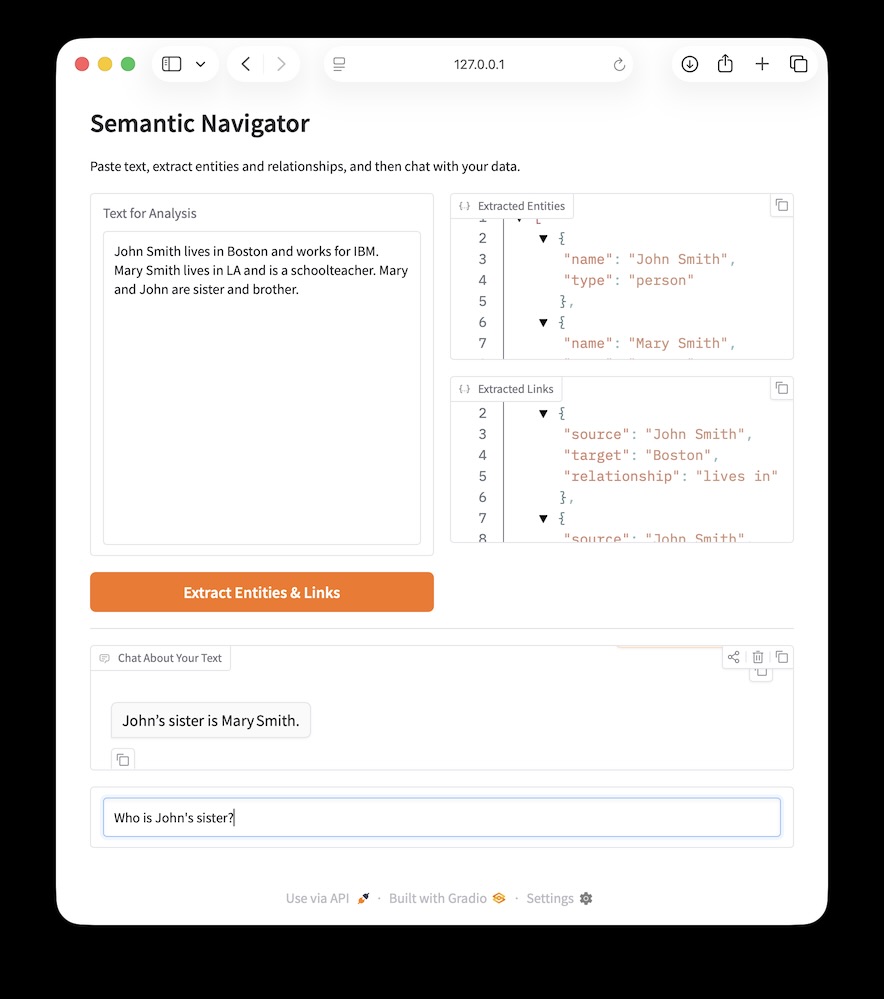
Implementation of the Semantic Navigator App Using Gradio
We will use the Gradio toolkit for creating interactive web apps. You can find detailed documentation here: https://www.gradio.app/docs.
The following program demonstrates the construction of a “Semantic Navigator,” a web application built with Gradio that leverages Large Language Models (LLMs) to transform unstructured prose into structured knowledge. By using the Ollama Python client library, the application connects to a high-performance model to perform two distinct natural language processing tasks: named entity recognition (NER) and relationship extraction. The code implements a dual-stage workflow where users first submit raw text for analysis—triggering a system prompt that enforces a strict JSON schema for identifying persons, places, and organizations—and then interact with that data through a context-aware chatbot. This implementation showcases critical modern AI patterns, including the handling of structured LLM outputs, state management within a reactive UI, and the use of RAG-lite (Retrieval-Augmented Generation) techniques to constrain assistant responses to a specific, extracted dataset.
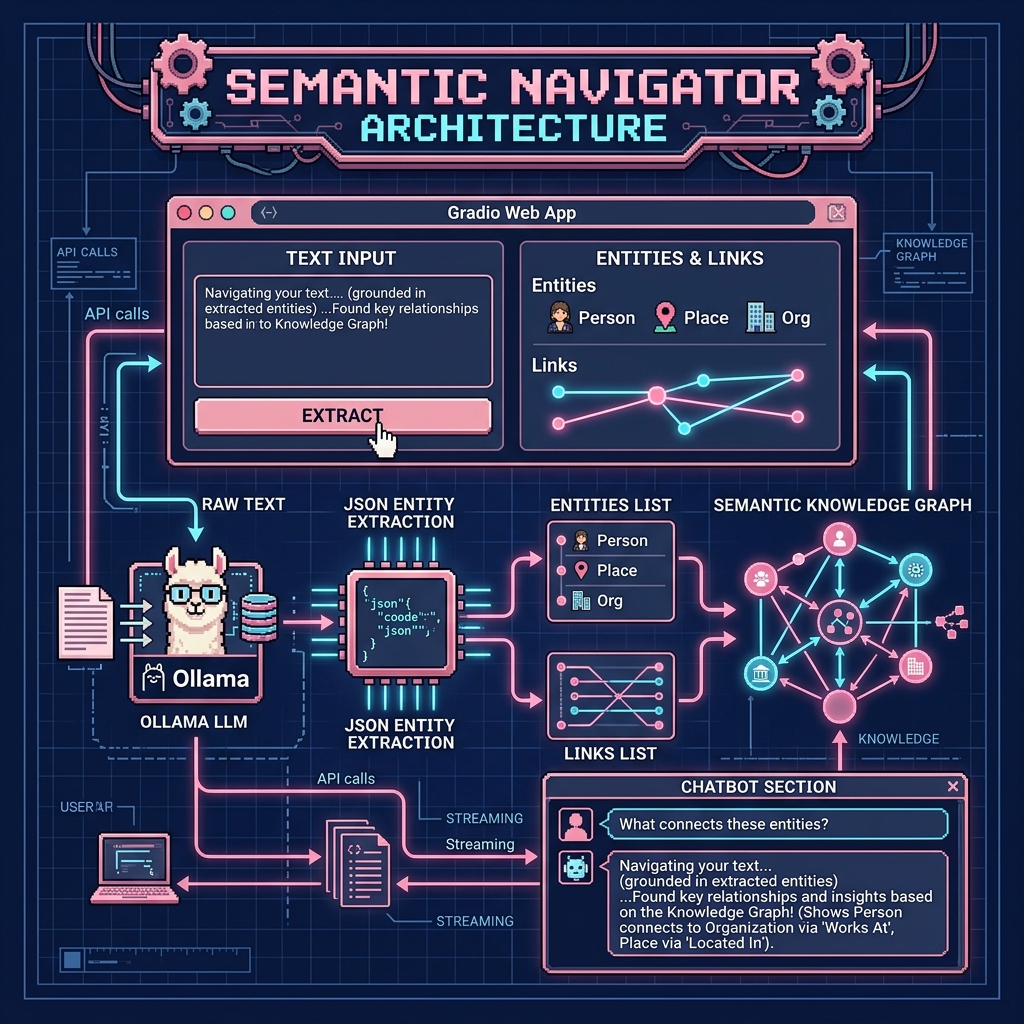
This example is in the directory SemanticNavigator in the file app.py:
  1 # set: export CLOUD=1
  2 #      export MODEL=nemotron-3-super:cloud
  3
  4
  5 import gradio as gr
  6 import os
  7 import json
  8 import sys
  9 from pathlib import Path
 10 from ollama import Client
 11
 12 ROOT = Path(__file__).resolve().parents[1]
 13 if str(ROOT) not in sys.path:
 14     sys.path.insert(0, str(ROOT))
 15
 16 from ollama_config import get_model
 17
 18 client = Client(
 19   host="https://ollama.com",
 20   headers={'Authorization': 'Bearer ' + os.environ.get('OLLAMA_API_KEY', '')}
 21 )
 22
 23 MODEL = get_model()
 24
 25 def extract_entities_and_links(text: str):
 26   """Uses an LLM to extract entities and links from text."""
 27   print("\n* Entered extract_entities_and_links function *\n")
 28
 29   system_message = (
 30     "You are an expert in information extraction. From the given "
 31     "text, extract entities of type 'person', 'place', and "
 32     "'organization'. Also, identify links between these entities. "
 33     "Output the result as a single JSON object with two keys: "
 34     "'entities' and 'links'.\n"
 35     "- 'entities': list of objects, each with 'name' and 'type'.\n"
 36     "- 'links': list of objects, each with 'source', 'target', "
 37     "and 'relationship'.\n"
 38     "Example output format:\n"
 39     "{\n"
 40     "  \"entities\": [{\"name\": \"A\", \"type\": \"person\"}],\n"
 41     "  \"links\": [{\"source\": \"A\", \"target\": \"B\", "
 42     "\"relationship\": \"works for\"}]\n"
 43     "}"
 44   )
 45
 46   messages = [
 47     {"role": "system", "content": system_message},
 48     {"role": "user", "content": text}
 49   ]
 50
 51   try:
 52     response = client.chat(MODEL, messages=messages, stream=False)
 53     content = response['message']['content'].strip()
 54
 55     # Strip Markdown formatting if present
 56     if content.startswith("```json"):
 57       content = content[7:-3].strip()
 58     elif content.startswith("```"):
 59       content = content[3:-3].strip()
 60
 61     print("\n* Raw model output: *\n", content)
 62     data = json.loads(content)
 63     entities = data.get("entities", [])
 64     links = data.get("links", [])
 65
 66     return entities, links, entities, links
 67
 68   except Exception as e:
 69     print(f"Error during extraction: {e}")
 70     raise gr.Error(f"Extraction failed. Details: {e}")
 71
 72 def chat_responder(message, history, entities, links):
 73   """Streaming chatbot using extracted entities as context."""
 74   print("\n* Entered chat_responder function *\n")
 75
 76   if not entities and not links:
 77     system_message = (
 78       "You are a helpful-but-skeptical assistant. The user has "
 79       "not extracted any information yet. Politely ask them to "
 80       "paste text above and click 'Extract' first."
 81     )
 82   else:
 83     system_message = (
 84       "You are a helpful assistant. Use ONLY the following extracted "
 85       "entities and links to answer questions. If the answer is "
 86       "not in this data, state that clearly.\n"
 87       f"Entities: {json.dumps(entities, indent=2)}\n"
 88       f"Links: {json.dumps(links, indent=2)}"
 89     )
 90
 91   messages = [{"role": "system", "content": system_message}]
 92   messages.extend(history)
 93   messages.append({"role": "user", "content": message})
 94
 95   response_text = ""
 96   new_history = history + [
 97     {"role": "user", "content": message},
 98     {"role": "assistant", "content": ""}
 99   ]
100
101   yield new_history, ""
102
103   for part in client.chat(MODEL, messages=messages, stream=True):
104     if 'message' in part and 'content' in part['message']:
105       token = part['message']['content']
106       response_text += token
107       new_history[-1]["content"] = response_text
108       yield new_history, ""
109
110 # --- Gradio UI ---
111 with gr.Blocks(fill_height=True) as demo:
112   gr.Markdown(
113     "# Semantic Navigator\n"
114     "Paste text, extract relationships, and chat with your data."
115   )
116
117   with gr.Row(scale=1):
118     with gr.Column(scale=1):
119       text_input = gr.Textbox(
120         scale=1, lines=15, label="Text for Analysis",
121         placeholder="Paste paragraphs of text here to analyze..."
122       )
123       extract_button = gr.Button("Extract Entities & Links",
124                                  variant="primary")
125     with gr.Column(scale=1):
126       entities_out = gr.JSON(label="Entities", max_height="20vh")
127       links_out = gr.JSON(label="Links", max_height="20vh")
128
129   gr.Markdown("---")
130
131   with gr.Column(scale=1):
132     chatbot_display = gr.Chatbot(label="Chat Context",
133                                  max_height="20vh")
134     chat_input = gr.Textbox(
135       show_label=False, lines=1,
136       placeholder="Ask a question about the extracted data..."
137     )
138
139   entity_state = gr.State()
140   link_state = gr.State()
141
142   extract_button.click(
143     fn=extract_entities_and_links,
144     inputs=[text_input],
145     outputs=[entities_out, links_out, entity_state, link_state]
146   )
147
148   chat_input.submit(
149     fn=chat_responder,
150     inputs=[chat_input, chatbot_display, entity_state, link_state],
151     outputs=[chatbot_display, chat_input]
152   )
153
154 if __name__ == "__main__":
155   demo.launch()
The core logic of this application resides in the extract_entities_and_links function, which serves as the bridge between raw text and structured data. It utilizes a system message to “program” the LLM to act as an information extraction expert, ensuring that the response is returned as a JSON object containing distinct lists for entities and their corresponding relationships. To ensure robustness, this function includes logic to strip common Markdown code block wrappers that models often include in their responses, and it employs internal state management via gr.State to persist this structured data across multiple user interactions without cluttering the visible interface.
The interactivity is rounded out by the chat_responder function which demonstrates a streaming chatbot implementation that utilizes the previously extracted entities as its primary source of truth. By dynamically injecting the JSON data into the system prompt, the assistant is constrained to answer questions based strictly on the provided context, effectively preventing hallucinations of outside information. The Gradio layout organizes these complex interactions into a clean, two-column interface, utilizing a combination of gr.Blocks, gr.Row, and gr.Column to provide a professional user experience that balances data input, structured visualization, and conversational exploration. This web app is responsive and adjusts for mobile web browsers.
Optional Practice Problems
Interactive Graph Visualization. Extend the Gradio interface in
app.pyto display the extracted links visually. Use a Python library likenetworkxandmatplotlibto render a node-link diagram when the user clicks “Extract Entities & Links,” and show the static plot in agr.Plotcomponent. Alternatively, generate an interactive HTML page usingpyvisand display it in agr.HTMLcomponent.User-Customizable Extraction Types. Currently, the entities and relationship links are extracted using a hardcoded prompt template. Modify the Gradio UI to include a textbox where the user can type specific entity types (e.g. “Products, Locations, Organizations”) and relationship types they want to extract. Pass these parameters into
extract_entities_and_linksand update the system prompt dynamically.Reset and Clear Session. Add a “Reset Session” button to the Gradio blocks. When clicked, it should clear the text inputs, empty the extracted JSON displays, reset the internal
gr.Statevariables (entity_state,link_state), and wipe the chat history.Export Extracted Data. Add a download button to the UI. Implement a function that writes the extracted JSON data to a temporary file on disk and exposes it via
gr.Fileso the user can easily export their structured knowledge base to a local JSON file.