Using Ollama Cloud Services
Why use cloud when Ollama was originally designed as a local-only LLM inference provider? Ollama cloud is (mostly) software compatible with using Ollama locally on your laptop or server and allows you to offload workloads from your own computer as well as run open source or open weight models that are too large to fit on your computer.
Ollama Cloud Services: Power and Knowledge on Demand
The Ollama cloud platform is built for developers seeking to run large language models on Ollama’s GPU hardware in the cloud, still providing privacy, control, and a streamlined user experience. However, the relentless pace of AI research presents a fundamental challenge: the exponential growth in model size and capability is rapidly outstripping the computational power of consumer-grade hardware. State-of-the-art models, often with hundreds of billions of parameters, are simply too large to fit on widely available GPUs on your laptop or in-house servers, or run at a practical speed. This creates a critical bottleneck for developers and researchers aiming to leverage the latest advancements.
In response to this challenge, Ollama has introduced Ollama Cloud Services, a strategic and seamless extension of the core ecosystem. This is not a separate product with a new learning curve, but rather a natural evolution designed to preserve the Ollama workflow we are used to using while unlocking access to state-of-the-art performance. The core purpose of the cloud offering is to allow users to “run larger models faster using datacenter-grade hardware”. It provides a direct solution to the hardware gap, ensuring that the Ollama community can continue to innovate while switching between local and cloud compute.
This evolution represents a significant shift from a “local-first” to a “hybrid-first” paradigm. By providing a cloud-based execution environment that is perfectly integrated with the existing Ollama App, CLI, and API, the platform creates a frictionless “escalation path”. A developer can prototype an application on their laptop using a smaller, local model and then, with a minimal change—often just a single command-line flag or a line of code—deploy the same application using a massive, high-performance model in the cloud. This approach prevents user attrition to purely cloud-based competitors and transforms Ollama from a local utility into a comprehensive platform that spans the entire development lifecycle, from edge devices to the cloud.
This chapter will explore the two fundamental pillars of Ollama Cloud Services. The first is High-Performance Model Inference, which provides the raw computational Power to run the largest and most capable models available. The second is the Web Search API, which endows these models with up-to-date Knowledge, allowing them to access real-time information from the internet. Together, these services represent a unified strategy to fundamentally expand what is possible within the Ollama ecosystem.
High-Performance Model Inference in the Cloud
The primary service offered by Ollama Cloud is a high-performance inference engine for running large-scale language models. This service directly addresses the physical limitations of local hardware, providing users with on-demand access to datacenter-grade infrastructure.
The Rationale: Why Move Inference to the Cloud?
The value proposition of moving model inference to the cloud extends beyond simply accessing more powerful hardware. It offers a collection of tangible benefits that enhance productivity, user experience, and application capability.
Speed and Scale: The most immediate advantage is the ability to run inference on models that are otherwise inaccessible. The service leverages newer, more powerful hardware to dramatically speed up response times and makes it possible to run exceptionally large models. As of this writing, available cloud-exclusive models include cutting-edge architectures like (with more expected to be added over time):
- deepseek-v3.1:671b-cloud
- gpt-oss:120b-cloud
- qwen3-coder:480b-cloud
Advantages of Ollama Cloud:
- Resource Offloading: Running large models locally is computationally expensive, consuming significant CPU, GPU, and RAM resources, which can slow down a user’s entire system. By offloading this workload to the cloud, developers can free up their local machine’s resources for other tasks, such as coding, compiling, and running other applications. For mobile users, this also translates directly into significant battery life savings.
- Privacy Commitment: A primary reason developers choose Ollama is its local-first, privacy-centric design. Moving to a cloud service often raises valid concerns about data privacy and security. Ollama Cloud addresses this head-on with a “Privacy first” policy. The platform explicitly states that it does not log or retain any user queries or data, ensuring that the core principle of user privacy is maintained even when leveraging cloud infrastructure. This commitment is designed to build and maintain trust with its user base, making the transition from local to cloud a more palatable choice.
- The service is currently available as a preview for a monthly subscription of $20. To manage capacity, hourly and daily usage limits are in place. All hardware powering the service is located in the United States. Looking forward, Ollama plans to introduce usage-based pricing, signaling an ambition to support more granular, metered consumption for enterprise and high-volume commercial applications.
Access and Interaction: A Practical Guide
A key design principle of Ollama Cloud is its seamless integration with existing workflows. Whether interacting via the command line or a programmatic API, the process is designed to be intuitive and require minimal changes.
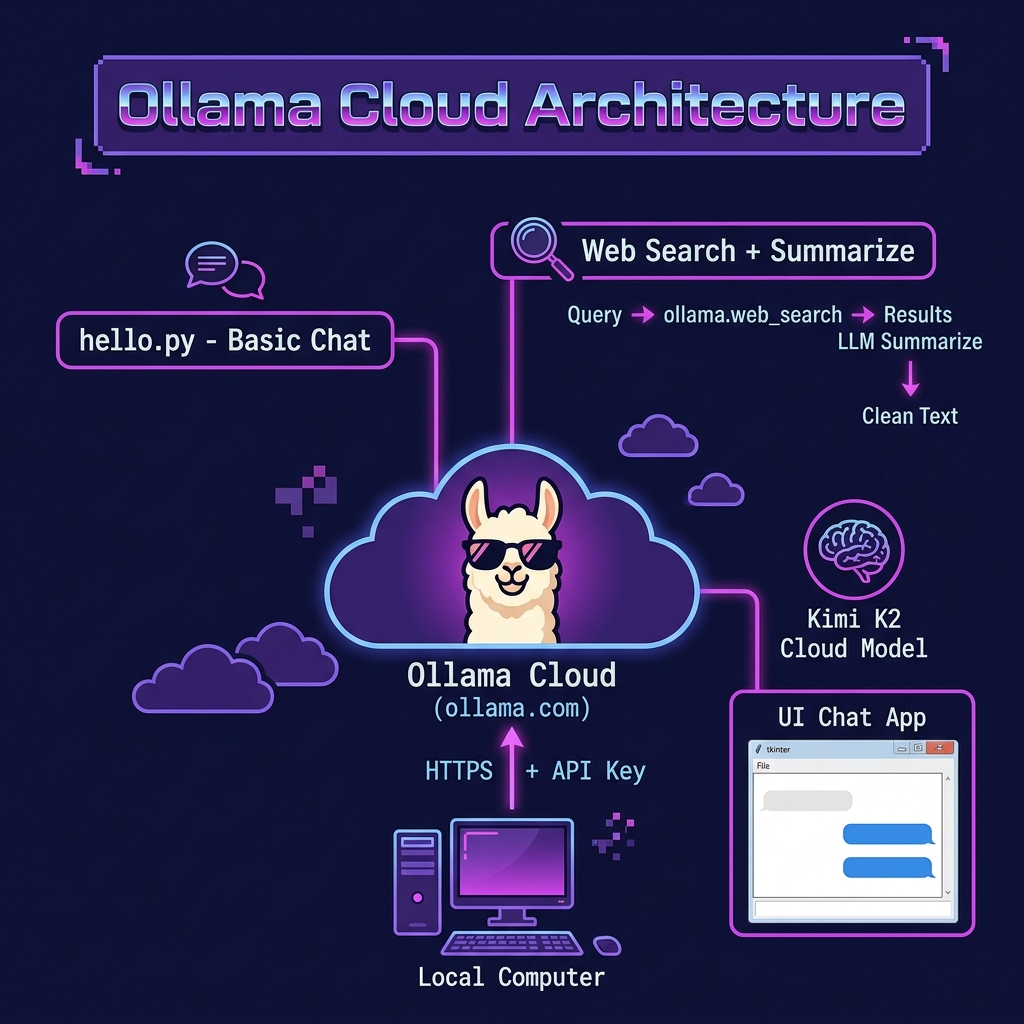
Seamless Command-Line Integration
For users of the Ollama CLI, accessing cloud models is remarkably simple. The process involves two steps:
Authentication: First, you must link your local CLI to your ollama.com account. This is a one-time setup accomplished by running the following command in your terminal:
1 ollama signin
This will open a browser window to authenticate your account.
Execution: Once signed in, running a cloud model is nearly identical to running a local one. The only difference is the addition of a -cloud suffix to the model name. For example, to run the 120-billion parameter gpt-oss model, you would execute:
1 ollama run gpt-oss:120b-cloud
This command instructs Ollama to automatically offload the request to the cloud service. All other command-line flags and interactions behave exactly as they would with a local model, demonstrating the elegance and simplicity of the integration.
Programmatic API Access: The Remote Host Pattern
For developers building applications, Ollama Cloud can be accessed programmatically through a powerful architectural abstraction known as the “Remote Host Pattern.” In this model, the cloud endpoint at https://ollama.com functions as a remote instance of the Ollama server, accepting the same API calls as a local installation.
To use this pattern, you must first generate an API key from your ollama.com account settings. This key is then used for authentication in your API requests.
The following Python example in the file hello.py demonstrates how to interact with a cloud model. Note how closely it mirrors the code for interacting with a local model:
 1 from ollama import Client
 2 import os
 3
 4 client = Client(
 5     host="https://ollama.com",
 6     headers={'Authorization': os.environ.get("OLLAMA_API_KEY")}
 7 )
 8
 9 def generate(text):
10     messages = [
11       {
12         'role': 'user',
13         'content': text,
14       },
15     ]
16
17     response = client.chat('gpt-oss:20b', messages=messages, stream=False)
18     return response['message']['content']
19
20 print(generate("Say 'hello' in three languages."))
Here is sample output:
1 $ uv run hello.py
2 Hello (English)
3 Hola (Spanish)
4 Bonjour (French)
The critical change is in the Client constructor, where the host is set to https://ollama.com and the headers dictionary includes the Authorization token. This design makes developer code location-agnostic. The decision of whether to run a model locally or in the cloud can be externalized to a configuration file or an environment variable, allowing for the implementation of sophisticated hybrid execution logic—such as trying a local model first and falling back to the cloud if it’s unavailable, with very small configuration alterations to the core application code.
Augmenting Models with the Web Search API
While the cloud inference service provides computational power, the Web Search API delivers up-to-date Knowledge. This service is designed to address one of the most significant limitations of large language models: their static knowledge base.
Dear reader, one particular thing that I love about this web search servie is that it automatically reformats HTML web page content into Markdown format.
The Rationale for Using Data from the Web to Augment Context: Combating Staleness and Hallucination
LLMs are trained on vast but finite datasets, resulting in a “knowledge cutoff” date. They have no awareness of events, discoveries, or information that emerged after their training was completed. This “staleness” can lead them to provide outdated or incorrect answers. Furthermore, when faced with questions about topics they have limited or no information on, models can “hallucinate,” generating plausible but factually incorrect information.
The Ollama Web Search API is a direct solution to this problem. Its purpose is to “augment models with the latest information to reduce hallucinations and improve accuracy”. By providing a simple mechanism to fetch real-time information from the web, developers can ground their models in reality, ensuring their applications provide relevant, timely, and factual responses.
The Web Search API: A Technical Deep Dive
The Web Search API is a straightforward REST endpoint designed for ease of use. Interaction with the API requires an API key generated from a free Ollama account, which must be passed as a bearer token in the authorization header.
The endpoint’s contract is summarized below.
| Property | Description |
|---|---|
| Endpoint URL | https://ollama.com/api/web_search |
| HTTP Method | POST |
| Authentication | Authorization: Bearer <OLLAMA_API_KEY> header |
| Request Body | JSON object with a required query (string) and an optional max_results (integer, default: 5, max: 10) |
| Success Response | JSON object containing an array of results, each with title, url, and content fields. |
| Failure Response | JSON object with an error field describing the issue (e.g., invalid API key, malformed request, or exceeding max_results). |
Example Hybrid Search and LLM-Based Summarization of Search Results
In this example we perform a web search and then use a LLM model to summarize each search result. This example is in file ollama_web_search.py:
 1 # Ensure OLLAMA_API_KEY is set  in ENV
 2
 3 # Note: the answer.contents is nicely converted from HTML to Markdown.
 4
 5 import os
 6 import sys
 7 from pathlib import Path
 8 import ollama
 9 from ollama import Client
10 from pprint import pprint
11
12 ROOT = Path(__file__).resolve().parents[1]
13 if str(ROOT) not in sys.path:
14     sys.path.insert(0, str(ROOT))
15
16 from ollama_config import get_model
17
18 client = Client(
19     host="https://ollama.com",
20     headers={'Authorization': 'Bearer ' + os.environ.get('OLLAMA_API_KEY', '')}
21 )
22
23 def generate(text):
24     messages = [
25       {
26         'role': 'user',
27         'content': text,
28       },
29     ]
30
31     response = client.chat(get_model(), messages=messages, stream=False)
32     return response['message']['content']
33
34 P = "Summarize the following Markdown text, returning only plain text. Markdown text:\n\n"
35
36 def clean_web_query(query, max_results=2):
37     ret = []
38     response = ollama.web_search(query)
39     for answer in response['results']:
40         markdown = answer.content
41         clean = generate(P + markdown)
42         #print(f"\n\n{answer.url}\n\n{answer.content}\n\n")
43         #pprint(answer)
44         ret.append(clean)
45     return ret
46
47 test = clean_web_query("AI Consultant Mark Watson works with AI, Lisp, Java, Clojure, and the Semantic Web.", max_results=1)
48
49 for clean in test:
50     print(f"{clean}\n\n\n")
What the code does:
- Initialize an Ollama client by reading the environment variable OLLAMA_API_KEY and uses it as an authorization header to create an ollama.Client instance pointing at https://ollama.com.
- Define generate(text) by wrapping a user‐provided prompt text into the format expected by Ollama’s chat API (a single message with role ‘user’), sends it to the model gpt-oss:20b (non-streaming), and extracts the resulting content (string) from the API response.
- Define clean_web_query(query, max_results=2) by calling ollama.web_search(query) to get search results (each result has fields .content, .url, etc.). For each result, it takes the .content, prepends the prefix P, and passes that into generate(…) to get a cleaned, summarized plain-text version. It collects and returns a list of those cleaned summaries.
- Test/example usage: Calls clean_web_query(…) on a sample query about “AI Consultant Mark Watson … Semantic Web.“ and prints eac the cleaned summaries for all of the returned search results.
Here is some partial sample output (note we are defining the model as gpt-oss:20b):
1 $ export MODEL='gpt-oss:20b'
2 $ uv run ollama_web_search.py
3 Mark Watson is a remote artificial intelligence consultant with experience dating back to 1982. He has worked on AI, machine learning, semantic web, linked data, and natural language processing, and has been using deep learning since 2015 and large language models since 2022. His customer list includes major firms such as Google, Capital One, Disney, and others. He offers “Getting Started” consulting for LLMs, with priority services at $120 per hour and non priority at $60 per hour.
4
5 He provides free mentoring for career and technology advice over email or 30‑minute Zoom calls. Watson’s current eBooks, available on LeanPub, cover topics like LangChain, LlamaIndex, Common Lisp, Racket, Java, and Python AI, and he frequently updates them. Older books on Clojure, Haskell, and other languages are also available.
6
7 Watson keeps his open source projects on GitHub in languages such as Haskell, Ruby, JavaScript, Java, Common Lisp, Python, and Smalltalk, inviting pull requests. He has hobbies that include cooking, photography, hiking, travel, and playing guitar, didgeridoo, and Indian flute.
Wrap-Up: A Unified Local and Cloud Strategy
Ollama Cloud Services represent a pivotal expansion of the platform’s capabilities, thoughtfully designed to address the growing gap between the demands of modern AI and the limitations of local hardware. This is not merely about offloading computation; it is a unified strategy to fundamentally enhance what developers can build within the Ollama ecosystem.
The key takeaways from this chapter are:
- A Seamless Escalation Path: Ollama Cloud provides a frictionless transition from local development to cloud-scale deployment. By maintaining consistency with the existing CLI and API, it preserves the developer experience that has been central to Ollama’s success.
- Power and Knowledge Combined: The two core services High-Performance Inference and the Web Search API can be composed in your application. The inference service provides the computational Power to run large models, while the search API provides the real-time Knowledge to make them more accurate and relevant. Together, they enable the creation of sophisticated, knowledgeable, and state-of-the-art AI applications.
- A Foundation of Trust: Even while embracing the cloud, Ollama has maintained its foundational commitment to user privacy. The explicit “no log, no retain” policy for cloud queries is a critical feature that builds trust and makes the service a viable option for its privacy-conscious user base.
Looking ahead, the planned introduction of usage-based pricing signals Ollama’s ambition to support a broader range of use cases, from individual developers to large-scale commercial applications. By providing a comprehensive, hybrid platform that spans from the local machine to the cloud, Ollama is solidifying its position as an excellent tool and platform for the entire lifecycle of AI development.
Optional Practice Problems
Compare Local vs. Cloud Performance. Write a benchmark script that sends the same prompts (such as generating a long creative story or solving a coding puzzle) to a small local model (e.g.,
llama3.2) and a larger model hosted on Ollama Cloud (such as a 70B parameter model). Measure and compare: (a) Time-to-First-Token, (b) total execution time, and (c) overall quality of the generated text.Grounding Search Results with Citations. Extend
ollama_web_search.pyso that the final output includes a separate section “Sources Cited:”. Under this section, list the titles and clickable URLs of the web pages retrieved by the Ollama Web Search API that the model used to ground its answer.Hybrid Fallback Mechanism. Implement a wrapper client in Python that first attempts to execute inferences using a local model on Ollama. If the local request fails (e.g. Ollama service not running) or takes longer than a specified timeout (e.g., 5 seconds), the script should automatically failover to use the Ollama Cloud API.
Token Rate and Latency Monitor. Build a CLI tool that wraps streaming chat completions from Ollama Cloud. Calculate the tokens per second in real time as they arrive and print a running stat in the terminal:
[Speed: XX tokens/sec | Cumulative time: X.XXs]. Compare the throughput of cloud streaming vs. local streaming.