Prompt Caching
Prompt caching serves as an optimization for the computationally expensive “prefill” phase of LLM inference, specifically targeting the attention mechanism. When a standard transformer processes a prompt, it must linearly project input tokens into Query (Q), Key (K), and Value (V) tensors and compute the attention scores. In a stateless setup, this entire forward pass is recomputed for every request, even if 90% of the prompt (e.g., a massive system instruction or RAG context) remains static. Prompt caching persists the K and V tensors (the “KV Cache”) of these static prefixes in GPU high-bandwidth memory (HBM) or tiered storage, allowing the model to effectively “resume” inference from a checkpoint rather than starting from zero.
The examples for this chapter are in the directory prompt_caching.
APIs like Anthropic’s Claude and Google’s Gemini support an explicit form of API calls to enable and use caching. As we will see, caching is different in Ollama.
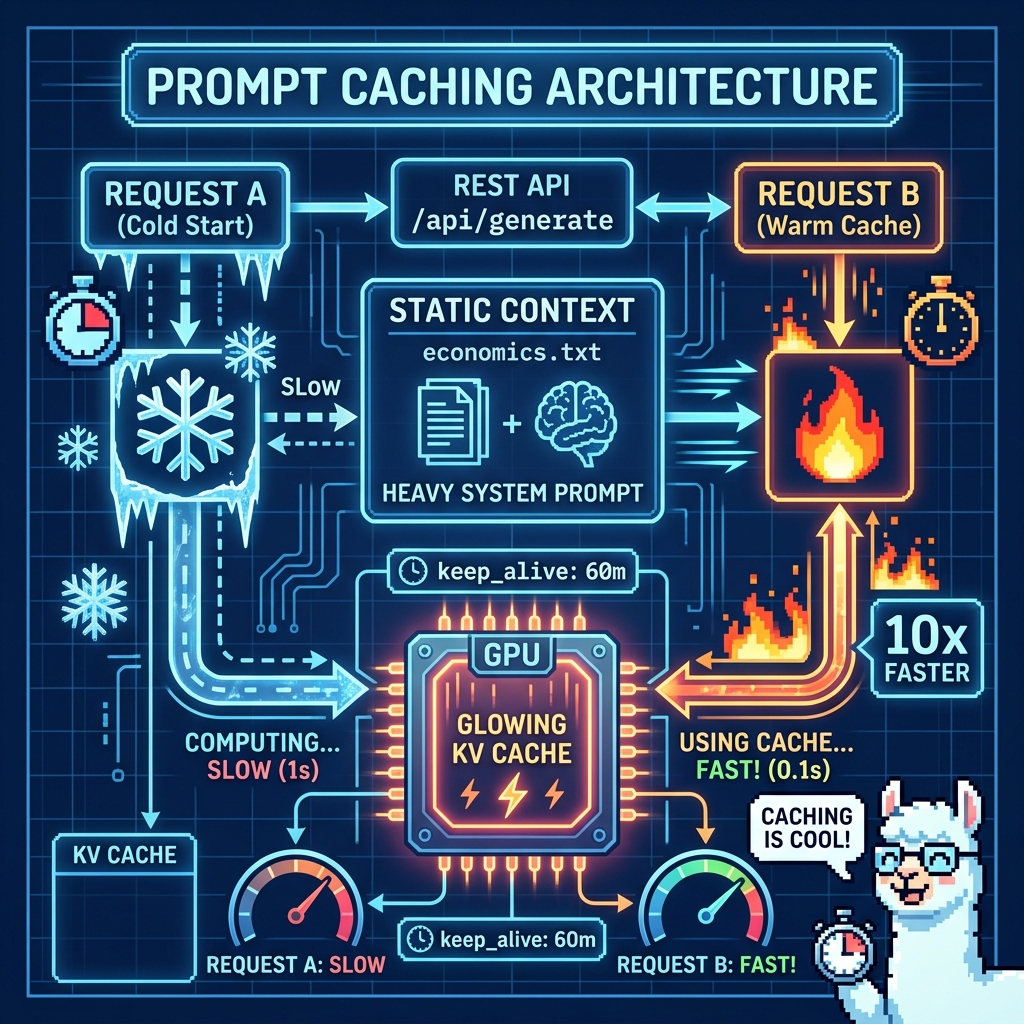
Caching is Implicit with Ollama
Ollama automatically caches the KV state of the prompt processing. If you send a request that shares a prefix with a previous request (and the model is still loaded in memory), Ollama will reuse the computation for the shared part.
You must keep the model loaded. By default, Ollama unloads models after 5 minutes. Set the keep_alive parameter to -1 (infinite) or a long duration (e.g., 60m) in your API call or environment variables to prevent the cache from being wiped.
You cannot explicitly “mark” checkpoints like Anthropic. It relies on exact prefix matching and the internal slot management of the underlying llama.cpp engine.
In Ollama (and the underlying llama.cpp), the cache lookup is strictly prefix-based.
If your request structure looks like this:
1 Request A: [System: Heavy Context] + [User: Question 1]
2 Request B: [System: Heavy Context] + [User: Question 2]
Ollama sees that Request B starts with the exact same token sequence as Request A. It will skip processing [System: Heavy Context] (which might be 90% of the work) and only process [User: Question 2].
However, to ensure this actually happens in practice, you must adhere to three specific rules:
- The keep_alive rule (Most Critical): Ollama unloads the model (and dumps the cache) from VRAM after 5 minutes of inactivity by default.
- The “Exact Match” rule: The prefix must be identical byte-for-byte. For example, if you have a dynamic timestamp in your system prompt (e.g., “Current time: 12:01” vs “12:02”), the prefix changes. The cache logic sees a mismatch at the timestamp token and recomputes everything following it. You need to move any changing variables or text out of the system prompt, or at least place changing data at the end of the system prompt.
- The num_ctx window: You must manually set the context window size if your “few pages of text” exceeds the default (usually 2048 or 4096 tokens). The workaround is to send “num_ctx”: 8192 (or however much you need) in the options block of every request. If you change the context size between requests, Ollama may treat it as a different model configuration and reload/recompute.
Here is a sample JSON request payload:
 1 {
 2   "model": "llama3",
 3   "keep_alive": "60m",  // Prevents cache dump
 4   "options": {
 5      "num_ctx": 8192    // Must match across requests
 6   },
 7   "messages": [
 8     { "role": "system", "content": "STATIC HEAVY TEXT..." },
 9     { "role": "user", "content": "Dynamic Question" }
10   ]
11 }
Ollama does not currently return an accurate count of just the tokens processed in a request when using caching. We can however use the return value of “prompt_eval_duration” to measure caching effectiveness. We will now look at a Python example.
Example Code to Show Caching Effectiveness
Here is a Python script that demonstrates the caching behavior. It sends a “heavy” request twice and compares the prompt_eval_duration.
 1 import requests
 2 import time
 3 import json
 4 import os
 5 import sys
 6 from pathlib import Path
 7
 8 ROOT = Path(__file__).resolve().parents[1]
 9 if str(ROOT) not in sys.path:
10     sys.path.insert(0, str(ROOT))
11
12 from ollama_config import get_model
13
14 # 1. Create a "Heavy" System Prompt (simulating your few pages of text)
15 static_context = Path("../data/economics.txt").read_text(encoding="utf-8")
16
17 # CONFIGURATION — model from env var; URL switches between local and cloud
18 MODEL = get_model()
19
20 if os.environ.get("CLOUD"):
21     OLLAMA_URL = "https://ollama.com/api/generate"
22     HEADERS = {
23         "Content-Type": "application/json",
24         "Authorization": "Bearer " + os.environ.get("OLLAMA_API_KEY", ""),
25     }
26 else:
27     OLLAMA_URL = "http://localhost:11434/api/generate"
28     HEADERS = {"Content-Type": "application/json"}
29
30 def query_ollama(prompt, label):
31     payload = {
32         "model": MODEL,
33         "keep_alive": "60m", # CRITICAL: Keeps model/cache in VRAM for 60 mins
34         "prompt": f"{static_context}\n\nUser Question: {prompt}",
35         "stream": False,     # False gives us the full stats in one JSON object
36         "options": {
37             "num_ctx": 4096  # CRITICAL: Context size must be consistent
38         }
39     }
40
41     start_time = time.time()
42     response = requests.post(OLLAMA_URL, json=payload, headers=HEADERS)
43     end_time = time.time()
44
45     if response.status_code == 200:
46         data = response.json()
47         # prompt_eval_duration is in nanoseconds, convert to milliseconds
48         eval_ms = data.get('prompt_eval_duration', 0) / 1_000_000
49         eval_count = data.get('prompt_eval_count', 0)
50
51         print(f"\n[{label}]")
52         print(f"Total Wall Time: {end_time - start_time:.2f}s")
53         print(f"Tokens Processed: {eval_count}")
54         print(f"Prompt Processing Time: {eval_ms:.2f} ms")
55         return eval_ms
56     else:
57         print(f"Error: {response.text}")
58         return 0
59
60 # 2. RUN REQUEST A (Cold Start)
61 print("\n--- SENDING REQUEST A (Cold Start) ---")
62 time_a = query_ollama("Who says the study of economincs is bullshit?", "Request A")
63
64 # 3. RUN REQUEST B (Warm Cache)
65 print("\n--- SENDING REQUEST B (Should Hit Cache) ---")
66 # Note: The static_context is identical. Only the question changes.
67 time_b = query_ollama("Name one person who criticizes the study of economics.", "Request B")
68
69 # 4. CALCULATE RESULTS
70 if time_a > 0 and time_b > 0:
71     speedup = time_a / time_b
72     print(f"\n--- RESULTS ---")
73     print(f"Request A (Cold): {time_a:.2f} ms")
74     print(f"Request B (Warm): {time_b:.2f} ms")
75     print(f"Speedup Factor:   {speedup:.1f}x FASTER")
76
77     if time_b < (time_a * 0.1):
78         print("✅ SUCCESS: Cache hit verified!")
79     else:
80         print("❌ FAILURE: Cache likely missed. Check 'keep_alive' or exact string matching.")
81
82
83 print("\nIn the current version of Ollama's API, the prompt_eval_count field reports the Total Context Size of the request you sent, not the number of new calculations the GPU performed.")
84 print("Ignore: prompt_eval_count (for checking cache hits). It just confirms you sent the same amount of text.\n")
What to look for in the output:
- Request A should show a high Prompt Processing Time (e.g., 2000ms+ depending on your GPU).
- Request B should show a near-zero Prompt Processing Time (e.g., 20ms - 50ms), even though the system prompt was identical.
Here is example output from this script:
 1 $ uv run ollama_rest_test.py
 2 Using CPython 3.14.2
 3 Creating virtual environment at: .venv
 4 Installed 5 packages in 8ms
 5
 6 --- SENDING REQUEST A (Cold Start) ---
 7
 8 [Request A]
 9 Total Wall Time: 7.81s
10 Tokens Processed: 723
11 Prompt Processing Time: 962.39 ms
12
13 --- SENDING REQUEST B (Should Hit Cache) ---
14
15 [Request B]
16 Total Wall Time: 2.72s
17 Tokens Processed: 723
18 Prompt Processing Time: 54.49 ms
19
20 --- RESULTS ---
21 Request A (Cold): 962.39 ms
22 Request B (Warm): 54.49 ms
23 Speedup Factor:   17.7x FASTER
24 ✅ SUCCESS: Cache hit verified!
In the current version of Ollama’s API, the prompt_eval_count field reports the Total Context Size of the request you sent, not the number of new calculations the GPU performed. Ignore prompt_eval_count for checking cache hits. It just confirms you sent the same amount of text.
Wrap Up for Prompt Caching
You don’t need to optimize initially for prompt caching but it is a good idea to keeping caching in mind for applications where, for example, you have a large system prompt containing several example data transformation (perhaps text to JSON) and then want to run a large number of data transformation inference calls. You might make your data transformation applications an order of magnitude faster.
Optional Practice Problems
Verify Cache Invalidation by Breaking the Prefix Modify the
ollama_rest_test.pyscript so that Request B includes a dynamic timestamp (e.g., the current date and time) inserted at the beginning of the static context string. Run the script and observe theprompt_eval_durationfor both requests. Do you still see a speedup? Now move the timestamp to the very end of the prompt, after the user question. Run again and compare. Write a short paragraph explaining why the position of changing data matters for Ollama’s prefix-based caching.Switch from the Generate API to the Chat Completions API Rewrite
query_ollama()to use Ollama’s/api/chatendpoint instead of/api/generate. Structure the payload with separatesystemandusermessages (as shown in the JSON example earlier in the chapter). Verify that prompt caching still works by comparingprompt_eval_durationacross a cold and warm request. Hint: the response JSON from/api/chatuses the same timing fields.Build a Multi-Query Benchmarking Harness Extend the example script to send five different user questions (not just two) while keeping the same static context. Collect the
prompt_eval_durationfor each request and print a summary table at the end showing the request label, processing time, and speedup relative to Request A. Does the cache benefit remain consistent across all subsequent requests, or does it vary? Explain your observations.Experiment with
num_ctxandkeep_aliveSensitivity Write a new script that sends two identical-prefix requests three times each under different configurations: (a) with matchingnum_ctxvalues, (b) with differentnum_ctxvalues between the two requests (e.g., 4096 then 8192), and (c) withkeep_aliveset to"0"(immediate unload) between requests. Record theprompt_eval_durationfor every run. Create a small table summarizing which configurations preserved the cache and which did not, and explain why based on what you learned in this chapter.Design a Prompt Structure for a Multi-Turn RAG Application Imagine you are building a retrieval-augmented generation (RAG) application where a large reference document (several pages) is included in every request, but each request also includes a few retrieved passages that change per query. Design a prompt structure that maximizes cache reuse. Write pseudocode or a Python outline showing the order of prompt components (system instruction, static reference document, retrieved passages, user question). Explain which parts will benefit from caching and estimate—based on the speedup factors you observed in this chapter—how much faster the second and subsequent requests might be compared to the first.